
Quick Answer
Choose the first release from the support work you need to reduce. For a status-heavy queue, start with payment visibility and clear waiting-on owners; for onboarding failures, fix the required setup with its controls. Enable payout-destination edits only after MFA, independent verification, recovery and approval controls pass. Keep account maintenance, invoice submission and payment lookup distinct where the operating model requires it.
Why most supplier portal advice fails platform teams#
If you are building a supplier portal self-service contractor payment hub, the real issue is not terminology. It is whether the portal cuts payment-support load without weakening control or reconciliation.
Start by separating labels from the operating model you actually need. Common definitions of Vendor Portal and Supplier Hub focus on supplier interaction with procurement and finance, and many examples emphasize POs, invoices, catalogs, or supplier management. That context can help, but it does not add up to an end-to-end contractor payout operation. Some portals explicitly do not replace existing invoice-submission processes, and some public-sector supplier portals are built mainly for account maintenance.
Use support burden as your first design filter. Payment-status questions are a common AP help-desk category, and some portals position 24/7 status visibility as a way to reduce those inquiries. If your queue is heavy on status tickets, start with trustworthy payment visibility before you add secondary features. Use this checkpoint:
- Can contractors see status beyond receipt, through submission, payment, and reconciliation?
- Do status labels match your internal events?
- Is the next action clear without contacting support?
Also protect the controls generic portal advice often skips:
- Access: who can change what
- Auditability: workflow history that is archived and accessible
- Reconciliation: outputs finance can actually use to trace payment outcomes
Contractor-focused self-service products do exist, including models where contractors update banking details, upload tax forms, and track payments. That is closer to what platform teams need, but it raises the stakes if controls are weak. If status lives in the portal while bank-detail changes, exceptions, or ledger mismatches still sit in email, you may shift support across channels without reducing investigation time or control risk.
Treat this guide as an operating-design exercise. The next sections focus on concrete decisions for access, Payment Status language, Direct Deposit change handling, and rollout checkpoints across finance, ops, and engineering. If you want the baseline definitions first, this primer on supplier portals is a useful place to start. For workload reduction, see How to Build a Vendor Self-Service Portal That Reduces AP Workload.
Set the boundary of your contractor payment hub before you build#
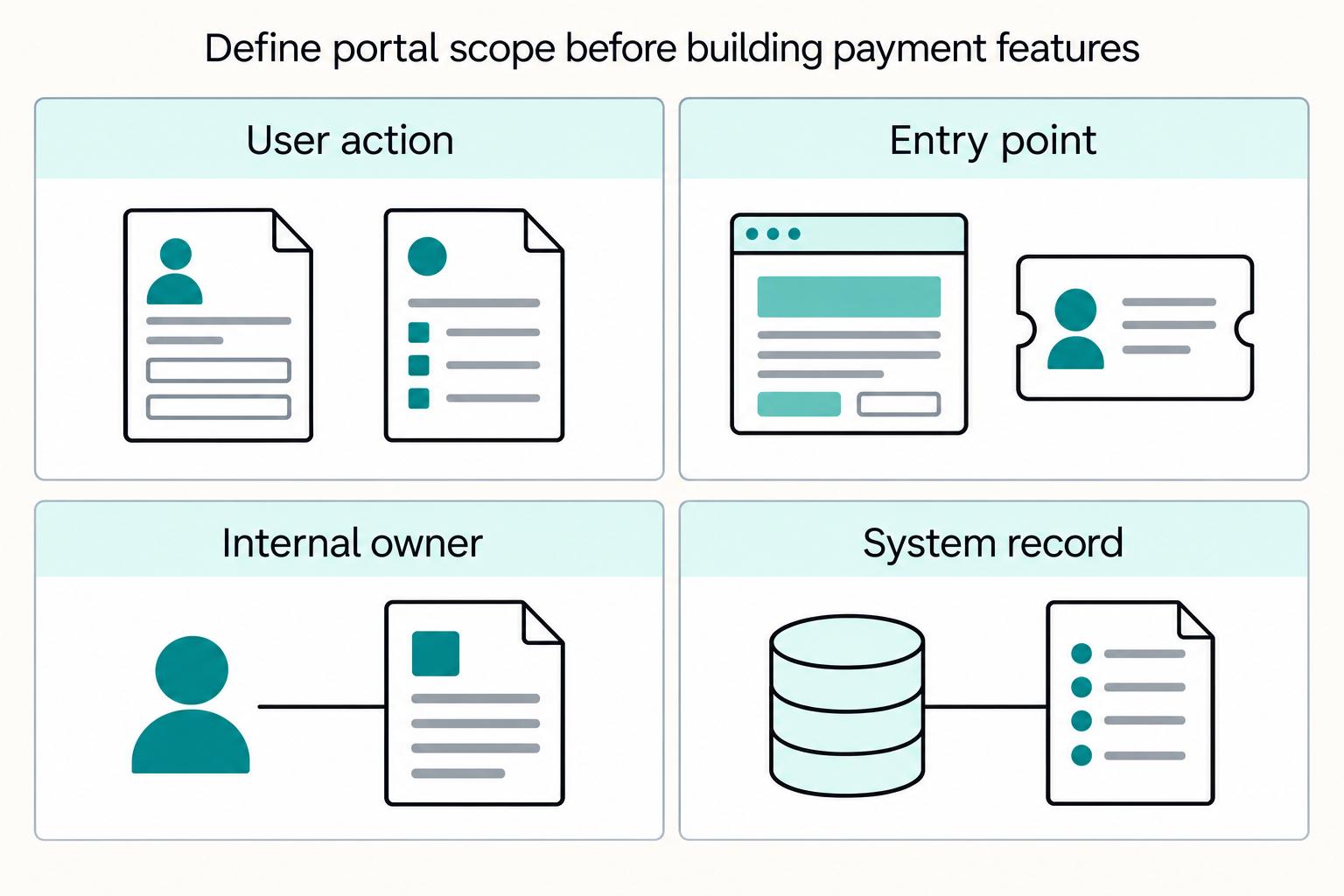
Set scope before UI work starts. Otherwise, "portal" turns into an undefined backlog across onboarding, payment support, profile maintenance, and exceptions.
Step 1. Define the hub as an operating surface, not just Supplier Registration. Supplier Registration is the entry point, not the whole operating scope. Your scope should explicitly cover ongoing profile updates, Invoice Submission, and Payment Tracking. If any of those sits outside the portal, say so plainly so users and internal teams do not assume "payment hub" means full self-service for every payment task.
Step 2. Use the PA Supplier Portal as the floor for account maintenance, not the full payout model. PA's Supplier Portal is positioned as a secure self-service site for authorized administrative users to manage supplier account data, and PA states it is the only method to maintain supplier information. PA help materials also include self-service vendor updates, including banking info.
At the same time, PA separates other payment operations. Invoice submission uses the E-Invoicing Program, and invoice/payment status uses a separate Self-Service Payment Lookup Tool. That lookup tool provides two reports, Invoices-In-Process and Vendor Payments, and covers the most current 60 days of activity. Account maintenance alone is not a full contractor payout model.
Step 3. Write a one-page scope with explicit ownership. List each contractor action and mark it as either self-serve or ops-only:
- account and profile changes
- invoice submission path
- payment status visibility
- banking-information changes
- support and exception routes
For each line, confirm the user entry point, internal owner, and system of record. If you cannot name all three, the feature is not scoped yet. bp's portal is a useful comparison point. It offers payment visibility and company-data change requests while explicitly keeping invoice submission in existing processes.
For a step-by-step walkthrough, see How to Build a Contractor Payment System for a Nursing or Allied Health Staffing Agency.
Prepare the prerequisites and evidence pack#
Before launch, lock down four things: ownership, record-linking keys, policy acceptance artifacts, and investigation evidence. If any of those is vague, you risk duplicate records, unclear handoffs, and disputes that are hard to resolve.
Assign explicit ownership#
Set explicit ownership for payout operations, incident response, and exception handling. For each escalation step, name the accountable internal owner and the system scope they can change.
Pressure-test this with incident walk-throughs such as a missing invoice, a rejected payout, and a contractor claiming the wrong account link. If ownership is not obvious quickly, document the split now instead of letting support absorb undefined work.
Define contractor record keys#
Define contractor record keys before you design account linking. In some portal flows, supplier administration requires both Vendor Number and a tax identifier. The PA Supplier Portal is one example of that pattern.
Do not assume Vendor Number behavior is universal. In some networks, buyer-created vendor numbers are buyer-internal and not stored on the network. Decide early whether Vendor Number is a primary key, a buyer alias, or only a lookup aid.
Your minimum record policy should state:
- what uniquely identifies a contractor account
- what identifies the legal or tax payout entity
- when one user can administer multiple vendor records
- what prevents duplicate account creation
Treat policy artifacts as controlled documents#
Treat in-product policy artifacts as controlled operational documents, not static copy. At minimum, include a supplier code or conduct equivalent and define how locale-specific policy variants are handled.
Support jurisdiction or locale variants where country-specific rules apply. Your acceptance evidence should capture version, locale, account, and timestamp, not just a generic "accepted" flag.
Build a launch evidence pack#
Create a launch evidence pack and review it jointly with the internal teams that own operations and escalation. It should prove traceability from user action to payout outcome and show who owns escalation at each step. Include at least:
| Artifact | Include | Why it matters |
|---|---|---|
| Event map | Supplier Registration and profile changes to payment visibility and payout events | Shows traceability from user action to payout outcome |
| Audit trail examples | Who accessed the portal and what actions they performed | Helps trace actor and action |
| Reconciliation export definition | Often CSV; ties each payout to the transaction batch it settles | Lets finance trace each payout to settlement |
| Escalation paths | Third-party handoff rules and named internal owners per escalation step | Shows who owns escalation at each step |
Run one mock dispute with someone outside the build team. If they cannot trace actor, action, payout, and escalation owner without tribal knowledge, the hub is not ready to launch.
Choose your operating model and decide what contractors can self-serve#
Pick the smallest operating model that removes your biggest avoidable workload first. If most inbound contacts are "where is my payment," launch Payment Tracking with clear Payment Status states first. If the real failures happen earlier, during onboarding, payee setup, or account linking, controlled profile and bank-detail self-service may need to come sooner.
Classify support demand by task#
Classify support demand by contractor task, not by internal queue. Use categories like payment status, profile maintenance, payout setup, tax or compliance documents, and true exceptions that still need ops handling.
For a status-heavy pattern, Pennsylvania's self-service payment lookup is a useful benchmark. It exposes Invoices-In-Process and Vendor Payments and covers the most current 60 days of activity. That is a focused "what happened to my payment?" model, not a full admin hub.
Use this decision rule:
- If the dominant ticket is payment status, build status visibility first.
- If failures happen before the first successful payout, status visibility alone will not remove the main friction.
Pick the model that matches the main failure#
Once you know the dominant failure type, choose the operating model that matches it and accept the tradeoffs up front.
| Model | What contractors can self-serve | Grounded comparator | Speed to launch | Control risk | Integration effort | Potential support impact (validate in your context) |
|---|---|---|---|---|---|---|
| Status-only portal | View invoice or payment status and lookup detail | Pennsylvania Self-Service Payment Lookup (Invoices-In-Process, Vendor Payments); AvidXchange Supplier Hub offers status visibility 24/7 | Fastest | Lowest | Lowest to moderate | May reduce repetitive status contacts; limited for onboarding or payout-change issues |
| Partial self-service | Status plus profile or support maintenance | bp's supplier portal supports this shape, but bp states it does not replace invoice submission | Medium | Moderate | Moderate | May help with status and some maintenance requests; payout setup can still drive ops work |
| Full payment hub | Status, profile, and payout setup (with tax-document center only if separately scoped) | Broader portal pattern includes profile and bank-account maintenance plus PO, invoice, and payment status; tax-doc self-service is a separate scope decision | Slowest | Highest | Highest | Broadest operational coverage when controls, audit trail, and recovery paths are strong |
Use the leftmost model when your problem is visibility. Move right only when your main problem is payout readiness and data correction.
Use market examples to test scope claims#
Use market examples to test scope claims, not to inherit labels.
| Example | Grounded point | Scope implication |
|---|---|---|
| AvidXchange | Supplier Hub is positioned for invoice and payment visibility; Supplier Care routes users there for 24/7 status access | Strong status comparator |
| SAP Supplier Portal | Validate the actual SAP product and buyer configuration for invoice visibility and document exchange | Validate per implementation; SAP signals non-trivial planning at scale |
| The Home Depot Supplier Hub | Uses tools, information, and procurement or supplier-management language | Generic supplier-collaboration baseline, not evidence of contractor payout operations |
Validate invoice-status behavior against the actual SAP product, buyer configuration, and integration scope. During evaluation, test your invoice volume, supported document exchange, deployment effort, and ownership rather than treating a vendor example as a universal project threshold.
Before you commit, run one end-to-end proof for your chosen scope. Test payment-status checks, profile updates, payout-destination changes, account-access recovery, and an audit record that ties the change to payout outcome. If any step fails, the operating model is not ready to launch.
If you are deciding between status-only and full self-service, review how to structure payout status flows and controls in the Gruv Payouts overview.
Design access and permission controls that reduce risk#
Access design becomes payment control as soon as contractors can do more than check status. Require Multifactor Authentication (MFA) for any change that can redirect money, change payout details, or expand access, and make sure recovery and admin paths are not weaker than normal sign-in.
Require MFA and step-up checks on high-risk edits#
Enforce MFA at the moment risky changes are made. Apply it when users update payout destination, legal entity details, or admin rights.
CISA recommends MFA as a core control. For high-risk account changes, verify the action with a strong authenticated session and an independent confirmation path. A six-digit verification code alone does not establish that two independent authentication factors or the intended recipient have been verified.
Test that verification runs when a risky action is requested. Exercise bank-detail edits, remit-to updates, and role assignments, then check actor, timestamp, masked old and new values, and verification outcome in the audit record.
Separate contractor actions from internal admin actions#
Keep contractor actions and internal admin actions separate by design. Do not use one broad role that can edit bank details, change Supplier Registration data, and invite new admins.
NIST's separation-of-duty principle applies directly here. No single user should have enough privilege to misuse the system alone. A practical pattern is to let contractors submit profile changes while internal admins review and apply updates to the system of record. Ariba's account model reflects that boundary by limiting role, user, and permission management to the account administrator.
Document this in plain terms. State who can propose a change, who can approve it, and which fields remain ops-only.
Harden recovery and role changes against support abuse#
Treat account recovery as authentication, not as a support shortcut. Recovery controls should be at least as strong as sign-in, with controlled paths such as saved recovery codes, issued recovery codes, or a recovery contact.
Consider a recovery attack in which someone persuades support to enroll a new MFA device, then requests an ACH destination change. A process that trusts the newly enrolled factor alone could let the attacker reroute money. For recovery requests and privileged role changes, require independent verification and approval before activation.
Then test a failure path on purpose. If support can bypass controls to "help" a locked-out user, the hub is still exposed.
Define the payment lifecycle and status language users can trust#
Your status model is only trustworthy if users can see where a payment is, what it is waiting on, and what to do next. If Payment Status labels are vague or provider-specific, users cannot act with confidence and support routing can break down.
Publish one status taxonomy#
Use one shared taxonomy across the portal UI, support macros, and internal dashboards. Map internal events from your ERP, payables stack, payout provider, or Vendor Portal to plain user-facing labels, a clear meaning, and the next action.
Build the lifecycle from Invoice Submission through approval and payment, and include additional stages, such as payout initiation or settlement confirmation, where your systems expose them. A compact progression like received, approved, paid, and rejected can work, but only if each label is explicitly defined in your environment.
| Internal event or condition | User-facing Payment Status | What the user should see next |
|---|---|---|
| Invoice accepted into your platform or buyer system | Submitted | We received your invoice and sent it for review. No action needed unless we contact you. |
| Invoice is under buyer or internal review | In review | Waiting on approval. If this stays here longer than your normal review window, contact support or your buyer contact. |
| Upstream dependency blocks progress, such as buyer approval or service confirmation | On hold | Waiting on a required approval before payment can continue. Show exactly what is pending if you can. |
| Invoice passed review and is eligible for payment | Approved for payment | Approved and moved to the next payment step in your process. This does not mean funds are already in your bank account. |
| Payment instruction created or issuing | Payment in progress | Payment is being issued. Settlement timing depends on method and provider. |
| Final payment confirmation recorded | Paid | Payment completed in our records. If funds do not appear after the normal bank window, contact support. |
| Validation or business rule failed | Rejected | Action required. Review the issue, correct the invoice, and resubmit if allowed. |
Keep "approved," "issuing," and "settled" separate where possible. In some systems, "paid" can blur in-process issuance with final completion, so an explicit in-progress state avoids false certainty.
Add visible waiting states#
Show actionable waiting states between invoice submission and payout release. Name the next action and owner when disclosure is appropriate; use the approved customer status wording for sensitive reviews while retaining detailed reasons in authorized internal views.
For each non-terminal status, make the UI answer three points in one line:
- What happened
- What or who it is waiting on
- What the user should do next, if anything
"On hold" is weak. "On hold: waiting for customer approval" is usable. "On hold: waiting for compliance review, no action needed from you" is clearer and can reduce misrouted support requests.
Translate provider jargon before it reaches the user#
Do not expose raw provider terms directly in contractor-facing UI. Keep provider-specific values in internal logs and support views, then translate them into plain portal language for users.
If transmission or queue steps matter, present them as understandable statuses such as "Submitted" or "Processing," with clear next-step guidance. Also define escalation timers for stuck upstream states. If you use a queue state, include a concrete escalation rule where your integration supports one.
Assign recovery owners to every failure state#
Every failure state should have an explicit owner so cases route correctly on the first touch. Rejected invoices are often supplier-owned when correction and resubmission are required. Transmission failures may be support-owned. Compliance or legal payment holds may be owned by legal/compliance or operations and may not sit with AP alone.
Document this owner mapping in both the taxonomy and support macros. If a status does not tell support who owns recovery, the label is incomplete and trust drops fast.
For home services marketplaces, Build a Contractor Payment Flow for Home Services Marketplaces goes deeper on flow design and operational handoffs.
Build secure payout setup and change controls#
Once users trust payment status, the next trust test is payout setup. Treat Direct Deposit and payout-method edits as high-risk payment events, not routine profile maintenance, and apply stronger controls than a basic Vendor Portal profile update.
Require stronger verification before payout destination changes#
Require Multifactor Authentication (MFA) or an equivalent-strength control before anyone can add or change a payout account. Single-factor login is not enough for high-risk payment actions, and vendor address or payment-instruction changes are a known Business Email Compromise pattern.
Do not rely on contact details included in the request or freshly changed recovery details. Use independently verified contact data already on file for out-of-band verification. Protect changes to authentication, recovery and trusted callback contacts with step-up checks and independent approval appropriate to the risk. Support should start a verified change flow rather than change bank details on an inbound email, chat or phone request alone.
A simple checkpoint is this: your record should clearly show who initiated the change, how identity was verified, and whether a second channel was used when risk was high.
Validate account data and confirm risky edits#
Validate bank fields using the selected country, account type, and provider’s rules. Normalize permitted separators for the API format while preserving leading zeros and meaningful characters; do not apply one blanket hyphen rule to every routing or account field. Show the masked destination for confirmation before approval.
Before submission, show a confirmation screen with:
- payout method type
- masked current destination, if one exists
- masked new destination
- a clear warning that future payouts may go to the updated account after approval
This step can catch input mistakes before funds move.
Duplicate destination checks can also help as an operator control, though they are not a universal requirement. If a new account matches another active payee, or if a change is followed by an immediate payout request, route it to review instead of auto-approving. Cooling periods can be useful as risk-based controls, but avoid one fixed delay for every case.
Separate the requester from the approver#
Use maker-checker approval for sensitive payout edits: one person requests, a different authorized person approves before the new destination is used. This matters most for internal admin edits and any exception path in your Supplier Hub.
Support workflows can become a weak point when this separation is not enforced. In a September 2025 report, the SSA Office of Inspector General estimated that unauthorized telephone changes diverted $2.2 million for 1,197 beneficiaries in its reviewed October–December 2023 nonreceipt population. That is a finding about that cohort, not a general beneficiary fraud rate. Support should collect context and trigger verification rather than treat a caller’s word as final authority to change payout instructions.
If your operating model requires buyer approval of remit-to bank details, keep that state visible and block payout use until approval is complete.
Preserve traceability from request to payout execution#
Keep a complete change log for payout edits so teams can investigate disputes quickly. At minimum, capture request timestamp, actor, masked old and new values, authentication outcome, approver, risk flags, hold reason, and the exact payout or payment instruction that later used the updated account.
Your test is straightforward. Can finance start from a disputed payment and reconstruct the full path from change request to payout execution in minutes, without relying on inboxes or ad hoc notes? If not, your traceability is too thin.
Related reading: How to Build a Payment Sandbox for Testing Before Going Live.
Make tax and compliance documents self-serve but auditable#
After you lock down bank changes, make tax documents self-serve in a dedicated area. Keep that area separate from payout decisioning and complete enough for audit review.
Publish a document center with explicit states#
Give IRS Form 1099 and IRS Form W-8 their own document center, not a buried profile setting. Use clear statuses such as not started, needs information, submitted, under review, available to download, and correction requested so users and support can see what happens next.
Make each status action-oriented. For Form W-8BEN, show whether it is valid and the applicable expiry. The general rule runs through the last day of the third succeeding calendar year, but some forms remain valid indefinitely under specified conditions; a change in circumstances can end validity sooner. For US reporting, use the correct form and tax-year calendar. Form 1099-NEC filing and recipient furnishing are generally due January 31, with applicable weekend and legal-holiday adjustments; other 1099 forms can have different deadlines.
Mask sensitive fields but log the event metadata#
Mask sensitive tax values in logs, and apply the same caution to screens, exports, and notifications. Logs can contain personal data, so they should support operations without exposing full identifiers.
Keep audit metadata rich: event type, timestamp, source, actor identity, outcome, and the specific tax record changed. Use a practical check. Can an admin confirm who uploaded, replaced, or approved a tax form, from which channel, and when, without exposing full tax IDs?
Separate tax status from payout status#
Do not imply that "tax document available" means "payouts enabled." Providers may continue receiving payments while payouts are paused when required tax-status information is missing.
Show separate statuses for document state and payout eligibility, with separate reasons. This helps avoid confusion when a contractor downloads a tax document but still has payouts blocked for a different reason.
For tax form access, Contractor Tax Document Portal: How to Build a Self-Service 1099 and W-8 Download Center covers the document-delivery side in more detail.
Integrate data flows so support and reconciliation use one source of truth#
Use one ledger-backed payout record as the operating truth for both support and finance. When Order Management and provider events arrive at different times, map them into that same record instead of letting each team read a different system and argue over status later.
Make payout writes retry-safe#
Give each money-moving operation a durable identity. Use the selected endpoint’s documented idempotency mechanism where supported, retain the original result, and recover an uncertain outcome before creating a new operation. Webhook delivery can repeat, so financial effects need their own completion controls.
Persist verified webhook receipt before acknowledgment, then process it through a recoverable handler. Commit local financial effects with their completed-operation marker; external calls need durable retry state and their own identities. A received event is not necessarily completed work. Return success for completed duplicates, and recover incomplete processing. Stripe’s live automatic redelivery can continue for up to three days; other providers have their own windows.
Reconcile order and payout events into one ledger-backed view#
Do not assemble portal truth directly from raw system feeds. Normalize order or work-completion events and payout or provider events into one ledger-backed record that answers three questions: what was earned, what was approved, and what actually moved.
That record should consistently carry your join keys and payout context, for example order or work reference, contractor identity, amount, currency, payout method, provider transaction reference, and ledger outcome. The tradeoff is some status lag versus raw upstream events, but the result is a status your support and finance teams can both defend.
Run three operating checkpoints#
Run a small control set on a regular cadence so drift shows up early.
| Checkpoint | What to review | What "good" looks like |
|---|---|---|
| Daily exception queue | Payments routed out of normal flow by exception type | Clear owner and timely investigation or reroute path |
| Unmatched-event report | Source records unmatched to subsystem or ledger records | Re-run until unresolved payments are cleared; unresolved items have explicit follow-up |
| Monthly close tie-out | Portal statuses versus ledger outcomes and bank or accounting balances | Reconciliation completed at least monthly on the team’s approved close timetable |
If unmatched items keep growing without clear ownership, support and finance will split into separate truths and the "single source" fails in practice.
Document eventual consistency so teams know when to wait#
Assume some writes will not be visible immediately on the next read, and document that behavior in operator guidance. Teams should know when to refresh, when to retry with backoff, and when to escalate.
For a delayed update, use the provider’s supported status query and your reconciliation path before attempting another money-moving request. Set refresh and escalation timing according to that method’s normal behavior. Stripe’s Events API covers the last 30 days; retain internal records for older investigations.
Roll out in phases with measurable checkpoints#
Choose the first phase from the dominant support problem. A status-heavy queue usually benefits from visibility first; onboarding failures may call for required setup first. Add sensitive edits only after fraud and recovery controls are validated.
Choose the first release and gate sensitive controls#
For a status-heavy queue, phase one should show payment status, lifecycle history, timestamps, amount, currency and a support-ready reference. If setup failures drive more contacts, prioritize the required onboarding task instead. In both cases, contractors and support need a shared recorded state and a clear next action.
Status visibility usually carries less account-change risk than editable payout destinations. Keep the bank-change and recovery gates in place regardless of which feature ships first.
Use a staged rollout instead of a full cutover. Start with a limited cohort or percentage, confirm statuses match your system of record, and keep the ability to halt if mismatches or unresolved exceptions rise. A practical gate is simple: agents should be able to resolve more "where is my payment?" contacts from the same status view contractors see.
Add sensitive edits only after controls are proven#
Treat payout-destination and profile changes as a separate release with stricter gates. Payment-change fraud commonly involves compromised business email and unauthorized transfer requests, so this phase needs tighter controls than a visibility-only launch.
Before enabling editable payout fields, validate three controls in production-like conditions:
- Authentication and step-up checks
Require MFA for actions that change payout destination, profile data, or admin rights.
- Recovery and support procedures
Run account-recovery drills so support can distinguish lockouts from suspicious change requests.
- Audit and reversal evidence
Confirm you can export who changed what, when, and which payout executed after the change.
Use a canary rollout for these edits: expose a small share first, monitor lockouts and exception spikes, then expand only if results stay clean.
Gate each phase with outcome metrics, not launch dates#
A phase is complete only when outcomes improve without reconciliation drift. Track gates from a pre-launch baseline:
- Support ticket mix shift
Look for fewer "payment whereabouts" tickets and a higher share of true exceptions.
- First-contact resolution rate
FCR is the percentage of support tickets resolved on the first attempt. Clear, support-ready status should improve this before broader feature expansion.
- Reconciliation exception trend
Watch daily exception queues and error artifacts. If visibility lowers tickets but unmatched or errored items keep rising, the underlying problem remains.
Use a hard operator rule: if support metrics improve while reconciliation exceptions worsen, pause expansion.
Avoid common implementation mistakes and recover quickly#
Once phase gates are in place, the biggest risk is solving the wrong problem cleanly. The fastest recovery is usually not more UI. It is a clearer status model, explicit ownership, separate policy flows, and tighter controls on actions that can move money or expand admin access.
Fix the status model before polishing the portal#
Mistake: copying a generic supplier-portal pattern and assuming contractor payout edge cases will fit later. Recovery: define one payment-status taxonomy, route each exception state to an owner, and show the same status to contractors and support before adding more UI.
The PA Supplier Portal is a useful baseline for authorized account self-management, but it is positioned around supplier account-data maintenance, not a full contractor payout operating model by default. Coupa's payment view also centers on a defined Status field, so teams should align on what each status value means and who acts next.
Checkpoint: for every visible payment state, support should know whether the next action sits with the contractor, support, finance ops, or no one because settlement is still pending. If agents still need engineering to interpret statuses, stop scope expansion.
Assign one accountable owner for each failure class#
Mistake: unclear ownership between product, finance, and support. Recovery: assign one accountable owner per failure class and publish escalation SLAs.
This is a control issue, not a collaboration issue. NIST defines an SLA as a commitment that sets responsibilities and expectations, and CISA incident-response guidance is explicit that response plans should clarify roles and responsibilities. Use named owners for payment exceptions, bank-change requests, tax-document issues, and account-recovery paths.
Checkpoint: sample recent exceptions and confirm that first-response owner, resolution owner, and response target are consistent across channels.
Separate policy acceptance from payment progress#
Mistake: mixing compliance notices with transaction states. Recovery: keep Terms and Conditions and other policy artifacts separate from payment lifecycle status.
SAP's supplier portal pattern is clear on this point: terms, code-of-conduct, and reimbursement artifacts are distinct elements. Follow that model so policy tasks do not read like payment failures.
Checkpoint: policy acceptance should create its own audit log event and should not rewrite payment lifecycle history.
Lock high-risk admin actions behind MFA and approvals#
Mistake: launching sensitive edits without admin guardrails. Recovery: require Multifactor Authentication (MFA) for privileged actions and pair it with role-based approvals.
CISA recommends MFA for privileged or administrative access and notes that it materially reduces account-compromise risk. But MFA alone is not enough for payout-risk actions. Use Role-Based Access Control so permissions map to function, and apply Separation of Duty for high-risk changes with a two-person request and approval pattern.
Checkpoint: your audit log export should show who requested a change, who approved it, when it was applied, and any subsequent payout action. Also verify that account-recovery flows enforce re-verification conditions rather than skipping them.
Use this copy-paste checklist to launch without losing control#
Treat launch as a control exercise first, and a feature release second. If you cannot name the owner for each risky action, define what each Payment Status means, and show how finance reconciles outcomes, hold the release.
Set scope boundaries in plain language#
Set scope boundaries in plain language: what contractors can self-serve, what stays ops-only, and who owns each exception. A strong pattern is to keep supplier-data maintenance in the portal path and stop processing those changes through side channels once that path exists.
Pressure-test the boundary with five common requests: profile edit, tax form download, bank change, account recovery, and role change. For each request, document one owner, one approval path, and one escalation contact. If support can still complete bank or admin changes from tickets, you have an avoidable fraud path.
Publish a user-facing payment status taxonomy#
Publish a user-facing Payment Status taxonomy before shipping UI. Use labels contractors can act on, and map each one to the internal events finance and support already use.
One practical, platform-specific starting set is: paid, rejected, pending approval, and approved pending payment. For each status, define what it means, who owns the next action, and the internal response target. Validate that support and contractors see the same status and the same "waiting on" reason. Broad labels like "processing" can create confusion and avoidable tickets.
Enforce controls before allowing high-risk edits#
Enforce controls before allowing any high-risk edits. Use Multifactor Authentication (MFA) as the minimum gate for actions that can reroute money or change account authority, and pair it with role-based permissions.
Use strict gates for legal entity, remit-to, and bank-account edits, and keep sensitive actions limited to the right admin role. If an action can change payout destination, legal entity details, or admin rights, require MFA plus independent verification through official, verifiable contact details, not the same inbound email or ticket that requested the change.
Validate operations, not just interface behavior#
Validate operations, not just interface behavior. Before broader rollout, confirm reconciliation checkpoints, a visible exception queue, and downloadable audit evidence.
| Validation check | What to confirm | Specific note |
|---|---|---|
| Payout-to-bank matching | Payout batches can be matched to bank deposits | Verify this before broader rollout |
| Failed payout handling | Failed payouts can be isolated | Run a forced-failure test so a failed payout lands with a named queue owner |
| Transaction drill-down | Teams can drill into transaction-level details | Verify this before broader rollout |
| Idempotency retry behavior | The same idempotency key is treated as the same request | Test late-retry recovery under the selected provider’s retention contract |
Verify payout-to-bank matching, failed-payout routing, and transaction drill-down. Replay a request with the same supported key and confirm one operation result. Then test recovery beyond the provider’s retention window: Stripe can prune keys after at least 24 hours, so internal operation history must prevent an old uncertain request from becoming a new payout.
Launch in phases and require proof before expanding scope#
Launch in phases and require proof before expanding scope. Choose status lookup, required setup or another first task from the support problem measured in your own queue, and keep sensitive-change gates in place.
Use partial rollout when possible so you can evaluate a smaller cohort before full deployment. Only add higher-risk self-service actions after reconciliation is stable, audit exports are clean, and status confusion or unresolved exceptions are under control. This pairs well with our guide on Vendor Portal Requirements Checklist for Platform Payment Ops.
When your checklist is complete, align implementation details with your engineering and finance owners using the Gruv API and ops docs.
Frequently Asked Questions
What is the practical difference between a supplier portal and a contractor payment hub?
A supplier portal is usually procurement or AP focused, centered on supplier transactions, invoices, and payment-status visibility. Oracle's iSupplier framing and bp's scope caveat both show that these portals can vary and may not replace invoice submission. In practice, a contractor payment hub can be broader, combining payout setup, payment tracking, support-usable statuses, and document access in one operating flow.
What are the minimum table-stakes features for a self-service contractor payment hub?
Start with payment-status lookup, history, and the next action both contractors and support can understand. Add controlled profile changes and document access according to scope. For US reporting workflows, collect the appropriate recipient forms and use IRS TIN Matching only when the payer is eligible and the reporting process calls for it; a missing optional lookup is not automatically a payout failure.
Which actions should contractors self-serve, and which should stay ops-controlled?
Status checks, document downloads, ordinary communication preferences and terms acceptance can be self-service. Authentication, recovery and trusted callback contacts need stronger change controls, as do payout destinations and admin roles. Do not immediately trust a freshly edited contact to approve a bank change. If an action can reroute money or restore access, require verification and approval appropriate to that risk.
How do we reduce payment support tickets without exposing risky account-change actions?
Prioritize status transparency before broad edit permissions. SAP positions invoice-status visibility as self-service and notes that transparency can reduce the need for supplier outreach. In practice, clear statuses, timestamps, and "waiting on" guidance can deflect tickets without opening bank-detail edits, so keep those edits behind stricter controls. For deeper implementation patterns, see How to Reduce Contractor Support Tickets About Payments: Self-Service and Automation.
What controls are required for secure `Direct Deposit` updates and payout visibility?
Use Multifactor Authentication (MFA) as a baseline for payout-method changes, but do not rely on MFA alone. CISA describes MFA as a core protection, and NIST also supports extra risk checks for signals like unexpected geolocation or IP. For change requests, use out-of-channel verification and independent callback details, then apply dual controls for higher-risk approvals with documented request and approval records.
What should a first release include if we need impact fast?
Start with the task generating the most avoidable support work. For a status-heavy queue, ship payment visibility, timestamps, references, and the next action first. If first-payment failures arise in onboarding instead, address the required setup with its controls. In either case, support should be able to explain the same recorded state the contractor sees.
What should we treat as unknown when evaluating generic supplier portal vendors?
Treat "Supplier Portal" or "Vendor Hub" as a label, not proof of payout capability. Confirm whether the product fits your status model, supports secure Direct Deposit change controls, including MFA, out-of-channel verification, and dual approval, and handles tax-document delivery for Form 1099-NEC and Form W-8BEN. Also verify scope boundaries, because some portals provide visibility without replacing invoice-submission processes.
Try a related tool
Where Gruv fits
Plan and approve payout batches
See how payee status, approval rules, route review, and exception handling sit in one payout workflow.
See reconciliation and mismatch review
Compare ledger entries, provider payment records, and statement rows to see what matches and what finance needs to review.
Researched and edited by the Gruv editorial team. Gruv builds cross-border billing, payouts, and finance-operations software for global businesses.
Sources
- cisa.gov/topics/cybersecurity-best-practices/multifac...trusted
- csrc.nist.gov/CSRC/media/Projects/risk-management/document...trusted
- csrc.nist.gov/glossary/term/Separation_of_Dutytrusted
- docs.stripe.com/api/idempotent_requeststrusted
- docs.stripe.com/webhookstrusted
- fbi.gov/how-we-can-help-you/scams-and-safety/common-...trusted
- irs.gov/businesses/small-businesses-self-employed/re...trusted
- irs.gov/individuals/international-taxpayers/forms-fo...trusted
Educational content only. Not legal, tax, or financial advice.
Related Posts

The Freelance Payment Penalty: A Modeled Audit of Platform Fees, FX Spreads, and Payout Delays
The money rarely disappears through a single, easy-to-spot fee. The real loss is stacked. A marketplace takes its commission, a processor adds a charge for international cards, a bank or payment company converts the currency at a spread, a platform holds the funds before release, and a wire sheds a little to intermediaries on the way in. Each layer looks defensible on its own, but the worker feels the combined result as a smaller deposit and a later payday.

How to Respond to a Subpoena for Business Records
Move fast, but do not produce records on instinct. If you need to **respond to a subpoena for business records**, your immediate job is to control deadlines, preserve records, and make any later production defensible.

A US Expat's Guide to Investing in UCITS ETFs to Avoid PFIC Issues
The real problem is a two-system conflict. U.S. tax treatment can punish the wrong fund choice, while local product-access constraints can block the funds you want to buy in the first place. For **us expat ucits etfs**, the practical question is not "Which product is best?" It is "What can I access, report, and keep doing every year without guessing?" Use this four-part filter before any trade: