
Quick Answer
A UK freelancer should issue invoices only after confirming the billing entity, current tax-status evidence, approved invoice type, and supporting service facts. This guide recommends a named decision owner, a small evidence pack, hard stop rules for missing or cross-border facts, and a traceable review and correction trail.
Treat invoice freelancer UK VAT as an evidence decision, not a template exercise#
Treat invoice freelancer UK VAT as an evidence decision, not a template exercise. Do not let teams guess. Require a small proof set, assign one decision owner, and block release when core facts are missing.
Before you start#
Important limit: the sourced evidence for this section is Australia GST material, not UK VAT or HMRC guidance. Use it as a control-design pattern, not as authority for UK outcomes. Where a decision depends on a UK-specific rule, verify it against GOV.UK, HMRC guidance, or tax counsel, especially for cross-border services and reverse-charge questions.
The lesson here is about process. Tax errors can start before an invoice is issued, when supplier status is assumed, customer facts are incomplete, or no one owns the final release decision.
Step 1 Name the decision owner#
Start by assigning one owner for invoice tax treatment before you refine templates. In smaller teams this may sit with finance. In platform or shared-services models it is often compliance or tax with authority to reject, request evidence, or escalate.
Your checkpoint is not whether the invoice looks right. It is whether the owner can explain the treatment and point to the supporting records. If that cannot be done quickly, the control is weak.
One failure mode is treating onboarding data as if it were current tax status. That can break when a freelancer changes entity, registers, deregisters, or starts cross-border billing and no one revalidates the treatment.
Step 2 Build the minimum evidence pack#
Keep the pack small enough to use every time, but specific enough that someone else can reconstruct the decision later. At minimum, attach:
- supplier legal name and billing entity type
- current registration-status evidence and check date
- customer status where treatment depends on it
- contract, statement of work, or order record describing what was supplied
- service-location facts and cross-border indicators
- prior invoice history or correction trail when this is not the first invoice
If the supplier recently registered, collect confirmation showing the effective date. The Australia material is useful here as a control example. ATO states it issues written registration details, including the effective date. That is not a UK VAT rule, but it is the kind of artifact you want in the file instead of a verbal assurance.
Step 3 Set stop rules before release#
Write your pause conditions down so the team does not improvise. Typical stop rules include:
- registration status is unknown or unverified
- first invoice after a status change lacks effective-date evidence
- service facts and selected treatment do not clearly align
- cross-border indicators exist but no support for the outcome is documented
- tax amounts were manually overridden without approval notes
Escalation is for high-impact uncertainty, not every edge case. This stops the few assumptions that can cascade into invoice errors, ledger issues, customer disputes, and later filing risk. What follows turns that control approach into a working process: decision sequence, field-level invoice checks, correction steps, and a monthly control list.
Need the full breakdown? Read How Platform Teams Accelerate MTD for UK VAT Without Control Gaps.
Who this guide covers and where the line is#
This is about repeatable freelancer invoice release controls, not custom legal advice.
Use it for operational invoice controls where the supplier's entity and tax-status evidence are clear, including sole trader setups. In practice, that means:
- what to verify before issue
- what records to keep
- when to stop release
Treat the invoice as outside the controlled process if the file does not clearly show the billing entity, current tax-status evidence, and the service facts that support the selected treatment. When status has changed recently, require dated written confirmation of the effective date instead of relying on informal messages.
This guide does not decide unclear reverse charge positions, withholding tax, UK VAT determinations, or non-UK indirect taxes such as GST. If cross-border facts are incomplete or uncertain, pause automation and escalate before release.
Related: How to Obtain a 'VAT Number' as a Freelancer in the Netherlands.
What to prepare before you issue or approve invoices#
Before you issue or approve an invoice, build a compact approval file that confirms the current Australian GST registration status, the applicable registration pathway, and the identifier details needed for release. If the file cannot answer those points, the invoice is not ready.
| Pre-issue check | What the file should show | Release note |
|---|---|---|
| Legal and GST profile | Billing entity details and GST registration status from dated records; ABN readiness before standard GST registration | Confirm before release |
| Recent status change | Written GST registration notice that shows the effective date | Keep it when status changed recently |
| Minimum evidence pack | ABN or ARN details, the registration pathway in use, and the current registration notice/details | A second reviewer can retrace the file |
| Standard non-resident registration pathway | BAS lodgment and GST payment controls (monthly or quarterly); electronic lodgment from outside Australia may require an Australian registered tax agent | Set pathway-specific controls |
| Simplified non-resident registration pathway | Do not issue tax invoices; do not claim GST credits; use the 12-digit ARN as the identifier | Set hard blocks before release |
| Escalation triggers | Registration status missing; ABN/ARN details incomplete; standard vs simplified pathway not confirmed; invoice treatment conflicts with pathway limits | Do not issue or approve the invoice |
Step 1 Confirm the legal and GST profile#
Start with the billing entity, not the email contact. Confirm the entity details and GST registration status from dated records, not memory. Before standard GST registration, confirm ABN readiness. If status changed recently, keep the written GST registration notice that shows the effective date.
Step 2 Build the minimum evidence pack#
Keep a minimum pack that a second reviewer can retrace: ABN or ARN details, as applicable, the registration pathway in use, and the current registration notice or details. If registration is required, confirm timing controls: registration is required within 21 days once obligated, and penalties may apply if required registration is missed. If pathway choice is unclear, escalate before release.
Step 3 Define release controls before volume builds#
Set controls that match the pathway. For standard non-resident registration, include BAS lodgment and GST payment controls, monthly or quarterly, and plan for the operational constraint that electronic lodgment from outside Australia may require an Australian registered tax agent. For simplified non-resident registration, set hard blocks: do not issue tax invoices and do not claim GST credits; use the 12-digit ARN as the identifier.
Step 4 Set escalation triggers now#
Define stop rules before exceptions happen. Escalate when registration status is missing, ABN or ARN details are incomplete, the standard vs simplified pathway is not confirmed, or the invoice treatment conflicts with pathway limits.
If a reviewer cannot justify the treatment from the file in front of them, do not issue or approve the invoice.
Use a UK VAT invoice decision matrix before invoice release#
A one-page release matrix keeps reviewers from making deadline guesses. Use it to force a documented decision. If VAT-relevant facts are missing or unclear, keep the invoice in draft and escalate to the named owner.
Step 1 Build the matrix as a release gate#
Keep only the columns that drive the decision: supplier VAT status, customer tax-status evidence, service geography, release outcome, and escalation owner.
| Supplier VAT status | Customer tax-status evidence | Service geography | Release outcome | Escalation owner |
|---|---|---|---|---|
| Confirmed and current | Confirmed and current | Confirmed | Follow your approved internal VAT treatment path | Finance reviewer |
| Unknown or not evidenced | Any | Any | Stop release pending VAT-status review | Tax or compliance owner |
| Confirmed and current | Unknown or not evidenced | Any | Stop release pending customer-status review | Onboarding or compliance owner |
| Confirmed and current | Confirmed but incomplete for cross-border context | European Union (EU) | Stop release pending specialist review | Tax specialist |
Step 2 Anchor each row to dated proof#
Every row should point to dated evidence before release. Record what the document proves, what it does not prove, and when it was checked.
Do not treat Self Assessment evidence as VAT confirmation. A UTR and Self Assessment timing checkpoints, such as notifying HMRC by 5 October when required, filing on or after 6 April, and paying by 31 January, relate to Self Assessment administration. They do not, by themselves, confirm VAT invoice treatment.
Step 3 Add hard-stop rows for unknowns#
The most important rows are the stop rows. If supplier status, customer status, or service facts are unclear, route to escalation instead of reusing prior treatment by habit.
For EU work, keep the same standard. If the file is not complete enough for a consistent decision, stop and escalate. If your team handles these often, keep a deeper guide close by: Cross-Border Invoicing: How to Handle VAT GST and Withholding Tax on International Invoices.
Step 4 Attach retraceable approval evidence#
Keep the evidence used, the invoice draft, and the reviewer sign-off timestamp in one record path for each matrix decision. If the case was escalated, keep the exception note and final decision with the same file set. This aligns with HMRC's recordkeeping expectation and can make second review and audit checks easier.
If you want a deeper dive, read A Guide to VAT MOSS for UK Freelancers Selling Digital Services to the EU.
Build invoices that meet GOV.UK table stakes every time#
Do not release an invoice unless it matches both the decision matrix and your current internal checklist. If the approved treatment or required fields are unclear, keep the invoice in draft and escalate.
| Invoice check | Match against | Required handling |
|---|---|---|
| Approved invoice type | The approved invoice type from the matrix | Stop release if it is missing |
| Checklist version used | The checklist version used to build the invoice | Stop release if it is missing |
| Supplier identity | Onboarding records, including whether the business is a sole trader or a limited company | Make sure the draft invoice matches that identity |
| Customer details | The contract or statement of work | Make sure the draft invoice matches the approved facts |
| Service description, period, and price | Underlying commercial documents | Make sure the draft invoice matches the approved facts |
| VAT-specific content | The approved treatment | Show it only when it matches the approved treatment |
| Manual override | Who changed the figure, why, and which source document supports the change | Keep it documented |
| Correction trail | Original invoice, reason for change, replacement document, and any credit note | Keep them in one record path |
Step 1 Separate baseline invoice content from VAT-only content#
Use a baseline invoice template for core commercial details, then add any VAT-specific block only after the matrix confirms the treatment.
The GOV.UK pages cited here do not establish an exact VAT invoice field list. If your policy uses fields such as invoice ID, supplier and customer details, dates, line amounts, VAT amount, and total, treat that as an internal checklist until your finance or tax owner validates it against current VAT guidance and versions the policy.
Before release, the reviewer should be able to find both the approved invoice type from the matrix and the checklist version used to build the invoice. If either is missing, stop release.
Step 2 Match the document to the approved facts#
Template errors are common and usually easy to catch if you compare the draft against the approved facts instead of reading it in isolation. At minimum, verify:
- supplier identity matches onboarding records, including whether the business is a sole trader or a limited company
- customer details match the contract or statement of work
- service description, period, and price match the underlying commercial documents
- VAT-specific content appears only when it matches the approved treatment
This is where you catch stale tax text, inherited line items, and other template-reuse mistakes.
Step 3 Reconcile calculations before issue#
Check that invoice calculations match the approved treatment and the underlying commercial scope. If VAT amounts are included, confirm they align with the treatment approved in the matrix.
Manual overrides should stay exception-only and be documented with who changed the figure, why, and which source document supports the change. That keeps exceptions traceable instead of leaving unexplained edits.
Step 4 Preserve a correction trail for every change#
Do not overwrite history when an invoice changes. Keep the original invoice, reason for change, replacement document, and any credit note in one record path.
No required HMRC format for linking an original invoice to a credit note is established here, so treat the linkage method as an internal control choice. The aim is a file that lets a reviewer reconstruct what changed, when, and who approved it, consistent with GOV.UK's broader record-keeping emphasis, for example keeping bank statements or receipts.
You might also find this useful: How a UK LTD Should Invoice an EU Business on VAT Post-Brexit.
Decide invoice type with one fast rule set#
Invoice type should follow the file, not the customer request or team habit. If key tax facts are missing, keep the invoice in draft and escalate.
Step 1 Verify the supplier record first#
Start with the supplier record, not the customer request. Confirm the invoicing entity and whether the freelancer is operating as a sole trader or a limited company, then make sure the draft invoice matches that same legal identity. If trading status is unclear, pause and seek advice from HMRC instead of guessing.
Step 2 Use VAT-format documents only when your file supports that treatment#
Use a VAT-format invoice only when the supplier record and documented evidence support that treatment. A customer request for a VAT line alone is not enough to change document type. If the request conflicts with your approved facts, hold release, document the mismatch, and escalate to a tax or finance owner.
Step 3 Treat unresolved tax-treatment ambiguity as a stop#
When tax treatment is still unclear because core facts are incomplete, do not issue a best-guess invoice. Keep the draft, record what is missing, and route it for review. Keep the support trail and underlying records together so a later reviewer can reconstruct what was decided and why.
What changes operationally after VAT registration#
After VAT registration, invoicing alone is often not enough for tax reporting. Each invoice should sit inside a record and review trail that can be explained to HM Revenue and Customs (HMRC). That is the real operational shift.
Step 1 Rebuild the record set around reporting, not just billing#
Treat each issued invoice as part of a traceable file, not a standalone document. A reviewer should be able to follow the path from contract or scope, to invoice, to supporting records, for example bank statements or receipts, and into your ledger.
If tax treatment is unclear, log the uncertainty and escalate instead of guessing. Leaving classification decisions until filing time can create late rework and avoidable disputes.
Step 2 Build digital-ready capture from day one#
Build consistent digital records as soon as registration goes live so your team is not reconstructing evidence from emails, PDFs, and spreadsheets later. This section does not establish exact Making Tax Digital (MTD) start triggers or format rules, so keep the control objective practical: consistent capture, clear evidence location, and review-ready records.
If you need a deeper MTD walkthrough, A Guide to 'Making Tax Digital' for UK Freelancers is the right follow-on read.
Step 3 Add taxable turnover monitoring before it becomes a fire drill#
Do not wait for filing pressure to discover that turnover monitoring is unclear. Set a recurring taxable turnover review with a named owner and an escalation note for uncertain classifications. This section does not support a specific VAT threshold figure, so focus the control on early visibility and escalation discipline.
Also keep date frameworks separate. The HMRC dates in the source material, such as 5 October and 31 January, are Self Assessment dates and should not be reused as VAT deadlines.
Step 4 Set internal filing ownership and backup coverage#
Define internal ownership for preparation, review, submission, and backup coverage so responsibility is clear when deadlines and exceptions collide. Treat this as an internal control choice, not a VAT-specific legal ownership model. If the freelancer operates through a limited company, tighter governance and record-keeping discipline are even more important.
Maintain an exception log for items that do not fit standard treatment. At minimum, record the period, affected invoice IDs, what was unclear, who approved interim handling, where evidence is stored, and when the issue was resolved.
Related reading: How to Handle VAT on Platform Fees Across the EU: A Marketplace Operator's Guide.
Handle cross-border freelancer cases without guesswork#
Cross-border cases deserve a harder release standard because the risk is usually in the missing facts, not the invoice format. Use one rule: if two reviewers cannot independently justify the treatment from the documented facts, pause and escalate before issue.
Step 1 Build a comparison table that captures facts before treatment#
Use a compact table to separate what you know from what you decided, so the file can be reviewed later without relying on memory.
| Service scenario | Facts to capture | Treatment status | Invoice wording action |
|---|---|---|---|
| UK domestic service | Customer and supplier details, service description, contract or SOW terms, supporting records held | Record only after review | Use approved wording for the reviewed treatment |
| European Union (EU) service with complete file | Customer jurisdiction details, service description, contract terms, supporting records used in review | Record only after review | Use wording linked to the approval note |
| EU service with gaps or conflicts | Missing or conflicting customer, service, or contract facts | Do not set | Hold for specialist review before wording is finalized |
Step 2 Treat VAT MOSS, GST, and withholding tax as separate checks#
Do not fold non-UK elements into one vague cross-border bucket. Treat VAT MOSS, GST, and withholding tax as separate checks that may change invoice handling, records, or review path. Do not accept customer instructions alone as evidence. Keep the underlying facts and reviewer conclusion in the file.
Do not infer specific UK VAT treatment rules from summaries alone. If the treatment is unclear, mark it as unresolved and escalate for specialist review.
Also separate commentary from the approved position. The cited EU VAT in the Digital Age report states it "reflects the views only of the authors," so treat external summaries as input, not as your decision record.
For broader operational coverage, use Cross-Border Invoicing: How to Handle VAT GST and Withholding Tax on International Invoices.
Step 3 Enforce the two-reviewer red-flag before release#
Make the second review real. Require reviewer one to log the facts and proposed treatment, then reviewer two to validate the same file independently. If their reasoning does not align, stop release and escalate.
GOV.UK guidance is explicit on escalation: if you are not sure, contact HMRC for advice. In practice, uncertainty is an escalation trigger, not a judgment call under deadline pressure.
Step 4 Attach cross-border evidence to each invoice version#
Keep evidence with each invoice version so the decision path survives audit. At minimum, retain draft and final invoice versions, contract or SOW, supporting records, reviewer notes, and escalation outcomes in one traceable path.
Use a final check: can a later reviewer reconstruct exactly what was known at issue time and who approved the treatment from the file alone? If not, the record is not ready.
For a step-by-step walkthrough, see How to Invoice as a Freelancer Without Chasing Late Payments.
Run monthly controls and keep an audit-ready evidence pack#
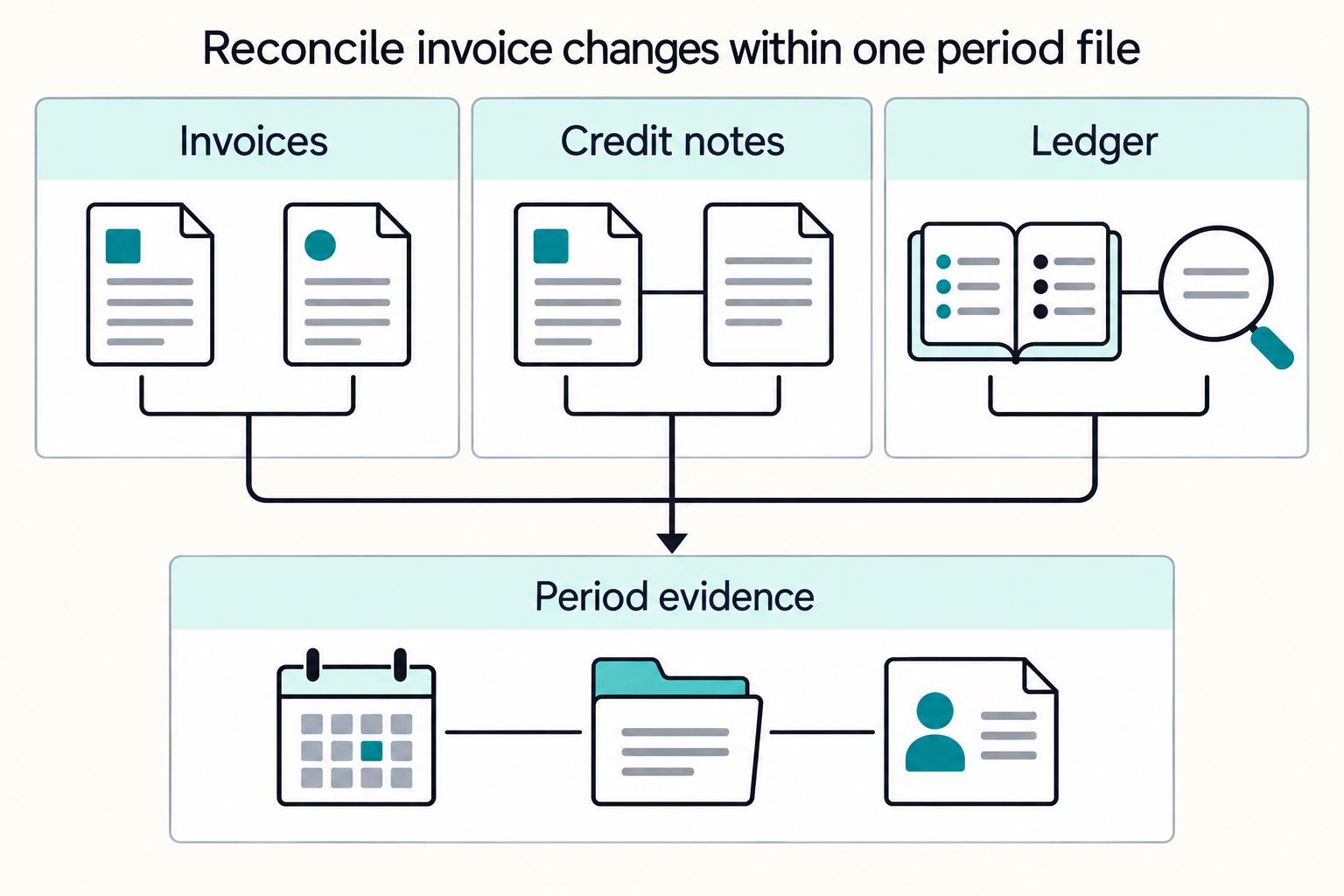
Month end is where weak controls show up. Treat it as an internal compliance checkpoint. If invoice or credit-note records do not reconcile, assign an owner and a dated decision before the period closes. Any VAT-focused checks below are internal controls, not formal HMRC requirements.
| Monthly control | What to compare or include | Handling |
|---|---|---|
| Invoice reconciliation | Issued invoices vs ledger records | Run before filing |
| VAT line check | Invoice VAT lines vs your internal VAT report or draft filing report | Run before filing |
| Credit note check | Credit note adjustments vs approval logs and original invoice references | Run before filing |
| Period evidence pack | Core records needed to complete returns correctly, for example bank statements or receipts, plus internal support documents you rely on | Keep one period file |
| Pre-submission checkpoint | Unresolved exceptions, missing evidence, and aging escalations with an owner, reason, and target date | Clear or formally defer before submission |
| Timing and account status | Online filing on or after 6 April after the tax year ends; payment is due by 31 January; tell HMRC by 5 October if a return is required for the previous year; confirm account reactivation if relevant | Anchor the checkpoint to HMRC timing and account status |
Step 1 Reconcile the records before filing#
Run these as internal controls, not as an HMRC-prescribed checklist:
- issued invoices vs ledger records
- invoice VAT lines vs your internal VAT report or draft filing report
- credit note adjustments vs approval logs and original invoice references
Step 2 Build one evidence pack per period#
Keep one period file that a reviewer can follow without extra context. Include the core records needed to complete returns correctly, for example bank statements or receipts, plus any internal support documents you rely on. If treatment changed during the period, keep version history and the final issued records together so the decision trail stays clear.
Step 3 Keep traceable exports where supported#
Where supported, use Gruv audit trails and reconciliation exports to connect invoice events with payment status and downstream payout records for internal traceability. Store those exports in the period pack so the evidence remains available even if system views or permissions change later.
Step 4 Run a pre-submission checkpoint#
Before anything is submitted, clear or formally defer unresolved exceptions, missing evidence, and aging escalations with an owner, reason, and target date as an internal governance step.
Anchor that checkpoint to HMRC timing and account status. Online filing is available on or after 6 April after the tax year ends. Payment is due by 31 January. If a return is required for the previous year, you must tell HMRC by 5 October. If account reactivation is relevant, confirm it before filing, since filing without reactivating can delay processing. If you are not sure whether you are trading, contact HMRC for advice.
Common mistakes and how to recover quickly#
When an invoice or filing record is wrong, speed matters, but control matters more. Contain the error first, then correct it with a traceable record before you move toward filing.
Step 1 Stop the spread before editing#
Treat the first error as a possible control failure, not a one-off typo. Pause related drafts, preserve the original record, and log what failed, which invoices or periods may be affected, who owns the fix, and what evidence is missing.
Step 2 Reissue with a clear audit trail#
A replacement document is only reliable if the correction path is clear. Use your documented correction method so the original record, corrected record, and approval notes stay linked for later review.
If your status is unclear, do not guess. Contact HMRC for advice if you are not sure whether you are trading.
Step 3 Pause cross-border cases until facts are complete#
If treatment depends on facts you do not yet have, suspend release and gather the missing details first. Escalate instead of issuing on assumption. See Cross-Border Invoicing: How to Handle VAT GST and Withholding Tax on International Invoices.
Step 4 Backfill records before filing pressure increases risk#
Missing records turn small errors into filing risk, so backfill them early. Keep the records needed to complete returns correctly, including core evidence such as bank statements or receipts, and add gaps to your period pack immediately.
Use HMRC timing checkpoints as hard gates. Online filing is available on or after 6 April after the tax year ends. Missing deadlines can lead to penalties. You must tell HMRC by 5 October if you need to complete a return for the previous year, and payment is due by 31 January. If an account needs reactivation, confirm that before filing, since filing without reactivating can delay processing.
This pairs well with our guide on How to Invoice a UK Client Post-Brexit Without VAT Rework.
Conclusion and copy-paste checklist#
Use this as the release rule: if key status data or service facts are unclear, pause and escalate instead of guessing. No confirmed status, no confirmed facts, no release.
- Confirm core records before drafting.
Keep the records you rely on with the file, for example bank statements or receipts. If records are missing, disputed, or inconsistent, stop release and assign an owner.
- Apply one decision path and hold unknowns.
Use the same decision path each time so approvals are based on known fields, not email context or deadline pressure. If VAT-specific treatment is unclear, keep it in escalation until it is confirmed from current guidance.
- Run a final GOV.UK check before issue.
Check current GOV.UK guidance for the full VAT-invoice field list and the trigger for when a VAT invoice is required — do not rely on memory. Keep the reviewed draft, approval note, and final version together for audit traceability.
- Keep evidence packs aligned to HMRC and filing checkpoints.
Keep records such as bank statements or receipts with invoice artifacts and exception notes. Where Self Assessment applies, keep these dates in view: tell HMRC by 5 October if you need to complete a return for the previous year, register before first online filing, file on or after 6 April after tax year end, and pay by 31 January. If an existing account was inactive, reactivate it early to avoid filing delays.
- Correct errors through your approved recovery process and log exceptions.
Preserve the original record, stop repeat invoices with the same treatment, and route the case through your approved correction process rather than editing history in place. Log owner, reason, open date, and resolution date for each exception.
If you want to turn this checklist into a controlled workflow with audit trails and status visibility, review the integration paths in the Gruv docs.
Frequently Asked Questions
Can a UK freelancer charge VAT if they are not VAT-registered?
This guide does not confirm that rule directly. Verify the current VAT registration status in your source records before issuing. If the status is missing or disputed, hold the invoice and escalate.
What must a UK freelancer invoice include to meet GOV.UK requirements?
There is no definitive VAT invoice field list set out here, though records such as bank statements or receipts should be kept so returns can be completed correctly. Treat the invoice as part of a linked file, not a standalone document.
When do you have to issue a VAT invoice instead of a standard invoice?
This trigger is not confirmed. Do not set a release rule from this section alone. If confirmed guidance for invoice type is missing, pause and escalate before issuing.
What operational changes should teams make right after VAT registration?
For VAT-specific post-registration steps, consult the relevant HMRC guidance. Key controls include keeping records such as bank statements or receipts and completing required HMRC setup for Self Assessment, including registration before first online filing and account reactivation if relevant. Teams can also assign ownership for filing dates and account access as an internal control.
Does reverse charge apply to EU freelancer invoices sent to UK businesses?
This guide does not confirm a reverse-charge rule, so this section cannot answer yes or no. Keep these invoices in escalation until cross-border VAT treatment is confirmed from guidance that covers that case. Do not infer treatment from business structure alone.
What should we do if VAT was charged incorrectly on an issued invoice?
Do not assume a specific correction method for VAT errors applies. Preserve the original record, stop repeat invoices with the same treatment, and gather the support file before making changes. Keep HMRC timing gates in view, including filing on or after 6 April, telling HMRC by 5 October if a return is required, and payment by 31 January.
Researched and edited by the Gruv editorial team. Gruv builds cross-border billing, payouts, and finance-operations software for global businesses.
Sources
Includes 2 external sources outside the trusted-domain allowlist.
- abr.gov.au/business-super-funds-charities/applying-abn/...trusted
- ato.gov.au/businesses-and-organisations/international-t...trusted
- ato.gov.au/businesses-and-organisations/gst-excise-and-...trusted
- business.gov.uk/support/business-structures-governance-and-e...trusted
- community.ato.gov.au/s/question/a0J9s0000001Dmq/p-00029303trusted
- taxation-customs.ec.europa.eu/system/files/2022-12/VAT%20in%20the%20Digita...trusted
- gov.uk/self-assessment-tax-returns/registeringexternal
- gov.uk/log-in-file-self-assessment-tax-returnexternal
Educational content only. Not legal, tax, or financial advice.
Related Posts

The Freelance Payment Penalty: A Modeled Audit of Platform Fees, FX Spreads, and Payout Delays
The money rarely disappears through a single, easy-to-spot fee. The real loss is stacked. A marketplace takes its commission, a processor adds a charge for international cards, a bank or payment company converts the currency at a spread, a platform holds the funds before release, and a wire sheds a little to intermediaries on the way in. Each layer looks defensible on its own, but the worker feels the combined result as a smaller deposit and a later payday.

How to Respond to a Subpoena for Business Records
Move fast, but do not produce records on instinct. If you need to **respond to a subpoena for business records**, your immediate job is to control deadlines, preserve records, and make any later production defensible.
A US Expat's Guide to Investing in UCITS ETFs to Avoid PFIC Issues
The real problem is a two-system conflict. U.S. tax treatment can punish the wrong fund choice, while local product-access constraints can block the funds you want to buy in the first place. For **us expat ucits etfs**, the practical question is not "Which product is best?" It is "What can I access, report, and keep doing every year without guessing?" Use this four-part filter before any trade: