
Quick Answer
Start with one repeatable invoice standard and one follow-up cadence. Each invoice should include a unique invoice number, clear line items, an explicit due date, and payment terms copied from the accepted agreement. Send through the approved channel, verify that the billing contact received it, and monitor status until funds settle. When payment runs late, move through preset escalation steps rather than ad hoc reminders. That is the practical core of how to invoice as a freelancer.
Keep Invoicing Simple From Terms to Settlement#
Set one standard from the start: every freelance invoice should identify the client, itemize the work, state agreed terms, and be tracked until funds settle. That habit helps prevent avoidable payment delays and keeps cash flow more predictable.
Define success before the first invoice goes out. You should be able to answer three questions at any moment: what is open, what is overdue, and what happens next for each invoice number. If you cannot answer quickly, tighten the process before volume grows.
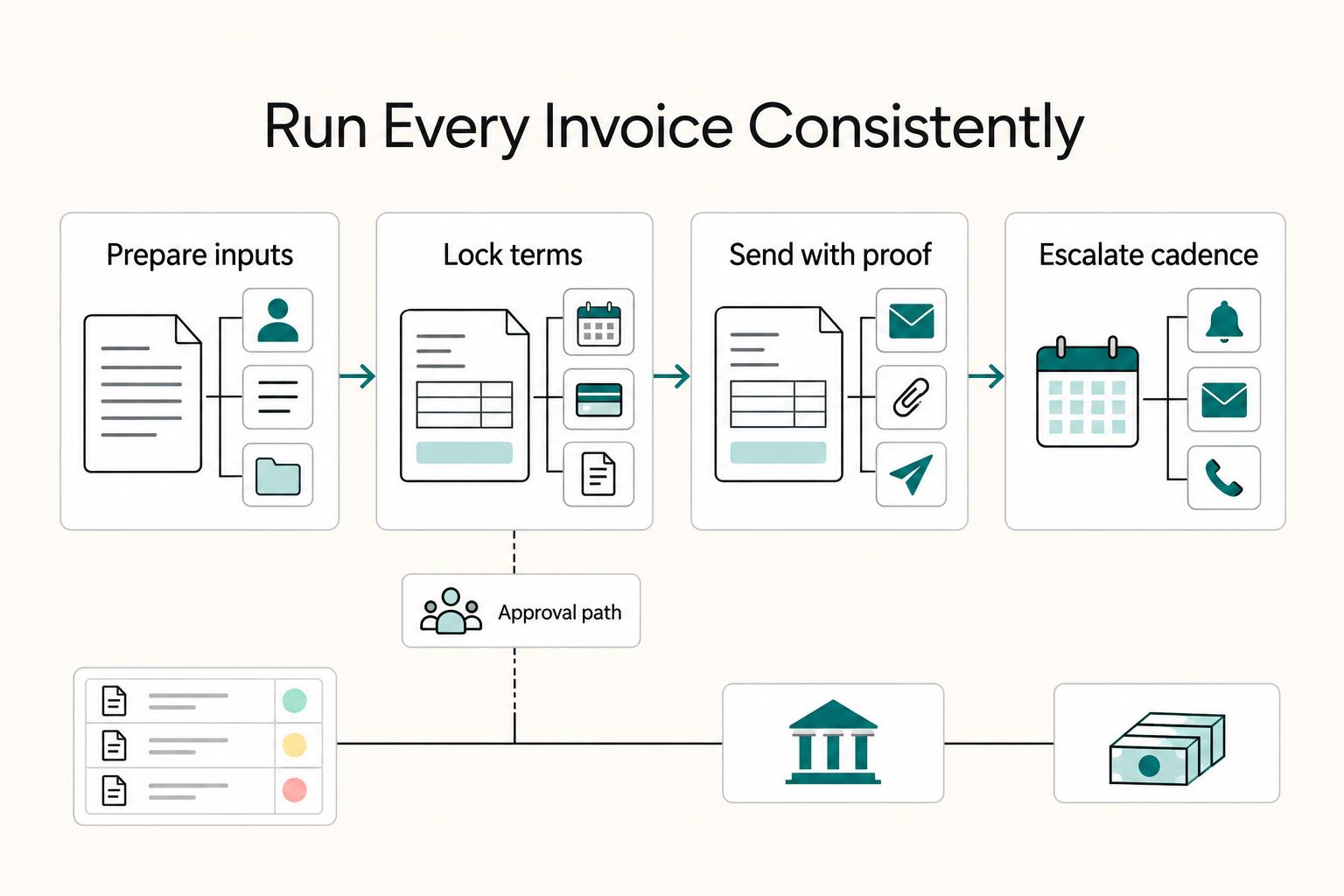
Run the same sequence for each client: prepare inputs, lock terms before delivery, send with proof, and escalate on a fixed cadence if payment slips. Consistency matters more than complexity.
- Set an approval-ready standard. Before sending, confirm four basics: what is being charged, who is paying, when payment is due, and how payment should be made.
- Choose a default payment-term pattern and reuse it. Define a baseline early and change it only when scope or client risk requires it. Common structures include net terms, partial up-front payment, and milestone payments.
- Use a consistent format for creation and delivery. Build invoices from software or a template so required details are not missed across clients or billing cycles.
- Treat jurisdiction checks as a send gate. Business requirements can vary by jurisdiction, so verify country or region requirements before sending.
When delays happen, diagnose the process failure instead of treating every late invoice as a one-off. If the bill went to the wrong contact or used unclear line-item language, fix the root issue in the template and client file right away. That change pays off on future invoices, makes approvals cleaner, and keeps follow-up straightforward.
Prepare Your Inputs Before the First Invoice#
Lock your inputs before work starts. Payment friction usually starts with missing setup details, vague line items, or payment terms that were never confirmed in writing.
- Build a client file before kickoff.
Include the client's billing details and payment contact, then confirm both in writing. That helps reduce avoidable follow-ups once payment is due.
- Choose one baseline format and stick to it.
Use one master invoice template so fields, layout and deadlines stay consistent. Keep the final version you send alongside its payment record.
- Pre-approve billing units and line-item wording.
Define line-item wording in advance and keep it consistent. If a line item can be read two ways, rewrite it before work starts so the questions do not show up after the invoice is due.
- Set a default timing model before delivery begins.
Set payment terms and due dates before work begins, then mirror them in your agreement and invoice. For first-time clients, requesting a down payment is one practical approach. For recurring work, invoice on a consistent monthly date so follow-up timing stays predictable.
Before the first invoice, run a quick preflight check in your client file.
- Terms wording in the agreement matches the invoice template
- Billing details and payment contact are confirmed in writing
- Line-item style is clear and reusable
- A monthly invoice cadence is set for recurring work
Pick the Right Invoicing Stack for Your Operating Style#
Choose the stack you can run reliably every week, not the one with the best demo. Template billing and software billing can both work, but keep one primary record per client when possible.
- Split options into two lanes first.
Put manual options in one lane, such as online invoice templates or a Word or Excel invoice. Put invoicing software options in the other lane. Decide what matters most before testing so you do not switch priorities mid-comparison.
- Run one identical test invoice in each lane.
Use the same line items, due date, and terms in both tests so the comparison is fair. After each test, confirm the saved record and sent record match on totals, due date, and invoice number. Also check how quickly you can find the final invoice later, because retrieval speed matters during disputes and late-payment follow-up.
- Score both lanes with a simple table.
| Option | Good fit | Reminder handling | Record to keep |
|---|---|---|---|
| Word or document template | A few invoices with individually negotiated details | Schedule and send reminders yourself | Final PDF plus dated payment log |
| Spreadsheet template | Simple hourly calculations or repeat line items | Track due dates and follow-ups yourself | Final PDF and controlled calculation sheet |
| Invoicing software | Recurring billing or enough volume to need automation | Check reminder settings and stop reminders when paid | Invoice history, payment events and export |
Test whether you can find the exact sent invoice, apply a partial payment and export an outstanding balance. Those tasks matter more than the number of template designs.
- Set one source of truth per client.
Choose either the software record or the final PDF invoice as the primary record. Avoid parallel records for the same bill, since versions can drift and create confusion later.
- Apply the rule for one full billing cycle.
If manual flexibility is the priority, start with templates. If a software-based workflow is the priority, start with invoicing software. Re-score after one complete cycle and keep the winner.
Set Payment Terms Before Any Work Starts#
Lock billing terms in writing before kickoff, then mirror that wording everywhere. Keep agreement and invoice language aligned.
- Write the terms first, then get written agreement.
Document payment schedule, due-date logic, and any payment conditions before work begins. Get written acceptance before work starts. Once accepted, copy the same language into your invoice template so you do not accidentally paraphrase critical terms.
- Choose terms by risk and trust.
Use partial up-front payment for higher-risk engagements, such as new clients. Use net terms when trust and payment behavior are already established. If risk is mixed, milestone payments are another common option.
- Define net terms with exact timing.
Net terms usually mean payment is due a fixed number of days after the invoice date. The contract may instead use receipt or another trigger, so state which date starts the clock. For Net 30 from issue, print the calendar due date as well as the term.
- Match structure to scope.
Common options include retainers, milestone payments, payment on completion, and hourly billing. Choose the structure that fits the job size, trust level, and project duration. If scope changes mid-engagement, update terms before the next invoice rather than forcing old terms onto new work.
- Make payment language explicit.
Terms should be short enough to read in one pass and specific enough that both sides interpret them the same way. Keep one default set for most clients and add custom clauses only when a real risk requires them.
Choose Billing Structure Based on Risk and Scope Stability#
Choose billing structure based on scope stability first, then risk. If scope is likely to change, hourly billing keeps cost tied to time worked. If deliverables and acceptance criteria are stable, fixed pricing lets you quote one fee for predefined deliverables.
- Use hourly billing for volatile scope. Total cost tracks time worked, which helps when requests evolve after kickoff.
- Use fixed pricing for stable scope. One agreed fee works when deliverables are narrow and acceptance criteria are explicit.
- Use milestone payments when revisions are likely. Milestones can help you avoid waiting until the end to bill.
- Keep custom terms specific. Add a custom clause only when it addresses a known risk.
A few common fits:
- Small one-off design task with clear output: Fixed fee with a milestone if needed, or payment on completion. Deliverables are narrow and can be defined upfront.
- Multi-month engagement with recurring support: Retainer. Retainers are a common freelancer payment-term option.
Use a simple decision rule when you're stuck:
- If acceptance is one clear event, fixed pricing or payment on completion can be cleaner.
- If approval happens in stages, milestones can keep billing aligned to progress.
- If scope may shift week to week, hourly billing can reduce repeated renegotiation.
Do not combine structures just to look flexible. If you do combine them, define each trigger clearly so review and approval stay simple. Pick the structure that best matches how the work will actually be reviewed and accepted. Related: Value-Based Pricing: A Freelancer's Guide.
Build the Invoice So It Gets Approved Fast#
Approvals usually move faster when the invoice is complete and consistent. Keep your agreement beside the draft so scope, dates, totals, and due terms line up before you send.
Step 1. Include the non-negotiables on every invoice#
Use the same core fields every time:
- A unique invoice number
- Your business details and the client's billing details
- The service period or project dates
- The due date
- Itemized services, including line items
- The total amount due
- The payment terms
- Invoice currency, applicable tax details and any deposit or credit already applied
- Payment instructions and a purchase-order reference when the client requires one
Step 2. Write line items for approval decisions#
Each line item should make clear what was delivered and how it was measured. Use clear units and quantities, and keep wording aligned with the agreed billing model. If a line can be read two ways, rewrite it before sending.
Illustrative invoice: INV-104, issued 3 October 2026, for 12 approved design hours at USD 80 per hour. Services total USD 960; an already-paid USD 300 deposit leaves USD 660 due. With agreed Net 30 terms from issue, the due date is 2 November 2026. This example assumes no applicable tax. Attach the approved timesheet and PO reference if required; the deposit is a credit, not a second charge.
Step 3. Keep payment details consistent with the agreement#
State due-date rules clearly on the invoice and mirror any details already approved. If one term is unclear, confirm it before sending to reduce back-and-forth.
Step 4. Run a pre-send verification checkpoint#
- Totals match the sum of line items
- Due date logic matches stated terms, such as Net 7, Net 14, or Net 30
- Service period or project dates are clear
- Invoice number is unique
- Business and client details are complete
- Payment terms are stated clearly
If one item fails, fix it before sending. A short verification pass is usually cheaper than a resubmission cycle.
Add one more control that can save time later: keep a copy of the exact file you sent. When a client asks for clarification, you can respond with confidence because you are looking at the same version they received. If you want a deeper dive, read The Silent Profit Killer: How to Stop Margin Erosion in Your Freelance Business.
Send, Confirm, and Record Payment Status in Order#
Use one send-and-track sequence so invoices are less likely to stall between sent and paid. Each checkpoint should be tied to a date, channel, and contact.
| Step | Action | Record to keep |
|---|---|---|
| Finalize the invoice record | Confirm invoice number, issue date, due date, line items, total, agreed terms, and payment instructions | Invoice record |
| Send through the agreed channel | Use software such as Stripe Invoicing or send a PDF invoice to the approved billing contact | Send time and channel |
| Confirm receipt, not just dispatch | Ask for receipt confirmation first, then route to accounts payable if needed | Receipt confirmation time and contact |
| Track follow-ups with recorded activity | Use dated activity notes and keep any payment confirmations in the same record | Payment confirmation notes |
| Record settlement before closing | Match received funds to the invoice and record the date and amount. Keep any unpaid balance open until paid or validly adjusted. | Settlement date and reconciled amount |
- Step 1: Finalize the invoice record. Before you send, confirm invoice number, issue date, due date, line items, total, agreed terms, and payment instructions.
- Step 2: Send through the agreed channel. If you use software such as Stripe Invoicing, you can create and send invoices quickly. If you send a PDF invoice, send it to the approved billing contact and, when practical, request a short receipt acknowledgment.
- Step 3: Confirm receipt, not just dispatch. Sent is not the same as received. When possible, ask for receipt confirmation first, then route to accounts payable if needed.
- Step 4: Track follow-ups with recorded activity. Use dated activity notes to time consistent follow-ups and keep any payment confirmations in the same record.
- Step 5: Reconcile payments and the remaining balance. Match each receipt to the invoice number and record its date and amount. A partial payment reduces the balance; it does not close the invoice. Send a closeout message only once the balance is fully settled or validly adjusted.
Keep a dated activity log for each invoice number.
- Send time and channel
- Receipt confirmation time and contact
- Payment confirmation notes
- Settlement date and reconciled amount
Run a Late-Payment Escalation Ladder#
For invoices on Net terms, decide your escalation cadence when you send the invoice, then follow it consistently. Consistent follow-up turns an overdue invoice into a documented collection process.
| Escalation step | Trigger | Action |
|---|---|---|
| First reminder | Chosen reminder date, for example 1–2 business days overdue | Confirm receipt and ask for the payment date |
| Terms restatement | After the first reminder in the preset sequence | Restate the agreed terms |
| Revised payment-date request | After terms restatement in the preset sequence | Request a revised payment date |
| Formal late notice | After the revised payment-date request, if needed | Send a formal late notice tied to the same invoice number |
| Stop-work rule | When the contract-defined overdue threshold is reached | Pause new work unless a revised payment plan is confirmed in writing with date and amount |
| Late-fee notice | Only where the terms and applicable law allow | State the agreed rate and calculation; do not add a fee solely because it appears on the invoice |
Choose a cadence you can maintain. For example, send a polite reminder one or two business days after the due date, check with accounts payable if there is no response, then issue a formal notice at the contract-defined threshold. Adjust for a documented dispute or an evidenced transfer in progress; the schedule is an operating choice, not a legal deadline.
- Set the cadence at send time. Schedule each follow-up checkpoint when the invoice is issued.
- Escalate in fixed steps. Start polite, then tighten language as delay increases. Confirm you are contacting accounts payable, not only the project contact.
- Apply your stop-work rule. If your contract-defined overdue threshold is reached, pause new work unless a revised payment plan is confirmed in writing with date and amount.
- Check late-fee terms and legality. Agreement alone does not make every fee enforceable. Confirm applicable rules and use the agreed rate and calculation.
First reminder example: Hi Maya, I’m checking on INV-104 for USD 660, due 2 November. Please confirm receipt and the expected payment date. If you have already sent payment, please share its reference so I can match it to the invoice.
Formal notice example: Hi Maya, INV-104 has an outstanding balance of USD 660. Please pay by 10 November or contact me by then to discuss a payment plan. Any contractually permitted next step should be stated accurately; add a late-fee calculation only if it is agreed and lawful.
Before each escalation message:
- Confirm the outstanding amount matches your ledger
- Confirm the accounts payable contact is correct
- Log date, channel, and tone so your record stays complete
Treat escalation as documentation, not emotion. Keep messages brief and factual so your records stay clear if you need to escalate further.
Handle Cross-Border and Jurisdiction Unknowns Early#
Confirm cross-border billing details before work starts. Separate the service price from transfer fees and currency conversion so both sides know how much must reach you.
| Item | What to confirm | Article note |
|---|---|---|
| Kickoff details | Client location, billing contact, invoice currency, and payment method | Mark any local format or tax-rule uncertainty as unresolved until confirmed |
| Payment path | Who covers transaction fees | State fee ownership in the contract and mirror that language on the invoice |
| Payment status | Whether funds were initiated or received | Treat payment sent as initiation only, not final receipt of funds |
| Transfer timing | Expected settlement window | Use the selected provider’s estimate for the actual currency, route and cutoff; there is no universal window |
A cross-border invoice can look complete and still fail in practice when those basics were never confirmed. What works in one country may be unavailable or unreliable in another, so lock the payment path in writing early.
- Flag unknowns at kickoff. Record client location, billing contact, invoice currency, and payment method. Mark any local format or tax-rule uncertainty as unresolved until confirmed.
- Lock payment path and fee ownership in writing. State who covers transaction fees in the contract and mirror that language on the invoice.
- Separate payment confirmation from settlement. Treat payment sent as initiation only, not final receipt of funds.
- Plan follow-up around the actual route. Obtain the provider’s expected arrival date and transfer reference, then investigate a missed estimate before asking the client to pay again.
Use an unknowns box in each client file so open country-specific decisions stay visible during kickoff, invoicing, and follow-up.
- Universal: invoice fields, due-date rule, reminder cadence, ledger updates
- Country-specific: payment rail availability, fee owner, expected settlement window, unresolved local compliance questions
- Status: confirmed, pending, or blocked, with owner and date
Give unresolved items an owner and a date. Agree commercial choices such as fee ownership in writing. Required tax or invoice rules need to be resolved under the applicable requirements; both parties accepting a risk does not waive them.
Before the first cross-border invoice, run a final alignment check with the billing contact: channel, format, currency, and expected settlement communication. One clean confirmation can prevent avoidable follow-up.
Avoid the Most Common Invoice Failures and Recover Quickly#
When payment stalls, review the invoice record first. Correct what the client sees and resend with clear documentation to help move payment forward.
Step 1 Clarify what was billed#
If a line item is vague, clarify it and keep the previous sent version. Use the correction or credit-note process required by your jurisdiction and software, link any replacement to the original, and make clear that it replaces the bill rather than adding a second debt.
Step 2 Align payment terms with the agreement#
If your invoice terms do not match the agreement, correct the invoice before you resend it. Keep wording consistent across contract and invoice so there is one clear record of what was agreed.
Step 3 Keep terms consistent unless an exception is necessary#
Use one standard invoice structure for most clients. Add special terms only when a real exception exists, and make sure that exception is reflected clearly in the invoice.
Step 4 Keep a simple documentation trail#
For each send or resend, keep the invoice record complete and organized. If non-payment or a dispute happens, a properly documented invoice can support your position.
Identify the problem, preserve the original, issue a traceable correction and update the remaining balance. A client’s payment screenshot is evidence to investigate, not permission to close an invoice before matching the funds.
Build a Reusable Client Packet You Can Reapply Every Time#
Build one client packet and reuse it on every project. Consistent materials make invoices easier to review, approve, and chase when late.
- Step 1: Set your default terms and line-item style.
Keep standard terms, approved line-item format, and escalation templates in one place. Use that packet as your starting point instead of drafting from scratch. Review it periodically and update only when a clear issue appears in approvals or collections.
- Step 2: Keep an editable template and a final send file.
Use an editable invoice template in your preferred format (PDF, Word, Excel, Google Docs, or Google Sheets), then keep a final send file. Template format availability can vary, so confirm your preferred format before relying on it. Once finalized, send by your chosen method, email or print, and keep that method consistent per client.
- Step 3: Add a short billing decision card.
Include default rules for when to use retainers, milestone payments, or hourly billing. Keep it short so the billing choice is fast and repeatable, with room for client-specific exceptions. A one-page decision card prevents overthinking when scope changes mid-project.
- Step 4: Add a tool-switch note to preserve continuity.
If you move from template billing to a different invoicing setup, keep core elements identical: term wording, line-item naming, file naming, and send records. That keeps the client experience stable while your internal setup changes.
Assign ownership in the packet so maintenance does not slip.
- Who updates terms language
- Who verifies template fields
- Who reviews escalation scripts
- When changes take effect for active clients
Packet checklist to keep with every client file
- Default terms
- Approved line-item examples
- Editable invoice template
- Final send version
- Escalation templates and send log
Final Takeaway and Copy-Paste Checklist#
Use one default invoicing method and run it the same way every time. The practical answer to how to invoice as a freelancer is not more complexity. It is consistent execution from setup through payment closeout.
- Step 1: Confirm terms before work starts.
Choose the billing structure for the engagement and document it before delivery begins. If you use options like milestone payments, keep wording identical across agreement and invoice. Keep payment handling language explicit so late follow-up is predictable when timing slips. Verification checkpoint: agreement and invoice use the same wording.
- Step 2: Build every invoice from the same field set.
Start from your template, not memory. Include client details, dates, itemized services, totals, amount due, agreed terms, and a consistent invoice number for traceability. Keep field order stable so approvers can review quickly and you can spot missing details fast. Verification checkpoint: the approver can confirm what was delivered, what is owed, and when payment is due in one pass.
- Step 3: Send with proof and track to payment.
Log the send date, receipt acknowledgment if available, due date and remaining balance under the invoice number. Reconcile each receipt, including partial payments and agreed fee deductions. Keep any unpaid balance open until fully paid or closed through a valid, documented adjustment.
- Step 4: Escalate on a fixed cadence and keep records together.
If payment is late, follow your preset sequence instead of improvising. Keep the invoice, message history, and acknowledgments in one place, since records can serve as proof in disputes or audits. Verification checkpoint: follow-up schedule and documentation are complete before you close the invoice.
-
Prepare client inputs
-
Confirm terms match agreement wording
-
Build and verify invoice fields
-
Send and confirm receipt
-
Track initiation and settlement
-
Escalate on schedule when overdue
-
Close with reconciled records
-
Client details verified -
Invoice number assigned -
Line items and totals validated -
Payment terms and due date confirmed -
Invoice sent and receipt acknowledged -
Follow-up dates scheduled
For a practical next action, Try the free invoice generator. If you need country or program-specific confirmation, Talk to Gruv.
Frequently Asked Questions
What must a freelance invoice include to avoid approval delays?
At minimum, include a unique invoice number, your business details and the client's billing details, the service period or project dates, the due date, itemized services, the total amount due, and the payment terms.
Should freelancers start with Net terms or Partial up-front payment?
There is no single default for every client. The practical rule is to use partial up-front payment for higher-risk work, such as new clients, and net terms when trust and payment behavior are already established.
When should I use Milestone payments instead of Payment on completion?
Use milestone payments when approval happens in stages or revisions are likely. Use payment on completion when acceptance is one clear event.
Are Late fees worth adding for small invoices?
For a small balance, a reminder or a payment plan may recover more than a fee dispute. Apply a late fee only when the agreed terms and applicable law allow it; confirm the rate, start date and calculation before sending a notice.
Is a PDF invoice enough, or should I use Stripe Invoicing or QuickBooks?
A PDF invoice can be enough if your process is simple and you keep clean send and status records. If you want a built-in sending and collection flow, Stripe Invoicing can speed that up. This guide does not provide a QuickBooks comparison.
How do I choose between Hourly billing and Retainers?
Use hourly billing when scope may shift week to week. Use retainers for recurring support or ongoing work that benefits from a stable billing pattern.
What should I adjust if my client is in Canada or another jurisdiction with different expectations?
Confirm the required invoice identifiers, tax treatment and any local format or electronic-invoicing requirements for your business and transaction. A client’s country alone does not establish all of those obligations.
Watch
How to Invoice as a Freelancer
Try a related tool
Researched and edited by the Gruv editorial team. Gruv builds cross-border billing, payouts, and finance-operations software for global businesses.
Sources
Educational content only. Not legal, tax, or financial advice.
Related Posts

Stop Freelance Profit Margin Erosion Before It Hits Cashflow
Revenue can hold steady while the business underneath it gets weaker. What comes in matters, but what you keep after the work is delivered is the clearer signal of health.

Value-Based Pricing for Freelancers Under Real Payment Risk
Value-based pricing starts with the client’s expected benefit and willingness to pay. It still needs a deliverable, scope and payment agreement you can perform. Use a discovery phase when the benefit or effort is too uncertain to support a defensible quote.

The Freelance Payment Penalty: A Modeled Audit of Platform Fees, FX Spreads, and Payout Delays
The money rarely disappears through a single, easy-to-spot fee. The real loss is stacked. A marketplace takes its commission, a processor adds a charge for international cards, a bank or payment company converts the currency at a spread, a platform holds the funds before release, and a wire sheds a little to intermediaries on the way in. Each layer looks defensible on its own, but the worker feels the combined result as a smaller deposit and a later payday.