
Quick Answer
Build a vendor portal as a controlled finance operations workspace, not a file drop. The first release should cover onboarding, tax and bank profile capture, invoice submission, payment and PO status visibility, compliance documents, payout retries, and disputes, all tied to traceable records, clear owners, role-based access, and evidence-based status changes.
Treat the vendor portal as an operating workspace#
Treat the vendor portal for platforms as an operating surface, not a file drop or message inbox. If it cannot support onboarding checks, invoice and payment visibility, clear access boundaries, and a reliable record of status changes, it will not take real work off finance and ops.
A vendor portal is a private, centralized space shared by a business and its vendors. The useful versions do more than pass messages back and forth. They support onboarding, file exchange, registration and checks, and task or status visibility tied to real records. Public examples such as the GSA vendor portal show the same principle: supplier-facing tasks only scale when required records and status checkpoints stay explicit. That matters because manual vendor-data updates and repetitive payment-status or invoice-discrepancy questions create mistakes, compliance risk, and extra AP load.
This is not a generic vendor management software selection guide. A VMS can cover broader vendor processes end to end. Portal outcomes usually come down to narrower control decisions: which records exist, who can act on them, how invoice or payment statuses change, and what status history is retained.
Design for self-service without giving up control. Vendors should be able to see their own invoice and payment status and use communication tools. That helps reduce the payment-status questions and discrepancy threads that overwhelm AP teams. But it only works when role-based permissions keep external users limited to their own records and tasks.
Model the portal around operating objects, not pages. A practical foundation is a relational structure for users, vendors, invoices, tasks, and documents, with workflow states tied to those records. Before you build, define the source record, who can change status, and what evidence is captured for each change tied to invoice or payment state.
The rest of this guide stays focused on execution. Start with what the portal must do in production. Then map the objects and statuses behind it, set permission boundaries, connect invoicing and payment visibility, support discrepancy communication around linked records, and make the build-versus-buy call with explicit control criteria. You should come out of it with a go-live checklist you can test against real failure paths before launch.
Related: What Is Procurement as a Service? How Platforms Can Outsource Vendor Sourcing and Contracting.
Start with what this portal must do in production#
Step 1 Define it as a finance operations surface#
Treat the portal as the place where supplier-facing finance work actually happens, not a supplier portal that only stores files and messages. If vendors can upload documents but your team still handles tax details, bank-detail updates, invoice intake, or payment-status checks in side channels, you have a document cabinet, not an operating surface.
As a practical baseline, vendors should be able to self-register, upload tax documents such as W-9s or VAT information, manage bank details, submit invoices, and track payment status directly. Use that as your first production check. Can the common money workflows run in the portal without email or spreadsheet fallbacks?
Step 2 Lock the first release to core outcomes#
For this guide, keep v1 scoped to a small set of operational outcomes: vendor onboarding, tax and bank profile capture, invoice submission, payment-status visibility, PO status updates, and compliance-document handling with expiry reminders. That is a launch choice meant to keep scope operational and testable, not a universal standard.
Cut adjacent features that do not directly support those outcomes. For each in-scope outcome, define the start trigger, owner, status path, and exportable record before you ship.
Step 3 Require traceable state changes for every action#
Set one hard rule early: every meaningful action must create a traceable state change that supports real-time activity tracking. Supplier self-registration, tax-form submission, bank-detail edits, invoice submission, payment-status updates, and PO acknowledgements or delay flags should all leave a timestamped record of actor, object, and resulting status.
Without that structure, ambiguity comes back quickly and the team loses a single current version of the truth. Keep logs exportable so anyone can answer what changed, who changed it, and which record was affected. If you run automated reminders, such as certificate-expiry alerts, log those too so the audit trail stays clean.
For vendor payment terms, see Net-30 Payment Terms for Platforms: How to Set Vendor Payment Terms Without Killing Contractor Cash Flow.
Gather prerequisites before any build work#
Once you know the target production outcomes, stop before you design screens. The fastest way to create rework is to build from assumptions that finance and ops later have to unwind. Designing the system before defining business needs can make operations harder to run.
Step 1 Build the evidence pack from requirements sessions#
Run requirements sessions by department or functional area, then turn the output into one detailed requirements document that survives design, selection, and launch. That keeps the work tied to business needs instead of opinion.
At minimum, capture core functional needs and nice-to-haves for each area, and make each item specific enough to drive workflow decisions. If a process depends on registered-vendor status, separate account creation from registration evidence so login access does not get mistaken for eligibility.
Step 2 Inventory every application that can change money data#
Before you design anything, inventory every system that touches vendor and payment operations data. For each one, record what it creates, updates, and exports, whether it stays or is replaced, and which system is the source of record for each object.
Do not move into build while ownership conflicts remain. If two tools can change the same field, resolve that boundary first.
Step 3 Assign ownership by decision boundary#
Assign the project team before requirements harden, then define decision boundaries clearly across finance controls, ops execution, product requirements, and engineering integrations. The org chart matters less than clear accountability.
For each major action, name who defines the rule, who executes it, who approves exceptions, and who owns resolution when data does not reconcile. Handoffs with multiple approvers and no single accountable owner are launch risks.
Step 4 Define success metrics before anyone writes tickets#
Set success metrics before implementation tickets are written. Use clear operational metrics so you can tell whether processes are getting cleaner.
For each metric, define the start event, end event, and data source up front. Clear definitions also make vendor evaluation more defensible, including when you compare a longlist of about 5-7 solutions instead of picking by reputation.
If you want a deeper dive, read Vendor Risk Assessment for Platforms: How to Score and Monitor Third-Party Payment Risk.
Step one map data objects statuses and handoffs#
Map the process model before you map screens. If records mean different things across tools, the portal adds cleanup work instead of removing it.
Turn the requirements document into an operating map: one shared object table, one allowed transition set per object, and one named owner for every handoff. Without that, status visibility drops during handoffs, exceptions drift without ownership, and missed approvals or stale records show up later as process breaks.
Step 1 List the in-scope objects in one shared table#
Start with one shared table for the in-scope objects, even if the schema is still evolving. The point is to stop teams from using the same term for different records.
| In-scope object | Core link you must preserve | Question to answer before build |
|---|---|---|
| Supplier record | Supplier ID across onboarding and activation workflows | Who can create, qualify, activate, suspend, or archive it? |
| Tax-form package | Tax forms linked to the supplier record | What blocks it from being marked complete? |
| Certification record | Certifications linked to the supplier and compliance review | Which certifications are required before activation? |
| Risk check | Risk-check outcome linked to the supplier record | Who reviews exceptions and clears them? |
| Compliance validation | Validation status linked to onboarding decisions | What evidence is required to pass or fail validation? |
| Approval task | Approval decision linked to the onboarding request | Who approves, and what happens if approval is delayed? |
| Exception case | Exception ID linked to the affected onboarding step | Who owns intake, review, and resolution? |
Each object needs one source of record and one stable identifier that survives handoffs and reconciliation.
Step 2 Define allowed transitions and explicit blockers#
Write transitions as rows, not notes, so the map can run real operations. For each transition, capture the current status, next status, trigger event, blocker, required evidence, and handoff owner.
Name compliance blockers explicitly instead of hiding them inside broad states. If progress stops because tax forms are missing, a certification is invalid, a risk check is open, or compliance validation is incomplete, make that blocker visible in the transition rule.
Be careful with catch-all states. A label like "on hold" only works if you also store the reason code, blocking team, and required document or approval. Every blocked transition should answer three questions immediately: what stopped it, who clears it, and what evidence clears it.
Step 3 Assign one owner to each handoff#
Give every transition a clear next owner, and assign ownership at the transition level, not the object level. Shared queues without accountable ownership are where exceptions stall. Different teams can own different actions on the same object, and the owner should always be the team or person who acts next.
Add workflow automation where it prevents records from stalling: request routing, reminders, and deadline tracking. If a blocked record sits untouched, the map is missing ownership or automation.
Checkpoint: test five likely exception paths and ask who owns each one tomorrow morning. If the answer is only a queue name, tighten the handoff map.
Step 4 Add validation checkpoints to retry-prone handoffs#
Any handoff that is frequently retried should follow the same validation path each time so teams do not create mismatches downstream when responses are delayed or unclear.
Keep the first design simple. For each retry-prone action, define the required validation checks, the blocking conditions, and the owner who confirms resolution before the workflow moves forward.
Checkpoint: run a retry simulation on a high-risk handoff and confirm you get a consistent status outcome rather than conflicting records. If you cannot prove that, pause feature work until the handoff rules are clear.
You might also find this useful: Procurement Data Management for Platforms: How to Centralize Vendor Contracts and Payment Terms.
Step two design access boundaries before feature depth#
Set access boundaries before you add convenience features. If you leave this late, mistakes spread into screens, exports, approvals, and audit trails, and they are much harder to unwind.
Step 2.1 Define roles from actions, not job titles. Build your Role-Based Access Control model from real actions on the canonical objects in step one, and document the decision rules you will revisit as the platform evolves.
Create one permission matrix before UI build. For each role, define the object, allowed action, blocked action, and whether access is full-record or field-limited. Validate it with real scenarios, not generic checks, so you know the right people can act without seeing data they should not access.
Step 2.2 Split the Vendor Portal from the internal Supplier Portal view. Keep the Vendor Portal limited to what vendors need to submit work and track status. Keep the internal Supplier Portal view for back-office decisions, queue controls, retries, and internal notes.
Do not rely on "shared page now, hide later." If a field is internal, design it as internal from day one. Treat access policy as a dedicated architecture concern, not only a data-path concern, so internal data does not leak through exports, search, activity feeds, or APIs. If you handle sensitive supplier or payment data across borders, design those exports and APIs against the countries-of-concern data rule before you widen access.
Step 2.3 Define sensitive-field and export rules explicitly. Include exports in the same access review as UI actions.
If a permission rule depends on legal or compliance interpretation, record the reference and verify it against the published Federal Register rule on access to US sensitive personal data and government-related data by countries of concern instead of relying on prototype page text alone.
Set masking, encryption, and export-scope mechanics in your own policy and implementation docs.
Step 2.4 Use overrides as a redesign signal. Temporary overrides are a warning, not a workaround. If a role needs them repeatedly, the role model likely needs redesign.
Repeated overrides can point to broken boundaries or missing handoffs. Fix the boundary, retest the permission matrix, and then continue deeper feature work.
We covered this in detail in Virtual Credit Cards for Platforms: How to Issue Single-Use Cards for Contractor and Vendor Payments.
Step three implement tax profile and compliance gates#
Once roles and masking are in place, make tax intake stateful and tie payout eligibility to status, not reminders. Finance should not have to decide eligibility from inboxes or memory.
| State | Handling |
|---|---|
| validation failed | Return practical fixes on validation failures |
| in review | Hold payout while in review |
| approved | Release on approval |
| review hold | Route holds to internal review |
Step 3.1 Collect tax and identity data in a fixed sequence. Collect profile data and tax-related documents in a structured sequence inside the vendor portal, not a loose upload bucket. A practical flow is profile basics first, tax identification artifacts next, then review outcome.
Capture fields and documents together. If reviewers have to open files just to find missing or mismatched details, you can recreate the onboarding and approval bottlenecks seen in manual tooling. In testing, a submission with a missing required field should stay incomplete before finance review. If intake starts outside the portal, normalize it into the same status model.
Step 3.2 Tie payout eligibility to workflow automation states. Use workflow automation states to hold payout creation when a tax profile is incomplete or still under review. This operating control can keep missing information from surfacing late during invoice or payout execution.
A workable path is draft -> submitted -> validation failed / in review -> approved or review hold. Keep the behavior explicit in each state: return practical fixes on validation failures, hold payout while in review, release on approval, and route holds to internal review. Validate the gate with three test cases: missing document, mismatched identifier, and clean record.
Step 3.3 Separate vendor-fix errors from internal risk holds. Do not mix vendor-correctable errors with internal review holds. Vendors need clear fix instructions, while finance needs a distinct risk queue.
Keep validation errors in the vendor-facing path and review holds in an internal compliance queue. For example, "missing tax identification document" is a vendor action, while "requires finance review before approval" is an internal hold. That split can reduce rework and keep payout operations focused.
Step 3.4 Preserve an approval history that audits cleanly. Record each approval and hold with vendor ID, tax profile version, decision, reviewer, and timestamp to support audit readiness. Preserve history so decisions can be reconstructed later instead of overwritten by the latest edit.
Tie the record to the exact profile object finance acted on. Capture what was approved, not just that it was approved. A simple test helps here: if the team cannot explain, from the record alone, why a vendor was cleared for payment, the control is incomplete. Related reading: Vendor Portal Requirements Checklist for Platform Payment Ops.
Step four connect invoicing collection and ledger truth#
Once upstream gates are in place, make invoice status evidence-driven. Otherwise the team ends up resolving stalled invoices and reconciliation issues at cycle end.
Step 4.1 Define one end-to-end invoice-to-payout path#
Write one explicit workflow that finance, ops, and product can test together. Keep each state dependent on evidence from the prior state, not operator memory or comments.
A practical example is: invoice created, invoice reviewed, approval complete, payment confirmed, Compliance Management cleared, payout processed. Use your own labels if needed, but keep the dependency logic intact.
Attach each state to a system record so reviewers can verify the path without stitching status together from comments or multiple screens.
Step 4.2 Pick one record for paid/unpaid status#
Choose one system record as the authority for invoice payment state, and make portal badges and balances derived views. This helps avoid cases where a screen shows "paid" before supporting workflow evidence exists.
If you use Vendor management solutions for collaboration with vendors, task assignment, and contractor or freelancer payments, keep those collaboration flows there. Keep payment-state decisions tied to the verified workflow evidence you control.
Step 4.3 Add checkpoints with explicit evidence#
Before money moves, put checkpoints in place that require evidence, name an owner, and define what blocks the next step.
| Checkpoint | Evidence to require | Block condition |
|---|---|---|
| Approval complete | Recorded approval checkpoint for the invoice or order | Do not advance payment processing |
| Payment confirmed | Payment record reconciled to the invoice | Do not treat invoice as paid |
| Compliance cleared | Current approved compliance status | Keep payout ineligible |
Keep the evidence inspectable and consistent so a reviewer can validate one invoice without stitching status together from multiple tools.
Step 4.4 Treat editable paid status without evidence as a launch risk#
If users can mark an invoice paid without matching evidence, treat that as a launch risk and fix it before broad rollout.
Test at least three cases: a clean path with matching evidence, an approval-complete path without payment evidence, and a payment-confirmed path still blocked by compliance. The outcomes should stay distinct so payment confirmation and payout eligibility remain separate controls.
Step five design payout execution retries and exception handling#
Once invoice and ledger truth are set, payout execution should run on explicit states and controlled retries, not ad hoc operator actions. Banks can delay, APIs can respond late, and alerts can arrive out of order, so assume failure and design for deterministic handling anyway.
| Go-live check | Required outcome |
|---|---|
| Late callbacks | Update the original payout record, not a second success path |
| Batch views | Expose partial outcomes, not one blended status |
| Finance and ops views | See the same status history across portal and internal queues |
| Compliance blocks | Remain distinct from provider-side failures |
Step 5.1 Lock the payout state model before you automate retries#
Define payout status on the payout instruction itself so operators can always answer the basic question: pending, successful, or failed. Then add operational sub-states under pending where helpful so each stage has clear handling.
The exact labels matter less than the control discipline. Each state should have a defined next action, a clear owner, and one record that explains the transition. If someone can jump a payout from failed back to submitted without review, you raise the chance of payout errors.
A practical check is simple: for any payout, one record should show the current state, owner, latest execution outcome, retry eligibility, and next triggering event.
Step 5.2 Make every retry replay-safe#
Treat retries as controlled continuation of the same payout instruction, not a new payout created under pressure. Use replay-safe request handling and keep retry decisions tied to recorded execution history. Engineering teams can borrow from Temporal's error-handling guidance here: retries should preserve workflow identity and send ambiguous outcomes to review instead of silently creating a new payout.
Store retry-critical fields with the payout instruction or attempt record:
- payout instruction ID
- current status
- attempt count
- last provider response or timeout outcome
- retry eligibility and next retry trigger
- current queue owner
This matters most during partial failures, when some services are healthy and another path is degraded. Without a recorded retry point, teams may drift into manual resubmission.
Before allowing a retry, compare the core request fields with the original instruction: amount, recipient details, currency, and payout instruction ID. If those differ, route to review or treat it as a new payout only after the original is resolved.
Step 5.3 Separate exception buckets and give each one an owner#
Do not collapse every failure into one list. Route payout failures by handling type so each queue has a clear purpose and reviewers know what they are looking at.
One practical pattern is to use buckets like these:
| Failure bucket | What it usually means | Route it to | Evidence reviewers need |
|---|---|---|---|
| Recoverable | Likely transient issue (timeout, delayed response, temporary upstream issue) | Automated retry queue | Last attempt timestamp, provider response, next retry trigger, attempt count |
| Manual review | Conflicting signals or missing information | Ops/finance review queue | Payout instruction, linked invoice/payable, recent event log, active compliance hold if any |
| Terminal | Retry should stop unless a new business decision is made | Closed-failure or reissue path | Failure reason, terminal decision owner, replacement-payout decision |
Keep the exception context tied to the original payable or invoice. Reviewers should be able to see whether funds are reserved, whether the payable has already been satisfied another way, and whether a compliance block is the real blocker.
Step 5.4 Expose Real-Time Activity Tracking for batch and single payouts#
Finance and ops need the same operational truth in real time at the payout-item and batch levels. End-of-day exports may be insufficient when exceptions are live.
For single payouts, show ordered events such as queued, submitted, callback received, settled, failed, and routed to review. For batch payouts, show both the batch summary and the item-level outcomes, because a batch can be partially healthy.
Use these go-live checks:
- Late callbacks update the original payout record, not a second success path.
- Batch views expose partial outcomes, not one blended status.
- Finance and ops see the same status history across portal and internal queues.
- Compliance blocks remain distinct from provider-side failures.
The goal is not to eliminate failure. It is to keep failure visible, bounded, and hard to turn into payout mistakes.
Step six tie disputes directly to invoices payouts and contracts#
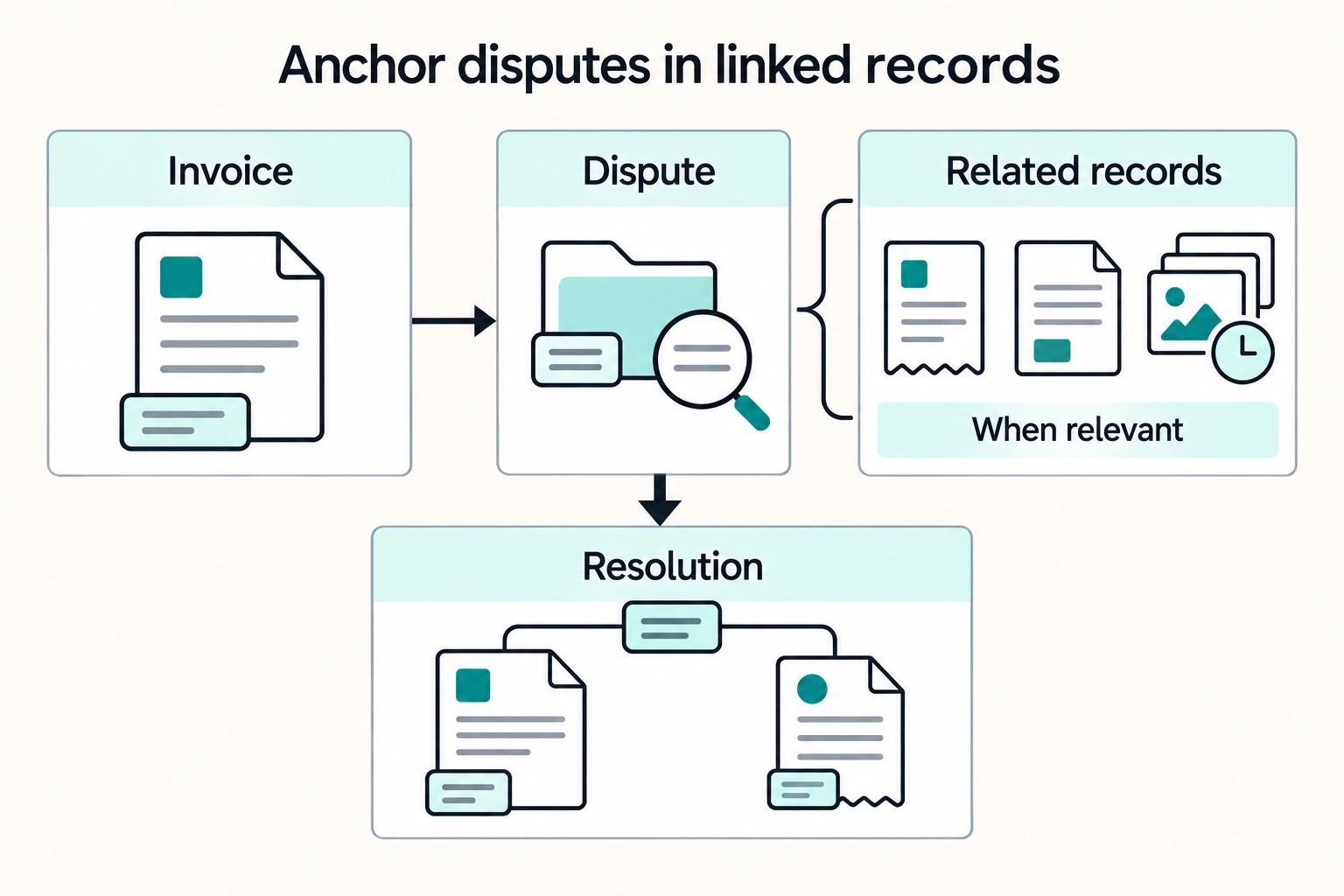
Disputes move faster when they start from the invoice record, not a loose ticket. Reviewers should see invoice context first, then the related payout and agreement records when those matter to the issue.
| Dispute intake element | When to include |
|---|---|
| Invoice ID and current invoice status | When available |
| Related payout details | When a payout exists |
| Governing commercial or contract record | When that context is needed to review the dispute |
| Time, parts, photos, and signatures | For billed-work disputes |
Step 6.1 Anchor intake on the invoice record#
Use the invoice as the intake anchor, because invoice management already covers the path from invoice arrival through payment completion. When cases start in email threads, spreadsheets, or manual notes, errors and delays can compound.
At intake, start with the invoice ID and current invoice status when available. Add related payout details when a payout exists, and include the governing commercial or contract record when that context is needed to review the dispute. For billed-work disputes, include the operational evidence behind the bill, such as time, parts, photos, and signatures carried from work order to billing.
A practical check is whether, from one dispute record, an operator can quickly answer what invoice is challenged, whether payout activity exists, and what agreement terms may apply.
Step 6.2 Standardize dispute types and required evidence#
Do not make every dispute a blank form. Define a small set of dispute types with required evidence so escalation does not begin with document chasing. Keep invoice and dispute status language aligned.
| Dispute type | Core linked records | Evidence at intake | First check |
|---|---|---|---|
| Invoice detail mismatch | Invoice ID, relevant agreement/contract record | Invoice version, line details, approval history | Does invoice status match the latest approved version? |
| Service or delivery challenge | Invoice ID, job/order reference | Time logs, parts, photos, signatures | Does the operational evidence support the billed work? |
| Payout status or amount question | Invoice ID, payout record (if present) | Payout history, amount, date, recipient details | What is the current payout status? |
Step 6.3 Close disputes by updating operational records#
A dispute is not really closed if only a support note changes. The resolution should update the operational record that was in dispute, such as the invoice state or payout exception state, so downstream teams see the same outcome.
Use exportability as a checkpoint. You should be able to export invoice tables to CSV or Excel and reconcile dispute outcomes against invoice and payout state changes.
If you reuse status patterns from Coupa Supplier Portal documentation, verify current behavior first. That page is marked as no longer maintained, last edited 18 February 2026, so labels can be stale.
Step 6.4 Reduce dispute load at the source#
If dispute load rises, look upstream before you add support capacity. Start with invoice quality, operational evidence quality, and whether vendors can clearly view and edit invoice details in the portal.
When the same mismatch repeats, fix the upstream process that creates it. Cleaner invoice inputs and clearer status visibility can reduce avoidable dispute churn.
For a step-by-step walkthrough, see Vendor Contract Management for Platforms: How to Automate SOWs MSAs and Rate Cards.
Choose your build approach with explicit tradeoffs#
Choose the approach that protects governance and exception handling in real operations, not the one with the best demo. If you need a fast internal rollout with moderate complexity, configurable SaaS can be a practical starting point. If you need strict custom state logic across onboarding, invoices, payouts, and disputes, an API-first build can be the safer choice.
| Approach | Typical fit | Main advantage | Main tradeoff |
|---|---|---|---|
| No-code or low-code (for example, Stacker, Knack) | Fast internal rollout and moderate process depth | Can speed setup and iteration | You must verify controls and reconciliation behavior in practice |
| Configurable SaaS (for example, Tipalti, Airbase, Taulia, Gatekeeper, Onspring, Genuity) | Teams that want packaged workflows with configuration | Can be a faster path for common flows | Edge-case state logic and integration shape can become limits |
| Enterprise suites (for example, SAP Ariba, Tradeshift) | Broader procurement and cross-team process scope | Can offer wider built-in process coverage | More fit-to-model work when your operating model is narrower |
| API-first custom build | Product-native portal needs and strict workflow control | Can provide deeper control over statuses and handoffs | Your team owns more modeling and assembly work |
Score every option against the same controls: semantic modeling, row-level security, tenant boundaries, AI grounding, integration depth, and dispute lifecycle fit. For access controls, test isolation explicitly so data stays isolated where required.
Weight governance above UI polish. Teams often over-index on dashboards and demo quality, but the real operational risk sits in ungoverned metrics, weak tenant isolation, and automation running outside governed business logic. For AI-assisted features, require centralized supplier data and a clean, structured data foundation before you trust outputs in workflow decisions.
Do not decide from marketing pages alone. Run the same pilot script for each shortlisted option and force real exception cases, including organization hierarchies, negotiated terms, approvals, RFQs, and integrations that must behave predictably at scale. A practical pass condition is that you can trace a dispute-linked exception from intake through export and reconciliation without manual patchwork.
If your pilot is exposing edge cases around retries, status transitions, and reconciliation, use this implementation checklist to pressure-test your architecture before rollout: Review the Gruv docs.
Avoid the failure patterns competitors gloss over#
Do not launch until workflow states and outage visibility hold up under production conditions, not just demos. The prototype-to-production gap shows up when volume, exceptions, and supplier traffic increase, and that is where operations get expensive.
Step 1 Block launch until every state is explicit. Make every critical workflow state explicit: named status, allowed transition, and clear owner. If you use labels like "in review" or "processing," define what is blocked, who can unblock it, and what evidence is required for the next move.
Use a simple pre-launch check: trace one invoice and one payout case from intake to export or settlement without relying on comments or tribal knowledge. Production introduces variables that controlled pilots miss, and teams often discover different processes, tolerances, and failure modes only after production handoff.
Step 2 Separate communication from approval records. Treat approval records as a risk control, not just a conversation artifact. Keep supplier communication and financial approvals as separate records. You can show both in the same portal, but approvals should be stored as structured actions with timestamp, actor, and reason code so they are exportable and reviewable without parsing chat threads.
Use messages for context and approval records for evidence so review teams are not forced to parse chat threads.
Step 3 Test edge-failure visibility before you need it. Treat 522 and related edge failures as symptoms, not full diagnoses. During the November 18, 2025 incident, some operators reported partial API availability while UI and login paths were down, and some monitoring pages were also affected because they depended on the same infrastructure.
Predefine what must still work during an edge outage: API health checks, internal alerts, supplier-facing fallback status, and an alternate status view outside the same sequence. If you keep an emergency DNS bypass like "proxied":false, document the tradeoff clearly: access may return, but exposure and protection posture can change.
Conclusion and copy paste launch checklist#
A launch-ready vendor portal for platforms helps vendors move from activation through required records and payouts while keeping controls clear and dispute risk lower. If any item below cannot be shown with a test result, a record, or an export, pause launch and close the gap first.
- Confirm the object model and status transitions are documented and approved.
Keep one shared status map across onboarding, invoices, payouts, disputes, and settlement records so each state has a clear next step and owner.
- Confirm access rules for sensitive identifiers are documented and reviewed with real user roles.
Validate vendor-facing views, internal views, and exports. If you collect restricted identifiers, for example, an eVP number, treat them as non-public in both screens and files.
- Confirm required onboarding and identification artifacts are enforced before activation.
At minimum, required onboarding artifacts should block progress until complete. The same discipline appears in procurement workflows where required identification pages must be submitted or risk rejection.
- Confirm invoice and payout checkpoints can be verified with recorded evidence.
Use sample cases to verify that portal states match records through intake, approval, and settlement.
- Confirm dispute intake links to relevant records where available.
Make intake evidence-based from the start. Weak early clarity on rules and payouts often shows up later as cancellations and dispute tickets.
- Confirm exception handling, retry rules, and ownership SLAs are defined and exercised before launch.
Test at least one recoverable failure and one manual-review case so routing, ownership, and evidence handling are explicit.
- Confirm reporting exports support finance close, audits, and vendor-level performance review.
Review real exports in the teams' normal tools. Fast onboarding and activation only hold up if reporting stays usable after launch.
Need the full breakdown? Read Vendor Approval Process for Platforms That Screen and Onboard Contractors.
When your checklist is complete and you need to confirm payout flow design, controls, and market coverage for your use case, take the next operational step: Talk to Gruv.
Frequently Asked Questions
What is the minimum scope of a vendor portal for platforms beyond a generic supplier portal?
The minimum useful scope is governed process checkpoints and reviewable records, not just file sharing or messaging. Start with onboarding and invoice-intake checkpoints, and make sure vendors can complete core money workflows without email or spreadsheet fallbacks.
Which controls are non-negotiable before scaling payout volume?
Before scaling payout volume, prove the controls that keep the program governable and reviewable. The article calls out supplier and product screening, data security, data analytics, and oversight through measurable KPIs. If those controls are not testable from the record itself, do not scale yet.
How do we prevent duplicate payouts when retries happen under pressure?
Use one retry policy and treat a retry as a controlled continuation of the same payout instruction, not a new payout. Keep a reviewable execution record, compare core request fields with the original instruction, and route ambiguous cases to human review before issuing another payout.
How should disputes be linked to invoices payouts and contract records?
Anchor dispute intake on the invoice record when available, then add related payout details and the governing commercial or contract record when needed. Use one consistent case record tied to the relevant transaction and agreement artifacts so reviewers can resolve issues from the record instead of message history.
When should we use no-code SaaS versus an API-first custom architecture?
Use no-code or configurable SaaS when packaged workflows can meet your governance, compliance checkpoints, and reporting needs, especially for faster rollout and common flows. Choose an API-first custom architecture when you need strict control over state logic, handoffs, and integrations across onboarding, invoices, payouts, and disputes. Make the decision with the same pilot script and real exception cases, not the cleanest demo.
What should vendors see versus internal finance and ops users?
Vendors should see the statuses and actions they need to complete submissions and track their own records. Internal finance and ops users should have the governance, compliance, queue, and oversight views needed to monitor data quality and program performance. Set those boundaries early across screens, exports, search, activity feeds, and APIs.
Which events should trigger exception handling instead of straight-through processing?
There is no universal event list in the article. A practical rule is to trigger exception handling whenever required onboarding, compliance, invoice-intake, or payment evidence is missing, incomplete, inconsistent, or conflicting. Keep compliance blocks separate from provider-side failures.
Researched and edited by the Gruv editorial team. Gruv builds cross-border billing, payouts, and finance-operations software for global businesses.
Sources
Includes 1 external source outside the trusted-domain allowlist.
Educational content only. Not legal, tax, or financial advice.
Related Posts

The Freelance Payment Penalty: A Modeled Audit of Platform Fees, FX Spreads, and Payout Delays
The money rarely disappears through a single, easy-to-spot fee. The real loss is stacked. A marketplace takes its commission, a processor adds a charge for international cards, a bank or payment company converts the currency at a spread, a platform holds the funds before release, and a wire sheds a little to intermediaries on the way in. Each layer looks defensible on its own, but the worker feels the combined result as a smaller deposit and a later payday.

How to Respond to a Subpoena for Business Records
Move fast, but do not produce records on instinct. If you need to **respond to a subpoena for business records**, your immediate job is to control deadlines, preserve records, and make any later production defensible.

A US Expat's Guide to Investing in UCITS ETFs to Avoid PFIC Issues
The real problem is a two-system conflict. U.S. tax treatment can punish the wrong fund choice, while local product-access constraints can block the funds you want to buy in the first place. For **us expat ucits etfs**, the practical question is not "Which product is best?" It is "What can I access, report, and keep doing every year without guessing?" Use this four-part filter before any trade: