
Quick Answer
Treat contractor payment preferences as an operational control system, not just a profile setting. Build the UI from an eligibility matrix that limits choices by program, market, currency, provider, and required data, then store ranked preferences, show method-specific timing expectations, and keep clear status, failure, and audit records from preference save through execution and reconciliation.
Why payout preferences are an operations control problem, not just a profile setting#
Treat contractor payout preferences as an operations control problem, not just a profile setting. Once you support multiple payout methods, saving a preferred method is only one part. The harder part is method eligibility, reliable execution at scale, failure handling, and showing what happened when finance needs answers.
At platform scale, this usually becomes a mass-payout process: paying many recipients in one batch, often through API-driven distribution. Automation can cut manual work, errors, delays, and handling costs. But fragmented systems create risk. When contractor and payment data live in different places, coordination gets harder and important tasks can slip.
That is why payout choice cannot live only in the UI. The selection experience should give contractors real options while still protecting finance and ops downstream. In some markets, traditional methods can take several days to settle, so the option shown to a contractor can affect when they access earnings. Your team still needs clear exception handling, audit evidence, and reconciliation. Design the flow with explicit checkpoints:
- Confirm the contractor sees methods your program can support for that profile and context.
- Track payouts from preference, to submission, to provider response, to the internal record used for books and reporting.
- Define what happens when execution breaks, including ownership for contractor updates, ops review, or controlled retry.
This matters because payout failures, webhook reliability issues, and API failures are explicit operational challenges in automated payout setups. If ownership and status handling are vague, coordination gets harder and important tasks can slip.
The rest of this guide follows one principle: give contractors real choice, keep operations in control, and reduce payout surprises as volume grows. Related reading: Build a Fair Internal Contractor Payment Dispute Process.
Set the operating target before you design screens#
Set the operating target first, or the UI will optimize for visible choice instead of payout control. Define success in measures you can inspect later: effective fee by currency, whether pricing is based on the live mid-market rate plus an upfront fee, and whether transfer volume crosses the volume-discount threshold documented in your approved pricing artifact.
Define outcomes at the method level#
Define outcomes at the method level, not as one blended metric. Fees vary by currency, and some receive methods use a fixed fee per payment, so keep each method's economics visible on its own. For finance review, make sure each payout path maps cleanly to the pricing assumptions documented for that path.
Lock scope before you design selection#
Lock scope by program, jurisdiction, and product variant before you design method selection. The pricing examples here are explicitly scoped to U.S. residents, and fees vary by currency, so do not assume one universal cost model or one universal method catalog. Keep method and pricing assumptions specific to the exact flow you are building.
Wise's own pricing and help pages show why this matters. Fees and receive-money options change by product, currency, and route. For example, the Wise pricing page and the receiving-money fees page make it clear that your UI should point contractors to corridor-specific pricing instead of one flat promise.
Choose your control stance early#
Choose your control stance before screen design starts. We recommend a preference-first UX, with clearly documented eligibility and pricing assumptions for each method. Keep those rules in operating documentation so product, ops, support, and finance all follow the same path.
For a step-by-step walkthrough, see Contractor Offboarding Final Payment Controls for Multi-Market Platforms.
Gather prerequisites and the evidence pack#
Build the evidence pack before you finalize UI behavior so every method you show is actually operable and traceable. That keeps product choice, support handling, and finance reconciliation aligned from day one.
Build the method catalog#
Start with one catalog for the payout methods in scope: direct deposit, wire transfer, digital wallets, payment cards, and local bank transfers. For each method, record the eligibility fields your teams need to run the flow: program, jurisdiction, currency, provider, required contractor data, selectable yes/no, and a plain-language blocked reason.
Keep this catalog specific to the launch flow, not a generic future state. Contractors may see multiple payout options in one experience, but cross-border flows still carry tradeoffs like wire fees, FX impact, and country-varying compliance requirements.
Collect compliance and tax artifacts#
Track the compliance and tax artifacts that affect eligibility status in your process. Document the specific artifacts your approved compliance and tax policy requires, then store artifact status, review status, received date, and owner so support and ops can explain availability decisions quickly.
Do not encode legal eligibility logic from memory here. The exact rules and thresholds for these artifacts are policy-dependent and should come from your approved compliance and tax guidance.
Define per-attempt settlement evidence#
Define per-attempt evidence requirements in your operating model, including identifiers for the attempt, payout method, provider, and ledger outcome. Include timestamps and refund indicators so each payout attempt can be reconstructed end to end.
This matters even more when one integration can route across multiple payout providers. If key routing context is missing, issue triage turns into log-hunting instead of normal operations.
Agree on the ready-to-launch checklist#
We use one shared launch checklist across finance, ops, and product: policy gates configured, exception handling ownership defined, and audit exports validated. Include implementation basics as explicit checkpoints too: process review, configuration, data conversion, training, report development, and integration readiness.
If you already run a centralized dashboard for payment processing, agreements, and compliance visibility, make it the system of record for this evidence pack.
Build a payout method and eligibility matrix#
Build this as a decision matrix, not a method list. Each row should answer whether the method is selectable now, why or why not, and which artifact proves it.
Turn each method into a decision row#
Use one row per method-provider-market-currency combination. Broad labels like "digital wallets" are not enough for UI eligibility when providers have different market scope and fee behavior. At minimum, include:
- method family
- provider
- contractor market
- payout currency
- contractor data requirements (if program-defined)
- selectable (
yes/no) disallowed_by_policyreason- evidence source
- evidence version or effective date
Add speed, reversibility, failure profile, and ops burden only after you attach approved internal evidence for each value.
Encode provider constraints before render time#
| Provider or variant | Grounded constraint to encode | UI enforcement | Evidence to retain |
|---|---|---|---|
| PayPal (US consumer fee schedule) | The PayPal consumer fee page is scoped to US-resident accounts and shows Last Updated: February 19, 2026 | Do not show this fee basis outside the supported market | PayPal page snapshot + downloadable fee PDF |
| PayPal domestic vs international | Domestic = same market; international = different markets | Determine route label or fee logic from sender market + contractor market | Saved definition snapshot from the same PayPal page |
| Wise receive details | Receiving details depend on supported currency and route, and some USD details are route-specific | Show Wise only when the selected currency and corridor are supported | Wise help article + provider config export |
| Wise transfer pricing | Fee varies by currency; sending or conversion fees shown from 0.57% | Use corridor-specific fee messaging, not one global fee line | Corridor-level pricing record with date |
| Wise card cash access | After 2 free withdrawals: 1.5 USD per withdrawal; above 100 USD monthly ATM withdrawals: 2% on amount over threshold | Do not present card cash access as flat-cost | Wise card-fee artifact tied to program rule |
If you mention FX behavior in UI copy, keep it aligned to Wise's stated mid-market-rate plus upfront-fee model. Keep Wise's regulator-standardized fee document in the evidence pack as a versioned policy artifact.
Make unavailability explicit#
Always populate and surface disallowed_by_policy in plain language. It should explain structural ineligibility, like market, currency, or program limits, separately from missing contractor data so remediation is clear. Use concrete reasons such as:
- "PayPal option not offered for this account market"
- "Wise unavailable for selected receive currency"
- "Provider not enabled for this program"
Default only inside validated combinations#
Do not hardcode blanket defaults without row-level evidence for that exact program, market, currency, and provider combination. Keep defaults narrow and evidence-backed.
For Wise-heavy flows, validate corridor behavior first, including whether your approved pricing artifact qualifies for any volume discount. Keep that threshold in your own operating record instead of hardcoding a number into product copy.
The standard for production is simple: selectable methods are evidence-backed, blocked methods show a visible reason, and provider claims map to dated artifacts.
If you want a deeper dive, read Payment Scheduling for Platforms: How to Build Flexible Payout Calendars for Contractors.
Design the preference selection experience contractors can trust#
Once the eligibility matrix is set, this screen has two jobs: capture a usable ranked choice and set realistic expectations before the contractor saves.
Capture ranked preferences#
Capture a ranked list from eligible methods when your payout stack supports preference ordering, not just a single default. Let contractors set a primary method and one fallback. Also give them a clear "do not use" choice for options they want excluded when those are selectable in your matrix.
Keep the ranking logic strict. Only rank methods currently marked selectable, and never auto-promote a method the contractor marked "do not use." If a method requires extra setup details, keep it in the same model and request those details only when selected.
Store enough change detail to support later review: selected order, method, and the context used at save time.
Show method expectations inline#
Show timing and status expectations next to each method so the choice is informed at selection time. For ACH, state the batch-rail expectation of 1-3 business days, and note that banking-hour timing can push a Friday evening initiation into Monday processing.
| Method or route | Expectation | Condition |
|---|---|---|
| ACH | 1-3 business days | Banking-hour timing can push a Friday evening initiation into Monday processing |
| SWIFT routes | 2-5 days | Use only when SWIFT is the route in scope |
| Real-time rails | Faster language | Only when that rail is actually in use and supports 24/7/365 operation |
For SWIFT routes, use 2-5 days only when SWIFT is the route in scope. For real-time rails, use faster language only when that rail is actually in use and supports 24/7/365 operation.
Separate status labels for "submitted" and "funds available." Provider API success can confirm submission before funds appear in the contractor's account.
Reveal sensitive fields progressively#
Only ask for sensitive fields when the contractor picks a method that actually needs them. That keeps the flow cleaner without giving up payout flexibility.
After save, show a limited summary of what is on file so the contractor can verify details without re-exposing full payout credentials.
Confirm when updates take effect#
Make timing explicit with two confirmations: the preference was saved, and when it becomes active for payout execution. Those are different events and should be shown separately.
If a payout is already in flight, state whether that payout uses the previous method or the updated ranking based on your payout rules. Keep an internal change record, including who changed it, when, and what ranking changed, so support and finance can trace later disputes.
You might also find this useful: Bank-Rejected Contractor Payout Recovery for Platform Teams.
Encode default and fallback decision rules in product and backend#
We keep routing deterministic. Separate contractor preference from release eligibility, map failures to clear owners, and cap automatic fallback behavior so retries stay explainable.
Separate preference from release eligibility#
Treat these as different decisions at execution time: the contractor's saved ranking, and whether the payout can be released now. A payout can have a valid preferred method and still be blocked before release if tax or compliance checks are not cleared.
If W-9 collection is incomplete, TIN matching fails, or a compliance hold exists, stop before provider submission. Do not classify that as a method failure or auto-move to fallback, because the block is not method-specific.
This keeps operations readable. Validation controls happen before release. Known scale failure points, like delayed W-9 collection and TIN mismatches, stay visible as release blocks instead of generic payment failures.
Normalize failure reasons into action groups#
You do not need a universal provider taxonomy. You do need internal reason groups that drive consistent actions.
| Reason group | Typical owner | Product action |
|---|---|---|
| Transient execution issue | Platform or ops | Apply a controlled retry policy; fallback only if policy allows |
| Contractor data issue | Contractor + support | Pause automation and require payout-detail updates |
| Policy or tax block | Compliance or tax ops | Hold before release; route for review and required updates |
Avoid a generic failed status. If reporting cannot separate submission issues from tax or compliance blocks, teams can over-retry and under-fix onboarding controls.
Cap automatic fallback behavior#
Set an explicit fallback cap per payout attempt chain, then send unresolved cases to review. This prevents hidden loops and keeps the attempt history auditable.
Your payout record should show a short, explicit sequence: primary attempt, optional fallback attempts within policy, then an exception queue if unresolved. Keep the normalized reason and owner on each step.
Add duplicate protection on retry paths#
Where retry paths can re-submit the same payout event, add duplicate protection for replayed events and operator retries. Use a stable payout-attempt identity and block duplicate active submissions for the same payout event.
Implementation can vary by provider and backend design, but the control objective is practical: retries should not create duplicate disbursements.
Feed hold and fallback reasons back into product decisions#
Track why payouts were blocked before release, why fallback was used, and which method was attempted versus preferred. Review those trends as an operations input, not just a finance report.
Use those patterns to tighten upstream controls: earlier tax onboarding collection, stronger TIN-validation checkpoints before payout readiness, and clearer setup requirements where contractor data errors repeat.
The model is straightforward: contractor preference guides method choice, but release happens only after policy and validation checks pass, with explicit reason paths and controlled retries.
Need the full breakdown? Read How to Set Up a Multi-Entity Payment Structure for Global Platform Operations.
Map UI statuses to payout lifecycle events#
Define your UI statuses in your own event contract, then require evidence for every label shown. Each status should map to one lifecycle phase so operators do not have to guess what "pending" means.
Reserve each visible state for one phase#
Avoid treating a broad label as a catch-all. In the Wingspan example, "Pending" can mean required conditions are unmet and the payable is skipped during payroll even when approved.
Documented pending causes in this excerpt are limited to four programmatic reasons: missing custom eligibility, missing standard eligibility, no payout method selected, and unverified tax information.
| Visible state | Enter this state when | What should back it |
|---|---|---|
| pending | Required conditions are unmet | status: "Pending" plus one explicit blocking reason |
| failed | A payout attempt has a recorded failure | Failure event (for example paymentFailedAt) |
| retry-related label (if used) | A retry has been recorded | Retry event (for example paymentRetriedAt) |
| delay-notice label (if used) | A delay notice was sent | sentPayoutMightBeDelayedToClient and corresponding actor field |
Tie each status label to one backend event contract#
Move status only when a named backend event occurs. Do not let UI state depend on integration-specific phrasing.
At minimum, keep timestamped lifecycle events and actor fields on each payable. Wingspan payloads show this pattern with events, including fields like paymentFailedAt and paymentRetriedAt, and eventActors, which show who triggered actions. This makes checks straightforward: every visible failure should map to a failure event, and retry or delay labels should map to recorded events plus available actor fields.
Show an asynchronous update note when events can arrive later#
For event-dependent states, set expectations in the UI with a short note such as: "Status updates may appear after backend events are recorded."
If you send a delay notice, log it as its own event. Wingspan shows sentPayoutMightBeDelayedToClient with a timestamp, for example 2023-08-25T16:57:43.152Z, plus sentPayoutMightBeDelayedToClientBy for traceability.
Keep status and action owner separate#
Status should show lifecycle phase. Owner should show who acts next.
Examples that stay grounded:
pending+action requiredonly when a blocking reason is present (for example no payout method selected or tax information is not verified).- A retry/action label only when a retry event exists, for example
paymentRetriedAt. - An eligibility action label only when custom or standard eligibility requirements are not met.
As a practical check, pull incomplete payables from GET https://api.wingspan.app/payments/payable and confirm each Pending record has a clear blocking reason plus matching event and actor fields. Related: How to Build a Payout SLA: Setting Expectations for Contractor Payment Timing.
Connect payout execution to ledger and reconciliation#
Treat your ledger as a source of truth, with each payout movement recorded as its own auditable event. If execution and accounting drift apart, finance may end up reconstructing payment history by hand.
- Map payout attempts to ledger entries with stable identifiers, and enforce idempotency on retries so duplicate processing does not create duplicate accounting effects.
- Keep payout and ERP/accounting data synchronized in both directions where possible to support reconciliation.
- Add a pre-release validation checkpoint so exceptions are caught before payments are released.
- Use monthly close checks for payout-to-ledger mismatches so reconciliation breaks are surfaced quickly.
- Consider booking provider corrections and returns as distinct ledger events instead of silent edits to prior payout records.
- Keep onboarding, threshold tracking, and payment data connected in one workflow where possible; fragmented payment data and spreadsheet-heavy handoffs are where manual processes break down at scale.
We covered this in detail in Building a Monthly Payout Reconciliation Process for a 1000-Contractor Platform.
Add compliance and tax gates without breaking payout conversion#
We keep methods discoverable while gating activation at finalization. Block too early and you can recreate a method mismatch that increases abandonment.
Stage checks before the preference is locked#
Show supported methods, but only mark a preference active after required program checks are complete. Use staged states like draft, pending review, and ready instead of a simple enabled or disabled flag.
| Audit trail field | Article detail |
|---|---|
| verification status | Store on each preference change |
| completeness status | Store on each preference change |
| review owner | Store on each preference change |
| status timestamp | Store on each preference change |
| verification path used | For example, online vs in-person when your process supports both |
| submission deadline status | Include cutoff time and timezone when applicable |
Treat date-based gates as hard stops: if a required review window is still open, do not finalize activation.
Separate visibility from activation. Store an audit trail on each preference change:
- verification status
- completeness status
- review owner
- status timestamp
- verification path used, for example, online vs in-person when your process supports both
- submission deadline status, including cutoff time and timezone when applicable
Route exceptions to review without freezing setup#
Use targeted holds. If risk is method-specific, hold that method. If risk is account-wide, hold the account.
In the review queue, show the exact trigger, selected method, relevant program context, deadline status, and evidence status so reviewers can resolve quickly. Where processing is first-come while capacity remains, late complete submissions create timing risk.
Make hold messages specific and practical#
Tell the contractor what is missing and what happens next. Avoid generic labels like "account restricted" when a precise reason is available.
Keep reason codes aligned across UI, ops queues, and exports so support and review teams act on the same signal.
Keep tax and compliance records traceable when your program requires them#
If your program includes tax-document or compliance checks, keep records that survive later profile edits. Preserve status history, collection timing, reviewer action, linked contractor ID, and exception notes.
Exact tax-document requirements are program-specific and should be defined by your policy source. Do not rely only on the latest profile snapshot. You should be able to trace why a payout preference was enabled, paused, or reviewed from one audit trail.
Plan for failure modes and operator recovery#
Define recovery before launch. Classify exceptions, assign one default action per class, and route each case to a named owner with expectations captured in your service-level artifact (for example, an SLA exhibit).
Define failure classes in controlled documentation#
Use a small set of operator-recognizable classes, and aim to map each event to one primary class. Keep those definitions in the same controlled artifact set as your service levels so operators are not inventing labels during incidents.
Pre-assign one recovery path per class#
For each class, document the default action, who executes it, and what condition closes the case. Keep the path as deterministic as practical so the next step comes from the documentation, not case-by-case interpretation.
Set ownership and escalation order#
Attach each exception to a responsible role and an escalation path with named principal representatives. If instructions conflict across documents, resolve them using your documented order of precedence so cases do not stall.
Plan for deadline and capacity constraints#
Define how triage is prioritized when demand exceeds available resources, and make that rule explicit in the operating playbook. A clear rule, such as processing in received order while resources remain available, keeps queue handling consistent under pressure.
Roll out in controlled stages and measure the right checkpoints#
Expand in stages: begin with a narrower scope, then widen only after checkpoint outcomes are reviewed. The important part is not the pilot label. It is using the same decision tests before each expansion.
- Define the goal and performance measures before each stage launches.
- Track outcomes during the stage using consistent checkpoint definitions.
- After the stage, document metrics, results, and outcomes, then complete required reporting before you widen scope.
- Where PSRs 2017/EMRs apply, align each expansion with your reporting and notification process and operational and security risk controls.
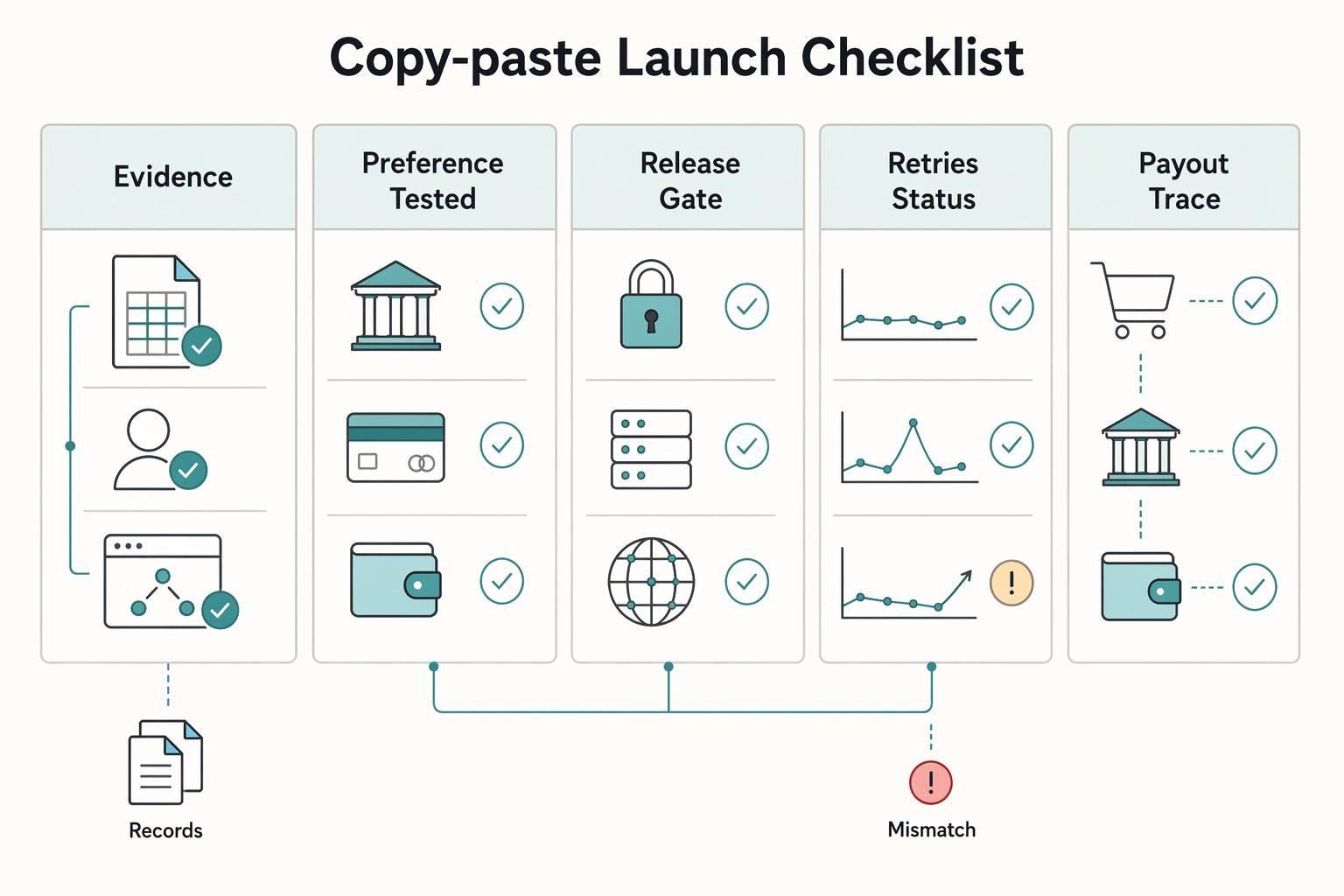
Copy-paste launch checklist#
Once pilot checkpoints are stable, we require evidence for each launch item instead of verbal sign-off.
| Launch item | Evidence |
|---|---|
| Method matrix approved and documented | Signed matrix, owner, and enabled environments; if payment cards are enabled, confirm whether fees are passed to the client by default in your setup |
| Preference UI tested for eligible and blocked states | Screenshots for at least one eligible case and one blocked case per enabled method |
| Tax/compliance gates configured where applicable | One valid record test, one mismatch test, and an audit trail for approvals |
| Retries and status handling rehearsed end-to-end | Event logs and operator notes for failed and returned paths; include delayed cross-border timing, since FX markups, surprise fees, and 48-hour delays are known risks |
| Finance export checks completed in your ledger workflow | Finance sign-off attached to the launch record |
- Method matrix approved and documented. Approve only the methods you plan to expose, for example: ACH debit, manual wire/ACH credit, and payment cards. In the cited invoice flow, payment methods are designated before send, and you can offer one method or several.
Evidence: signed matrix, owner, and enabled environments; if payment cards are enabled, confirm whether fees are passed to the client by default in your setup.
- Preference UI tested for eligible and blocked states. Validate enabled-method selection and blocked-method messaging so users see clear unavailability reasons.
Evidence: screenshots for at least one eligible case and one blocked case per enabled method.
- Tax/compliance gates configured where applicable. If your workflow includes W-9 collection, IRS TIN matching, or 1099 handling, confirm those gates before launch. Real-time TIN matching is the strongest supported control available.
Evidence: one valid record test, one mismatch test, and an audit trail for approvals.
- Retries and status handling rehearsed end-to-end. Replay failed and returned scenarios, and confirm status handling through delayed confirmations.
Evidence: event logs and operator notes for failed and returned paths; include delayed cross-border timing, since FX markups, surprise fees, and 48-hour delays are known risks.
- Finance export checks completed in your ledger workflow. Validate failed and returned scenarios, not only paid outcomes, so exceptions remain traceable after import.
Evidence: finance sign-off attached to the launch record. For one reconciliation example, see QuickBooks Online + Payout Platform Integration: How to Automate Contractor Payment Reconciliation.
Use this checklist as your go-live gate, then map each item to your implementation runbook in Gruv Docs.
Conclusion#
A multi-method payout UI is most credible when contractor preference, policy eligibility, and execution records stay aligned. If those drift, adding rails or faster options can create more exceptions instead of improving payout operations.
Treat preference as input, then run eligibility and compliance checks before execution, and record enough detail to reconstruct each attempt end to end. At minimum, operations should be able to explain why a method was available, which path a payout took, and how the result reached your books.
When you are ready to validate rail coverage and control design for your markets, review Gruv Payouts.
Frequently Asked Questions
What payout methods should a platform offer first for contractor-heavy marketplaces?
Start with the smallest method set that covers your real payout volume. Base that choice on measured outcomes in your top 10 contractor corridors, including P50 and P95 time-to-funds, and prioritize rail quality over country-count claims.
How should we set the default payout method for each contractor without increasing failure rates?
Set the default from observed corridor performance and verified financial details. Use time-to-funds as the key metric, not provider claims or API success alone, and account for banking-window risk on batch rails.
When should the system auto-fallback to another payout rail versus stopping for manual review?
Define an explicit fallback policy in your operating policy. Auto-fallback is most defensible when the issue looks rail- or timing-related and another eligible method is already available. Send cases to manual review when signals point to bad or incomplete financial information, and log the fallback reason.
How do we retry failed payouts without creating duplicates?
Retry only after checking whether the first attempt failed, is pending, or already progressed. Do not treat API response state alone as proof that the contractor received funds. Use duplicate protection so repeated sends resolve to one final payout outcome.
What fields must be stored for audit trail and reconciliation on every payout attempt?
Store enough detail to reconstruct each attempt end to end, such as internal identifiers, method, timing, provider references when available, ledger outcome, and reason details for failures or fallbacks.
How do compliance checks and tax documents change method availability in the UI?
Method availability should follow your legal and compliance policy, not a generic rule. If required documentation is missing, show a specific block reason in the UI instead of a vague restriction message. You can keep methods visible while gating activation until required checks are complete.
Researched and edited by the Gruv editorial team. Gruv builds cross-border billing, payouts, and finance-operations software for global businesses.
Sources
Includes 3 external sources outside the trusted-domain allowlist.
- irs.gov/forms-pubs/about-form-w-9trusted
- irs.gov/tax-professionals/taxpayer-identification-nu...trusted
- securepayments.paypal.com/us/digital-wallet/paypal-consumer-feestrusted
- wise.com/us/pricingtrusted
- wise.com/help/articles/2946451/what-are-the-fees-for-...trusted
- docs.wingspan.app/docs/locate-incomplete-payablesexternal
- docs.wingspan.app/docs/change-payout-or-payment-methodsexternal
- payquicker.com/dev-centerexternal
Educational content only. Not legal, tax, or financial advice.
Related Posts

The Freelance Payment Penalty: A Modeled Audit of Platform Fees, FX Spreads, and Payout Delays
The money rarely disappears through a single, easy-to-spot fee. The real loss is stacked. A marketplace takes its commission, a processor adds a charge for international cards, a bank or payment company converts the currency at a spread, a platform holds the funds before release, and a wire sheds a little to intermediaries on the way in. Each layer looks defensible on its own, but the worker feels the combined result as a smaller deposit and a later payday.

How to Respond to a Subpoena for Business Records
Move fast, but do not produce records on instinct. If you need to **respond to a subpoena for business records**, your immediate job is to control deadlines, preserve records, and make any later production defensible.
A US Expat's Guide to Investing in UCITS ETFs to Avoid PFIC Issues
The real problem is a two-system conflict. U.S. tax treatment can punish the wrong fund choice, while local product-access constraints can block the funds you want to buy in the first place. For **us expat ucits etfs**, the practical question is not "Which product is best?" It is "What can I access, report, and keep doing every year without guessing?" Use this four-part filter before any trade: