
Quick Answer
A state sales tax calculator helps you estimate the combined rate to charge on an invoice for a specific location, but it is not final legal clearance. State is only a starting point because county, city, and special district layers can change the result. For final charging, validate the taxable base, use the best location input available, and save the lookup details so the invoice can be reproduced later.
Charge correctly and prove why before you send the invoice#
A sales tax calculator by state is a control step, not a final legal conclusion. Use it to calculate the invoice rate, but do not treat the output alone as proof of collection duty, final jurisdiction assignment, or audit-ready support.
The operational goal is simple: apply the right combined sales tax rate to the invoice, then keep enough evidence to reproduce the result later. Your team should be able to show which location input was used, which tool returned the rate, and how the final tax amount was calculated.
Use the tool for calculation, not legal closure#
State is a starting filter, not the full answer. Invoice tax can include county, city, and special district layers, and even adjacent addresses can produce different results. Treat each lookup as location-specific, not as a blanket legal rule.
Keep rate math separate from nexus. A calculator can return a location-specific rate, but collection duty depends on whether your business has nexus in that state. If nexus is unresolved, a clean numeric rate is not final clearance.
What "correct" looks like before invoice release#
Before release, a reviewer should be able to see the location used, the rate returned, the taxable amount, and the final tax charged. If any of those are missing, the invoice is harder to defend. Use this pre-send check:
- Confirm the location input is specific enough for the transaction.
- Confirm the tool returned the combined sales tax rate for that location, not only a base state rate.
- Confirm the invoice tax can be reproduced from the taxable base and returned rate.
A common failure mode is relying on state-only results when address-level jurisdiction assignment was needed. That can produce invoices that look complete but are weak on support.
Build for the people who own the risk#
At scale, this stops being a billing task and becomes a control problem. Compliance, legal, finance, and risk owners need consistent use, documented exceptions, and a clear escalation path when the output is not enough.
Set the evidence standard up front. At minimum, retain the submitted location, tool name, lookup timestamp, returned rate, and invoice ID. Timing metadata matters. For example, Texas documents search results with a timestamp and applicable quarter, which helps explain why a rate was used at invoice time.
If you operate broadly across the U.S., assume state-only thinking will break in edge cases. Providers cite more than 11,000 taxing jurisdictions, and some cite more than 12,000. The exact count matters less than the control principle. Run a repeatable pre-send check and keep defensible proof of how tax was charged.
You might also find this useful: How a German Freelancer Can Handle US Sales Tax with a US LLC.
Understand what this tool solves and what it does not solve#
A U.S. sales tax calculator is a location-based rate lookup tool that helps you estimate transaction tax for invoicing. It is not the IRS tool for Schedule A deduction reporting, and it is not full legal clearance by itself.
| Use case | Right tool | Output you need |
|---|---|---|
| "What tax should we charge on this invoice?" | U.S. sales tax calculator | A location-based rate or estimated tax amount for the relevant tax jurisdiction |
| "What state and local general sales tax can be deducted on an individual return?" | IRS Sales Tax Deduction Calculator | A deduction figure used for itemized deductions on Schedule A |
Keep those lanes separate. Invoice charging belongs in the rate-calculation lane. The IRS deduction tool belongs in personal return preparation, including the Schedule A election context, not billing controls.
Also keep the boundary clear: a rate lookup supports rate estimation, but it does not by itself confirm every legal obligation tied to the charge. Rates and jurisdiction boundaries can change, and registration, reporting, and payment duties are separate compliance requirements. For a related example outside sales tax, see What is FIRPTA Withholding on US Real Estate Sales?.
See why by state is necessary but often not precise enough#
State is the right starting filter, but it is often not enough for a final invoice tax decision. For more reliable rate assignment, move from state to ZIP or ZIP+4 to street address, because the tax jurisdiction and combined rate can change within the same state.
California shows why this matters: CDTFA says a 7.25 percent base rate applies statewide, and total tax also includes district tax that varies by district. A state label alone cannot determine the final charge.
Use a location-precision hierarchy#
Use this sequence in your workflow:
| Input level | What it is good for | Main limitation |
|---|---|---|
| State | Fast screening and routing | Not enough to assign local layers |
| ZIP or ZIP+4 | Better estimate for many lookups | Can still miss the exact jurisdiction |
| Street address | Highest-confidence jurisdiction match | Requires better input capture |
TaxJar's calculator uses city and ZIP to return a combined rate, and Washington DOR supports address or ZIP+4 inputs. Washington DOR is also explicit: for a specific address, use the Washington DOR lookup tool to make sure you have the correct rate. Colorado's lookup guidance also centers on jurisdiction codes, not just state names.
Why same-state records can still differ#
Two invoices in the same state can produce different combined rates once local layers apply. Virginia Tax says rates vary by locality, and Avalara notes that in some locations even adjacent addresses can have different rates.
That is where ZIP-only logic can fail. CDTFA says it is not always possible to determine the correct rate from a mailing address or ZIP code alone. If your system cannot show the assigned jurisdiction or location code, treat the output as provisional.
Make street address a control for higher-risk invoices#
For higher-risk invoices, make street address a control, not a nice-to-have. When invoice value or regulatory exposure is material, requiring street-address input before approval is usually safer than relying on ZIP only. That is a risk policy choice, not a universal legal rule.
For final review, store the exact lookup input used, whether state, ZIP, ZIP+4, or street address, the returned combined rate and jurisdiction or location code when available, and the lookup timestamp, since some state tables update on a schedule. For example, Washington updates quarterly.
If you only have state or ZIP data, use it for pre-checks and consider holding taxed invoicing until you capture better location detail.
Map your pre-invoice decision path and ownership#
Your pre-invoice control should assign ownership before any rate result reaches billing. The calculator is an input, not an approval.
Set a hard rule: no taxed invoice goes out without a named reviewer for jurisdiction assignment, taxable amount validation, and release approval. State-level rates alone can be insufficient; local rates vary within states, and nexus and reporting obligations differ by state.
Put the decision in a table, not in tribal memory#
Use one table for standard and exception paths so reviewers do not improvise when lookup results are unclear. It should force two decisions: which jurisdiction was assigned, and whether the result is reliable enough to invoice.
| Row type | Transaction type | Location data quality | Assigned tax jurisdiction | Selected sales tax lookup tool | Approver | Escalation owner |
|---|---|---|---|---|---|---|
| Standard | Direct taxable sale | Street address | Address-level jurisdiction and jurisdiction code captured from lookup output | State source or approved vendor tool | Finance | Compliance |
| Standard | Marketplace transaction | Street address or marketplace destination data | Jurisdiction assigned and collection responsibility documented | Approved tool plus marketplace-rules check | Compliance | Legal |
| Exception | Direct sale with weak location data | State or ZIP only | Provisional only; final jurisdiction not confirmed | Output marked provisional until better address data is captured | Finance hold | Compliance |
| Exception | Missing or conflicting output | Street address present, but output missing, conflicting, or unsupported by current sales tax rate table | Unresolved | Secondary lookup or state table review | No approval | Legal |
Split accountability by question, not by tool access#
Ownership should follow the risk, not whoever has access to the calculator.
- Finance validates taxable base, invoice math, and tax amount reconciliation.
- Compliance checks nexus assumptions, registration posture, and state-specific collection responsibility.
- Legal resolves edge cases before invoice release.
For marketplace transactions, add an early ownership check for who must collect and remit. In some states, that responsibility sits with the marketplace facilitator on marketplace transactions, so rate review is not the first question.
For nexus reviews, require the reviewer to record the state, rule basis, and measurement period used. State thresholds and reporting requirements are not uniform, and summary charts do not replace state law.
Use a fixed checkpoint order and a hard stop#
Keep checkpoint order fixed: input capture, rate lookup, amount validation, approval, send, then archive evidence. If ownership, jurisdiction, or result support is unclear, stop and escalate before issuing a taxed invoice.
Archive a defensible record per invoice: lookup inputs, returned rate, jurisdiction data including code when available, timestamp and quarter when available, approver, and escalation notes. Keep records dated, organized, and retained per applicable state requirements, for example at least three years in Virginia.
Pick the right input level for each risk tier#
Use state-only input for low-risk pre-checks, but move to a street address at final point of sale or invoice approval when you are charging tax.
| Input mode | Best use | Speed | Confidence for final charge | Audit defensibility | Main tradeoff |
|---|---|---|---|---|---|
| State-only | Early screening and rough planning | Fastest | Low | Low | Does not identify the exact local jurisdiction |
| ZIP code | Mid-stage estimates when full address is not yet captured | Fast | Medium at best | Medium to low | Better than state-only, but ZIP can miss exact taxing location and state-rule detail |
| Street address | Final charge, invoice approval, dispute replay | Slowest of the three | Highest | Highest | Requires clean address capture and validation |
Match the input level to the decision stage, not convenience. Keep state-only and ZIP for provisional decisions. Move to street-address input before approval.
Tool behavior supports that policy. Avalara's calculator flow requires street, city, and state for exact-location lookup. It also warns that using city and ZIP is not the most reliable method, and it positions AvaTax for street-level point-of-sale precision. TaxJar's public calculator uses city plus ZIP for a combined rate, but TaxJar also states ZIP is only a starting point, and its developer guidance says U.S. calculations are ideally based on street address.
Not all tools give the same support for approval decisions. SalesTaxStates explicitly says exact-address calculation is not available on its site and tells users to verify with authorities. Calculator.net presents state-rate checking, but the retrieved page does not provide a formal update cadence or source-method disclosure. Washington DOR is a useful benchmark for transparency: it provides address-based lookup with location code and states rates are updated quarterly.
Set one hard no-go rule: if your team cannot verify a tool's rate method or data recency, treat the result as provisional and escalate. A returned percentage alone is not enough for final approval.
If you want a deeper dive, read Quarterly Tax Calculator for Freelancers: Estimate Federal and State Taxes.
Validate taxable amount logic before rate math#
Validate the taxable amount first, then apply the rate for the applicable jurisdiction. A rate lookup can still produce the wrong invoice if the taxable base is wrong.
New York's sequence is clear: determine the taxable receipt, then multiply it by the combined state and local sales tax rate. Iowa also applies tax to the sales price at the time of sale. Keep those as two separate decisions so reviewers can reproduce the result.
Determine the taxable base as a separate decision#
Treat taxable-base determination as its own approval step before rate math. In New York guidance, if the invoice includes only taxable items or services, the full invoice amount is subject to sales tax. If the invoice mixes taxable and nontaxable items, identify taxable lines before calculating tax. If the team cannot explain why taxed lines are included in the base, stop approval.
A common control failure is debating the rate source while carrying forward the wrong pre-tax amount.
Make the invoice math reproducible#
Once the taxable base is approved, keep the calculation chain explicit and reviewable.
| Checkpoint | What should match |
|---|---|
| Pre-tax amount | Sum of approved taxable line items, or approved taxable receipt |
| Tax amount | Pre-tax amount x combined sales tax rate |
| Total amount | Pre-tax amount + tax amount |
This also supports invoice review: New York requires the total sales tax due to be separately stated on customer receipts or invoices. Store the taxable base, returned rate, tax amount, and total with the invoice ID so another reviewer can recompute the same result.
Recalculate at point of sale when your tools support it#
Once address and jurisdiction are final, rerun the calculation at point of sale before finalizing the invoice when your stack supports it.
This is a control step, not a universal legal requirement. TaxJar treats each tax calculation or rate lookup API request as a transaction, and Avalara describes regularly updated tax rates pushed into financial systems. Both can support final verification in transaction flow. If delivery or service location changes after quote creation, rerun the calculation before finalizing, since Washington ties collection to where the customer receives the merchandise or service.
Need the full breakdown? Read The Best Software for Calculating and Remitting Sales Tax.
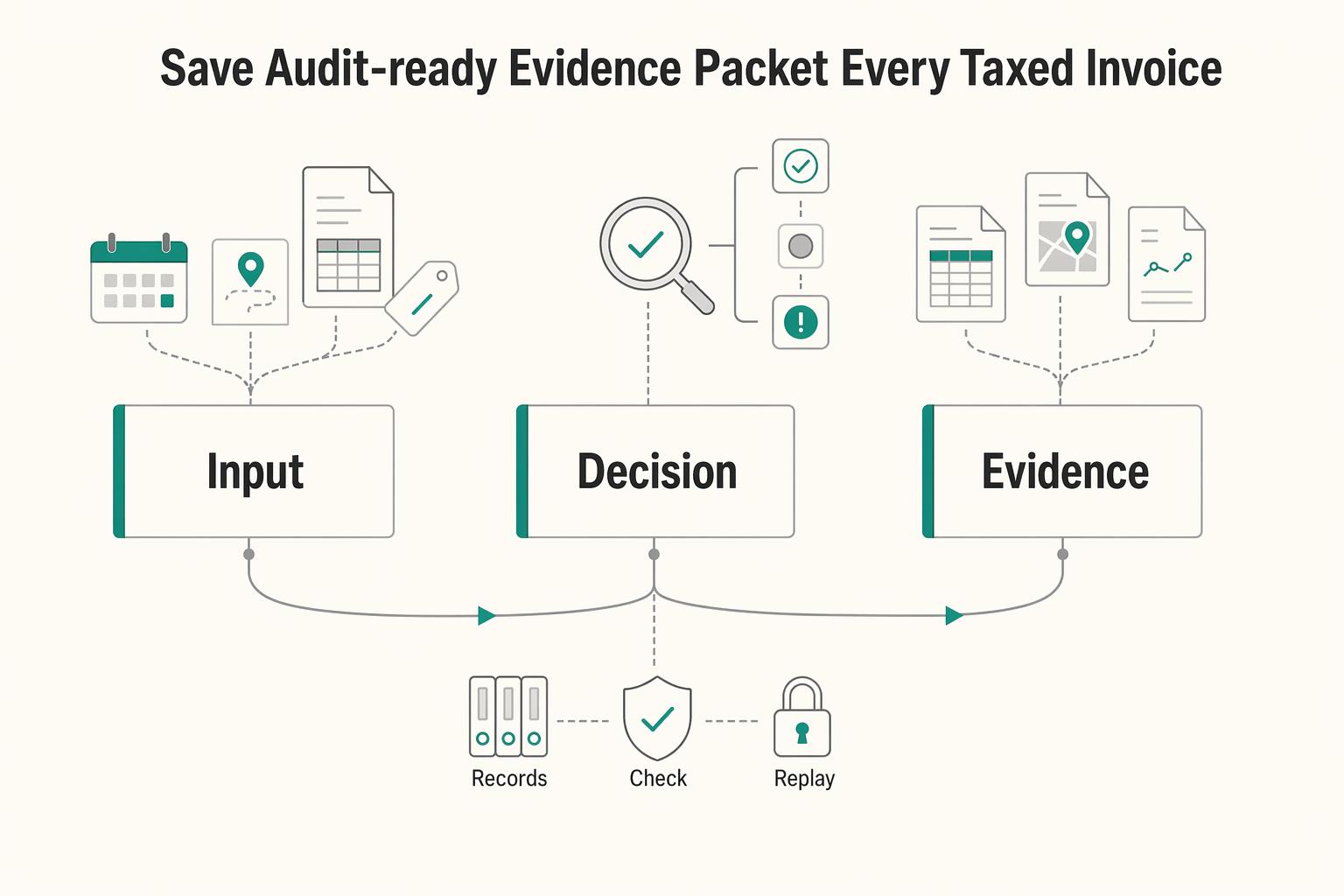
Save an audit-ready evidence packet for every taxed invoice#
If a reviewer cannot replay the tax decision, the invoice may not be audit ready. Save a packet that reconstructs the exact input, result, source context, and review trail tied to that invoice record.
California's recordkeeping guidance is a practical benchmark for "detailed sales records": keep enough detail to identify the sale date, what was sold, taxable and nontaxable charges, and tax applied. At the invoice level, that includes fields such as customer and shipping details, product, quantity, sales price, shipping charges, and tax amount. A rate screenshot alone may not be enough to test the full decision.
Save the exact lookup inputs, not a summary#
Store the original lookup payload, not a paraphrase. Include the street address used for the lookup, any ZIP input used, state, tool name, and lookup timestamp. If available, keep the normalized address or jurisdiction label returned by the tool.
Address precision affects jurisdiction assignment. Rate tools note that adjacent addresses can map to different rates, so preserving only a state or broad location can make the final rate hard to defend later.
Tie outputs and decisions back to the invoice record#
Keep the tax result and the review decision together so a second reviewer can reproduce the same outcome without asking the original preparer.
| Evidence layer | What to store | Why it matters |
|---|---|---|
| Request payload | Street address used, any ZIP input used, state, tool name, lookup timestamp | Shows what location data drove jurisdiction and rate selection |
| Returned result | Rate, taxable and nontaxable charge amounts, tax amount | Supports recomputation and consistency checks |
| Review trail | Reviewer identity, review time, escalation or exception notes (if your workflow uses them) | Documents who accepted edge-case treatment and why |
Approver and escalation fields are control evidence, not a universal statutory minimum.
Preserve source context with dates and table periods#
Do not store only "used a sales tax lookup tool." Keep the exact source context used at decision time. That includes tool name and any visible effective date, data-update stamp, or rate-table period.
Washington's local rate table is period-labeled, for example a specific quarter, and the state also directs users to its lookup tool for specific-address rates. If your workflow used both, preserve both references so the file shows why the table was a general check and the address lookup was final.
California's city and county rates page explicitly warns rates may be outdated while also showing an effective date and a data-last-updated stamp. Save that context with the packet so a reviewer can evaluate whether your source was current when the invoice was issued.
Retention is jurisdiction-specific, so set policy deliberately. Texas requires keeping sales and use tax records for at least four years unless earlier destruction is authorized in writing. It also warns missing records can lead to taxable presumptions in audit.
For a step-by-step walkthrough, see How to Get a Sales Tax Permit as a Freelancer.
Set escalation triggers before exceptions happen#
Set escalation triggers before you run a tax lookup. Keep one hard stop: if you cannot confirm the proper tax jurisdiction, do not issue a taxed invoice just because a tool returned a numeric rate.
Rate and jurisdiction are not the same control. New York guidance distinguishes proper jurisdiction and jurisdiction code for an address, and separately warns that ZIP-based collection can produce a high degree of inaccurate reporting. If a calculator returns a combined rate but your team cannot tie it to the destination address or transfer location, treat it as an exception, not an answer.
What should trigger escalation#
Use a short trigger set that catches the failures most likely to create filing and invoicing risk:
| Trigger | Why it matters | Route first |
|---|---|---|
| Conflicting outputs across tools | You have not yet validated jurisdiction, sourcing, or method differences | Compliance or finance, based on issue type |
| Missing local jurisdiction data | Local assignment drives the correct rate and reporting | Compliance |
| Unclear sales tax nexus | You may be collecting when not required, or failing to collect when required | Compliance |
| Unusual transaction structure | Tax treatment can change based on facts and sourcing | Legal or compliance |
Unknown jurisdiction with a numeric rate | A number without confirmed jurisdiction can still misstate local tax | Hard stop before invoice release |
Two quick checks improve decision quality. First, confirm the result names the local jurisdiction, not only a rate. Second, confirm the lookup method: Washington directs taxpayers to use its lookup tool to confirm the correct rate for a specific address.
Route by issue type, not by whoever notices it#
Assign ownership by failure mode. Compliance should own nexus and jurisdiction uncertainty. Legal should own statutory interpretation, especially where state guidance points teams back to statute and rule text, as Texas does. Finance should own calculation integrity: taxable base, rate application, rounding, and total math.
Do not send every tax exception to finance because "the number looks off." In New York, the point where possession transfers determines the rate collected on a retail sale. If transfer location is unclear, that is a sourcing and compliance or legal question first.
Set response clocks by severity#
Define internal response clocks so exceptions do not block revenue indefinitely or ship unreviewed.
- High severity: unknown jurisdiction, unresolved nexus, or statutory ambiguity. Hold taxed invoice release until review closes.
- Medium severity: conflicting tool outputs with complete address data and an otherwise standard transaction. Resolve before billing-cycle close.
- Low severity: reproducible arithmetic or formatting mismatch that finance can correct from the evidence packet.
For nexus exceptions, anchor review to grounded thresholds and timing. Texas states remote sellers with less than $500,000 in Texas revenue in the preceding twelve calendar months are not required to collect and remit. Collection begins no later than the first day of the fourth month after exceeding that safe harbor. New York's no-physical-presence vendor rule references a threshold of more than $500,000 and more than 100 sales of tangible personal property delivered in the state.
Escalate uncertainty before invoice release, store the reason code with the invoice record, and keep unknown jurisdiction as an absolute stop even when a calculator returns a rate. For more on nexus timing and registration, see When Remote Businesses Need to Register for Sales Tax Nexus.
Decide when manual lookup stops scaling#
Manual lookup stops scaling when tax review becomes unstable, not when you hit a single invoice count. Keep manual checks for narrow, low-volume lanes you can review without backlog. Move calculation to automation once queues slip across many addresses, states, and exceptions.
Do not wait for a neat threshold. Use operational signals instead: invoices waiting on tax review, inconsistent results across reviewers, and disputes you cannot replay from saved evidence. A public rate calculator can be useful for spot checks, but not as a production engine. TaxJar's public calculator limit of five calculations per hour is a practical example of that constraint.
Whether a source cites 11,000 jurisdictions or more than 12,000, the control conclusion is the same. As destination and local-jurisdiction coverage grows, browser lookups and spreadsheet workflows can become fragile.
What should trigger the move#
Move from manual checks to API-based calculation when these patterns are recurring:
- Review queues depend on a few specialists and become unpredictable.
- Street-level jurisdiction assignment is regularly required.
- Different reviewers can produce different outcomes from the same facts.
- Refunds, credits, or disputes cannot be reliably tied back to the original tax decision.
Replay is the key test. In TaxJar's refund flow, refunds use a unique transaction_id, and transaction_reference_id links back to the original order transaction. If your process cannot preserve that lineage, control quality is likely weak.
Compare automation on control quality#
Avalara AvaTax and TaxJar can reduce operational load, but selection should be based on control quality.
| Control criterion | What good looks like | What to verify before rollout |
|---|---|---|
| Determinism | Same input returns a consistent, explainable result | Re-run stored invoice payloads and confirm the same jurisdiction and tax logic |
| Update transparency | Rule or rate updates do not depend on static table maintenance | Verify how updates are pushed and what calculation-time evidence is retained |
| Audit logs | Every calculation is traceable to invoice, timestamp, and inputs | Confirm logs are retrievable by invoice ID without screenshots |
| Ease of replay | Original treatment can be reconstructed for disputes, refunds, and backfills | Test original transaction lookup, refund linkage, and import or backfill handling |
AvaTax emphasizes geolocation and street-level precision, with updates pushed automatically. TaxJar emphasizes API scale, sub-20ms response times, and 99.999% historical uptime. Those are operational benefits, not a transfer of legal responsibility. Dealers still collect tax from customers, and recordkeeping obligations still apply.
Keep governance where it belongs#
Automation should remove repetitive lookup work, not ownership. Your team still owns nexus assumptions, taxable-base logic, exception routing, and records. If you do not preserve request payloads, returned results, timestamps, and transaction IDs, you can create more dispute and audit work later.
Keep one ongoing checkpoint: sample recent invoices, replay calculations from stored inputs, and confirm charged amounts match archived records. If replay fails, controls are still incomplete.
Implement controls inside Gruv payment and invoicing flows#
Put tax control at the invoice finalization gate: validate location and taxable base while the invoice is still editable, then finalize with a saved calculation record. This keeps tax decisions replayable and avoids retroactive fixes after monetary fields are locked.
Gate tax before finalization#
Treat draft status as the stage where tax inputs and amounts can change. Use this order: confirm location quality, confirm taxable base, run the calculator, verify rate and tax amount, then finalize.
Keep location checks inside the same gate. A state or 5-digit postal code can support early screening, but final charging may require a street address because rates can vary within a county, city, or ZIP code. For material invoices or lanes with frequent local variation, require street address before approval.
Before finalization, store the exact location input used, taxable amount submitted, returned rate, tax amount, total amount, and timestamp. If you use a browser calculator for spot checks, still preserve the exact output Gruv used for the decision.
Keep one trace from tax to cash to books#
The control goal is one trace from tax decision to payment confirmation to ledger posting. A reviewer should be able to move from invoice to tax decision to accounting entry without manual reconstruction.
Capture operational detail, not only the final number. At minimum, log:
- Who triggered calculation or approval.
- What inputs were used, with masked location fields where appropriate.
- When the call ran and from where.
- Which result was accepted, overridden, or escalated.
Use drilldown as the control test. If a reviewer can open a journal line but cannot reach the underlying tax decision and inputs, explainability is incomplete.
Make retries replay-safe#
Retries are normal. Duplicate tax effects are not. Use idempotent behavior for calculator calls and tax-dependent posting steps so the same key returns the original result instead of creating a second effect.
Same-key retries can also return the original server error. If a call returns a 500, do not automatically retry with a new key. Hold the invoice, investigate, and create a new calculation version only when material inputs changed, such as address, line amounts, or taxable-base treatment.
A practical rule is one idempotency key per invoice tax-decision attempt. Reuse it for safe retries, and version intentionally changed decisions so replay matches what was originally approved.
Protect address data without breaking reviews#
Street address can improve jurisdiction precision, but it is sensitive data. Use masked storage for nonprivileged users and least-privilege access so only required roles can view raw fields.
Validate this in operations. Teams should be able to explain a taxed invoice from stored tax results, masked address data, and approval records. If routine review requires broad unmasked access, tighten the evidence packet and narrow permissions.
Handle cross-border scope limits without confusion#
Keep the scope strict: this covers charging U.S. sales tax on invoices, which runs through state and local systems with different rates by jurisdiction, not a single universal model. It is not guidance for VAT or other non-U.S. indirect-tax regimes.
For cross-border invoices, do not reuse U.S. sales-tax logic by default. VAT is widely used globally, and cross-border transactions can create non-taxation or double-taxation risk. If a customer, seller, or place of supply is outside the U.S., confirm country and tax program first, then route to the market owner before charging.
Also keep invoice-tax controls separate from foreign-account reporting. Form 8938 and FBAR (FinCEN Form 114) are different obligations: Form 8938 does not replace FBAR, and FBAR is filed with FinCEN through the BSA E-Filing System, not the IRS. If FATCA or FBAR comes up during a sales-tax review, treat it as a routing signal, not a reason to change invoice tax amounts.
Use one checkpoint before applying any non-U.S. billing logic: confirm invoice country, seller country, and tax program. If the transaction is non-U.S., stop U.S. state and local rate logic until the relevant VAT or local indirect-tax owner signs off. If the issue is Form 8938 or FBAR, route it to tax reporting, not invoice charging.
For related U.S. state-tax context, see How to Properly Sever Ties with a 'Sticky' Tax State Like California or New York.
Use this pre-send checklist before any taxed invoice goes out#
Do not send a taxed invoice until four checks pass: location precision, jurisdiction and taxable-base match, invoice disclosure and internal review completion, and evidence retention. If one check fails, treat the tax amount as provisional and pause release.
- Confirm location precision matches risk.
Use the most detailed location data available for final charging. Official tools show final rates can depend on finer inputs: Washington supports address, ZIP+4, or map search; North Carolina queries using the most detailed input provided; and California requires full address fields and returns a rate tied to that address.
- Confirm the calculator result matches jurisdiction and taxable base.
Verify the selected output maps to the correct local jurisdiction and that tax is applied to the correct taxable sale amount. As a practical control, recompute pre-tax amount, tax amount, and total together before sending.
- Confirm invoice disclosure and internal review fields are complete.
At minimum, make sure the record shows the location level used (state, ZIP, or street), jurisdiction and rate source, taxable amount, tax amount, and total. If your workflow uses approvals or escalations, make sure those fields are complete. Confirm tax is separately stated when required.
- Confirm the evidence packet is stored and retrievable.
Keep sale-level support in dated, organized records so the decision can be reconstructed later. Save lookup inputs, returned rate, timestamp and applicable quarter when provided, invoice copy, and retain records per applicable state rules. For example, Texas requires keeping sales and use tax records for at least four years.
This pairs well with our guide on How to use Paddle to handle sales tax and VAT for a SaaS product sold globally. If you want to operationalize this checklist in your workflow, start with Gruv docs and map each checkpoint to your invoice approval path.
Treat the calculator as a control point, not a shortcut#
Do not let a tool output go straight onto an invoice. Use it to calculate, verify, approve, and archive before sending, because jurisdiction errors can be harder to unwind after collection.
A state-based calculator gives you a fast starting point, not a final legal answer. California says sales and use tax rates are not the same in all locations, and the 7.25 percent statewide rate can increase with district taxes that vary by district. The process matters more than the raw rate.
Make the handoff explicit#
Treat each lookup as a decision record, not just a number on screen:
- Calculate with the best location data available, ideally a specific street address for final charging.
- Verify the location assignment and recompute taxable base, tax amount, and total.
- Approve before release under your internal ownership process.
- Archive evidence with the invoice record so another reviewer can reproduce the result.
Washington shows what useful evidence looks like: its tool can return the tax amount, total, and a confirmation code. Preserve equivalent artifacts when available.
Archive what you will need later#
Keep evidence with the invoice ID, including location input, tool name, returned rate, taxable amount, tax amount, total, lookup time, and any approval or escalation notes. If a result is overridden, keep the reason.
This is an audit control, not admin cleanup. Texas requires records that let authorized reviewers verify return accuracy and warns that missing records can cause sales to be presumed taxable in audit. California says keep required records for at least four years and keep audit-period records until the audit is complete. Virginia's general business guidance says at least three years from the return due date. There is no single national retention period, so define and enforce a defensible rule.
Escalate before collection#
If jurisdiction assignment is unclear, district treatment is uncertain, or tools conflict, stop before charging and treat the result as provisional. California guidance says to contact cities directly when address questions remain.
Keep the legal boundary clear too: publication summaries and calculator outputs are not the law. California states decisions are based on law, not the publication. Vendors are still responsible for collecting and remitting applicable sales tax.
If you need to confirm program coverage before rollout, contact the Gruv team for a fit check on your invoicing and payout controls.
Frequently Asked Questions
What does a sales tax calculator by state actually solve?
It estimates the combined state and local rate for a sale location so you can calculate invoice tax. That supports rate lookup and invoice math, but it does not by itself resolve nexus or final jurisdiction assignment.
How is this different from the IRS sales tax deduction calculator?
The IRS calculator is for personal deduction reporting on Schedule A, not invoice charging. Keep deduction reporting separate from billing controls and transaction tax rate lookup.
Should we use state, ZIP code, or street address?
Use state or ZIP for early screening and provisional estimates. Use street address for higher-confidence final charging because local jurisdiction and combined rates can vary within the same state, ZIP, or even nearby addresses.
What must we document before issuing a taxed invoice?
Keep enough detail for another reviewer to reproduce the result. At minimum, store the location input used, tool name, lookup timestamp, returned rate, taxable amount, tax amount, total, invoice ID, and any approval, override, or escalation notes.
When should we escalate a calculator result?
Escalate when tools conflict, local jurisdiction is unclear, or nexus is unresolved. If a tool returns a numeric rate without confirmed jurisdiction, treat the result as provisional and stop before invoice release.
Can a calculator alone make us compliant?
No. A calculator supports rate estimation, but compliance also depends on ownership, review decisions, and audit-ready records. Retention requirements also vary by state, so your process must preserve defensible evidence.
Researched and edited by the Gruv editorial team. Gruv builds cross-border billing, payouts, and finance-operations software for global businesses.
Sources
- bsaefiling.fincen.govtrusted
- cdtfa.ca.gov/formspubs/pub105trusted
- comptroller.texas.gov/taxes/sales/faq/records.phptrusted
- dor.wa.gov/taxes-rates/sales-use-tax-ratestrusted
- dor.wa.gov/taxes-rates/sales-use-tax-rates/local-sales-...trusted
- gis.cpa.texas.gov/searchtrusted
- irs.gov/credits-deductions/individuals/use-the-sales...trusted
- irs.gov/taxtopics/tc503trusted
Educational content only. Not legal, tax, or financial advice.
Related Posts

The Freelance Payment Penalty: A Modeled Audit of Platform Fees, FX Spreads, and Payout Delays
The money rarely disappears through a single, easy-to-spot fee. The real loss is stacked. A marketplace takes its commission, a processor adds a charge for international cards, a bank or payment company converts the currency at a spread, a platform holds the funds before release, and a wire sheds a little to intermediaries on the way in. Each layer looks defensible on its own, but the worker feels the combined result as a smaller deposit and a later payday.

How to Respond to a Subpoena for Business Records
Move fast, but do not produce records on instinct. If you need to **respond to a subpoena for business records**, your immediate job is to control deadlines, preserve records, and make any later production defensible.

A US Expat's Guide to Investing in UCITS ETFs to Avoid PFIC Issues
The real problem is a two-system conflict. U.S. tax treatment can punish the wrong fund choice, while local product-access constraints can block the funds you want to buy in the first place. For **us expat ucits etfs**, the practical question is not "Which product is best?" It is "What can I access, report, and keep doing every year without guessing?" Use this four-part filter before any trade: