
Quick Answer
Payment reconciliation for freelancer platforms is the process of matching each bank deposit to the correct invoice or settlement record before funds are posted or payouts are released. A sound workflow routes deposits into auto-match, manual review, or exception handling based on evidence such as amount, date, payer, and remittance details, then keeps a traceable record through GL posting.
How freelancers match invoices to bank deposits#
Payment reconciliation on freelancer platforms breaks down when a bank deposit cannot be tied, with confidence, to the right internal transaction. Your operating goal is simple: route each deposit into the right path, auto-match, manual review, or exception handling, and keep a record that can be traced from bank transfer through GL posting.
Step 1 Define the real matching problem#
At its core, payment reconciliation is a matching exercise. You are not just confirming that cash arrived. You are confirming that the bank-side deposit record aligns to the right invoice or settlement-side record before you treat the funds as attributable.
Reference quality is a common failure point. If wire reference data is weak, missing, or truncated, match confidence drops fast. Fedwire Tag {6000} is a concrete constraint: four lines, 35 characters each. If your identifiers are long or inconsistent, expect more non-matches and build for that reality.
Step 2 Split work between automatic, manual, and exception paths#
The practical move is to set explicit matching rules, then route every deposit into one of three paths:
| Path | When used |
|---|---|
| Auto-match | Evidence is strong enough to support a reliable match |
| Manual Review | The transaction looks plausible but the evidence is incomplete or conflicting |
| Exception Queue | The item does not match or needs investigation before posting |
Do not silently post ambiguous transactions just to keep flow moving. Exceptions exist because some bank transactions will not line up cleanly and must be analyzed before posting or release actions continue.
Step 3 Set the audit-trail standard before volume grows#
A completed reconciliation is not just a status flag. It is a chronological record detailed enough to reconstruct what happened across the full sequence of events.
Before a matched item affects posting or release decisions, confirm that it can be traced across the bank deposit record, the internal invoice or settlement record, and the GL result without guesswork. If one link is missing, the case is not operationally complete.
Many freelancer-platform flows also include an escrow-like holding stage before release. That turns reconciliation into a release-control process, not just a bookkeeping task. This guide follows that operator view: what can move automatically, what needs human review, and what must stay blocked until the evidence is complete.
For a broader platform-ops view, read How Freelancers Use AI Without Scope, Compliance, or Payment Chaos.
What payment reconciliation actually means for freelancer platforms#
For many freelancer marketplace flows, reconciliation is about proving the money path, not just recording cash receipt. You need a traceable chain from client funding to invoice allocation to payout eligibility.
Step 1 Trace the three-part money chain#
Use this as your baseline sequence: client funding enters a holding state, often escrow-like; that funding is mapped to the correct invoice; and only then is freelancer payout considered eligible. In fixed-price marketplace flows, Upwork shows this pattern clearly: clients fund upfront, funds stay in client escrow until release, and after approval or auto-release there can still be a five-day security hold before withdrawal, with auto-release after 14 days if there is no response.
Operational checkpoint: for every payout-eligible item, you should be able to point to one deposit record, the related invoice or allocation record(s), and one payout decision. If one of those links is missing, the case is not complete.
Step 2 Expect uneven reference data quality#
Bank-transfer reconciliation often gives you less structured reference detail, so invoice-matching inputs are thinner. Remittance capacity varies by rail and format: SEPA unstructured remittance allows one 140-character occurrence, while SEPA ERI supports up to 999 occurrences of 280 characters of structured remittance information; ACH CCD allows a single addenda record, while CTX supports up to 9,999 addenda records.
| Rail or format | Reference support | Limit |
|---|---|---|
| SEPA unstructured remittance | Unstructured remittance | One 140-character occurrence |
| SEPA ERI | Structured remittance information | Up to 999 occurrences of 280 characters |
| ACH CCD | Addenda record | Single addenda record |
| CTX | Addenda record | Up to 9,999 addenda records |
The practical implication is that your matching rules have to tolerate uneven reference quality. If your logic assumes rich identifiers on every deposit, you will create avoidable manual work.
Step 3 Set scope before you design controls#
Keep this guide scoped to deposit-to-invoice matching so funds are correctly attributed and payout release is gated correctly. It is not a guide to tax filing, contract drafting, or every downstream accounting decision.
Use evidence that actually proves linkage: bank statements, invoice records, dates, amounts, descriptions, and available remittance details. If a document does not strengthen deposit-to-invoice proof, treat it as context, not matching evidence.
For a deeper dive, read Improving Credit Card Reconciliation for Platforms: How to Auto-Match Card Charges to Invoices.
What to prepare before you start matching deposits#
Most avoidable reconciliation failures start before matching begins. Lock the inputs, source systems, owners, and evidence rules first.
Step 1 Standardize the minimum fields#
Set a minimum field set across your invoice ledger and bank-deposit view: invoice ID, customer or payee name, expected amount, currency, invoice date, due date if you use it, transfer timestamp when available, and remittance references. In practice, number, amount, date, and payee are common checks, and remittance detail helps when more than one invoice could fit.
Keep due date explicit in the invoice record instead of inferring it from terms text. If you use Stripe invoicing for manual collection, due behavior is parameterized, so a value like days_until_due=30 must be set if you want past-due status to apply. Treat transfer time as optional evidence. If your bank feed is date-level only, do not treat a timestamp as authoritative.
Verification point: open a recent paid invoice and confirm you can see invoice ID, customer or payee name, amount, currency, due date or invoice date, and available remittance reference data from the bank side.
Step 2 Confirm the source of truth for each question#
Before you start, assign one source of truth to each dataset.
| Source system | What it should answer | Red flag |
|---|---|---|
| Invoice ledger | What was billed, to whom, for how much, and when due | Multiple invoice exports with conflicting IDs or statuses |
| Bank deposits feed | What hit the bank statement line, including amount, currency, date, and remittance detail when present | Matching from screenshots instead of statement or feed data |
| General Ledger (GL) entries | What accounting entry was posted after the match decision | GL entries posted through shortcuts with no deposit linkage |
Keep the internal and external records separate. The invoice ledger and GL are internal records. Bank statement lines are external receipt evidence. If they conflict, resolve the conflict instead of blending records.
Step 3 Assign ownership before exceptions arrive#
Be clear about ownership before the first hard case shows up. Document who triages unmatched deposits, who approves manual-review outcomes, and who makes payment-release decisions in your workflow.
Titles vary by team, but the control principle is the same: one person should not initiate, authorize, record, and reconcile the same transaction.
Checkpoint: for any disputed case, you should be able to name the case owner, approver, and reconciliation owner immediately.
Step 4 Assemble the evidence pack for every case#
Define a minimum case file up front: payment proof, invoice record, and any internal allocation notes or audit-trail exports your team uses. Supporting documents should identify the payee, the amount paid, proof of payment, and relevant dates.
That keeps decisions reviewable later. A complete case file should let another operator understand why a deposit was matched, left unmatched, or held before payout.
For a step-by-step walkthrough, see Calendly for Freelancers Who Want Reliable Booking-to-Payment Handoffs.
Map the money flow before you automate anything#
Do not automate against a single "paid" label. Map the money as state transitions so allocation, settlement, and payout decisions stay tied to records you can verify later.
Step 1 Draw each money state as a separate row#
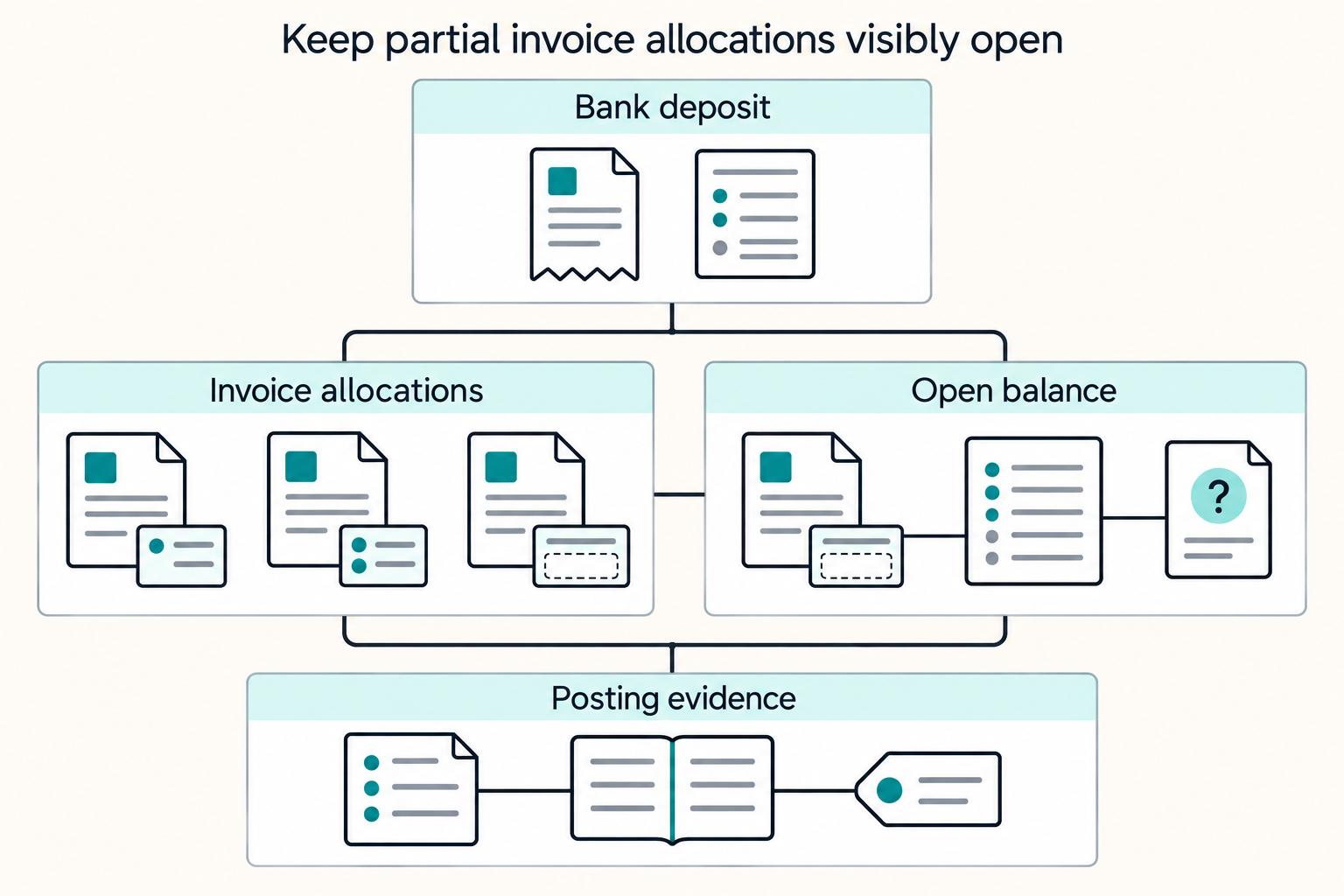
Start with an evidence-first lifecycle: Bank deposit received, funds pending or held, allocation to one or more invoices, Settlement created, then Freelancer payout released. Keep those states separate even if your UI collapses them into one status.
If your team says "escrow," treat that as an internal label unless you have legal and account documentation for a true escrow structure. In a balance-account model, the balance account is the record of funds held for the user, so map that record directly.
Checkpoint: pick one recent payment and identify one source record for each state transition, plus the trigger that moved it forward.
Step 2 Separate receipt from usable funds#
A deposit hitting the account does not automatically mean the funds are usable. In Stripe's balance model, funds move from pending to available at an available_on time, so your flow should track both moments:
- Deposit or transfer is received.
- Funds become available for allocation, transfer, or payout.
That timing gap is normal. Automatic payouts are scheduled batches that can include multiple transactions, and settlement can also be batch-driven rather than real time.
Step 3 Mark handoffs in your balance-account flow#
The key operator detail here is the handoff. In a balance-account flow, define what has to be checked before money moves to the next stage.
Mark where collection evidence ends, where held-funds tracking is confirmed, and where payout instructions begin. If you use separate charges and transfers, record that the platform creates the charge and then transfers funds to connected accounts. That means collection evidence and payout evidence can sit in different records.
For each handoff, document the source record, the owner, and the next allowed action.
Step 4 Add checkpoints before allocation and payout#
Put a verification checkpoint at each handoff, especially when reference data is incomplete. For inbound transfer matching, preserve the strongest signals: reference code, amount, and date. If memo text includes an invoice number, Stripe attempts that invoice first.
| Stage | Minimum verification |
|---|---|
| Deposit intake | Provider or statement record, amount, currency, date, payer name, and any wire reference or memo text |
| Allocation | Matched invoice ID, allocation note, and evidence supporting that match |
| Settlement and payout | Settlement or payout identifier, included transactions, and confirmation that only reconciled funds moved forward |
Also plan for grouped allocations. One transfer can match multiple invoices, and Stripe's grouped search example is five or fewer invoices. For larger groupings with weak references, send the case to manual review instead of forcing auto-match.
Related reading: Radical Candor for Freelancers: Scope, Feedback, and Payment Conversations.
Set matching rules that decide auto-match vs manual review#
The safest pattern is a strict rule ladder: auto-match only when the evidence is unique, and send anything ambiguous to manual review.
Step 1 Rank your match signals from strongest to weakest#
Start with direct invoice identifiers, then widen only when those fail. A reconciliation matching rule is a set of criteria for pairing bank lines to internal transaction lines, so the criteria need to be strong enough to act on without human review.
A practical ladder looks like this:
- Invoice ID plus payer bank-account context
- Invoice ID alone
- Wire reference or remittance advice with invoice references
- Exact amount and narrow date tolerance
- Weaker fallback fields for manual review only
Set tolerances before scale. A documented date-tolerance example is Start -1 to End +1. A documented amount-tolerance example is -10 to +10. Treat those as configuration examples, not default settings.
Step 2 Auto-match only true one-to-one cases#
Auto-match should be limited to clean one-to-one cases: one bank deposit, one open invoice, amount and date inside tolerance, and no conflicting evidence.
Require all of the following:
- exactly one open invoice candidate
- amount within approved tolerance
- date within approved tolerance window
- no conflicting remittance or payer reference data
If your accounting flow allows it, that can trigger the next GL step. If not, create a GL-ready reconciliation record for accounting review.
Step 3 Route ambiguity to Exception Queues#
If one deposit could match multiple invoices, do not let the system pick the first thing that qualifies. Keep it unmatched and route it to the Exception Queue until the evidence is strong enough to resolve it.
Use remittance advice to disambiguate when you can, since it can specify covered invoice references and related payment detail. If payer-side documents narrow the candidate set, keep them as supporting evidence in the case record.
Step 4 Define a conflict review path before final allocation#
Conflicts need a standard path before they happen. When remittance data conflicts with invoice records, route the case to manual review and require a complete evidence pack before a final allocation decision.
A practical evidence pack can include:
- bank deposit record
- invoice record or records
- remittance advice or payer message
- allocation notes
- approver identity and decision record
Use a compact internal decision table so escalations stay consistent:
| Confidence level | Typical case | Suggested artifacts | Approver role | Audit trail notes |
|---|---|---|---|---|
| High | One deposit, one open invoice, amount and date within tolerance, no competing candidates | Bank deposit record, invoice record, matched reference fields | System or finance ops owner per policy | Rule name, timestamp, matched IDs, tolerance used |
| Medium | Multiple candidates, but remittance clearly identifies covered invoices | Bank deposit record, remittance advice, invoice records, allocation note | Finance ops reviewer | Stored remittance text or file, reviewer decision, allocation rationale |
| Low | Conflicting remittance vs invoice data, weak or missing references, unresolved candidates | Bank deposit record, invoice records, conflict notes, payer follow-up evidence | Senior finance approver or controller delegate | Full case history, override notes, approver identity, decision timestamps |
If you want a practical reference for rule ladders, exception states, and approval-safe retries, start with Gruv's docs.
Handle one deposit paying multiple invoices without breaking settlements#
When one deposit covers multiple invoices, control comes from disciplined allocation. Set the order first, keep partials open, and document the path for any remainder or overpayment.
Step 1 Set allocation priority before anyone applies the deposit#
A single payment can be split across several invoices, including full allocation to some and partial allocation to another. The control point is consistency. Do not leave the allocation order to analyst judgment.
Use an explicit sequence, similar to an AutoCash rule set where the first applicable rule is used:
- remittance advice with explicit invoice references
- invoice and payer/customer matching against verified open items
- oldest due date among that payer's verified open invoices
- manual review if payer or customer information is missing or conflicting
If payer or customer information is missing, do not force allocation. Route the case for clarification against open items.
Step 2 Apply the deposit line by line and keep partials open#
When the deposit does not fully cover the invoice set, apply it line by line and leave the remaining balance open. A partially funded invoice remains open.
Illustrative allocation example:
| Item | Due date priority | Invoice amount | Allocation from bank transfer | Outcome | Exception after allocation |
|---|---|---|---|---|---|
| Invoice A | 1 | 240.00 | 240.00 | Fully paid | 0.00 |
| Invoice B | 2 | 180.00 | 180.00 | Fully paid | 0.00 |
| Invoice C | 3 | 310.00 | 310.00 | Fully paid | 0.00 |
| Invoice D | 4 | 150.00 | 150.00 | Fully paid | 0.00 |
| Invoice E | 5 | 260.00 | 120.00 | Partially paid, remains open | 140.00 |
| Bank transfer total | 1,140.00 invoiced | 1,000.00 received | 140.00 still open |
Track any unallocated remainder explicitly, for example as Unapplied or On Account, and surface it in your exception workflow.
Step 3 Choose one overpayment path and document it#
Overpayments create problems when teams improvise. Use one approved path per policy: apply the excess as credit to invoices or issue a refund.
Your audit trail should capture the original deposit, the excess amount, the chosen disposition, and any required approval and follow-on reference.
Step 4 Reconcile allocation outcomes to subledger and ledger on a periodic cadence#
After allocation, reconcile the receivables result to subledger and ledger posting on your operating cadence, including checks before and after posting. Subledger entries should trace back to the bank deposit, the invoice allocations, and any unapplied or on-account remainder.
If totals do not tie, or an invoice is marked settled while still carrying an open balance, correct the posting path before treating the settlement as complete.
If reconciliation shows a client has not actually paid, see our guide on How Freelancers Collect Overdue Invoices When Clients Stop Paying.
Build the exception queue for unmatched deposits and chargebacks#
Once a deposit cannot be matched cleanly, it should move into a named exception class with an owner, a due time, and a recovery action. A single generic unmatched bucket is too blunt for real operations.
Step 1 Classify exceptions before resolution starts#
Different exception classes need different actions. Matching rules reduce manual work, but after a rule fails, the case still needs structured handling.
| Queue class | What puts a case here | Why it matters | First recovery action |
|---|---|---|---|
| Missing Wire References | Bank deposit received, but no usable invoice reference or payer detail to match confidently | High ambiguity, easy to misapply cash | Request remittance advice from the payer or payment intermediary with invoice-level detail |
| Amount mismatch | Deposit and open invoice candidate differ beyond your approved tolerance | Can indicate short pay, overpay, fees, or wrong payer | Hold allocation, confirm expected amount, and document residual treatment |
| Duplicate Bank Transfers | Same payer, amount, and timing pattern suggests the payment may have been sent twice | Risk of double crediting and overstated cash application | Check prior allocations and duplicate controls before applying or refunding |
| Chargebacks | A cardholder disputes a card payment with their issuer | Funds can reverse immediately and dispute fees can apply | Start dispute evidence collection immediately and apply settlement holds where policy requires |
| Returned deposits (ACH returns) | An ACH return sends funds back after apparent receipt | Cash is no longer available even if already allocated | Reverse affected cash application and review downstream payout exposure |
Verification point: every case should include the original bank line or transaction ID, the suspected invoice or payer, current GL posting status, and any settlement-hold status.
Step 2 Set SLA and escalation by payout risk#
A practical triage pattern is to prioritize payout-blocking exceptions first, then reporting-only exceptions, so bad matches are less likely to flow into settlements and payout release.
Chargebacks should get the fastest path. They can reverse funds immediately, and response windows are usually 7 to 21 days depending on card network rules. Route them separately, assign ownership on intake, and start evidence collection right away.
Returned ACH items are also deadline-driven. In the FedACH/Nacha context cited here, effective April 1, 2025, RDFIs must respond to an ODFI Request for Return within 10 banking days. Even when your platform is not the responding bank, track these cases by age and escalation deadline.
Daily checkpoint: review all open payout-blocking exceptions and confirm each one is either explicitly on hold or explicitly cleared.
Step 3 Attach one recovery path and evidence pack to each class#
Each exception class should have one default recovery path and one minimum evidence pack.
For missing-reference cases, request remittance advice (820/REMADV) or equivalent invoice detail. Remittance can come directly from the payer, through a financial institution, or through a third party, so request the deposit amount, date, and the invoice-level fields you need.
For duplicate bank transfers, do not rely on amount alone. Some processors support duplicate checks in a configured window, for example Braintree's default of 30 seconds, but that is not a universal banking rule. Confirm whether the earlier transfer already funded the same invoice set, whether a refund is required, and whether the second item should stay unapplied pending confirmation.
For chargebacks and returned deposits, recovery can include reversing incorrect General Ledger (GL) Entries and, where policy requires, holding affected settlements until cash position and invoice state are corrected.
The goal is not speed by itself. It is speed with traceability, so the team can clear real exceptions without creating new ones.
Related: How to Build a Payment Reconciliation Dashboard for Your Subscription Platform.
Connect reconciliation to GL entries and close readiness#
Reconciliation is not finished when the match looks right in ops. It is finished when each cleared match is traceable from bank activity to the ledger entries used for reporting.
Step 1 Post traceable GL entries for every cleared match#
Treat traceable posting as a control requirement for each reconciliation outcome, whether entries are automated or manually approved. Oracle's subledger-to-GL process states that GL journal entries are posted before reconciliation proceeds, and that is a sound operating rule here.
For each matched item, retain an evidence pack such as:
- Invoice ID and payer name
- Bank deposit line or transaction ID
- Allocation note when one bank transfer covers multiple invoices
- Related settlement or payout batch ID
- Approver identity for any manual-review override
Verification point: sample same-day matches and confirm bidirectional traceability, bank line to invoice to GL posting, and GL line back to the reconciliation case. If that chain breaks, close quality is fragile.
Step 2 Reconcile subledger totals to bank activity every day#
Run a daily tie-out so exceptions are caught before they spill into settlements and payout release. Stripe frames payout reconciliation as matching bank-account payouts to underlying payment batches, with report data computed daily on a defined day window.
Your daily tie-out should answer three questions:
- Do cleared bank-deposit totals in the reconciliation subledger agree with bank activity for the day?
- Do posted GL cash and clearing movements agree with those subledger totals?
- Do any payout batches include items still in Unmatched Deposits or unresolved Manual Review?
If the answer to question 3 is yes, hold release until the case is cleared or explicitly carved out with documented approval. Missing or incorrect remittance information can create exceptions and delay cash application and reconciliation, turning a small matching issue into a close issue.
Step 3 Run close-readiness checks before monthly reporting#
Before monthly reporting, run formal subledger-to-GL reconciliation and bank reconciliation. Public bank-reconciliation guidance sets a minimum cadence of at least monthly, within 30 days of receiving the bank statement.
Your close-readiness check should confirm:
- Period bank deposits are matched, held in a named exception class, or reversed
- GL entries required by your policy for matched invoices are posted
- Open exceptions are visible by period
- Any reported settlement can be traced to reconciled underlying transactions
For deeper payout-to-ledger matching patterns, see Account Reconciliation for Payment Platforms: How to Automate the Match Between Payouts and GL Entries.
Step 4 Track the few metrics that expose drift early#
Track a short list of operational metrics that actually surface drift: open Unmatched Deposits count, Manual Review aging, and payout-blocking exception volume.
Trend and aging matter more than raw counts. A small queue with old cases can be riskier than a larger queue that clears quickly, because stale items usually point to ownership gaps or weak evidence.
Choose rule-based matching or AI-assisted matching tools#
Pick the tool that can explain each match, not just the one that reports a high match rate. Deterministic rules should stay in place for high-value settlements and payout-blocking cases, with AI layered in only for lower-risk ambiguity classes that still require human approval.
Step 1 Check rule coverage before AI claims#
Before you evaluate AI, confirm that the rule engine can express the matching logic you actually need: one-to-one, one-to-many, many-to-one, and many-to-many, with usable reference fields and reconciliation tolerance. If it cannot reliably match bank deposits to open invoices using known criteria, AI is unlikely to fix the underlying gap by itself.
| Tool example | Documented reference or ingestion support | Deterministic control to verify | Exception behavior to verify |
|---|---|---|---|
| Oracle matching | Supports structured payment reference; can match reference or payment batch name to statement transaction number; uses reconciliation tolerance | Supports one-to-one, one-to-many, many-to-one, many-to-many matching types | Verify how ambiguous candidates are surfaced for review |
| Dynamics 365 Finance | Built-in bank statement formats include ISO20022, BAI2, and MT940 | Matching rules are configured as criteria sets | Can require manual matching when multiple bank documents meet rule criteria |
| SAP Business One | Supports up to 3 successive rounds of matching criteria | Multi-round deterministic matching before fallback | If no transactions are selected, automatic internal reconciliation does not occur |
For wire references and AP remittance, test field-level behavior, not demo claims. Confirm which imported fields are actually usable for matching, whether structured references survive import, and whether remittance text is preserved or truncated.
Step 2 Evaluate exception routing, not just auto-match#
The real test is what the system does with ambiguity. Auto-match should run only when the criteria are specific enough to support one clear outcome. When multiple candidates qualify, the system should route the case to Manual Review.
If one bank transfer could fund several invoices and remittance is incomplete, treat that as an exception case, not a best guess. Your process should capture the approver, notes, and a visible block on downstream settlements until the issue is resolved.
Step 3 Use AI as a second layer for low-risk ambiguity#
AI-assisted matching may reduce manual review for repetitive gray-area cases, but model decisions can be wrong or misused, with real financial consequences. Keep deterministic logic or manual approval for high-value, payout-blocking, or close-sensitive items.
The sensible rollout is narrow: pilot AI on recurring low-risk ambiguity classes first, then keep approval gates in place until you understand the error pattern.
Step 4 Validate audit-trail export quality before selection#
Export quality is a selection criterion, not a nice-to-have. Audit documentation depends on written evidence of why conclusions were reached.
At minimum, confirm that exports include:
- Bank statement or bank deposit ID
- Invoice ID and matched amount
- Wire references or structured payment reference used
- Rule name or model version
- Tolerance applied
- Exception status, approver identity, and timestamps
Red flag: the UI shows detailed match decisions, but exports only final status or summary counts. That weakens close and payout defensibility when the team needs to explain why a match or override was accepted.
Add audit trail and payout controls before scaling volume#
Before volume grows, tie payout release to reconciliation status and make sure the system can reconstruct each decision from first bank transfer to freelancer payout. If you cannot show who changed a match, why it changed, and when payout was released, the process is not ready for live settlements.
Step 1 Record every decision with individual user attribution#
Your audit trail should let a second reviewer reconstruct the full case, not just scroll through status changes. Each action should be attributable to an individual user ID.
Keep one retrievable case record with the bank transfer or bank deposit ID, linked invoice IDs, matched amount, payment reference used, rule outcome, exception status, override reason, approver identity, timestamps, and final payout decision. Verification check: select one overridden case and confirm that the full decision path is exportable without relying on analyst memory.
Step 2 Keep unsupported items in suspense until evidence is complete#
Avoid permanently posting or releasing funds when support is missing or incomplete. Hold the item in a suspense state until research is complete and supporting documents are attached.
Your evidence pack should capture enough support for a second reviewer to reach the same conclusion, including the transaction record, payment proof or bank line, allocation note, and written findings. Red flag: a case is marked resolved, but the attached record would not let a second reviewer reach the same conclusion.
Step 3 Gate payout release on reconciled case status#
As an internal control, make payout eligibility a downstream result of reconciliation status, not a separate manual judgment. If a deposit is unmatched, partially supported, or still under review, keep the linked payout blocked until the case reaches an approved reconciled state.
If you operate in FCA client-money scope, records must distinguish one client's funds from another, and internal client-money reconciliation is required each business day. Outside that scope, use the same daily checkpoint for payout-blocking exceptions and aging suspense items.
First 30 days implementation checklist for finance ops owners#
Treat the first month as a control build. Matching rules, exception handling, and GL tie-outs should work together before volume scales.
Step 1 Standardize fields and publish matching rules#
Start by standardizing how invoices and bank deposits are represented across your invoice ledger, bank statement feed, and accounting records. Matching rules work best when the underlying fields are consistent.
Publish the first rule set in writing: what qualifies for auto-match, what goes to Manual Review, and what is always held for research. Require manual matching when one rule returns multiple possible transactions. That avoids false confidence early.
Verification checkpoint: test recent statement lines and confirm that each lands in exactly one outcome category with the same structured fields available to every reviewer. Red flag: analysts rely on ad hoc notes to fill missing source data.
Step 2 Launch Exception Queues with deadline-aware ownership#
In week 2, move exceptions into owned queues with due-date policies, not personal inboxes. Keep separate queues for Unmatched Deposits and Chargebacks, each with a clear owner and next action.
Do not give both queues the same urgency. Chargebacks are payment disputes, and response windows are usually 7 to 21 days depending on the card network. Missing evidence submission deadlines can lead to automatic chargeback losses. At minimum, capture core case evidence, for example a bank line or dispute notice, the related invoice record, prior allocation notes if available, and written findings.
Failure mode: queue counts are visible, but aging, ownership, and next action are not. Cases then sit until close and turn into payout blocks or write-offs.
Step 3 Tie outcomes to GL entries and close readiness#
By week 3, approved reconciliation outcomes should generate traceable General Ledger (GL) Entries linked to the bank deposit and the related invoice or settlement event. A match in ops is not enough by itself.
Run subledger-to-GL checks before period close and confirm that you can explain differences between bank-reported and accounting-recorded balances on a given date using saved documentation. Bank reconciliation should be completed at least monthly, within 30 days of receiving the bank statement.
Step 4 Tighten thresholds and document payout gating#
Use week 4 to tune decision thresholds based on observed false positives and false negatives. If a rule repeatedly returns multiple valid candidates, reduce its auto-match authority and require review.
Document how reconciliation status controls payouts and settlements in your process: which statuses block payout, which approvals release it, and what evidence is required before funds move. This matters most for disputes and reversals, since delaying transfer reversals after a chargeback increases platform loss risk. Final check: sample payout-eligible items and confirm reconciled status, attached support, posted GL entries, and no unresolved exception sitting behind a released settlement.
If you use payment apps, our guide to Form 1099-K for Freelancers Using Payment Apps explains how those deposits may be reported.
Conclusion#
The outcome that matters is operational: a close process you can defend from client transfer to freelancer payout to posted General Ledger (GL) Entries.
For freelancer platforms, the right starting point is control, not speed. Use deterministic matching rules across invoices, bank deposits, settlements, and GL posting. Add AI only after your exception queues and audit trail can hold up under review. If a transfer cannot be resolved clearly, keep it unresolved until manual reconciliation is complete.
Step 1 Verify payout eligibility before release#
Release payouts only when each payout-eligible item has a reconciled invoice and a posted settlement, not just a likely match. In three-party flows, timing gaps create false confidence quickly.
Your checkpoint is traceability: from bank deposit to the exact invoice, or documented invoice group, then to settlement status before payout release. Use automatic transfer reconciliation only in clean cases where reference code, amount, and date align. For multi-invoice splits, one documented model auto-groups only five or fewer invoices and only eligible open or past-due invoices less than 30 days overdue. Send anything murky to manual review.
Step 2 Escalate unmatched deposits with ownership#
Put unmatched deposits in an explicit exception queue with an owner, due date, and reason code. Make reference gaps, amount mismatches, and chargebacks visible early.
Do not measure only queue size. Confirm that each unresolved item above your internal threshold has an owner and a next action, such as requesting remittance details, reversing incorrect postings, or holding a settlement. Letting unresolved transfers age while downstream work continues is how close turns into out-of-balance pressure.
Step 3 Require evidence for every manual override#
Manual review is fine. Unexplained overrides are not. If someone changes a match, reallocates a deposit, or clears an exception, require documented evidence and approver identity.
Audit-trail quality matters. You should be able to show who acted and when, and in some systems device metadata such as IP address. Notes like "looks correct" do not hold up when payouts are challenged or chargebacks hit the same funds later. If override history is hard to export, treat that as a control gap before scaling or adding AI-assisted matching.
Step 4 Tie subledger outcomes to GL before close#
Before sign-off, compare reconciled totals with the corresponding GL balances in the accounting period. If matched invoices, unresolved exceptions, and posted settlements do not agree with reported GL entries, you are not close-ready.
Use this check to catch settlement-level surprises too: confirm that payments, refunds, and chargebacks in payout-batch reporting are reflected in the ledger outcome you expect. For a deeper tie-out pattern, see Account Reconciliation for Payment Platforms: How to Automate the Match Between Payouts and GL Entries. The standard is simple: clear rules, disciplined exceptions, complete evidence, and totals that tie.
If your team wants to validate reconciliation-to-payout controls against your current workflow, contact Gruv.
Frequently Asked Questions
What is Payment Reconciliation for Freelancer Platforms in plain terms?
Payment reconciliation is the control process of matching transaction records to accounting records so recorded payments are accurate and consistent. On a freelancer platform, that means linking each bank line to the correct invoice outcome and carrying that result into accounting records and payout decisions. A reviewer should be able to trace the outcome from structured records, not ad hoc notes.
Why is matching Invoices to Bank Deposits harder for freelancer marketplaces than standard ecommerce?
It is harder because marketplace collection and transfer legs can be decoupled, so the collected payment and the freelancer transfer are not always the same event. Your Connect charge type affects fund distribution and who is debited for refunds or chargebacks. Provider default booking can also make reconciliation harder when amounts and fees are booked to the platform liable balance account.
How do you match one Bank Transfer to multiple Invoices without causing payout errors?
One bank transfer can be allocated across multiple open invoices, but ambiguous or weakly supported splits should go to manual review. In the documented Business Central model, multi-entry application is limited to open entries for the same account. Treat cross-account splits as a review case to avoid payout errors.
What minimum data fields are required for reliable matching from AP Systems?
Use the fields your matching engine can consistently compare between bank lines and open entries. In the documented Business Central approach, prioritized signals include related-party text, transaction text, additional transaction info, external or document numbers, and statement amount. This model only allows text matching for text longer than four characters.
When should a payment be auto-matched versus sent to Manual Review?
Auto-match only when one bank line resolves to a single clear invoice outcome or to a clearly supported group of open entries. Send the case to manual review when candidates conflict, references disagree, or the automatic application is wrong and needs reapplication. If your system provides match confidence, treat low-confidence results as a review trigger.
How do Unmatched Deposits and Chargebacks affect Freelancer Payouts timing?
Unmatched deposits can delay related payout decisions until the payment is matched to the right invoice outcome. Chargebacks are reversals that can debit the platform balance for the disputed amount and fee. Payouts do not always stop immediately, but persistent negative balances or unresolved recovery issues can delay or pause payouts.
Researched and edited by the Gruv editorial team. Gruv builds cross-border billing, payouts, and finance-operations software for global businesses.
Sources
- bsaaml.ffiec.gov/docs/manual/06_AssessingComplianceWithBSAReg...trusted
- consumerfinance.gov/rules-policy/regulations/1005/33trusted
- csrc.nist.gov/glossary/term/audit_trailtrusted
- ecfr.gov/current/title-12/chapter-II/subchapter-A/par...trusted
- fdic.gov/resources/supervision-and-examinations/exami...trusted
- federalreserve.gov/supervisionreg/srletters/sr1107a1.pdftrusted
- finance.cornell.edu/controller/internalcontrols/unitlevelactivit...trusted
- gao.gov/assets/gao-21-132.pdftrusted
Educational content only. Not legal, tax, or financial advice.
Related Posts

The Freelance Payment Penalty: A Modeled Audit of Platform Fees, FX Spreads, and Payout Delays
The money rarely disappears through a single, easy-to-spot fee. The real loss is stacked. A marketplace takes its commission, a processor adds a charge for international cards, a bank or payment company converts the currency at a spread, a platform holds the funds before release, and a wire sheds a little to intermediaries on the way in. Each layer looks defensible on its own, but the worker feels the combined result as a smaller deposit and a later payday.

How to Respond to a Subpoena for Business Records
Move fast, but do not produce records on instinct. If you need to **respond to a subpoena for business records**, your immediate job is to control deadlines, preserve records, and make any later production defensible.
A US Expat's Guide to Investing in UCITS ETFs to Avoid PFIC Issues
The real problem is a two-system conflict. U.S. tax treatment can punish the wrong fund choice, while local product-access constraints can block the funds you want to buy in the first place. For **us expat ucits etfs**, the practical question is not "Which product is best?" It is "What can I access, report, and keep doing every year without guessing?" Use this four-part filter before any trade: