
Quick Answer
Build a payment reconciliation dashboard as a daily operating view that shows what matched, what is still moving through normal timing, and what needs review. Start with internal billing and general ledger records, then add processor statements, bank statements, and settlement reports. Use deterministic matching, separate settlement states, and route refunds, chargebacks, missing references, and timing gaps into an owned exception queue.
Build a Reconciliation Dashboard Your Team Can Actually Run#
A usable dashboard is a daily control surface, not a reporting artifact. Finance, ops, and product should be able to see whether yesterday's payment movement is explainable enough to support close readiness and where exceptions are building.
Step 1 Set the control objective#
Start with one clear outcome: at the start of each day, your team can see what matched, what is still moving through normal timing, and what needs review. The dashboard should connect transaction activity to settlement and payout outcomes, not just show successful charges.
For a subscription platform, reconcile collection, settlement and bank receipt as separate checkpoints. Stripe’s payout reconciliation report links transactions to automatic payouts; manual payouts need balance reconciliation, and instant payouts do not have the same transaction allocation.
If payout setup is in your control, start with the simplest supported pattern. Automatic payouts can preserve the transaction-to-payout association and make review easier.
Step 2 Scope for subscription payment reality#
Timing is not edge-case behavior here. It is part of the reconciliation model from day one. Settlement timing varies by country and payment method, and payout cadence can be daily, weekly, monthly, or manual. With a daily automatic schedule, T+3 is one example where funds from transactions captured 3 business days earlier are paid out today.
Keep these states separate in the dashboard:
- collected but not yet settled
- settled but not yet paid out
- paid out and visible on the bank statement
Also keep net-settlement components explicit. Where your processor provides that detail, your transaction view should show payments, refunds, and chargebacks inside payout batches so teams can distinguish timing gaps from real exceptions.
Give chargebacks their own lane. A dispute is a bank-initiated contest of a payment, and response windows are usually 7 to 21 days depending on card network.
Step 3 Build the first operating path#
Before you optimize tooling, make the operating path work. That means matching rules, an owned exception queue, and verification checkpoints.
Start with practical matching rules:
- Match transactions to settlement lines using amount, currency, and transaction reference where available.
- Reconcile payout totals to the bank statement after transaction and settlement checks.
- Route refunds, chargebacks, missing references, and timing-lag records to exceptions instead of forcing matches.
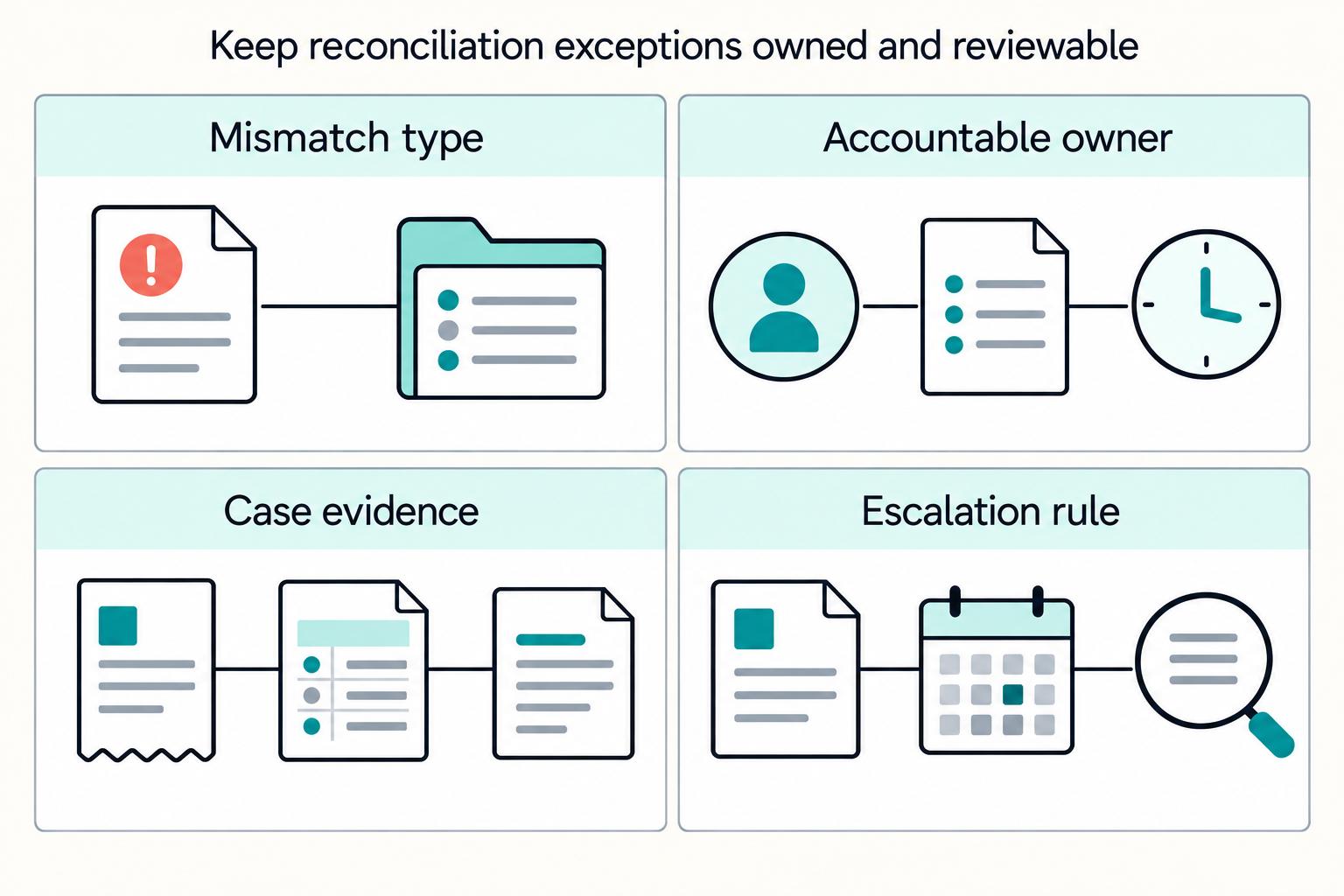
Assign clear ownership by exception type. Each case should keep enough context for review: source record, settlement or payout line, any posted journal reference, decision note, and final disposition.
Use two checkpoints. Before matching, validate source completeness, duplicate keys and the expected population for each feed. After matching, trace bank deposits to payout and balance records using the provider’s supported reports. Keep manual and instant payouts in a separate workflow when transaction allocation is unavailable.
Lock the Scope and Prerequisites Before You Build#
Lock ownership, approval rules, and source access before you build. If you wire up data first, reconciliation logic can drift away from how close and review actually work.
Step 1 Assign named owners and separate preparation from approval#
Set named owners for the decisions that cut across finance operations, payments operations, and product so ledger treatment, processor behavior, and product edge cases each have a clear owner. Treat this as an operating choice for clarity, not a universal standard.
Before the first dashboard view ships, document the general-ledger-facing reconciliation workflow explicitly: preparer, reviewer, and approver. Keep segregation of duties intact so one person does not initiate, authorize, record, and reconcile the same transaction chain.
Step 2 Confirm access to the three baseline records#
Do not proceed until you can reliably pull all three baseline records:
- Bank statement data
- Payment processor statement exports or API data
- Settlement report data
Each record serves a different control need. Bank statements confirm cash, processor reporting connects payouts to processor activity, and settlement details provide transaction-level settled and paid-out activity. Validate this with a real pull from each source, and for settlement data confirm traceable identifiers such as batch number, date, or another unique ID.
Step 3 Set the close cadence before you design freshness rules#
Choose the reconciliation rhythm first: daily, weekly, or month-end. Then set dashboard latency and alerting to match it.
Align that cadence with payout frequency before settlement reconciliation starts. If those two are misaligned, the dashboard can treat expected timing as exceptions and create noise.
Step 4 Standardize the evidence pack up front#
Define a lightweight evidence pack template before the first run. Include traceability identifiers used by your team, preparer and reviewer identity, date prepared, and date reviewed, with links or references to the bank statement, processor statement, settlement report, and other required support documentation.
Use one practical verification test: a reviewer should be able to open any reconciled item and trace the decision back to its source artifacts. If that trace is incomplete, the item is not close-ready.
For a step-by-step walkthrough, see Calculate NRR for a Subscription Platform Without Reconciliation Gaps.
Choose Build Versus Buy for the First Release Window#
For a first release, buying is usually the default unless reconciliation control is a real business differentiator. Use one test: can you enforce your own matching and exception-routing rules and export reconciliation evidence for your general ledger close process?
Step 1 Start with the bottleneck#
Start with the constraint that is blocking close. If the main issue is fragmented ingestion across bank, processor, and settlement inputs, prioritize buying connectivity. If data is already available but exceptions are not clearly owned or tracked to resolution, prioritize building the control layer first.
That split keeps scope realistic. Building a full payments stack expands quickly into operational work beyond engineering, so many first-release teams buy the generic layer and build the policy-specific workflow.
Step 2 Test market tools against rule control, not demo polish#
Test each candidate against your actual reconciliation rules, exception workflow and evidence requirements. Ask vendors to run the same anonymized sample containing partial refunds, fees, duplicate events and an unresolved bank deposit.
| Capability | Sample to test | Evidence to require |
|---|---|---|
| Ingestion | Duplicate event and missing statement row | Source lineage and completeness report |
| Matching | Partial refund, fee and net deposit | Versioned rules and explicit timing differences |
| Exception workflow | Unresolved payout near close | Owner, deadline and approval history |
| Evidence export | One disputed match | Source records, rule version and reviewer decision |
Run one live exception chain as a checkpoint. If you cannot clearly see ownership, the rule applied, and resolution status, the tool is weak exactly where teams usually feel the most operational pain.
Step 3 Require exportable match evidence#
Set a hard stop here: if a tool cannot export transaction-level reconciliation detail for close evidence, it is not enough for a first release. Dashboard status alone is not enough. You need transaction-level detail a reviewer can retain as an audit trail, with exportable output for close support.
A common failure mode is a dashboard that looks reconciled but still requires screenshots or manual notes to complete close evidence. That can push the work back into month-end spreadsheet cleanup.
Define the Data Contract and Source of Truth#
Freeze the data contract before you connect sources, and set one rule in writing: the General ledger is authoritative for accounting, while dashboard balances are operational views rather than GL-backed accounting evidence.
Step 1 Define the canonical object map#
Start by naming the records you will reconcile across systems. For subscription payments, use this minimum map: invoice event, payment event, Journal entry, settlement line, payout line, and dispute event.
| Canonical object | What it represents | Minimum joins to carry |
|---|---|---|
| Invoice event | Amount owed, including recurring invoices generated from subscriptions | Internal invoice ID, customer/account ID, amount, currency |
| Payment event | Customer payment collection attempt or completion | Provider reference when available, internal transaction ID, amount, currency, payment status |
| Journal entry | Accounting record posted to the GL | GL journal ID, account code, amount, currency, posting date |
| Settlement line | Processor-side item included in settlement/reconciliation reporting | Provider reference, transaction type, gross or fee amount, currency |
| Payout line | Movement into or out of a payout batch | Payout/batch ID, settlement line link, net amount, payout date |
| Dispute event | Chargeback or related dispute state change | Provider reference, dispute ID, linked payment ID, amount, status |
Use canonical names even when providers use different labels. The goal is one shared object map that finance, payments ops, and product can reconcile the same way.
Step 2 Set the source-of-truth rule in policy#
Write this directly into reconciliation policy: the General ledger is the accounting source of truth. Dashboard status can show operational progress, but it does not replace GL-backed accounting evidence.
If a payment appears collected but the related Journal entry is missing, delayed, or misposted, keep the accounting exception open. If dashboard totals and GL disagree, resolve the posting issue or log a recon exception with evidence rather than treating the dashboard as an unofficial ledger.
Step 3 Normalize identifiers into a shared key model#
Normalize external feeds into a shared join model using provider reference, internal transaction ID, and Idempotency key as the base, then extend when needed. This is a strong starting set, not a universal key set for every processor and flow.
Keep provider references and internal transaction IDs together to reduce matching failures. Keep the exact idempotency key you sent when available. Retries happen, and some provider-side retention windows are limited. For example, Stripe keys can be up to 255 characters and may be pruned after at least 24 hours.
Before matching, run missing-key and duplicate-key checks so retry-related duplicates are caught as key-chain issues, not mystery variances.
Step 4 Separate settlement components and add lineage#
Model net settlement as components, not as one opaque amount. Track Processor fee, Refund, and Chargeback separately so teams can audit payout and GL impact without spreadsheet splitting.
That fits how settlement reporting breaks out payments, refunds, chargebacks, and transaction costs, and how payout transaction typing makes refunds and processor fees explicit. It also helps with timing gaps, because refunds, chargebacks, and fees can settle in different payout windows or batches.
Add lineage metadata to each normalized record as custom audit fields:
- upstream source
- ingest timestamp
- transformation details (for example, transform version)
- reviewer (if your audit workflow requires it)
Use a trace test to validate the contract: pick a chargeback-related payout line and trace it to the upstream source record, transformation details, related GL journal entry, and any reviewer decision path you maintain. If any link exists only in chat threads, screenshots, or side spreadsheets, the contract is incomplete.
We covered this in detail in How to Build a Subscription Billing Engine for Your B2B Platform.
Connect Data Sources in the Right Order#
Connect sources in stages. For first-pass matching on collection integrity, start with internal billing and General ledger events, then add the Payment processor statement plus async feeds, then the Bank statement, and bring in settlement and payout-side reports later.
Step 1 Start with internal billing and ledger events first#
Start with invoice events, payment events, and related Journal entry records. That gives you an internal baseline for what you billed, what you recorded as collected, and what posted to accounting before external cash layers are added.
A pre-match gate can include row counts by source and date, duplicate checks for internal transaction IDs and journal IDs, and missing-value checks for fields you will match on later, including internal invoice ID, customer or account ID, amount, currency, and provider reference when present.
Step 2 Add the payment processor statement and asynchronous event feeds#
Next, add the Payment processor statement and treat async channels as core inputs. For subscriptions, processor activity is asynchronous, and webhook processing is a primary path.
Ingest webhook events and processor reports with source, ingest timestamp and transform version. Compare counts only after defining comparable populations, cutoff windows and expected cardinality: one transaction can generate several webhook events. Check provider event IDs, duplicate accounting effects and missing fields. Stripe live-mode webhook delivery retries can continue for up to three days, while event listing covers the last 30 days; retain your own recovery evidence for the approved period.
Step 3 Bring in the bank statement after processor-side collection is clean#
Bring in the Bank statement after processor-side collection records are coherent. The bank layer confirms cash and is usually most useful once processor-side collection uncertainty has narrowed.
Run a bank-data checkpoint before matching: row counts by statement date, duplicate bank-reference checks, and missing-key checks for amount, currency, and posting date.
Step 4 Turn on settlement and payout-side data in a later first-pass phase#
Finally, connect the Settlement report and payout-side files. This is an operating choice to keep first-pass matching focused on collection and posting integrity before you add net settlement and batch movement complexity.
Settlement and balance reports are required alongside bank statements. Use automatic-payout allocation where supported; reconcile manual payouts through balance activity, and investigate instant payouts without assuming a transaction-to-payout allocation exists. Check completeness, duplicates and references for each report before matching.
Related reading: How to Integrate Your Subscription Billing Platform with Your CRM and Support Tools.
Set Matching Logic and Escalation Decision Rules#
Once your feeds pass pre-match gates, make matching deterministic first and exception handling explicit. Start with exact-field rules, document exception paths, and add tolerances only when you can justify them.
Step 1 Start with deterministic rules before you allow tolerances#
Require matching identifiers, exact amounts and currency for deterministic matches. Apply an approved date window and accounting-period policy for each match class. A bank posting date and a ledger posting date can differ legitimately; record the timing difference rather than treating one universal date inequality as proof.
For a subscription platform, a practical default looks like this:
| Match class | Auto-match only when | Hold or review when |
|---|---|---|
| Invoice to payment event | Internal invoice ID or provider reference matches, amount and currency are exact, and payment date is in your approved window | Reference is missing, amount differs, or multiple candidate invoices exist |
| Payment event to General ledger / Journal entry | Internal transaction ID, amount and currency match, and posting follows the approved accounting-period and date policy | Duplicate journal candidates, missing journal ID, or manual override posting |
| Payment processor statement to bank statement | Provider or bank reference aligns, expected net amount is exact for the class, and date is in your documented window | No usable bank reference, unexpected fee/refund component, or incomplete payout batch |
Treat tolerances as a second layer, not the default. Reconciliation tolerances can be valid, but they should be controlled and documented by match class, reason, owner, and review cadence. If the rationale is unclear, do not automate it.
Step 2 Route every unmatched item through an explicit triage matrix#
Unmatched items should be investigated, not ignored. PeopleSoft supports both automatic and manual exception handling, including routing exceptions to user worklists. In practice, use an Exception queue with clear entry rules:
- Auto-match when the rule is deterministic and required keys are present.
- Hold in Exception queue when normal review can likely resolve it, such as a missing reference, duplicate candidate, or expected timing gap.
- Escalate immediately when the item meets your internal escalation policy or is deadline-driven, such as a dispute response.
Set escalation thresholds with finance and payments ops and document them so reviewers apply the same standard.
Step 3 Add subscription-specific rules so retries and prorations do not poison the queue#
Subscription flows need dedicated logic. Prorations are partial-period adjustments, so billed amounts can differ from a full-period plan amount. Match to actual invoice line totals, not assumed plan totals.
Retries matter too. Failed subscription and invoice payments can be retried automatically, so one invoice can have multiple attempts. Anchor matching to the successful collection event and treat failed attempts as related history.
For card flows, separate authorization, partial capture, and capture states. Delayed automatic capture and partial manual capture can shift timing and amounts, so state-aware rules can reduce early or incorrect cash matching.
Step 4 Set strict dispute handling and define what "done" means#
Disputes need a strict rule because chargebacks reverse the original payment and response windows are usually 7 to 21 days. Cardholder dispute windows can extend to 120 calendar days, and in some cases 540 calendar days.
Define a local policy for disputed items tied to previously reconciled payments, such as a controlled re-review path until disposition is confirmed.
Then define what "done" means by match class. For each class, document the required matched fields, who reviews manual exceptions, and the closeout artifact your team requires. For example, keep the reconciliation run ID plus the source evidence used to approve the outcome.
This pairs well with our guide on How to Build a Deterministic Ledger for a Payment Platform.
Before you automate triage, align your match states, retries, and evidence fields with the API event model in the Gruv docs.
Design the Exception Queue With Clear Ownership#
After auto-match rules run, every unmatched item should have three things immediately: a lane, an owner, and a due-by target. Without that structure, exceptions age into noise instead of getting resolved.
Step 1 Split the Exception queue by mismatch type#
Treat the Exception queue as an active triage list, not a passive backlog. Segment by mismatch type so each lane has a clear investigation path.
| Lane | Typical owner | First verification check |
|---|---|---|
| Amount delta | Finance ops | Compare source amount, currency, and posted amount; confirm whether the variance is expected for the transaction context |
| Missing settlement | Payments ops | Check expected payout cadence and confirm whether the batch has closed before labeling it missing |
| Duplicate posting | Finance ops | Check for repeated internal transaction IDs or duplicate ledger-posting activity before rematch or repost |
| Stale event | Product or platform ops | Confirm event timing and status across source and ingest records |
| Payout mismatch | Payments ops with finance review | Trace the payout line through the Settlement report and related processor payout records |
These lanes are a practical operating model, not a mandated standard. The value is clear routing and faster resolution.
Step 2 Assign one owner and one SLA per lane#
Set one accountable owner and one SLA per lane so exceptions are measurable and practical. SLA targets should reflect work type and time to resolve, and breaches should be visible on the dashboard.
At each cycle checkpoint, review unassigned items explicitly. If your system cannot block aging for unowned exceptions, keep an urgent unassigned view and clear it daily.
Step 3 Require an evidence pack on every exception#
Each exception should include enough evidence for a second reviewer to validate the decision quickly. Include source lines, related ledger details when relevant, a decision note, and final disposition.
For payout-side cases, link the Settlement report line and related processor payout records. For ledger-side cases, keep status-history detail that shows who changed status, when, and the before and after values.
Step 4 Add explicit escalation triggers for compliance-sensitive cases#
Define escalation triggers in advance for exceptions tied to policy controls, payout release conditions, or dispute risk. Keep standard queue aging for routine cases, and escalate only when trigger conditions are met.
For disputes, use deadline-aware handling: if a case is near its response cutoff, escalate immediately rather than waiting for the normal SLA. Typical response windows are often 7 to 21 days. For missing-settlement cases, keep normal review while payout timing is still within the expected window, then escalate when that window has passed and settlement evidence is still missing.
For the full breakdown, read How Platform Builders Implement Subscription Pause for Retention.
Build Daily Views Operators Use in Real Time#
Your daily dashboard should tell operators what to do next, not just show that data exists. One practical first-release pattern is a four-panel layout with drillthrough so teams can track status, aging exceptions, value exposure, and close progress in one place.
Step 1 Use four panels that map to daily decisions#
A common starting point is four panels, each tied to one operator question.
| Panel | Operator question | Minimum contents |
|---|---|---|
| Current reconciliation status | What cleared, what is still in process, and who owns it? | Reconciled count/value, in-process count/value, grouped by lane or owner |
| Aging exceptions | What is overdue or close to breaching review expectations? | Exception counts by age bucket, past-due filter, owner, mismatch type |
| Unresolved value at risk | Which open items matter most financially right now? | Open exception value, sortable by severity, account, or batch |
| Close-readiness progress | Are we moving toward close? | Percent complete, rejected items, fully approved items, approval backlog |
Do not treat "unresolved value at risk" as a universal formula. Define it in your policy and show that rule in the UI so finance ops and payments ops work from the same assumption.
Step 2 Add drillthrough to record-level evidence#
This is the point where a dashboard becomes an operating surface. Every headline number should open a filtered record page.
Drillthrough should let a user click a KPI, chart slice, or total and land on the exact records behind it with context preserved. On that detailed page, include record key, current status, owner, and evidence links such as a settlement report line, a bank statement entry, and exception action history. If a reviewer cannot move from "12 payout mismatches" to those 12 records in one click, the view is reporting, not operations.
Use one quick verification check: click a tile, confirm the destination page contains only matching records, and confirm filter context carries through. Then spot-check that exception action history is present for reviewer validation.
Step 3 Put payout visibility beside collection reconciliation#
If you manage outbound money, include Payout batch status on the same daily page. Batch-level payout reconciliation can connect batches to Bank statement matching and show payments, refunds, and Chargeback activity within a single batch.
Separate failed, canceled, returned and pending payouts. Compare a pending payout with its provider-specific expected arrival window before escalating. A pending status does not establish failure or authorize another payment.
Step 4 Model asynchronous funds states explicitly#
For Virtual Accounts, show state transitions, not just paid or unpaid outcomes. Depending on provider terminology, incoming funds can move through pending review, settled/credited, or returned outcomes, and each state needs a different owner and next action.
Use provider-native states underneath, then normalize them into a small operating set for daily use. A held state should not inflate missing-settlement alerts. A returned state should show the return reason when available because it changes the investigation path. Providers can distinguish pending review from settled credit, and funds sent to a closed Virtual Account may be returned instead of credited. If that distinction is hidden, operators chase false mismatches and finance may assume cash is available before settlement.
If you want a deeper dive, read How to Use Machine Learning to Reduce Payment Failures on Your Subscription Platform.
Automate Safely With Replay and Retry Controls#
Automation is safe only when retries, late events, and rematches cannot create duplicate postings or silent overwrites.
Step 1 Enforce replay safety on every write path#
Provider API idempotency and local accounting deduplication solve different problems. Reuse a provider-supported key when retrying the same API operation within that provider’s documented retention window. For local processing, commit the event receipt and its ledger effect atomically, or use a durable job and a unique accounting-effect key.
Store stable provider event IDs and business-operation identifiers. Enforce uniqueness on the accounting effect, including when different events describe the same operation. A key on an outbound API request does not prevent duplicate local journal entries.
Keep a duplicate-rejection log operators can inspect from the record page. Include fields such as source, event or request ID, first-seen time, duplicate-seen time, disposition, and reconciliation run ID.
Step 2 Design for out-of-order and delayed webhooks#
Webhook events can repeat and arrive out of order. Stripe retries live-mode delivery for up to three days. Use the provider resource version or current resource state to decide whether an event changes the ledger; preserve legitimate refunds, reversals and returns rather than discarding every later-arriving event with an older timestamp.
If prerequisite records have not arrived yet, show pending causality rather than an immediate mismatch. If a refund, dispute, or settlement-related event appears before its payment record, hold the chain open until the required predecessor record is present.
Persist an event or durably enqueue its work before acknowledging receipt. Mark it processed only after the intended effect has succeeded, with the receipt and effect committed atomically where possible. Marking it processed before work can lose an event when the worker crashes.
Step 3 Block automation from overwriting approved decisions#
Keep reviewer-approved reconciliation decisions immutable until an authorized reopen. Automated rematching can propose a change and preserve its evidence, but it must not silently overwrite approval.
Make reopen explicit with reason code, requester, approver, and timestamp. That preserves auditability when later Chargeback updates, corrected settlement lines, or duplicate warnings affect already approved records.
Step 4 Add one gate before any auto-close#
Before auto-close, run one visible gate with three checks:
- No critical exceptions under your policy
- No unreviewed manual overrides
- No unresolved duplicate warnings
If any check fails, block auto-close and route the record back to the queue. Show the block reason on the record and in close-readiness so operators can quickly see whether the blocker is risk, review debt, or replay ambiguity.
Track Close-Readiness KPIs That Drive Decisions#
Your close-readiness KPIs should answer one question first: proceed, pause, or narrow automation.
Step 1 Measure completion and aging so ownership is visible#
Track completion as open, late, on-time, and rejected, not as a single matched-rate view. That split makes it easier to see whether close risk is actually shrinking.
Add aging buckets to exceptions and owners. A clear starting bucket is 1 to 30 days old, then add ranges that match your close cadence. Also break backlog by preparer and reviewer assignment so you can separate team-wide strain from owner-specific bottlenecks.
Step 2 Break settlement variance into components#
Track net-settlement accuracy as component variances, not one blended payout delta. Show expected versus actual at least for Processor fee, Refund, and Chargeback, and leave room for other components like reserves or corrections when they appear in processor reporting.
Use this as an operator check: component-level variance can help explain total payout variance. If it does not, you may have a missing component or a mapping issue.
Step 3 Define close confidence gates before approval#
Make close-readiness a visible gate with explicit rules. Typical controls are:
- No high-risk reconciliations still open
- Variance within your approved reconciliation threshold
- Required documentation attached
Where your workflow supports it, use stricter submission control for configured profiles that require zero unexplained difference before submit.
Step 4 Tie KPI deterioration to predefined actions#
KPI review should trigger action, not just reporting. Set trend windows in advance, such as a preceding four-week window, and define what changes when reliability worsens.
For example, you can choose a policy that pauses noncritical changes or temporarily slows change velocity when threshold performance is breached. This is a control choice, not a universal finance standard, but it keeps operating behavior aligned to measured risk.
Handle Common Failure Modes and Recovery Steps#
When close-readiness drops suddenly, treat it as a containment problem first. Figure out whether the issue is duplicate retries, schema or version drift, or true payout variance, then run the matching recovery path for that failure mode.
Step 1 Isolate duplicate retries before you touch the ledger#
Isolate duplicate deliveries before changing the ledger. Check provider event IDs and accounting-effect identifiers against committed local records, then verify whether the intended effect already succeeded. An outbound API idempotency key is separate from this local control.
Group suspected duplicates by provider event ID, resource ID and internal accounting-effect key. Stripe may prune API idempotency keys after at least 24 hours; retain local deduplication evidence according to your replay and accounting retention policy rather than relying on that API window.
Step 2 Contain schema/version drift before normal matching resumes#
If mismatch volume jumps after a provider change, treat it as a mapping or version problem before you treat it as a finance variance. Webhook payloads can be out of order, partial, or outdated, and major API releases can include non-backward-compatible changes that require code updates.
Validate field presence, field meaning, and version handling on the new payload shape, then reprocess a controlled sample through normalization. Reopen normal queue processing only after the transformed output matches your expected schema behavior.
Step 3 Reconcile payout variance from the payout inward#
For payout variance, start with payout and bank records, then inspect balance credits and debits. For automatic payouts with supported allocation, trace the underlying transactions. For manual or instant payouts, use the available balance evidence without inventing a transaction allocation.
Work in this order: payout total, failed payouts if present, settlement lines, then underlying collection events. If the payout still does not tie, trace the remaining credit and debit components back to source records and confirm the final expected amount against the deposited amount.
Put This Into Production This Quarter#
You can ship this quarter without a perfect build if the first release is controlled: clear owners, trusted source feeds, approved match rules, an active exception queue, record-level drill-through, replay-safe ingestion, and end-of-cycle KPI review.
Use this copy/paste launch checklist:
- Owners assigned for finance ops, payments ops, and product (or equivalent functions)
- Source ingestion live for Payment processor statement, Bank statement, and Settlement report as a baseline
- Matching matrix approved with auto-match and escalation rules
- Exception queue lanes, SLAs, and evidence requirements active
- Dashboard panels live with drill-through to record-level evidence
- Replay-safe ingestion validated with Idempotency key and Webhook retry tests
- Close-readiness KPIs defined and reviewed at the end of each cycle
If you want a second pass on your rollout checklist for reconciliation and payout operations, talk with Gruv.
Frequently Asked Questions
What is a payment reconciliation dashboard for a subscription platform?
A payment reconciliation dashboard is an operating view that helps your team match transaction records against accounting records and identify unresolved items. It should show status, exceptions, and drillthrough evidence, not just totals. If a reviewer cannot trace a variance back to source records and settlement lines, it is reporting rather than a reconciliation control.
Which data sources should we connect first to avoid bad matches?
Start with internal billing and accounting records, then add the payment processor statement, and bring in the bank statement after processor-side collection is clean. This sequence helps verify collected amounts, deducted fees, and received deposits without forcing early cash matches. Before matching, confirm record counts, duplicate detection, and missing keys for each source.
What should be auto-matched versus manually reviewed?
Auto-match only deterministic cases with clear alignment across source records. Send missing keys, partial or ambiguous matches, and lines affected by refunds or disputes to manual review. Auto-reconciliation reduces effort, but unreconciled lines still need direct action.
Which exceptions should trigger immediate escalation?
Escalate duplicate postings, unexplained material differences and disputes approaching a response deadline according to the approved severity and close policy. Investigate smaller differences within the assigned tolerance and resolution window. Distinguish a chargeback with a balance debit from an inquiry that may not move funds; inspect the provider event and deadline before assigning urgency.
How do refunds, chargebacks, and processor fees change net settlement reconciliation?
They shift reconciliation from billed amounts to what actually settled. Refunds, disputed amounts, and associated fees can be debited from platform balances, and refunds or disputes also reduce the payments balance used for payout reconciliation. Track refunds, chargebacks, and processor fees as separate components so payout differences stay explainable.
What KPIs prove the dashboard is improving operations?
Use operational KPIs such as fewer aged exceptions, faster resolution by mismatch class, and more periods ending with exceptions addressed and fully reconciled status. Track unmatched categories by source and whether adjusted balances are converging. Improvement is real when the team can close each cycle with complete exception evidence instead of spreadsheet backtracking.
How do we prevent duplicate postings when webhooks retry or arrive out of order?
Record webhook event IDs and commit local accounting effects with a unique effect key. Acknowledge after durable receipt, and mark processing complete only after successful work. Use resource versions or current state for out-of-order events while preserving reversals. Retry the same outbound API operation with the provider’s supported idempotency key; this does not replace local deduplication.
Where Gruv fits
See recurring billing operations
Launch recurring billing, manage plan changes, and configure failed-payment recovery as the billing model grows.
See reconciliation and mismatch review
Compare ledger entries, provider payment records, and statement rows to see what matches and what finance needs to review.
Researched and edited by the Gruv editorial team. Gruv builds cross-border billing, payouts, and finance-operations software for global businesses.
Sources
- csrc.nist.gov/pubs/sp/800/61/r3/finaltrusted
- dgs.ca.gov/Resources/SAM/TOC/7900/7901trusted
- docs.stripe.com/api/idempotent_requeststrusted
- docs.stripe.com/webhooks/process-undelivered-eventstrusted
- ecfr.gov/current/title-17/chapter-II/part-244/section...trusted
- finance.cornell.edu/controller/internalcontrols/unitlevelactivit...trusted
- guides.gaoinnovations.gov/greenbook/2025/principle-3-establish-structu...trusted
- onesource.uga.edu/wp-content/uploads/financial_review_procedur...trusted
Educational content only. Not legal, tax, or financial advice.
Related Posts

The Freelance Payment Penalty: A Modeled Audit of Platform Fees, FX Spreads, and Payout Delays
The money rarely disappears through a single, easy-to-spot fee. The real loss is stacked. A marketplace takes its commission, a processor adds a charge for international cards, a bank or payment company converts the currency at a spread, a platform holds the funds before release, and a wire sheds a little to intermediaries on the way in. Each layer looks defensible on its own, but the worker feels the combined result as a smaller deposit and a later payday.

How to Respond to a Subpoena for Business Records
Move fast, but do not produce records on instinct. If you need to **respond to a subpoena for business records**, your immediate job is to control deadlines, preserve records, and make any later production defensible.
A US Expat's Guide to Investing in UCITS ETFs to Avoid PFIC Issues
The real problem is a two-system conflict. U.S. tax treatment can punish the wrong fund choice, while local product-access constraints can block the funds you want to buy in the first place. For **us expat ucits etfs**, the practical question is not "Which product is best?" It is "What can I access, report, and keep doing every year without guessing?" Use this four-part filter before any trade: