
Quick Answer
Start by running AI through one operating sequence: Acquire, Deliver, Collect, and Close-out. Before work moves forward, pass four gates for Data, Client Policy, Quality, and Money. Keep one documentation home, classify inputs into Public/Generic or Client-Confidential, and log approvals where you can retrieve them fast. Tie every invoice line to signed scope evidence and a delivery artifact so you can defend what was approved, shipped, and paid.
Build AI into a clear freelance workflow#
If you are hunting for more AI tools for freelancers, stop and put controls in place first. One practical setup is Acquire -> Deliver -> Collect -> Close-out, with each AI action checked through Data, Client Policy, Quality, and Money. If a tool has no named job, no clear data boundary, and no record you can retrieve later, it probably does not belong in your stack.
Step 1 Use the model before you add any app#
Think in stages, not tabs. Map outreach and qualification to Acquire, drafts and approvals to Deliver, invoices and follow-up to Collect, and handoff plus records to Close-out. Use your four gates as the control layer: what data goes in, what the client allows, how output gets checked, and how work ties back to billable proof.
Tool sprawl often adds cost, complexity, and compliance risk without improving outcomes. A common failure mode is pasting raw model output into a doc and calling it finished. A safer rollout path is audit -> roadmap -> pilot -> rollout tied to KPIs, with a pilot sprint that is usually time-boxed, for example 4-6 weeks.
Step 2 Store the operator documents where you can retrieve them fast#
Keep your scope document, for example an SOW, in both the client folder and your main documentation home so you can check it quickly before drafting, scope changes, or invoicing. Keep confidentiality terms, for example an NDA, in the same place before sharing source material, meeting notes, or client files with any model. If your engagement includes data-handling terms, for example a DPA, keep those with onboarding and vendor records.
| Document | Where to keep it | Check or use point |
|---|---|---|
| SOW | In both the client folder and your main documentation home | Check before drafting, scope changes, or invoicing |
| NDA | The same place as the SOW | Before sharing source material, meeting notes, or client files with any model |
| DPA | With onboarding and vendor records | When the engagement includes data-handling terms |
Build your audit trail as you work, not after the fact. Store key prompts, approvals, versions, exports, invoices, and payment confirmations in one integrated workspace so context does not disappear.
Step 3 Compare your behavior, not your tools#
| Area | Tool-first behavior | Operator behavior |
|---|---|---|
| Scope | Starts drafting from a vague request | Starts from the SOW and logs changes |
| Confidentiality | Pastes client material into any tool | Checks NDA, redacts inputs, limits access |
| Quality | Ships the first clean-looking output | Reviews against brief, sources, and client voice |
| Invoicing traceability | Bills from memory at month-end | Ties invoice lines to delivery artifacts and approvals |
Readiness check: for each stage in your freelance process, confirm you have one clear tool role, one data boundary, and one retrievable record. Once that is true, your next operational step is How to Manage Bookkeeping for Your Freelance Business. You might also find this useful: Best PR Tools for Freelancers Who Need a Lean Weekly System.
What to prepare before you start (10-minute setup + tool-selection rules that prevent chaos)#
Set your operating rules before the first prompt: choose the data lane, assign the tool role, and decide which record you will keep at the end.
Step 1 Split work into two lanes before you paste anything#
Use Public/Generic for material you can safely generalize: your templates, sample prompts, published portfolio copy, dummy briefs, broad research prompts, and your own style notes. Use Client-Confidential for engagement-specific material: client files, meeting notes, unpublished metrics, contract language, internal comments, and anything covered by NDA or personal data obligations.
Write a one-page SOP you can follow under pressure:
- Lane rules: define what goes in each lane, with 2-3 real examples from your workflow
- Sanitization checklist: remove names, emails, credentials, access tokens, raw financial figures, and any unapproved client detail
- Approval log path: pick one path, for example
Client > Project > Approvals - Access line: state who can view or edit each lane, including collaborators and client visibility
Quick test: if you cannot classify a queued document in seconds, tighten the lane rules.
Step 2 Pick tools by role, not by brand#
You already carry delivery, admin, contracts, and invoicing, so each tool should reduce non-billable drag and leave a retrievable output.
| Role | Selection criteria | Single owner output location | Failure if omitted |
|---|---|---|---|
| General assistant | Strong drafting/summarizing, clear history, easy export or copy-out | Project notes in your documentation home | Decisions get trapped in chat history |
| Documentation home | Fast search, versioning, and simple links to files and approvals | One client project workspace | No dependable record of what changed |
| Automation connector | Only for repetitive handoffs you already run manually | Same project workspace, with a run log | Silent failures and scattered updates |
| Time/activity record | Prefer privacy-first defaults, local-first when available, with optional cloud sync when needed | Time record linked to project or invoice notes | Weak support for estimates, invoices, or disputes |
If a tool does not have a clear output owner and location, do not add it.
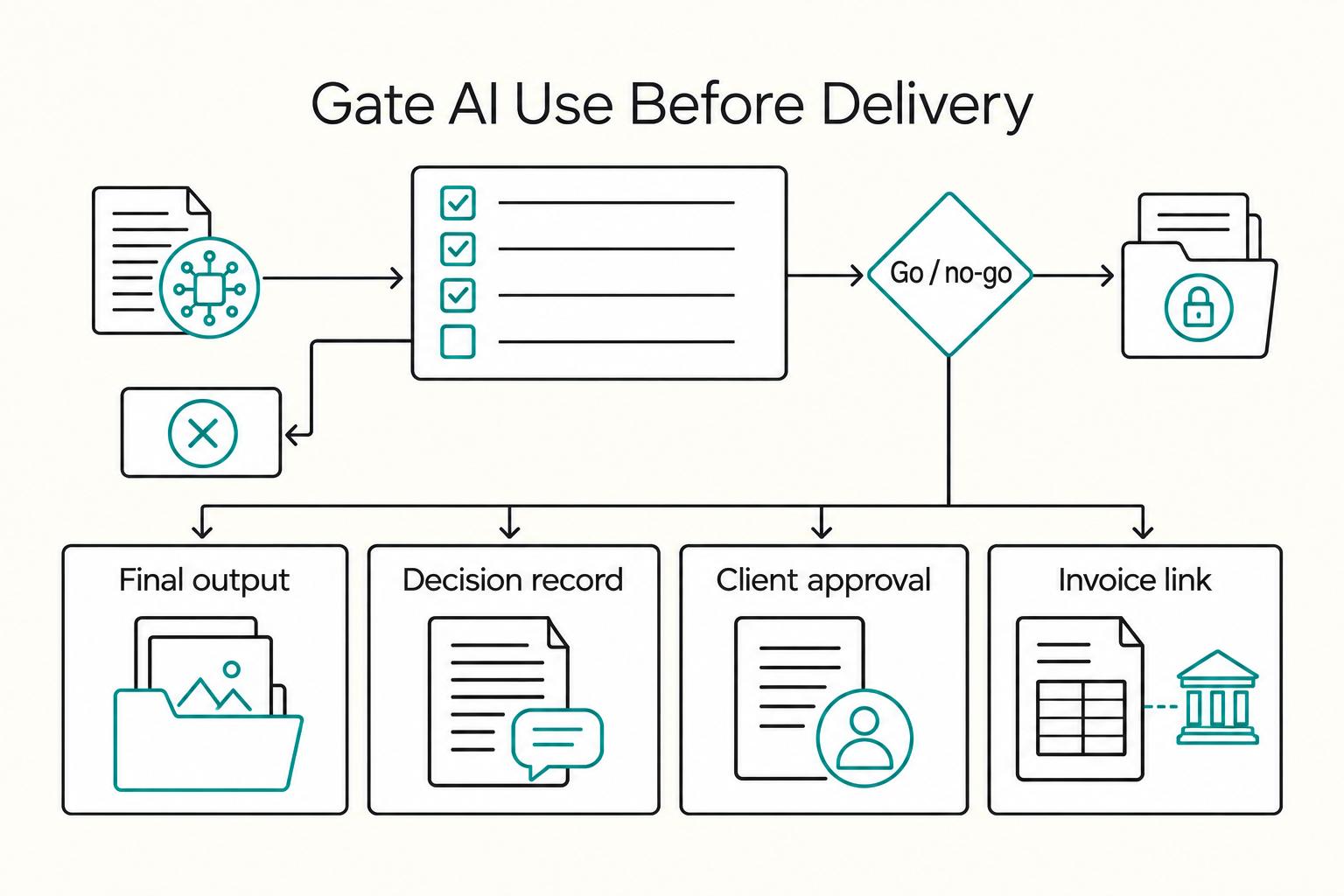
Step 3 Lock the minimum artifact set and run go/no-go#
For each project, keep four artifacts in predictable locations:
- Final output in the delivery folder
- Key prompt/decision record in project notes
- Client approval in your approval path
- Invoice linkage in your finance note or invoice record
Then run this go/no-go check before any prompt:
- Client policy confirmed, or outside AI use explicitly checked
- Input sanitized for the selected lane
- Current model training/retention settings reviewed in vendor policy, with your selected setting noted in SOP
- Collaborator and client access reviewed for this project
- Any jurisdiction- or client-specific limit marked as unresolved until confirmed
After this setup is stable, compare optional tools. Related: Best No-Code Tools for Freelancers Who Need Clean Handoffs. Optional next step: Browse Gruv tools.
What's the minimal AI stack I need as a freelancer in 2026? (Pick tools by workflow stage, not hype)#
A minimal stack means fewer tools with clearer ownership, not fewer capabilities. Each tool should have one job, one approved data boundary, and one output location you can retrieve later. If it only adds tabs and copy-paste loops, leave it out.
Step 1 Assign one primary tool to each stage#
Keep the rule: one job, one primary tool. Add a specialist only when there is a clear trigger and a record you need to keep.
| Stage | Primary tool role | Optional specialist trigger | Required output location |
|---|---|---|---|
| Acquire | General assistant for research, personalization drafts, and reply triage | Outreach automation only after domain setup, consent/unsubscribe handling, message version logging, and lead-source traceability are defined | CRM or lead tracker, plus campaign copy log in documentation home |
| Deliver | General assistant for drafting, summarizing, outlining, and extraction | Design generator for concept visuals, coding assistant in your editor, or transcription tool when the task is format-specific | Client project folder and linked project notes |
| Quality | Editor/checker for language, consistency, and review prompts | Specialist review tool only when the client requires a specific format, accessibility check, or technical test | QA note, revision history, and approval record |
| Record | Documentation home as the source of truth for prompts, decisions, approvals, and SOW links | Automation connector only for repeated handoffs you already do manually | Project workspace with retrievable exports |
Verification point: open one active project and confirm every tool maps to a stored artifact, not just chat history.
Step 2 Tighten Acquire before you automate#
Start outreach manually. Spend 3-5 minutes understanding the offer, audience, and lead source before prompting, and write your own outline first. Use AI to generate variations, such as subject lines, hooks, and CTAs, not your final message.
Do not automate outreach until domain setup, the applicable contact permissions and opt-out handling, message logging and lead-source traceability are documented. A lead list is not evidence that every person on it may be contacted.
Step 3 Add specialist tools only when the category earns its place#
Choose specialist tools for a defined task. Use a design generator for concepts when the client permits it and licensing fits. Review AI-assisted code for behavior, dependencies and security with appropriate tests; a confident-looking draft is not evidence that it is safe. Use writing checks to improve clarity while preserving the client’s voice.
For client-facing work, confirm client policy and licensing terms in the exact tool you plan to use, and mark any project-specific limit as unresolved until verified. Your stack passes only if every chosen tool has a defined owner, approved data boundary, export or retrieval path, and handoff into your documentation home so it can be tied back to the SOW and approval record.
For a step-by-step walkthrough, see The Best SEO Tools for Freelancers.
How do I keep AI use compliant and client-safe (without slowing down)? Use 4 gates: Data, Client Policy, Quality, Money#
Use four gates at the points that create risk: before you paste, before you send, before you deliver, and before you invoice. You are not adding bureaucracy; you are standardizing key checks so speed does not create cleanup later.
Data Gate (before you paste)#
Keep the two input lanes consistent: Public/Generic and Client-Confidential. Treat your private business material as restricted as well; publishing or removing a name does not by itself resolve rights or confidentiality.
| Input class | Handling rule | Record to keep |
|---|---|---|
| Public/Generic | Use only necessary material you have rights to use | A protected decision/source record appropriate to the project |
| Client-Confidential or private business material | Use only an approved tool and permitted processing; redaction alone may leave sensitive or identifiable data | Approval, selected tool/settings and a minimized protected input record where needed |
Keep only the input evidence needed for traceability, with appropriate access and retention controls. Do not create unnecessary copies of confidential material just to preserve every prompt.
Client Policy Gate (before you send)#
Confirm three items in one pass: whether AI use is allowed, whether disclosure is expected, and whether your approach matches the current SOW, NDA, and any DPA on file.
If client permission or data-processing terms are unclear, use generic or independently authorized material only and clarify before uploading client content. Calling a draft internal, manually rewriting it or removing names does not cure an unauthorized disclosure.
Quality Gate (before you deliver)#
Do not ship a raw draft. Check claims against client materials or accessible sources, recalculate numbers yourself, and confirm names and dates are consistent. If a source is blocked behind a security check or verification screen, treat it as unverified until you can access it properly.
| Check | Raw AI draft | Verified client-safe deliverable |
|---|---|---|
| Claims | Plausible wording | Each claim checked against source material |
| Calculations | Model-generated math | Recalculated by you |
| Sources | Mixed or missing references | Consistent, accessible, and reviewed |
Money Gate (before you invoice)#
Map every invoice line to one scope artifact and one delivery artifact, for example SOW section plus file, link, commit, or handoff record. Store invoice, approval trail, delivery proof, and dispute notes together. If your setup needs a compliance cutoff, mark the cutoff as unresolved until verified instead of guessing.
Quick self-audit: can you show the redacted input, state the client AI rule in one sentence, explain your verification steps, and trace every invoice line to scope and delivery? If not, fix that before you scale. Next step: How to Manage Bookkeeping for Your Freelance Business.
Acquire: a lead-gen + qualification SOP that doesn't wreck your reputation (or trigger compliance issues)#
Protect your reputation in acquisition by qualifying for fit first, sending only defensible outreach, and handing off only SOW-ready opportunities.
Step 1 Qualify for SOW readiness before outreach#
Use a checklist so each lead ends in one of three paths: proposal, paid discovery, or no fit.
| Qualification area | What to confirm |
|---|---|
| Business problem | What needs to change |
| Owner and approvals | Who decides, who reviews, who uses the work |
| Constraints | Budget, timing, dependencies, and access to inputs |
| Readiness evidence | Usable materials, prior attempts, or baseline information |
| Risk flags | Unclear outcomes, missing decision-maker, impossible timing, or refusal to share inputs |
If you cannot outline scope boundaries without guessing, route to paid discovery instead of proposal. If risk flags dominate, decline early.
Step 2 Use personalized operator outreach, not generic sequences#
Send fewer messages, but make each one specific enough to defend.
| Check | Generic sequence | Personalized operator outreach |
|---|---|---|
| Personalization signals | Name + company only | One recent trigger, one observed constraint, one clear reason your offer fits now |
| Proof | Broad claims | One relevant proof point you can explain if asked |
| CTA | "Open to chat?" | One concrete next step tied to their situation |
| Fail condition before send | Could be reused unchanged at scale | Fails if you cannot point to the exact observation and proof used |
If removing the company name leaves the message mostly unchanged, it is not ready.
Step 3 Run jurisdiction-aware compliance checks before sending#
Check the rules that apply to the sender, recipient and message. U.S. CAN-SPAM covers commercial B2B email as well as bulk campaigns: use truthful headers and subjects, the required advertising identification and postal address, and a working opt-out. UK PECR distinguishes corporate subscribers from individuals, including sole traders; consent or a valid applicable exception may be required for individuals. UK GDPR obligations can still apply when business contacts’ personal data are used.
- where you operate and where the recipient is based
- which rule set you believe applies
- your current contact basis note
- any unresolved rule or threshold questions marked as pending verification
Record contact source, applicable permission or basis, message version and suppression status. CAN-SPAM requires honoring opt-outs within 10 business days. Keep opted-out contacts from re-entering through imports; personalization or AI drafting does not remove marketing rules.
If you operate as a UK sole trader, remember your business structure affects legal responsibilities, and you should keep records that support your returns.
Step 4 Make the deal brief mandatory before proposal handoff#
A deal brief is required before proposal. It keeps scope drift from starting before the work does.
Include:
- client and contact
- problem statement
- desired outcome
- known constraints
- key assumptions
- named risks
- required inputs and access
- recommended path: proposal, paid discovery, or decline
- next action with owner and date
If the brief is hard to complete, qualification is incomplete. Pause and resolve gaps before you scope.
Need the full breakdown? Read The Best Email Encryption Tools for Freelancers.
Deliver: how do I ship client work with AI without hallucinations or IP surprises?#
Ship only work you can explain, verify, and transfer cleanly. Your delivery control pattern is proposal checklist -> signed scope package -> asset trace log -> QA gate -> handoff with reviewer sign-off.
Step 1. Turn each proposal deliverable into a pass/fail checklist. Use AI for draft support, including research, brainstorming, translation, proposal drafting, and basic production, then tighten each deliverable with four checks:
| Deliverable check | What you must state before send | Pass/Fail trigger |
|---|---|---|
| Assumptions | Inputs and source materials you need | Fail if required inputs are missing or unclear |
| Exclusions | What is explicitly out of scope | Fail if scope boundary is not explicit |
| Change path | How extra requests are reviewed and approved | Fail if change handling is undefined |
| Acceptance criteria | What "done" means for this output | Fail if a third party could not judge accept or reject from the text alone |
If this checklist is incomplete, do not send the proposal yet.
Convert agreement into a clear written scope before production, using the form required by the contract and applicable law. Record deliverables, inputs, review rounds, formats and acceptance criteria. An email can form part of a valid agreement in some circumstances; do not assume a separate formal signature is universally required.
Keep an origin and rights log for shippable assets. In the United States, AI-assisted work can contain protected human authorship, but purely AI-generated expression is not protected just because a client approved it or the provider grants use rights. Do not promise exclusive transferable copyright without checking the actual human contribution and third-party rights.
| Asset type | Ownership model in signed agreement | Asset origin record | License/permission evidence | Approval status | Ship/No-ship rule |
|---|---|---|---|---|---|
| Client-supplied material | Permitted project use | File name, date received, sender, intended use | Client email, portal upload, or brief | Confirmed for use | Ship only within stated use |
| Your human-created draft | Transfer timing and scope | Author, date, version history | Signed agreement + acceptance record | Awaiting or approved | Ship when scope and acceptance match |
| AI-assisted text/design draft | Whether final output is included in transfer | Tool used, prompt summary, source inputs, your edits | Tool terms and input rights; separate output copyright and transferability review | Explicit approval required | No ship if origin or evidence is unclear |
| Third-party stock/template asset | Use/sublicense terms for project | Provider, asset ID, download date | Receipt, license page, or client-provided license | Approved for project use | No ship without proof |
| AI-assisted code | Deliverable + repo handoff terms | Commit history, reviewer, linked ticket/brief | Source/dependency provenance and applicable software licenses, plus review notes | Final reviewer sign-off | No ship if behavior cannot be explained |
Step 4. Run one QA gate against the current source of truth. Before delivery, verify claims against current approved source materials, not stale exports. For public factual claims, check against the client-approved source and, where relevant, an authoritative source. For U.S. government information, that may include a .gov website. Then confirm client terminology, file naming, and version labels, and add the final reviewer name plus timestamp.
Step 5. Keep AI-assisted development explainable and confidentiality-safe. Use AI to speed repetitive coding and first passes, not to replace your judgment. Each change should map to a ticket, brief, or stated requirement, and you should be able to explain inputs, outputs, dependencies, and likely failure modes in plain language. Do not paste client code, secrets, or internal logic into unapproved tools. At handoff, include commit history, environment notes, test results, and reviewer sign-off. If you cannot explain what a code block does, do not ship it.
Related reading: The Best Social Media Scheduling Tools for Freelancers.
Collect: how AI helps you get paid faster-without creating disputes, FX confusion, or recordkeeping mess#
Once delivery is documented, collection should be boring. Make each invoice easy to approve, easy to match to work, and easy to defend later.
Before you start#
Create one Billing folder inside the same client project you use for scope and delivery. Keep the signed SOW, change approvals, delivery links, invoice drafts and final PDFs, reminder emails, payment confirmations, and processor exports in one place. When proof is split across chat, email, portals, and bookkeeping tools, it gets harder to keep a clear client view and reconciliation slows down.
Step 1. Build invoice line items as an approval checklist, not just a bill. Draft from signed scope records, not memory. Missed hours, messy approvals, and unclear templates can delay payment, so treat the invoice as a review-ready document.
For each line item, check:
- Scope match: points to the signed scope item
- Delivery match: points to the delivery artifact
- Status note: says delivered, approved, or awaiting sign-off
Also confirm core fields are complete: invoice number, invoice date, due date, amount, and clear service description. Final check: if someone reads only the invoice, can they approve without extra context? If not, revise. Do not let AI invent milestone names, dates, or totals not in signed records.
Choose reminder track and payment rail on evidence, not habit#
Pick reminder cadence and payment method for traceability and clean reconciliation, not convenience alone.
Step 2. Use a reminder track you can run consistently. Billing tools can centralize invoice creation, reminders, collection, and payment-status visibility. Let AI draft reminder wording, but keep reminders in one thread or portal history so records stay intact.
| Reminder track | How to run it | Traceability | Client friction | Dispute defensibility |
|---|---|---|---|---|
| Light | Gentle follow-ups around due timing | Good if kept in one thread | Low | Fair |
| Standard | Due-date follow-up plus overdue follow-up | High | Medium | Good |
| Escalated | Repeated overdue follow-up plus procurement or portal escalation | High | Higher | Strongest when prior reminders are logged |
Step 3. Choose a payment rail you can reconcile quickly. Real-time payments, RTP, are designed for immediate access to funds where available. Faster collection helps only when payment records still map cleanly to invoices.
| Payment option | Traceability | Reconciliation effort | Dispute defensibility | Client friction | Best use |
|---|---|---|---|---|---|
| Invoice-linked bank transfer | High if invoice reference is included | Medium | Good | Low to medium | Common B2B collections |
| RTP where available | High | Low to medium | Good | Low | When speed matters and both sides support it |
| Client portal or payment link | Medium to high | Low in one tool, higher after exports | Medium to good | Low | Clients who prefer click-to-pay |
Checkpoint: you should be able to see pending, paid, failed, and partial statuses at a glance. Avoid rails that leave weak references, missing payer identity, or heavy manual matching.
Record cross-border details and keep a dispute packet ready#
For cross-border payments, documentation behavior matters more than memory.
Step 4. Log FX details when payment happens. For each cross-border invoice, record quoted currency, settlement currency, invoice timestamp, payment timestamp, fees, and the conversion source used. Save the screenshot, processor record, or bank export from that day. If a reporting or tax rule is relevant, mark it as pending verification in the file until confirmed.
Step 5. Keep a dispute packet retrieval sequence ready. If a dispute appears, pull records in this order:
- Scope evidence: signed SOW and approved changes
- Delivery proof: file links, sent timestamps, and version references
- Approvals: email, DM, or portal confirmation
- Invoice trail: draft, final, reminders, and revised invoice versions
- Payment trail: remittance advice, transaction ID, receipt, and payout export
If this packet is slow to assemble, fix recordkeeping before the next invoice. Next operational step: tighten month-end records in your books at How to Manage Bookkeeping for Your Freelance Business. We covered this in detail in Best Video Conferencing Tools for Freelancers in Client Meetings.
Close-out: month-end admin with AI (clean books, clean client handoffs, fewer surprises when taxes hit)#
Your month-end close-out works when each finished project has a compact evidence packet and every cash movement matches your records.
Step 1. Build a close-out packet you can reopen six months from now#
Keep only the artifacts that let someone else understand the project without guesswork:
- Final deliverables, with version notes or filenames showing what you shipped
- Acceptance proof, such as email, portal approval, or sign-off message
- Scope-change approvals, including add-ons or revised SOW sections
- Final invoice-to-payment evidence, such as the final invoice, remittance or receipt, processor confirmation, or bank reference
- A short factual recap you can reuse later
Use AI to draft the recap only after the file is complete. Keep it factual: objective, what you shipped, what changed, final delivery date, and payment status. If acceptance proof or change approvals are missing, fix that first instead of summarizing around the gap.
Step 2. Reconcile your invoice ledger, processor activity, and bank entries#
Reconciliation is the control point: AI can help draft notes or flag patterns, but your underlying records decide what is true.
| Record to review | What it should match | Likely mismatch cause | Exact correction action |
|---|---|---|---|
| Invoice ledger | Issued, paid, overdue invoices | Marked paid, but cash not received | Check payout timing, partial-payment status, and remittance reference before changing ledger status |
| Payment processor activity | Gross payments, fees, refunds, payouts | Net payout is lower than invoice total | Record fees separately and attach processor payout or export detail to the project file |
| Bank entries | Deposits and withdrawals in your account | One deposit covers multiple invoices | Match payout ID to included invoices and split the deposit in your books where needed |
| Bank entries vs ledger | Deposit exists but no invoice match | Wrong reference, duplicate charge, or manual transfer | Trace payer, amount, date, and invoice number; then relink, issue corrected receipt, or mark for follow-up |
If you automate handoffs across invoicing, forms, and payment tools, retest after app changes. Broken triggers and looping issues are known failure modes and can create duplicates, missed updates, or incorrect paid flags.
Step 3. Make records tax-ready as you go#
Use AI for memo drafting only; treat accounting records and supporting documents as the source of truth. For each income or expense item, keep documentation plus a one-line business-purpose note. If you cannot explain a transaction clearly in one sentence, review it now instead of carrying uncertainty into month-end.
Step 4. Recover mistakes and update your gates so the same issue does not repeat#
Close the month only after each incident gets one prevention update.
If confidential text was pasted into the wrong tool, log it, follow the client-agreement steps that apply, and tighten your Data gate so similar material is redacted or excluded.
If an AI-drafted recap or memo is wrong, correct the record and update your Quality gate with a required human check against the original invoice, acceptance message, or receipt.
If automation caused a ledger, processor, or bank mismatch, correct the books first, then update your Money gate: document the trigger, test end to end, and check for duplicate or looping behavior before the next close.
Keep the close-out packet small, protect confidential records and use each incident to improve the next project. Income and tax treatment follow the rules for the actual business and jurisdiction, not an AI-generated summary.
A repeatable workflow for the next project#
Use one repeatable system on every project: keep your stack minimal, run the same gates, and store evidence in one retrievable place. That is how you get cleaner handoffs, fewer avoidable errors, and faster answers when a client asks what changed, what was approved, or what was billed.
Step 1 Freeze a minimal stack by role#
Freeze a minimal stack by role, not by brand list: one assistant for drafting and rewriting, one documentation home for decisions and approvals, and one automation layer only when it removes manual copy work without hiding steps.
Pass check: you can quickly retrieve the SOW, any NDA or DPA you are using, review notes, kept prompt history, and final delivery artifacts in one place. Fail check: you cannot clearly trace which tool touched the draft, outline, title, or headers before handoff.
Step 2 Run four gates on every project#
Run four gates on every project:
- Data gate: send only what the task needs
- Client Policy gate: confirm the client allows this use and whether disclosure belongs in the SOW or approval thread
- Quality gate: do human review before delivery for facts, names, dates, calculations, and voice
- Money gate: map each invoice line item to scope and a delivery artifact so disputes are easier to resolve
Step 3 Apply pass or fail checks across the full sequence#
Apply pass or fail checks across the full sequence:
- Acquire: brief and policy notes are stored
- Deliver: reviewed files and approvals are saved
- Collect: invoice mapping and payment confirmation are attached
- Close-out: final pack is filed for retrieval, then reconciled to your books
If you need a close-out refresher, review How to Manage Bookkeeping for Your Freelance Business.
Escalate when cross-border payment friction delays delivery or makes records hard to match. Mark eligibility details as pending verification until you confirm what applies. For adjacent workflow tooling, see Best Usability Testing Tools for Freelancers in 2026. To confirm what is supported for your country or program, Talk to Gruv.
Frequently Asked Questions
What are the right ai tools for freelancers in 2026?
Choose tools by the work that needs help, the client’s permissions and the tool’s data handling. Use first drafts for writing, design or code, then verify facts, calculations, rights and final quality yourself. Test the tool on representative work before relying on it.
Is it legal to use AI for client work?
Treat it as a contract and compliance question, and confirm requirements before you upload, generate, or deliver client work with AI.
Do you need to disclose AI use to clients?
Set expectations early and align AI-use boundaries in your agreement when it affects scope, process, or deliverables.
How do you protect client data when using AI tools?
Use a minimum-data approach and confirm client security terms before sharing material with any tool.
Can AI help with invoicing and bookkeeping?
Yes, for draft descriptions, reminder wording, summaries and review prompts. Keep issued invoices, accounting entries and payment evidence in the accounting system, and verify every amount and status before posting or sending.
How do you avoid hallucinations in client deliverables?
Use a hard verification gate for client-facing work: check names, dates, numbers, quotes, and claims against original sources, and remove anything you cannot verify.
Can AI help with outreach without hurting your reputation?
Yes, if you use it for research and drafting, not generic blasts. Build your target persona first with concrete fields like job title, industry, keywords, location, and employee count, then review the returned prospect list before you send anything. The failure mode is obvious: bulk email that sounds automated and delivers no specific value.
Watch
AI Tools for Freelancers Without Workflow Chaos
Try a related tool
Researched and edited by the Gruv editorial team. Gruv builds cross-border billing, payouts, and finance-operations software for global businesses.
Sources
Includes 2 external sources outside the trusted-domain allowlist.
Educational content only. Not legal, tax, or financial advice.
Related Posts

Freelance Bookkeeping: Invoices, Receipts, and Month-End Close
Freelance bookkeeping connects what you earned, what a client owes, what a provider received, and what reached your bank. It also records expenses and the evidence behind them. Clear records help you identify missing payments and resolve mismatches; they cannot guarantee faster payment or prevent every dispute.

How to Report Foreign Rental Income on a U.S. Tax Return
When dealing with `us tax on foreign rental income`, start conservatively: treat reportability and treatment as unresolved until primary IRS authority for your facts says otherwise.

The Freelance Payment Penalty: A Modeled Audit of Platform Fees, FX Spreads, and Payout Delays
The money rarely disappears through a single, easy-to-spot fee. The real loss is stacked. A marketplace takes its commission, a processor adds a charge for international cards, a bank or payment company converts the currency at a spread, a platform holds the funds before release, and a wire sheds a little to intermediaries on the way in. Each layer looks defensible on its own, but the worker feels the combined result as a smaller deposit and a later payday.