
Quick Answer
Treat dribbble for freelance designers as a measured hiring funnel, not a portfolio vanity metric. Start by choosing one conversion target, then align Shots, Services, and Designers profile cues to that target. Use Project Brief or Instant Match as test lanes, and judge results by qualified inquiries, accepted calls, and signed scope. Keep claims conservative where public data is missing, especially around platform fees and conversion reliability.
Dribbble can be useful for freelance visibility and, sometimes, client opportunities#
Dribbble can be useful for freelance visibility and, sometimes, client opportunities. Treat it like a hiring funnel, not just a gallery. If you're evaluating dribbble for freelance designers, the practical question is simple: what can it reliably do for visibility, what can it do for lead capture, and what still has to be proven by your own numbers?
Before you start#
Pick one conversion event before you judge the platform. That might be a qualified inquiry, a booked discovery call, or a signed scope. If you cannot name that event in one sentence, you are still optimizing for attention, not revenue.
Step 1. Define the role Dribbble will play in your mix. Dribbble supports more than one use case, and that is where many teams get sloppy. Shots are a discovery surface for published work. Designers is a search surface for buyers evaluating people to hire. Project Brief is a direct intake path the platform exposes for matching project needs with talent.
Your first checkpoint is a channel decision, not a profile-design decision. If you want browsing and reach, optimize for discovery. If you want direct opportunities, treat Project Brief and the buyer-facing parts of your profile as the surface that matters most. A common failure mode is posting more work when the real problem is that no clear next step exists for a buyer.
Step 2. Separate visible signals from verified outcomes. You will see profile signals that look persuasive on public pages. Use them as screening clues, not proof. Public pages can tell you that someone is visible and presenting work, but they do not give you platform-wide conversion rates, reliable ROI, or the full fee picture for every engagement.
A practical check here is to write down what each signal is allowed to mean. A strong portfolio may justify a shortlist. That still does not prove close rate, client fit, or margin quality. If you skip that discipline, you start mistaking reputation signals for booked-work signals.
Step 3. Set hard decision checkpoints before you scale effort. Dribbble clearly enables discovery at volume. One tag page alone can show hundreds of design examples, including a page showing 916 inspirational designs, illustrations, and graphic elements. What that proves is supply and browsing activity, not buyer intent. Your job is to connect platform activity to outcomes you can verify in your own pipeline.
Set your evidence threshold early. Keep a simple record of views, qualified inquiries, calls accepted, and projects signed. If you get attention without qualified messages, fix your positioning before you publish more Shots. If you get inquiries but they are a poor fit, tighten your offer and intake criteria. Keep that posture throughout: stay conservative about what Dribbble proves on its own, and strict about what you require before investing more time or money.
You might also find this useful: A Guide to Webflow for Freelance Designers.
Place Dribbble in your channel mix before you optimize anything#
Give Dribbble one clear job in your channel mix before you optimize your profile or Shots. The fastest way to waste effort is to treat discovery, hiring, and direct intake as the same lane.
| Channel job | Surface | Use it for |
|---|---|---|
| Discovery | Freelance/Freelancer browsing and Shots | Published work discovery and reach |
| Hiring evaluation | Designers directory | Buyers evaluating people to hire |
| Direct lead capture | Project Brief and any direct match lane you choose to test | Direct intake and matching project needs with talent |
Step 1. Define Dribbble's primary role in your mix#
Define Dribbble's primary role in your mix:
- Discovery: Freelance/Freelancer browsing and Shots
- Hiring evaluation: the Designers directory
- Direct lead capture: Project Brief and any direct match lane you choose to test
Dribbble's hiring guidance says it's important to know exactly what you need. Apply that to your own use of the platform first.
Step 2. Name the conversion event before you polish anything#
Name the conversion event before you polish anything. Finish this sentence: "We use Dribbble to generate ______."
If that blank is not a concrete event like a qualified inquiry, paid discovery call, or signed scope, stop optimization work. If people can see your work but cannot tell what you sell, who it is for, or how to start, more visibility usually means more low-intent traffic.
Step 3. Use public profile signals to build a shortlist#
Treat public profile signals as triage inputs, not proof. You can filter Designers by categories, budget, location, rating, availability, PRO, Responds Quickly, and Agencies; some listings show starting prices like "From $5,000/project," and some Services pages show Quick Hire language with package examples such as $199 | 1 day.
Use those signals to build a shortlist, then verify what matters: scope clarity, explicit next step, and real response behavior you can test. Do not infer final project cost, platform fee structure, or conversion reliability from public pages alone. Related: The Best AI Image Generators for Freelance Designers.
Prepare the operating inputs you need before launch#
Before you publish anything, lock four inputs so your profile attracts the right buyer and your team can handle inquiries consistently.
| Input | What to prepare | Why it matters |
|---|---|---|
| Category thesis | Choose the category focus you can support with current work and align first Shots and profile copy to it | Your positioning should match the category you want to be hired for |
| Offer architecture | Set each Services offer as a fixed-scope package, retainer, or project-based engagement with explicit inclusion and exclusion boundaries | Structure is a positioning decision before you invite leads |
| Evidence pack | Use strongest relevant Shots, short case outcomes, a response-time commitment you can keep, and screening questions for inbound leads | Launch with proof and screening inputs you can defend |
| Qualification rubric | Write routing rules for Agencies versus individual Designers based on scope, required disciplines, timeline, and response expectations | Handle inquiries consistently and improve routing over time |
Step 1. Pick a category focus your current work supports#
Build a category thesis first. Dribbble exposes category filters like Logo & Branding, Web Design, Illustration, Product Design, Mobile Design, Typography, Print Design, and Animation, so your positioning should match the category you want to be hired for.
Pick the category focus you can support with your current work, then align your first Shots and profile copy to that focus.
Step 2. Define your offer architecture before you invite leads#
Define your offer architecture in Services before you invite leads. Set each offer as a fixed-scope package, retainer, or project-based engagement, and make inclusion and exclusion boundaries explicit.
As you set pricing, remember that structure is a positioning decision. Dribbble's own guidance frames this as hourly rates versus project fees.
Step 3. Draft your evidence pack before launch#
Draft your evidence pack before launch. Use your strongest relevant Shots, short case outcomes, a response-time commitment you can keep, and screening questions for inbound leads.
If you rely on responsiveness signals, be precise: "Responds Quickly" indicates designers who typically reply within a few hours, not a guaranteed SLA. If you use Project Brief, treat it as a faster intake path for generating a brief and receiving proposals quickly.
Step 4. Create a qualification rubric before leads arrive#
Create a qualification rubric for Agencies versus individual Designers before leads arrive. Write routing rules your team can apply the same way every time, based on scope, required disciplines, timeline, and response expectations.
Keep those rules operational, then review them after real inquiries so routing improves over time. For adjacent workflow structure, see The Best Project Management Tools for Freelance Designers.
Build a profile that converts browsing into credible buyer intent#
If browsing is not turning into qualified inquiries, fix your credibility stack before you post anything new. Prioritize trust signals in this order: proof of work in Shots, service clarity in Services, responsiveness, then social proof such as PRO, reviews, and completed projects.
Visual polish alone is not enough. A profile can look strong and still miss leads if the offer is ambiguous, so your page should make the buyer's next decision obvious.
Step 1. Show what you do on the first screen#
Use Shots as proof, not decoration. A buyer should be able to tell what you do from the first screen, not just that the work looks polished.
Checkpoint: can a buyer name your category and likely hire reason without opening multiple tabs? If not, the work is still too aesthetic relative to the commercial offer you want to sell.
Step 2. Package the offer to remove scope ambiguity#
Use Services to remove ambiguity and package the offer. A serious buyer should be able to understand scope, timing, and fit quickly.
Dribbble examples emphasize outcome-led positioning, such as "High-performance fintech websites built for trust, speed, and conversion," and concrete packaging like "Fintech Website Design And Development" with an example $25,000 | 1 month. Do not copy those specifics unless they are true for your business.
If your profile lacks clear packaging, improve Services before publishing more Freelance content. More traffic to an unclear offer usually creates more low-intent inquiries.
| Trust signal | What a buyer sees | What it implies | What your team must verify before a call |
|---|---|---|---|
Shots | Relevant visual work in a clear category | You have done this type of work | Visible work matches the offer you want to sell now |
Services | Named offer, scope cues, outcomes, and sometimes price or timeline | You can define work commercially, not just creatively | Inclusions, exclusions, buyer type, and scope boundaries are written and current |
| Responsiveness | Responds Quickly signal | You typically reply within a few hours | Inbox ownership, coverage, and response expectations are real and sustainable |
| Social proof | PRO, reviews, completed projects, follower counts | Other people have engaged with you | Every visible claim is backed by real reviews, completed work, or profile facts |
Step 3. Use trust cues you can defend with hard data#
Treat responsiveness and social proof as support signals, not substitutes for fit. They help with screening, but they do not prove you are the right match for a specific brief.
Use trust cues you can defend with hard data: relevant work, clear offer packaging, a response standard you can maintain, and proof you deliver the engagement type you advertise. When buyers have to guess, they browse; when proof, packaging, and response expectations align, they inquire with intent. We covered this in detail in How to Use Make.com to Automate Onboarding, Compliance, and Cash Flow for Your Freelance Agency.
Turn discovery surfaces into a measurable funnel#
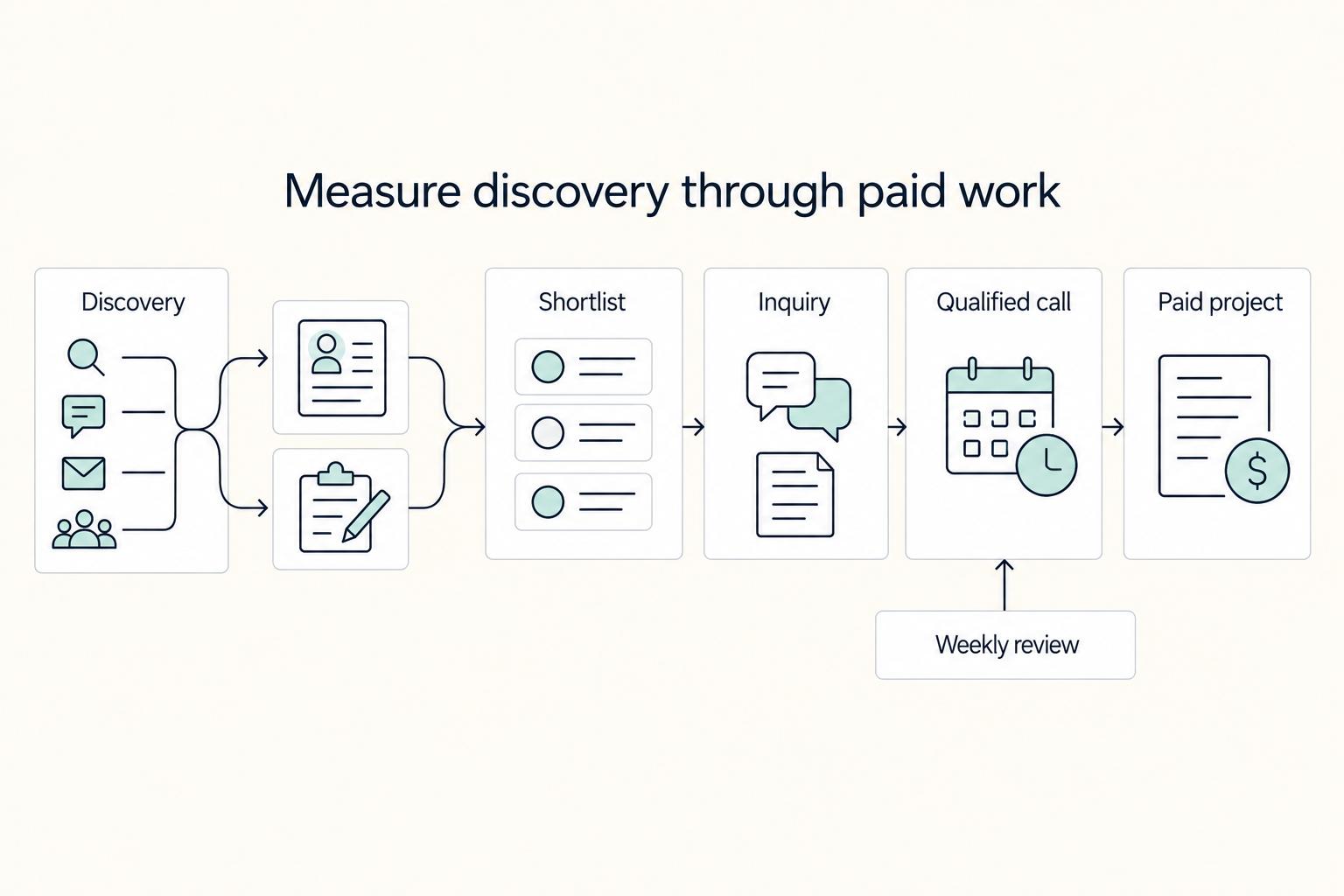
Dribbble activity only matters when it turns into paid work. Define the funnel before you measure it, or tracking becomes reactive and fragmented.
Step 1. Track each inbound in one sheet or CRM#
Map named stages instead of one blended "lead" bucket. A practical map is:
Freelance/Freelancer discovery -> Designers shortlist -> inquiry via Get in touch or Project Brief -> qualified call -> paid project
Track each inbound in one sheet or CRM with: source surface, requested service/category, stated scope, budget or timing signal, and current status. If you rotate offer copy, log which listing the buyer likely saw so you can compare how different commercial cues affect inquiry quality.
Verification point: after one review cycle, you can answer "Where did this inquiry come from?" without guessing.
Step 2. Set stage checks that show where conversion breaks#
Set stage checks so you can see where conversion breaks.
- Profile view -> inquiry quality: judge fit, not just volume.
- Inquiry -> call acceptance: use a clear acceptance rule for category fit, commercial fit, and priceability.
- Call -> paid project: track whether qualified calls become paid work, or at least a paid first step.
If your profile has Get in touch, keep that lane separate from platform-assisted or brief-intake lanes. Different entry points often bring different expectations, and blended reporting hides that.
Verification point: within a week, each inquiry should be marked as low-fit reject, accepted to call, or advanced to a paid next step.
Step 3. Review weekly and separate speed from value#
Review weekly and separate speed from value. If your own data shows Instant Match closes faster but at lower average project value, keep it as a speed lane while protecting margin in your direct profile lane.
| Failure point | What it usually means | One corrective action |
|---|---|---|
| High views, low inquiries | Discovery is happening, but proof and offer are not converting intent | Rewrite top offer for clearer category, outcome, and scope |
| Many inquiries, low fit | Wrong buyer or request type is being attracted | Tighten Shots category signals and add clearer exclusions in the offer |
| High fit, slow close | Commercial next step is unclear | Use a named package, paid diagnostic, or clearer proposal step |
Keep the review simple but explicit: when results flatten, you should know whether to fix discovery, qualification, or closing. This pairs well with How to Use the StoryBrand Framework for Your Freelance Website.
Price and scope engagements without margin drift#
Protect margin in the proposal, not just in the rate. Most margin drift starts when scope is loose, so set scope boundaries before you quote.
Step 1. Define scope by category before pricing#
Define scope by category before pricing. Dribbble's guidance on app project failure is clear: vague goals and loosely defined requirements drive scope creep, shifting priorities, and budget or focus issues.
For Web Design and Product Design, use named milestones with approval points instead of one blended project fee. A practical sequence is discovery, concept direction, production design, and handoff. For each milestone, define the output, one approval checkpoint, and what happens if requirements change. If you cannot list goals, requirements, and deliverables on one page, do not price the full build yet.
For Logo & Branding, keep the package boundary explicit on the page. A logo file is not the same as a full brand identity system, so list inclusions and exclusions clearly before the first call.
Step 2. Start with a paid diagnostic when leads are uncertain#
If lead quality is uncertain, start with a paid diagnostic. Use it when goals are vague, the roadmap is unclear, or validated needs are mixed with assumptions.
The diagnostic should produce the brief needed for scoped pricing: goals, constraints, priority screens or flows, decision-makers, and a milestone map for the next phase. If a buyer asks for fixed pricing but will not fund definition work, treat that as scope and margin risk.
Step 3. Choose the delivery model by execution risk#
Choose delivery model by execution risk, not by label. Do not assume solo Designers or Agencies are inherently better; compare response speed, revision risk, and continuity first, then structure the proposal around collaboration load.
| Decision point | Verify with solo Designers | Verify with Agencies | Proposal adjustment |
|---|---|---|---|
| Response speed | Who replies when the designer is booked or offline | Who owns day-to-day communication | Add response expectations and approval windows |
| Revision risk | How many review rounds one person can absorb | How feedback is consolidated across roles | Cap rounds and define change requests |
| Capacity continuity | What happens if availability changes mid-project | Whether staffing can continue through handoff | Tie payment to milestones, not calendar time |
Headline price alone is weak guidance. Dribbble's agency pricing examples range from $10,000 to over $150,000, and similar web projects can still receive very different quotes. Anchor scope and pricing to the collaboration reality: approvals, handoffs, and expected change after kickoff. Related: The Best Cross-Platform Password Managers for a Freelance Team.
Connect hiring flow to payment operations and controls#
Once work is awarded through Dribbble, lock the payment structure before delivery starts so billing follows agreed terms instead of ad hoc decisions.
Step 1. Set invoice triggers by pricing model at award stage#
Set invoice triggers by pricing model at award stage, not at kickoff. Dribbble's pricing guidance highlights three common models, and each needs a different approval path: retainer, project-based, and hourly.
| Pricing model | Trigger | Verify before invoicing | Common failure mode |
|---|---|---|---|
| Retainer | Fixed monthly invoice on a named billing date | Start date, monthly fee, coverage period | Work continues while the next month is still unapproved |
| Project-based | Invoice on milestone approval | Written output, approval record, change log | "Almost done" work is billed without clear acceptance |
| Hourly | Invoice on a fixed cadence with approved time records | Rate, tracked hours, approver | Hours are logged without billable approval |
Use the exact model terms in the award record. For example, Dribbble defines project-based as a defined scope with a fixed price, and cites typical ranges of $15,000 to $150,000, so invoicing should follow scope acceptance rather than elapsed time.
Step 2. Handle payment controls in your own finance stack#
Handle payment controls in your own finance stack, even if hiring starts quickly on Dribbble. A practical gate sequence is vendor onboarding complete, contract entity matches invoice entity, and milestone acceptance before payment approval.
If your billing tools support retry controls and status logs, use them for failed charges or payout retries to reduce duplicate-payment risk. Keep an audit trail with who approved, what was approved, and when status changed.
Also track promotions separately in reporting. Dribbble pages advertise 20% off a first payment (up to $100) for some design and development services, so record gross contract value, discount, and net cash distinctly.
Step 3. Standardize payout evidence across every designer and milestone#
Standardize payout evidence across every designer and milestone so reconciliation does not break as volume increases. Finance overhead usually rises first when each engagement follows a different proof format.
For each payout, keep: designer name, client or project ID, pricing model, milestone or time period, approval date, invoice number, amount, and exception notes (for example refund, hold, or revised scope). The control check is simple: every payout should map to one approved milestone or one approved billing period. As hiring mix shifts across freelancer, agency, or in-house paths, Dribbble frames the tradeoff as cost, speed, flexibility, and long-term ownership, and your payment operations should reflect that handoff complexity.
Related reading: How to Calculate a Freelance Rate You Can Actually Get Paid On.
Avoid the common mistakes that make Dribbble look worse than it is#
Dribbble usually looks "bad" when teams rely on weak hiring signals, not when they run a disciplined selection process.
| Mistake | What the text warns | Practical check |
|---|---|---|
| Treating portfolio engagement as proof of business fit | Portfolio engagement is visibility, not proof of business fit | Review work against the audience you are actually trying to hire for |
| Confusing polished visuals with execution depth | An impressive portfolio can mask technical gaps | Ask for relevant examples with enough context on scope |
| Leaving scope vague | Unclear project definition can lead to scope creep | Document goals, features, timelines, and responsibilities before work starts |
| Separating hiring decisions from payment operations | Weak quality checks create downstream finance noise | Document who approves fit, what gets approved, and when payment is allowed to move forward |
Step 1. Ask whether the work is relevant to your audience#
Treat portfolio engagement as visibility, not proof of business fit. Dribbble's portfolio guidance warns against "forgetting the user" and calls out different audiences, including hiring managers, recruiters, and freelance clients. Review the work by asking whether it is relevant to the audience you are actually trying to hire for.
Step 2. Ask for relevant examples with enough scope context#
Do not confuse polished visuals with execution depth. Dribbble's hiring guidance explicitly warns that an impressive portfolio can mask technical gaps. Ask for relevant examples with enough context on scope so you can judge whether the work matches your needs.
Step 3. Document goals, features, timelines, and responsibilities before work starts#
Define scope early and concretely. Dribbble's hiring article links unclear project definition to scope creep, so document goals, features, timelines, and responsibilities before work starts. If those basics are vague, quality, delivery, and cost control usually degrade together.
Step 4. Keep hiring decisions and payment operations connected#
Keep hiring decisions and payment operations connected. Dribbble notes that some projects fail due to poor hiring decisions, and those decisions create downstream finance noise if quality checks are weak. Document who approves fit, what gets approved, and when payment is allowed to move forward.
For a step-by-step walkthrough, see Font Licensing for Freelance Designers in Client Work.
Conclusion#
Treat Dribbble like a channel you test, not a story you tell yourself. The closing rule is simple: stronger signals should lead to better inquiries, better inquiries should lead to paid work, and paid work should still hold up after you account for delivery and admin time. If you cannot prove that chain with your numbers, do not scale based on profile activity alone.
Step 1. Confirm the work you want to be known for#
Confirm the exact work you want to be known for, then match your offer to it clearly in your profile. The checkpoint is blunt: a buyer should be able to tell in under a minute what you do, who it is for, and what they can ask you to do next.
The practical failure mode is publishing broad creative work while selling a narrow service. That can create browsing without fit. Dribbble is described as a place to share work, look for inspiration, and find work, and that mix can blur positioning if you do not separate portfolio appeal from what you actually sell.
Step 2. Show the finished work you want inquiries for#
Publish portfolio pieces that act as proof, not decoration. Dribbble is framed as a visual showcase of finished work, so use that deliberately: show the kind of finished, polished work you want inquiries for. If you want UX work, do not let your most visible examples point buyers toward unrelated work.
Your verification detail here is simple: review your recent visible pieces and ask whether they support one clear commercial story. If they do not, the profile may still look strong while producing weak leads. That is why teams can misread Dribbble as "working" when it may only be generating attention.
Step 3. Set conversion checkpoints before the first inbound arrives#
Set conversion checkpoints before the first serious inbound arrives. Track at least three moments: inquiry quality, call acceptance, and movement to a paid project or paid diagnostic. Keep claims conservative where data is unknown; public material supports that companies do hire freelance designers, but it does not support benchmark conversion rates or ROI.
A good evidence pack for each lead is lightweight but consistent: source, requested service, fit notes, discovery notes, proposed scope, and whether the opportunity reached paid work. Without that record, you cannot tell whether the issue is your positioning, your follow-up, or the market.
Step 4. Define payout handling, then run a bounded pilot#
Define your own payment and payout handling before volume shows up, then run a bounded pilot. Dribbble's freelance guidance, last updated Mar 11, 2024, supports freelancing as a real path for some designers, but it does not validate your back-office process. So decide invoice timing, approval points, and exception handling on your side first.
Run the pilot for a fixed window or fixed number of leads, review results, and expand only if the economics still make sense after delivery effort. That is the closeout checklist in practice: clear positioning, clear offer, proof-centered portfolio work, measured checkpoints, payment readiness, then scale.
Frequently Asked Questions
Is Dribbble better for portfolio visibility or direct client acquisition?
From the public material in this section, Dribbble is clearly a visibility surface: Shots are a public portfolio surface, while public pages here do not disclose verified conversion rates. If you cannot point to qualified inquiries, calls, or signed work, treat it as exposure first, not proof that the platform is driving revenue.
How do freelance designers actually get hired through the `Designers` directory?
The public guidance here does not publish verified shortlist criteria for the Designers directory. What Dribbble does emphasize is clear business definition and positioning: define what your business is, choose a niche, and avoid being so broad that execution bogs down early. A useful checkpoint is whether a buyer can tell quickly what you do, for whom, and what happens after they click through.
Which profile signals matter most: `PRO`, reviews, completed projects, response speed, or `Services` pricing?
Start with what you can verify: relevant work samples and clear offer packaging. PRO, reviews, and completed-project history may affect perception, but they are not quality guarantees in the material provided here. If you are buying, ask for closely related examples plus discovery answers, because Dribbble’s guidance frames early questioning as the heartbeat of a project.
When should I use `Project Brief` or `Instant Match` instead of waiting for organic profile inquiries?
Use them as a controlled test lane, not as proof of predictable outcomes. Instant Match performance and reliability are not verified, so define scope and approval criteria first, then keep the project narrow enough to judge fit. A practical failure mode is using matching tools before requirements are clear, then blaming the channel for weak lead quality.
How should buyers shortlist between individual `Designers` and `Agencies`?
Choose based on scope complexity and continuity needs, not assumed prestige. Public material here does not provide agency-vs-individual win-rate data, so use the same evaluation standard in both cases: relevant examples, clear responsibilities, and how discovery will be handled before design starts.
What can’t I reliably conclude from public Dribbble pages about fees, conversion rates, or ROI?
You cannot reliably infer platform fees, take rates, payout policy, or a dependable ROI model from the public material in this section. You also cannot prove that PRO, reviews, directory presence, Project Brief, or Instant Match will convert at any specific rate. The practical rule is simple: measure your own funnel, because a freelancer’s role includes business operations too, from marketing to issuing invoices, not just design execution.
Try a related tool
Researched and edited by the Gruv editorial team. Gruv builds cross-border billing, payouts, and finance-operations software for global businesses.
Sources
Includes 2 external sources outside the trusted-domain allowlist.
Related Posts

The Best Project Management Tools for Freelance Designers
Start with [operating rules](https://www.asyncagile.org/blog/project-management-not-just-for-project-managers), then pick the interface. If scope, ownership, approval rights, and timeline checkpoints are vague, even a clean board becomes a status mirror instead of a delivery engine.

The Best AI Image Generators for Freelance Designers
For paid client work, a shortlist is usually safer than chasing a single tool labeled best. Tool fit depends on the brief, and cost, output quality, and licensing clarity can shift across options.

Webflow for Freelance Designers Who Want Predictable Client Work
If you want **webflow for freelance designers** to pay like a business rather than a string of one-off builds, you need three things working together: a way to accept only the right projects, a repeatable delivery path, and controls for the moments when scope and risk start drifting. By the end of this guide, you should have a practical way to qualify leads faster, run one clear approval path, and reduce the chance of mid-project expansion quietly hurting your margin.