
Quick Answer
Use Make.com to automate your freelance agency by building risk-control workflows, not just time-saving tasks. Start with client onboarding checks, write approvals and documents to one central audit trail, trigger invoices from real billing events, and route unclear cases to a human reviewer. The goal is correct, provable, repeatable operations that protect revenue.
Why "Saving Time" is the Wrong Goal (And How to Buy Certainty Instead)#
If you judge automation by minutes saved, you will choose the wrong projects. In Make, the real win is not shaving ten minutes off admin. It is preventing the expensive miss: a client dispute, a missing approval before delivery, or a filing gap that becomes a problem later. Faster is nice. Correct, provable, and repeatable is what protects revenue.
That distinction matters because manual work fails in predictable places. A missed filing, a mishandled contract, or a weak approval trail can cost far more than the time you saved. The better return is operational certainty. If one deliverable dispute can lock up $10,000 for six months, that is the return metric that matters.
| Measure | Efficiency view | Certainty view |
|---|---|---|
| Focus | Speed | Correctness and risk mitigation |
| Trigger | Repetitive admin pain | A known failure point |
| Controls | Auto-fill, copy, send | Verification, central logging, required checks |
| Business outcome | Marginal productivity gains | Reduced compliance and financial risk |
Use a certainty scorecard before you build anything. A scenario that fails these checks is usually too shallow to matter:
- Proof trail: Can you show a central audit trail for signatures, approvals, and key client actions?
- Compliance step: Does the process verify business details such as VAT IDs, or add required invoice text like the Reverse-Charge clause for EU clients?
- Risk test: Does this workflow reduce a known failure point, not just save a few minutes?
Use this checkpoint before you build: if you cannot name the log, the compliance check, and the failure point being reduced, you are still buying speed, not certainty. That logic carries through the rest of the article. Onboarding controls, audit-trail integrity, and cash-flow protection are not separate projects. They are one operating model.
For a step-by-step walkthrough, see How to use 'Airtable Automations' to simplify your agency's workflow.
Pillar 1: Run onboarding checks before work, contracts, or billing#
Treat onboarding as a risk-control gate, not a setup task. Before work, contracts, or billing move forward, your process should confirm business details, log the result, and route the client to the right next step.
| Area | Basic onboarding automation | De-risking onboarding system |
|---|---|---|
| Trigger | Lead submits a form | Lead submits a form, then checks must clear before progression |
| Checks | Contact details only | Business-detail verification, VAT ID check when relevant, required document status, risk flags |
| Evidence captured | Form timestamp | Validation outcome, reviewer/action owner, document status, approval events in a central audit trail |
| Decision outcome | Create project and send welcome email | Route to vetted, pending documents, or manual review |
-
Verify business details before commitment. Collect the details you need for contracts and billing, then run required checks, including VAT ID verification when relevant, before contract creation or kickoff.
-
Write results to one source of truth and gate next actions. Log pass/fail/not-applicable in your CRM or master log, then route automatically: vetted moves forward; failed or incomplete goes to manual review.
-
Automate required tax-document handling where applicable. If you use country-based form routing, for example, W-9 or W-8BEN, automate request, signature collection, reminders, and status updates so missing documents are visible and traceable.
-
Triage red flags with explicit escalation paths.
- Identity risk: mismatched or unverified business details. Action: pause and request supporting documentation.
- Payment risk: missing billing details, unusual payment requests, or deposit pushback. Current payment threshold is pending finance, contract, or source-record verification. Action: require prepayment or finance review before kickoff.
- Scope risk: unclear approver or pressure to start without signed scope. Action: no scheduling until scope and approver are documented.
The tradeoff is simple: basic intake saves a few clicks; de-risking onboarding lowers error and liability exposure by creating a clear, auditable decision trail from day one.
If you want a deeper dive, read Value-Based Pricing: A Freelancer's Guide.
Pillar 2: The Compliance Engine (Automating Your Indisputable Audit Trail)#
Once a client is vetted, your next job is evidence. You are building a record you can retrieve quickly for filing checks, audits, or disputes, not a pile of app activity logs.
Before you start#
Use one evidence register and lock it down. A single Airtable base or database table works if every row includes event type, actor, source system, timestamp, client/project reference, evidence link, and status. This is an operating schema, not an IRS-required format.
Design it as append-first, restrict edits, and limit access to people who need to review or approve evidence.
| Record type | Tool execution logs | Business-grade audit trail |
|---|---|---|
| Ownership | Usually controlled by the app vendor | Controlled by you |
| Retention | Usually tied to plan limits or tool defaults | Set by your storage and policy |
| Portability | Often fragmented across tools | Evidence links and metadata remain portable |
| Dispute readiness | Shows a tool ran | Shows what happened, who acted, and where proof lives |
Capture events as they happen#
Log events when they happen, not at month end. Typical events include contract signatures, invoice sends, payment receipts, milestone approvals, tax-form receipts, and travel/account events that may affect FEIE or FBAR review.
If you track FEIE with the physical presence test, capture travel evidence against the 330 full days in 12 consecutive months rule. A full day is 24 consecutive hours from midnight to midnight. For each trip entry, you should be able to open the timestamped source and confirm whether the day counts. If days are missing or counted incorrectly, reasons like illness or vacation do not change that result.
Store proof, not just status#
A status alone is weak evidence. Each logged event should link to its artifact: signed PDF, message snapshot/export, invoice copy, receipt image, or bank notice. Store the file in a client or tax-year folder, then write the stable link back to the register.
| Topic | Article note |
|---|---|
| FBAR workflow design | Confirm the current FBAR filing criteria from the official source. |
| FBAR record retention | Confirm the current FBAR record-retention requirement from the official source. |
| FBAR filing | Filed electronically through the BSA e-filing system |
| FEIE filing | You still file a U.S. return and report the income |
| Housing exclusion | Record that interaction because it reduces income available for FEIE |
Keep filing checkpoints grounded: FBAR is filed electronically through the BSA e-filing system. For FEIE, you still file a U.S. return and report the income. If you also claim a housing exclusion, record that interaction because it reduces income available for FEIE.
Build retrieval for approvals and disputes#
Design retrieval around the moment facts are challenged. Use one chain of custody for client approvals:
| Step | What to do |
|---|---|
| Trigger | Trigger an approval event when an email approval, portal approval, or signed change request arrives |
| Snapshot | Snapshot the message as received, including sender and timestamp |
| Archive | Archive the related file in the project folder and link it to the same register row |
| Sync | Sync project status only after the evidence link exists |
| Queue exceptions | Queue verbal approvals, forwarded emails, and missing attachments for manual review |
Checkpoint: can you answer "who approved what, when, and from where?" from one evidence trail without searching multiple tools? If not, your audit trail is incomplete.
Related: Automating Your Freelance Finances: A Guide to Tools and Workflows.
Pillar 3: Run billing and collections as a control system#
Your billing system is a risk-control system. Every manual step between "work approved" and "cash received" increases the chance of stalled cash, record drift, or a dispute that can lock up revenue for months.
Use the same control standard you used for audit trails: no invoice without a traceable trigger, no reminder without an owner, and no invoice marked paid until your records align.
Before you start#
Keep one financial register, or finance fields in your existing register, with tight permissions. At minimum, track: invoice ID, client record link, milestone or contract reference, receivable status, paid status, aging bucket, payment method, amount due, amount received, due date, source links, and variance flags.
Assign one human owner for exceptions. That owner handles stalled sends, clause decisions, and collections handoffs when automation cannot safely decide.
Trigger invoices from a billing event, not from memory#
Treat invoicing as a compliance workflow, not a one-click send:
| Step | Control |
|---|---|
| Milestone trigger | Start from a real event such as an approved milestone, retainer renewal, or signed change request |
| CRM pull | Pull the current client record and billing entity details |
| Jurisdiction and client-type checks | Run the rule check before invoice creation |
| Tax language insertion | Insert required language, including Reverse-Charge where applicable |
| Exception queue | If required facts are missing, stop the send and route for official or policy-source verification before invoice creation |
Verification checkpoint: each sent invoice should store the clause decision, the CRM record used, and the link to the trigger event. Common failure mode: a status change fires an invoice while billing contact, entity, or tax treatment is outdated.
Define collections as an escalation framework with owners and handoffs#
A single overdue email is not collections governance. Use stages with four required fields: trigger, message intent, owner, handoff rule. The current escalation interval must be verified from finance, contract, or policy records before use.
| Stage | Trigger | Message intent | Owner | Handoff |
|---|---|---|---|---|
| 1 | Approaching due status | Reminder | Automation from billing mailbox | Handoff if variance flag already exists |
| 2 | Overdue status | Firm follow-up with invoice copy and payment method details | Automation or finance admin | Handoff if client raises billing dispute |
| 3 | Continued overdue status | Formal escalation to appropriate contact | Named human reviewer | Handoff to founder/account lead for material risk |
| 4 | Unresolved nonpayment | Direct intervention and decision | You | Handoff becomes a business decision, not another automated email |
Log every reminder, reply, and handoff in your central audit trail. Otherwise, you risk chasing already-paid invoices because tools are out of sync.
Build a cash view that reconciles status, not just totals#
Keep the dashboard narrow. Too many metrics hide decisions instead of supporting them.
| Control area | Basic invoice automation | Financial control system |
|---|---|---|
| Compliance handling | Fills invoice fields | Checks client record and jurisdiction, inserts required language, or routes to exception |
| Collections governance | Sends generic reminders | Uses defined escalation stages with trigger, intent, owner, and handoff |
| Cash visibility | Shows sent/paid invoices | Tracks receivable status, paid status, aging bucket, payment method, and variance flags |
Use clear reconciliation logic across systems:
- Accounting tool: invoice amount, due date, official receivable status.
- Payment processor: attempted, succeeded, failed, or refunded payment state.
- Bank feed: confirmation that cash actually landed.
If these disagree, raise a variance flag instead of forcing a "paid" status. Useful flags include processor paid but no bank match, bank deposit with no linked invoice, partial payment, duplicate payment, and manual-close cases.
If you are six months behind on bookkeeping or your reports contain many errors, fix records first. Automation on unreliable data increases risk.
Run a weekly control check before small gaps become cash risk#
Run a short weekly review focused on scenario health, failures, and overrides:
- Review failed scenario runs, skipped invoices, and exception queue items.
- Check manual overrides and confirm who approved each one.
- Scan aging buckets for invoices that should have escalated but did not.
- Reconcile new processor payments with bank receipts and invoice records.
- Clear or document every variance flag.
- Confirm no active reminder sequence exists on an already resolved invoice.
We covered this in detail in How to Create a Standard Operating Procedure (SOP) for Your Freelance Tasks.
Connect onboarding, compliance, and finance into one traceable system#
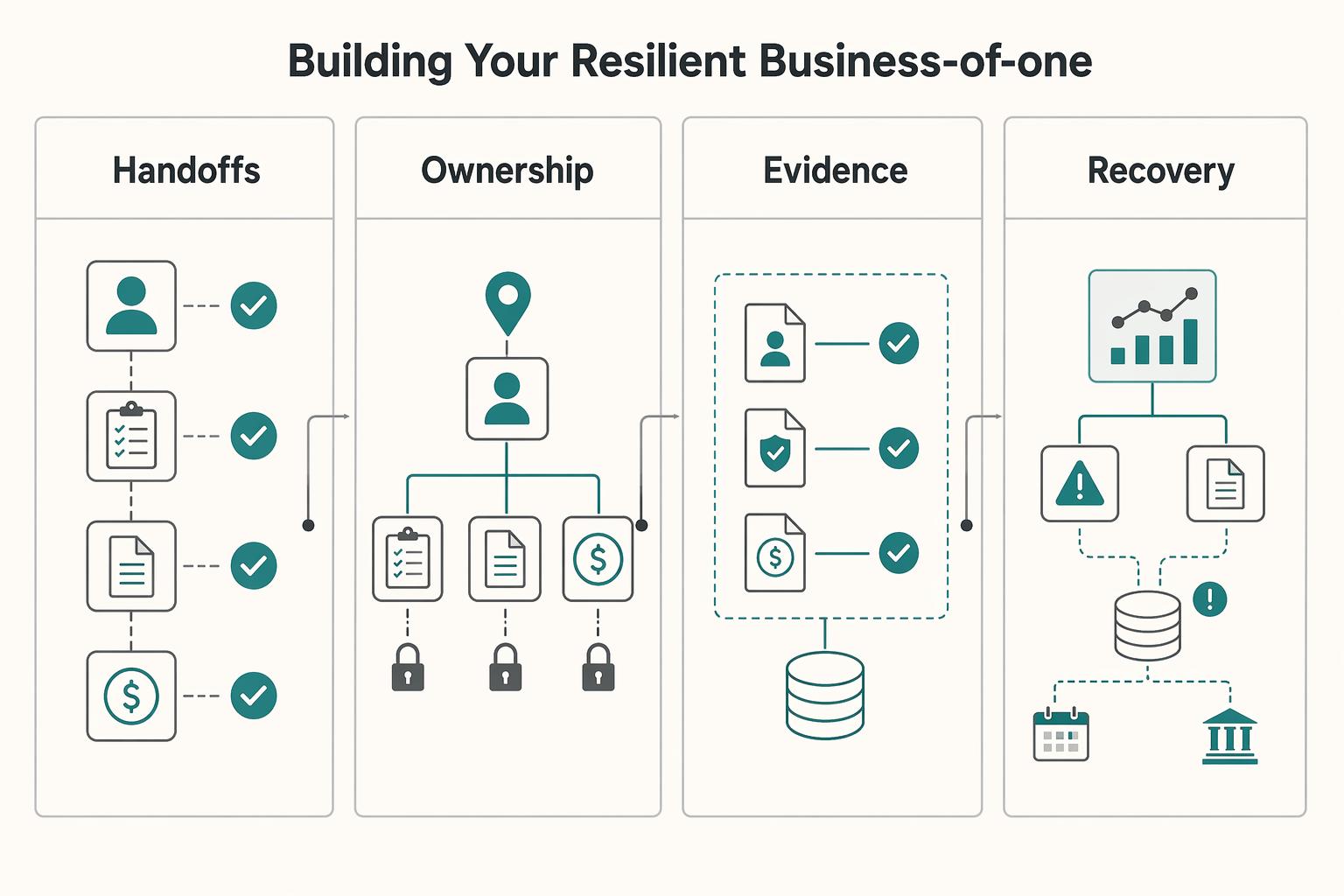
Your onboarding, compliance, and finance workflows need to run as one system, not as separate automations. The goal is not more activity in Make.com; it is lower operational risk through ordered, traceable execution.
In practice, that means client checks run before work starts, key approvals and documents are written to a central audit trail, and later invoice or payment actions follow the same client record.
| What you can verify | Operator mode | Orchestrated mode |
|---|---|---|
| Handoffs | You re-enter client details across intake, documents, and billing | One client record ID is reused across intake, approval, and invoicing |
| Ownership | Exceptions wait in a general inbox | Failed or unclear cases route to a named reviewer with a timestamp |
| Records | Contract and approval evidence is scattered across tools | One central audit trail logs contract signatures and client approvals |
| Recovery | You manually check multiple apps to find a break | Scenario history and real-time flow visibility show the blocked step quickly |
What to do next#
- Review your current chain in order. In each scenario, confirm the trigger, exception owner, and evidence link.
- Fix the highest-risk manual step first. Start where a miss creates meaningful damage, not cosmetic reminders.
- Set a recurring workflow health check in Make.com. Use scenario history and visual flow checks to catch blocked or fragile steps early.
Keep this practical: resilience means your process still works when you are busy, unavailable, or under client pressure. This structure supports professional credibility, steadier delivery, and controlled growth without overpromising outcomes. You might also find this useful: How to Use Zapier to Connect Your Freelance Tech Stack.
Frequently Asked Questions
How do I automate client compliance checks with Make.com?
This is a cornerstone of de-risking your business. You can build a powerful workflow that connects your client intake form (like Typeform) to external validation services. 1. Trigger: The scenario starts when a new form is submitted. 2. Action: Make.com takes the client’s registered business number or VAT ID from the form. 3. Validation: It then uses a built-in app or an HTTP module to send that data to an official registry's API, like the European Commission’s VIES for EU clients. 4. Routing: Based on the "valid" or "invalid" response, a router directs the workflow. A valid ID updates the client's profile in your CRM to "Vetted." An invalid ID can trigger a notification to your Slack or email, flagging the client for manual review before you proceed.
Can Make.com create a verifiable audit trail for my business?
Absolutely. While Make.com has a built-in execution history, creating your own independent and permanent audit trail is the superior strategy. You can architect a "logging" scenario where critical workflows—contract signed, invoice sent, payment received, milestone approved—all send a standardized data package (e.g., Client Name, Action, Timestamp, Value) to a central and immutable log, such as a dedicated Google Sheet or an Airtable base. This creates a single source of truth for your entire business history, independent of any single tool.
What are the best Make.com scenarios for financial risk management?
Financial risk management is about control and foresight. The three most impactful scenarios are: 1. Intelligent Invoicing: This goes beyond just creating an invoice. It involves automated checks for client location (e.g., EU B2B) and dynamically inserting legally required text like "Reverse-Charge" to mitigate tax and compliance risk. 2. Automated Collections Escalation: A multi-stage chase sequence that politely but firmly escalates from a pre-due date reminder to a final notice. This protects your cash flow by ensuring overdue invoices are never forgotten. 3. Real-Time Cash Flow Dashboard: This scenario connects your payment gateways and accounting software to a central dashboard (like a Google Sheet). It provides an immediate, always-on view of accounts receivable vs. cash on hand, eliminating financial blind spots.
How can I automate W-8BEN and W-9 collection for new clients?
This is a perfect example of automating a critical compliance task. A Make.com workflow can connect your onboarding system to a digital signature platform like DocuSign or HelloSign. Your intake form should ask for the client's country of business registration. A router in your scenario checks this field. If the country is "United States," it triggers a workflow that sends a W-9 form. If it is any other country, it sends the W-8BEN form. The scenario can then monitor the signature platform for the completed document, automatically download the signed PDF, and file it in the client's dedicated folder in your Google Drive or Dropbox.
Is Make.com secure for handling sensitive client and financial data?
Yes. The platform is built on a secure infrastructure and adheres to top-tier industry standards. Make is SOC 2 Type II audited, a rigorous examination of its security controls. It is also GDPR compliant, offering robust data protection in line with EU regulations. Data is encrypted both in transit (using TLS 1.2/1.3) and at rest (using AES-256), and its infrastructure is hosted on secure Amazon AWS EC2 private instances. This enterprise-grade security foundation is designed to handle sensitive data responsibly.
Can I use Make.com to automatically check an EU client's VAT ID?
Yes, and it is surprisingly straightforward. The European Commission provides a free API service called VIES for validating VAT numbers. Within your Make.com scenario, you can use a pre-built VIES API app or the universal HTTP module to make a direct request to the VIES endpoint. You simply pass the client's country code and VAT number to the API, and it returns a response indicating whether the number is valid. This allows you to build a fully automated, reliable check into your client onboarding workflow.
Researched and edited by the Gruv editorial team. Gruv builds cross-border billing, payouts, and finance-operations software for global businesses.
Sources
Includes 4 external sources outside the trusted-domain allowlist.
- clame.nyu.edu/virtual-library/E0245G/311371/Plc%20For%20Du...trusted
- irs.gov/individuals/international-taxpayers/foreign-...trusted
- irs.gov/individuals/international-taxpayers/figuring...trusted
- uscode.house.gov/view.xhtmltrusted
- beanninjas.com/blog/agency-accounting-guideexternal
- community.make.com/t/hiring-a-make-expert-freelance-full-time/1...external
- dti.domaintools.com/category/researchexternal
- experiment.com/projects/pfncfdbbuiuwvottvrig/protocols/1893...external
Educational content only. Not legal, tax, or financial advice.
Related Posts

Value-Based Pricing for Freelancers Under Real Payment Risk
Value-based pricing works when you and the client can name the business result before kickoff and agree on how progress will be judged. If that link is weak, use a tighter model first. This is not about defending one pricing philosophy over another. It is about avoiding surprises by keeping pricing, scope, delivery, and payment aligned from day one.

Automating Freelance Finances Without Losing Cashflow Control
You can [automate freelance finances](https://solofinancehub.com/blog/how-to-automate-freelance-finances) and still keep control over key cash decisions. The practical target is simple: automate repetitive admin, then keep human approval for higher-risk exceptions.
Use Zapier to Run a Reliable Freelance Tech Stack
If your stack feels messy, the fix is usually not one more app. Zapier works best here as the connective layer in your business, so client work, paperwork, invoicing, and follow-up keep moving without you babysitting every handoff.