
Quick Answer
Choose a password manager for freelance team operations only if it supports your three-tier workflow: private owner-only credentials, client-isolated internal vaults, and a contractor airlock with limited access. Then enforce least privilege, review memberships on a fixed cycle, and remove access at project closeout. The right tool is the one you can operate consistently, prove through event records, and recover without improvising.
The Credential Protocol: Written Rules and a Three-Tier Structure#
A password manager by itself gives you secure storage. It does not give you a clear rule for ownership, access, approval, or removal. A credential protocol does. It is the written operating rule for who owns credentials, who can see them, how access is granted, and how it is removed when work ends.
That distinction matters as soon as you stop working entirely alone. Password managers are still useful because they replace plaintext notes with stronger storage. But they still depend on a protected login, and a tool-only setup can break down operationally when client accounts, temporary contractors, or rushed offboarding enter the picture.
The practical model is a three-tier structure.
- Tier 1: Personal Command Center
Purpose: hold your root accounts like primary email, billing, and admin credentials. Boundary rule: never share this tier. Risk contained: if a client vault or contractor account is exposed, your business control layer is still isolated. This is least privilege at its strictest.
- Tier 2: Internal Operations Layer
Purpose: store the credentials your business uses to deliver work. Boundary rule: grant only the minimum needed for assigned tasks. Risk contained: privilege creep across clients or projects. This is where separation of duties starts to matter, so the person doing delivery should not also inherit every admin permission by default.
- Tier 3: Secure Airlock
Purpose: give outside collaborators limited access without exposing your inner layers. Boundary rule: keep access narrow and easy to revoke. Risk contained: lingering access after a project ends. In 1Password for teams, guest access can be limited to a single vault. In Bitwarden, collections let you scope access to only required shared items.
| Decision area | Tool-first password storage | Protocol-driven operations |
|---|---|---|
| Ownership | Can become mixed or person-based | Named owner per tier or vault |
| Access control | Shared broadly for convenience | Least privilege by role, vault, or collection |
| Offboarding | Manual, easy to miss | Disable accounts no longer tied to a valid user and remove access immediately |
| Audit readiness | Logs may exist but go unread, and may be insufficient alone for formal audits | Access changes are reviewed; timestamped records are checked, not just stored |
Use one checkpoint to see whether you actually have a protocol. Review access on a set interval, confirm every account still maps to a current person, and inspect event records for unexpected sharing or sign-in changes. If you cannot explain who still has access to a client vault, you do not have a protocol yet. What follows turns that into a working setup for your personal core, your internal sharing, and your external collaborator access.
Tier 1: Keep Your Owner-Only Credentials Private and Recoverable#
Tier 1 is your security foundation: if this layer is not private and recoverable, every other layer is easier to break. Because password handling and sharing affect the security of the people and systems you work with, keep this tier personal by design.
| Area | Rule | Operational note |
|---|---|---|
| Master passphrase | Use one master passphrase for Tier 1 only; keep it unique and never share it | Make sure you can reliably recall it without depending on another account |
| Recovery | Create the provider's recovery record and store an offline copy with critical business records | Keep recovery channels current and run periodic recovery practice |
| Boundary | Tier 1 holds only owner-only credentials that control or recover the business account stack | If a credential could be needed by a teammate, contractor, or client workflow, move it to Tier 2 or Tier 3 |
| Baseline controls | Enable multifactor security and prefer the most phishing-resistant option the provider supports | Protect the devices that can open Tier 1 and document changes to devices or recovery methods |
Master passphrase checklist (practical, not optional):
- Use one master passphrase for Tier 1 only.
- Keep it unique and never share it.
- Make sure you can reliably recall it without depending on another account.
- Before finalizing your policy, verify your provider's current 2026 guidance for passphrase length and entropy.
Recovery workflow (keep the "Emergency Kit" concept, verify naming):
- Create your provider's recovery record for this account.
- Store an offline copy with your critical business records.
- Keep recovery channels current so the record stays usable.
- Run periodic recovery practice so you can recover access without guessing.
- If your provider no longer uses "Emergency Kit," verify the current vendor terminology before updating your internal policy.
Boundary policy for Tier 1 vs collaboration tiers:
- Tier 1 holds only owner-only credentials that control or recover the business account stack.
- If a credential could be needed by a teammate, contractor, or client workflow, it does not belong in Tier 1 and should move to Tier 2 or Tier 3.
Baseline controls to harden Tier 1:
- Enable multifactor security on the Tier 1 account.
- Prefer the most phishing-resistant option your provider currently supports, and verify setup details in current docs.
- Protect the devices that can open Tier 1 and keep account recovery settings current.
- Document your setup so changes to devices or recovery methods are tracked.
Use this checkpoint before moving on: can you explain why each Tier 1 credential is owner-only, and recover access without improvising? If not, fix Tier 1 first. This pairs well with our guide on The 'Barbell Strategy' for a freelance career.
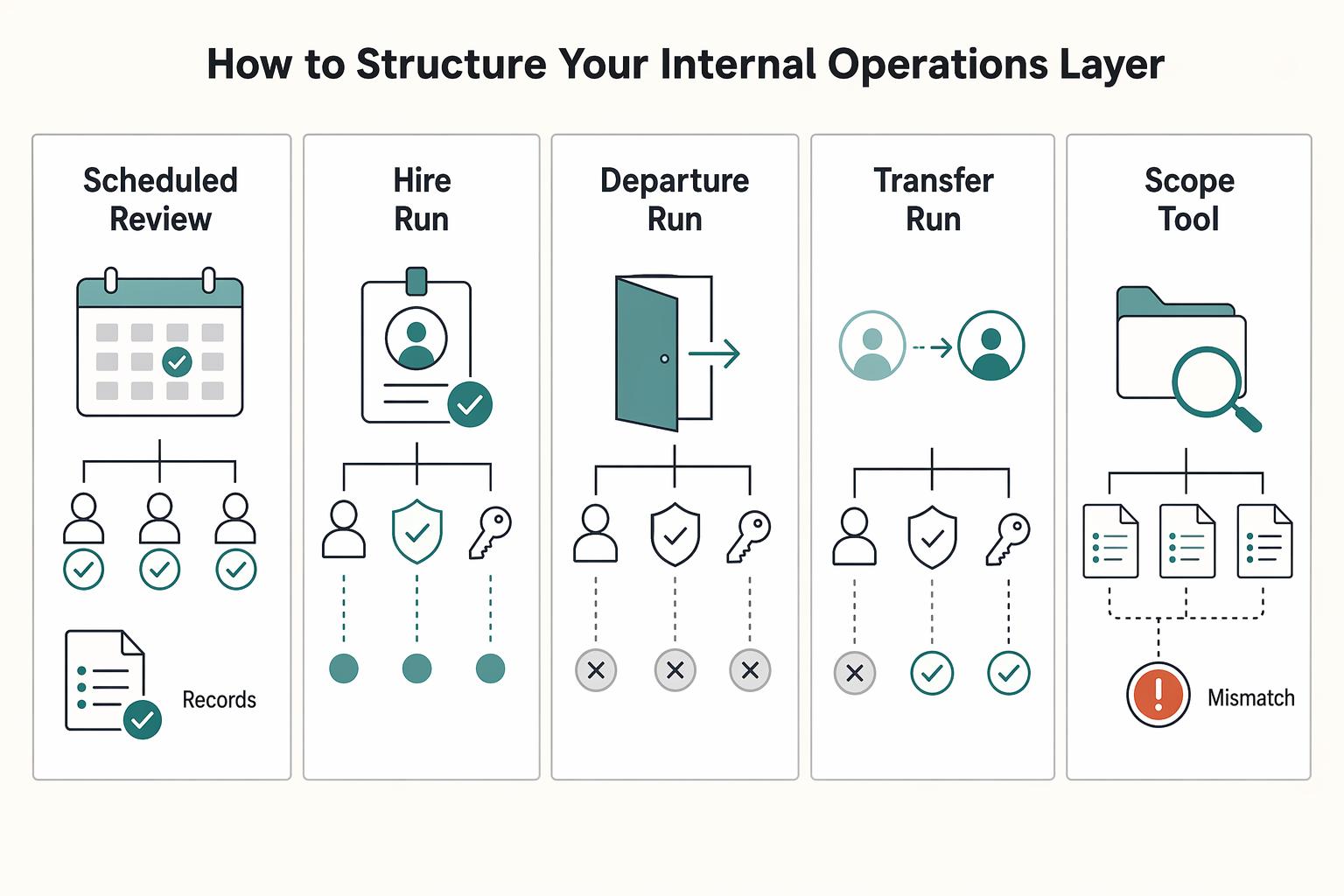
Tier 2: How to Structure Your Internal Operations Layer#
Tier 2 should be predictable: define access before sharing anything, then keep permissions tight and reviewable. The main failure mode is not encryption, it is access drift you cannot explain later.
| Trigger | Review timing | Checks |
|---|---|---|
| Scheduled review | Set a recurring review frequency | Confirm each user is still active and the current role still matches assigned permissions |
| Hire | Run an immediate review after a hire | Confirm each vault/collection still matches current work |
| Departure | Run an immediate review after a departure | Remove excess access and change shared/group authenticators when someone leaves |
| Transfer | Run an immediate review after a transfer | Confirm the current role still matches assigned permissions |
| Scope or tool change | Run an immediate review after a scope change or credential-bearing tool change | Confirm each vault/collection still matches current work |
- Define your access model before you invite anyone
Start with roles, not people. Set role-membership criteria first, then map each account to an authorized user, a role, and that role's privileges. Keep a simple access register with: person, function, vault/collection, permission level, approver, start date, and next review date. If you cannot complete those fields, do not share the credential yet. Key differentiator: this blocks the "temporary help" access that becomes permanent by accident.
- Build vaults around clients or business functions, never around a person
Use client-based or function-based vaults/collections so ownership, containment, and offboarding stay clean.
| Operating factor | Client/function vaults | Person-based vaults |
|---|---|---|
| Ownership clarity | Tied to the client or workflow | Tied to whoever set it up |
| Breach containment | Limits spread to that scope | One compromise can span many clients |
| Onboarding friction | Assign the right shared vault once | Reconstruct what lives in each person's space |
| Offboarding reliability | Remove access at vault/collection level | Depends on memory and manual hunting |
| Audit readiness | One place for credentials, notes, and membership | Evidence is fragmented across personal storage |
Key differentiator: if others need to use or rotate it, it belongs in shared structure with named owners, not in personal space.
- Match permissions to decision rights, then use temporary elevation for exceptions
Use RBAC in plain terms: executors use items, maintainers edit/rotate items, owners manage membership and structure. In Bitwarden, effective access comes from organization roles, collection settings, and collection permissions, and assignments start from a minimal View items baseline. In 1Password, you can layer custom groups by project/department/location on top of its three built-in groups.
Keep elevated access temporary unless it is part of the standing role. Require: requester, approver, exact vault/collection, reason, expiry, and rollback step. Document the verified provider actions for granting edit/manage access and for revoking or restoring access. Check current vendor docs or source records before using those steps. Also ensure each shared collection keeps at least one manager. Key differentiator: over-permission usually comes from one-time admin access that never gets removed.
- Run access reviews on a schedule and on change triggers
Set a recurring review frequency, then run immediate reviews after a hire, departure, transfer, scope change, or credential-bearing tool change. Use this checklist every time:
- Confirm each user is still active.
- Confirm current role still matches assigned permissions.
- Confirm each vault/collection still matches current work.
- Remove excess access.
- Change shared/group authenticators when someone leaves.
Use logs as supporting evidence, not your only memory. In Bitwarden, the event-log view shows up to 367 days at one time, and most client-side events are transmitted about every 60 seconds, so capture what you need before separation or audit discussions. Key differentiator: immediate reviews after real changes are where stale access gets caught early.
- Treat secure notes as controlled secret storage, not a dumping ground
Passwords are only one secret class. Keep API keys, database credentials, IAM details, SSH keys, certificates, recovery details, and infrastructure notes under the same permission boundaries as passwords. Store them in the relevant shared vault/collection, not in chat, email, project docs, or plaintext source/config.
Make each sensitive note operationally complete: owner, purpose, where used, last rotation date, and who approves changes. If someone can read the note, assume they can act on it. Key differentiator: non-password secrets can create the same business risk as passwords.
You might also find this useful: How to Manage Client Assets Securely in 1Password.
Tier 3: The Secure Airlock for Clients & Contractors#
Treat every client or contractor invite as a high-risk exception, not routine access. In this tier, your sequence is always the same: grant the minimum needed access, monitor activity, then revoke as soon as the engagement ends.
| Phase | Keep | Key details |
|---|---|---|
| Before sending access | Setup record | Collaborator name, company, project, vault/share name, exact items included, approver, start date, planned end date, expiry setting (confirm the current default expiry policy with the vendor). |
| During engagement | Logs and evidence pack | Keep the access record plus relevant event exports or screenshots; review who had access, who approved it, when it started, whether permissions changed, who changed critical credentials, and when access was removed |
| Closeout | Removal confirmation | Remove the guest account or time-limited share, confirm the removal event in logs, rotate credentials that could have been changed or copied, record any known out-of-tool copies, archive the evidence pack with the project file, and send the closeout notice |
- Grant through an isolated guest vault
Use a project-specific Guest Vault (or your tool's equivalent guest account/time-limited share), not direct access to a main shared vault. Keep scope to only the credentials and notes needed for that engagement so outer-layer mistakes stay contained and do not reach inner layers.
Required setup record (before sending access):
- Collaborator name
- Company
- Project
- Vault/share name
- Exact items included
- Approver
- Start date
- Planned end date
- Expiry setting: confirm the current default expiry policy with the vendor.
| External access pattern | Blast radius | Revocation speed | Auditability |
|---|---|---|---|
| Direct access to a main vault | Wider if scope expands or mixed items sit together | Slower if you need to unwind mixed access | Harder to show exact external scope |
| Isolated guest vault or time-limited share | Limited to that engagement when scoped correctly | Faster at a single clear access point | Cleaner to evidence scope, timing, and approval |
- Monitor the events that answer real questions
Your logs should let you answer who had access, who approved it, when it started, whether permissions changed, who changed critical credentials, and when access was removed. If your provider records access or sign-in events, review those too, including unusual timing (for example, late-night access).
Keep an evidence pack per engagement:
- Access record
- Relevant event exports or screenshots
- Final removal confirmation
Do not move credentials through email, docs, or chat, where they can become persistent and unaudited.
- Revoke immediately and close out cleanly
Work is not complete until external access is removed. Closeout should be a checklist, not a memory task:
- Remove the guest account or time-limited share
- Confirm the removal event in logs
- Rotate credentials that could have been changed or copied
- Record any known out-of-tool copies
- Archive the evidence pack with the project file
- Send the closeout notice
Policy statement: "For client and contractor engagements, credential access is provided only through an isolated, time-limited vault or share limited to project-required items. Access is monitored during the engagement and removed at closeout."
Related: The Best Password Managers for Freelancers and Teams.
How to Choose a Tool That Powers Your Protocol#
Pick the tool that passes your protocol tests in a live admin workflow, not the one that looks best in a demo.
1) Test this first: access control fit#
Start with a shortlist you can actually trial. In 2026, comparison directories let you filter by pricing, features, platform, region, support options, integrations, and user reviews, which is enough to narrow quickly. Review volume is only a signal, not proof, but a listing with substantial feedback (for example, 2,053 ratings) deserves a different confidence level than one with almost no public usage signal.
Then run the first hard test: can you scope access tightly enough for your tier model? If authorization is limited to broad roles and you cannot isolate permissions cleanly, treat that as an early rejection risk.
| Shortlisted tool | Permission granularity | Guest/external access controls | Audit logging depth | Cross-platform reliability | Buyer call |
|---|---|---|---|---|---|
| Candidate 1 | Verify whether access can be narrowed beyond broad team roles | Verify whether one outside collaborator can be isolated and removed cleanly | Verify admin visibility into auth events, access changes, and admin actions | Test real desktop, mobile, and browser workflows | Pass / Hold / Reject |
| Candidate 2 | Repeat with your internal-layer permission boundaries | Repeat with a mock external invite and closeout | Repeat with role updates and revocation events | Repeat sign-in, autofill, and recovery in normal work conditions | Pass / Hold / Reject |
| Candidate 3 | Repeat with your personal core boundaries | Repeat with time-bound external access | Repeat with export and review of logs | Repeat across your full device mix | Pass / Hold / Reject |
2) Reject immediately if evidence is weak#
If a tool cannot show what happened, reject it. Before rollout, run one admin evidence check and confirm all three points:
- Exportable logs
- Clear access-event visibility
- Role-change traceability from one state to another
Also confirm the product can enforce access policies and monitor authentication events. If the vendor cannot show these in trial, assume you will not have dependable reporting when it matters.
3) Validate before rollout: security architecture and tier implementation#
Before adoption, verify supported identity methods across your plan and devices (passwords, biometrics, MFA, token-based authentication, and SSO), then explicitly test phishing-resistant authentication options for admin accounts. Validate how shared secrets are handled when multiple people can access the same item, and request independent security assurance artifacts from the provider.
Finish with an implementation-fit checkpoint: your personal core, internal layer, and external airlock should all map cleanly without workarounds. Record provider-specific verification details in your notes, including plan name, admin console path, external access method, and log export location; verify those details against vendor docs, the contract, or source records before using them.
We covered this in detail in How to Use the StoryBrand Framework for Your Freelance Website.
Conclusion: Your Credentials Aren't a To-Do List; They're a Business Asset#
The takeaway is simple: treat credentials like business property you control on purpose, not loose tasks you clean up later. Keep the three tiers intact. That reduces the blast radius of mistakes, gives clients a better answer when they ask about access, and makes day-to-day work less shaky.
-
Protect your personal core. Keep your highest-risk accounts private and apply least privilege in the literal NIST sense: only the minimum access needed for the job. The differentiator here is boundary discipline. If an account can recover other accounts, change billing, or grant wider access, it does not belong in any shared client space.
-
Structure your internal layer by client access, not convenience. Put each client in its own vault or collection and assign access by role or group where your tool supports it. Bitwarden, for example, lets you assign collection permissions through groups instead of person by person. The differentiator is clean isolation: if someone works on Client A, they should not even see Client B.
-
Use a real airlock for contractors and offboarding. Guest access only works if the boundary is narrow and the exit is documented. In 1Password, a guest can be invited to one vault at a time, and Teams includes 5 guests while Business includes 20. In Bitwarden, revoking access is temporary and removing a member is permanent for organization access, but removal alone is not enough if someone could have copied a secret earlier, so rotate exposed credentials after closeout.
This does not give you perfection. It gives you tighter risk control, clearer client trust signals, and a calmer operating posture because access decisions are visible, limited, and reviewable.
Next, finalize your protocol, assign one owner for invites and removals, and schedule recurring access reviews (at least quarterly is a practical baseline). Then tie offboarding to project end dates so revoke, remove, verify, and document happen consistently. For a step-by-step walkthrough, see The Best Password Managers for Families.
Frequently Asked Questions
How should you share credentials with a contractor?
Put the work in a separate client or project vault, not in your main shared space. If the tool offers guest or temporary access, use that with the narrowest permission available, preferably view-only. If it does not, create a dedicated isolated vault and remove access when the work ends. The check is simple: the contractor should see only that one project, and the audit trail should show both the invite and the later removal. | Scenario | Recommended control pattern | What to configure | Risk it reduces | |---|---|---|---| | Short contractor engagement | Isolated project vault plus temporary access if available | One vault only, narrow permissions, end-date reminder, removal check in logs | Exposure of unrelated client credentials | | Assistant working across clients | Client-by-client isolation plus limited-permission access | Separate vault per client, no global “all clients” vault, least access needed | Cross-client spill if one account is compromised | | Scheduled access review | Review membership against active work plus export audit trails | Current user list, current project list, log export date | Privilege creep and weak evidence | | Project closeout | Remove access first, then rotate any exposed secrets | Account removal, shared-item check, rotate anything sent outside the manager | Lingering access and plaintext leakage |
How should you manage passwords across multiple clients?
Keep each client in its own vault or equivalent isolated space. Do not build one big shared vault for every account just because it feels easier at the start. The verification step is to open the membership list for each client space and confirm only assigned people are present.
What should you require from a tool before you adopt it?
The baseline is secure sharing, compatibility with multi-client workflows, event logs, recovery controls, and 2FA. Test sign-in on the devices and browsers your team actually uses, then confirm 2FA works and the account recovery path is clear (for example, a Recovery Key if the tool provides one). If any one of those is missing in trial, treat it as a real gap, not a future feature request.
How often should you review access?
Pick a fixed review date and keep it recurring. During each review, compare current vault membership to active contracts and remove anyone who no longer needs access. A common failure mode is letting browser-saved passwords or old shared items linger after a project is done, which leaves secrets exposed if a device is compromised.
What records should you keep for compliance or client audit questions?
Retain exported audit trails, dated access review notes, a current record of who should have access, and offboarding confirmations. Those records usually start in the product’s admin or reporting area, then you should export copies into a secure internal evidence folder and note the export date. Export after material access changes and at each scheduled review. If the product keeps logs for a limited window, export before older entries roll off. Verify the retention standard against the vendor, security policy, contract, or source records before relying on it.
What is the safest way to offboard someone?
Remove their access in the manager first. Then verify in the logs that the change happened and that they no longer appear in the relevant client vaults. If the tool supports temporary access expiration, use it, but still do a manual check at closeout. Rotate any credential that was copied into email, chat, or another plaintext channel, because you should never send passwords in plain text.
Try a related tool
Researched and edited by the Gruv editorial team. Gruv builds cross-border billing, payouts, and finance-operations software for global businesses.
Sources
Includes 3 external sources outside the trusted-domain allowlist.
- cisa.gov/resources-tools/training/cyb3rsmrt-use-passw...trusted
- cisa.gov/topics/cybersecurity-best-practices/zero-trusttrusted
- csrc.nist.gov/glossary/term/RBACtrusted
- nist.gov/cybersecurity/how-do-i-create-good-passwordtrusted
- bitwarden.com/help/event-logsexternal
- gruv.ai/blog/best-cross-platform-password-managers-f...external
- support.1password.com/guests-teamsexternal
Educational content only. Not legal, tax, or financial advice.
Related Posts

Value-Based Pricing for Freelancers Under Real Payment Risk
Value-based pricing works when you and the client can name the business result before kickoff and agree on how progress will be judged. If that link is weak, use a tighter model first. This is not about defending one pricing philosophy over another. It is about avoiding surprises by keeping pricing, scope, delivery, and payment aligned from day one.

The Best Password Managers for Freelancers and Teams
A client asks for an urgent file, you open their portal, and the login fails. Ten minutes later your invoicing app wants a reset too. That is why your password setup is a business risk, not just a nuisance. Weak credential habits can turn one mistake into wider account access problems, then into delivery delays and cleanup work.
How to Manage Client Assets Securely in 1Password
To manage client assets in 1Password well, stop treating credentials like loose project notes. You need a process you can verify inside the workspace itself: create the right vault, assign access per person, change permissions when scope changes, then revoke or archive cleanly when the work ends.