
Quick Answer
Start by treating any unverified font as blocked: no EULA, no client use. Run a green/yellow/red check before production, confirm the license holder for paid fonts or retain the source and terms for open-license fonts, and match rights to the real deliverable (desktop, web, app, or server). At handoff, send a Font Handoff Sheet and outlined/exported assets unless the license explicitly permits sharing .otf or .ttf files.
Phase 1: Build Your "License Hub" - The Compliant Foundation#
If you cannot show the license terms, treat the font as not approved for client production. Fonts are licensed software, and the EULA is the contract that defines what you can do with them. Before any client use, verify four things in one pass:
- Source: where the font came from
- Scope: what the license allows
- Owner: whose name holds the license
- Fit: whether the planned use matches granted rights, such as desktop, web, app, or server use
If any of that is unclear, stop. Do not install the font in your production library or use it "temporarily." Get the license text from the foundry or seller, or replace the font.
Verify before you touch a client file#
Do not rely only on a vague "commercial use" label. Read the EULA and match it to the real deliverable, whether that is static brand assets, a website, a mobile app, or a SaaS/cloud service. License grants vary by foundry.
When a client already has the font, check their licensing early too. Some terms require the third party, meaning your client, to buy its own license for its own use. That affects scope and handoff planning early.
Use a traffic-light audit with hard decision rules#
Use a simple approval system and stick to it. Apply the same decision rule every time:
| Status | Use when | Action |
|---|---|---|
| Green | License terms and acquisition evidence are on file, and intended use matches the grant; paid fonts also have a receipt or invoice | Keep it in production and record limits such as seats or traffic terms |
| Yellow | Evidence is incomplete or unclear, such as a missing foundry EULA, unclear scope language, missing paid-license purchase proof, or an unresolved client-license requirement | Do not use it until the issue is resolved in writing |
| Red | No verifiable license terms, a missing receipt for a paid license, or planned use that exceeds scope | Quarantine it so it cannot be used by accident |
In practice, Green stays in production with any limits recorded. Yellow pauses until the gap is resolved in writing. Red comes out of the production library so no one uses it by accident.
Match the license type to the project#
The main question is not whether a font is "commercial." It is whether the license type fits the actual job. The table below describes common commercial-license categories. OFL grants broader use and embedding rights without separate desktop, web, app, or server purchases.
| License type | Allowed use | Common restriction | Who typically needs to hold it | Next action before kickoff |
|---|---|---|---|---|
| Desktop | Print/static outputs (PDFs, logos, social graphics, packaged artwork) | Often seat/user limits; raw file sharing can be restricted | Usually your production team; client may also need a license for downstream use | Confirm seat terms, store EULA + invoice, decide if client needs a separate purchase |
| Web content | Use on websites | May be limited by page-view terms; agency work can require separate client agreements | Usually site owner/operator | Confirm hosting model and capture traffic limits |
| Mobile app | Use in phone/tablet apps | Separate from desktop/web rights | Usually app owner | Verify app-specific rights before design/dev handoff |
| Server | Web/cloud/SaaS service use | Not covered by standard desktop rights | Usually service operator/client entity | Confirm server terms directly before specifying the font |
Adobe Fonts shows why this distinction matters. Adobe states that hosted web use has no pageview limits, while self-hosting is not included in baseline coverage.
Build a proof pack you can defend later#
For each approved font family, keep one record that includes:
- EULA text
- Receipt or invoice for paid fonts; source and download record for free fonts
- Snapshot or PDF of the terms as they existed when acquired
If checkout captures a License Owner, confirm it before purchase so ownership is clear on the invoice. For OFL fonts, save the exact license version text, SIL OFL Version 1.1, 26 February 2007, and track any Reserved Font Name conditions when modifying or renaming. An OFL font needs no purchase receipt: keep the source and license instead. OFL permits embedding and redistribution under its conditions; when sharing font files, include the copyright notice and license, and respect Reserved Font Names for modified versions.
Set sourcing gates for every new font#
A clean library starts with a firm procurement gate before install:
- Buy or download only from approved sources with retrievable terms.
- Save the source page and license terms at acquisition, plus the receipt for paid fonts.
- Confirm the intended use category, such as desktop, web, app, or server, before production approval.
- If the terms are unclear or conflicting, do not use the font. Request written clarification or switch to a compliant substitute.
That is the foundation of safe client work: clear scope, clear ownership, and proof you can retrieve later. Once that foundation is in place, the next step is making those checks part of your client process instead of a cleanup task.
Phase 2: Integrate Licensing Into Your Client Workflow#
Once you have the license hub, make it part of your client workflow. Decide who buys the font based on who will install it and keep using it, then record that decision before design approval. A font file is licensed software, not just a visual asset. In practice, problems usually come from unclear ownership, unclear usage scope, or missing proof in the project record.
Choose ownership before you finalize type direction#
Set the ownership model before you lock the type choice. Consider client-held licensing when the client will install fonts internally or continue using them after your engagement. That can keep ongoing use tied to their own records.
For paid fonts, consider designer-procured licensing when you need a font for clearly scoped production work on the project. Treat it as a project cost, keep the EULA and receipt in the file, and state clearly what the client will and will not receive at handoff. Do not assume rights transfer unless the license terms allow it.
Before purchase, confirm the exact weights and styles needed now and likely next. That reduces avoidable rework and cost surprises later. If cost becomes a blocker, present options: the preferred typeface and a lower-cost or free alternative, then let the client choose.
Use a fill-in licensed-assets clause#
Keep the clause practical and complete:
| Clause part | What to state | Details mentioned |
|---|---|---|
| Scope of use | Name the font family and intended use for the project | Brand assets, website implementation, or app mockups; if final use is not confirmed, approval is limited until use is confirmed |
| Purchaser of record | State who buys the license and whose name appears on the purchase record | If the client buys direct, say so; if you buy it, state whether it is reimbursable or included under the agreed billing method |
| Transfer and delivery limits | State that license transfer is not assumed unless the license terms permit it | List deliverables clearly, such as outlined assets, PDFs, font names, purchase links, and proof records |
| Expanded use after delivery | State what happens if use expands later | Additional licensing review and purchase may be required before that expanded use starts |
The goal is to keep scope, purchaser of record, delivery limits, and expanded use in one place so your SOW, invoice, and handoff all say the same thing. If you also need broader IP language, pair this with your ownership terms, for example work for hire vs. assignment of rights.
Explain licensing as continuity and risk control#
Clients usually understand this quickly when you explain it in plain language. Fonts are licensed software, so the right party needs to hold the right permissions. The project record should show the paid purchase or the source and terms of an open-license font.
If the client will keep using the typeface, direct purchase in their name can support continuity. If you purchase it for production, show it as a project cost and keep proof in the project file. This follows the same risk-control logic teams use for other licensed assets, such as stock photography.
Choose a billing method that matches risk#
The billing method should match the ownership decision and the amount of risk you are carrying.
| Billing approach | Transparency | Admin burden | Cash-flow risk to you | Procurement speed | Dispute risk |
|---|---|---|---|---|---|
| Client buys direct | High when client sees source and terms | Lower for you, higher for client | Low | Depends on client procurement speed | Lower ownership ambiguity when documented clearly |
| Designer buys with itemized pass-through | High when receipt/estimate is attached | Higher for you | Medium to high if you prepay | Can be faster after approval | Medium if reimbursement timing is unclear |
| Designer bundles cost in project fee | Lower unless scope is detailed in writing | Medium | Medium | Can feel faster for the client | Higher when scope expands and inclusions are unclear |
If you are purchasing on the client's behalf, itemized pass-through is often easier to document later than bundled pricing.
Proposal-to-invoice checklist#
Keep the paperwork tight from proposal through billing:
- Identify required licenses early: family, exact weights and styles, expected use.
- Confirm the ownership model in writing before type approval.
- Document approvals for font choice, cost, and purchaser of record.
- Attach proof records to project files at invoice stage: license terms and purchase or free-download record.
If a required record is missing, pause handoff and close the gap first. Once ownership, scope, and billing are settled, final delivery becomes much easier to manage cleanly. Before your next proposal, draft your licensing-responsibility clause and approval language with the freelance contract generator.
Phase 3: Execute a Professional Handoff - Deliver Assets & Mitigate Long-Term Risk#
At handoff, default to documentation first, not raw font-file transfer. Unless the EULA clearly allows it, do not deliver .otf or .ttf files. Use this practical flow at closeout:
- Static deliverables: Provide outputs that do not depend on client font installation, such as outlined or exported final assets where appropriate.
- Editable deliverables (if in scope): Provide the editable source files, list the exact font family and styles used, and state any license purchase required before installation or editing. For OFL fonts, provide the source and license; no separate purchase is needed for permitted use.
- Any font-file transfer request: Pause and verify the specific EULA terms first. If you cannot locate the EULA, do not use that font for client work.
A narrow exception may exist in some licenses, including possible printer-only cases, but treat every exception as EULA-specific. Save the exact permission record before transfer, and note who received files and why the transfer was allowed.
Turn the handoff sheet into a standing template#
Your handoff sheet should answer the client's next question before they need to ask it. Make it reusable and complete every time:
- Font family
- Exact weights/styles used
- Source foundry/seller
- Licensed use scope for this project
- Purchaser of record
- Ownership responsibility
- Required client purchase action, if any
- What you are delivering instead of raw font files
Keep the action line explicit. For example: "Client must purchase its own license before installing or editing with this font." or "No client action required for static outlined deliverables only." For an OFL font, use: "No separate purchase required; the font files include their copyright notice and OFL license."
Build a defensible License Dossier#
Treat the License Dossier as your project evidence package. Include at least:
- Final Font Handoff Sheet
- EULA copy or stable link
- Purchase record for paid fonts, or source and license record for open-license fonts
- Any approval notes that clarify scope or ownership
Store it in one project location and link that location from your core project records. Before closeout, confirm that every font in delivered source files appears in the dossier and that every dossier entry maps to the final approved deliverables.
Keep the License Ledger audit-ready#
Keep one centralized License Ledger, whether that is a sheet or a database, with fields such as:
- Client
- Project
- Font family
- Foundry/source
- Licensed use scope
- Purchaser of record
- EULA link
- Receipt link
- Delivery status
- Exception notes
Use consistent naming for dossier files, for example Client_Project_FontFamily_YYYYMMDD, so receipts, EULAs, and handoff sheets are easy to find and cross-check.
Closeout control list#
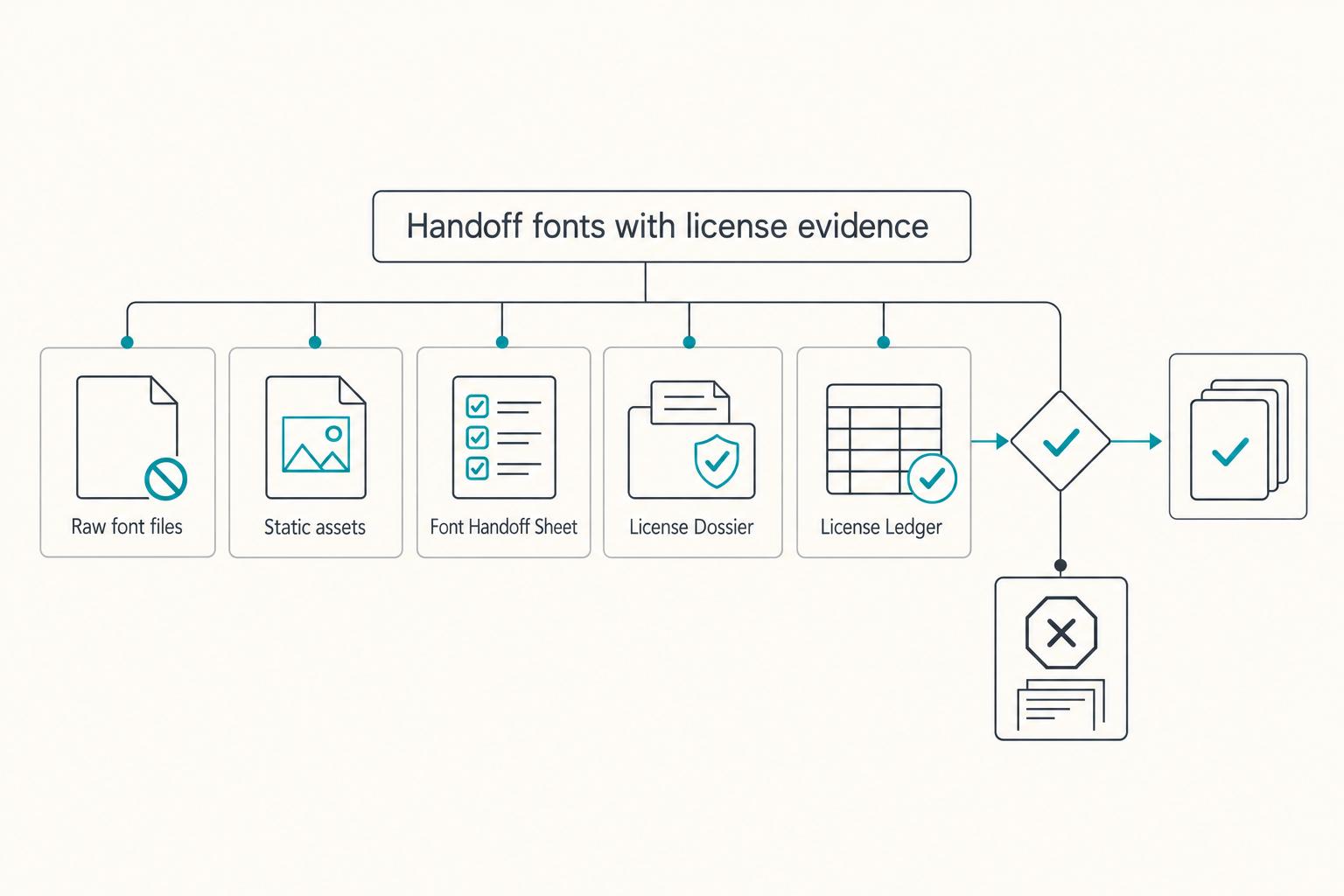
Before final delivery, verify:
| Check | Verify |
|---|---|
| Raw font files | Font files are attached only where the license permits sharing, with required notices included |
| Static assets | Static assets were exported so client use does not depend on local font installation |
| Font Handoff Sheet | It is complete, including foundry, scope, purchase action, and ownership |
| License Dossier | It is stored, linked, and complete |
| License Ledger | It is updated with links and exception notes |
If any item is missing, pause handoff and resolve it before project close.
Conclusion: Treat Font Licensing as a Business Practice#
Treat font licensing as a business practice, not a last-minute file task. Check the EULA before production, tag your library with a traffic-light status, and block any font you cannot verify for source, license, and handoff terms.
In day-to-day work, use the same controls at each stage. Before a font enters client work, complete a documentation check with the source page, purchase or free-download record, version note, and dated terms snapshot. In your workflow, define license responsibility in the contract at the start. At handoff, pass documentation instead of raw font files.
Most licensing problems show up later as rework, launch delays, and licensing questions. If you cannot locate the EULA, do not use the font for client work. If a font will be used beyond your own environment, recheck the license before delivery.
| Reactive designer | System-driven designer |
|---|---|
| Assumes a download or recent page update proves commercial rights | Verifies the EULA and keeps proof of terms before production |
| Leaves license responsibility unclear until mid-project | Defines license responsibility in the contract at project start |
| Shares files first and clarifies usage later | Uses handoff documentation instead of sending raw font files |
| Scrambles when proof is requested | Keeps a license dossier with terms, paid receipt or open-license source, and decision record |
For your business, the change is straightforward: this process can reduce preventable mistakes, support clearer approval conversations, and set clearer client expectations about what is licensed and what still needs to be purchased. That is how you operate as more than a production vendor, with decisions you can defend when questions come up later.
On your next client project, run the full process: document each license decision, use contract language that assigns responsibility, and make handoff documentation part of every delivery. You might also find this useful: A Guide to Music Licensing for Video Projects.
If you want to run invoicing, payout tracking, and tax-document workflows in one place where supported, review Gruv for freelancers.
Frequently Asked Questions
Who should buy the font license, you or the client?
Decide this before work starts, and write it into both your contract and Font Handoff Sheet. Match the purchaser of record to the party that will actually install and use the font, then verify the foundry's terms. If only you use it on your own machine for static, non-customizable outputs, a Desktop license may be enough. If the client will install or keep using the font after handoff, a restricted commercial license may require their own purchase. For OFL fonts, they can use the existing license without a separate purchase; retain the source and license records.
Can you use Google Fonts for client work and commercial projects?
Yes. A font released under the SIL Open Font License can be used commercially in client logos, print, websites, and apps. Keep the actual font’s license with your records. If you redistribute OFL font files, include the copyright notice and license; modified versions must respect any Reserved Font Names. A separate paid license is not required for those permitted uses.
What if a developer or contractor needs access to the font files?
Pause file sharing until you confirm who will use the font, where it will be installed, and which license type covers that use. A Desktop license on your machine may not automatically cover a contractor device or production website use. For live site text, check web-embedding rights. Restricted commercial fonts may need a separate web license; OFL fonts permit embedding under their existing license. If control over editable text or font behavior leaves your desktop workflow, you may need a custom license.
Do you need a web license if the site only shows text as images?
Verify the implementation first. If the site uses only rasterized images of text, a web license may not be required. For live text, verify that the license permits web embedding. Some commercial fonts require a separate web license; OFL fonts already permit embedding under their conditions. Record the applicable terms in your license dossier.
What happens if you use a font without the right license?
Treat it as an immediate compliance fix, not an admin task for later. Assess current exposure after you verify the facts and the applicable license terms, then prioritize remediation. Protect yourself by keeping the license terms, paid receipt or open-license source record, and handoff controls together for each project.
What is the most important habit in font licensing for designers?
Read the full license terms every time you buy or assign a font to a client project. Font files are licensed software, and terms differ by foundry. One common failure is assuming a Desktop license covers client installs, website embedding, or editable handoff when it does not.
Try a related tool
Researched and edited by the Gruv editorial team. Gruv builds cross-border billing, payouts, and finance-operations software for global businesses.
Sources
Includes 6 external sources outside the trusted-domain allowlist.
- bentley.edu/brand/faqtrusted
- uvu.edu/marketing/guidelinestrusted
- fonts.adobe.com/about.htmlexternal
- fonts.google.com/knowledge/glossary/web_fontexternal
- gruv.ai/blog/the-best-places-to-find-commercial-use-...external
- jenwagner.co/font-license-faq-all-your-most-common-questi...external
- monotype.com/font-licensing-explained-designers-and-brandsexternal
- monotype.com/resources/videos/what-font-license-agreementexternal
Educational content only. Not legal, tax, or financial advice.
Related Posts

Work for Hire vs Assignment of Rights for Freelancers
A freelance agreement is not just about price and scope. It decides who controls the rights in the work. If the ownership language is loose, rights can move earlier than you expect, cutting down your control once the work is delivered or used.

Germany Freelance Visa Application Path for Freiberufler and Gewerbe
Choose your track before you collect documents. That first decision determines what your file needs to prove and which label should appear everywhere: `Freiberufler` for liberal-profession services, or `Selbständiger/Gewerbetreibender` for business and trade activity.
Best Digital Nomad Cities for Safety and Stability in 2026
Treat this as a relocation decision, not a travel mood. The fastest way to make a good call is to run every city through the same three checks in the same order: shortlist signal, stay feasibility, and day-to-day work readiness. Stick to that order and you avoid most expensive mistakes before money leaves your account.