
Quick Answer
Test AP automation on your invoice mix, approval rules, duplicate and failed-payment cases, and ERP reconciliation. Treat approved access controls, authorized release, outcome visibility and traceable records as production gates. Verify the actual connector scope and recovery behavior rather than selecting by feature count or sync direction.
Select AP automation by operating evidence, not demos#
Use this checklist to evaluate the invoice-to-pay process you will actually operate. Capture quality matters, but so do approval authority, failed-payment recovery and the records needed to close the books. A vendor should demonstrate those together on your invoice mix.
For this guide, the scope is the full invoice-to-pay lifecycle, not just intake. That includes invoice receipt and data capture, often with OCR, invoice coding, PO matching, approval routing, payment initiation, and reconciliation to the general ledger. Keep the evaluation anchored on four criteria: control quality, execution reliability, system fit, and traceability across approvals and ledger reconciliation.
Manual AP is often described as slow, error-prone, and costly. Treat headline benchmarks as context, not as the buying decision. The real test is whether the product handles exceptions cleanly, supports reliable approvals, and leaves records your team can actually use during close and review.
What to test instead of trusting the demo script#
Ask the vendor to run a single invoice end to end: intake, approval, payment, and final posting reference. If they only show capture, routing, and dashboards, you still do not know whether the product will hold up in production.
Define review thresholds before the demo. For example, test a no-PO bill that requires human authorization and an invoice whose amount rises beyond your approved tolerance. A 20% increase can be one hypothetical test case; it is not a universal fraud threshold.
Selection should include implementation reality#
Selection should cover implementation discipline, not just features. A fast integration promise is not enough if the vendor cannot explain how you validate outputs, train approvers, and prove the process before broad rollout.
| Input | What it helps test |
|---|---|
| Short requirements document | Map stated requirements to the product concretely |
| Sample approval map | Verify approval logic in the product |
| Representative invoices | Test fit with representative invoices |
| At least one exception case | Show how the process holds up before broad rollout |
Go into evaluation with a small evidence pack: a short requirements document, a sample approval map, representative invoices, and at least one exception case. If the vendor cannot map their product to those inputs concretely, you do not have a serious fit test yet.
What you should leave with#
By the end of this guide, you should have three outputs: decision checkpoints for live demos, red flags that justify slowing down or disqualifying a tool, and a short list of non-negotiables for internal approval.
Use one rule from day one. If a platform touches approvals, payment initiation, and ledger reconciliation, controls and traceability are selection criteria, not phase-two improvements.
For a step-by-step walkthrough, see How to Audit Your Payout Platform: An Internal Audit Checklist for Finance Teams.
Why platform finance teams need a different AP checklist#
For platform finance teams, the checklist should prioritize operational fit over feature breadth. Test how the system handles your real invoice mix, exception paths, and ERP sync requirements before you score UI polish.
Generic AP advice can break early#
Use demos to pressure-test verification, matching, approval routing, payments, and reconciliation behavior, not just the straight-through path.
Control and exception design should be explicit#
Manual AP commonly stalls in verification, matching, and approvals, and it carries higher exposure to duplicate or fraudulent payments. Build your checklist around how exceptions are detected, routed, resolved, and documented for review. If the tool cannot support clear approval and reconciliation records for audit readiness, treat that as a material risk.
Decision rule for evaluation#
Define integration requirements before vendor scoring. Decide whether you need real-time sync, batch imports, or bidirectional data flow, then require proof against your operating scenarios. Predefine success metrics such as exception rate, approval cycle time, audit readiness, and cash flow visibility so selection and rollout are measured against outcomes, not demo quality.
The non-negotiable feature checklist for platform AP#
Use this as a go or no-go checklist, not a wish list. If a vendor cannot meet the minimum standard below and prove it in your environment, with your invoice mix, ERP, and team, stop the evaluation before pricing and UI start to sway the decision.
| Feature | Risk if missing | Minimum acceptable standard | Owner | Verification test |
|---|---|---|---|---|
| Multi-Factor Authentication (MFA) | Security and payment-approval risk increases when account access is weak | If MFA is part of your control policy, require it for privileged and payment-impacting roles and verify it live | Security + Finance Ops | Ask the vendor to show login and step-up behavior for an approver and an admin, including post-reset behavior |
| Encryption in transit and at rest | Data-handling risk increases when protections are unclear | Define required in-transit and at-rest encryption expectations with Security, and require documentation plus a live data-flow walkthrough | Security | Request the security overview and a walkthrough of how invoice attachments and payment files move between systems |
| User permissions | Control gaps can allow incompatible duties to sit with one user | Define separation-of-duties rules for invoice entry, approval, payment release, and reconciliation, then verify enforcement in demo | Controllership | Attempt a transaction that violates your approved separation rules; check user, service-account and override paths and their logs |
| Access controls | Privileged changes can happen without clear visibility | Require role-scoped access and reviewable admin-change logs your team can inspect | Security + IT | Request a sample admin activity log showing a permission change, actor, and timestamp |
| Duplicate-risk detection | Duplicate suppliers or invoices can be missed, especially across subsidiaries | Duplicate-risk alerts plus enforced controls preventing a second financial effect for the same approved obligation | Payments Ops | Submit duplicate invoice variants and repeat a payment request after a simulated timeout; verify investigation and no second payment |
| Positive Pay or bank-file support where relevant | Treasury handoffs become manual if bank requirements are unclear | If your bank process requires this, require exact file-format and exception-handling proof in demo | Treasury | Ask for the exact output format supported for your bank and a sample exception response file |
| Invoice capture | Intake mismatch drives rekeying and early data errors | Require capture from your real intake channels and preservation of source image plus extracted fields | AP Operations | Feed a mixed batch from email, PDF, and portal upload, then verify header and line data retention |
| Invoice matching | Match failures create manual bypasses and delays | Supports your match type and routes broken matches, including partial-receipt cases, to review instead of silent overrides | AP Operations + Procurement | Test a partial-receipt case and verify queue placement, reason code, and required reviewer action |
| Approval routing | Invoices stall or route incorrectly | Rules route by entity, amount, department, and exception type, with timestamped approvals | Finance Ops | Change amount and entity on the same invoice and confirm routing updates with clear history |
| Payment status visibility | Status ambiguity can hide pending, failed, or reversed payments | Statuses are clearly separated and tied back to payable and posting records | Payments Ops | Run one successful and one failed payment, then verify statuses are distinguishable without spreadsheet stitching |
| Exception queue handling | Aging exceptions become month-end surprises with no owner | Exceptions land in named queues with reason codes, aging, and accountable owners | AP Operations | Request unmatched, duplicate, and failed-payment queue views, including reassignment and aging |
| ERP integration and audit trail exports | Close depends on manual joins and weak review evidence | Documented connector scope for your ERP, plus exportable audit trails with actor, timestamp, action, and posting reference | ERP Admin + Controllership | Verify connector scope and current SuiteApp status where relevant; export one posted transaction with linked approval and payment references |
How to use this table in vendor review#
Do not average these rows into a soft score. This is a hard gate. Run it inside a documented buying process, and treat unproven claims as missing until they are demonstrated in your environment.
For NetSuite, verify field coverage, sync direction, failure handling and links between invoice, approval and payment records. Built for NetSuite status is a useful SuiteApp verification signal, not a substitute for testing your configured workflow or proof that a connector covers every required field.
Failure modes worth forcing in the demo#
Run ugly cases, not only the happy path. Force a partial-receipt scenario, because three-way match can break there and push teams into manual bypass or bill splitting. Force a multi-subsidiary vendor-duplication scenario, because weak supplier controls can lead to the same invoice being posted twice.
For a hypothetical zero-tolerance goods purchase, order 100 units at $10 each, record receipt of 60 and submit an invoice for all 100. A receipt-based three-way rule should hold the unmatched 40 units for investigation rather than silently mark the full invoice ready to pay. Keep the 60-unit receipt, the 100-unit invoice and the hold reason linked. If your policy allows a partial bill or payment, require an authorized split and a remaining obligation record. Repeat the test after a supplier bank-detail change and a payment timeout; neither should bypass verification or produce a second payment.
Ask for evidence artifacts during selection, not after signature: a role-permission matrix, an admin activity log sample, an anonymized audit trail export, and an exception report with owner, age, and status. If a feature is claimed but cannot be shown with a test artifact, treat it as missing for now.
Control layer requirements that prevent expensive mistakes#
Separate invoice approval, supplier-detail changes and payment release according to your control policy. Test prohibited combinations and overrides at the transaction level; broad role names alone do not establish effective segregation of duties.
Start with segregation of duties, not convenience#
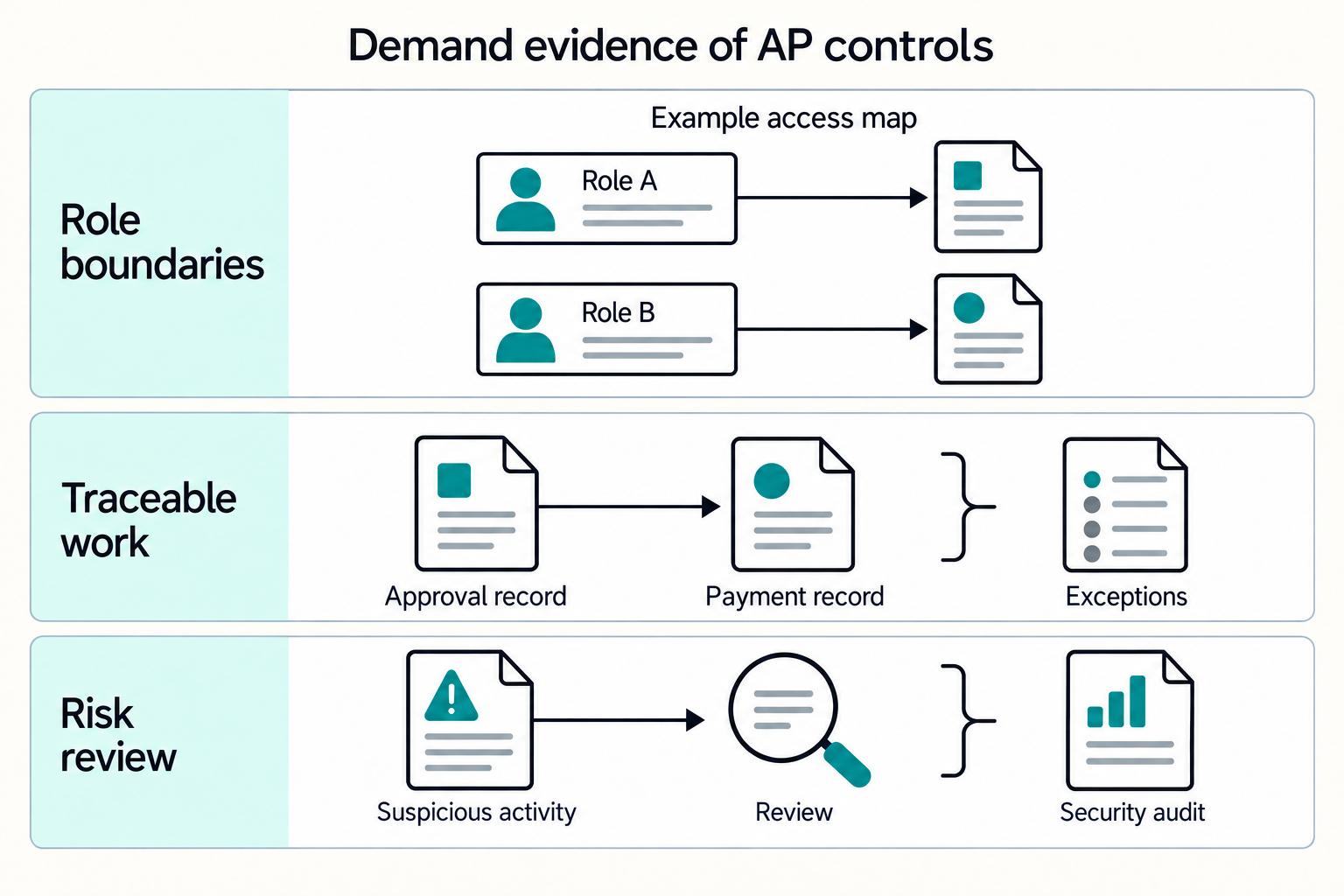
Your baseline should separate key AP steps through role-scoped user permissions and access controls. That is how segregation of duties holds in daily operations, not just on an org chart.
Do not accept broad role labels without the underlying permission map. You want proof that the platform can enforce separation at the permission level and keep approvals, exceptions, and payment records traceable in one place. If teams need side spreadsheets or email threads to explain overrides, treat that as a warning sign that the control design is leaking.
Anti-fraud minimums are table stakes#
Require the access and fraud controls in your approved security policy, including MFA for privileged and payment-impacting roles. Ask how suspicious activity is surfaced and investigated, and inspect the scope and date of independent assurance reports rather than treating the existence of an audit as proof of every control.
| Evidence artifact | What it should show |
|---|---|
| Role-permission matrix | Who can perform key AP actions |
| Sample workflow record | Approvals, exceptions, and payment records traceable in one place |
| Suspicious-activity alert example | How suspicious activity is surfaced for review |
| Evidence of regular third-party security audits | Regular external security audits |
Force the bypass test in the demo#
Do not stop at the standard flow. In a sandbox, ask the vendor to attempt overlapping role assignments and approval exceptions, then inspect whether those actions remain clearly reviewable.
Use a simple rule. If the vendor cannot prove access segmentation, MFA, suspicious-activity alerting, and traceable approvals, exceptions, and payment records in your test flow, do not move them forward.
Execution layer checks from invoice intake to payment release#
Trace one invoice from intake to posted status, including any handoffs between products. The vendor should show capture, matching, approval, payment outcome and posting with preserved references and controlled recovery. An unexplained handoff leaves execution reliability unproven.
Walk one invoice through the full chain#
Run a live, end-to-end trace on a single invoice. The sequence should move from Invoice capture, through validation or policy checks, into Invoice matching (2-way or 3-way), then approval routing, payment execution, and Posting + Reconciliation + Reporting.
Verify what entered the system, which checks ran, who acted, what was released and what was posted. For a file or manual exchange, inspect validation, ownership, duplicate prevention and recovery evidence. The problem is a state change that cannot be reconstructed, rather than the presence of a file.
Make exception routing explicit#
Ask the vendor to show explicit handling for exceptions before payment release and reconciliation. Do not accept "the team reviews exceptions" without a clear path.
During demos, confirm what conditions pause release before payment execution, what reviewer action is required, and how that action is traced.
Test failure behavior, not just the happy path#
Fair comparison matters here. Run the same exception and failure checks in the same order so the differences are visible.
| Scenario to test | What to ask in the demo | What good proof looks like |
|---|---|---|
| Workflow leaves the AP system mid-flow | "Show whether intake, approvals, payments, and reconciliation stay in one workflow or move to inboxes/spreadsheets." | Controlled handoffs with preserved identifiers, clear ownership and replay/recovery behavior |
| Exception remains unresolved | "Show where exceptions are logged, who resolves them, and what happens if they are not resolved." | Visible exception state, assigned action, and no silent progression into reconciliation |
| High-volume, multi-approver path | "Show how approval actions are controlled and recorded when multiple people are involved." | Traceable approval actions and clear release controls before payment |
| Payment through posting/reconciliation trace | "Show how payment processing and posting/reconciliation are tracked to completion." | Clear status history and traceable payment records through reconciliation |
Ask for one evidence artifact, not a promise#
Request one end-to-end execution log or export for a completed invoice. It should let your team follow approvals, exception handling, payment records, and posting/reconciliation status in one place.
Prefer a true log or export over stitched screenshots. If the vendor cannot prove a connected execution path, explicit exception handling, and traceable records for a finished transaction, do not move them forward.
System layer fit with your finance stack and data model#
Test whether AP, approval, payment and ERP records remain linked in your finance stack. Separate products can serve the full process when their exchanges preserve references and have clear ownership and recovery. Missing status or unsupported handoffs limit the fit.
Test integration in your real operating structure. "Works with NetSuite/SAP/Xero/QuickBooks Online" is not enough. Run a live scenario in the entity, account, class, department, location, and other dimensions your team actually uses for close.
Use one invoice through approval, payment and posting, then verify each state across systems. Inspect any mapping or spreadsheet control for documented ownership, versioning and validation. An undocumented repair to make totals agree is a gap; a controlled exchange is part of the design to test.
Verify traceability, not only matched amounts. Month-end reliability is stronger when records are traceable, not only when totals match. Confirm that you can follow approvals, exceptions, and payment records in one place and connect them to reconciliation outputs.
Ask the vendor to show the reference path across:
- invoice or AP record ID
- approval or exception history
- payment event reference
- reconciliation output reference
Then rerun the same test with an exception in the flow and check whether the path is still visible.
Evaluate the actual synchronization design. A controlled one-way file exchange can be suitable when data ownership, import validation, duplicate prevention and return status are explicit. An API or two-way connector can still fail those tests. Define the authoritative system for each field and status, then test interruption, replay and recovery before classifying the integration as close-ready.
Require one operational view for live state. Operational readiness should be visible without stitching reports by hand. Ask to see how the team tracks approvals, exceptions, and payment records during normal operations.
Assurance layer and evidence pack for audit-ready operations#
Once integration is proven, the next question is simple: can the platform show what happened without manual reconstruction? If it cannot produce evidence as work happens, treat it as a review aid rather than fully audit-ready.
Define the evidence pack before you compare vendors. Set the evidence-pack standard first, then evaluate vendors against it. For AP, that means records your finance, compliance, and audit teams can use to follow a transaction path from execution through exceptions without relying on screenshots or memory.
Treat "we have audit logs" as a starting point, not proof. Ask for one normal transaction and one exception case, then verify the trail is still readable and complete in both.
Require operating proof. Verify enforcement of duties, thresholds and approvals in actual records. Logs should preserve actor, time, action, relevant record and change history, with access and tamper protection appropriate to your policy. An “immutable” label alone does not prove completeness or retention.
Use a practical review test. If your team still needs screenshots or support tickets to validate controls, assurance is likely weak. That usually means the tool supports a step, but not the full execution path.
Separate assurance evidence from vendor marketing. Vendor pages can describe the product, but they are not audit evidence. Ask for current control documentation and a clear walkthrough of how assurance works in live operations.
Decision matrix for must-have now vs later-stage upgrades#
Use a stage matrix to sequence spend, but keep control and traceability in place from the start. You can phase in richer reporting later. You should not phase in the basics that keep approvals, exceptions, and payment records readable through reconciliation.
Set a baseline, then stage the rest#
A practical baseline for this checklist is to define your core control set early, including Multi-Factor Authentication (MFA), Access controls, Invoice matching, and Audit trail, and decide what needs day-one enforcement in your environment. Then stage secondary capabilities based on volume, entity complexity, and close pressure.
| Capability | Launch | Growth | Scale | Accountable owner |
|---|---|---|---|---|
| Multi-Factor Authentication (MFA) | Enforce policy-required MFA before production | Enforce consistently | Re-validate at scale | Assigned internally |
| Access controls | Enforce approved role rules before production | Enforce consistently | Re-validate at scale | Assigned internally |
| Invoice matching | Baseline based on process risk | Expand coverage | Standardize across entities | Assigned internally |
| Audit trail | Must-have for traceability | Must-have | Must-have | Assigned internally |
| ERP integration | Priority based on close dependency | Must-have | Must-have | Assigned internally |
| Invoice capture | Capture must be reliable; automation may be phased | Must-have | Must-have | Assigned internally |
| Approval routing and exception queues | Must-have before production payments | Must-have | Must-have | Assigned internally |
| Payment status visibility | Must-have before production payments | Must-have | Must-have | Assigned internally |
| Advanced analytics and trend reporting | Later | Should-have | Should-have | Assigned internally |
Two rows usually need the most judgment:
- ERP integration: If your close depends on ERP data integrity, move this to must-have early and test it in the system you actually close in.
- Advanced analytics: Useful, but secondary to reliable intake, routing, exception handling, and reconciliation visibility.
Put one owner on each row#
Assign one accountable owner per capability row, even when multiple teams contribute. Without clear ownership, unresolved exceptions, unclear approval paths, and missing fields are easier to miss and can still show up as close delays.
Verify with operating proof, not feature claims#
Before scoring any vendor, run one normal invoice and one exception case, for example missing fields or unresolved exceptions. Confirm that intake, approvals, exceptions, and reconciliation remain visible in one connected workflow instead of requiring screenshots, email threads, or manual spreadsheet repair.
Define risk checks before pricing#
Set your risk checks before commercial discussions so control gaps are not traded away for UI polish. Practical examples include:
- MFA or access enforcement cannot be verified in operation.
- The audit trail is not readable for both normal and exception flows.
- Approval, exception, and payment records cannot stay traceable without disconnected tools.
Use this matrix as your vendor scorecard, then pressure-test implementation details and status surfaces in your workflow: Read the docs.
Sanity checks before you sign a vendor#
Use these as procurement gates. If the vendor cannot show operating proof on messy AP flows, pause approval.
Run a pilot that includes normal work and breakage#
Run a controlled pilot with representative invoice volume and exception mix, not just clean invoices. Include duplicate invoices, an invoice with missing purchase order data, a rejected invoice, and at least one additional exception case.
Also test continuity in approvals. If a primary approver is unavailable, confirm temporary delegation works and remains visible in the record.
Match sales promises to the contract you will actually deploy#
Treat demo claims as unverified until they are documented in your signed scope. Ask the vendor to label each promised capability as available now, limited, or roadmap, then verify that against your contract.
Be explicit on control features. If approval controls are described as a Four Eyes Principle, or fraud checks are described as pre-approval, confirm how those controls are configured in your environment and where they are documented in deal paperwork.
Surface integration upkeep before implementation starts#
Do not stop at "we integrate." Confirm the connection method, key field mappings, who owns updates when ERP objects change, and what your internal team must maintain after go-live.
ERP integration needs ongoing upkeep. If ownership for mapping changes, escalation, and release coordination is unclear, reconciliation issues are more likely.
Treat missing evidence as a stop sign#
Before approval, ask the vendor to demonstrate auditability for standard and exception paths, including required comments on rejected invoices.
Review admin role assignments and confirm approval, payment, and admin rights are clearly defined. If these controls cannot be evidenced, postpone procurement approval.
A phased rollout with gates before production payments#
Do not turn on the full AP automation stack all at once. Even when a vendor can integrate with your ERP quickly, a measured rollout is usually easier to manage and troubleshoot when exceptions appear.
Phase 1 setup#
Start with a documented requirements pack before configuration. Define how your procure-to-pay process should run, how exceptions are handled, and how approvals and matching should behave so teams follow one standard process.
Document approval and access rules, then test them with sample users before broad onboarding. The goal in this phase is simple: prevent configuration drift early.
Phase 2 execution#
Enable invoice capture and invoice matching on a controlled slice of volume. OCR can speed intake, but verify extracted fields against real supplier invoices during rollout.
Use matching rules that reflect your actual workflow, including three-way matching where it fits your process. Route low-confidence or incomplete items into exception queues instead of forcing them through approvals.
Track two signals from day one:
- Exception volume and resolution time by type
- Error and rework trends as processes become standardized
Phase 3 assurance#
Validate configured ERP mappings and reconciliation outputs in the pilot before releasing production payments. Once the initial scope is stable, repeat sample checks as volume or entities expand. Do not postpone integration assurance until after live payment release.
Treat testing and employee training as release gates before wider rollout. If users cannot clear queues or resolve matching issues in the system, address those gaps before expanding.
Review implementation results on a recurring cadence. If exception queues stay elevated, pause expansion and fix matching logic or intake quality before adding more entities.
Common failure modes and how to catch them early#
An early miss is automation theater: strong straight-through claims without proven controls in production. If you cannot verify access controls, clear exception ownership, and live fraud checks, treat the setup as unproven.
Inspect exception queues with an ID, creation date, type, status, supplier and owner. Test a new supplier, an urgent payment and a bank-detail change. For changed payment instructions, verify through a trusted contact channel already on file, keep the verification evidence and require authorized release; a reply to the same change-request email is not independent verification.
Reconciliation drift#
This usually shows up during close, not in a demo. A common drift pattern is inconsistent invoice and payment status visibility that teams patch manually. Since weak payment-status visibility can lead to cash-flow mismanagement and slower supplier communication, validate status consistency on a reconcilable sample period before relying on production totals.
Use the audit trail (or equivalent transaction history) as your evidence check. Sample paid invoices and confirm you can trace key steps, including approval, payment event, and status changes, without unresolved gaps.
Approval bottlenecks#
Approval design can create queue jams instead of better control. Serial approvals, unclear fallback ownership, and restrictive roles can age invoices and compound delays.
Use these weekly checkpoints early in production:
| Weekly checkpoint | What to review |
|---|---|
| Duplicate-payment exceptions | Include items held for manual review |
| Failed or stuck payments | Age by status and owner, not only by invoice date |
| Approval and payment actions | Confirm they are traceable for each sampled item |
| Approvals that bounced or sat idle | Tighten routing or role design |
Related reading: How to Make the Case for AP Automation to Your CFO: A Platform Finance Team Playbook.
Conclusion#
Use one decision standard in your next vendor cycle: choose an AP automation platform only if it proves workflow reliability, exception handling, and verifiable process checks in your real AP process. A polished demo is not enough.
- Map invoice, supplier-change, approval, release and reconciliation responsibilities before demos.
- Use the same normal, partial-receipt, duplicate and failed-payment cases with each vendor.
- Resolve material control or reconciliation gaps before production release.
Take the tested controls, connector scope and unresolved limitations into procurement review. Document each promised capability as available, limited or planned, and make the production gate depend on your approved requirements.
Before signing, confirm market coverage, compliance gating, and integration fit for your exact AP and payout process: Contact Gruv.
Frequently Asked Questions
What features are truly non-negotiable in an AP automation platform for platform finance teams?
Require reliable capture and matching for your invoice mix, approval and exception routing, payment outcome visibility, controlled ERP synchronization and exportable records. If separate products perform these steps, their handoffs still need supported references, ownership and recovery controls.
How is platform AP automation different from SMB AP automation?
In this checklist, the emphasis is less on intake alone and more on exception handling, reconciliation, and cross-system traceability. Connected AP and ERP records matter more than a polished intake demo because disconnected systems can create data silos and duplicate entries. That is why this checklist puts more weight on approval flow, sync behavior, and audit evidence.
Which controls reduce duplicate payments and fraud risk the most?
Combine invoice and supplier duplicate checks with authorized supplier-detail changes, independent verification of changed payment instructions, separated approval and release duties, and durable controls against a second payment for one obligation. Test a repeated submission and an ambiguous provider outcome: an alert alone must not leave the same invoice payable twice.
What should be included in an AP automation RFP checklist?
Require a demo of your real invoice-to-payment process, including approvals, exceptions, payment execution, and reporting. Ask for concrete artifacts during selection, such as workflow setup details, for example users, divisions, and workflows, and sample audit and reporting outputs. Also include implementation checkpoints such as user testing of configured workflows and feedback-driven tweaks before rollout.
How do I evaluate ERP integration quality with NetSuite, SAP, or Xero?
Define the authoritative system, fields and statuses first. Then test the supported connection method, direction, import or API errors, duplicate prevention and recovery. API-level or two-way synchronization is not inherently stronger than a controlled file flow. Trace a normal and failed case through your own entity and accounting dimensions.
Which features are table stakes now versus upgrades for later growth?
Day-one controls must cover authorized invoice approval, duplicate-effect prevention, payment outcome visibility, governed exceptions and reconcilable posting records. Automated capture or richer analytics can be phased when a controlled manual process serves the initial volume. The minimum depends on the workflow you will actually put into production.
What evidence should we keep to prove AP controls are audit-ready?
Keep an evidence set that shows what happened, who acted, and where final records landed. At minimum, retain approval and payment records plus audit and reporting outputs for both a normal transaction and an exception case. If your team would need screenshots or support tickets to reconstruct the path, the record is not strong enough yet.
Researched and edited by the Gruv editorial team. Gruv builds cross-border billing, payouts, and finance-operations software for global businesses.
Sources
Includes 5 external sources outside the trusted-domain allowlist.
- ic3.gov/CrimeInfo/BECtrusted
- nvlpubs.nist.gov/nistpubs/SpecialPublications/NIST.SP.800-53r...trusted
- cpa.com/sites/cpa/files/media/resources/whitepapers/...external
- docs.oracle.com/en/cloud/saas/procurement/25c/oapro/match-ap...external
- docs.oracle.com/en/cloud/saas/netsuite/ns-online-help/sectio...external
- netsuite.com/portal/developers/built-for-netsuite.shtmlexternal
- stampli.com/blog/ap-automation/how-to-successfully-imple...external
Educational content only. Not legal, tax, or financial advice.
Related Posts

The Freelance Payment Penalty: A Modeled Audit of Platform Fees, FX Spreads, and Payout Delays
The money rarely disappears through a single, easy-to-spot fee. The real loss is stacked. A marketplace takes its commission, a processor adds a charge for international cards, a bank or payment company converts the currency at a spread, a platform holds the funds before release, and a wire sheds a little to intermediaries on the way in. Each layer looks defensible on its own, but the worker feels the combined result as a smaller deposit and a later payday.

How to Respond to a Subpoena for Business Records
Move fast, but do not produce records on instinct. If you need to **respond to a subpoena for business records**, your immediate job is to control deadlines, preserve records, and make any later production defensible.

A US Expat's Guide to Investing in UCITS ETFs to Avoid PFIC Issues
The real problem is a two-system conflict. U.S. tax treatment can punish the wrong fund choice, while local product-access constraints can block the funds you want to buy in the first place. For **us expat ucits etfs**, the practical question is not "Which product is best?" It is "What can I access, report, and keep doing every year without guessing?" Use this four-part filter before any trade: