
Quick Answer
Automate vendor onboarding by defining explicit control points for what each vendor type must submit, what can be validated automatically, what requires manual review, and what blocks payout. Collect structured tax, bank, and compliance data in one flow, run sanctions and tax checks before payout, keep fixed approval states, and preserve an audit trail so every decision is defensible.
Why automate vendor onboarding#
Vendor onboarding automation for bank details, tax forms, and compliance documents works best when the control points are explicit. If you cannot define what must be collected, what gets validated, what triggers manual review, and what blocks payout, automation can scale bad decisions faster.
Vendor onboarding is the process of setting up a new supplier so you can start doing business with it. In practice, that means collecting tax IDs, banking details, and compliance documents before money moves, then keeping enough evidence to defend each decision later. This guide is for compliance, legal, finance, and risk teams that need scale without losing the audit trail.
A usable onboarding flow should answer four questions up front:
- What is required for this vendor type and market?
- What can be validated automatically?
- What must be escalated for review?
- What conditions keep the vendor blocked from payout?
When those answers are unclear, teams make inconsistent calls, exceptions are hard to explain, and evidence quality drops.
Before you automate#
Define a documented minimum evidence pack for each onboarding case. For U.S. payees, that can include Form W-9, which is used to provide a correct TIN to payers filing information returns. If you use IRS TIN Matching, treat it as a real control point. It validates name and TIN combinations before information returns are submitted. A completed form with a failed result is an exception, not a completed onboarding.
Be just as explicit with sanctions controls. Screening against OFAC data, including the SDN List, matters, but OFAC states that Sanctions List Search is not a substitute for appropriate due diligence. Your control record should include the search result, reviewed identity details, reviewer decision, and timestamped action in the audit trail.
What this guide is designed to give you#
This guide gives you a practical operating sequence: collect required data, validate high-risk items before payout, preserve evidence, and escalate cases that should not auto-approve. We use that sequence because bank details, tax forms, and compliance documents work as connected controls for your team, not separate checklists.
You will get concrete guidance on tax-form collection, where the IRS name-and-TIN check fits, and what to record so the audit trail is useful in review. That matters because a trail that only shows the final status is hard to defend later.
One caution before you build retention rules: do not turn one requirement into a blanket policy. OFAC requires full and accurate records for blocked property, and those records must be kept for at least 10 years after property is unblocked. That is a specific requirement for a specific case, not a universal retention rule for every onboarding artifact.
For a more detailed walkthrough of collecting W-9s, bank details, and KYC in one flow, see Supplier Onboarding Automation: How to Collect W-9 Bank Details and KYC in One Flow.
What to prepare before you automate vendor onboarding#
Set control ownership and activation rules before you configure tooling. Otherwise, your flow may collect documents but still fail when it comes time to decide whether payout should be enabled or escalated.
| Control area | Owner |
|---|---|
| Sanctions screening | Compliance |
| Payout readiness | Finance |
| Required-document policy | Legal |
| SLA tracking | Operations |
Step 1. Assign one decision owner per control#
Assign one decision owner per control. A practical split is compliance for sanctions screening, finance for payout readiness, legal for required-document policy, and operations for SLA tracking, but your exact split is an operating choice, not a universal legal rule.
For each onboarding state, define who can approve, escalate, and override. Put that into the workflow before launch so tax and sanctions exceptions do not get stuck in shared ownership.
Set a finance policy for tax identity quality. A W-9 supplies the name and TIN; optional TIN Matching can flag corrections before filing. Distinguish that result from an IRS notice. For payments subject to backup withholding, missing or obviously incorrect TIN data can require withholding; finance should apply the relevant rule rather than treating every mismatch as a legal payment ban.
Step 2. Build a minimum stack that connects intake, decisions, and evidence#
Build a minimum stack that connects intake, decisions, and evidence, such as a self-service onboarding portal, an approval workflow, and an audit trail.
We recommend collecting structured tax and bank fields, not just file uploads. In your approvals, separate pass, review, and reject outcomes, and log who reviewed the case, when the status changed, and which validation result supported the decision. Limit sensitive tax and bank data in reviewer views and logs to what is necessary for the purpose.
Use a simple check: you should be able to reconstruct one case end to end from system records without relying on side emails or full values on every screen.
Step 3. Publish market caveats before launch#
Publish market caveats before launch. KYC, KYB, and AML controls are program- and jurisdiction-dependent, so document what is required, what is risk-based, and what is optional for your program.
For covered legal-entity onboarding contexts, beneficial-owner identification and verification may be required at account opening. For MSBs, AML programs must be written, risk-commensurate, and integrated with automated processing systems when those systems exist.
A short market-control memo is usually enough: jurisdiction, program type, required checks, optional checks, and owner sign-off.
Step 4. Set activation policy so payout gating is consistent#
Keep payout activation separate from document submission. Define which internal checks must pass, which exceptions an approver may authorize, and which legal duties remain mandatory. An internal exception cannot waive sanctions restrictions or required tax withholding.
If you use IRS TIN Matching, treat it as an explicit control point. It is a pre-filing service for payers and authorized agents. Interactive matching supports up to 25 name and TIN combinations per request and up to 999 requests per 24 hours. Bulk supports up to 100,000 combinations with results within 24 hours.
For sanctions, align policy with SDN prohibitions. Unresolved sanctions risk should keep payout inactive until it is resolved through your documented escalation path.
For a step-by-step walkthrough, see How to Create Fillable PDF Forms for Client Onboarding.
Define your required document set by vendor type and market#
Define one jurisdiction-aware document matrix before rollout. For each payee type and market, mark what is required, what is conditional, and which reporting or compliance control each item supports.
Step 1. Build rows by payee type, jurisdiction, and payout context#
Build rows by payee type, jurisdiction, and payout context, not broad labels like "vendor." Use row definitions such as "U.S. individual contractor paid for services," "non-U.S. individual in a U.S. withholding or reporting context," or "EU platform seller with a VAT number."
For each row, capture three evidence families together: tax form, business identity evidence, and payout beneficiary data. In U.S. information-return contexts, Form W-9 is used to provide the payee TIN. In U.S. withholding or reporting contexts for foreign-status documentation, route to the W-8 path, for example Form W-8BEN for foreign individuals establishing foreign status. Do not treat this as a blanket country-only rule.
| Payee row | Typical required evidence | Reporting or validation dependency |
|---|---|---|
| U.S. individual contractor in a U.S. reporting context | Form W-9, legal name, TIN, payout beneficiary name and bank data | Optional TIN Matching for eligible payers; apply the tax-year and payment-type rules for 1099-NEC |
| Non-U.S. individual in a U.S. withholding or reporting context | Applicable Form W-8, identity details, payout beneficiary data | U.S. withholding or reporting analysis; do not route to W-9 by default |
| U.S. or non-U.S. legal entity in a KYB or account-opening context | Entity identity documents, authorized signer details, payout beneficiary data, and where applicable beneficial owner information | KYB review; in covered legal-entity account opening contexts, beneficial owners may need to be identified at account opening |
| EU platform seller with VAT registration | Seller identity or KYB evidence, VAT number, payout beneficiary data | DAC7 may apply if you are a covered digital platform operator; VAT number can be checked through VIES |
Checkpoint: for every row, you should be able to state exactly what blocks payout and exactly which report or review each document feeds.
Step 2. Keep tax and reporting dependencies in the same matrix#
Keep tax and reporting dependencies in the same matrix so collection logic stays aligned with filing obligations.
For 2026 payments, the general 1099-NEC reporting threshold is $2,000, compared with $600 before 2026; amounts subject to backup withholding must be reported regardless of payment size. Form 1099-MISC categories have their own thresholds. Keep card and third-party network payments on the applicable 1099-K reporting route instead of duplicating them on NEC or MISC. Use the relevant year’s filing instructions and deadlines.
For EU platform activity, mark DAC7 only where you operate as a covered digital platform operator. DAC7 entered into force on 1 January 2023 and creates seller-income reporting obligations in covered platform contexts. If VAT validation is relevant, note that VIES is a search engine querying national VAT databases, not a standalone definitive database.
Step 3. Separate mandatory from conditional evidence and record the rationale#
Separate mandatory evidence from conditional evidence, and record the rationale for each item. This is what prevents over-collection.
Use columns such as Required, Conditional trigger, Purpose, and Rationale. Keep the rationale short and specific, for example "required for U.S. information-return reporting," "required for payout beneficiary validation," or "required in covered legal-entity account-opening context for beneficial ownership due diligence." This aligns with data minimization because personal data should be limited to what is necessary for the purpose.
Apply two rules:
- If an item does not support a defined validation, reporting duty, or legal requirement for that row, do not collect it at onboarding.
- If an item is conditional, encode the trigger so it appears only when conditions are met.
A common failure mode is applying the highest-friction route to every market. That can lead to unnecessary identity collection and weaker data quality.
Design the intake sequence so failures happen early#
Sequence matters. Put the highest-risk checks first so you stop bad records before finance spends time on them.
Step 1. Screen identity and sanctions before you ask finance to care#
Start with identity and sanctions controls where they apply in your program. For individuals, that may mean an identity-verification path. For entities, an entity-verification path. For either, screen against OFAC data, including the SDN List. If identity cannot be established or there is a potential sanctions hit, move the record to blocked and pause downstream steps.
This is the right fail-fast point because OFAC search alone is not a substitute for due diligence, and potential matches need more review before you proceed. Letting a payee continue through tax and bank setup while a possible match is unresolved creates avoidable cleanup and approval risk.
Checkpoint: reviewers should be able to see the screened name, screening timestamp, list source, and disposition such as false positive, pending review, or blocked. If you maintain a list-refresh routine, record your actual cadence.
Step 2. Run tax form validation immediately after form submission#
If your organization is eligible and adopts TIN Matching, run it after W-9 submission to catch name/TIN errors before information-return filing. It is an optional pre-filing service, not a universal prerequisite for paying a vendor.
For foreign-person paths, collect the applicable Form W-8 when requested by the payer or withholding agent, but do not treat TIN Matching as a W-8 validation control. Route those records to form-completeness and withholding review based on your matrix.
Operator detail: the IRS interactive tool can verify up to 25 name and TIN combinations per request, with a limit of 999 requests in a 24 hour period. Use that limit to decide between real-time checks and queued batches.
Step 3. Validate bank details after tax identity is clean#
Do bank validation after identity, sanctions, and tax checks in this workflow. If a W-9 record has a name and TIN mismatch, collecting payout credentials first adds work without reducing risk.
This sequence also makes exceptions easier to manage. A mismatch between tax identity and beneficiary data is a clear manual-review trigger. Missing non-critical internal metadata can stay open, but payout should remain disabled.
Step 4. Use fixed portal states so every team reads the same record#
We recommend a short, enforced status set tied to allowed actions so your teams read the same record the same way. These are internal control labels, not regulator-prescribed terms.
| Status | What it means | Payout allowed |
|---|---|---|
| submitted | Vendor sent required intake data | No |
| pending review | Automated checks passed entry rules or need reviewer confirmation | No |
| blocked | Identity or sanctions issue, or another hard-stop failure | No |
| approved | Required checks passed, but payout activation not yet turned on | No |
| payout-enabled | Tax, bank, and compliance gates are complete | Yes |
Recommendation: keep records blocked when identity or sanctions checks fail, and do not resume downstream steps until review closes the case. If only non-critical fields are missing, keep intake editable but do not move to payout-enabled. In covered OFAC blocking situations, preserve evidence because blocked payments or transfers can trigger formal reporting timelines, including 10 business days from the date property becomes blocked.
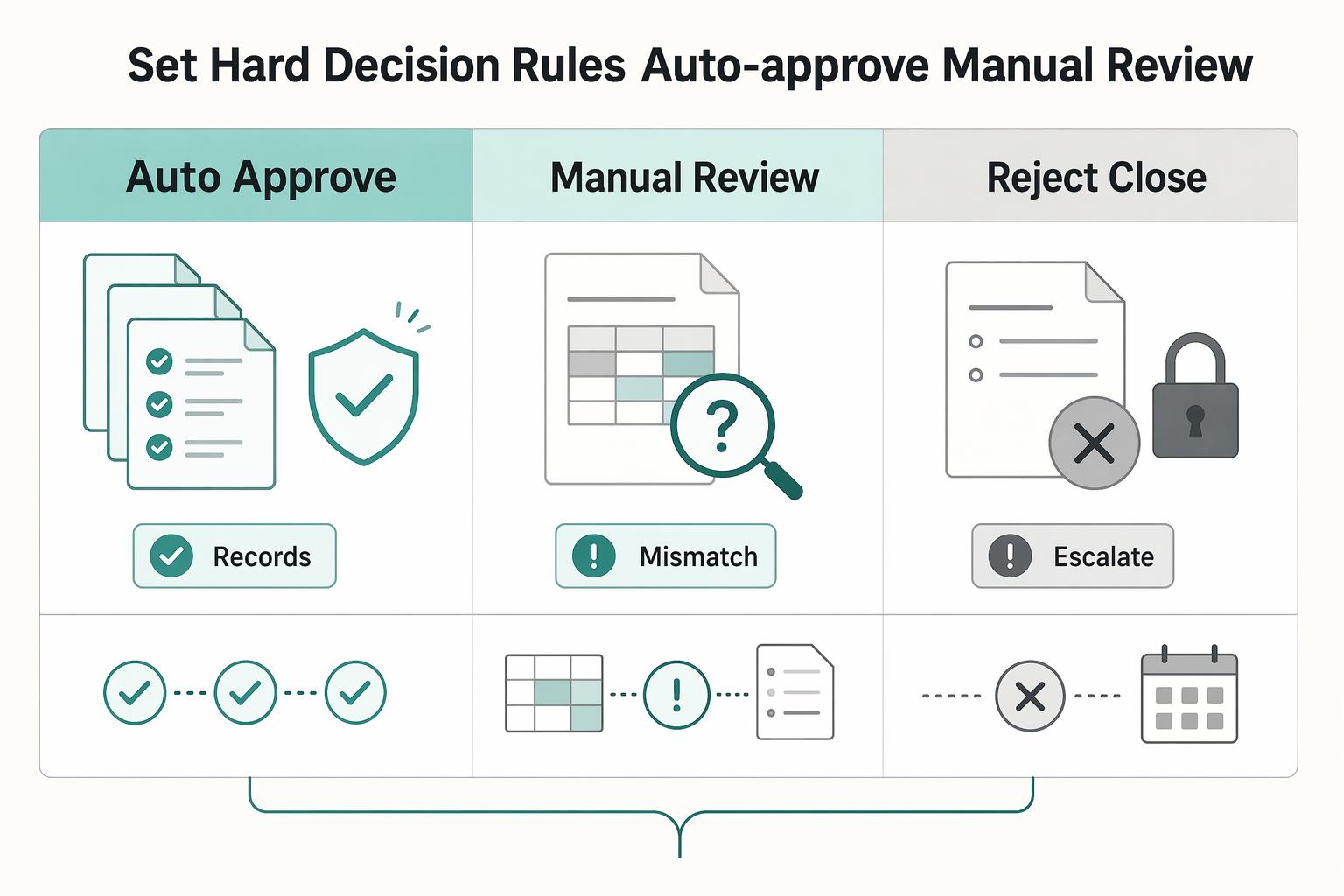
Set hard decision rules for auto-approve vs manual review#
Use fixed routing rules. Auto-approve only when all required controls pass with no contradictions. Send ambiguous records to manual review, and reject or close records that cannot legally or credibly proceed.
| Outcome | Minimum rule | Evidence to retain |
|---|---|---|
| Auto-approve | Required documentation complete, applicable sanctions restrictions resolved, no unresolved identity contradictions, and adopted tax and bank controls passed | TIN result and timestamp, sanctions source and disposition, bank-check result (if used), document checklist, decision log |
| Manual review | Any unresolved name/TIN mismatch, potential SDN List hit, or contradictory legal-entity data | Exception reason code, submitted documents, screening output, reviewer notes, decision timestamp |
| Reject or close | Activity prohibited by the applicable sanctions program, identity unresolved, or required documentation not furnished; distinguish blocking from rejection | Match confirmation, identity-failure record, outreach history, final disposition, approval to close or block |
Step 1 Set a narrow auto-approve gate#
Where your policy uses TIN Matching, a mismatch should leave automatic approval and enter the correction queue. Decide the payment treatment separately: an automated mismatch is not an IRS notice and does not itself require backup withholding.
Also require clear sanctions screening, complete mandatory documents, and no unresolved beneficial-ownership conflict for legal entities. If your program or rail requires bank-account validation, include that in the gate as well. Contradictory ownership data belongs in exception handling, not straight-through approval.
Step 2 Route ambiguity into manual review#
Use manual review for records that may still be valid but are not clean enough for auto-approval. Typical triggers include unresolved name/TIN mismatches, potential sanctions hits, or contradictory legal-entity data.
Do not auto-clear a fuzzy sanctions result from tool output alone. Require a documented reviewer disposition such as false positive, needs more evidence, or escalated.
Step 3 Reject or close records that cannot proceed#
A confirmed sanctions match requires review of the applicable program, property interest and any authorization. Block property when required; reject prohibited activity that does not require blocking. Do not release blocked property or return it as though it were an ordinary rejected payment.
If identity cannot be established, retain the exception and outreach history. If a W-9-path vendor does not furnish a required TIN, apply the relevant backup-withholding treatment and internal approval policy; a blanket prohibition on all payments is not the tax rule.
Step 4 Separate response windows by queue#
Keep low-risk corrections, sanctions escalations, and legal exceptions in distinct queues so ownership and decision records stay clear.
If risk is high and evidence remains inconclusive, keep full activation off until stronger evidence supports full approval or closure.
For a fuller breakdown, read Vendor Onboarding ROI Calculator for Manual Review vs Automated Verification.
Use this rule matrix as a control test before launch, and compare each auto-approve and escalation trigger with how Gruv Payouts handles compliance-gated payout flows.
Validate tax data before payout activation#
Tax controls should determine whether the record is payout-ready. If the tax path is wrong or unverified, keep payout disabled even when bank and sanctions checks are clean.
| Track | Applies to | Key note |
|---|---|---|
| Form 1099-NEC | Nonemployee compensation | General threshold $2,000 for 2026 payments; $600 before 2026; report backup withholding regardless of amount; use applicable filing deadline |
| Form 1099-MISC | Categories such as rents, royalties, prizes, awards, and other fixed determinable income | Category-specific thresholds: several former $600 categories increase to $2,000 for 2026; royalties retain $10; check the applicable box |
| Form 1099-K | Payment by card or third-party network | Not reported on Form 1099-MISC or Form 1099-NEC |
| DAC7 | Covered digital platform operator contexts | Entered into force on 1 January 2023 |
Step 1 Route the vendor to the correct tax form#
Route by tax status first. Use Form W-9 on the U.S.-person path, including resident aliens, and use the appropriate Form W-8 variant on non-U.S. paths, such as Form W-8BEN for foreign beneficial owners and Form W-8BEN-E for foreign entities, with other W-8 variants where applicable.
Validate required fields at entry so incorrect or incomplete forms cannot reach approval. A practical red flag is an entity and individual mismatch between profile and form, or a U.S.-person path with no usable TIN.
Verification point: one approved tax-form family, with no unresolved status contradictions.
Step 2 Run TIN Matching on the W-9 path where supported#
Use IRS TIN Matching where your organization is eligible and chooses to include it in onboarding. Record the submitted name/TIN combination, result and resolution without exposing full identifiers in routine logs.
Lack of access to this optional service is not a legal control failure. Review form completeness and tax status under your policy. A failed match can require correction, but it is distinct from a CP2100/CP2100A notice; use the formal notice procedures when they apply.
Verification point: the tax profile is complete, unresolved identity issues have an owner, and any applicable withholding treatment is configured.
Step 3 Map the approved tax profile to reporting outputs#
Once the form is approved, map the tax profile directly to reporting readiness. Form 1099-NEC covers nonemployee compensation, and Form 1099-MISC covers categories such as rents, royalties, prizes, awards, and other fixed determinable income. If EU platform reporting applies, include DAC7 readiness in the same profile mapping.
For DAC7, collect the required seller identifiers rather than treating XML validity as proof of due diligence. A no-TIN reporting value does not authorize skipping a TIN that must be collected. For individual sellers, place of birth can be required where the residence jurisdiction does not issue a TIN or does not require its collection. Apply the local rules to the seller’s circumstances. DAC7 and DPI reporting explains the data fields.
Version reporting rules by payment year and category. The 2026 increase affects several NEC and MISC thresholds, while royalties and other categories retain different rules. A single permanent dollar threshold will misclassify some payments.
Verification point: before first payout, the record shows its reporting track, for example 1099-NEC, 1099-MISC, DAC7, or none.
Step 4 Handle tax-status changes after onboarding#
Treat tax-status changes after onboarding as a recovery control. If status changes, consider holding payout updates per policy until updated forms are revalidated and approved. This includes changes in U.S. or non-U.S. status, individual or entity classification, or legal name changes that affect the tax record.
Keep one case history with the prior approved form, the change event, the updated form, the validation result, and the reviewer decision so reporting treatment stays aligned with the current tax profile.
Related: Gig Worker Tax Compliance at Scale: How Platforms Handle 1099s W-8s and DAC7 for 50000+ Contractors.
Validate bank details and payout readiness#
After tax approval, keep payout disabled until you confirm you can pay the approved party into a valid account. If the beneficiary name, bank record, and approved tax identity do not align, send the case to review.
Step 1 Check beneficiary name alignment against the approved tax identity#
Compare the bank beneficiary with the verified payee and authorized payment instructions. A W-9 may put a disregarded entity’s owner on line1 and the entity name on line2, so exact tax-name equality is not a universal beneficiary rule.
Review a different business or account name against entity, ownership and authorization records before treating it as an identity contradiction. Record why a legitimate naming difference is accepted or why a change remains on hold.
Step 2 Run bank validation before first use and queue failures with reason codes#
Run bank validation before first use, then send failures into an exception queue with explicit reason codes and resubmission steps. The goal is to confirm not just account format, but also that the account is valid and open where your payment method supports that check.
For ACH WEB debits, validate the account before first use or an account-number change under the applicable Nacha rule. That debit requirement does not itself impose the same mandate on a vendor credit payout, and its minimum validation standard does not establish account ownership.
matchor equivalent passclose matchrequiring vendor confirmation or manual reviewno matchbetween beneficiary name and account record- account not validated as valid or open
- repeated failed submissions
If you support UK rails or providers with Confirmation of Payee (CoP), the match, close match, and no match pattern is useful. Do not assume the same service exists in every market, but keep the exception structure consistent.
Step 3 Hold final approval until all control gates are green#
Set a release gate, often in finance, after required tax, sanctions, and bank checks are approved, or after an authorized exception is recorded. This is a control-design choice, but the sequence matters: verifications, authorizations, and approvals should happen before payout enablement.
Before final approval, require a complete evidence pack in the Approval workflow: bank-validation result, beneficiary name-check result, tax status, sanctions status (if applicable), timestamps, and reviewer disposition. If any control is still pending, keep payout disabled.
Step 4 Document MoR or platform payout liability before money moves#
Document who owes the vendor payment, who instructs the payout and who bears return or dispute losses under the contracts. If customer sales are also involved, record the merchant of record separately; operating a vendor payout does not itself make the platform the merchant of record.
Record the responsible entity and supporting evidence in the case file: contract terms, payout-program terms, and customer-facing flow or terms of service identifying that party. If ownership is unclear, pause activation until it is resolved.
Run sanctions and identity controls without blocking low-risk vendors#
Sanctions screening should be a hard gate for confirmed risk, not a blanket reason to stall vendors you can clearly clear. We see teams move faster when your workflow blocks and escalates confirmed matches, pauses activation for potential matches pending investigation, and moves clear false positives forward.
| Disposition | Definition | Action |
|---|---|---|
| True match | Confirmed sanctions hit | Review applicable restriction; block or reject as required and escalate |
| Possible match | Cannot clear with available evidence | Hold pending investigation |
| Clear false positive | Enough differentiating data to clear | Continue onboarding |
Step 1 Refresh official sanctions data with a documented control#
Screen against OFAC data from the Sanctions List Service, including both the SDN and consolidated non-SDN datasets. Document how lists and filtering criteria are updated, who owns that control, and what happens when updates fail or are delayed.
Make freshness auditable. Store the last successful list update, the filter or rules version used, and the screening timestamp tied to the vendor record. If list data or filters are not current under your policy, pause auto-approval until screening is current again.
Step 2 Triage alerts before blocking activation#
Treat alerts as potential matches until investigation is complete. Compare the hit against submitted identity details, and for legal entities include beneficial ownership information as required by your CDD/KYC/KYB program.
Use clear dispositions:
- True match: confirm applicable restrictions and authorization; block or reject as required and escalate.
- Possible match: cannot clear with available evidence, hold pending investigation.
- Clear false positive: enough differentiating data to clear, continue onboarding.
Record the reasoning for each disposition and keep escalation procedures explicit. If you use a false-hit list to reduce repeated noise, reassess it periodically as sanctions programs change.
Step 3 Apply KYC, KYB, and AML checks by payout risk#
Apply identity and AML controls by risk tier, not a one-size-fits-all standard. When payout risk is higher, increase KYC, KYB, and AML depth before activation.
Record the risk tier and rationale in the approval record. If risk is higher and evidence is incomplete, keep activation on hold or apply tighter payout controls until required identity checks are complete.
Capture audit evidence your legal and finance teams can defend#
Treat the audit trail as part of the release gate. If you cannot reconstruct how a vendor moved from intake to activation, your team will struggle to defend the approval.
Step 1 Preserve a case history from intake to activation#
Record the decision path for each vendor, including submitted forms, validation outputs, reviewer actions, timestamps, exception notes, and the final approval state. Tie each action to a specific user so it is traceable and accountable.
Use a simple checkpoint: pick one approved vendor and confirm you can replay the case in order without pulling screenshots from multiple teams. If the record does not show who cleared key exceptions, who resolved compliance-related alerts, and when payout was enabled, the trail is incomplete.
Step 2 Store check results without exposing sensitive values#
Capture external check outcomes, including IRS name-and-TIN match outcomes and other compliance screening outcomes, but avoid exposing raw sensitive identifiers in routine logs. Keep what proves the control ran and how it was resolved.
That balance matters. Logging too little weakens defensibility, and logging too much increases exposure. A practical middle ground is the control name, timestamp, result, reviewer disposition, and case reference, while masking or truncating sensitive values in routine log views.
Step 3 Make evidence exportable and retention-ready#
Make evidence exportable on demand as a single pack tied to the vendor or case record: submitted form versions, control outcomes, exception resolutions, approval history, and activation state. The point is to support report generation and on-demand analysis, not just storage.
Protect audit information and logging tools from unauthorized access, modification, and deletion. Set retention by obligation. For OFAC-covered transactions, keep full and accurate records and make sure they are available for examination for at least 10 years; the 10-year rule took effect on March 12, 2025. As an internal control, keep activation blocked when the audit trail is partial, missing, or not exportable.
Reporting cadence and escalation paths that prevent surprises#
Reporting should surface control failures early, not just summarize them later. Set a risk-based cadence you can run consistently, and reserve prompt escalation for confirmed sanctions events and persistent identity failures.
Step 1 Publish a consistent control report#
Use one recurring report with the same core measures: completion rates for Form W-9 and applicable Form W-8BEN-E submissions, IRS match failures, bank validation failures, and sanctions review backlog. Because the IRS service is pre-filing, split first-pass failures from cases waiting on corrected name and TIN data.
Sample vendors from each failure bucket and confirm the record shows the blocker, current owner, and last action date. Totals alone can hide aging exceptions.
Step 2 Track exception aging with named owners#
Use a shared view of open risk items across compliance, legal, finance, and operations, even if source systems differ. For each exception, show age, owner, blocker type, and whether payout remains disabled.
Do not allow unowned pending items. Repeated tax mismatches, unresolved bank beneficiary conflicts, and sanctions alerts can stall when ownership is unclear.
Step 3 Escalate by trigger, not volume#
Escalate blocked property and rejected prohibited transactions to compliance with the date, legal basis and transaction record. Applicable OFAC initial reports are due within 10 business days; do not substitute a calendar-day clock or treat blocking and rejection as interchangeable.
Use a separate escalation path for tax and bank identity issues. Escalate within your policy window when name-and-TIN mismatches repeat, corrected Form W-9 data still fails pre-filing validation, or bank identity conflicts remain unresolved after resubmission, since backup withholding obligations can attach when TIN data is missing or incorrect.
Step 4 Review control quality on a policy cadence#
Use a periodic control review to tune decision rules and reduce avoidable noise. A monthly review can work, but it is a policy choice rather than a stated IRS or OFAC mandate.
Focus the review on false-positive rates in sanctions screening, noisy bank-validation reason codes, and coverage changes by market for tax documentation, KYC, or payout corridors.
Copy and use this launch checklist#
Keep payout activation off until required controls pass or a lawful internal exception is recorded. Configure any required withholding and preserve sanctions restrictions; neither can be waived by an ordinary approval override.
Step 1: Publish the document matrix#
Publish one matrix by vendor type and market before intake starts. Route U.S. payees to Form W-9 for TIN collection, and route foreign individuals to Form W-8BEN when requested by the payer or withholding agent. Keep sanctions checks and bank-data requirements on the same row so mandatory controls are explicit.
Before launch, test one U.S. vendor and one foreign individual in the portal to confirm each profile sees one tax path, not both.
Step 2: Lock decision rules and owners#
We recommend documenting auto-approve, manual-review, and reject rules with clear ownership. For each rule, define when your response clock starts, what evidence clears the case, and whether payout remains blocked during review.
Pressure-test with three cases: a clean Form W-9 with passed checks, a name and TIN mismatch, and a potential sanctions hit.
Step 3: Integrate core checks and log them#
Core controls typically include IRS name-and-TIN validation for eligible payers or authorized agents, sanctions screening against OFAC/SDN data, and bank-account validation where applicable. Log who ran the IRS check, when it ran, and the result tied to the submitted tax form. For sanctions screening, retain the decision result and the list version or refresh timestamp used at decision time.
If onboarding includes ACH WEB debits, require account validation before first use and before any account-number change, effective March 19, 2021. Keep full Audit trail evidence: submitted document record, timestamps, control outcomes, reviewer or automation decision, and final payout state.
Step 4: Block payout until controls clear#
Enable payout only when mandatory controls are complete and any permitted internal exception has an approver, rationale and follow-up date. The resulting payment must still follow applicable withholding and sanctions requirements.
Test with three records before launch: one missing a tax form, one failing validation, and one clean file. If a confirmed SDN match results in blocked property, escalate immediately to compliance or legal because the initial OFAC report is due within 10 business days.
Step 5: Run reporting and recordkeeping#
Weekly reporting is an operating choice, not a cited legal requirement, but it helps catch aging exceptions early. Track missing Form W-9 or Form W-8BEN, IRS match failures, sanctions reviews, bank-validation failures, and payout-blocked records, with aging by owner.
Document scope limits clearly: what is covered now, such as U.S. tax forms, OFAC/SDN screening, and bank checks, and what requires local-market or specialist advice. For OFAC-covered matters, keep records available for examination for at least 10 years.
Before you go live, confirm your market/program coverage, ownership boundaries, and exception handling with Gruv.
Frequently Asked Questions
What documents should be required before first payout?
Collect the tax form that matches payee status, the bank account details needed for validation, and the data needed for sanctions screening. Use Form W-9 where that form applies, Form W-8BEN for foreign individuals, and Form W-8BEN-E for foreign entities. These forms are furnished to the requester, withholding agent, or payer and are not sent to the IRS by the payee.
How should `Form W-8` and `Form W-9` be routed in one onboarding flow?
Route by payee status first, not by country field alone. Use Form W-9 where applicable, Form W-8BEN for foreign individuals, and Form W-8BEN-E for foreign entities. For one tax profile, do not route the same vendor through both W-9 and W-8 paths. If tax status changes, collect and review a replacement form before payout changes are applied.
When should a vendor be auto-approved versus sent to manual review?
Auto-approve when the documents and controls required by your program are complete and consistent. Route potential sanctions matches, unresolved identity contradictions and repeated validation failures to review. Configure any lawful withholding treatment separately from the internal payout approval state.
What is the minimum audit evidence needed for onboarding controls?
For internal onboarding controls, keep the submitted form record, timestamps, check outcomes, decision owner or automation decision, and final payout state tied to the vendor record. This should include tax-validation outcomes, bank-validation outcomes, and sanctions-screening outcomes. For OFAC-covered matters, records must be available for examination for at least 10 years.
How do `TIN Matching` and bank validation interact before payout activation?
IRS TIN Matching is an optional pre-filing name/TIN check for eligible payers; bank validation addresses the payout account. Neither substitutes for the other. A failed automated match alone is not an IRS notice requiring backup withholding. Missing or obviously incorrect TINs and formal notices require their own tax treatment for covered payments.
What should trigger immediate escalation to compliance or legal?
Escalate a confirmed sanctions match to determine the applicable blocking or rejection duty and any authorization. Report blocked property or rejected prohibited activity within the applicable 10-business-day window. Separately route missing TINs, formal IRS notices and persistent identity contradictions to finance for the correct withholding and remediation treatment.
Try a related tool
Researched and edited by the Gruv editorial team. Gruv builds cross-border billing, payouts, and finance-operations software for global businesses.
Sources
Includes 2 external sources outside the trusted-domain allowlist.
- irs.gov/tax-professionals/taxpayer-identification-nu...trusted
- irs.gov/forms-pubs/about-form-w-9trusted
- ofac.treasury.gov/faqs/5trusted
- ofac.treasury.gov/media/934131/downloadtrusted
- nacha.org/rules/supplementing-fraud-detection-standard...external
- vero.fi/en/businesses-and-corporations/taxes-and-cha...external
Educational content only. Not legal, tax, or financial advice.
Related Posts

The Freelance Payment Penalty: A Modeled Audit of Platform Fees, FX Spreads, and Payout Delays
The money rarely disappears through a single, easy-to-spot fee. The real loss is stacked. A marketplace takes its commission, a processor adds a charge for international cards, a bank or payment company converts the currency at a spread, a platform holds the funds before release, and a wire sheds a little to intermediaries on the way in. Each layer looks defensible on its own, but the worker feels the combined result as a smaller deposit and a later payday.

How to Respond to a Subpoena for Business Records
Move fast, but do not produce records on instinct. If you need to **respond to a subpoena for business records**, your immediate job is to control deadlines, preserve records, and make any later production defensible.

A US Expat's Guide to Investing in UCITS ETFs to Avoid PFIC Issues
The real problem is a two-system conflict. U.S. tax treatment can punish the wrong fund choice, while local product-access constraints can block the funds you want to buy in the first place. For **us expat ucits etfs**, the practical question is not "Which product is best?" It is "What can I access, report, and keep doing every year without guessing?" Use this four-part filter before any trade: