
Quick Answer
To create a fillable client onboarding PDF in Acrobat, open All tools > Prepare a form, select your document, review detected fields, and add missing inputs. Give independent fields distinct names, add labels and tooltips, mark necessary answers required, and set tab order. Save a blank master, complete a dummy copy in a recipient reader, reopen it to check saved answers, and test the return route before sending it to clients.
Design the onboarding questions before adding fields#
A fillable PDF lets a client type answers into a fixed document, save it, and return it. Start with the information you need for a contract draft, invoice setup, and project kickoff, then build actual interactive fields. This guide uses Adobe Acrobat desktop as a concrete creation path and explains the checks that matter when clients open the file in different readers.
Step 1. Assign a job to every field. Each field should exist for one of three reasons: risk prevention, decision clarity, or automation readiness. A scope field helps prevent fuzzy deliverables. A billing contact field helps your invoice reach the right person with the right details. A decision-maker field helps keep onboarding from stalling by clarifying who can approve what. If a field does not support one of those jobs, cut it.
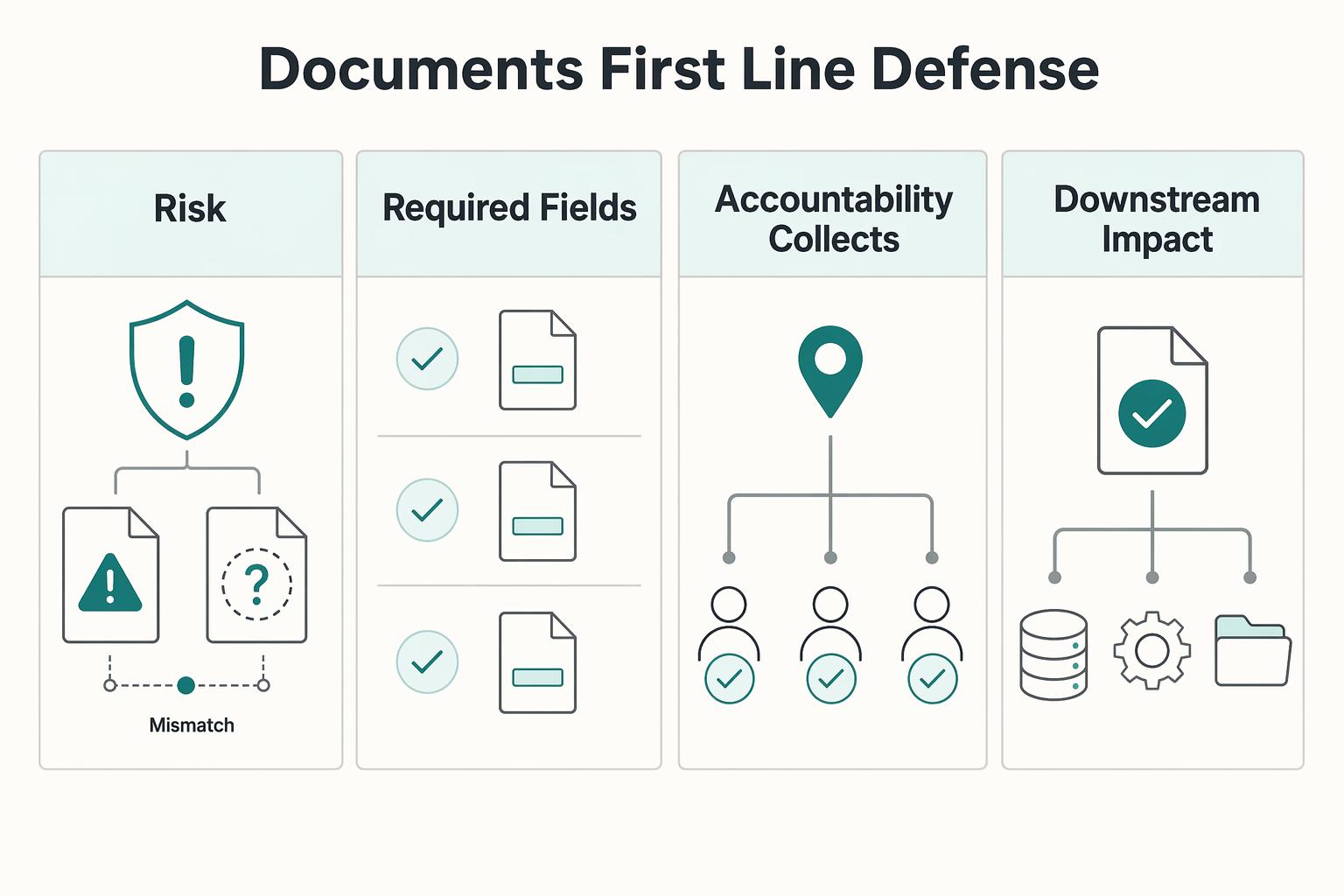
| Practical area | Basic fillable form | Operationally engineered form |
|---|---|---|
| Field design | Adds boxes wherever text appears | Adds fields only where they drive an action or reduce a risk |
| Required fields | Few or none marked required | Marks necessary inputs required; the receiving process also checks completeness |
| Accountability | Collects information | Identifies owner, approver, billing contact, and next step |
| Downstream impact | Manual follow-up and rework | Clearer contract drafting, invoicing, and project kickoff |
Treat contract, invoice, and intake as connected records. The contract records agreed scope and payment terms. The invoice records the amount and payment details. Intake gathers the client details used to prepare those records; it does not by itself turn a requested service or checked box into an agreed contract change.
Keep the questionnaire short enough for a client to finish in one sitting. Give each section a heading and each input a visible label. Draft labels and help text before converting the document, and remove questions you cannot explain or use. The existing diagram shows how the same information supports scope, billing, and accountability.
Create the fillable PDF in Acrobat#
Start with a clean PDF or convert your existing document in Acrobat desktop. Use a supported authoring plan; recipients can fill a compatible form in Reader without owning the same authoring plan. Adobe’s conversion instructions use All tools > Prepare a form, followed by selecting a file or scan and creating the form. Review detected fields, delete incorrect ones, and add missing components. Use Preview to inspect the form, then save it. A scanned page may need manual field placement; detection is a starting point.
- Use a text field for client_legal_name and billing_email, and a multiline text field for project_summary. Leave enough space for realistic answers.
- Give independent questions distinct internal names. Copied fields with the same name can repeat the same answer; rename copies in Properties > General. Intentional repeated values and radio groups need deliberate naming.
- In General properties, add a useful Tooltip and select Required only for necessary inputs. Keep an obvious visible label as well; “required” must not rely on color alone.
- Use dropdowns for a small fixed list and radio buttons for one mutually exclusive choice; use checkboxes when more than one independent choice is allowed.
Adobe documents field names, tooltips, Required, and Read Only. Stable names such as billing_email are useful for exports; a tooltip such as “Email address that receives invoices” helps the recipient understand the input. Required flags do not guarantee that every viewer or emailed return enforces completeness.
Set navigation, accessibility, and any calculations#
Set the tab order to follow the visual question order. In the Fields panel, display tab numbers and use a suitable ordering option or manual ordering. Try Tab and Shift+Tab through the form, checking that focus reaches every input in a sensible sequence.
Add meaningful field descriptions, document language, headings, and tags, then inspect reading order and keyboard use. Adobe’s accessibility guidance explains accessible field descriptions and document checks. Run automated checks where available and review items that require manual judgment; an automated pass alone does not establish full accessibility.
For an invoice worksheet, set each calculated field through Properties > Calculate and define its inputs. Adobe documents calculations and field calculation order: put upstream amounts before dependent totals. Keep calculated outputs read-only to reduce accidental changes and compare the result with a manual dummy example, including the discount, tax, and advance treatment shown in the FAQ. Keep actual invoice records in the billing ledger.
Save, reopen, and test the return route#
- Save an empty versioned master, then make a separate dummy test copy. Open it in Reader and the browser or mobile viewer your recipients use.
- Enter a long name, multiline project description, checkbox choices, and realistic punctuation. Test a blank required input, invalid input, and any calculations. Confirm answers fit and remain recoverable.
- Save the completed file, close it, reopen it, and confirm every answer remains. Do not use Print to PDF as the master-saving step; it can flatten interactive fields.
- Send the test file through the intended secure return route and open the returned copy. Check completeness yourself and verify any export or manual transfer.
- In the client message, name the form version, give tested fill-and-save instructions, state the return destination, and provide a contact or alternative if their viewer cannot handle it.
Use dummy information for these checks. The receiving owner should retain the returned client version and confirm key details before drafting an agreement, issuing an invoice, or inviting someone into a workspace.
Use the form to prepare a clear service agreement#
Your contract is your boundary-setting system before work starts. Use it to define what is included, what is excluded, how payment works, and how out-of-scope work becomes a paid change.
Step 1. Draft scope as a checklist, not a single broad paragraph#
Do not rely on one generic "services" line. Complete these three fields in plain language before you send for signature:
- Project Scope: State the project purpose clearly enough that someone outside the project can understand the objective.
- Deliverables Included: List each output separately.
- Explicitly Out of Scope: Name common assumptions you are not including.
For a genuine request outside the agreed scope, send a proposed amendment with the extra work, price, and timeline, and obtain agreement before doing it. Extra effort on your side does not automatically make included work a paid change; corrections and revisions already owed remain included.
Quick QA check: compare this section against your intake answers so optional items are either clearly included or clearly excluded.
Step 2. Replace vague payment language with usable clauses#
Use dates, amounts, and invoice triggers that the parties actually agree. The examples below illustrate a hypothetical €2,000 project; replace them with your agreed terms before using the document.
| Clause area | Vague wording | Illustrative wording to adapt |
|---|---|---|
| Payment timing | “Payment due promptly.” | “The €600 advance is due before the agreed start; the €1,400 balance is due 14 calendar days after the final invoice.” |
| Invoice trigger | “Invoice sent when work is done.” | “Issue the advance invoice after agreement and the balance invoice on delivery of the agreed final files.” |
| Payment method | “Pay by standard methods.” | “Pay in EUR by the bank-transfer instructions on the invoice; confirm any alternative method with the billing contact.” |
| Late payment | “Late payments may incur a fee.” | State the applicable lawful interest or agreed charge, its trigger, and any required notice; do not invent a universal fee. |
Confirm that the proposal, agreement, and invoice schedule match. This illustrative advance is not a universal prerequisite for payment or a reason to withhold work already owed. Follow the actual agreement and applicable notice requirements when resolving a dispute.
Step 3. Separate draft editing from final signature workflow#
Finish drafting first, then move to your signing/finalization workflow and store records where you can retrieve them later.
Keep a reusable blank master separate from the client-specific draft and final agreement:
- Save the editable source and an empty PDF master with a version and date.
- Create a separate client copy; check that test answers and hidden default values have been removed.
- Complete drafting and resolve changes before routing the agreed version for signature.
- Decide whether your transaction needs an electronic signing service or a certificate-based digital signature; a pasted signature image does not provide the same evidence.
- Keep the final document, related agreement correspondence, and any signing completion record together.
Step 4. Run a pre-send QA pass#
Before onboarding starts, run one short release check:
- Verify the relevant party names, scope, payment terms, and any required signature inputs; routine intake does not always need a signature.
- Check cross-document consistency (client legal name, project title, pricing terms, billing contact).
- Confirm signature readiness (correct recipients, correct sequence if needed, retrievable final record).
- Test the form flow before distribution.
Required-field markings help recipients identify missing answers. They are not a complete enforcement control: a client may save and return an incomplete file through a different viewer or channel. Check the returned record before treating it as complete.
Use a consistent folder structure for the blank master, each client version, and the returned file. How to Create a System for Naming and Organizing Your Digital Files gives a related filing workflow.
Reuse confirmed intake details in invoices#
Collect billing details once, confirm them, and reuse them in your invoicing system. A tidy PDF can reduce clarification requests, but it does not guarantee approval, payment, or tax compliance.
Step 1. Build an invoice minimum data set before you send anything#
Separate legally required invoice data from client-specific routing preferences. Require information needed for the actual transaction rather than forcing every client to provide a tax ID or tax form.
- Your legal entity details: legal business name, business address, and your invoicing tax identifier where applicable.
- Client legal entity details: registered business name and registered billing address (not internal nicknames).
- Tax identifiers where applicable: collect the VAT or other tax identifier required for the transaction. A supplier tax form is a separate record, not a universal invoice field.
- Billing contact ownership: the person or team that owns invoice approval, plus the AP billing email.
- Invoice controls: invoice number, issue date, due date, currency, line items, subtotal, tax line, total due, and payment instructions.
- Contract and routing references: record a PO or engagement reference when required by the actual agreement or client routing process; an internal missing reference does not automatically erase a payment obligation.
A common failure is sending the invoice to your day-to-day contact when AP requires a different inbox, portal, or reference. Capture billing ownership early and reuse it every time.
Step 2. Decide the tax path before you finalize the template#
Do not finalize tax treatment from summaries alone; verify it against primary requirements before issuing the invoice.
Use a simple path:
- Identify the supplier and customer locations and whether the customer is acting as a business or consumer.
- Identify the service or goods supplied; special place-of-supply rules can change the treatment.
- Record the applicable tax treatment, identifiers, and invoice wording using current authority guidance; preserve the evidence and any exception owner.
For an EU transaction that depends on a VAT number, check it in VIES and retain the result. An unavailable or invalid result needs follow-up with the customer or tax authority; it does not automatically prove consumer status. Resolve treatment through the appropriate process while respecting the applicable invoice deadline.
Step 3. Compare your template against an approval-ready version#
A payment-ready template is complete, readable, and easy for AP to code without interpretation.
| Template type | Field completeness | Tax handling | Approval readiness |
|---|---|---|---|
| Incomplete template | Missing applicable legal details, billing destination, or references | Unexplained tax line | Requires correction or follow-up |
| Readable but unverified template | Names and totals present; relevant routing or tax evidence missing | Tax amount entered without confirmed treatment | Check the unresolved item with its owner |
| Checked template | Applicable entity details, invoice controls, and confirmed billing route | Treatment and required wording documented | Ready to send through the agreed route; payment still depends on the actual obligation and process |
Standardized formatting helps here. If totals, dates, and labels are hard to scan, payment slows down.
Step 4. Run a pre-send validation pass. Before you send any invoice, run a short QA check:
- Recalculate line items, subtotal, tax, and total.
- Confirm consistency with the contract: legal names, scope label, price, milestone trigger, due date, and PO/reference fields.
- Check approval readability: grand total, due date, payment method, and billing destination should be obvious at a glance.
If AP asks the same question repeatedly, fix the template itself, not just that one invoice. For pricing structure context, see Value-Based Pricing: A Freelancer's Guide.
Collect and confirm reusable client details#
Your intake form is an input record for onboarding, not automatic proof that the answers are correct. Confirm the legal entity, billing destination, and agreed project details before reusing them. Record later corrections so the contract, invoice setup, and project workspace stay consistent.
Step 1. Capture only fields you will reuse downstream#
Use text fields for names and short answers, a multiline field for the project summary, checkboxes for independent choices, and radio buttons for a single choice within a group. Mark only necessary answers required and explain when a conditional field applies.
| Intake field | Required | Data owner in your process | Validation intent |
|---|---|---|---|
| Legal business name and billing address | Yes | You or your onboarding owner, with client confirmation | Prevent informal or incomplete entity details from being reused in formal documents |
| Primary project contact name and email | Yes | Project owner | Keep the day-to-day contact clear before onboarding starts |
| Billing / accounts payable contact | Conditional (required if billing goes to a different contact) | Billing owner, with client AP confirmation | Prevent invoice routing delays and approval loops |
| Service request or project summary | Yes | Project owner, then client agreement for scope | Keep contract label, invoice label, and project naming aligned |
| Workspace access email(s) | Optional | Workspace administrator | Reduce avoidable access/setup delays |
| Preferred communication channel and timezone | Useful; allow an agreed alternative | You define options; client selects | Set communication defaults early and reduce handoff confusion |
Use the field setup steps earlier in this guide for the PDF version. Keep visible labels such as “Billing email” separate from stable internal field names such as billing_email; the latter make exports and mapping easier to maintain.
Step 2. Map each intake field to one destination#
Only collect data you can route to a clear next step. Even with manual copy-and-paste, this map reduces avoidable errors.
- Legal business name and billing address -> contract draft fields and invoice setup fields
- Billing contact -> invoice destination and approval-routing notes
- Project contact and access email -> project workspace invite list
- Communication channel and timezone -> onboarding message and scheduling defaults
- Project summary -> scope draft and engagement label
Submit a dummy response and trace each answer into the actual destination. Acrobat response collection does not automatically map fields into your CRM, agreement, or invoice system. A manual transfer is acceptable; for an integration, configure the mapping, client identifier, and duplicate handling, then check that values arrive in the right record.
Step 3. Set working norms inside the form#
Collect preferences and show proposed working norms clearly. Confirm any contractual response times or changes separately; a form response is not automatic consent to every proposed term.
- Communication channel: ask which agreed project channel the client will use.
- Response expectation: state the agreed business-day window and how urgent issues are handled.
- Working timezone: collect the client timezone and show yours when scheduling.
- Escalation: name the project owner or agreed alternate contact and when to use that route.
A browser form may suit a short questionnaire; a fillable PDF suits a client who needs a fixed document to save and return. Check the exact authoring features in your existing plan before buying another tool. How to Create a Client Welcome Packet That Wows helps with the accompanying onboarding message.
Choose tools around the return and signing workflow#
Choose the capture, PDF editing, and signing steps you need. One product may cover several roles; separate products are useful only when the workflow requires them. Test the recipient experience and the record you will receive before standardizing.
Step 1. Match the tool category to the document job#
| Tool category | Best-fit use case | Data handling model | Audit trail strength | Field logic depth | Integration fit | Handoff friction | Main tradeoff |
|---|---|---|---|---|---|---|---|
| Browser form builder | Intake questionnaires and quick client data capture | Responses are typically processed or stored in the vendor cloud | Verify submission history and record export options | Often supports required fields and conditional logic; verify your exact needs | Usually easier when the rest of your workflow is online | Low for clients, but may require a second step for PDF/contract output | Convenient online collection, with vendor data-handling checks |
| Desktop PDF editor | Existing PDF reuse, strict layout control, scanned-document conversion | May allow local editing; sharing, sync, and connected features can still send data elsewhere | Verify document-history controls in your process | Strong for fixed field placement and layout precision | Often needs separate send/sign steps | Medium when recipients must handle PDF files directly | Better layout control, more file management |
| E-signature tool | Contracts and approvals where signer evidence is required | Document routing usually runs through the signature service | Verify evidence capture and exportability before rollout | Typically centered on signature fields, not deep intake logic | Useful when you need send-sign-complete flow in one system | Usually low for signers | Strong signing workflow, but document prep may still happen elsewhere |
Step 2. Check the implementation details that break first#
Confirm that your editor creates real interactive PDF fields, then open the saved result in the readers your clients use. Test typing, selecting, keyboard navigation, saving, reopening, and returning it. If the browser viewer drops answers or ignores logic, give tested Reader instructions or offer an alternative collection route.
A text annotation placed over a page is not the same as a reusable form field. Click each input in a fresh copy and use Tab to move between fields. Ask a test recipient to complete and return it, then verify that the saved file retains the answers.
Before uploading client files to a web editor or AI-assisted feature, check processing, access controls, retention, storage, export, and deletion settings. Local editing alone does not establish privacy if files are synced or later uploaded. Collect only information needed for onboarding, consistent with the ICO data-minimisation principle.
Step 3. Verify the signature layer as evidence, not design#
If the document needs signing, choose evidence suitable for the jurisdiction and agreement type. A typed name, a drawn signature, a signing-service record, and a certificate-based digital signature have different technical properties. Check the selected workflow for:
- Identity evidence
- Signer consent capture
- Tamper-evident logs
- Exportable records for storage with the final document
Quick tool stack by document:
- Intake form: use a tested browser form or fillable PDF according to how the client will complete and return the answers.
- Contract: prepare the document in your editor, then send it through a dedicated signature step (for example, Request signatures or equivalent).
- Invoice: generate from the invoicing ledger and export a delivery copy. Add a signature only when actually required; a client-editable PDF is not the authoritative billing record.
Record who receives returned forms, who checks completeness, and who updates each destination. This ownership matters more than the number of tools in the stack.
Keep a tested master and a clear handoff#
The finished result should be a blank reusable PDF that a client can complete, save, and return, plus a receiving process that checks the answers and puts them in the right records. Keep the contract, invoice, and intake roles distinct while reusing confirmed information across them.
- Step 1. Lock the contract to the actual agreement.
Check that the final agreement records the actual scope, payment terms, and boundaries. Use the appropriate signing flow when required and save its completion evidence with that version. Missing a formal template does not automatically invalidate an agreement already made through another valid route.
- Step 2. Make the invoice easy for accounting to approve.
Confirm applicable invoice fields, treatment, agreed billing triggers, and arithmetic before sending. Keep the authoritative invoice in the invoicing system; use the PDF as a delivery copy. A readable form can support routing, but it does not grant approval or remove tax obligations.
- Step 3. Collect intake data once, not twice.
Make a fresh copy of the master, complete it with dummy answers in a recipient reader, save and reopen it, and trace the returned data to its destination. Check missing required answers at receipt and confirm important client details before reuse. Keep test data out of the client copy.
- Step 4. Operate this on a regular cadence.
Recheck templates when fields, terms, software, or tax requirements change. Review repeated missing-answer and handoff problems on a cadence that suits your volume. Keep dated masters and prior client records so a revision does not overwrite the version used for an earlier agreement.
A working fillable PDF combines usable fields with a reliable return path. The final check is practical: can your client complete it, can you recover the saved answers, and does someone own the next step?
For a client-facing home for documents, see How to Create a Client Portal in Notion, and verify that each client can access only their intended records.
Frequently Asked Questions
How should you handle contract signing?
Finalize the agreed version before sending it to the correct signers. Use a signing method suitable for your jurisdiction and contract type, and retain the final document with identity, consent, and completion evidence available from that workflow. A normal intake form need not be signed; adding a signature box does not by itself establish a contract or prove enforceability.
How should you handle invoice totals and tax math?
Test a separate dummy copy against a manual calculation before using any formula. For an illustrative tax-exclusive invoice: 2.5 hours at €80 is €200; a €20 discount leaves €180; an assumed 10% tax adds €18, giving €198; a €60 advance leaves €138 due. This assumes the discount reduces the taxable base and the advance reduces the balance, not the tax base; actual rules may differ. Test zero, decimal, blank, and invalid inputs, and calculation order. Read-only total fields reduce accidental edits but are not a security boundary; verify the final amount against the invoicing ledger.
How should you handle sensitive client intake data?
Collect only details needed for the task, limit access, and choose a secure return route. Keep passwords, card details, identity documents, and tax forms out of general intake unless there is a specific justified requirement and an appropriate collection process. Check vendor processing and folder-sharing settings; a desktop-created PDF can still expose data through email, cloud sync, or an open client folder.
How should you handle tax forms in onboarding?
Keep tax forms separate from the general questionnaire and use the current official form rather than recreating it as custom intake fields. Form W-9 generally supplies a US person’s taxpayer information to a requester who needs it; a foreign individual may instead provide W-8BEN when applicable, while entity and income circumstances can require different forms. A US client does not make every supplier a W-9 filer. Follow the requester’s legitimate reporting need and IRS instructions, and return sensitive forms through an appropriate secure channel.
What should you verify on EU invoices and VAT setup?
A fillable PDF does not determine VAT treatment. For the cross-border SME scheme, an EU-established eligible business must meet both the €100,000 Union turnover ceiling for the current and preceding calendar year and the applicable national or sectoral threshold and reference periods in each exemption country. File prior notification through the establishment Member State and wait for the EX number and confirmation for the selected countries before using the exemption. Registration normally takes up to 35 working days but can take longer for anti-evasion checks. Preserve notification and confirmation records and submit the quarterly Union-turnover report. The scheme permits simplified invoices; confirm the applicable country’s required content before changing your template.
Should you use OSS for EU work?
Use OSS only for supplies covered by the relevant scheme; it is not a blanket route for every EU B2B invoice. The schemes are optional and use a single identification Member State. Union and non-Union returns are quarterly; import-scheme returns are monthly. These returns are additional to, rather than a replacement for, domestic VAT returns. Confirm coverage and the relevant reporting route before adding OSS fields to your template.
Try a related tool
Researched and edited by the Gruv editorial team. Gruv builds cross-border billing, payouts, and finance-operations software for global businesses.
Sources
Includes 3 external sources outside the trusted-domain allowlist.
- europa.eu/youreurope/business/finance-and-tax/vat/chec...trusted
- irs.gov/forms-pubs/about-form-w-9trusted
- irs.gov/instructions/iw8bentrusted
- sme-vat-rules.ec.europa.eu/sme-scheme/cross-border-sme-scheme_entrusted
- vat-one-stop-shop.ec.europa.eu/one-stop-shop_entrusted
- helpx.adobe.com/acrobat/desktop/work-with-pdf-forms/create-f...external
- helpx.adobe.com/acrobat/using/pdf-forms.htmlexternal
- ico.org.uk/for-organisations/uk-gdpr-guidance-and-resou...external
Educational content only. Not legal, tax, or financial advice.
Related Posts

Value-Based Pricing for Freelancers Under Real Payment Risk
Value-based pricing starts with the client’s expected benefit and willingness to pay. It still needs a deliverable, scope and payment agreement you can perform. Use a discovery phase when the benefit or effort is too uncertain to support a defensible quote.
How to Create a Freelance Client Welcome Packet That Actually Protects You
**A welcome packet is one of the first repeatable documents that shows a client you run this like a real business, and it starts doing that work before the kickoff call even happens.**

The Freelance Payment Penalty: A Modeled Audit of Platform Fees, FX Spreads, and Payout Delays
The money rarely disappears through a single, easy-to-spot fee. The real loss is stacked. A marketplace takes its commission, a processor adds a charge for international cards, a bank or payment company converts the currency at a spread, a platform holds the funds before release, and a wire sheds a little to intermediaries on the way in. Each layer looks defensible on its own, but the worker feels the combined result as a smaller deposit and a later payday.