
Quick Answer
Build a public payment status page around customer-visible stages, verified impact, safe customer actions, publishing ownership, notification rules, and backlog-aware recovery.
Why a Public Status Page Matters for a Payment Platform#
A payment status page should help customers decide what to do while a service is disrupted. Report the affected payment stage, scope, current evidence, safe customer action, and next update time. A working API does not prove payouts arrived, and a recovered provider does not prove your delayed backlog is clear.
- Publish timestamped notices so each update is tied to a concrete checkpoint.
- State impact directly, including when no data-content impact is expected.
- Provide an escalation or contact path for affected users.
Distinguish an outage from normal settlement timing, planned maintenance, and an announced support-hours change. For example, an ACH payout scheduled for the next banking day is not necessarily a service incident; a queue missing its promised submission window may be. Publish planned changes separately and explain any effect on payment deadlines.
Answer the payment questions customers need: can they submit a new instruction, are accepted payments progressing, which recipients or corridors are delayed, and should they wait or contact support? Avoid recommending a resend while the first instruction’s outcome is unknown.
This pairs well with our guide on How to Build a Deterministic Ledger for a Payment Platform.
What to prepare before you build#
Before you design components or incident states, settle publishing responsibility, evidence, and platform prerequisites. If those basics are fuzzy, the page can look finished before it is operationally ready.
Assign publishers before the first incident#
Assign a primary publisher and a backup publisher for each customer-facing area on the page. The checkpoint is simple: if an incident starts now, your team should already know who can publish the first update.
Build one evidence pack the team trusts#
Build one evidence pack your team trusts. It can include a current component inventory, dependency list, and the checks you use to confirm customer impact.
Keep the public status page, incident publishing access, and responder authentication available when the payment application is down. Store management credentials securely, use the access controls your status product supports, and rehearse the backup publisher’s access. Payment API secrets and customer-level payout evidence belong in restricted internal systems.
Set a day-one claim rule#
Publish observed impact promptly, even when cause or full scope is still unknown. Say what is confirmed, what is being investigated, what customers should do, and when the next update is due. Do not claim no data or financial impact until the relevant checks support that statement.
Confirm status stack prerequisites before launch week#
Verify public hosting, custom-domain and TLS setup, responder access, backup publishing, and notification configuration before launch. A self-hosted page also needs capacity, patching, and recovery owners. Avoid depending entirely on the same application, identity service, or region whose outage the page must report.
If you plan to automate updates or subscriptions, verify JSON API support and subscriber notifications by email as well.
Related: How to Build a Payment Compliance Training Program for Your Platform Operations Team.
Decide what your status page covers and what it does not#
Define the page’s service boundary around customer payment outcomes. Record covered components, regions, methods, normal settlement calendars, external dependencies, and who owns each. Review that inventory after product or provider changes so an operational banner cannot conceal an uncovered payout path.
Define scope in customer-impact terms first#
Define scope in customer-impact terms first, then map possible causes underneath it. Lead with outcomes customers can verify, and keep internal subsystem names as supporting detail.
Use a scope record with customer outcome, internal dependencies, external dependencies, and owner. For example, Funding & Payouts may include instruction acceptance, bank submission, and delayed payout processing; a customer’s individual balance or disputed invoice remains an account-level support matter.
Set a rule for incidents caused outside your stack#
Set a rule for incidents caused outside your stack. Publish customer impact once you verify it, and do not label an external dependency as the cause until your checks confirm it.
Use the same evidence checkpoints from your prep work, and add a visible freshness marker to the scope note. A dated last reviewed or last modified field makes the boundary auditable instead of implied.
Add a short "not covered here" statement#
If you add a short "not covered here" statement, keep it specific and operational. State plainly which decisions the page supports and which it does not. Treat this as a team policy choice rather than an externally validated standard.
For example: "This page reports service availability and customer impact. It does not replace account-level reporting, reconciliation, or support case updates."
Map components to the payment lifecycle users actually experience#
Map components to customer-visible payment stages, not your org chart. Keep a separate lane for external dependencies you do not control. That gives customers a page that matches what they actually experience when money movement breaks.
Name components by the stages users feel#
Name components by the stages users feel when payments fail or recover, such as Authorization & Payments, Acquiring Services, Settlement and payouts, Funding & Payouts, and Portals & Reporting.
That matches the flow customers actually experience. It starts with payment submission, tokenization, API and gateway routing, then moves through acquirer or processor handling, card-scheme routing such as Visa, and issuing-bank approve or decline decisions after checks. If a user can authorize a payment but cannot receive funds, that should map to a different component than a checkout authorization failure.
Keep authorization, collection settlement, and outbound payout processing distinguishable. A checkout authorization outage needs different advice from a settled collection whose contractor payout is delayed. Use the stages your product actually supports rather than adding every card-processing component by default.
Create a dedicated dependency lane#
Create a dedicated dependency lane for external entities such as card schemes and issuing banks. Third-party incidents need a clear home, but they still need to show up where customers feel them.
When an external issue affects users, show impact in both places: the affected lifecycle component and the external dependency entry. Do not leave a customer-facing component marked as unaffected just because the root cause is outside your stack.
Start with a small top-level component set#
Start with a small, readable top-level component set, then split only when incident patterns show users need finer detail.
Use incident history as the test. If issues inside one component repeatedly require different customer guidance, mitigation paths, or owners, split it. If not, keep it grouped. That avoids both over-segmentation and status signals that are too broad to be useful.
Use one status model across components#
Use one status model across components and define internally who can change each state. Clear labels work only if your team applies them consistently.
Set state-change authority before launch as an internal policy. Decide who can mark impact, who can return a component to a normal state, and what evidence is required so state changes stay reliable across internal and external incidents.
Define incident states and escalation rules before launch day#
If the team has to debate severity and approvals during an incident, updates can stall. Define your internal rules before launch so responders can classify impact and communicate under pressure.
Define customer-impact boundaries for each component#
Set separate internal criteria for Authorization & Payments and Funding & Payouts so similar technical symptoms are not automatically treated as the same customer incident.
Use your own definitions for states like Degraded, Partial Outage, and Major Outage, and anchor them to customer-visible outcomes for each component. The real test is consistency: if two responders review the same incident, they should land on the same state.
Use structured updates from the first public post#
Use a fixed update format from the first message so communication stays clear and repeatable.
Decide in advance which fields your team will publish consistently, for example timestamp, current state, affected component, customer-visible impact, and next update plan. If you use lifecycle labels such as Investigating, Identified, and Resolved, apply them consistently.
Describe external dependencies clearly and keep customer impact explicit#
When an external dependency is involved, say so clearly, but keep customer impact attached to the affected lifecycle component.
Separate "what customers are experiencing" from "what cause is confirmed." That lets you communicate early without overcommitting to a root-cause statement and without shifting attention away from customer-facing impact.
Set internal publish expectations and escalation authority#
Set internal communication expectations and escalation paths before launch so updates do not stall during active incidents.
Document who can publish, when escalation is needed, and how decisions are handed off in your team. Keep this as an internal playbook your responders can follow during response:
| State | Illustrative payment impact | Publishing decision |
|---|---|---|
| Degraded performance | Instructions are accepted, but processing latency exceeds the normal range | State measured delay, affected scope, and whether the deadline is at risk |
| Partial outage | One supported corridor or payout method cannot submit while others operate | Identify the affected route and supported customer action |
| Major outage | The entire covered payout service cannot accept or process instructions | State service-wide impact and recovery updates; avoid promising a completion time without evidence |
These are example definitions, not universal thresholds. Set actual latency, failure, and scope criteria for each component. Keep incident priority, component condition, and lifecycle state as separate fields; a high-priority incident can affect only one component.
Use Payment Health Dashboard for Your Platform to identify the internal evidence that supports public component updates.
Build status data architecture from operational events to public output#
Keep one controlled incident record and publish a sanitized public view from it. Separating command and read models can help a custom implementation, but CQRS is an architectural option rather than a requirement for every hosted status page. The public page reports service conditions; it does not become the payment ledger or account-level source of truth.
Separate incident writes from public reads#
For a custom system, incident creation and state changes form the write path; the public page reads an approved projection. Microsoft’s CQRS guidance describes separate read and write models, which can share a datastore. A hosted status product can provide this separation without your team building a new event system.
Keep one write-side incident record as the source of truth for status decisions, and have the public page read from that record instead of acting as the record itself.
Keep one source of truth for public output#
Use the incident record to drive every public surface you expose, including page components and any other public status output. This helps reduce drift between what responders set and what customers see.
If responders can change public state by editing page content directly, you risk competing truths.
Design for different read and write demands#
Read and write operations often have different performance and scaling requirements, especially during incidents. A separated model lets you optimize each path independently.
If a public projection is asynchronous, monitor its lag and show the last published timestamp. A stale page should say its data is stale rather than default to operational. Reconcile the projection with the current incident record and provide a manual publishing path when automation fails.
Keep the public state contract aligned to the incident model#
Define incident ID, component, condition, lifecycle state, public message, publication time, next update time, and record version. Keep account numbers, names, private payment references, balances, and security investigation details out of the public projection. Review field and component changes before external consumers depend on them.
For a related organizational view, see How to Build a Compliance Operations Team for a Scaling Payment Platform.
Write incident updates that reduce support tickets#
Clear incident messages can help reduce duplicate support contacts. Use a fixed format every time, especially when you are still in Investigating and do not yet have root cause.
Standardize every update around core fields#
Do not free-write updates. Require the same core fields in every public message on your status page:
- Publication timestamp and time zone
- Affected component and confirmed scope
- Customer-visible impact and safe customer action
- Current incident state
- Next update time
This lines up with common incident-tooling fields such as status, message, and affected components, and with the practice of early acknowledgment to reduce redundant support contacts.
Illustrative first update: 14:10 UTC — Funding & Payouts — Investigating. USD bank payouts submitted since 13:40 UTC are delayed; card collection is unaffected based on current checks. Existing instructions remain under investigation. Do not resubmit a payout whose outcome is unknown; use your account support channel for an urgent case. Next update: 14:40 UTC. Do not reuse these scope or safety claims without incident evidence.
Before publishing, confirm all core fields are present and the lifecycle label is accurate: Investigating, Identified, Monitoring, or Resolved.
Name components the way customers experience them#
Use customer-facing component names like Funding & Payouts and Portals & Reporting, not internal service names. Customers report outcomes, not internal system labels.
If an external dependency is involved, state it directly in the same update. An upstream issue affecting Open Banking payments is clearer than generic "degraded performance." It explains likely impact boundaries without guessing root cause.
Avoid mixing internal and external language in one message. Translate to the user-facing component first, then add the dependency note.
Replace vague scope with explicit scope categories#
Vague scope creates follow-up work. Phrases like "some issues" or "intermittent errors" do not help customers decide whether they are affected.
State the scope category you actually know, for example:
- a subset of payment methods
- Open Banking payments
- SMB customers
- users of Portals & Reporting
Use a confirmed impact window with a time zone when available, and label it provisional while scope is still being established. An estimated start time should not be presented as a measured end time or a completed recovery.
If you know the dependency impact but not the full blast radius yet, say that plainly. State what is confirmed, what is still being validated, and when the next update will be posted. That keeps expectations clear while the investigation continues.
Add subscriptions and machine consumption without alert fatigue#
Once the updates are clear, the next risk is noise. Start with fewer channels, map each one to a real audience, and add only the channels your team can operate reliably during incidents.
Match each channel to a specific audience#
Choose channels by audience: email for customer incident notices, team subscriptions or webhooks for operators, and feeds for passive monitoring. Verify the actual product’s supported channels, plan limits, and trigger rules; a public status page’s subscription menu is not a universal standard.
| Channel | Use | Statuspage realtime incident and component-change triggers when notifications are enabled |
|---|---|---|
| Customer notices | Incident creation, updates, and resolution; component-only changes do not trigger email | |
| Webhook | Operator ingestion or controlled automation | Incident events and component status changes |
| Slack subscriptions | Team visibility | Incident events and component status changes |
| SMS | Urgent lifecycle notices | Incident creation and resolution; intermediate updates do not trigger SMS |
Slack and webhooks often fit operator workflows better because updates can land in shared queues or trigger internal actions. Component subscriptions are often more useful than adding another channel because subscribers can choose only the components they care about.
Atlassian Statuspage distinguishes event triggers by channel. Its realtime incident updates notify email, webhook, and Slack subscribers when enabled, while SMS focuses on creation and resolution. Component-only changes trigger webhook and Slack notifications. Test your configured product and subscriber scope before relying on this behavior.
Benchmark public patterns, then cut unsupported channels#
Use public payment status pages as examples of readable components and history, then verify available subscription features in your own status product. Launch a channel only when an owner can test delivery, troubleshoot subscriber problems, and keep its messages consistent with the public incident.
The real decision is operational ownership, not channel count. If you cannot test webhook delivery consistently, or no team owns Slack subscription support, do not launch those channels yet.
Before rollout, run one sample incident through create, update, resolve, and a component-only status change. Confirm delivered notifications match your expected trigger behavior by channel.
Add subscription guardrails before scaling#
Alert fatigue can come from publishing rules as well as subscriber volume. Enable component subscriptions so people receive only relevant updates.
Use notification suppression deliberately for low-signal edits that do not change customer impact. Add your own duplicate checks, such as incident ID, lifecycle state, affected components, and customer-visible impact, instead of assuming platform deduplication will handle it.
For Atlassian Statuspage, current documentation limits automatic SMS subscriptions to ten per IP address per four hours, requires SMS double opt-in, and gives email confirmation links a 90-day lifetime. Scope these limits to that product and verify current configuration before rollout. Keep consent and unsubscribe handling in your subscriber workflow.
Version machine-readable outputs before broad adoption#
If you publish machine-consumable outputs, separate consumption from management. Statuspage distinguishes a page-level Status API for consuming status data and an authenticated Manage API for updating components, incidents, subscribers, and metrics.
Version each API or feed surface explicitly and document field expectations. Atlassian's public status API shows a /api/v2/summary.json pattern, while Statuspage developer API docs show a /v1/ prefix on another surface. Do not assume one version scheme applies everywhere.
For Statuspage webhook notifications, receiver endpoints must respond with a 2xx code within 30 seconds; redirects count as failures. Treat this as that product’s requirement. Persist accepted events before acknowledgment, deduplicate deliveries, and alert on delivery failures. Do not let a status event alone create a replacement payment.
Handle third-party incidents without confusing accountability#
Third-party outages become customer-impact incidents once users are affected. Separate cause from accountability. A provider may cause the failure, but your platform still owns customer communication and response.
Add a dependency lane and clear external labeling#
Where your status product supports external components, show dependencies that materially affect customer outcomes. Statuspage can mirror third-party component state, but that signal does not establish the scope or outcome of your own payment instructions. Link it to an internal impact check and publisher decision.
Use both a component and explicit "external dependency" language in incident updates. The component shows current dependency health, and the incident wording makes dependency incidents easier to scan in incident history.
Separate cause owner from impact owner in every incident#
Report confirmed customer impact and name an external cause only when evidence supports it. Keep the internal cause owner and communication owner recorded even when the public message does not name a partner. Avoid presenting a suspected provider as the confirmed cause.
A useful update says the affected payment stage, current scope, available mitigation, and next review time. A partner outage notice alone does not explain whether accepted payments moved, whether a queue is delayed, or which action your customers should take.
Publish on impact threshold, not on provider confirmation#
Do not wait for a provider status update before publishing. Third-party component degradation does not auto-create incidents on your page, and page owners decide when an incident exists for their audience. If needed, you can manually override component state.
Set your own publish threshold from customer impact, including sustained failures, material delays, or missed processing promises. Internal P1/P2 labels can inform escalation, but they are not universal public-status rules. Publish confirmed impact without waiting for the provider to acknowledge it.
Separate platform-wide incidents from a single receiving institution or corridor issue. Communicate each where affected customers can find it, and avoid marking every payout route unavailable because one dependency failed.
Carry the incident until customer impact is over#
Set a next-update time responders can meet; every 30 minutes is an illustrative starting policy, not a universal rule. Move to Monitoring after mitigation only when evidence supports recovery. Before Resolved, check queued instructions, delayed notifications, settlement exceptions, and ongoing recipient impact; if backlog remains, describe it and continue updates.
Before posting each update, confirm the same core facts: affected component, dependency involved, customer-visible symptom, and current scope. If you want deeper examples of customer-facing outage language, this companion guide goes deeper on update text.
Related reading: How to Build a Payment Health Dashboard for Your Platform.
Roll out in phases with explicit go live gates#
A phased rollout is usually easier to run reliably than launching a rich page your team cannot keep current during the first live incident.
| Phase | Focus | Gate |
|---|---|---|
| Phase 1 | Customer-facing component status, public incident history, and basic component subscriptions | Team can detect an issue, publish quickly, and keep updates flowing without ownership confusion |
| Phase 2 | Richer segmentation and machine-readable outputs | Review KPI trends across real or simulated incidents, including cadence and whether incident communication is helping deflect support tickets |
| Phase 3 | Post-incident reviews, historical reliability views, and cross-team checks | Teams handling similar customer impact use consistent component naming, state transitions, update cadence, and closure standards |
Ship an MVP your team can keep current#
Start with components customers understand, current incidents, history, and supported subscriptions. The Worldpay public page is one example of a component-and-history layout. Validate your own lifecycle names and coverage rather than copying another platform’s entire inventory.
Phase 1 go-live gate: your team can detect an issue, publish quickly, and keep updates flowing without ownership confusion. Validate this with simulation drills and confirm that:
- incident updates follow a defined cadence during active incidents (for example, every 30 minutes when appropriate)
- resolved incidents remain visible in public history
- subscribers can follow only the components they care about
Keep segmentation simple at this stage so ownership and update behavior stay clear.
Add segmentation and machine-readable outputs after state quality is stable#
Add segmentation by region, method, or service only where it changes customer guidance. A machine-readable summary should expose the same approved component conditions, incident states, and timestamps as the human page, including a freshness signal.
Statuspage supports summary data, including component status and unresolved incidents, and REST API resources for incidents, components, subscribers, and postmortems. That creates downstream dependency on your status data, so consistency matters more.
Phase 2 gate: review KPI trends across real or simulated incidents, including whether updates met your planned cadence and whether public incident communication is helping deflect support tickets.
Add trust features that prove governance#
Use Phase 3 to show that incident communication is governed and repeatable. Add post-incident reviews, historical reliability views, and cross-team checks for incident classification and update behavior.
Define what an uptime view counts and disclose its measurement limits. Statuspage’s showcase uses a 90-day display derived from component states; it is not a measurement of every individual payment outcome. Keep public historical reporting distinct from your contractual SLA calculation.
Phase 3 gate: teams handling similar customer impact use consistent component naming, state transitions, update cadence, and closure standards. If that consistency is not there, fix governance before expanding the page further.
Before Phase 2, sanity-check your event model and retry behavior against implementation patterns in Gruv Docs.
Common mistakes and how to recover fast#
Many recoveries come from fixing the public status model, not rebuilding tooling. In practice, failure modes often repeat: pages are too coarse, dependency impact is hidden, or teams classify similar impact differently.
| Mistake | Recovery |
|---|---|
| Publishing only "All Systems Operational" | Model major customer-facing functional areas as components and run a drill |
| Hiding third-party failures | Add third-party components for dependencies that materially affect outcomes and publish external-impact incidents directly |
| Using inconsistent severity labels across teams | Use one shared decision matrix tied to customer impact and apply the same incident progression every time |
| Overbuilding too early | Trim back to an MVP centered on the customer-facing areas people depend on most and the services with real outage history |
Publishing only "All Systems Operational"#
If the page has no components, the top-level status can stay "All Systems Operational" unless an incident is active, which hides useful detail.
Recovery: add customer-facing components and rehearse a single-component failure. Confirm the banner and incident identify the affected area. In Statuspage, component-only changes notify webhook and Slack subscribers but not email or SMS subscribers; create an incident when customer impact needs the broader notification path.
Hiding third-party failures#
When external dependencies fail, customers may still experience your platform as degraded even if the root cause sits outside your stack.
Recovery: show materially affected dependencies and publish your own observed impact. A mirrored provider component can guide investigation, but it does not replace a public incident describing which payment stage, method, or customer scope is affected.
Using inconsistent severity labels across teams#
If similar incidents are labeled differently by different teams, your incident history can become hard to trust.
Recovery: use one shared decision matrix tied to customer impact, and apply the same incident progression every time: Investigating, Identified, Monitoring, Resolved. If you expose machine-readable outputs, be stricter still. Rollups like minor, major, and critical can spread inconsistency quickly when downstream systems consume them.
Overbuilding too early#
Too much detail too soon can slow updates during live incidents.
Recovery: trim back to an MVP centered on the customer-facing areas people depend on most and the services with real outage history. Statuspage supports up to 1100 components, but that is a platform limit, not a design target. Add depth only after incident patterns and user feedback justify it. If payout visibility is your biggest pain point, prioritize clearer Funding & Payouts communication first, then expand, including payout status page design.
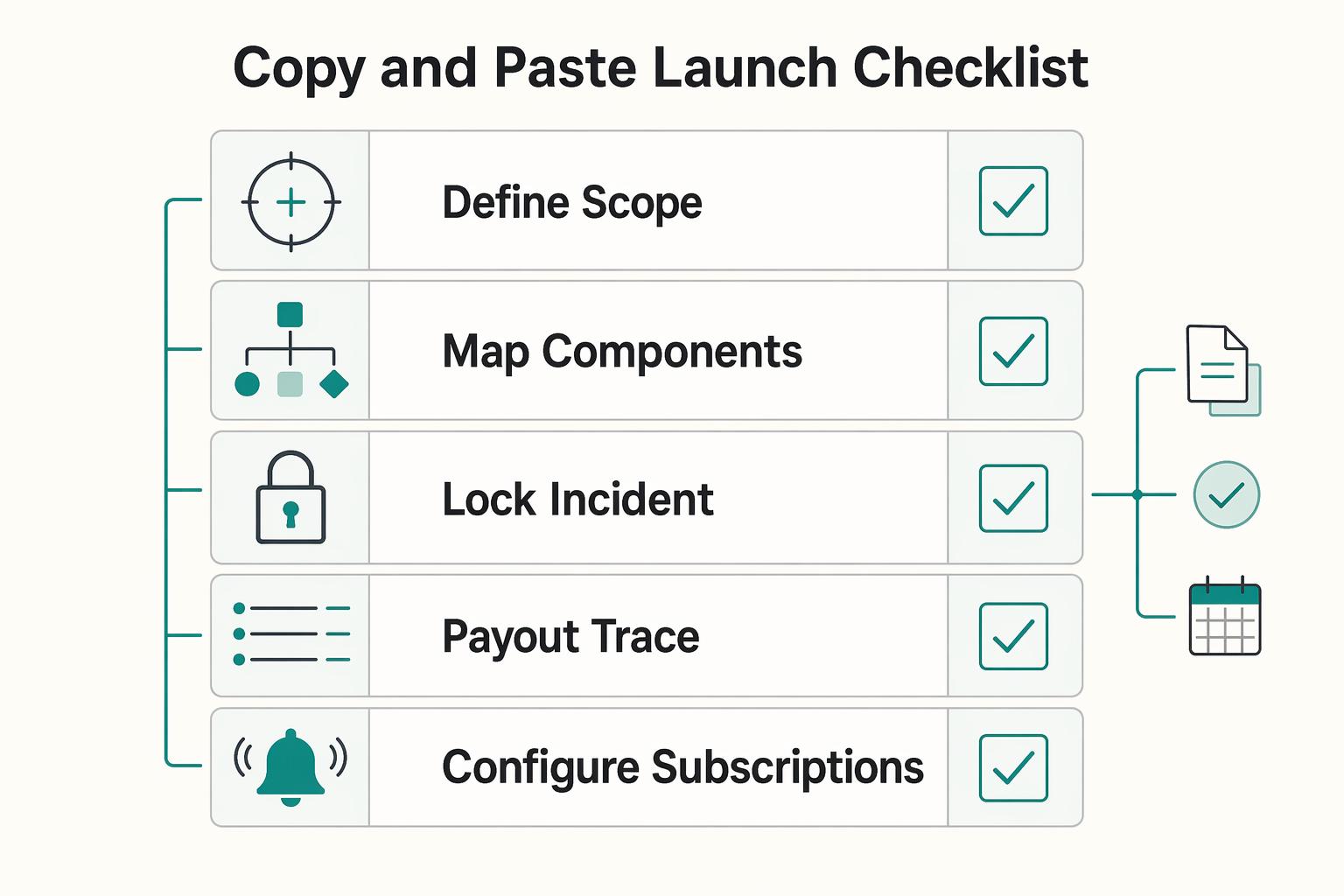
Copy and paste launch checklist#
Use this as a launch gate, not a wishlist. If you cannot verify these eight items in one drill, your public status page will be harder to trust during a live incident.
-
Define scope boundaries in customer language. State what your page covers inside your platform and what is an external dependency. Keep impact ownership separate from cause ownership, then test one internal and one third-party scenario to confirm readers can tell the difference.
-
Map components to customer-facing service areas. Use components customers recognize, such as
Authorization & Payments,Funding & Payouts, andPortals & Reporting. Keep component names aligned to major functional or architectural divisions, not internal queue or microservice names. -
Lock incident and component status rules before go-live. Use a fixed set of component states (
Operational,Under maintenance,Degraded performance,Partial outage,Major outage) and incident lifecycle states (Investigating,Identified,Monitoring,Resolved). Add brief decision notes so responders classify similar incidents the same way. -
Route updates through a controlled, auditable publish path. Component updates can be manual or automated, but publishing should remain traceable. Keep activity logs enabled and make write operations idempotent so retries do not create duplicate updates.
-
Configure subscriptions and consent. Test the actual channel trigger matrix, including component-only changes. Enable relevant component filtering where supported by your plan, limit channels to those you can operate, and verify opt-in and unsubscribe behavior.
-
Run one rehearsal and verify first-update execution. Practice an internal incident, publish an
Investigatingupdate, and confirm page content, notifications, and activity logs stay consistent. If update speed stalls on wording or ownership decisions, fix that before launch. -
Publish a clear third-party incident policy. Define when you post external-impact incidents tied to third-party services, such as Open Banking dependencies. Communicate customer impact first, name the external cause when known, and allow for uncertainty when partner data is incomplete or delayed.
-
Set staged gates for safe expansion. Launch with stable components, incident updates, and a focused subscription setup. Add machine-readable outputs only after your status model is stable, and remember the Statuspage incident history link appears only after 14 days of operation.
When your launch checklist is complete, align owners on coverage, compliance gates, and rollout sequencing with Gruv.
Frequently Asked Questions
What must a payment platform status page include on day one?
Start with defined customer-facing components, current conditions, timestamped incident updates, a named primary and backup publisher, a next-update time, and an account-support path. Add supported subscriptions and retained history. Rehearse an internal failure and a dependency failure so responders can publish accurate payment guidance.
What is the difference between system status and provider or institution status?
System status is your platform's view of customer impact across what you operate. Provider or institution status reflects dependencies outside your direct control. Keep those signals separate so readers can distinguish customer impact from external root cause.
When should we mark degraded performance instead of partial outage or major outage?
Use a component-specific impact matrix. For example, slow processing with successful acceptance can be degraded performance; one unavailable corridor can be a partial outage; a wholly unavailable covered payout service can be a major outage. Define actual scope and latency criteria, and keep component condition separate from incident lifecycle and internal priority.
Should we publish third-party incidents even if our internal systems are healthy?
Yes, publish confirmed customer impact even when its cause is external. Identify the affected platform payment stage and safe action, then name the dependency only when confirmed. Your team still owns communication, backlog checks, and resolution criteria.
Which alert channels should we support first for engineering and ops teams?
Start with email for customer updates and the supported team channel or webhook your operators already monitor. Test creation, update, resolution, and component-only events because triggers differ. Add SMS or more channels only with consent, delivery support, and a clear need.
How much incident history should we keep public?
Choose a public-history policy that supports your customers’ review needs and preserves incident timestamps, scope, updates, and resolution notes consistently. Keep internal evidence under its separate retention policy and remove sensitive account data from public messages. If using Statuspage, its Incident History link appears after 14 days of page operation.
Should we expose a status API for machine consumption from the start?
Launch a status API when consumers need it and your fields, freshness rules, and incident model are stable. Keep public read access separate from management credentials, version the contract, and monitor projection lag. A status response describes service conditions; it should not instruct a client to retry a payment with an unknown outcome.
Researched and edited by the Gruv editorial team. Gruv builds cross-border billing, payouts, and finance-operations software for global businesses.
Sources
Includes 6 external sources outside the trusted-domain allowlist.
- cisa.gov/resources-tools/services/cisa-tabletop-exerc...trusted
- developer.statuspage.ioexternal
- learn.microsoft.com/en-us/azure/architecture/patterns/cqrsexternal
- status.atlassian.com/apiexternal
- status.worldpay.comexternal
- support.atlassian.com/statuspage/docs/notification-event-triggersexternal
- support.atlassian.com/statuspage/docs/enable-subscribersexternal
Educational content only. Not legal, tax, or financial advice.
Related Posts

The Freelance Payment Penalty: A Modeled Audit of Platform Fees, FX Spreads, and Payout Delays
The money rarely disappears through a single, easy-to-spot fee. The real loss is stacked. A marketplace takes its commission, a processor adds a charge for international cards, a bank or payment company converts the currency at a spread, a platform holds the funds before release, and a wire sheds a little to intermediaries on the way in. Each layer looks defensible on its own, but the worker feels the combined result as a smaller deposit and a later payday.

How to Respond to a Subpoena for Business Records
Move fast, but do not produce records on instinct. If you need to **respond to a subpoena for business records**, your immediate job is to control deadlines, preserve records, and make any later production defensible.
A US Expat's Guide to Investing in UCITS ETFs to Avoid PFIC Issues
The real problem is a two-system conflict. U.S. tax treatment can punish the wrong fund choice, while local product-access constraints can block the funds you want to buy in the first place. For **us expat ucits etfs**, the practical question is not "Which product is best?" It is "What can I access, report, and keep doing every year without guessing?" Use this four-part filter before any trade: