
Quick Answer
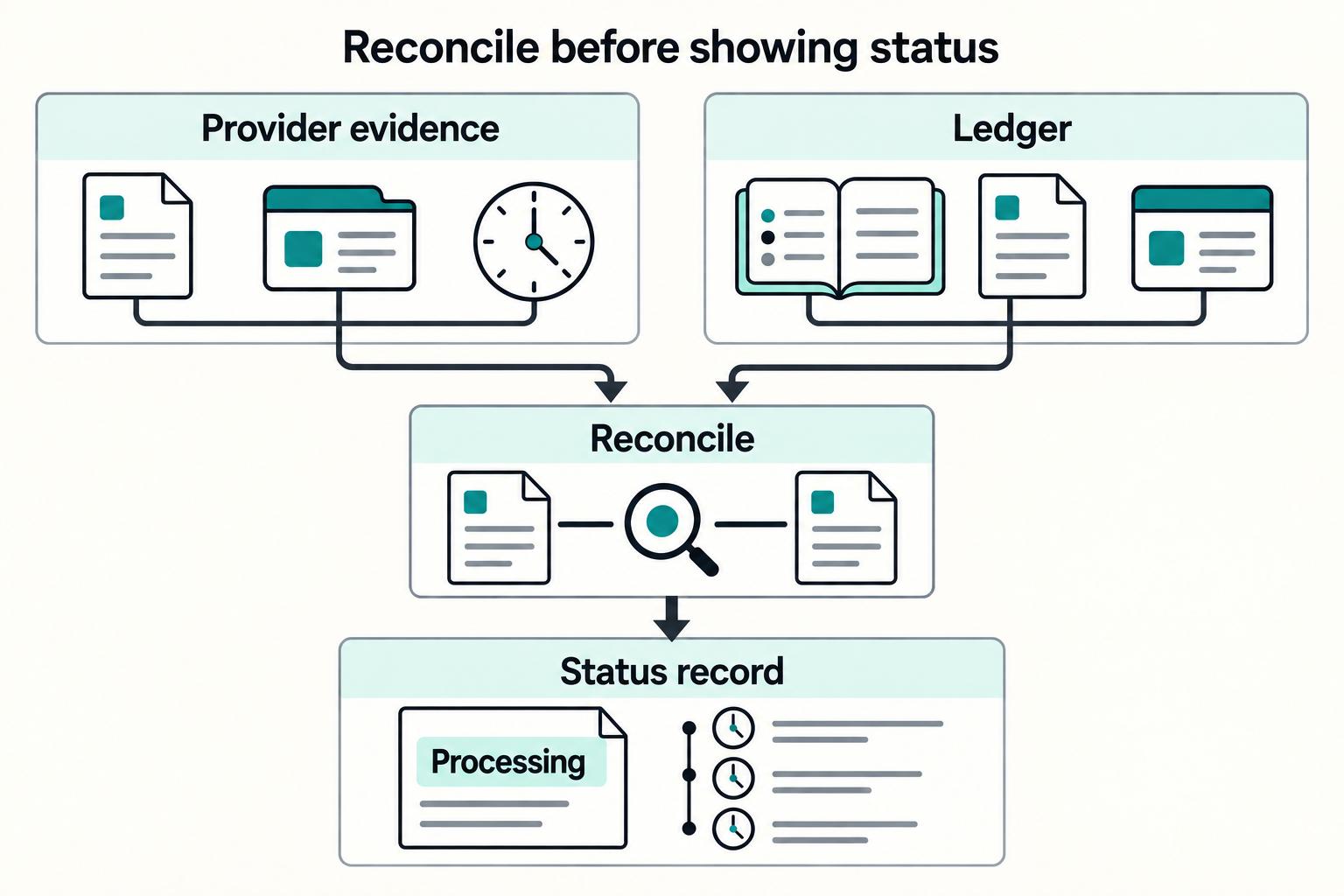
Build your payout status page design around verifiable states, not UI labels. Each visible status should map to a stored event, payout ID, timestamp, and provider reference, with a named owner and next action. Add explicit escalation copy when `pending` or `processing` runs long, and route `failed`, `returned`, and held items into an exception inbox with due-by ownership. This is what prevents vague status text from turning into repeat support tickets.
Many examples of payout status page design focus on visual inspiration instead of operating guidance#
Many examples of payout status page design focus on visual inspiration instead of operating guidance. Layout ideas can help, but they do not answer the question your finance or support team asks most: where is the money, who owns the next step, and what proof do we have?
A page that shows "pending" without an owner, timestamp or reference can create a Where-Is-My-Money ticket when a payout runs late. Design the page around evidence your payment system and provider can actually supply.
For this guide, a practical Payout Status Page has three jobs:
- Name the current state
Not just "processing," but a state with operational meaning. If your team cannot explain what changed, when it changed, and whether the payout is still moving, the label is too vague to help support or payees.
- Point to the next action and owner
Every status should answer who is waiting on whom. Sometimes the next move belongs to your ops team, sometimes to the payout provider, and sometimes to the payee who needs to fix bank details or complete a review.
- Leave a Verifiable Trail
A usable page gives support and finance something they can check, such as status history, timestamps, payout IDs, or masked provider references. If a visible state cannot be tied back to evidence, treat it as a draft idea, not a customer-facing status.
That last point is the red flag to keep in mind as you read the rest of the list. Before you add a status to the UI, check whether your team can verify it consistently. If the answer is no, you are not adding clarity. You are adding false confidence, which is usually worse.
One scope note before we get into patterns: this is about a Payout Status Page, not a generic Payment Status Page and not a Payment History Page. A payment history view covers what happened in the past across many transactions. A payout page is narrower and more urgent: it explains the current state of a specific disbursement, what happens next, and what evidence exists if someone needs to investigate it.
How this list chooses winning payout status page designs#
This list picks designs for operational clarity, not visual polish. A pattern stays only if it helps you answer three questions fast: where the payout is, who owns the next step, and what evidence support or finance can verify.
Public examples are uneven for this exact workflow, so this is not presented as an external industry canon. Many published references cover generic payment history, checkout, or dashboard UI rather than the current state of a specific disbursement. That is why the list uses practical checks you can validate in your own product.
| Design pattern | Best for | Key pros | Key cons | Required data | Failure mode coverage |
|---|---|---|---|---|---|
| Ledger-anchored status timeline | Teams that need strong Audit Trail and easier Reconciliation | Visible states tie to stored events, timestamps, and provider references | Hard to implement if API and Webhook events are loosely mapped | Ledger entries, provider refs, API events, Webhook timestamps | Strong against vague statuses; weaker when provider events arrive late or out of order |
| Next-action status cards | Early-stage teams reducing repeat payee contacts | Makes owner and next step clear | Can expose too much internal process if copy is not tightly scoped | Current status, owner, next-step copy, masked identifiers | Good for stalled payouts when escalation copy is triggered |
| Exception inbox | Ops teams handling failed, held, and returned payouts | Centralizes reason, owner, and escalation path | Becomes backlog-prone without owners and due-by checkpoints | Reason codes, owner fields, timestamps, payout IDs, provider refs | Strong for known failures; weaker if hold reasons are not classified |
| Batch operations board | High-volume platforms running Payout Batches | Adds batch visibility with item-level investigation paths | Can hide partial failures behind a green batch summary | Batch ID, item statuses, totals, failure counts, exportable evidence | Strong for partial-fail cases when drill-down is required |
Use this quick pass/fail test before you keep a pattern:
- The visible status is verifiable from internal or provider events.
- The page still behaves safely when API/Webhook updates are delayed.
- Ownership and escalation are explicit, especially for high-volume or batch flows.
If your team is early-stage, start with two essentials: status definitions tied to internal events and clear next-step copy for payees. If your volume is high, prioritize ownership and escalation checkpoints over minimalist UI.
For paid speed tiers, How to Offer Instant Payouts as a Premium Feature shows how pricing and UX decisions affect status expectations.
Ledger-anchored status timeline#
If reconciliation disputes are common, build this pattern first: only show statuses that are backed by your ledger record and provider evidence. That gives finance, ops, and support one verifiable timeline instead of conflicting interpretations.
Processing logic, the external-provider executor and the ledger play different roles. The ledger records your financial position; it cannot by itself prove that a receiving bank credited the beneficiary. Derive each visible state from the relevant internal record and provider or bank evidence, with a clear definition of what that evidence proves.
Why this pattern earns its keep#
Use this when you need an audit-ready trail across handoffs. A single badge like "processing" is weak evidence; a timeline with timestamps, payout ID, and provider reference is much easier to review when someone asks what happened and when.
A timeline can use states like these when each one is derivable from your own event model:
| Example timeline state | Show it when you can verify | Why it helps |
|---|---|---|
| Request accepted | Your API accepted the payout request and the internal record captured the event | Confirms the payout entered your payment system |
| Provider submitted | The provider accepted the submission and returned a reference; a local send attempt alone is not confirmation | Separates internal acceptance from external submission |
| Provider confirmed | A provider event confirms provider-side progress | Gives support a concrete update during delays |
| Settled | Provider or bank evidence supports the rail-specific settlement outcome and the internal financial record is reconciled | Separates external settlement evidence from a local ledger posting; beneficiary credit may need additional confirmation |
These are examples, not a universal status set. Keep the rule simple: if a state is not derivable from ledger truth plus provider evidence, keep it provisional.
What to verify before you ship it#
Test one payout end to end and confirm every visible step maps to a stored event, timestamp, and reference. If support opens "provider confirmed," they should see what confirmed it. If finance checks "settled," they should be able to tie it to internal records without raw-log digging.
At minimum, keep these evidence fields together in the page or linked detail view: payout ID, event timestamp, status history, and provider reference. If some fields are not payee-facing, keep them in the internal view.
Where teams get false confidence#
The main risk is weak mapping across API and webhook-driven updates. At scale, race conditions can create inconsistent state updates, so a timeline can look precise while being wrong. Validate and durably store webhook events before acknowledgment, process duplicate events with atomic local state changes, and handle out-of-order updates without overwriting newer evidence. Provider idempotency and local deduplication do not replace reconciling an unknown remote outcome.
Keep financial postings and external status evidence linked. Missing or conflicting evidence means the outcome is unresolved, not failed. Retrieve the current provider record before deciding to retry or reroute; a ledger entry alone must not turn an unknown outcome into a completed payout.
Next-action status cards for payees#
After your ledger-backed status is reliable, make each payee-facing card answer three questions immediately: what happened, who owns the next move, and what the payee should do now. That is what reduces repeat Where-Is-My-Money contacts, not a better-looking badge.
If you use states like pending, processing, paid, failed, and returned, keep the card format consistent and only change owner/action text by state.
| State | What to show first | Next action guidance |
|---|---|---|
pending | Request received and current owner | Tell the payee whether waiting is normal or whether they need to act |
processing | In progress, not final | Tell the payee what not to do yet (for example, avoid duplicate requests) and show a support-verifiable checkpoint like last status-change time |
paid | The defined completion event is evidenced | State what is confirmed, such as provider completion or beneficiary credit. Do not imply the payee received funds merely because submission succeeded. |
failed | Did not complete | State the fixable next step when your records support it |
returned | Outcome requires follow-up | Separate ownership clearly: your team review first, or payee correction first |
For verification or compliance-related holds, keep wording plain and masked. Stable labels are clearer than vague language; examples of label-style wording include terms such as Payee Verification, Business Payee, and Verification Process.
If a status sits beyond your internal aging threshold, switch from passive status text to an explicit escalation path. Otherwise, the card still reads like a dead-end status page.
For outage communication, Platform Status Page Best Practices covers how to explain payment incidents without creating support dead ends.
Exception inbox for failed returned and held payouts#
Use this inbox as a decision queue, not a backlog: every failed, returned, or held payout should have a clear owner, next action, and due-by time as soon as it lands. That matters even more when exceptions come from multiple sources, such as Virtual Accounts, bank rails, and provider returns.
Centralization only works if each row has enough context to act. At minimum, show current owner, action family, reason code, escalation path, and supporting evidence. The goal is to speed exception decisioning and resolve incoming returns efficiently, while keeping settlement operations reliable.
What belongs in the inbox#
Keep these exception types in one place, but split by next actor first.
| Exception type | Primary owner | First decision |
|---|---|---|
| Failed payout | Support or Payments Ops | Confirm a terminal unsuccessful outcome before retrying or rerouting; missing responses remain under investigation |
| Returned payout | Treasury or Payments Ops | Have funds returned, and has the internal record been updated before resend? |
| Held payout | Compliance | Is this a verification or review hold, and should retries stay blocked until cleared? |
A usable row should include payout ID, rail or source, reason code, current owner, last status-change timestamp, and a masked destination label so teams can verify state before acting.
Route by next actor, not just by status#
The practical split is payee action required vs internal action required. If the payee must update details or complete verification, route to support with plain-language next steps. If the issue is a return, reconciliation mismatch, or compliance hold, keep it in internal lanes instead of asking the payee to retry blindly.
| Case | Actor | Handling |
|---|---|---|
| Update details | Payee action required | Route to support with plain-language next steps |
| Complete verification | Payee action required | Route to support with plain-language next steps |
| Return | Internal action required | Keep it in internal lanes instead of asking the payee to retry blindly |
| Reconciliation mismatch | Internal action required | Keep it in internal lanes instead of asking the payee to retry blindly |
| Compliance hold | Internal action required | Keep it in internal lanes instead of asking the payee to retry blindly |
Show a mapped action label first, but keep the raw provider code available in detail view. That gives teams readable triage at a glance without hiding the evidence needed for deeper review.
Allow several teams to collaborate on an exception, but keep one active owner so the next move is clear. Restrict sensitive review details to authorized roles.
Checks that stop queue rot#
Before changing status, confirm the internal financial event and external provider reference still match, and confirm the exception reason still fits the current state. Returned items are especially sensitive: if internal posting is not complete, a resend decision can be premature.
A practical triage lens is the OCC Payment Systems structure: operational risk, fraud risk, and compliance risk. You do not need to mirror the handbook, but those buckets are useful for routing held and returned work with the right review depth.
If a row does not clearly answer who owns it now, what evidence supports its status, and what event closes it, the inbox will drift into reporting instead of operations.
Related: Mobile-First Payout Experience: How to Design Contractor Payment Flows for Mobile.
Batch operations board for payout batches#
For scheduled or high-volume Payout Batches, use a batch board only if it makes item-level exceptions impossible to miss. The batch view should be your finance and ops control point, not a green summary that hides broken payouts.
SAP Business ByDesign defines a payment batch as a collection of payments sent electronically to a bank. In that model, batches can be created automatically or manually, sent directly to a bank or through a payment service provider, and routed through an approval process with responsible approvers. Those details are what your board needs to expose for Reconciliation: how the batch was created, where it was sent, and who can approve or fix it.
What the row needs#
A good row should answer both questions quickly: "Can we close this?" and "What is stuck?" At minimum, show:
- batch ID and creation method (automatic or manual)
- created timestamp and scheduled send time
- destination path (bank direct or provider routed)
- current owner and approval state
- responsible approver when approvals are required
- payment format, bank or provider label, item count, and total value
- exception count with item-level links
- export link for an evidence pack
The evidence pack is what makes the board useful in close and review cycles. Include batch ID, included payout IDs, internal references, provider references when present, status-change timestamps, approval history, and any add/remove actions after creation. SAP explicitly allows adding payments, removing payments, or deleting a batch, so those mutations should be visible later when teams are resolving mismatches.
Where teams get misled#
The common failure is a "done" batch row with unresolved item exceptions. Require automatic drill-down to affected items whenever exception count is above zero.
| Area | Check | Why it matters |
|---|---|---|
| Exception count | Require automatic drill-down to affected items whenever exception count is above zero | A done batch row can hide unresolved item exceptions |
| Mixed corridors or methods | Split batches by risk profile, keep bank-direct payouts separate from provider-routed payouts, and avoid mixing payment formats | Mixed batches slow root-cause work |
| Batch total | Confirm the batch total matches the internal export before marking a batch closed | If the check fails, the batch is not finished yet |
| Item count | Confirm the item count matches the export before marking a batch closed | If the check fails, the batch is not finished yet |
| Approval trail | Confirm the approval trail is complete when approvals are required before marking a batch closed | If the check fails, the batch is not finished yet |
Mixed batches also slow root-cause work. If you process mixed corridors or methods, split batches by risk profile, keep bank-direct payouts separate from provider-routed payouts, and avoid mixing payment formats when the destination bank setup expects one payment format.
Close a batch only after totals, item counts and approval history reconcile and every item has an evidenced final outcome or a separately owned reconciling item permitted by your close policy. A matching export does not prove external settlement.
Cost controls should not disappear from status design; How Platforms Reduce Cross-Border Payout Costs covers the operating tradeoffs behind route choices.
Self-serve evidence drawer for support and finance#
Build this drawer to resolve payout disputes quickly, but keep it operational by default and separate from tax/compliance records. The goal is simple: let support and finance prove what happened to a payout without turning the page into a document vault.
For most cases, one internal panel is enough: payout ID, provider reference, status history, and a downloadable evidence pack. If teams still need raw logs or engineering screenshots for routine disputes, the drawer is missing core proof.
What should be in the default drawer#
Keep payout evidence in the default view, and gate tax/compliance artifacts behind separate permissions.
| Evidence type | Typical user | Default drawer |
|---|---|---|
| Payout ID, provider reference, status history, exportable evidence pack | Support, finance | Yes |
| Batch link, approval trail, ledger or reconciliation references | Finance, ops | Yes, role-gated as needed |
| Tax forms, withholding certificates, sanctions or identity-review case files | Tax, compliance, authorized finance staff | No, separate restricted access |
A practical check: hand one real dispute to support and confirm they can answer, from the drawer alone, which payout it is, the provider reference, and what changed over time.
Keep tax and compliance proof on a different path#
This split matters because compliance review answers different questions than payout support. If your program uses ACH or other batch rails, a shared status vocabulary such as Nacha's Transaction Status Documentation can help ops and support map internal evidence to clearer public labels. Keep that mapping in the operational layer, and keep tax or identity-review files on restricted paths.
If the task is payout movement, show payout evidence. If the task is tax, identity, or compliance review, route to a separate restricted view.
For API design, Payout API Design Best Practices maps the state and webhook behavior that makes status pages reliable.
Dual-view status architecture for payees and internal teams#
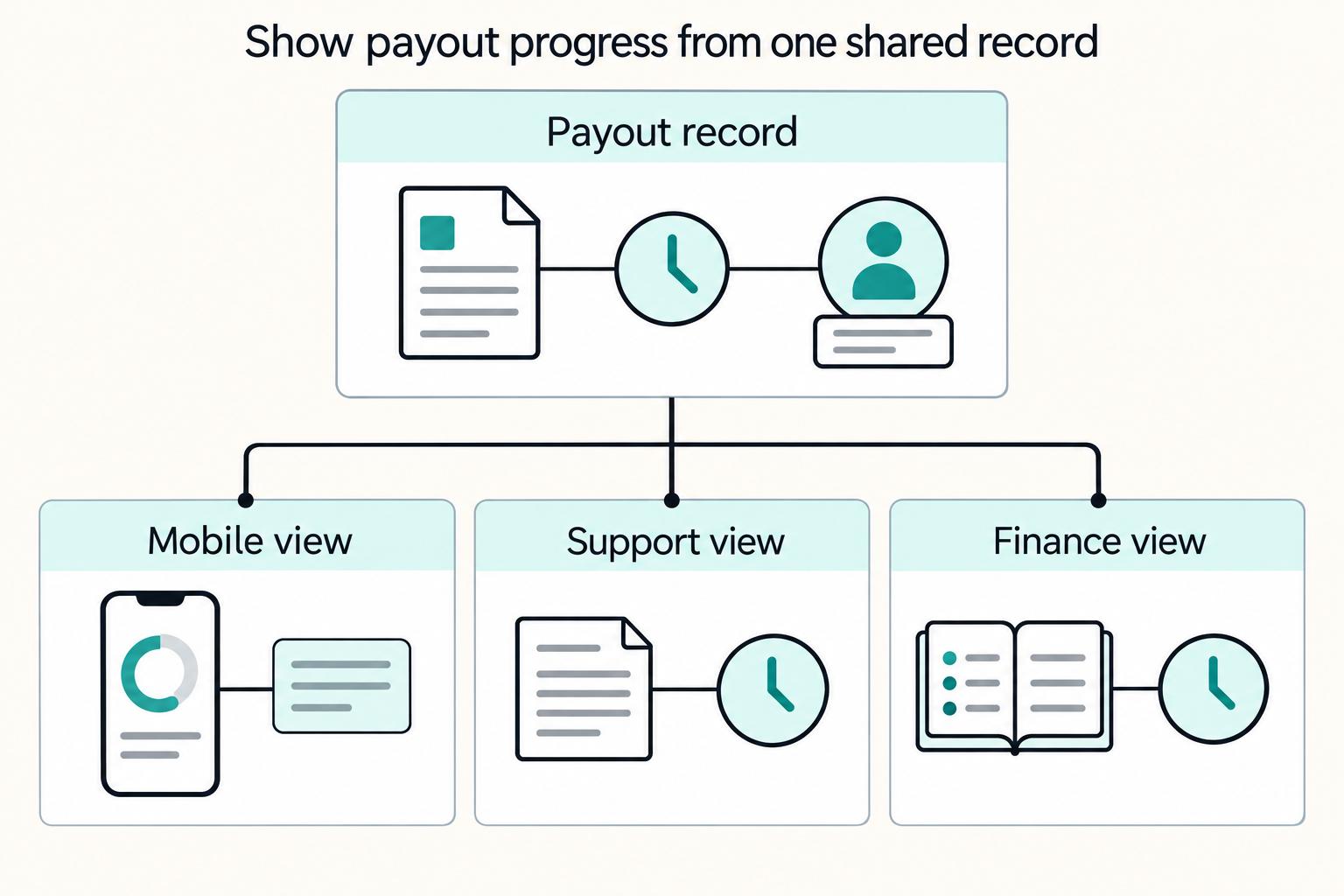
Use a dual-view model only if both views are driven by the same underlying transaction events; otherwise, public status text and internal diagnostics drift.
| Component | What it should show | Purpose |
|---|---|---|
| Payee view | Current status, whether the payee needs to act, and when to contact support | Keep the payee story short |
| Internal view | Latest event, current owner, expected next step, and where the blocker sits | Make the internal view useful for support-ready decisions |
| Status mapping | One versioned mapping for public labels and internal states | Prevent view drift |
Keep the payee story short#
The external view should answer three things fast: current status, whether the payee needs to act, and when to contact support. A broad label like "processing" can stay clear for payees, as long as internal users can resolve it to the underlying sub-state without exposing sensitive review detail.
Make the internal view actually useful#
The internal view should translate system behavior into support-ready decisions. In payment architecture, teams use rules engines to classify transactions across multiple factors and complex event processing to handle high volumes in real time; your internal screen should show the outcome of that analysis in plain language, not just raw event logs. A practical check: for a payout that still appears as "processing" externally, an internal user should be able to identify the latest event, current owner, expected next step, and where the blocker sits.
Prevent view drift#
The common failure mode is maintaining separate logic for public labels and internal states. Keep one versioned mapping and review it whenever event logic changes, so visibility differs by audience but the underlying status truth stays consistent.
For the public-facing layer, How to Build a Public Status Page covers the status-page structure around payment operations.
Conclusion#
The strongest payout status page design is not the prettiest one. It is the one that turns every status into a decision with three answers attached: who owns it, what happens next, and what evidence proves that status is true.
- Choose truth over polish
If you take one thing from the six designs above, make it this: the visible page should be downstream from your core financial record, not from whatever copy looked clean in mocks. A practical checkpoint can be simple. Before release, pick 10 real payouts and verify that the last visible status, timestamp, provider reference, and status history all match the internal record. If that check fails, the page can create false certainty, and support may end up reconciling screenshots instead of facts.
- Use inspiration sites for layout ideas, not operational proof
Design inspiration is useful for hierarchy and visual language, but it cannot decide whether your public processing state should exist without provider confirmation or a record-backed event. Treat inspiration as layout input only, and keep status labels, ownership, and escalation rules tied to evidence your team can verify.
- Keep one model, show it with role-based depth
For Gruv-style operations, the important choice is not public page versus internal tool. It is whether both views read from the same status model. Your payee can see a clear next step, while support, product, and finance can see deeper diagnostics, ownership, and the audit trail behind it. The red flag is drift: if the external page says "processing" while the internal side shows "returned" or a duplicate attempt caused by weak idempotency handling, trust can fall apart fast.
- Ship one design end to end before expanding
Do not combine all six patterns at once. Pick the one that matches your biggest pain point, implement it fully, and make sure the evidence drawer, status labels, escalation copy, and internal ownership all line up on the same payout ID. A useful failure-mode test is to simulate a delayed webhook, a failed payout, and a returned payout, then confirm the page changes ownership and next-step copy instead of staying stuck in generic text.
- Track two operational signals after launch
Once one design is live, track it against a small set of operator-facing signals, such as Where-Is-My-Money Support Ticket volume and Reconciliation cycle time. Do not assume movement because the UI looks cleaner. Review contact reasons, audit a sample of exceptions, and check whether support is resolving from the page itself or still jumping into logs and provider portals.
If you want a simple next step, choose one of the six designs above and implement it completely before polishing a second surface. The page should not just report status. It should help the right person make the next correct decision.
Related reading: Real-Time Payout Tracking for Platforms.
Frequently Asked Questions
What is the difference between a payout status page and a payment history page?
A payout status page focuses on the current payout: where it is now, what happens next, and whether the user needs to act. A Payment History Page is broader. It helps users review past transactions and builds trust through visibility, but it may not be enough on its own to explain a live exception or immediate next step.
Which statuses should every payout status page include?
Do not assume a universal regulated status set applies, so do not treat any one list as a standard. Use a small set of plain-language labels your team can map reliably to internal records and user-facing next steps. Labels like pending, processing, paid, failed, and returned can be useful examples, but the exact set should follow your workflow.
What should users see for pending, processing, paid, failed, and returned payouts?
For each status, show clear status language, the latest update point, what happens next, and whether the user needs to do anything. Pending and processing states should reduce uncertainty and set expectations. If a payout is complete, make that explicit. If it fails or is returned, provide the safest next action or direct users to support when self-serve is not appropriate.
Which fields are mandatory for support and reconciliation?
Keep the payout ID, amount and currency, masked destination, provider reference when available, event and receipt timestamps, status history, evidence source, and current owner together. Restrict access by role so support can investigate without exposing tax or identity files.
When should the page show next actions versus contact support?
Show next actions when users can take a concrete, safe self-serve step. Route to support when manual investigation is needed or the outcome is uncertain. Do not offer a resend button for an unresolved payout.
How should teams handle long-running pending payouts?
Do not leave them on static copy. Open an investigation tied to the payout ID, verify the current workflow state in your internal records, and keep user messaging updated as ownership or next steps change. Replace generic "processing" text with specific guidance as soon as the path forward is clear.
Try a related tool
Where Gruv fits
Researched and edited by the Gruv editorial team. Gruv builds cross-border billing, payouts, and finance-operations software for global businesses.
Sources
Includes 4 external sources outside the trusted-domain allowlist.
- docs.stripe.com/webhookstrusted
- docs.stripe.com/api/idempotent_requeststrusted
- occ.gov/publications-and-resources/publications/comp...trusted
- achdevguide.nacha.org/how-ach-worksexternal
- docs.adyen.com/classic-platforms/payouts/track-payoutsexternal
- help.sap.com/docs/SAP_BUSINESS_BYDESIGN/2754875d2d2a403f9...external
- nacha.org/sites/default/files/2020-03/Transaction%20St...external
Educational content only. Not legal, tax, or financial advice.
Related Posts

How Platforms Can Offer Instant Payouts as a Premium Feature Without Margin Surprises
Treat instant payouts as a paid acceleration option, not a blanket promise that money always arrives immediately. Teams tend to get better results when they package it as a Premium feature with clear scope limits, then make those limits visible before pricing, copy, or rollout decisions harden.
Mobile Contractor Payout UX: Design Rules and Launch Checks
A contractor who taps Withdraw on a phone needs to know whether the request reached your server, whether the provider accepted it, and when to seek help. Design the mobile flow around that evidence, with readable amounts, recoverable interruptions, and statuses that finance and support can trace. A fast confirmation screen is useful only when it describes what actually happened.
How to Build a Public Status Page for a Payment Platform
A payment status page should help customers decide what to do while a service is disrupted. Report the affected payment stage, scope, current evidence, safe customer action, and next update time. A working API does not prove payouts arrived, and a recovered provider does not prove your delayed backlog is clear.