
Quick Answer
Build a payment platform pricing page by grounding every promise in real product behavior, choosing pricing logic your team can reconcile, and mapping each plan to a clear CTA path. Define three plans with hard fit criteria, explain fixed, variable, and conditional fees in plain language, place trust details near the CTA, and measure both conversion outcomes and operational health after launch.
What a Payment Platform Pricing Page Needs to Communicate#
A payment platform pricing page should help qualified buyers decide without creating downstream confusion in reconciliation or settlement. It is a late-stage decision point, so what you promise there shapes purchase behavior and sets expectations that later affect reconciliation and reporting clarity.
This guide takes an operations-first view of conversion work. Traffic alone is not enough, and visual polish is not the goal. You need pricing logic, CTA paths, and reporting expectations that match how your product actually works in production.
For B2B platform operators, that matters early because pricing often shapes the decision before sales gets involved. The goal is not to suggest that page edits alone will fix reconciliation exceptions or settlement delays. It is to remove avoidable ambiguity at the decision point, then measure whether changes improve both buyer behavior and operating outcomes.
Keep the promise grounded#
Start with measurement discipline before you change copy or layout. Document the current funnel, baseline your KPIs, and align product, finance, and marketing on what success means. Without that checkpoint, you can ship a cleaner page and still have no credible answer when support volume rises or finance outputs stop tying out.
Use a simple rule here. If a promise cannot be traced to real product behavior, rewrite it. Clear promises can reduce avoidable confusion. Instrumentation tells you whether the change actually worked.
Write for the real operating context#
Write for the operating model you actually run, not a generic SaaS template. If pricing depends on conditional fees, coverage, routing, or approvals, say so plainly. Otherwise, buyers can choose the wrong path, support may handle more exceptions, and finance may inherit preventable cleanup.
Keep architecture boundaries in mind when you write claims. Some payment stacks separate authorization and settlement so teams can optimize cash flow and reconciliation independently. Your page does not need infrastructure detail, but it should avoid implying one universal outcome when payout timing, settlement visibility, or fee handling varies by path.
What you will leave with#
You will leave with concrete section specs, decision rules, launch checks, and recovery steps that generic pricing-page playbooks often miss. The focus is practical: what to gather before a redesign, how to define plans without avoidable choice paralysis, and how to map CTAs to real onboarding and payment events.
You will also get operator-grade validation checkpoints, including baseline KPI capture before experiments and launch checks against product and finance data. If a change increases clicks but adds month-end friction, this guide treats that as a bad trade. That is why the work starts with evidence and constraints, not design.
For a step-by-step walkthrough, see Top 10 Payment Fraud Patterns Hitting Freelancer and Platform Payouts.
What to prepare before you touch page design#
Before you change headlines, layout, or CTA treatment, gather the evidence and constraints first so your pricing promises still match real behavior after launch.
Build a one-page evidence pack first#
Build a one-page evidence pack from your own data. Include current pricing details, known points of buyer confusion, and any caveats that affect what you can promise publicly.
Keep it short and ordered before you draft copy. Product, finance, and ops should be able to scan it and answer three questions: what you charge, where buyers get confused, and which wording could create confusion.
Confirm hard constraints with system owners#
Confirm hard constraints with system owners before anything is rewritten. If pricing depends on technical constraints or sales-led and custom paths for atypical accounts, capture that now.
Every public pricing claim should map to real product behavior or an approved caveat.
Define non-negotiables before design starts#
Define non-negotiables in writing before design work starts. Use three buckets: what can be public, what must route to sales, and what requires an approved caveat.
If your model separates standard pricing from custom pricing for larger volume or unique business models, make that explicit early. Also lock what must appear above the fold, including at least one call to action.
Assign one measurement owner before copywriting#
Assign one measurement owner before copywriting starts, and make that person accountable for conversion outcomes. Give that owner a prelaunch checklist with baseline conversion measures and the outcomes you will review after launch.
Without clear ownership, a cleaner-looking page can still increase buyer confusion.
Choose a pricing model your operations team can reconcile#
Choose the model your team can explain end to end before you optimize copy. On a fintech pricing page, every extra fee dimension adds logic. That logic can surface later in the Ledger, during Reconciliation, and when a settlement or payout outcome is questioned.
Compare models by operational clarity first#
Compare models by operational clarity first, then by commercial upside. If pricing logic is hard to explain in plain language, it may also be hard to reconcile later.
| Model | What to make explicit on the page | Reconciliation control to define before launch | Red flag |
|---|---|---|---|
| Flat fee | What is included, what is excluded, and when exceptions apply | A single source of truth for plan eligibility and any adjustments | Hidden add-ons or one-off credits that are handled outside the standard process |
Usage-based Transaction fees | Which usage units are billable and how they map to charges | Clear meter definitions plus event-to-billing traceability | Metered dimensions you cannot reliably capture and map |
Blended Tiered pricing | Exact tier boundaries and when a tier change takes effect | Deterministic handling for threshold crossings and mixed periods | Ambiguous thresholds or overlapping plan rules |
| Custom enterprise | Which terms are custom versus standard | Contract terms translated into billing logic and reporting fields | Custom terms that cannot be mapped cleanly to exported finance reports |
Complexity is a tradeoff, not a free upgrade. If finance needs a long internal explanation, customers may need one too when charges or reports do not match expectations.
Use a working bias on complexity#
Use a working bias, not a universal rule. When Ledger postings are high-volume and variable, a conservative starting point is fewer fee dimensions. When pricing precision matters more, add complexity only if you also have stronger Reconciliation controls.
Usage-based billing is a clear example of that tradeoff. It supports many measured units, including clicks, API calls, downloads, seats, text messages, minutes, and bandwidth. If you choose this route, define how usage is captured, who owns it, and how it becomes a billable outcome. Then define how source data connects through APIs, webhooks, and ERP or CRM connectors.
For Tiered pricing, keep boundary logic explicit. Define what triggers a tier move, when the new rate becomes effective, and what entity the threshold applies to. If those rules live only in sales notes, cleanup usually lands in operations.
Trace a realistic customer month before launch#
Do not publish until you can trace a realistic customer month from source activity to invoice, settlement report, Ledger entry, and any payout adjustment. "Looks clear on the page" is not enough.
For usage-based or tiered models, test a messy scenario before launch. Include late events, duplicated events, a refund or dispute, and a mid-period plan change. If finance and ops cannot agree on expected outputs in advance, confusion and escalations are more likely later.
Also verify implementation prerequisites when pricing depends on checkout or payment-method capability. For example, BigCommerce Stripe Optimized Checkout Suite requires Optimized One-Page Checkout or Custom Checkout. Custom checkout requires Checkout SDK 1.850.3 or later, and setup requires Manage Payments plus Manage Settings permissions. If implementation cannot support the public offer, the offer and checkout flow can drift out of sync.
Before you lock plan tiers, run your current and proposed fee mixes through the payment fee comparison tool. This can help surface pricing complexity before launch.
Define three plans with hard fit criteria, not vague labels#
If you choose to show three visible plans, give each one a hard fit test. The page should help the right visitor decide quickly at the conversion moment.
Constrain tier logic before you write plan cards#
Constrain Tiered pricing before you write plan cards. Use the same fit axes on every plan so buyers can self-select fast.
| Plan | Transaction profile | Support needs | Integration depth | One-line descriptor | Primary CTA |
|---|---|---|---|---|---|
| Plan 1 | Lower complexity, standard processing patterns | Standard support | Minimal setup | For SMB ecommerce teams that want straightforward setup and a clear starting point | Start now |
| Plan 2 | Higher volume or more detailed pricing needs | Faster or more hands-on support | Moderate integration needs | For growing operators who need more control without a full custom engagement | Talk to sales |
| Plan 3 | Complex or custom commercial terms | Dedicated support expectations | Deep integration or custom requirements | For B2B platform operators with custom requirements, approvals, or implementation scope | Book a technical review |
On the page, make three things obvious for each plan: who it is for, what support is included, and what implementation effort to expect. Then run an internal classification check across sales, support, and ops using only the page criteria. If placement is inconsistent, tighten the fit rules.
Write descriptors for self-selection#
Write descriptors for self-selection, not brand theater. Labels can stay short, but the one-line descriptor should carry the real decision signal.
For SMB ecommerce, use plain language tied to setup and support expectations. For B2B platform operators, be explicit about custom terms, deeper integration, or implementation review. If page intent is unclear, trust is weak, and there is no measurement rhythm, conversion usually suffers.
Use a billing toggle only when it stays clear#
Use a Billing toggle only when monthly and annual views stay easy to compare and preserve plan fit. There is no universal annual-versus-monthly rule here, so treat the toggle as a hypothesis to validate.
Treat this as a measurable decision, not a design preference. Top-performing apps frequently A/B test paywalls, and the same testing discipline applies here.
Map each plan to one clear CTA path#
Map each plan to one clear Call-to-action (CTA) path that matches the real next step. Do not send different buyer types into the same funnel by default.
If a plan is self-serve, use a direct signup CTA. If it requires commercial review, route to sales. If technical evaluation is required, say that directly. Place trust details close to each action point, since misplaced trust signals are a known conversion risk.
Related reading: How to Implement a Freemium-to-Paid Conversion Funnel on Your Platform.
Write pricing details that remove ambiguity before checkout#
Your fee logic should be understandable before checkout starts. If buyers cannot tell what changes the total, they may hesitate or treat the Order summary as a surprise.
Break transaction fees into clear parts#
Break Transaction fees into clear parts instead of one blended line. If you cannot publish every commercial detail, still explain what is fixed, what varies, and what applies only in specific cases.
| Fee component | What to say on the page | Plain-language example |
|---|---|---|
| Base | The standard fee that typically applies on this plan | "A successful payment starts with the standard processing fee for this plan." |
| Variable | The part that can change based on payment context | "The total can change by payment method or channel." |
| Conditional | Charges that apply only when a specific event or option is triggered | "Extra fees may apply for optional services or special routing." |
Use examples to explain triggers, not to imply a universal quote.
Add a compact Pricing FAQ for repeated edge cases#
Add a compact Pricing FAQ for the edge cases your team answers repeatedly. Then mirror that wording in sales and support macros so page language, assisted conversations, and checkout expectations stay aligned.
Show where totals are confirmed#
Show, in order, where totals are confirmed so buyers know what is an estimate and what is final at each step.
| Checkpoint | What to label clearly |
|---|---|
| Pricing page estimate | Explain that this is a pre-checkout estimate based on the inputs shown on the page. |
Order summary in the Checkout experience | Mark whether this is the point where the payable total is confirmed for that checkout flow. |
Put caveats next to the related fee line#
Put caveats next to the related fee line, not in a distant footnote. Call out payment method availability and program constraints in plain language so exceptions are visible before buyers commit.
Map CTA paths to real product and ops flows#
Do not force every buyer into one next step. Even visually strong, modern pages can underperform when decision flow is unclear, so match CTA type to visitor readiness.
Build your CTA hierarchy around readiness#
Build your CTA hierarchy around readiness. Keep one primary path for clarity, then add secondary routes for visitors at different decision stages. For example:
| Route | Best fit | CTA example | What must be true behind it |
|---|---|---|---|
| Self-serve start | Visitor is ready to take an immediate product step | Start now | The promised next step can be completed without a sales conversation |
| Sales conversation | Visitor needs direct commercial guidance before committing | Talk to sales | A clear human follow-up path is in place |
| Technical evaluation | Visitor is validating implementation details before commercial commitment | Evaluate APIs or View API docs | Clear technical information and next steps are available |
This helps you avoid the contact-form trap. In one B2B example, only 1-3% were ready to talk to sales immediately, while 97% were still researching. Treat that as a warning signal, not a universal benchmark.
Set the default CTA to match the real next step#
Set the default CTA to match what can actually happen next. If a segment is still researching, leading with Start now can create false momentum and friction.
Use a simple check. Click through your own pricing CTA and verify that the promised next step is actually reachable. If the flow stalls or redirects people into a different path, your default CTA is overstating readiness.
If segments differ materially, use segment-specific variants instead of one universal message. Variant paths often perform better.
Map each CTA path to activation checkpoints#
Map each CTA path to measurable activation checkpoints before launch. Evaluate CTA quality by downstream activation and revenue outcomes, not clicks alone.
Keep the map short and operational: route name, expected milestones, source-of-truth signal, and success criteria. If your flow depends on integration milestones, define what "done" means for those milestones and how you verify them. For deeper implementation patterns, see ERP Integration Architecture for Payment Platforms: Webhooks APIs and Event-Driven Sync Patterns.
A common failure mode here is silent drop-off. People click, browse, and leave without any meaningful progress signal.
Assign ownership for every handoff#
Assign clear ownership for each handoff from click to activation. If a buyer gets stuck, one team should know it, own it, and resolve it.
Trace each CTA end to end and ask three questions: who owns this stage, what signal shows progress, and who intervenes when it stalls? If that is unclear, the CTA path has a dead end.
Add trust blocks that match actual controls#
Once your CTA paths are honest, prove them at the decision point. Put trust close to the click, and pair social proof with a compliance or pricing detail a buyer can verify in the experience.
Place trust blocks beside the main CTA#
Place trust blocks beside the main CTA, but make them operational. A testimonial, logo, or short proof point can support conversion on a focused page, but it should not stand alone. If the CTA is Start now or Talk to sales, the nearby trust copy should answer a practical question: what can a buyer or compliance reviewer verify from this step?
A quick check helps here. Have someone from finance or platform ops read only the CTA area and trust block. If they still ask where key pricing or operational details are confirmed, the block is decorative.
Document controls in plain language#
Document controls in plain language, and only claim what you actually expose. For fintech pages, trust and compliance details should be visible in the user experience, not buried in legal pages.
Use short copy tied to real artifacts buyers can access, so the trust claim stays verifiable:
- Records and history: state whether users can review relevant account activity or history, and where.
- Settlement information: state whether settlement status is visible, and where.
- Payout information: state whether payout progress or exceptions are visible, and where.
If details are only available during evaluation or sales review, say that directly. Avoid broad promises like "full transparency" unless your page and product experience support them.
Use a Pricing FAQ to handle risk and compliance friction#
Use a Pricing FAQ to handle risk and compliance friction before purchase. Keep it short and operational, and prioritize the questions teams ask before implementation and reconciliation. Examples include:
- How are fees explained for finance review?
- Is settlement or payout status visible after activation, and where?
- What happens when a payout or transaction needs investigation?
- Which pricing details are confirmed on-page versus during sales or implementation review?
Before you optimize, align sales, support, finance, and product on a focused KPI set and the same answers to these questions. Trust blocks work when the promise near the CTA matches what teams say and what the product actually shows.
Keep pricing page decisions separate from checkout UX fixes#
Treat these as two different conversion jobs: the Payment platform pricing page drives plan choice and CTA-path choice, while Website payment processing UX drives completion after intent already exists.
Set the boundary before making changes#
On the pricing page, ask whether the buyer can understand fit, price logic, and the right next step. In checkout, ask whether the buyer can finish the flow with minimal friction now that intent already exists.
Use a simple journey map as a checkpoint. Label each touchpoint with the user need and the business goal, then keep each screen focused on one clear job.
Fix checkout friction as checkout work#
Focus on UX-friction fixes in the buying flow rather than broad storefront redesign. Those are completion improvements, not pricing-clarity improvements.
If buyers abandon, verify where the break happens before you rewrite pricing copy. Use drop-off diagnostics such as session replay, heatmaps, or step-level A/B tests to confirm the failing step.
Measure pricing and checkout separately#
Measure and run these layers separately. Give pricing and checkout different success checks so one does not mask the other.
- Pricing page: plan-choice behavior and CTA-path selection.
- Checkout: completion rate and step drop-off.
If plan selection is unclear, revise pricing-page clarity. If intent is clear but completion is weak, fix checkout UX. Different problem, different evidence, different action.
Instrument the page so you can prove both conversion and ops gains#
Do not call a pricing-page test a win on CTA lift alone. Measure the full path from first visit to activation, then confirm that operations stayed healthy.
Tie the journey to an account, not just a visitor#
Build an event map that connects front-end behavior to back-end outcomes with a shared account identifier. Person-level tracking alone can miss whether the right mix of roles in an account is actually engaged.
Track both micro conversions and your macro conversion. Micro conversions show where intent builds or stalls. Macro conversions capture the primary business action.
pricing_page_viewplan_selectedor CTA path chosenaccount_createdwebhook_receivedandevent-driven sync completedfirst_successful_paymentor your agreed activation event
The key control is identifier continuity. The same account ID should appear across product analytics, webhook payloads, and downstream system logs.
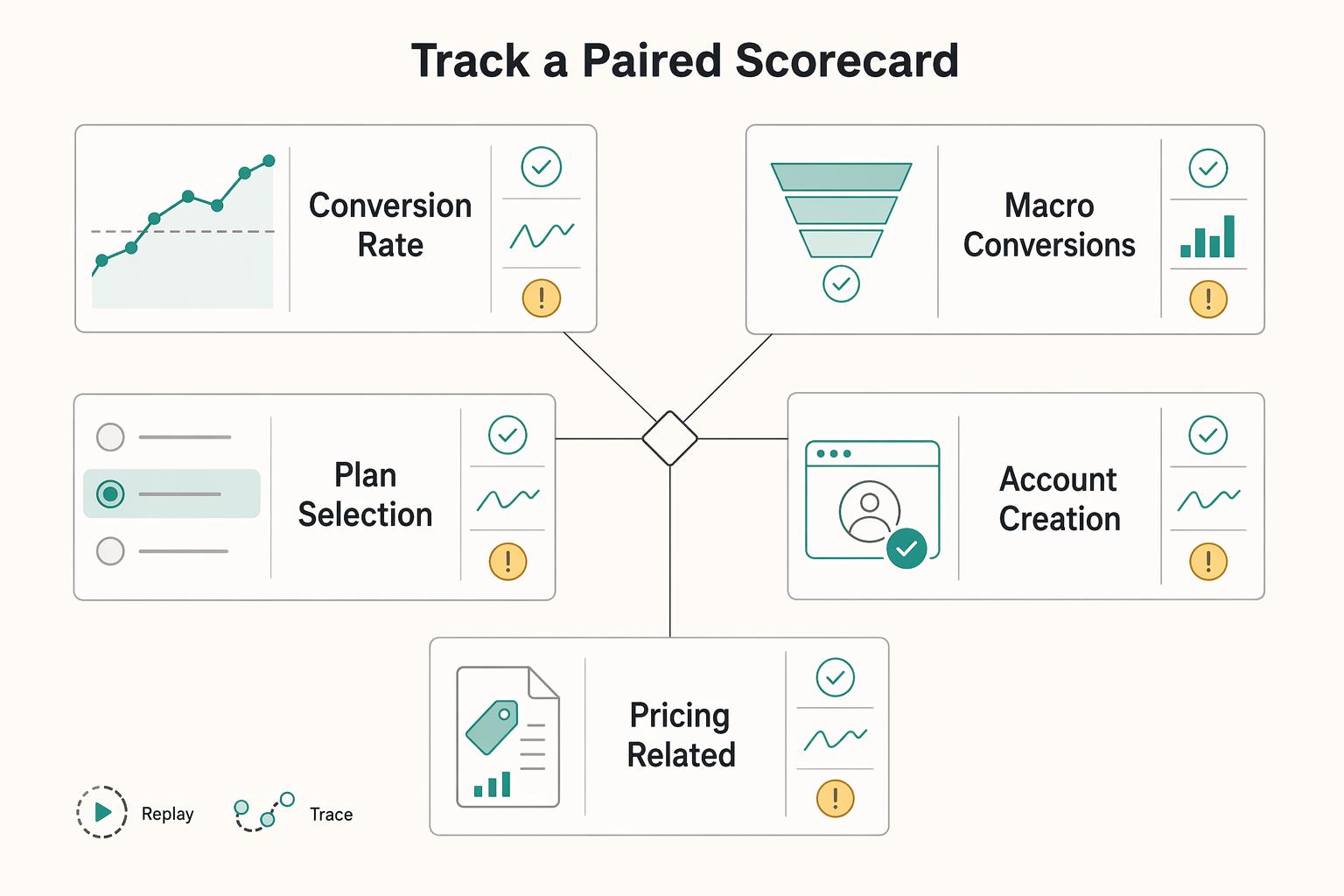
Track a paired scorecard, not a single conversion line#
Use one scorecard with two halves: conversion performance and operational health. That keeps you from improving top-of-funnel behavior while adding downstream cleanup work.
| Metric | Scorecard side | Notes |
|---|---|---|
| Conversion rate | Conversion side | Use your own pre-change performance as the baseline |
| Macro conversions by CTA route | Conversion side | Track by CTA route |
| Plan selection | Conversion side | Example micro conversion |
| Account creation | Conversion side | Example micro conversion |
| Pricing-related ticket volume | Ops side | Define operational indicators up front |
| Reconciliation exceptions | Ops side | Define operational indicators up front |
| Delayed settlements | Ops side | Define operational indicators up front |
| Sync latency for key updates | Ops side | Example integration-health metric: how long a price or account-state change takes to reach downstream systems |
Use your own pre-change performance by CTA path and account type as the baseline. External conversion benchmarks are context only.
Include at least one integration-health metric. For example, measure how long a price or account-state change takes to reach downstream systems. One comparison shows 3-5 days for manual CRM updates versus 0.4 sec with bidirectional webhook push. Use that as an illustration of what to measure, not a universal target.
Reconcile the measurement before declaring success#
Before you declare success, verify consistency across product analytics and downstream records. If systems disagree, conversion gains may be overstated.
For the first days after release, trace a small set of real accounts end to end. Follow page view, CTA click, account creation, webhook delivery, and downstream records. Check event order, timestamps, and identifier continuity at each handoff.
Watch for false positives. CTA clicks may increase while activation does not, or downstream exceptions may rise. If counts conflict, audit identifier joins, sync behavior, and export logic before making rollout decisions.
Common failure modes and how to recover fast#
Measure first, then fix. In pricing-page work, teams often treat symptoms instead of root causes, and breaks are usually concentrated in one funnel step rather than spread across the whole journey.
| Failure mode | Diagnostic signal | Recovery step |
|---|---|---|
| Repeated questions about what transaction fees include | Measure where the question shows up in the funnel; use at least 30 days of data, or 90 days when volume is uneven | Rewrite the fee line in plain language with concrete examples and align wording in the Pricing FAQ, support macros, and order-summary labels |
| Billing toggle creates activity but weak progression | Inspect drop-off from plan_selected to account_created by billing view in GA4 Funnel Exploration | Simplify the toggle first, then tighten plan descriptors |
| High-complexity accounts enter self-serve and need sales rescue | Validate CTA path, account_created, and first_successful_payment | Qualify earlier with practical fit criteria and route those buyers to sales before account creation |
| Conversion metrics improve while month-end exceptions rise | Check IDs, state, and event order across Webhooks, ERP integration, and reconciliation flows | Pause and repair those joins before scaling the pricing-page change |
Rewrite fee language when support load points to ambiguity#
If buyers repeatedly ask what Transaction fees include, treat that as a clarity signal and measure where it shows up in the funnel before changing copy. Rewrite the fee line in plain language with concrete examples, then align the same wording in the Pricing FAQ, support macros, and order-summary labels so terms stay consistent.
Use at least 30 days of data before you change copy; 90 days is better when volume is uneven. After release, check whether the same fee question still appears after key funnel steps such as pricing_page_view or checkout review. If labels differ between the page and checkout, confusion can persist.
Simplify the billing toggle when plan value gets muddy#
If the Billing toggle creates activity but weak progression, simplify it. Reduce option complexity and make plan-fit language easier to interpret so the added choice does not blur the offer.
Use GA4 Funnel Exploration to inspect drop-off from plan_selected to account_created by billing view. If one view drives clicks but weakens progression, simplify the toggle first, then tighten plan descriptors.
Reroute CTA logic when enterprise prospects land in self-serve#
If high-complexity accounts repeatedly enter self-serve and then need sales rescue, your Call-to-action (CTA) routing may be misaligned. Qualify earlier with practical fit criteria and route those buyers to sales before account creation.
Validate with route-level outcomes: CTA path, account_created, and first_successful_payment. High clickthrough with weak activation can point to a routing issue, not a copy win.
Audit joins when analytics rise but month end breaks#
If conversion metrics improve while month-end exceptions rise, pause and investigate handoffs and state consistency before scaling the pricing-page change. In systems that depend on Webhooks, ERP integration, and reconciliation flows, check whether IDs, state, and event order align end to end.
At scale, state is a common failure source. If those joins do not hold, repair them before you scale. Related: How to Build a Payment Reconciliation Dashboard for Your Subscription Platform.
30-day rollout sequence with decision checkpoints#
Run this as a 30-day execution plan with one meaningful test and one quality guardrail at a time so conversion gains do not create avoidable quality risk.
| Week | Focus | Decision check |
|---|---|---|
| Week 1 | Finalize the commercial truth: page structure, offer language, caveats, and CTA routing rules | Each team can point to the same source of truth and show where that language appears later in the buyer decision journey |
| Week 2 | Implement the page and tracking paths together | Run an end-to-end trace on a small sample from page interaction to the guardrail scorecard |
| Week 3 | Launch a controlled test scope and review the paired scorecard daily | Check CTA-path progression, repeated question themes, and whether trial-intent and demo-intent visitors stay in separate paths |
| Week 4 | Make a keep, iterate, or rollback decision with paired criteria | Use pre-agreed conversion outcomes and guardrail outcomes together, not clickthrough alone |
Finalize the commercial truth in Week 1#
Align product, marketing, sales, and ops on one signed version of page structure, offer language, and caveats before design polish or experiment setup. If teams use different wording, the page, sales replies, and support macros will drift.
Week 1 output should be a practical signoff pack that includes:
- approved offer names and fit criteria
- exact offer wording with plain-language examples
- caveats for eligibility, scope, or sales-led cases
- CTA routing rules for trial-intent and demo-intent paths
- named owners across product, marketing, and ops
Checkpoint: each team can point to the same source of truth and show where that language appears later in the buyer decision journey.
Implement the page and tracking paths in Week 2#
Build the page and the measurement path together. The goal is to preserve traceability from pricing-page intent through the key conversion step and into the quality-guardrail review.
Connect tracking across page entry, CTA clicks, and next-step completion, and confirm the same journey identifier is usable across steps. If joins are unreliable, fix that before launch. Also confirm that trust evidence appears before major commitment requests, and that information appears in the right order; a modern-looking page can still underperform when sequence is wrong.
Checkpoint: run an end-to-end trace on a small sample from page interaction to the guardrail scorecard.
Launch a controlled test scope in Week 3#
Use a narrow test scope, keep the experiment focused, and review outcomes daily with one paired scorecard: conversion movement plus guardrail health.
In the daily review, watch these signals together:
- progression through the intended CTA path
- repeated question themes that indicate confusion in the flow
- whether trial-intent and demo-intent visitors are staying in separate paths
Keep intent paths clear so trial and demo journeys do not conflict. This pattern guide can help: How to Offer Free Trials That Convert: Design Rules for B2B Platform Operators.
Decide in Week 4 with paired criteria#
Make a hard keep, iterate, or rollback decision using pre-agreed conversion outcomes and guardrail outcomes together, not clickthrough alone. If conversion rises while quality degrades beyond your guardrail, iterate or roll back.
Document the result in a simple governance model: what changed, which guardrail you used, what held, what failed, and who owns the next revision. Standardize the foundation, but keep room for the next focused experiment.
Conclusion and copy-paste launch checklist#
Ship only when the page promise, the next click, and your reporting logic stay aligned. The design patterns worth keeping are the ones your team can explain, track, and verify after launch.
Define one action for each plan#
Make each plan answer two questions quickly: who it is for and what action comes next. Make the primary action explicit, not a vague shared button.
Verification check: read each plan card on its own and confirm that it has clear fit criteria and a CTA that matches the real path behind it.
Remove ambiguity before publish#
Write pricing so buyers can understand likely cost without guessing. Use plain language, and clearly state what determines final pricing.
Verification check: ask someone outside the project to explain what they would likely pay and where final pricing is confirmed. If they cannot, the page is not launch-ready.
Instrument for verification, not vanity metrics#
Track interactions tied to valuable outcomes, not just clicks. Capture the core journey events so conversion tracking reflects actions that affect business results.
Important boundary: front-end tracking alone is not proof of end-to-end outcomes. It should create clean signals your team can review and validate.
Set recovery triggers before traffic ramps#
Treat CRO as continuous, with checks before, during, and after publish. Define internal triggers for conversion drops, CTA-path failures, and tracking gaps before traffic scales.
Verification check: each trigger should have an owner, a first diagnostic step, and a rollback or rewrite action.
Use this copy-paste launch checklist before publish:
- Plans have explicit fit criteria and each plan maps to a clear
CTA. - Pricing is written in plain language and explains what determines final pricing.
- Conversion tracking is focused on actions tied to valuable outcomes, not vanity clicks.
- Instrumentation produces clean, reviewable signals for post-launch validation.
- Recovery triggers are defined for conversion drops, CTA-path failures, and tracking gaps.
Main takeaway: keep the patterns your team can explain and operate after launch. If your launch checklist is complete but coverage or compliance assumptions are still unclear, use contact Gruv to confirm market and program fit before rollout.
Frequently Asked Questions
What sections are mandatory on a payment platform pricing page?
There is no universal mandatory section list. Include the minimum needed to prevent confusion: clear plan options, plain fee language, key caveats, clear CTA paths, and a short FAQ for pre-sales questions. Keep wording consistent across the pricing page, support replies, and checkout language.
How many plans should a payment platform usually show?
Three visible plans are a strong default because they balance clarity and choice. A common rule of thumb treats three tiers as a practical balance and notes that conversion can drop around four tiers, but treat that as directional, not universal. If you need more options, keep the public comparison simple and route edge cases to a custom or sales-led path.
How do you explain variable transaction fees without lowering conversion?
There is no validated transaction-fee wording that guarantees higher conversion. Explain fees in plain language and use a simple example so buyers can estimate impact quickly. If the page shows estimates, state clearly where final pricing is confirmed.
What is the difference between pricing-page optimization and checkout optimization?
Pricing-page optimization focuses on plan choice and next-step clarity. Checkout optimization focuses on completion after that choice. If plan fit and fee clarity are weak, checkout tweaks alone usually will not fix conversion quality.
Which metrics should finance and ops track after a pricing-page change?
Track both conversion and operating health, not just the final conversion rate. On the conversion side, watch macro conversions and micro conversions so you can see where intent builds or stalls. On the ops side, track pricing-related ticket volume, reconciliation exceptions, delayed settlements, and sync latency for key updates.
When should we route users to sales instead of self-serve onboarding?
There is no validated universal rule for this routing decision. Route users to sales when the page cannot resolve pre-sales objections quickly enough for a confident self-serve choice. Define that threshold internally and keep pricing-page and sales messaging aligned so users do not have to reinterpret the offer mid-journey.
Researched and edited by the Gruv editorial team. Gruv builds cross-border billing, payouts, and finance-operations software for global businesses.
Sources
Includes 3 external sources outside the trusted-domain allowlist.
- acquisition.gov/far/part-31trusted
- fac.gov/assets/compliance/2025-Compliance-Supplement...trusted
- stripe.com/pricingtrusted
- stripe.com/resources/more/omnichannel-payments-101-how-...trusted
- wordpress.nccommunitycolleges.edu/wp-content/uploads/2026/03/Ex-Libris-ILS-50-...trusted
- apphud.com/blog/design-high-converting-subscription-app...external
- billingplatform.com/solutions/usage-based-billingexternal
- btng.studio/articles/mobile-checkout-optimization-guideexternal
Educational content only. Not legal, tax, or financial advice.
Related Posts

The Freelance Payment Penalty: A Modeled Audit of Platform Fees, FX Spreads, and Payout Delays
The money rarely disappears through a single, easy-to-spot fee. The real loss is stacked. A marketplace takes its commission, a processor adds a charge for international cards, a bank or payment company converts the currency at a spread, a platform holds the funds before release, and a wire sheds a little to intermediaries on the way in. Each layer looks defensible on its own, but the worker feels the combined result as a smaller deposit and a later payday.

How to Respond to a Subpoena for Business Records
Move fast, but do not produce records on instinct. If you need to **respond to a subpoena for business records**, your immediate job is to control deadlines, preserve records, and make any later production defensible.

A US Expat's Guide to Investing in UCITS ETFs to Avoid PFIC Issues
The real problem is a two-system conflict. U.S. tax treatment can punish the wrong fund choice, while local product-access constraints can block the funds you want to buy in the first place. For **us expat ucits etfs**, the practical question is not "Which product is best?" It is "What can I access, report, and keep doing every year without guessing?" Use this four-part filter before any trade: