
Quick Answer
Choose Net 30, Net 60, or Net 90 based on what your team can execute consistently and what cash-flow tradeoff you are willing to accept. Longer terms let buyers hold cash longer, but they delay supplier collections and increase execution risk. Before changing terms, align the contract, invoice, and finance-system due-date trigger, then confirm AP can process approvals, discounts, exceptions, and payment release on time.
When Net 30, Net 60, and Net 90 Make Sense for Platforms#
Step 1. Treat the term choice as an operating decision#
Choose Net 30, Net 60, or Net 90 based on what your payment process can meet consistently, not on generic B2B norms. The right term is one your team can execute reliably while protecting cash flow.
At the invoice level, net payment terms set when payment is due. Net 30, Net 60, and Net 90 mean full payment is due within 30, 60, or 90 days. In practice, those terms affect cash timing for both sides because suppliers are effectively extending short-term financing.
Step 2. Verify how your due date is being counted#
Confirm the contractual clock-start event before comparing terms. Georgia Tech uses the latest of invoice date, receipt of goods/services or accurate invoice receipt. UT System describes a latest-event rule under Texas prompt-payment law. These are institution-specific policies, not universal platform rules. Harvard’s public page mixes calendar-day and business-day descriptions, so confirm the applicable contract rather than copying its table.
Use one checkpoint and confirm that:
- the contract and invoice wording use the same countdown trigger
- weekends and holidays are included, unless your terms say otherwise
This matters in day-to-day operations. When invoice dates are missed or interpreted inconsistently, cash-flow problems can follow and core expenses become harder to cover.
Step 3. Set scope and risk boundaries#
Longer terms retain buyer cash while making the supplier carry a longer receivable. Compare the supplier’s cash needs, your funding cycle, credit exposure and applicable payment deadlines. A large customer or established relationship does not by itself justify Net 90.
This guide covers term selection and execution. Check applicable prompt-payment or freelancer-payment requirements before proposing a longer window. Supplier consent cannot override a mandatory legal deadline. Record the jurisdiction and applicable rule alongside the negotiated term.
Set the operating objective before you pick a term#
Once you know how the due date is counted, decide what you are optimizing for. Net 30, Net 60, and Net 90 produce different operating outcomes. Longer terms increase buyer-side DPO, while pushing out supplier collections and extending seller-side DSO.
Step 1. Define the objective by vendor segment#
For each segment, state the primary goal in plain language before you argue about term length. Use a reason you can defend, such as liquidity needs, operational realities, or negotiated supplier acceptance of slower payment. If you cannot name the reason, you are probably inheriting a default instead of making a decision.
Step 2. Choose terms explicitly, not by drift#
Treat Net 30 as a common baseline. Move to Net 60 or Net 90 only when the cash or operating constraint is clear and the supplier has accepted it. Record the segment, selected term, reason, and review trigger so one legacy setting does not quietly become policy for everyone.
Step 3. Set failure boundaries before rollout#
Set the boundaries before anything goes live. A common failure mode is missing early-payment discounts because invoice processing is too slow to meet the discount window.
If you plan to use discount terms like 2/10 net 30, make sure AP can consistently approve and pay within 10 days. Otherwise, you miss the discount and the full amount remains due at 30 days.
For a step-by-step walkthrough, see Procurement Data Management for Platforms: How to Centralize Vendor Contracts and Payment Terms.
Gather prerequisites before term selection#
Do not choose Net 30 or Net 60 until you can show what is agreed, how invoices are processed, and which record sets the due date. If those basics are fuzzy, the issue may be execution and data quality, not just term design.
Step 1. Assemble the minimum evidence pack#
Build one pack with three artifacts: current trade credit agreement terms, invoice payment terms now in use, and a simple view of historical on-time payment performance. Net terms function as trade credit, so longer windows require clear records of both agreement terms and payment performance.
| Artifact | Check | Use |
|---|---|---|
| Current trade credit agreement terms | Agreed term and due-date trigger | Shows what is agreed |
| Invoice payment terms now in use | Live invoice term and due-date trigger | Checks agreement language against invoiced terms |
| Historical on-time payment performance | How often payment was on time | Provides a clear record of payment performance |
Check consistency before volume. Compare agreement language to live invoice terms and flag any mismatch in the due-date trigger. Sources describe timing differently, including timing from the invoice and after goods or services are received, so resolve that ambiguity before debating term length.
For each vendor you may move, keep one view that answers three questions: what term is agreed, what term is invoiced, and how often payment was on time.
Step 2. Confirm AP can execute the term you want#
A longer payable window is more useful when invoices move through intake, approval, and payment in a predictable way. Review current process timing and how invoices enter the queue across channels.
This matters for discount terms. Early-payment discounts apply only when payment is made before the deadline.
Trace a recent invoice from receipt to scheduled payment and mark each handoff. If you cannot see where the clock starts and who owns the next action, do not expand term options yet.
Step 3. Validate the records that govern due dates and collections#
Pick one due-date record and make that explicit in your process. Sources describe different timing triggers, so close should not depend on conflicting versions.
Then confirm that due-date and payment-status records stay consistent across teams. If those records disagree, it is hard to separate true term breaches from reporting noise.
Step 4. Write the edge-case policy before rollout#
Write the edge-case policy before you change terms. Cover cases like late invoice receipt or disputed amounts, and align handling with the underlying agreement terms.
Capture exception reason, owner, and corrected due date from day one. Without that, Net 30 or Net 60 performance can turn into case-by-case interpretation instead of controlled execution.
Related: Real-Time Payment Use Cases for Gig Platforms: When Instant Actually Matters.
Compare Net 30 Net 60 and Net 90 with a decision table#
Use the same invoice and agreed trigger to compare Net 30, Net 60 and Net 90. Longer terms require a commercial reason, supplier agreement and legal eligibility; they do not remedy slow AP processing. The table is a decision aid, not a legal maximum or industry threshold.
| Term | Timing definition | Due-date checkpoint | Cash-flow signal | Caveat |
|---|---|---|---|---|
| Net 30 | Full amount due 30 days after agreed trigger | Capture trigger evidence and actual due date | Shorter receivable exposure than 60/90 on the same invoice | Useful starting point where both parties can support it; faster legal or negotiated deadlines may apply |
| Net 60 | Full amount due 60 days after agreed trigger | Confirm supplier agreement and legal eligibility | Buyer retains cash 30 days longer than Net 30; supplier finances that gap | Assess supplier capacity and costs rather than using approval delay as the reason |
| Net 90 | Full amount due 90 days after agreed trigger | Approve the commercial reason, exposure and exception controls | Buyer retains cash 60 days longer than Net 30 | Use selectively with explicit agreement and a supported funding plan; not a default for vulnerable suppliers |
For a $10,000 invoice whose agreed trigger is October 1, 2026, calendar-day Net 30, Net 60 and Net 90 dates are October 31, November 30 and December 30 respectively, before any contractual holiday adjustment. Net 60 holds buyer cash 30 days longer than Net 30; the supplier carries the same additional gap. On 2/10 Net 30, a qualifying $9,800 payment by October 11 earns a $200 discount. At a hypothetical 10% annual funding cost, borrowing $9,800 for the 20 days from day 10 to day 30 costs about $53.70 on a 365-day basis. The $200 discount exceeds that interest by about $146.30 before fees. Confirm the agreement’s completion event and bank timing before treating initiation on day 10 as qualifying payment.
Before you pick any row, confirm what starts the clock. A source example defines Net 15 as due 15 days after the invoice is sent. If your agreement uses a different trigger, such as end-of-month terms, the label alone is not enough.
Step 2. Apply explicit house rules, then test them#
If you need internal rules, make them explicit and treat them as policy choices, not market facts:
- Define the clock-start event for each supplier (for example, invoice-sent date or end-of-month terms).
- Document which net terms are allowed by supplier segment using your own payment history and cash-flow needs.
- Set an owner, objective, and exception-monitoring plan before moving a supplier to a longer term.
If you use rules like these, require a written reason for any move from Net 30 to Net 60 or Net 90.
Step 3. Verify the choice against known failure modes#
Do not validate the term until the records line up. The executed agreement, live invoice terms, and finance-system due date should match for the same supplier. If they do not, fix that first.
Test late invoice receipt, an approval stall, a dispute and a bank return against the same due-date rule. Retain the original due date and evidence; log any authorized correction rather than moving the clock to make performance look better. Measure your own overdue distribution instead of adopting an unsourced invoice-lateness benchmark.
For the negotiation side of term length, see Payment Terms Negotiation: Net-15 vs. Net-30 vs. Net-60, Which to Demand?.
If your decision table lands on different terms by vendor segment, map each segment to one controlled payout flow. That keeps approval timing and exception handling predictable: See how Gruv Payouts works.
Define when shorter terms are the better control#
Shorter terms are the better control when timing uncertainty and exception risk matter more than cash retention. Net 15 is one shorter-term option. Longer terms like Net 30, Net 60, and Net 90 mainly extend buyer cash-hold time.
Step 1. Segment suppliers by exposure#
Start with suppliers where late or disputed invoices create the fastest operational strain. Use shorter terms there to surface issues sooner, not to accelerate every payment. Treat very short terms as a narrow option, not a default.
Step 2. Compare term length to cash-timing risk#
Longer terms can support buyer working capital, but they also delay when sellers can expect payment. If missed due dates are already creating strain, longer delays can increase cash-flow pressure. In that case, shorter terms can be the safer control for key suppliers.
Step 3. Lock term mechanics before rollout#
Before you shorten terms, lock the mechanics. Make the clock-start trigger explicit in both the agreement and live invoice terms, and define accepted payment methods. Net terms are described from invoice timing, such as invoice date or when the invoice is sent, so pick one rule and apply it consistently. Also state whether weekends and holidays count, since they typically do unless you specify otherwise.
Practical guardrail: do not shorten terms beyond what your AP cycle can consistently process from intake through payment scheduling. Validate a recent invoice sample so the agreement term, invoice term, and finance-system due date match before you shorten terms.
Write enforceable payment terms in contracts and invoices#
If you want terms to hold up in practice, keep the timing rule consistent across the trade credit agreement and the invoice. Ambiguity about when the clock starts can turn a normal term into a late-payment dispute, even when the label says Net 30, Net 60, or Net 90.
Step 1. Write one clock-start rule and repeat it everywhere#
Define one trigger for when the net-term clock starts, then repeat that exact trigger in every document. The trigger can be invoice date, shipment, receipt, or another agreed event, so do not leave it implied. If you use invoice date, Net 30 means full payment is due 30 days after the invoice date.
Use plain language so both sides interpret the start date the same way. Keep that wording aligned between the contract and the invoice.
Review a recent invoice sample and compare three fields side by side: signed agreement term, invoice term text, and finance-system due-date logic. If they differ, fix the templates before wider rollout.
Step 2. Spell out discount mechanics instead of assuming shared interpretation#
For 2/10 Net 30, specify a 2% discount when the agreed payment-completion event occurs within 10 days of the agreed trigger; otherwise the full amount is due at 30 days. State whether qualifying payment means bank receipt, payment initiation or another defined event, and which amounts are discountable. Avoid treating invoice date as universal.
Also state what makes the discount ineligible under your policy, such as payment after day 10. If those conditions are vague, discount treatment can become inconsistent and disputes can follow.
This matters even more when you extend trade credit. Longer terms can support growth and loyalty, but they also increase credit and cash-flow control demands.
Step 3. Standardize alternate terms and gate exceptions#
If you allow alternate terms, treat them as controlled templates, not free-text edits. Keep one approved term catalog and require the same wording in both contract and invoice documents.
Route any nonstandard term through internal approval before the sale is finalized. Terms agreed up front are easier to enforce. Mismatches discovered after invoicing are more likely to trigger late-payment conflict.
Keep a simple exception record with the approved term text, approver, effective date, and a matching invoice example.
For a closer look at when Net 30 works operationally, see Net-30 Payment Terms for Platforms: How to Set Vendor Payment Terms Without Killing Contractor Cash Flow.
Sequence execution from invoice intake to payout release#
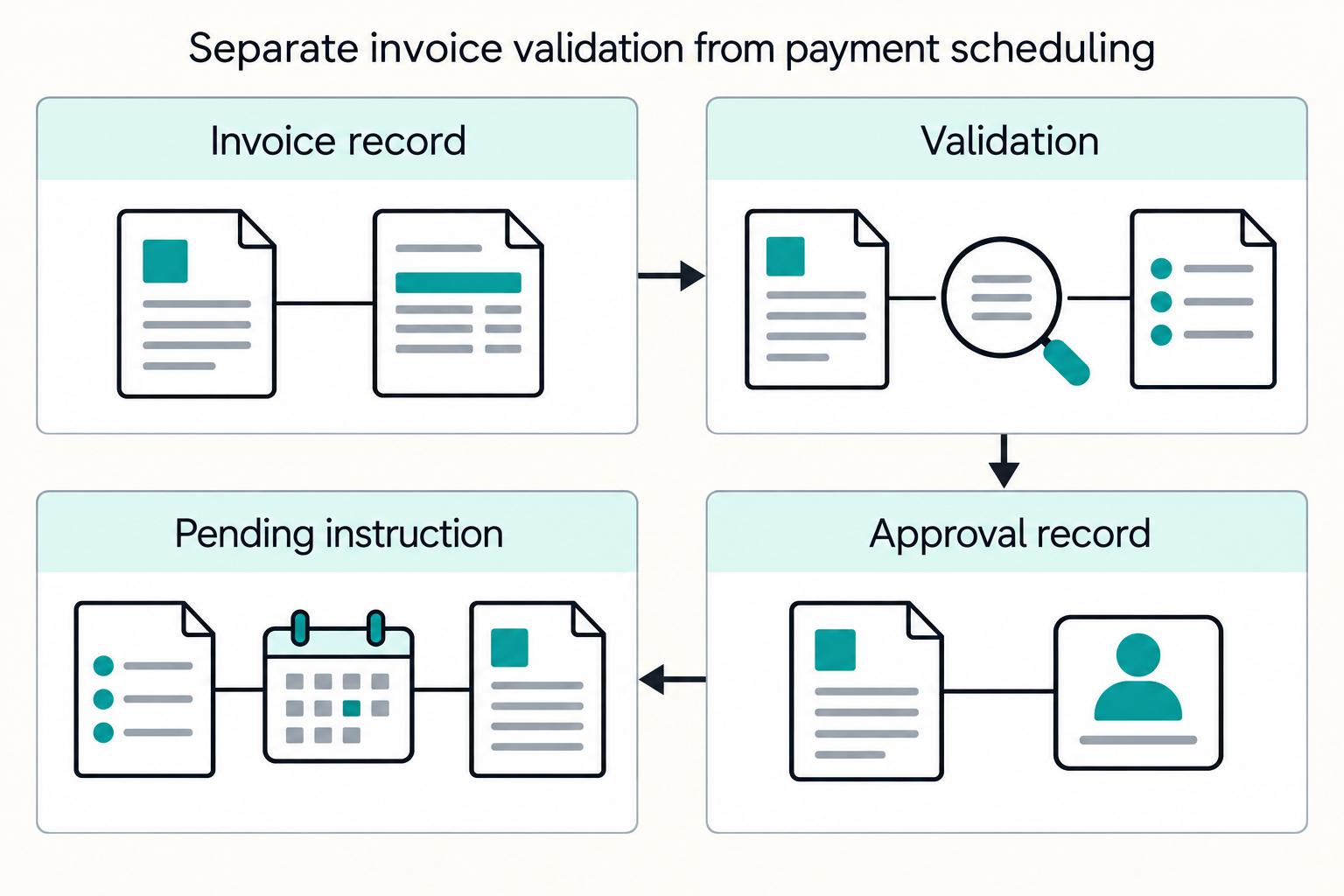
A documented, gated sequence matters more than the label on the term. Do not let the due date by itself trigger payment. In accounts payable, vendor payment is the final purchase-to-pay step, so payout release is where obligations become cash outflows.
| Stage | Purpose | Checkpoint |
|---|---|---|
| Receive and register the invoice | Record the invoice before scheduling | Invoice is recorded with core details and agreed term text |
| Validate against the payable to be settled | Check invoice details and payment terms against the obligation | Validation is complete, due-date logic matches the agreed terms, and unresolved mismatches are held in an exception path |
| Approve for payment | Keep approval separate from scheduling | Invoice status is approved for payment, or any unresolved portion is blocked with a documented hold reason |
| Schedule payment with pre-release checks | Convert an approved invoice into a payment instruction | The pending instruction ties back to the approved invoice, and any possible duplicate or mismatch is held for review before payout release |
| Post settlement and reconcile | Record actual funds movement and match settlement to the payable | Provider result, bank evidence, invoice application and fees align; unknown or returned outcomes have an owner |
Step 1. Receive and register the invoice#
Route incoming invoices through a documented intake path so each one is recorded before scheduling is touched. The goal is a complete invoice artifact, not a partial queue entry.
Checkpoint: the invoice is recorded with core details and agreed term text. That term text might be Net 30, Net 60, or Net 90.
Step 2. Validate against the payable to be settled#
Validation confirms the invoice is fit to pay, not just present. Check that invoice details and payment terms match the obligation you intend to settle, and route mismatches to exceptions instead of editing them silently.
Checkpoint: validation is complete, due-date logic matches the agreed terms, and unresolved mismatches are explicitly held in an exception path.
Step 3. Approve for payment#
Treat approval as a distinct control before scheduling. That keeps a valid invoice from being paid just because a due date arrives.
Checkpoint: invoice status is approved for payment, or any unresolved portion is clearly blocked with a documented hold reason.
Step 4. Schedule payment with pre-release checks#
Scheduling converts an approved invoice into a payment instruction. Before release, review pending instructions for common AP failure risks, including manual errors and possible duplicates.
Checkpoint: the pending instruction clearly ties back to the approved invoice, and any possible duplicate or mismatch is held for review before payout release.
Step 5. Post settlement and reconcile#
A scheduled payment is not a settled payment. Record settlement after confirmation that funds moved, then reconcile payment records against invoice and accounting records on a recurring basis.
Checkpoint: payment confirmation and invoice/accounting records align in reconciliation before you move forward.
Before submission, require invoice validation, authorization, eligible funds and cleared pre-release exceptions. After submission, collect provider status and bank evidence, then reconcile. Post-settlement evidence cannot be a prerequisite for initiating the same payment.
Checkpoint: intake, validation, approval and scheduling evidence must align before release. Submission, settlement and reconciliation evidence complete the record afterward. Hold the affected instruction when a pre-release exception remains unresolved; investigate later returns separately.
Instrument AP and AR checkpoints that show term health#
You can only manage term health if you can see it in one place. The job is to show whether you are meeting Net 30, Net 60, and Net 90 commitments and how that performance lines up with cash timing in Days Payable Outstanding (DPO) and Days Sales Outstanding (DSO).
Step 1. Build the minimum term-health scorecard#
Use the contractual trigger, invoice receipt, approval, submission and qualifying completion dates. Calculate on-time payment against the original agreed due date. A late AP approval does not reset that date unless the contract and applicable law allow the change.
| Metric | What to segment by | Why it matters |
|---|---|---|
| On-time payment rate | Net 30, Net 60, Net 90 | Shows whether agreed terms are being met |
| Early payment discount capture rate | Eligible discount invoices | Shows whether available early-pay discounts are being captured |
Days Payable Outstanding (DPO) | AP overall, then vendor cohort if available | Shows payable timing direction |
| AP turnover ratio | AP overall, then vendor cohort if available | Shows payable velocity |
Days Sales Outstanding (DSO) | AR overall, then payer/customer cohort if available | Shows receivable timing direction |
| AR turnover ratio / average collection period | AR overall, then payer/customer cohort if available | Shows collection timing direction |
Each invoice in the scorecard should trace back to a received invoice that was recorded and posted, plus an approval event before payment issuance. If that trail is missing, treat the metric as non-decision-grade.
Step 2. Read AP and AR together#
Do not read AP and AR as separate dashboards. They are one timing system. When supplier payments and customer collections drift apart, cash-flow stress can follow.
Review DPO and DSO together, but do not call a rising DPO an automatic improvement. It may reflect agreed longer terms or overdue supplier payments. Segment past-due items, disputes and supplier impact before interpreting the cash result.
Step 3. Run a recurring review with explicit escalation triggers#
Use a recurring term-health review as an operating control and define it in policy. Set cadence and escalation rules to your operation rather than assuming one uniform standard.
If working-capital gains come with worsening receivables timing or weaker term performance, escalate across AP and AR owners. Document your internal thresholds, version them, and assign one owner to decide whether to accept, correct, or roll back the change.
Step 4. Separate term-policy misses from process defects#
Do not renegotiate terms until you know the miss is a term design issue and not an execution failure. Start by checking for process defects such as late invoice recording or slow approvals.
Compare misses to your control points. If receipt recording or pre-issuance approval is failing, fix execution before you change term policy. Extending terms can hide weak controls rather than solve them.
For more on how longer payables affect working capital, see How Payment Platforms Use DPO to Improve Cash Flow Without Reconciliation Risk.
Use early payment discounts without losing control#
Early payment discounts are most useful when the savings justify earlier payment and your approval path can reliably hit the discount window. If you cannot consistently approve, schedule, and pay inside that window, terms like 2/10 Net 30 can add operating risk and reduce the expected benefit.
| Step | Key point | Control |
|---|---|---|
| Qualify the discount | In 2/10 Net 30, a 2% discount applies if payment is made within 10 days; otherwise the full amount is due in 30 days | Confirm the agreed trigger and what qualifies as timely payment |
| Flag at intake | Record the term and discount deadline from the contractual trigger | Flag discount invoices at intake, not later in the queue |
| Route approvals by deadline | Prioritize discount-eligible invoices by deadline instead of queue age | Limit discount terms to suppliers and invoice types with predictable approvals until reliability is consistently high |
| Verify after payment | Confirm payment timing met the discount window and the discounted amount matches the term | Measure discount capture from the recorded term to the approval trail and final settlement result |
Step 1. Qualify the discount before you operationalize it#
Start with the term itself. In 2/10 Net 30, you receive a 2% discount if payment is made within 10 days; otherwise the full amount is due in 30 days.
Then make a control decision, not just a math decision. Payment terms affect working capital and supplier relationship management, so only scale discount terms when your accounts payable (AP) process can execute them consistently. If AP handoffs are still inconsistent, fix reliability first.
Verification point: capture the contractual trigger and discount deadline. For an invoice-date agreement, capture that date; for a receipt-based agreement, retain receipt evidence. Apply the same completion-event rule when deciding whether the discount was earned.
Step 2. Flag discount eligibility at intake#
Flag discount invoices at intake and store the term, trigger, discount deadline, eligible amount and payment-completion rule. Calculate the deadline from the agreed trigger rather than assuming every supplier uses invoice date.
If you do not flag them early, the team may notice the discount too late and miss the window.
Step 3. Route approvals by deadline, not by queue age#
Once flagged, move discount-eligible invoices through an approval path that prioritizes the deadline. This is where AP automation or similar controls help. Inefficient AP processing makes discount deadlines hard to meet, and slow processing can forfeit eligibility.
Use a simple rule. Limit discount terms to suppliers and invoice types with predictable approvals until reliability is consistently high.
Step 4. Verify discount capture after payment#
After payment posts, confirm the result in reconciliation: payment timing met the discount window, and the discounted amount matches the term.
That closes the control loop. Measure discount capture from the recorded term to the approval trail and final settlement result.
Anticipate failure modes and define recovery paths#
When invoices go past due, intervene quickly and log each action so recovery does not drift. Unpaid invoices generally become harder to collect as they age, so the priority is to resolve delinquencies early and keep accounts current.
Track past-due exceptions in one queue, and treat each delinquency based on its specific circumstances. For each item, define the next action and a checkpoint date.
Set outreach and escalation dates as internal policy. For example, you may require written follow-up by 20 days past due, while urgent supplier or statutory deadlines need faster action. Record the actual contact, response and next step; that example is not a universal collection rule.
Define recovery paths as internal policy choices, not universal rules. Close each exception with auditable records of the outreach, escalation, and resolution actions taken.
Roll out changes in controlled phases#
Change payment terms in controlled phases so you can see what actually changed. Start with one cohort and one shift, such as Net 30 to Net 60, and keep other variables steady.
Step 1. Pick one cohort and one term change#
Choose a cohort that is stable enough to measure and small enough to reverse. Keep the phase limited to one change in term length, and do not combine it with discount-policy or routing changes.
Checkpoint: capture a baseline pack before launch. Include current invoice terms, cohort scope, exception and dispute baseline, and the reports you will use for pre/post comparison on DPO, DSO, and 2/10 Net 30 discount capture.
Step 2. Fix the pilot period and lock pre/post measures#
Set the pilot period before launch and keep it fixed. Common credit terms are 30, 60, or 90 days, but there is no universal pilot duration, so document your chosen window in advance.
Track the same measures before and after:
DPODSO- discount capture for
2/10 Net 30 - exception rate
- dispute backlog
Issue invoices promptly after the agreed billable event, such as accepted delivery or a completed service milestone. For discount terms, retain the agreed trigger and timely-delivery evidence so the customer has a workable window. Discounts bring cash forward at a cost; compare the benefit with the revenue given up.
Step 3. Define rollback before the first invoice changes#
Define rollback before day one. If exceptions or supplier strain exceed your threshold, stop extending the new term to future invoices and negotiate any contractual change. Do not retroactively shorten an existing invoice’s agreed payment window.
Record the threshold and decision owner. Repair process failures promptly and restore the prior template for future transactions where permitted. Existing invoices retain their contractual due dates unless both parties validly agree otherwise.
Checkpoint: verify reversion ownership and execution path in advance, including system updates and supplier notification steps.
Step 4. Close with a decision memo, not a preference call#
End the phase with a short decision memo that states keep, adjust, or stop based on measured outcomes.
Include:
- cohort tested and exact term change
- pilot start and end dates
- pre/post results for
DPO,DSO, discount capture, exceptions, and disputes - rollback events or manual interventions
- recommendation and approver
If results are mixed, adjust one variable and run another controlled phase before broader rollout.
Final takeaway and copy-paste checklist#
Treat term selection as a contractual and operating commitment. Align the trigger, due date, discount rule and qualifying payment event across the contract, invoice and finance system. Repair mismatches before changing future terms; an internal setting cannot override the supplier’s existing agreement.
-
Set the objective and risk boundary by supplier segment. Define where buyer flexibility matters more and where seller cash-flow risk matters more, and state what dispute volume, late-payment rate, or backlog level triggers a rollback.
-
Choose an eligible term by supplier segment. Record the legal and commercial basis, supplier agreement and cash tradeoff for Net 30, Net 60 or Net 90. Fix inconsistent approvals rather than extending terms to hide them.
-
Lock contract and invoice wording. In your contracts and invoice payment terms, state the due date, the date that starts the clock, and any discount or penalty conditions. Unclear terms create late payments and vendor friction, including avoidable mismatches like a supplier expecting 15 days while your team runs a 45-day cycle.
-
Verify operational support before promising the term. Confirm invoice intake, approvals, submission and bank timing allow the agreed qualifying completion event by the due date. Sample the trigger and completion evidence against the invoice, AP queue and contract; scheduled payment alone is insufficient.
-
Document stage checkpoints from intake to settlement. Assign stages and owners for invoice received, validated, approved, scheduled, settled, and posted, with a clear pass condition before each handoff.
-
Track monthly term-health metrics. Monitor on-time payment rate, exception aging, and discount capture where you offer structures like
2/10 Net 30. If discount capture drops, check intake, approval, release and qualifying completion timing. -
Predefine recovery actions. Keep original due dates visible, log disputes and resolve late or returned payments. Change future terms through approved templates and agreement; do not retroactively alter invoice deadlines to improve reported performance.
-
Scale only after pilot reliability under load. Start with one cohort and one term change, compare before-and-after results with the same metrics, and expand only if cash timing improves without increasing exceptions or supplier friction.
If you need one line to guide decisions, use this rule. Longer windows can work as trade credit, but only when terms are explicit and operations can meet them consistently without avoidable disputes or cash-flow strain.
Before rolling changes out broadly, align policy with execution details and reconciliation handoffs in your environment: Review the Gruv docs.
Frequently Asked Questions
What do `Net 30`, `Net 60`, and `Net 90` mean in day-to-day platform operations?
They mean the buyer has 30, 60, or 90 days to pay the full invoiced amount under agreed net terms. In operations, that due-date logic needs to stay consistent from contract or invoice through AP scheduling and ledger posting. Confirm what starts the clock in your documents, because terms may run from invoice date or from end-of-month timing.
When should a platform choose `Net 30` instead of `Net 60` or `Net 90`?
There is no one-size-fits-all rule, so terms should match operating and cash-flow needs. Moving from Net 30 to Net 60 extends buyer-side cash retention and DPO, while also extending supplier-side DSO. If intake, approval, and payment release are not stable in practice, keep terms shorter until the process is consistent.
Who benefits and who takes on risk as payment terms get longer?
Longer terms generally help buyers hold cash longer, while suppliers carry the receivables delay. That can increase supplier cash-flow strain, especially if execution slips past agreed due dates. A common risk pattern is long terms combined with weak processing, which can lead to penalties and supplier relationship damage.
How does `2/10 Net 30` change the decision for finance and ops teams?
2/10 Net 30 means a 2% discount if the agreed qualifying payment event occurs within 10 days of the agreed trigger; otherwise full payment is due in 30 days. Can your team validate, approve and complete that qualifying event in time, including bank receipt if required? Scheduling or releasing payment on day 10 is insufficient when timely receipt is the contract condition.
What usually breaks when `accounts payable (AP)` processing is slow?
Slow processing can miss the discount window or the full-payment deadline. Compare invoice receipt, validation, approval, submission and qualifying completion timestamps on missed items. Include bank and rail timing, returns and corrections; release on time alone does not establish timely payment when the agreement requires receipt.
Should we use `Net 15`, `Net 10`, or `Net 7` for any supplier segments?
Sometimes, but only where faster payment supports the relationship and your AP process can actually meet the shorter window. Net terms should be tailored to operating and cash-flow needs, and shorter terms can work in specific segments. If approvals and release timing are not reliable today, avoid committing to Net 7 or similar terms you may not meet.
Researched and edited by the Gruv editorial team. Gruv builds cross-border billing, payouts, and finance-operations software for global businesses.
Sources
Educational content only. Not legal, tax, or financial advice.
Related Posts

The Freelance Payment Penalty: A Modeled Audit of Platform Fees, FX Spreads, and Payout Delays
The money rarely disappears through a single, easy-to-spot fee. The real loss is stacked. A marketplace takes its commission, a processor adds a charge for international cards, a bank or payment company converts the currency at a spread, a platform holds the funds before release, and a wire sheds a little to intermediaries on the way in. Each layer looks defensible on its own, but the worker feels the combined result as a smaller deposit and a later payday.

How to Respond to a Subpoena for Business Records
Move fast, but do not produce records on instinct. If you need to **respond to a subpoena for business records**, your immediate job is to control deadlines, preserve records, and make any later production defensible.
A US Expat's Guide to Investing in UCITS ETFs to Avoid PFIC Issues
The real problem is a two-system conflict. U.S. tax treatment can punish the wrong fund choice, while local product-access constraints can block the funds you want to buy in the first place. For **us expat ucits etfs**, the practical question is not "Which product is best?" It is "What can I access, report, and keep doing every year without guessing?" Use this four-part filter before any trade: