
Quick Answer
Customize platform invoices by defining required legal, tax, and reconciliation fields before changing the design. Keep branding secondary to the supplier identity block, store tax IDs as separate validated fields, and write line items with a clear service label, service date or period, and pricing basis. Then run pre-send QA so each invoice can be traced to source records, payment events, and reconciliation outputs.
What to customize on platform invoices#
Invoice customization is an operations control, not a design exercise. The goal is a document that stays clear to customers, includes required legal and tax information, and supports payment collection and reconciliation.
This is about content and branding, not just visuals. Start with required content. Requirements vary by jurisdiction, and the document needs the right information and tax treatment for that jurisdiction. In B2B contexts, customer tax IDs are often required, and line items should be specific enough to show what was billed.
Before you touch layout, set a practical baseline: business and customer identity fields, tax ID fields, and itemized lines with description, quantity, rate, and total. If your system supports shared defaults across invoices and estimates, use them to reduce template drift. If you manage multiple tax IDs, for example up to 100 account tax IDs and up to 5 customer tax IDs in Stripe, make sure the right ID appears on the right invoice.
This guide focuses on practical standards for branding, tax identity fields, and line-item quality, then shows how to validate them with QA and ownership checks.
Related reading: How to Calculate LTV in a Two-Sided Marketplace for Buyer, Seller, and Platform Decisions.
Define your non-negotiable invoice standard before you touch the UI#
Set the standard before any UI work. Otherwise, required fields can drift into team preferences and create avoidable reconciliation and tax exceptions.
Step 1 Separate document types before marking required fields#
Separate document types first, then mark fields as required or optional for each one. An estimate is not an invoice, so keep distinct rows for invoice template, tax invoice, sales receipt, and estimate.
Requirements differ by document type and jurisdiction. In Australia, a tax invoice must be intended as a tax invoice, rules differ below and at or above $1,000, and higher-value invoices also need the buyer's identity or ABN. In the EU, invoicing is required for most B2B VAT supplies, and VAT invoice content includes supplier and customer identity details.
Step 2 Pick one platform baseline, then layer local requirements#
Pick one platform baseline for all customer-facing billing documents, then layer local requirements on top.
| Field | Why it belongs in your house standard |
|---|---|
| Legal business name | Legal identity and customer clarity |
| Registration number field | Needed where entity or tax rules require it |
| Invoice or document title | Distinguishes invoice, tax invoice, estimate, or receipt |
| Customer identity block | Supports tax review and payment operations |
| Payment terms | Can support collections and settlement discipline |
Use this as an operating baseline, not a claim that every field is legally required in every country for every document. QA check: render one sample per document type and confirm these five fields appear consistently without manual edits.
Step 3 Require fields that reconciliation or settlement workflows need#
Use one hard rule: if a field is needed for reconciliation, settlement, or tax authority workflows, make it required everywhere that workflow applies.
That prevents partial identity drift across document variants. For example, UK invoices require a unique identification number, and UK full VAT invoices require supplier name, address, and VAT registration number. If identity fields diverge between estimates, invoices, and tax invoices, mismatches can surface later in payment matching or VAT review.
You might also find this useful: Platform Invoicing at Scale for Compliant Auto-Generated Contractor Invoices.
Gather the data and owners you need before template changes#
Before editing templates, treat this as a control change, not a design task. Assign clear owners, map tax-identity data lineage, lock system boundaries, and prepare a sign-off pack an independent reviewer can follow.
Step 1 Assign named owners with approval and rollback duties#
Assign named owners across finance ops, product, and engineering, with explicit approval and rollback duties.
Finance ops can own field correctness and reconciliation impact. Product can own customer-facing behavior and document scope. Engineering can own render logic, source wiring, and rollback if incorrect tax or registration data appears on invoices.
Avoid unclear accountability. Before release, ask each owner two questions: what exact fields changed, and how do we revert if a finalized invoice renders the wrong identity block? Management is expected to establish and maintain internal control over financial reporting, and to evaluate control-impacting changes. Fragmented visibility is a known close issue: "Often, team members have visibility only into their small piece of the close."
Step 2 Build a source map for every tax identity field#
Build a source map for every tax-identity field that can appear on invoices: tax ID, taxpayer ID, TIN, VAT number, and registration number.
For each field, record the source system, exact field name, who can edit it, where it is validated, and whether it becomes locked after finalization.
If you operate in the U.S., note whether a TIN is collected via Form W-9 and whether name and TIN validation happens at intake or only before information returns. IRS TIN Matching is a pre-filing service for payers or authorized agents, not a global tax-ID checker. Interactive matching verifies up to 25 name and TIN combinations immediately, with a 999-request limit per 24 hours. Bulk matching supports up to 100,000 combinations within 24 hours. For deeper U.S. handling, see TIN Matching for Platforms: How to Validate Contractor Tax IDs Before Filing Season.
Do not treat billing as a display-only layer. In Stripe, default account tax IDs are pulled during invoice finalization, and account tax IDs cannot be modified after finalization.
Step 3 Document system boundaries and which source is authoritative#
Document system boundaries so teams know where each field originates and which system is authoritative when values conflict.
| Boundary | Typical fields | What to verify |
|---|---|---|
| Checkout or product catalog | Customer tax ID capture, product or service selection, pricing basis | Was the value captured at purchase time, and can later systems overwrite it? |
| CRM | Legal customer name, billing contact, company or deal data, quote references | Which record is authoritative if contact, company, and quote data differ? |
| Billing | Invoice number, final rendered tax IDs, issue date, totals, finalization status | Which values are generated here versus copied from upstream systems? |
Keep checkout separate from later edits because it is a distinct capture boundary. CRM can be an origin layer, not only a reference layer. For example, HubSpot supports invoice creation from contact, company, deal, or quote records.
Step 4 Prepare an evidence pack before sign-off#
Prepare an evidence pack before sign-off: rendered sample invoices, a field dictionary, and reconciliation acceptance checks.
In the field dictionary, include the customer-facing label, internal field name, source system, owner, validation rule, and post-finalization editability. In samples, cover each changed document type and any entity or jurisdiction variant that changes the identity block.
Use a practical acceptance test: can a reviewer trace invoice number, customer identity, tax ID or registration number, and line totals back to source records without guesswork? If not, the template is not ready.
Set branding fields without breaking legal entity clarity#
Branding can sit around the legal identity block, but it should not replace required legal disclosures. Set legal name, address, and tax ID fields first, keep them legible, and treat any branding conflict as a legal-disclosure issue, not a design preference.
Step 1 Lock the supplier identity block before layout changes#
Lock a fixed supplier identity block before changing logo size, colors, or header layout. In the UK, a limited company invoice must include the full company name as shown on the certificate of incorporation, and required invoice disclosures must be legible. Under EU VAT invoice rules (Article 226), invoices must include the full name and address of the taxable person and customer, plus the VAT identification number used for that supply.
If a branded layout hides or weakens those fields, fix the layout and keep the legal block intact.
Step 2 Use one approved legal identity format per entity#
Use one approved legal-identity format per entity across invoice variants. Keep the same legal name string, address format, and contact details so disclosures stay consistent.
Where VAT registration details apply, keep them aligned with the VAT registration certificate. If different templates show different legal identity text for the same entity without a documented rule, treat it as a control failure, not a branding tweak.
Step 3 Map each invoice to the supplying entity#
When multiple entities exist, map each invoice to the supplying entity at render time. If your billing stack supports product-to-account ownership and invoice-level tax ID selection, use those controls so each invoice reflects the actual supplying entity.
For EU VAT invoices, do not rely on one global default tax ID. EU VAT rules require the VAT ID under which the taxable person supplied the goods or services, so the rendered identity should follow the supplying entity for that transaction.
Step 4 Test legal identity rendering against your approved mapping#
Test legal identity rendering the same way you test totals. For each brand and entity path, verify the visible supplier name, address, and tax ID against your approved mapping and jurisdiction rules.
For Australian tax invoice cases, requirements vary by amount, including additional buyer identity or ABN detail for sales of $1,000 or more. Treat requests like "show only the brand" or "use one header for all regions" as risk signals, because invoice requirements vary across jurisdictions.
Standardize tax identity fields by jurisdiction and invoice type#
Standardize tax identity rules by document type and jurisdiction, not by template style. Require tax identifiers on documents that function as VAT invoices or tax invoices, and keep estimates or receipts out of that path unless applicable local rules say otherwise.
Step 1 Classify each document before assigning tax fields#
Classify the document first: invoice, VAT invoice or tax invoice, sales receipt, estimate, and credit note if used. Tax identity requirements are not interchangeable across these classes.
| Document and jurisdiction rule | Tax identity rule to enforce | Key threshold or rule |
|---|---|---|
| EU VAT invoice | Show the supplier VAT identification number used for the supply. In specified cases, also show the customer VAT identification number. | EU VAT Directive Article 226 |
| UK full VAT invoice | Include seller name, address, and VAT registration number. | HMRC VAT invoice guidance |
| UK less detailed VAT invoice | Allow reduced detail only when the supply value including tax is £250 or less. | £250 or less |
| UK non-VAT invoice | Do not assume VAT registration details are required just because the template is labeled "invoice." | VAT invoices include more detail than non-VAT invoices |
| Australia tax invoice under $1,000 | Include enough information to clearly determine the required 7 details. | $1,000 split; 7 details |
| Australia tax invoice at $1,000 or more | Also show the buyer's identity or ABN. | ATO higher-value rule |
For sales receipts and estimates, set an internal rule: they can omit tax identifiers only when they are clearly classified as non-tax documents for that jurisdiction and are not being used as formal tax evidence.
Step 2 Keep tax identity fields separate and validate before issuance#
Do not collapse tax ID, taxpayer ID, TIN, and registration number into one generic field. Store and validate them as separate data points, for example supplier tax ID, supplier registration number, customer tax ID, identifier type, and country code, then render by jurisdiction and document type.
For U.S. name and TIN workflows, run IRS TIN matching where applicable before information return submission. In practice, earlier validation is better, before invoice issuance turns into a downstream dispute or filing problem.
Minimum checks:
- Reject U.S. TINs that are obviously incorrect: not 9 digits or containing letters.
- Verify name and TIN alignment against onboarding records. For U.S. payees, the W-9 line 1 name and TIN alignment matters to avoid backup withholding risk.
- For VAT workflows, verify displayed VAT IDs and related seller details against approved registration records.
Step 3 Route validation failures to hold-and-fix#
If a document requires tax identity data and validation fails, hold it for correction instead of sending it.
At minimum, hold these cases:
- Missing supplier VAT ID on VAT invoices where the applicable rule requires it, including EU baseline rules and UK full VAT invoices.
- Missing buyer identity or ABN on Australian tax invoices at $1,000 or more.
- Obviously incorrect U.S. TIN format.
- Legal-name and TIN mismatch against approved onboarding records or match results.
This is an operations control choice: catch errors before they create correction loops, reporting rework, and preventable notice risk, including CP2100 or CP2100A scenarios tied to missing or obviously incorrect TIN data.
Step 4 Validate rendering behavior and keep policy links nearby#
Validate implementation, not just schema. If your billing layer is Stripe, customer and account tax IDs can appear on related invoices and credit notes, with platform limits that affect multi-entity design: up to 100 account tax IDs, up to five customer tax IDs, and up to 10 tax IDs specified for an individual invoice. Test the selection logic so the correct ID appears on each document.
The operational end state is straightforward: each supported document type has one jurisdiction rule table, one validation rule set, and one exception path. For broader country guidance, keep a policy link in your template spec and use How to Issue Compliant Tax Invoices in 50+ Countries as a Global Platform.
Related: Creator Platform Tax Reporting for 1099 and W-8 Expansion Decisions.
Design line-item descriptions for reconciliation not just readability#
Line-item text has to support reconciliation, not just look clean on an invoice. A workable standard is simple: each line should state a clear service label, the service period or date, and the pricing basis so teams can trace what was supplied and how the amount was calculated.
Step 1 Set mandatory line-item fields#
Define what each line must communicate before you optimize the layout. For tax-grade invoices, this lines up with established requirements: EU VAT Article 226(6) covers the nature or extent of goods or services, Article 226(7) covers supply or completion date, and HMRC guidance expects each item to include a clear description, quantity or extent, and unit price.
Use these elements on every service line:
- Stable service label such as "Marketplace commission," "Subscription seat," or "Onboarding service"
- Service period or service date such as "2026-03-01 to 2026-03-31"
- Pricing basis such as "3 seats x $49," "2.9% commission on settled sales," or "8 hours x £120"
That helps keep vague labels like "Services rendered" or "Platform fees" from turning into interpretation work later.
Step 2 Anchor rendered text to structured line data#
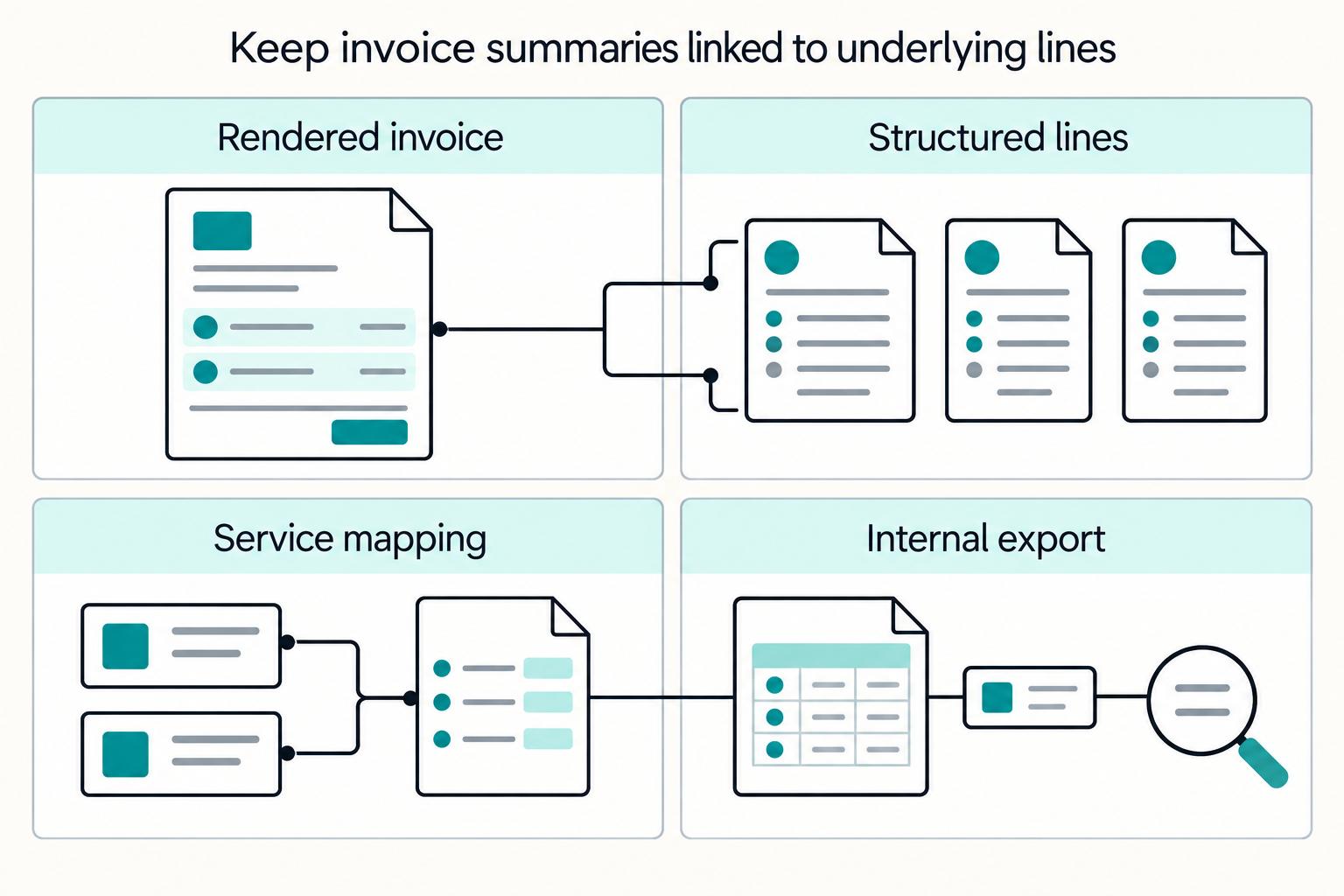
Do not rely on visible description text as the only identifier. Keep each rendered line tied to structured fields you can connect to internal reconciliation records.
If your billing system supports operational line fields, use that split deliberately. In Stripe, invoice line items include fields such as description, metadata, period, pricing, and quantity, so you can keep customer-readable text while preserving reconciliation structure.
Step 3 Keep a back-office line key even when customer output is summarized#
You can hide internal IDs from customers while still keeping a durable line key in back-office exports and reconciliation data. Consider keeping an immutable line identifier, or equivalent, with period, pricing basis, quantity, and service mapping in internal records.
This matters most when invoices are grouped for readability. Stripe can group line items and show only group-level subtotals to customers, so the control point is whether teams can still trace any subtotal back to underlying lines in internal records. If you use Stripe grouping templates, remember the limit is 10 line item grouping policies.
Step 4 Compare weak and strong line patterns before rollout#
Use concrete examples so reviewers apply one standard consistently.
| Weak line-item description | Strong line-item description | Reconciliation impact |
|---|---|---|
| Platform fee | Marketplace commission, 2026-03-01 to 2026-03-31, 12% of settled order value | Service type, period, and pricing logic are explicit for matching |
| Monthly service | Subscription seats, 2026-03-01 to 2026-03-31, 25 seats x $49 | Can be checked against seat counts, catalog price, and billing records |
| Professional services | Onboarding service, completed 2026-03-18, 8 hours x £120 | Supports date-of-supply review and ties to delivery evidence |
Step 5 Run a reconciliation-readiness check before publishing the standard#
Test the draft standard with a mixed sample: subscriptions, usage, one-off services, credits, and custom lines. Require reviewers to map each invoice line to product or service records and internal reconciliation data using only the invoice plus the back-office line export.
If mapping depends on tribal knowledge, tighten the description pattern or the hidden structured fields before rollout. Keep an evidence pack with a rendered invoice sample, a matching line-level export, and the service-label mapping table.
For a step-by-step walkthrough, see How to Find Vendors for Your Platform and Vet Third-Party Providers at Scale.
Map invoice events to ledger and settlement checkpoints#
Invoicing is an event chain, not a PDF output. You need a traceable path from invoice issuance to payment result to ledger posting to settlement and reconciliation.
Step 1 Define the lifecycle states you will reconcile#
Start with provider states, then map each one to your internal control point. In Stripe, invoices move from draft to open, then to paid when payment succeeds. If payment fails or is incomplete, the invoice remains open.
Use a minimum operational flow:
- invoice created or finalized
- payment attempted
- payment succeeded or failed
- ledger entry posted
- settlement batch identified
- reconciliation result closed
Record the IDs that connect each step. For Stripe, that is typically invoice ID, payment object ID, BalanceTransaction ID, payout ID, and internal journal entry ID. If a handoff has no linking ID, it is still a manual checkpoint.
Do not treat invoice creation as cash evidence. Stripe can wait 1 hour after successful invoice.created webhook responses before attempting payment, and if webhook success is not received, it may attempt to finalize and send after 72 hours.
Step 2 Tie payment outcomes to ledger and settlement evidence#
Use state-change events to drive workflow, but use funds-movement records to support settlement and cash controls. Stripe creates Event objects on resource changes, and every funds movement creates a BalanceTransaction with a source ID that links back to the originating object.
Set a clear rule: invoice status changes can trigger candidate accounting actions, but cash-settled status requires a linked funds-movement record. For Stripe automatic payouts, payout-scoped balance transaction filtering and the payout reconciliation report support this check. For Adyen, the Settlement details report provides transaction-level settled and paid-out evidence.
Do not assume a successful payment-link outcome or a paid invoice automatically updates payout execution status in your records. That depends on your integration and report ingestion.
Step 3 Add idempotency and duplicate guards before retries#
Retries are a common source of duplicate-risk failures. Use an idempotency key on create and pay actions where supported. Stripe returns the same result for repeated keys, including 500 errors, but keys can be removed when at least 24 hours old. PayPal also states not all APIs support its idempotency header.
Add your own duplicate protection instead of relying only on processor behavior. Keep an operation fingerprint, for example invoice ID plus action type plus amount plus attempt window, and block any second ledger post when that fingerprint already produced a journal entry.
Step 4 Verify a traceable path for each paid invoice in your environment#
Use this acceptance test: for each invoice marked paid, can you trace at least one settlement path and a recorded reconciliation result in your stack?
For each sampled invoice, keep:
- invoice ID and status history
- payment object ID and event IDs
- BalanceTransaction ID
- payout ID or settlement report row
- ledger journal entry ID
- reconciliation status with reviewer and date
Retain raw events before retrieval windows close. Stripe says Retrieve Event API access is 30 days, so investigations should not depend on late ad hoc pulls.
Add governance so template edits stay controlled over time#
Template changes are controlled configuration changes, not quick design edits. Put an approval gate in place, document each decision, and retain the change record.
Step 1 Assign approvers before changes go live#
Use a defined approval path for normal changes. In some change-management processes, normal non-BAU changes include at least two approval levels, so apply that pattern where it fits your process. You can split review by risk area, for example operational or tax impact and customer-facing or release impact.
Apply stricter review when edits touch tax ID or TIN display, legal entity details, or line-item description rules. Local document rules differ, so include an explicit jurisdiction check before release.
Step 2 Version templates and keep a durable change history#
For each template release, record a version ID, effective date, owner, and approval record. Keep before-and-after invoice examples with the change record so you can show exactly what changed.
Do not rely only on whatever history your billing tool exposes. Stripe supports multiple invoice customization control points, including API, editor, templates, and settings, so maintain your own change log for high-risk template fields. Your checkpoint should be simple: for any live version, you can identify who approved it, what changed, and what version it replaced.
Step 3 Define an emergency path that is still auditable#
Emergency fixes can be necessary, but they should remain exceptions. If a change is implemented first, require a retrospective change record and route it through the same change-management system.
Make the policy explicit for finalized-invoice risk. Stripe notes you cannot add, change, or remove account tax IDs after an invoice is finalized, so urgent changes that affect tax ID behavior need clear pre-release controls and traceable approvals.
Run pre-send QA with pass fail criteria and evidence capture#
Pre-send QA is a release gate, not a visual check. Each scenario should pass explicit checks for required fields, tax IDs, line-item clarity, and reconciliation output before send.
Step 1 Build a scenario matrix around real failure risk#
Use a small matrix that covers domestic invoices, cross-border tax invoices, refunds, discounts, and mixed standard and custom line items. Keep domestic and cross-border cases separate, because the checks are not always the same.
| Scenario | Pass only if | Common failure |
|---|---|---|
| Domestic invoice | Required fields are present and readable, issuer details are correct, unique sequential number is present | Template styling hides issuer details |
| Cross-border tax invoice | Required VAT details are present, issuer and customer tax IDs are correct, reverse-charge indication appears when customer liability applies | Wrong tax ID source or missing reverse-charge wording |
| Refund or item-specific reversal | Refunded item and tax behavior are correct at line-item level | Header total looks right while item tax treatment is wrong |
| Discounted invoice | Discounted presentation still preserves clear line-item meaning and tax amounts for review | Total is correct but tax basis is hard to verify |
| Mixed catalog + custom line items | Free-text line items are clear and specific enough to identify goods or services and map to back-office records | Customer-readable text that cannot be reconciled |
If you operate in EU VAT scope, use Article 226 requirements, including the VAT identification number, as the check baseline.
Step 2 Define pass/fail criteria before preview#
Write the checks so reviewers can make a binary pass or fail decision without interpretation:
Required fields: fail if any required value is missing, misplaced, or unreadable in rendered output.Tax ID accuracy: fail if rendered tax IDs do not match source records for the issuing or customer entity. Run this before finalization where tax IDs lock after finalization.Line-item clarity: fail if descriptions are not specific enough to identify supplied goods or services.Reconciliation readiness: fail if invoice outputs cannot be tied to expected ledger or reconciliation records without manual guesswork.
Step 3 Capture evidence for each scenario#
Keep an evidence pack per test case:
- Rendered invoice sample, PDF or HTML.
- Field extraction output for controlled values, for example invoice number, legal entity, tax ID, customer ID, line-item text, tax amount, and total.
- Ledger or reconciliation proof, including core transaction attributes such as payee, amount, proof of payment, and date.
Preview is useful, but it is not enough evidence on its own.
Step 4 Run migration and integration regression checks#
Run the same matrix before and after migration or integration changes to catch behavior drift early.
For QuickBooks Desktop-to-Online moves, account for feature differences that may require adjustments. For HubSpot-Stripe setups, test downstream paths explicitly because invoices created in HubSpot are not created in Stripe. In all cases, compare required fields, tax ID placement, sequencing, line-item rendering, and reconciliation output. If extracted fields or downstream identifiers change unexpectedly, fail the release.
Fix common failures fast without creating duplicate records#
When QA finds a defect, recover in a way that preserves traceability and avoids a second record, second send, or second ledger impact. If a required tax or identity field is wrong or missing, pause delivery and only retry after you confirm whether the right path is revise, void, credit note plus revised invoice, or regeneration under the applicable jurisdiction rules.
Step 1 Quarantine tax identity errors before finalization#
If a taxpayer ID, TIN, or registration field required in that jurisdiction is missing, treat it as a hold-and-fix event. In EU VAT scope, Article 226 requires seller and customer identity details and VAT identification details, so use that as your check baseline where it applies.
The cleanest recovery is before finalization. On Stripe, you cannot add, change, or remove account tax IDs after finalization, so block send, correct the source record, regenerate the draft, and log the correction decision.
If the invoice is already finalized or sent, avoid silent edits. Compliance handling varies by country. For example, Irish Revenue guidance states that incorrect VAT details require a credit note and a revised invoice. On Stripe, revision finalizes a new invoice, voids the old one, and keeps revision history in the timeline.
Step 2 Remap unclear line items before reissue#
If a free-text line item cannot be reconciled, remap it to your canonical service taxonomy before any reissue. HMRC guidance is clear that descriptions should be specific enough to identify what was supplied.
Do not just rewrite the wording. Confirm the line item maps to a canonical internal record and that the rendered invoice still matches what was supplied.
Step 3 Prevent duplicates before retry#
Use idempotency keys for invoice-related create and send operations so retries do not duplicate processing. Stripe supports idempotent retries and returns the same prior result for the same key, including errors, with keys up to 255 characters and pruning after at least 24 hours. PayPal notes that omitting its idempotency header can duplicate a request. Adyen also supports idempotent retries, with keys up to 64 characters and a minimum 7-day validity window.
Before you resend, reconcile the invoice register and ledger so you do not retry an operation that already completed.
Step 4 Fix entity mismatches and monitor patterns#
If branding shows one entity but the registration or tax identity belongs to another, treat it as a legal-identity mismatch, not a cosmetic issue. Move to the correct template version, refresh entity master data, and rerun QA checks.
Keep a weekly exception report for tax ID, TIN, entity mismatch, duplicate retry, and reconciliation failures. Weekly cadence is an operational control choice, and reconciliations plus trend analysis align with ongoing monitoring activities. Track at minimum:
- failure type
- invoice ID and customer ID
- jurisdiction and document type
- failed source field
- correction path used
- resend status
- post-correction ledger or reconciliation match
Copy and use this invoice customization checklist#
Use one release checklist for every template change, and hold release if any required check is unknown, missing, or not traceable to a source record.
Step 1 Confirm mandatory fields#
Start with jurisdiction and document type, because that determines what the document must show. For UK invoices, verify the unique identification number and seller and customer identity fields. For EU VAT scope, use Article 226 to check supplier and customer names and addresses, what was supplied, and pricing basis details.
Check legal entity name, relevant tax identifiers, customer identity, and any registration or payment-term fields required in your jurisdiction as separate fields rather than one combined block. If branding matches one entity but the legal entity or tax identifier belongs to another, stop and switch templates before send. On Stripe, account tax IDs cannot be added or changed after finalization, so complete this check on drafts.
Step 2 Validate line-item descriptions#
Each line item should clearly show the service label, pricing basis, and a mapping key to a canonical back-office record. For EU VAT scope, line detail should identify the extent or nature of services and the taxable amount or unit-price basis.
Reject free text that looks readable but cannot be mapped. A practical check is whether each line can be tied to an invoice item or subscription item and then to the expected internal record without manual guesswork.
Step 3 Verify traceability end to end#
Trace a sample paid invoice across invoice event, reconciliation status, settlement output, and payout linkage before release. If you use payout reconciliation, confirm the transaction appears in the relevant settlement batch and matches the payment outcome referenced by the invoice.
Use idempotency keys or equivalent request identifiers so retries are reviewable and duplicate-record handling is auditable.
Step 4 Confirm governance artifacts#
Record approver sign-off, template version, and change evidence, including QA notes and rollback plan, in the change record before release. This aligns with change-control practice that proposed changes are reviewed and decisions are documented.
Include rendered samples for key scenarios, source-mapping notes, and reconciliation proof from the test path so the team can verify what changed and how to revert if needed.
If you are turning this checklist into release gates, map each pass/fail rule to your integration and status events in the Gruv docs.
Conclusion#
Invoice customization is an operations control, not a design task. The goal is a finance-ready document and data trail that supports reconciliation, exception handling, and traceability from invoice through payment records and payout execution.
- Freeze required data before branding.
Define non-optional fields first for each invoice type and jurisdiction: required legal and tax details, a unique invoice number, and line-item detail describing what was supplied. EU VAT Article 226 requires a sequential number that uniquely identifies the invoice and the quantity and nature of goods or the extent and nature of services. HMRC guidance also requires unique sequential numbering for full VAT invoices. If branding reduces the clarity of required fields, the template is not operationally acceptable.
Lock tax-field design early. In Stripe, account tax IDs tied to an invoice cannot be modified after finalization, so validate tax ID selection and required invoice details while the invoice is still a draft.
- Run template updates through formal change control.
Changes should be controlled updates, not copy edits: review, explicit approval or disapproval, and a recorded decision. NIST change-control guidance supports this standard. For invoice templates, keep evidence with rendered samples, the field dictionary, and QA pass or fail results for required fields and reconciliation readiness.
One approval path is a practical starting point, but multi-entity or multi-region setups may require separate approvers or template variants. Clear ownership is what prevents silent field regressions.
- Prove traceability before scaling volume.
Run a strict traceability check on one paid invoice: confirm the path from the paid invoice to balance transaction records, reconciliation outcome, settlement batch, and payout execution status. In Stripe, balance transactions are the core records for funds movement, payout reconciliation is designed around settlement batches, and automatic payouts preserve transaction-to-payout association.
Guard against duplicate retry effects with idempotency keys on retryable operations. Stripe supports idempotent requests. Keys can be up to 255 characters, and repeated requests with the same key return the same result.
Start with enforceable controls: one checklist, one approval record, and one traceability test you actually run before release. Then tighten the process with exception review and regression checks so invoice operations remain explainable under audit.
When you want to validate rollout coverage for payouts, compliance gating, and traceable reconciliation flows, talk with Gruv.
Frequently Asked Questions
What fields are mandatory on a platform invoice versus optional branding fields?
Mandatory fields depend on jurisdiction and document type, not one global template. Keep the required legal identity, invoice numbering, tax content, and line-item detail for the document you are issuing. Branding such as logos, colors, and layout is optional only if it does not replace or hide required disclosures.
How should tax ID, taxpayer ID, and TIN appear without creating reconciliation risk?
Keep tax ID, taxpayer ID, TIN, VAT number, and registration number as separate mapped fields rather than one free-text block. Validate each field against its source and approved records before issuance or filing, and complete draft-stage QA if your system locks tax IDs after finalization. This makes each identifier traceable and reduces reconciliation risk.
What makes a line-item description operationally usable for finance teams?
A line item is operationally usable when finance can tell what was supplied and how the amount was calculated without guesswork. Use a clear service label, the service date or period, and the pricing basis, such as quantity, rate, or percentage. Avoid generic labels that cannot be mapped to internal records.
Who should approve invoice template changes in a platform organization?
Use a formal review-and-approval process with a documented decision record. Approval can be split across finance ops, product, and engineering based on tax, operational, and customer-facing impact. The key requirement is clear ownership, recorded approval, and a rollback path.
What should a pre-send QA check include before publishing template updates?
Pre-send QA should check required fields by jurisdiction and document type, tax ID accuracy, line-item clarity, and reconciliation readiness. Review rendered samples and extracted field values, and confirm outputs tie back to source, ledger, or reconciliation records. If tax IDs lock after finalization, complete those checks while invoices are still drafts.
What is the fastest recovery path when a sent tax invoice has a missing or invalid tax field?
There is no single global fastest path because correction rules vary by jurisdiction. If the invoice is still a draft, correct the source record, regenerate, and re-check before issuing. If it has already been finalized or sent, avoid silent edits and follow the applicable correction path, which can include a credit note and a revised invoice.
Researched and edited by the Gruv editorial team. Gruv builds cross-border billing, payouts, and finance-operations software for global businesses.
Sources
- ato.gov.au/businesses-and-organisations/gst-excise-and-...trusted
- csrc.nist.gov/CSRC/media/Projects/risk-management/document...trusted
- docs.stripe.com/tax/invoicing/tax-idstrusted
- docs.stripe.com/invoicing/customizetrusted
- ecfr.gov/current/title-17/chapter-II/part-229/subpart...trusted
- ecfr.gov/current/title-26/chapter-I/subchapter-C/part...trusted
- guides.gaoinnovations.gov/greenbook/2025/principle-16-perform-monitori...trusted
- irs.gov/tax-professionals/taxpayer-identification-nu...trusted
Educational content only. Not legal, tax, or financial advice.
Related Posts

The Freelance Payment Penalty: A Modeled Audit of Platform Fees, FX Spreads, and Payout Delays
The money rarely disappears through a single, easy-to-spot fee. The real loss is stacked. A marketplace takes its commission, a processor adds a charge for international cards, a bank or payment company converts the currency at a spread, a platform holds the funds before release, and a wire sheds a little to intermediaries on the way in. Each layer looks defensible on its own, but the worker feels the combined result as a smaller deposit and a later payday.

How to Respond to a Subpoena for Business Records
Move fast, but do not produce records on instinct. If you need to **respond to a subpoena for business records**, your immediate job is to control deadlines, preserve records, and make any later production defensible.

A US Expat's Guide to Investing in UCITS ETFs to Avoid PFIC Issues
The real problem is a two-system conflict. U.S. tax treatment can punish the wrong fund choice, while local product-access constraints can block the funds you want to buy in the first place. For **us expat ucits etfs**, the practical question is not "Which product is best?" It is "What can I access, report, and keep doing every year without guessing?" Use this four-part filter before any trade: