
Quick Answer
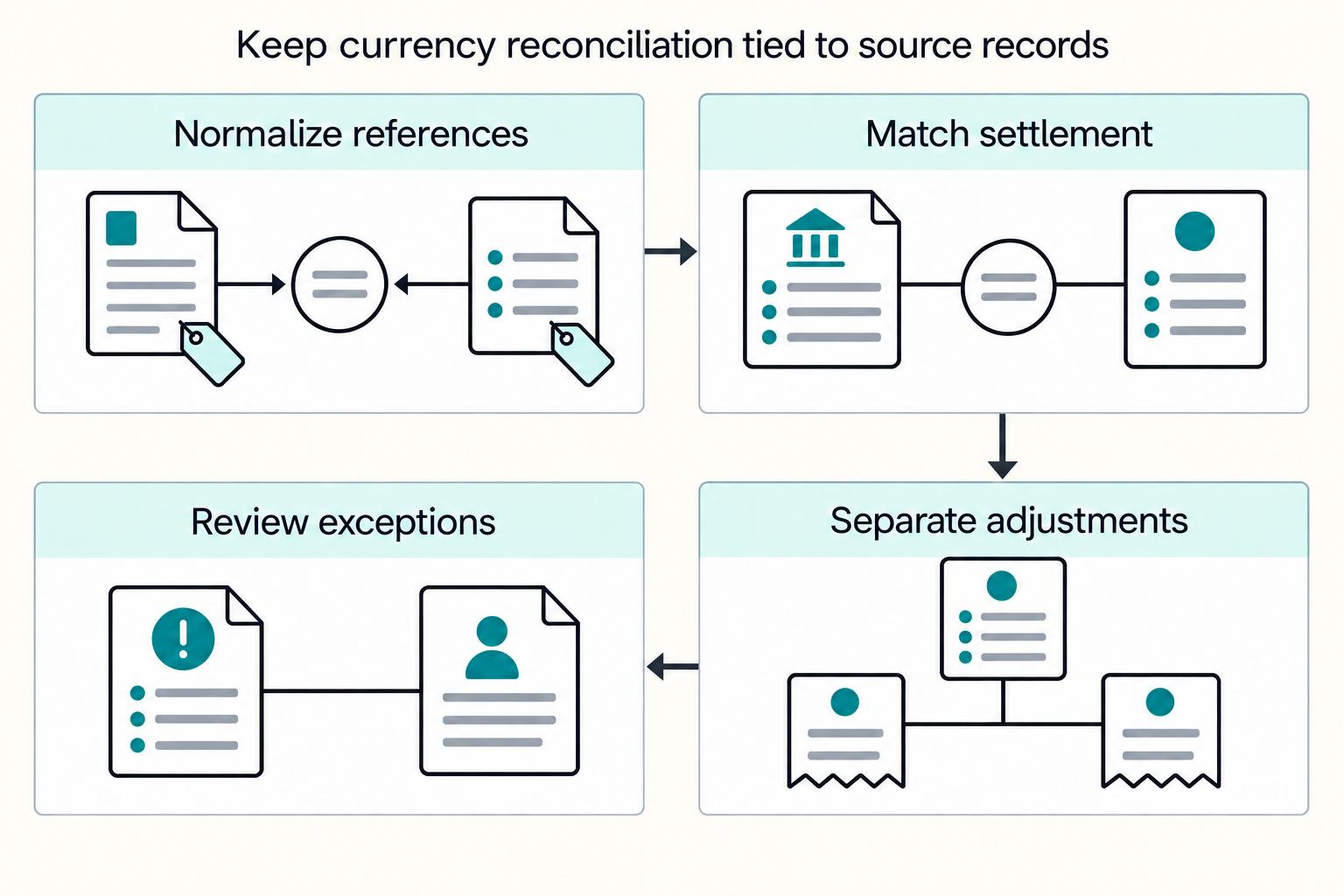
Xero can reconcile foreign-currency payouts for payment platforms, but only with a defined workflow and clear controls. Confirm multicurrency is enabled, keep payout records, settlement statements, and bank lines in one record set, use stable payout or settlement IDs in Xero, separate fees and FX differences, and use a clearing account when bill and payment currencies differ and neither is base currency.
Reconciling Foreign Currency Payouts in Xero#
If you operate a platform, the goal is not just to post foreign-currency activity in Xero. The goal is a close that reconciles foreign-currency payouts the same way every time, with evidence finance, ops, and engineering can all trust.
Xero Multi-Currency is strong at the accounting layer. Xero says it supports invoices, quotes, purchase orders, bills, and payments in more than 160 currencies, and that FX rates from XE.com update hourly. It does not, on its own, define how reconciliation should work when payout currency, settlement currency, and base-booking logic are not aligned.
Xero's core reconciliation model is clear: match each bank statement line to an existing transaction. Xero defines foreign-currency reconciliation as a case where the statement-line currency differs from the invoice or bill currency. Platform settlements are often less tidy. One settlement can include multiple components, such as sales, refunds, fees, and taxes, while your ledger still needs stable references and clear FX treatment.
Confirm multicurrency before workflow design#
Confirm multicurrency is enabled before you design month-end workflows. Xero says you need a trial organisation or a pricing plan with multicurrency to set up a foreign currency. If that entitlement is not active first, teams can end up reworking the workflow design.
Separate accounting capability from payout proof#
Treat accounting capability and payout proof as separate questions. Xero can process transactions in many currencies, but that does not automatically give you payout-event-level traceability for every settlement path. The books can look broadly right while the close is still fragile if payout events cannot be tied to bank lines without manual reconstruction.
Use one explicit booking policy and retain the rate actually applied to each transaction. Stable payout references help explain the close even when a provider’s conversion rate differs from Xero’s reference rate. Use this guide to decide:
- When a Xero-native approach is good enough
- When recurring exceptions justify adding AP automation
- What evidence pack must exist at close so no one is rebuilding the story after the fact
Keep the close evidence pack in view#
Keep that evidence pack simple: payout exports, settlement statements, bank lines, stable payout or settlement IDs, and a record of manual exceptions. Tool claims can help frame options. For example, Link My Books says payouts are imported and broken down into sales, refunds, fees, and taxes, and HedgeFlows says its Xero integration supports bulk international payments with automated reconciliation. Those claims are useful context, not substitutes for your own controls.
If you want to make Xero Multi-Currency work for payment platforms without month-end guesswork, the target is repeatable, auditable execution where exceptions surface early.
For a step-by-step walkthrough, see How Platforms Build Multi-Currency Sub-Wallets for Contractors.
What Xero multi-currency solves and what it does not#
Treat Xero multicurrency as the accounting layer, not the proof layer. It handles conversion, reporting, and exchange-rate tracking, but Xero guidance here does not by itself document proof of every foreign-currency settlement line at close.
Start with the explicit Xero coverage#
Start with what Xero explicitly covers. Xero says multicurrency lets you invoice customers and receive payments in more than 160 currencies, and that exchange rates update hourly. It also says your base currency cannot be changed after setup, so that choice matters early.
Your check is simple. Open a representative foreign-currency transaction and confirm you can see the transaction currency, the converted base-currency impact, and the rate used. If your team cannot explain that path consistently, reconciliation risk can start before payout operations.
Separate posting from payout operations#
Do not confuse posting capability with payout operations. Xero's foreign-currency reconciliation guidance centers on matching a bank statement line when its currency differs from the invoice or bill currency. That guidance covers accounting matches, but it does not state payout-event-level traceability for platform settlements.
Also plan for cross-foreign-currency edge cases. If a bill and payment are in different foreign currencies and neither is base currency, Xero says you need a clearing account. If you do not design that path up front, manual reconstruction risk increases.
Use Product Ideas as boundary checks#
Product Ideas show requested features and regional rollout discussions. Use the current product documentation and your enabled workflow to establish availability; votes, old statuses and planned dates do not establish a capability.
Read those threads as demand signals, not guaranteed functionality. If your close depends on a Product Idea shipping, treat that as a current risk. Build controls around what you can verify now: statement lines and any required clearing-account entries.
Related: Multi-Currency Payment Processing for Platforms: How to Accept and Disburse in 50+ Currencies.
What to prepare before first reconciliation cycle#
Before the first close cycle, set up the basics: a complete record set, a durable currency and entity map, stable references, and connector checks. If those are missing, reconciliation turns into exception handling instead of matching.
Build one record set for each cycle#
For each reconciliation cycle, build one record set with:
- payout records from your platform or connector
- settlement statements or connector settlement reports
- bank statement lines for the receiving account
Xero reconciliation is statement-line-to-transaction matching, so both sides need to exist before finance can clear items. As a first checkpoint, trace one foreign-currency settlement from payout ID to settlement record to bank line. If feed timing leaves bank lines missing, manually import the statement lines before matching starts.
Define currency scope and entity ownership#
Define currency scope and entity ownership before creating accounts. Document which flows settle in relevant currencies, for example GBP, EUR, USD, and CAD, which Xero organisation books each flow, and which bank account receives each settlement.
In Xero, add the foreign currency before creating a bank account or transaction in that currency. Treat setup as durable: base currency is fixed after setup, and bank account currency cannot be changed later.
Lock references and mappings#
Lock reference conventions and account mappings across finance and engineering. Use one deterministic format for payout ID, settlement ID, gateway name, and mapped account names so matching is easy to find by reference in Xero.
Also assign mapping ownership. Link My Books mapping drift is a known failure mode when mapped accounts are deleted, archived, or changed in Xero.
Test connector unknowns in your tenant#
Document connector unknowns and test them in your tenant before the first close. For Link My Books, verify behavior for your specific flow: in one documented foreign-currency setup, settlements post in the original foreign currency, reconciliation runs through a dedicated foreign-currency bank account in Xero, and Shopify guidance describes one settlement summary report per payout. For HedgeFlows, test sync timing, manual refresh behavior, and scope limits. For Xero-connected third-party apps from the App Store, record what data is synced, what is not, and who handles exceptions when behavior changes.
Pick the right operating model for your payout volume#
Start Xero-native while exception work is predictable and traceability is still easy. If unmatched items keep resurfacing, manual rework across foreign-currency paths becomes routine, or close cycles start slipping, move to an automation review.
Apply the operating rule#
Anchor the decision to operating evidence, not tool preference.
If payout volume is still manageable and exceptions are predictable, start with pure Xero. Xero supports multicurrency bills, payments, and reconciliation in more than 160 currencies, including cases where statement-line currency differs from the invoice or bill currency.
Escalate when the bottleneck shifts from accounting capability to operator drag: repeated unmatched lines, recurring spreadsheet cleanup, or inconsistent handling across bank accounts.
Batch payments need extra caution in practice. Xero documentation says foreign-currency transactions are not available for batch payments or deposits, and API-created batch payments are base-currency only. Developer docs note that some Xero surfaces can create multicurrency batch payments.
Compare the three operating models#
Use this table to score your current pain points.
| Model | Work it can cover | Boundary to test | Practical fit |
|---|---|---|---|
| Pure Xero | Accounting records and bank reconciliation | Whether your references and currency path permit a clean match | Predictable matches and manageable manual exceptions |
| Xero + Link My Books | Supported ecommerce settlement breakdown and posting | Exact sales channel and payout route; this is not generic contractor-payout software | Supported merchant sales settlements needing decomposition |
| Xero + HedgeFlows | Supported supplier payment execution and writeback | Eligibility, currencies, sync and writeback for payments actually executed through the service | Supplier payment operations rather than sales-settlement import |
Verify with one live foreign-currency cycle#
Before you standardize, run one end-to-end cycle and confirm where the evidence can break.
For pure Xero, reconcile one case where bank-account currency differs from invoice or bill currency, and confirm your internal references from payout record to settlement record to bank line are consistent.
For Link My Books, confirm in your tenant that settlements post in original foreign currency, land in the intended dedicated foreign-currency bank account, and match bank deposits as expected.
For HedgeFlows, test a payment executed from HedgeFlows and verify writeback coverage in Xero for payment, exchange rate, and bank fee treatment in your configured path.
Escalate on signals, not preference#
Escalate when any of these become normal:
- repeated unmatched bank lines or settlement entries
- recurring manual rework across foreign-currency paths
- close delays caused by mapping, reference, or payment-record repair
When those signals persist, choose the model that removes the specific bottleneck you can name and validate.
If you are deciding when to move beyond Xero-native workflows, compare your exception triggers against payout status visibility and integration surfaces (where enabled) in Gruv Docs.
Define your currency map and account architecture#
Close stability usually comes from locking your currency map before you add more automation or bank feeds. In Xero, a common risk is letting payout, settlement, and base-currency booking logic drift so the same event posts differently month to month.
Build one canonical map for every rail#
Use one mapping sheet per active rail in your Platform Payments & Infrastructure stack, and capture three currencies for each flow: payout currency, settlement currency, and Xero base-booking currency. Xero reconciliation supports cases where the statement-line currency differs from the invoice or bill currency, so your map needs to model both sides.
For each mapped line, include entity, bank account, wallet or provider balance, and the reference key that ties payout IDs to settlement IDs. Without that detail, totals may look right while line-level reconciliation can still fail.
Decide bank-account currency up front. Xero requires you to add a foreign currency before creating a bank account or transaction in that currency, and you cannot change a bank account's currency after setup.
Separate movement, fees, and variance#
Keep the chart of accounts simple and repeatable: separate foreign-currency cash or wallet balances, clearing, fees, and FX variance so period-to-period journals are easier to compare. Where bill and payment currencies differ and neither is base currency, use a clearing account so both amounts can be converted to base currency.
Keep FX effects visible in the right places. Xero's foreign-currency system accounts are designed to track realised and unrealised currency movements, so avoid folding FX into fee lines or net settlement adjustments.
Your check is consistency. Similar payout batches in different months should post to the same accounts in the same order, with FX separated rather than buried in a balancing line.
Add ownership tags that route breaks fast#
Once account design is fixed, use Xero tracking categories to tag ownership instead of expanding the chart for every team or rail. Xero supports assigning tracking across transaction types, and Xero developer guidance emphasizes tracking to keep the chart manageable.
A practical setup is one tracking category for operational owner, for example Finance Ops, Payments Ops, or Engineering, and one for rail or provider family if needed. Keep scale limits in mind: up to four tracking categories total, only two active at once, and a recommended maximum of 100 options per category for reporting performance.
Test routing with a known mismatch. If someone cannot assign it to the right team from the tags, the ownership design is too vague. If you use Link My Books for Amazon-style foreign-currency settlements against GBP in Xero, keep those entries under the same ownership-tag pattern as native postings.
We covered this in detail in How to Build a Currency Reserve Strategy for Marketplace Platforms Operating in Volatile Markets.
Run the reconciliation sequence from payout file to Xero close#
Do the matching before you reconcile in Xero. Xero's reconciliation flow is built around matching bank statement lines to transactions already in Xero, so cleaning things up after posting creates avoidable breaks.
Ingest and normalize before posting#
Pull the close-window payout export, settlement report and relevant bank lines. For Stripe automatic payouts, payout reconciliation can link a payout to included balance transactions; manual and instant payouts need your own transaction association. For Adyen, use the settlement details report for transaction-level detail.
Keep provider-native IDs alongside your internal reference. Use a Stripe automatic-payout ID to retrieve associated balance transactions where supported; do not assume the same batch linkage for manual or instant payouts. On Adyen, retain both Psp Reference and Merchant Reference.
Group records by the currency paths you close and retain missing-field exceptions. Hold unsupported allocation or FX treatment for review, while recording evidenced bank cash with an appropriate suspense or clearing entry under finance control. A missing reference is a matching problem; it is not a reason to omit known cash from the books.
Match settlement to payout events#
Match each settlement line to its payout event or batch, then post with the same stable reference pattern every cycle. In Xero reconciliation, matching can be searched by name, reference, or amount, so consistent references reduce judgment calls later.
Use one key format and keep it fixed, for example payout ID, or payout_id + settlement_id when needed for uniqueness. If statement-line currency differs from invoice or bill currency, follow Xero's foreign-currency reconciliation path. If bill and payment currencies differ and neither is base currency, route through your clearing account.
If Stripe automatic payouts are available in your setup, they help preserve payout-to-transaction association. Do not assume Stripe's bank reconciliation feature applies to every account context.
Post FX differences and fees separately#
Keep fees and FX effects separate from core cash movement so reviews stay auditable. Xero supports recording bank fees as a distinct adjustment during reconciliation, and realised FX gains and losses are automatically calculated and journaled when foreign-currency invoices are settled.
Do not hide FX movement inside a balancing adjustment. Retain the transaction’s booked rate, the provider’s actual conversion and any explicit fee. A reference-rate difference is not automatically an extra bank fee.
Run close checkpoints with exceptions in the open#
Run close controls without assuming the system caught everything, and keep three checks every cycle:
- unmatched items at period end
- aging of open exceptions by owner and first-seen date
- final tie-out between provider payout or settlement totals and related Xero bank or clearing balances
For sign-off, keep an evidence pack with payout export, settlement report, bank lines, reconciliation summary, and an exception log with references intact. That keeps month-end close tied to records, not memory.
Post FX differences consistently across EUR USD CAD and GBP#
Consistency is the control. Use one documented FX-variance approach across EUR, USD, CAD, and GBP each close cycle so period-to-period movement reflects rate movement, not posting drift.
Set one FX decision rule#
Set one internal decision rule and apply it the same way every cycle. In practice, differences explained by rate timing or Xero's rate precision can be treated as FX variance, and unclear items can be routed to an exception queue for review.
Record the exchange rate and effective date actually used for the transaction, including any user-entered rate. Investigate precision and timing differences from those records rather than choosing whichever rate balances the books.
Let Xero handle realised gains where it already does#
Let Xero calculate realised gains or losses on foreign-currency invoices settled with payments or credits. Review the generated entries before posting a manual adjustment, so you do not record the same FX movement twice.
Illustrative merchant-receivable example: a USD 100 invoice was booked at GBP 80. The provider later converts the gross collection to GBP 75 and deducts an explicit GBP 2 fee, leaving GBP 73 in the bank. Reconcile GBP 75 to the receivable with a GBP 5 realised FX loss, then record the GBP 2 fee separately; bank cash is GBP 73. This assumes the receivable belongs to your business. Client funds or contractor liabilities require the appropriate liability and clearing entries rather than treating gross settlement as your revenue.
If you edit a rate to match a bank-specific rate, make that visible in the transaction narrative or supporting workpaper so the audit trail stays clear.
Trace every manual variance line#
Before you post any manual variance line, confirm it is traceable to source records. At minimum, include references to the underlying transaction and cash movement used in your reconciliation flow.
Your trace check is simple: variance line to underlying transaction to received cash. If that chain is incomplete, keep the item in exceptions even when the amount is small.
Validate outcomes in Xero reports#
Validate outcomes in Xero reports, not only in spreadsheet logic. The Foreign Currency Gains and Losses report shows revalued balances and indicates whether rates came from XE or user entry. The Account Transactions report preserves the rate used when each transaction was added.
Keep explained FX movement visible and unresolved differences in an owned exception record. Finance should decide the supported interim posting and materiality-based close treatment; an unresolved match does not justify omitting evidenced cash or liabilities.
Related reading: Currency Risk for Platforms Collecting USD and Paying INR.
Manage exceptions and failed matches before month end#
Treat exceptions as close-critical work, not cleanup. Classify each unmatched item to the exact Xero bank statement line, assign an owner immediately, and route it to one path: replay-safe retry, manual review, or policy-approved write-off.
Use a small taxonomy tied to real failure modes#
In Xero, reconciliation succeeds only when each imported bank statement line is matched to an existing transaction or a new one is created during reconciliation. Each exception type should explain why that failed.
| Exception type | Primary owner | Verification checkpoint | Usual recovery |
|---|---|---|---|
| Missing payout reference | Finance ops first, then engineering if the source key is absent upstream | Confirm the bank statement line has no usable payout or settlement ID and search Xero with Find & match | Manual review, then source-data fix if the reference never arrived |
| Partial settlement | Finance ops | Check whether the cash line represents only part of a payout batch or net settlement | Record evidenced partial cash and leave the remaining allocation or expected balance open for investigation |
| Duplicate line | Finance ops | Confirm whether a duplicate account transaction was created during reconciliation | Unreconcile if needed, then delete the duplicate transaction |
| Stale mapping | Engineering with finance validation | Compare current payout, settlement, and account mapping against what was used when the line was posted | Resolve the original posting outcome, correct the approved mapping, and reverse or amend existing records before any replacement; retain the audit trail |
| Unsupported currency path | Finance ops and accounting owner | Check whether bill and payment currencies differ and neither is base currency | Route through a clearing account |
Flag unsupported currency paths early. If bill and payment currencies are different non-base currencies, Xero requires a clearing account, so route these out of the standard direct-match path.
Set owner and close-cycle rules early#
Set owner and close-cycle handling rules by exception type before the queue grows. You do not need one universal hour target, but you do need a rule for what must clear in this close versus what can remain open with approval.
Finance ops should own issues resolvable in Xero, including Find & match when no suggestion appears and unreconciling incorrect links. Engineering should own source-event misses, key drift, and connector retries where duplicate creation is a risk. Keep this split strict: unreconciling removes the connection but keeps both records, and duplicate transactions created during reconciliation should be deleted.
Use replay-safe retries only when failure is clear#
Give each import or posting a durable operation reference. Within the destination API’s idempotency window, retry the same request with the same key. Store pending and completed outcomes locally and prevent concurrent duplicate work; a timeout must remain unresolved until you establish whether the original write occurred.
Use the destination’s actual key window. Xero’s Accounting API documents a six-minute response cache for idempotent requests; Stripe’s separate window does not protect Xero writes. After expiry, retrieve and reconcile the original operation by its durable reference before allowing another write.
Route ambiguous cases to manual review. Link My Books documents a "no matching settlements" state and recommends first confirming settlements were successfully sent to Xero. It also notes some settlements can appear as bills when fees or advertising exceed sales. If a small break is truly irrecoverable, apply your documented write-off policy and keep evidence attached: statement line, payout-batch ID, search output, and reason for non-match.
Track exception trends by path#
Track trends by path: native Xero flow, Link My Books flow, and your automation flow. The goal is root-cause visibility, not vendor scoring.
If exceptions cluster in manual Xero work, tighten process discipline. If "no matching settlements" clusters in the Link My Books path, strengthen settlement-delivery checks. If stale mappings or unsupported currency paths cluster in automation paths, review mapping and accounting-path design before adding volume.
Set ownership and controls across finance ops and engineering#
Set ownership before close work starts. Define who can change, who can approve, and who can sign off for foreign currency payouts.
Publish a short RACI in the close checklist#
Publish a short RACI-style matrix in the close checklist so ownership is explicit for payout ingestion, matching logic, FX posting approval, and final close sign-off.
| Workstream | Responsible | Accountable | Consulted | Informed |
|---|---|---|---|---|
| Payout ingestion | Engineering | Engineering lead | Finance ops (failed loads) | Accounting owner |
| Matching logic and account mapping | Engineering | Accounting owner (when mapping changes affect posting) | Finance ops | Finance leadership |
| FX posting approval | Finance ops (prepares support) | Accounting owner | Engineering (if system behavior changed) | Finance leadership |
| Final close sign-off | Finance ops (evidence completeness, unresolved items) | Controller or head of finance | Engineering (open technical exceptions) | Product and ops stakeholders |
Keep segregation of duties visible. If one person can replay imports, change mapping, and approve resulting journals, treat that as a control gap. Xero supports role-based access separation, and standard users can reconcile bank accounts, so separate reconciliation execution from approval authority.
Require one evidence pack per close#
Require one evidence pack per close cycle, and reject sign-off when it is incomplete. At minimum, include the payout export, settlement statement, reconciliation summary, and approved exception log.
Define acceptable artifacts up front. Stripe's payout reconciliation report supports payout-level settlement-batch review, and Adyen's Settlement details report supports transaction-level reconciliation and cost visibility. In Xero, include the Bank Reconciliation Summary for each active bank account and the General Ledger Exceptions Journal report when reviewing breaks.
Use one verification rule for exceptions: each approved exception should document the related bank statement line, payout or settlement ID, owner, disposition, approval timestamp, and timely corrective action.
Make three control checkpoints mandatory#
Make three control checkpoints mandatory: idempotent retries, ledger-first close evidence, and traceable audit history.
Retain durable import references and original outcomes, resolve uncertain writes before replay, and use the destination’s documented idempotency support. Preserve accounting and source evidence together with the Xero History and notes report or equivalent change history.
Define handoff rules before routing changes ship#
Define handoff rules before routing changes ship. If product changes payout currency, settlement currency, payout schedule, provider export shape, or entity routing, require a finance and engineering handoff before release.
The handoff package should include the effective date, impacted currencies and entities, example payout and settlement files, expected account mapping, and any historical backfill requirement. If a routing change affects how payouts land in Xero and this package is missing, freeze release or route affected settlements to manual review until mappings and approvals are updated.
You might also find this useful: How to Reconcile Multi-Currency Payouts Across Multiple PSPs in One Ledger.
Decide when to add Link My Books or HedgeFlows#
Make this decision based on where your close still fails. If month-end still depends on recurring manual CSV surgery, stop stretching Xero-native reconciliation and add an automation layer with explicit controls. If reconciliation stays predictable and reviewable inside Xero, stay native for now.
Match the tool to the bottleneck#
These paths are not interchangeable.
| Path | Practical fit in Xero | Boundary to verify |
|---|---|---|
| Xero only | Use when finance can reconcile from bank statement lines to existing transactions with manageable exceptions. If the bill and payment are in different foreign currencies and neither is base currency, use a clearing account. | Confirm multicurrency is included in your current country-specific plan; plan names and entitlements vary by market. |
| Xero + Link My Books | Fit this path when the core problem is payout ingestion and decomposition into sales, refunds, fees, and taxes for cleaner matching in Xero. | Link My Books states a Xero multi-currency-enabled plan is required, and its foreign-currency guidance is tied to Amazon payout paths (ACCS vs direct foreign-currency payouts). |
| Xero + HedgeFlows | Fit this path when pain is bulk international payment runs, multi-currency cash management, FX operations, and payment write-back to Xero, based on HedgeFlows positioning. | Validate feature boundaries before rollout: HedgeFlows documents some gaps as not yet available, and several integration capabilities are vendor claims. |
Use one checkpoint from a recent close. If manual file reshaping, net-settlement splitting, or fee and FX rebuilds happen repeatedly, treat it as an architecture issue.
Use a hard rule, not roadmap hope#
Multicurrency supports foreign-currency accounting, but settlement-file normalization can still require process or tooling. Base the implementation on the currency paths and integrations actually enabled in your organisation.
For roadmap context, Xero's product-ideas response on multicurrency batch bill payments references a UK launch, including paying one or many bills. Treat that as UK-specific context, not a universal fix. The long-running prepayment multi-currency idea thread is another signal that some edge cases may still need process design.
Pressure-test connector risk before rollout#
Xero App Store guidance is explicit: suitability is your responsibility. Treat app due diligence as a control requirement.
Before go-live, validate four points:
- Data lineage: trace each Xero payment or journal back to payout export, settlement or transfer ID, and bank line
- Failure visibility: confirm where failed or partial syncs surface and who is alerted
- Rollback path: confirm how to stop, reverse, and re-import if mappings or posts are wrong
- Continuity: confirm a one-close manual fallback if connector behavior changes
Require a sample write-back, field mapping, and failed-sync example. Then test traceability end to end in your evidence pack.
Keep the ERP scale path in view#
Use Link My Books or HedgeFlows when they remove today's manual burden without hiding tomorrow's complexity. If your constraint is settlement normalization or bulk FX payment operations, an app layer may be enough. If your constraint is shifting to multi-entity consolidation and broader financial control, Xero plus connectors may be a bridge.
That is when an ERP path becomes the better comparison. NetSuite is positioned for complex multi-entity structures on one platform. If you are nearing that point, compare the ERP route directly: Intacct vs. NetSuite for Payment Platforms: Which ERP Handles Multi-Currency and High-Volume AP Better.
Conclusion#
Treat reconciliation as an operating discipline. Keep payout batch, bank line and accounting entry linked with stable references. Stay native when matches are predictable; choose additional tooling for the specific sales-settlement, supplier-payment or integration problem that remains.
Xero multicurrency supports more than 160 currencies, and Xero supports reconciliation when a bank statement line is in a different currency from the related invoice or bill. In practice, close quality depends less on multicurrency being enabled and more on fixed mappings, explicit posting rules, and checkpoints that catch breaks before period end.
A checklist for your next close#
- Confirm the currency path for every active flow.
Record payout currency, settlement currency, and base-booking currency for each flow, plus the destination bank or clearing account. If books and settlements run across multiple currencies, keep those lanes separate.
- Reconcile settlement lines to payout IDs and post in Xero with stable references.
Use one reference key, for example payout ID or settlement ID, across journals, payments, and clearing entries. From any Xero entry, a reviewer should be able to trace back to payout and bank records without reconstruction work.
- Post FX variance and bank fees explicitly.
Keep FX effects visible instead of netting them away. Xero automatically calculates realised gains or losses when foreign-currency payments or credits are made, and Xero includes three system accounts for currency movements; align your posting policy to that structure. If a foreign-currency difference is a bank fee, use Xero's bank-fee adjustment path.
- Validate your close evidence and assign ownership before close.
Keep payout exports, settlement references, related bank lines, reconciliation decisions, and exception ownership together. If an exception has no owner, it is still open.
Do not anchor the process to hoped-for feature changes. Verify the batch-payment capability for the exact product surface, market and currency path, and compare automation cost with the recurring work it would remove.
If reconciliation still relies on manual CSV fixes at close, map your current flow and review a control-first rollout with Gruv.
Frequently Asked Questions
Can Xero reconcile foreign-currency payouts natively for platform workflows?
Yes, for supported currency paths. A bank line and related invoice or bill can be reconciled when their currencies match or one is the organisation’s base currency. If invoice, bank and base currencies are all different, use the supported clearing-account workflow. A consolidated bank line spanning multiple invoice currencies may require separate payment records before Find & Match.
What usually breaks first when payout currency and settlement currency differ?
A common break point is matching logic. Problems show up when one settlement line nets activity across multiple currencies, or when bill and payment currencies differ and neither is your base currency. In those cases, use a clearing account, and if one bank line covers multiple invoice currencies, record separate payments and then reconcile with Find & Match.
How should teams handle EUR, USD, and CAD settlements when books are in GBP?
Run EUR, USD, and CAD as separate reconciliation lanes instead of forcing one net GBP shortcut. Keep payout currency, settlement currency, and base-currency posting explicit for each flow, then reconcile each path cleanly. If your flow resembles Amazon-style settlements, Link My Books documents different handling paths by payout method, so validate your exact route before standardizing.
When is Xero-native good enough, and when should you add AP automation?
Stay native when references and currency paths allow predictable matches with reviewable exceptions. If sales-settlement breakdown is the gap, evaluate a connector for the actual sales channel; if supplier payment execution is the gap, evaluate AP tooling. Repeated unmatched deposits alone do not show that an AP product is the right fix.
Do Xero Product Ideas on multicurrency batch payments and prepayments change what teams should implement now?
Only if the feature is already live for your exact region and payment path. Xero's standard batch-payments guidance still says payments are base-currency only, and foreign-currency transactions are unavailable for batch payments or deposits. A Product Ideas update dated 11 June 2025 notes a UK launch for international bill payments. That UK flow is constrained to payments from a UK GBP bank account to a non-GBP account in another country, with up to 200 bills per batch; multicurrency prepayments are still not supported.
What evidence should finance keep to make reconciliation audit-ready and repeatable?
Keep a consistent evidence pack every close so reviewers can follow the same trail each time. At minimum, retain the payout records, settlement or transfer references, related bank lines, and the reconciliation decisions for exceptions. The standard should be simple: from a Xero payment, a reviewer can trace back to source records without guesswork.
What is the fastest recovery path when month-end has too many unmatched payout lines?
Triage first, then clear. Split unmatched lines by currency pair and payout batch before touching entries. Prioritize lines that combine multiple currencies, because those often need separate payments followed by Find & Match. Where bill and payment currencies differ and neither is base currency, route through a clearing account so close can continue in a controlled way, then treat repeat patterns as a signal to add automation.
Researched and edited by the Gruv editorial team. Gruv builds cross-border billing, payouts, and finance-operations software for global businesses.
Sources
Includes 4 external sources outside the trusted-domain allowlist.
- controller.fiu.edu/resources/faqs/ar-depttrusted
- docs.stripe.com/reports/payout-reconciliationtrusted
- guides.gaoinnovations.gov/greenbook/2025/principle-3-establish-structu...trusted
- guides.gaoinnovations.gov/greenbook/2025/principle-10-design-control-a...trusted
- apps.xero.com/us/app/link-my-booksexternal
- central.xero.com/s/article/About-multicurrencyexternal
- central.xero.com/s/article/Reconcile-foreign-currency-transac...external
- developer.xero.com/documentation/api/accounting/batchpaymentsexternal
Educational content only. Not legal, tax, or financial advice.
Related Posts

The Freelance Payment Penalty: A Modeled Audit of Platform Fees, FX Spreads, and Payout Delays
The money rarely disappears through a single, easy-to-spot fee. The real loss is stacked. A marketplace takes its commission, a processor adds a charge for international cards, a bank or payment company converts the currency at a spread, a platform holds the funds before release, and a wire sheds a little to intermediaries on the way in. Each layer looks defensible on its own, but the worker feels the combined result as a smaller deposit and a later payday.

How to Respond to a Subpoena for Business Records
Move fast, but do not produce records on instinct. If you need to **respond to a subpoena for business records**, your immediate job is to control deadlines, preserve records, and make any later production defensible.
A US Expat's Guide to Investing in UCITS ETFs to Avoid PFIC Issues
The real problem is a two-system conflict. U.S. tax treatment can punish the wrong fund choice, while local product-access constraints can block the funds you want to buy in the first place. For **us expat ucits etfs**, the practical question is not "Which product is best?" It is "What can I access, report, and keep doing every year without guessing?" Use this four-part filter before any trade: