
Quick Answer
Show available earnings, destination, fees and expected receipt before confirmation. Derive status from authoritative payout evidence and show when it was checked. Recover the original request after interruption instead of inviting a new payment. Reuse valid data, retain required controls and validate accessibility, user comprehension and reconciliation.
Help a contractor know what they can receive and what to do next#
Mobile-first contractor payment UX should make three questions easy to answer: how much is available, where will it go, and what is happening to a request already submitted? A contractor checking earnings between jobs needs readable amounts and useful next steps, especially when connectivity drops or a payout requires review.
Design those tasks together with the backend payment model. A polished confirmation screen is misleading if the server does not know whether a transfer was created. This guide gives six steps, concrete screen-copy examples and an interrupted $300 payout scenario. It focuses on receiving earnings and requesting payouts; customer card checkout is a separate flow. Standards and provider references were checked on October 4, 2026.
Step 1: Map the contractor’s tasks and distinct balances#
Identify the mobile tasks for first-time setup, checking earnings, requesting a payout, tracking an existing request and getting support. Define available, pending, held and already-submitted amounts against backend records. Separate contractor earnings, provider balances and bank receipt instead of calling all of them a wallet balance.
Start with a concise earnings screen. Put the relevant currency beside every amount and distinguish “Available to request” from “Earnings awaiting approval” and “Payouts in progress.” Explain holds with the permitted next action and expected update, without exposing sensitive internal risk details. A held earned payable can remain owed even though it cannot currently be released.
A contractor may be paid automatically rather than have an on-demand withdrawal feature. In that case, show the agreed schedule and current payout record, not a request button that invents a capability. Keep the underlying obligation separate from payment operations so partial payments and later returns can be represented without rewriting earnings history.
Country, recipient type, account and provider program determine eligible methods, currency and timing. Retrieve applicable options instead of displaying unsupported methods and rejecting them after confirmation. Explain when a minimum, fee or conversion applies and distinguish estimates from amounts already executed.
Step 2: Make setup and the review screen readable#
Collect the required beneficiary and verification information with clear labels, input guidance and accessible errors. Reuse valid existing information where permitted, while rechecking changed or expired requirements. Before a financial request, show the amount/currency, destination, fees, expected receipt and timing with a way to correct material details.
Use persistent labels rather than disappearing placeholder text. Choose an appropriate keyboard without making international account identifiers numeric-only. Validate formats in context and preserve acceptable entered data when an error occurs. Explain why a field is needed and separate optional information from what blocks the current step.
Make the destination recognizable without exposing a full bank identifier on shared screens. For example, show a saved account label, institution and masked ending, with a deliberate change action. Changing a beneficiary should trigger the required verification and authorization policy; the same small tap that reveals information must not silently replace the payout destination.
WCAG 2.2 target-size guidance explains the Level AA 24-by-24 CSS-pixel criterion and its spacing and other exceptions. That web minimum is not a universal native-device pixel size or proof that a control is comfortable. Use adequately large separated targets for the primary request and edit actions, with platform-appropriate sizing and accessible names.
Financial error-prevention guidance covers reversibility, checking or review/confirmation for relevant submissions. A clear review-and-correct screen is one practical route. Do not promise undo after submission unless the actual rail supports it. Use an explicit action such as “Request USD 300 payout” instead of an ambiguous “Continue” at the financial commitment step.
Worked example: a $300 request that loses connectivity#
Assume a hypothetical contractor has USD 500 available, requests a USD 300 payout and agrees to a $3 fee deducted from that requested amount. The review screen shows a $300 balance debit, $3 fee, expected $297 receipt and a saved destination ending 4821. No FX, receiving-bank charge or tax deduction is assumed. If your program charges the fee additionally, its review and balance calculation would need to say so instead.
| Moment | Backend fact | Useful mobile message |
|---|---|---|
| Before confirmation | No request released | Request: USD 300; fee: USD 3; expected receipt: USD 297 |
| After server records the request | One operation exists under reference PAY-1042 | Request received. We’re processing it. Reference PAY-1042 |
| Connection disappears after submit | Client does not know whether the server received it | Connection lost. We’ll check your request when you reconnect |
| Reopen and retrieve the original | Server returns the same operation | Processing USD 300 to account ending 4821; status checked at [time] |
| Verified receipt under the program’s definition | One $297 receipt and $3 fee are recorded | USD 297 paid out; fee USD 3. View details |
Once the request is accepted, reserve or otherwise account for the $300 under the program’s balance model so it cannot be requested again while in progress. The contractor’s available amount becomes $200; the accepted $300 is separately in progress until the outcome is established. A second tap or app restart must retrieve the same logical request, not debit another $300.
If the client timed out before it learned PAY-1042, recover using the durable client/server request identity and authenticated lookup. The screen may offer “Check status” or support, not a new financial submission labeled “Try again.” Only show failure or cancellation when the authoritative result supports it and explain how reserved funds and fees were handled.
Step 3: Map status to evidence and an actionable message#
Define the internal meaning, authoritative evidence, user label, owner and allowed next action for each payout state. Render a concise view with a stable support reference and last-check time. Keep data freshness separate from the payout’s outcome, and preserve later failures or returns as visible history.
| User label | Meaning to define | Next action |
|---|---|---|
| Action needed | A required setup or confirmation step prevents release | Open the specific task with saved progress |
| Request received | Server recorded the request; external release may not have happened | View details; avoid another submit |
| Processing / sent | Provider stage is known but required receipt evidence is incomplete | Show the current estimate and update/support route |
| Checking status | An operation outcome is uncertain or data is stale | Retrieve/investigate the original operation |
| Paid | The program’s defined completion evidence is present | View receipt/details; support remains available |
| Failed / canceled / returned | A verified outcome or later change occurred | Explain funds/fee treatment and permitted recovery |
Stripe’s Payout object distinguishes pending, in_transit, paid, failed and canceled, with pending before bank submission and in_transit after it. Its documentation also notes that some payouts can initially appear paid and later fail. Treat this as a provider-specific mapping, not an irreversible universal status model. Arrival estimates and account-balance effects are not the same evidence as the recipient’s usable funds.
Stripe PaymentIntent states such as requires_action describe collecting a payment, not the contractor’s outbound payout by themselves. A customer’s 3DS soft decline and a contractor’s missing beneficiary information need different screens and recovery. Map the actual product objects; do not borrow checkout statuses merely because they are documented payment states.
When offline, display the last known result and when it was checked. “Last checked yesterday; reconnect for an update” is more truthful than animating an apparently live processing state. State the expected arrival window with the appropriate time zone/business-day assumptions, and update it when the provider supplies new information rather than using one global promise.
WCAG status-message guidance explains making relevant updates available to assistive technology without requiring focus movement. Give success, progress and error updates accessible semantics and text. Avoid repeatedly announcing every polling cycle, moving focus unpredictably or using color alone to distinguish failed from paid.
Step 4: Make interruption and retries safe on the server#
Persist the logical request identity and current operation before relying on a mobile response. Recover existing status after reconnect, app relaunch or authentication return. Enforce authorization, amount/destination consistency and duplicate-effect protection on the backend; a disabled button is useful feedback but not a payment control.
Use provider idempotency where supported with its documented scope, lifetime and payload rules. Stripe’s idempotency documentation permits key pruning after at least twenty-four hours, so keeping the old key alone does not make a later new request safe forever. Maintain the internal operation-to-provider mapping and investigate unknown results before deciding whether another operation is authorized.
Separate delivery deduplication from legitimate new operations. A repeat callback must not reduce the contractor’s payable twice, but a later return or authorized partial payment must remain visible. Verify callback signatures, tolerate late/out-of-order messages and use current provider evidence where needed. Never let a locally restored success screen create an accounting posting.
Mobile operating systems can suspend or delay work. Android’s persistent-work guidance describes WorkManager for scheduled persistent work; it is not a guarantee of immediate payout execution. Choose background mechanisms appropriate to each platform and task, while keeping release authority and recovery on the server. Do not depend on a foreground timer to complete an already accepted transfer.
A queued draft should not silently become a new financial request hours later when connectivity returns. If offline submission is supported, define consent, expiry, balance/rate revalidation and visible queued status; otherwise save a draft and require a fresh authorized confirmation. Background retries must preserve an authorized existing operation, not bypass new eligibility checks or changed terms.
Step 5: Reduce repeated input while protecting account changes#
Use valid saved beneficiary/profile data and accessible authentication mechanisms where the program permits. Keep required verification, consent and risk controls attached to their actual trigger. Reauthenticate or otherwise apply the required control for sensitive changes, and preserve the user’s place while the check completes.
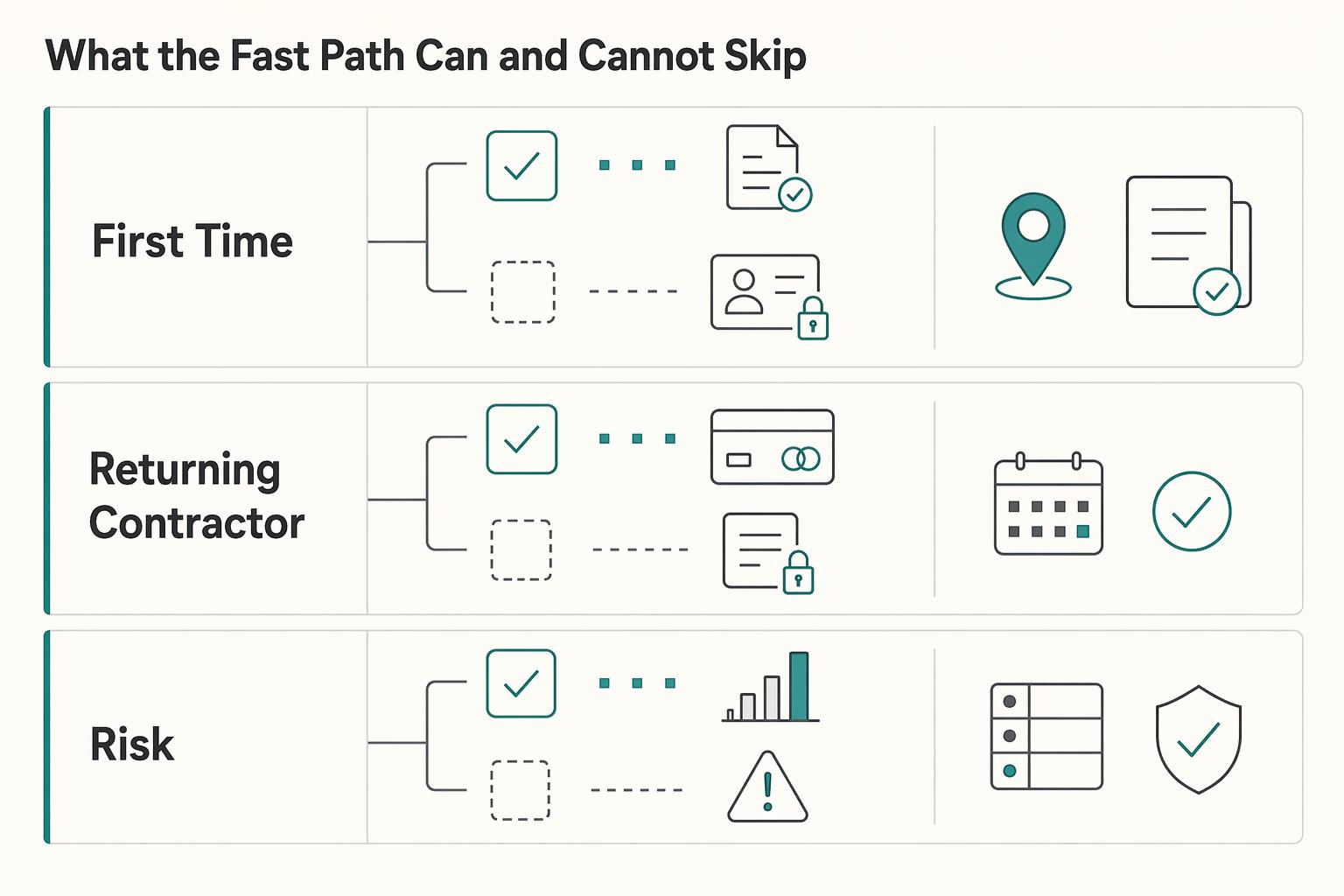
The diagram distinguishes first-time, returning and changed-risk paths. Returning contractors can reuse information that is still valid; they cannot automatically skip newly required checks. Explain the outstanding task before asking for another document, save progress securely and return to the original payout review afterward. Recheck material destination, fee or amount changes before executing.
Accessible-authentication guidance addresses cognitive tests with specified alternatives or assistance, including password-manager and paste support. Avoid unnecessarily requiring users to memorize or transcribe codes when a supported accessible mechanism can assist. A device biometric prompt authenticates a user under its implementation; it is not by itself proof that every payout compliance requirement is satisfied.
Show allowed actions without exposing exploitable risk details. “Verify your bank account to receive this payout” is actionable when that is the real requirement. An internal legal/compliance hold may need different approved copy and support handling. Required withholding, sanctions restrictions and eligibility should not disappear merely because the returning-user path has fewer screens.
Protect sensitive data in local caches, screenshots where appropriate, analytics and support handoffs. A lock-screen notification can say “Your payout status changed” and link to authenticated details instead of showing earnings or bank information. A deep link must enforce ownership/tenant access and refresh authoritative state before exposing details or accepting a financial action.
Step 6: Validate the journey with failure cases and reconciliation#
Exercise setup, review, confirmation, interruption, return from authentication, status retrieval and support on the supported platforms and assistive technologies. Reconcile each authorized logical operation with its balance, provider reference, fee and outcome. Use observed task completion and exception evidence before expanding the cohort.
Include slow/offline networks, duplicate taps, app force-close, session expiry, a changed destination, a stale quote, delayed/repeated callbacks, a failed payout after an earlier paid signal and mismatched records. Test large text, screen-reader reading order, keyboard navigation where applicable, focus visibility and translated content. These are implementation checks for teams applying the guide, not claims that a particular app has already passed them.
Ask a contractor to identify available money, expected receipt, destination and next action in each scenario. Ask support to retrieve the same request from the displayed reference. The product view need not expose internal provider IDs, raw webhook JSON or journal terminology; authorized staff should be able to map its reference to those records.
For the example, reconcile the $300 balance allocation, $3 fee and $297 actual receipt with one operation, plus the $200 remaining available amount. If the payout fails, reconcile returned funds and the actual fee policy before updating availability. A returned request should not automatically launch a replacement or claim that all fees were refunded.
Monitor ambiguous submissions, repeated-operation attempts, required-task completion, stale-status age, unresolved returns, support contacts and monetary discrepancies. Define denominators and severity; a high API success rate can hide poor user comprehension or an unpaid contractor. Rollback can disable future release paths but cannot undo completed money movement.
For the underlying delivery controls, see Payment Event Modeling. For retrievable decision history, see Build a Compliance Audit Log That Survives Scrutiny.
Frequently Asked Questions
What is mobile-first payment UX for contractors in operational terms?
It lets contractors set up receipt, understand available earnings, review a payout, track its actual outcome and get help on mobile. Pair readable, accessible screens with durable backend operation identity and evidence-based status. Customer card checkout and outbound contractor payouts are different flows.
What are the must-have states in a contractor payment flow?
Define action-needed, recorded-request, processing, uncertain/stale-result, completion and verified failure/cancellation/return paths as needed by the actual product. Every label needs a meaning, evidence and next action. Provider statuses can change later; do not call a request permanently complete just because the app received a successful response.
How do we reduce mobile friction without weakening compliance controls?
Reuse still-valid data, collect what is currently required, preserve progress and explain tasks clearly. Apply authentication, verification and risk checks at the relevant trigger, including material account changes. Accessible password-manager/paste or other supported assistance can reduce input burden without declaring required controls optional.
Which failure modes should we design first for contractor payouts?
Test interrupted submission, duplicate taps, app relaunch, stale status, changed destinations and delayed or repeated callbacks. Retrieve the original operation after an unknown result; do not create another payment under a fresh identity. Show verified return/failure and fee treatment before an authorized replacement.
What should finance and ops measure to confirm the flow is working?
Measure unknown results, duplicate-effect attempts, unresolved returns, status freshness, required-task completion, support contacts and reconciliation differences with defined denominators. Check contractor understanding alongside backend outcomes. Provider response success alone does not prove actual receipt or a usable mobile journey.
How should we handle new versus returning contractor payment paths?
New contractors may need setup and verification; returning contractors can reuse valid information where permitted. Changed or expired requirements and beneficiary changes need the applicable checks. Return from a task to the same request review without losing progress or silently accepting changed financial details.
How do country and program differences change payout UX decisions?
They affect eligible methods, recipient/entity types, currencies, beneficiary requirements, fees, authentication and timing. Retrieve supported options and disclose applicable estimates/cutoffs. Do not use one universal first-payout timeline or show a method simply because another account or country supports it.
Researched and edited by the Gruv editorial team. Gruv builds cross-border billing, payouts, and finance-operations software for global businesses.
Sources
Includes 3 external sources outside the trusted-domain allowlist.
Educational content only. Not legal, tax, or financial advice.
Related Posts

The Freelance Payment Penalty: A Modeled Audit of Platform Fees, FX Spreads, and Payout Delays
The money rarely disappears through a single, easy-to-spot fee. The real loss is stacked. A marketplace takes its commission, a processor adds a charge for international cards, a bank or payment company converts the currency at a spread, a platform holds the funds before release, and a wire sheds a little to intermediaries on the way in. Each layer looks defensible on its own, but the worker feels the combined result as a smaller deposit and a later payday.

How to Respond to a Subpoena for Business Records
Move fast, but do not produce records on instinct. If you need to **respond to a subpoena for business records**, your immediate job is to control deadlines, preserve records, and make any later production defensible.
A US Expat's Guide to Investing in UCITS ETFs to Avoid PFIC Issues
The real problem is a two-system conflict. U.S. tax treatment can punish the wrong fund choice, while local product-access constraints can block the funds you want to buy in the first place. For **us expat ucits etfs**, the practical question is not "Which product is best?" It is "What can I access, report, and keep doing every year without guessing?" Use this four-part filter before any trade: