
Quick Answer
Choose the option that gives you clear settlement status, usable reconciliation exports, strong audit trails, and safe retry behavior across mobile and web. For most teams, mobile should handle capture and quick actions, while web remains the control layer for review, payout monitoring, and close. App store presence alone is not enough to prove payout control or reconciliation readiness.
How Contractors Use Mobile Payment Apps on iOS and Android#
Choosing mobile payment apps for contractors on iOS and Android is an ops decision, not a screen-design decision. If you compare only what contractors can tap in the app, you can run into trouble later with payout control, settlement visibility, and posting accuracy at close.
Mobile usability still matters, but it is not enough on its own. A polished iOS or Android flow can still leave gaps in payout execution, reconciliation exports, or settlement status interpretation. Stripe's balance model is a useful anchor. Funds move through pending and available states, and timing varies by location and payment method. A mobile status alone is not close-ready evidence.
This comparison uses four operational tests:
- how the tool handles Invoicing
- who owns and executes Payout execution
- whether you get a usable Reconciliation export
- how strong the Audit trail is when something fails
These are the places where duplicate payouts, missing settlements, and reconciliation drift can start. One failure mode is retrying after a timeout without retry-safety controls. Stripe is explicit that idempotent requests allow safe retries without creating a second object or repeating an update. If a vendor cannot explain retry behavior clearly, treat that as an ops risk.
| Signal | What the public docs show | Why it matters operationally | Limit |
|---|---|---|---|
| Helcim | Mobile distribution through Apple App Store and Google Play; support thresholds of iOS 16.0+ and Android 10.0+ | Confirms mobile availability and a concrete device baseline to test | Does not prove end-to-end payout, audit, or reconciliation fit |
| JobFLEX | Positions itself around Android devices, points to an Android app on Google Play, and promotes a web-based platform | Suggests contractor workflow focus with web fallback potential | No direct confirmation here of native iOS coverage, so do not assume parity |
| SourceForge and GetApp | SourceForge shows contractor-payment comparisons with sponsored sorting; GetApp states vendors pay for traffic and leads, and Category Leaders uses 5 criteria worth up to 20 points each | Useful for discovery and category mapping | Not a neutral endorsement and not enough to validate controls |
Use these public signals as a starting point, not a decision endpoint. They can confirm platform presence and help you build a longlist. They do not tell you whether your team can trace a payment from request to settlement to the accounting record with reliable evidence.
Before you shortlist anything, ask for one real settlement-level export sample and one retry walkthrough. If exports do not support transaction-level reconciliation, or duplicate-operation prevention is unclear, keep looking. Adyen's settlement details report is a good benchmark because it is explicitly transaction-level.
This guide compares iOS and Android options through that lens. Which setup still holds up when volume grows and close gets unforgiving?
At a glance comparison for finance and ops teams#
Start with the category that gives you the clearest payout ownership, status visibility, export, and audit evidence. Then use mobile UX as a second filter. Read this table as an ops-control screen, not an app-store polish scorecard.
| Option type | iOS signal | Android signal | Web or desktop signal | Invoicing, recurring, virtual terminal | Payout execution ownership | Control signal | Fit warning |
|---|---|---|---|---|---|---|---|
| Mobile payment app | SourceForge shows a mobile-payment comparison category; verify vendor iOS support directly | SourceForge shows a mobile-payment comparison category; verify vendor Android support directly | Helcim documents a browser-based virtual terminal usable from a laptop or tablet | Helcim explicitly lists Invoicing and Recurring Payments and separately documents a virtual terminal | Often strongest for collecting funds, not automatically for contractor payout release | Do not assume payout-status lookup, CSV reconciliation export, or retry safety from mobile presence alone | Control breaks when client payment confirmation is treated as proof contractor payouts can be released |
| Contractor payment app | SourceForge has a contractor-management iPhone comparison page; do not assume vendor iOS parity | JobFLEX explicitly points to an Android app; SourceForge also has a contractor-management Android page | JobFLEX explicitly points to a web-based platform | Public evidence here does not confirm recurring-billing or virtual-terminal depth for this category | Closer to contractor workflows, but approval and fund-release ownership still needs explicit confirmation | Useful discovery category, weak proof alone. Ask for payout-status lookup, export sample, and retry semantics before shortlisting | Control breaks when field approval workflow is mistaken for finance-grade payout authorization |
| Accounts payable app | BILL states iOS support (iOS 16 or later) | BILL states Android support (Android 7.0 or later) | BILL states mobile and desktop are synchronized; verify browser-specific tasks separately | Virtual terminal or recurring collection may need a separate layer | BILL documents create, review, approve or deny, and pay bills on mobile | Strongest sourced control evidence here: in-app payment-status tracking, CSV export of bills/payments, and audit-trail entries that can show API/mobile-originated actions | Control breaks when AP software is forced to handle in-field card acceptance or contractor-facing collection UX |
The practical read is simple: collection tools can be strong front ends, contractor tools can support field workflow, and AP tools usually carry more of the finance control load. The mistake is expecting category presence in an app store to answer all three jobs.
What matters more than platform presence#
Platform coverage is useful, but control evidence should decide your shortlist. Settlement status visibility means you can retrieve payout state from an identifier, not just read a generic in-app status. PayPal's Payouts docs use payout_batch_id for that lookup.
| Control | What to look for | Grounded example |
|---|---|---|
| Settlement status visibility | Retrieve payout state from an identifier, not just a generic in-app status | PayPal Payouts docs use payout_batch_id for lookup |
| Reconciliation export | Use an export that supports filtering, joins, and import | BILL documents export of bills and payments to .csv |
| Audit trail depth | Trace when changes occurred and whether actions came from API or mobile | BILL audit trail can label actions as Username-API |
Next, check the export. BILL documents export of bills and payments to .csv, which supports filtering, joins, and import.
Audit trail depth is where mobile-originated mistakes become traceable. BILL's audit trail documentation includes when changes occurred and can label API or mobile-originated actions as Username-API, which is the level to validate in demos.
Retry behavior is a go or no-go check#
Treat retry semantics as release-critical. Stripe documents idempotent requests as protection against duplicate operations on retries, and PayPal documents the failure mode: omitting PayPal-Request-Id can duplicate a request.
This still matters when requests are retried after timeouts. For payout batches, PayPal also documents a 30-day duplicate window on sender_batch_id. If a vendor cannot clearly explain request keys, duplicate windows, or replay handling, do not assign payout execution to that product.
Recommended reading of the table#
If your main need is in-field collection, a mobile payment app can be a good front end. In the evidence here, invoicing, recurring payments, and virtual terminal capabilities are well represented. Just keep that separate from proof of settlement control, contractor release control, and close readiness.
If your pain is approval control, payment-state clarity, or export reliability, start with the accounts payable category. BILL is the clearest grounded example here because it combines mobile availability, status tracking, CSV export, and audit-trail detail. Contractor-focused apps can still be part of the stack, but only after you validate one real export sample, one audit-log sample, and one documented retry scenario. Related: A Guide to App Store Optimization (ASO) for Mobile Apps.
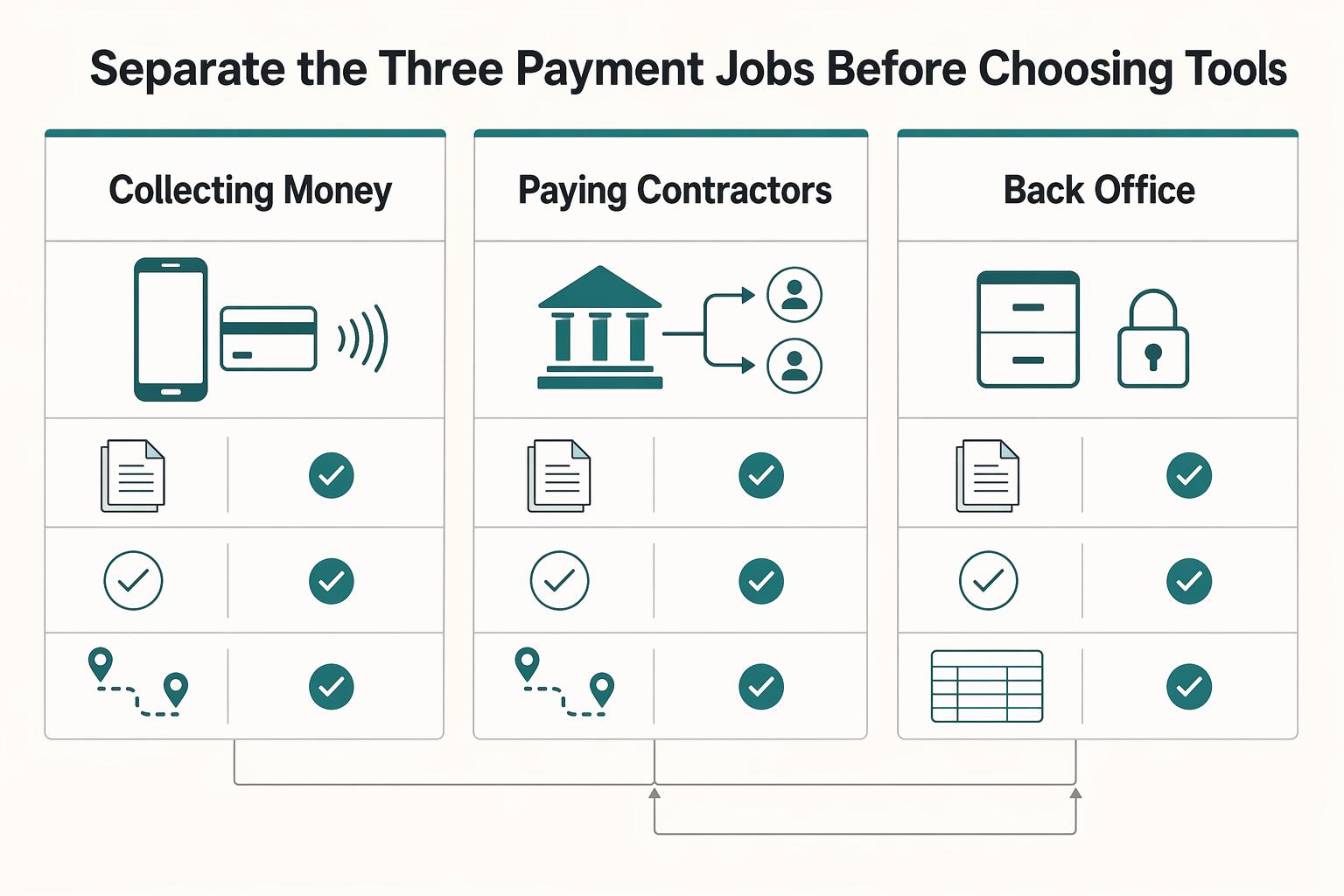
Separate the three payment jobs before choosing tools#
Treat payments as three separate jobs. If one product cannot show clear status or audit evidence and close-ready outputs across all three, split the stack on purpose.
| Payment job | What it includes | Strongest grounded signal | What to verify before rollout |
|---|---|---|---|
| Collecting money | Invoicing, virtual terminal, Point-of-sale (POS) system, NFC (near-field communication) acceptance | Helcim documents a browser-based virtual terminal that works from a laptop or tablet without hardware, and its POS supports contactless wallet acceptance like Apple Pay and Google Pay. Android NFC is a short-range wireless method for small data exchanges. | Confirm the exact iOS and Android capture path, and whether each payment lands in an order or invoice record you can reconcile later. |
| Paying contractors | Contractor payment app, payout execution, settlement status | Contractor payment software is a distinct category focused on sending digital payments to contractors. Deel defines Complete as fully settled funds and notes payments can remain in approved status for up to 5 business days. | Request one real payout-status lookup, one delayed-payment example, and the status evidence you receive before marking work as paid. |
| Back-office payables | Accounts payable app, approval routing, audit trail, reconciliation export or ERP handoff | NetSuite documents an Invoice Approval Workflow in its Approvals Workflow SuiteApp. SAP Concur says AP teams can see a full history of status changes and that finalized invoices are ready to be uploaded into the ERP system and paid. | Verify that approval routing states and final handoff are visible to finance, not only field users. |
One failure mode is mixing control points. Client payment acceptance is not proof contractor payouts are ready, and a contractor workflow app is not automatically finance-grade AP control. A virtual terminal or POS can be strong for collection without proving payout execution ownership or settlement visibility.
Use one checkpoint per job: ask for one audit-trail sample and one finance-facing output for each flow. Keep going only if the vendor can show collection intake records, payout settlement-status evidence, and AP approval history plus ERP handoff. If any area is thin, split tools early.
For more on contractor-friendly mobile flows, see Mobile-First Payment UX: Designing for Contractors on the Go.
Platform differences that actually change operations#
Use mobile for capture and quick actions, but make web mandatory for finance controls. The real iOS versus Android question is not which platform is better. It is where each one is reliable enough for entry, and where browser reporting and export are still required for review, reconciliation, and accounting handoff.
| Surface | What usually works well | Operational risk to plan for | What to verify before rollout |
|---|---|---|---|
| iOS app | Fast entry, receipt/photo capture, approval actions while the user is active | Background runtime is limited; lower-priority APNs notifications can be grouped; offline devices can receive queued notifications later; apps are typically suspended soon after backgrounding (often within seconds unless an approved background mode applies) | Test one approval from push and one from app reopen; compare event created vs notification visible vs approval writeback timestamps |
| Android app | Field entry, POS use, and notification-driven actions when message priority is configured correctly | Doze can defer network, jobs, and syncs; normal-priority push may be delayed, while high priority is intended for faster wake-and-deliver behavior | Confirm whether approval/sync messages are normal or high priority, then test on a sleeping device with battery optimization enabled |
| Web app | Transaction review, export, and reconciliation controls | Less convenient for field capture | Confirm dashboard visibility for transaction history and approval status, plus downloadable CSV/accounting export before close |
That split matters because a mobile action can start the process, while finance still needs a browser-based place to verify what actually happened.
Approval timing is where platform differences show up first#
Approval timing is usually where platform differences first become operationally visible. Android can delay background sync under Doze, and normal-priority Firebase messages can arrive with unspecified delay. iOS can batch lower-priority APNs notifications and queue them while devices are offline. Background runtime is also tightly constrained.
Use one checkpoint on both platforms: capture event created, notification visible, and approval writeback for the same approval. If that drift breaks your approval timing target, push cannot be your only control point.
Attachments and receipt evidence need a real review path#
Do not assume attachment handling is equivalent just because both apps exist on iOS and Android. The control question is whether receipt or bill uploads become reviewable evidence tied to the correct transaction before posting. QuickBooks documents a mobile upload flow where receipt data is extracted into a transaction for review, which is the pattern to validate.
Test at least one image upload, confirm the attachment remains visible after reopen, and confirm approvers can inspect it before posting. Then verify the exported or finance-facing record preserves a transaction key finance can match later.
Offline capture is useful only when the handoff is visible#
Offline capture is useful only when reconnect behavior is explicit and reviewable. Stripe Terminal documents store-and-forward behavior, and Square has described a 24-hour reconnect/upload window. That means unsent items need active monitoring.
At handoff, mobile acceptance is not enough by itself. Reconciliation-grade outputs usually come from web reporting and export. Stripe reports are available in the Dashboard or CSV, and Helcim documents browser dashboard access plus CSV/QuickBooks Desktop export. Keep web required for final review, export, and exception handling even when mobile starts the transaction.
For a step-by-step walkthrough, see A Guide to Form 1099-K for Freelancers Using Payment Apps.
Where each app category fits and fails#
Once you decide that mobile is your capture layer and web is your control layer, category fit becomes the main decision. Helcim-style collection apps, JobFLEX-style contractor workflow apps, and directory-listed contractor payment or AP options solve different jobs. Expecting one category to cover all three is where handoff gaps start.
| Category | What it is strongest at | What it usually does not prove | What to verify before you commit |
|---|---|---|---|
| Collection-focused payment app like Helcim | Taking customer payments across POS and contactless checkout contexts, plus transaction reporting/export | Contractor payout execution ownership or end-to-end payout controls | Pull a real CSV export and confirm finance can join on order number, customer code, customer name, source of payment, and status |
| Contractor workflow app like JobFLEX | Fast estimating and invoicing for contractors on web and mobile, including offline field use | Contractor disbursement controls or reconciliation-grade payout evidence | Create an invoice offline, sync later, and confirm the same job/customer identifier survives into finance review records |
| Directory-listed contractor payment or AP options on SourceForge/GetApp | Surfacing apps focused on contractor payments or bill-management workflows | Operational fitness, record linkage, or export quality from listing presence alone | Request sample payout history, export samples, and mobile support details before selection |
The category labels matter because each one solves a different operational bottleneck. That helps if you design for it, and hurts if you ignore it.
Helcim style apps help collection first, not payout first#
Helcim-style apps are strongest at collection, not payout control. Helcim positions its POS for accepting card and mobile contactless payments like Apple Pay and Google Pay, and it documents CSV reporting plus transaction export to CSV or QuickBooks Desktop.
That can improve collection speed, but it does not by itself solve contractor payout execution. If payouts happen in another system, you still need reliable stitching across collection, approvals, and payout records.
For reconciliation-heavy teams, export quality matters more than checkout polish. Helcim documents export fields such as order number, customer code, customer name, source of payment, and status, with a limit of 6,000 transactions per export. Validate with a real month or pilot export and confirm finance can match records without manual relabeling.
Also verify device policy before rollout. App Store metadata shows an install minimum of iOS 14.5, while Helcim support documentation states fully supported iOS 16.0+.
JobFLEX style apps help contractor workflow first#
JobFLEX-style apps are strongest at field workflow speed. JobFLEX and GetApp positioning emphasizes fast estimating and invoicing across web and mobile, including offline use.
That helps when your bottleneck is quote-to-invoice execution in the field. It does not establish payout-state controls or reconciliation-grade payout trails here.
The key check is identifier stability after sync. If offline-created estimates or invoices do not keep stable job or customer references in downstream records, faster invoicing can still create reconciliation friction.
Directory lists are useful discovery, not proof#
Directory pages are useful for discovery, not operational validation. SourceForge has contractor-payment lists for Android and iPhone, and GetApp's contractor-management mobile-app filter shows 113 options, but listing presence does not prove record linkage or export quality.
Contractor payment category descriptions are payout-oriented, for example direct deposit, paycards, processor integrations, and digital wallets, which is a different strength from collection-first apps. The tradeoff can reverse: payout-focused tools may be stronger for disbursement workflows, but you may still need a separate front-end layer for estimates, invoicing, POS, or customer collection.
If reconciliation is your top pain, prioritize record linkage and export quality over checkout smoothness. Ask each vendor for the same evidence pack: one sample export, one sample report, and one traced transaction or payout from app action to finance review.
Decision rules by operating model#
Choose tooling based on money-movement complexity, not feature volume. If you operate in one country at lower volume, one app can work for invoicing and basic settlement visibility when its mobile and export workflows match your needs. Once you add cross-border routes, multiple entities, or finance-owned close, separating collection from payout usually reduces operational risk.
| Operating model | Setup to prefer | Controls to require up front | Verify before selection | Likely failure if skipped |
|---|---|---|---|---|
| Single-country, lower-volume | One app can be acceptable for invoicing, payment capture, and visible payout/settlement status | Required mobile-platform support, settlement-state visibility, CSV or dashboard export | Run one invoice-to-payment test, confirm statuses like processing/posted/failed/returned/canceled, and export the record for finance review | Mobile shows "paid," but finance cannot confirm what settled |
| Cross-border or multi-entity | Separate collection from payout early | Audit trail, idempotency keys for retries, reconciliation output with metadata, user/system logs | Retry once with the same idempotency key and confirm no duplicate operation; test one unsupported border or balance route and review the surfaced error | Duplicate payouts, transfer failures across unsupported routes, and weak accountability |
| In-field payment acceptance | Prefer POS plus a documented contactless path, with web fallback for admin review | NFC acceptance path, device/OS compatibility, export path after field capture | Validate the real device matrix. One documented POS example requires iOS 16.0+ and Android 10.0+ | Rollout stalls because field devices cannot support contactless acceptance |
| Finance-owned close quality | Prioritize reconciliation output over mobile polish | Payout reconciliation report, metadata in export, balance-transaction traceability | Pull a real export and confirm payout, transaction, and metadata can be joined without manual relabeling | Close depends on spreadsheet stitching and breaks at volume |
For cross-border and multi-entity models, decoupling collection from payout is the key design choice. A separate charges-and-transfers flow keeps customer collection independent from contractor transfer. That matters because cross-border payouts can be supported in some regions while unsupported border or balance routes can still error.
For field acceptance, confirm the exact contactless path on your target devices and OS versions. Apple documents Tap to Pay on iPhone. Android documents NFC card emulation through HCE. Source framing on iOS NFC context is not fully consistent, so "supports contactless" is not enough by itself.
Use one binary gate before selection for finance-owned close: can you trace each payout from request to payout-state history and reconciliation records without manual stitching? In pilot, require one successful payout and one failed or retried case with request or transaction ID, initiation log, payout-state history, and reconciliation output tied to underlying transactions.
Order of operations from invoice to payout close#
Run payout operations on a backend-controlled sequence, not on mobile UI state. A reliable flow is payment confirmed server-side, internal record posted, payout instruction created with duplicate protection, settlement monitored by status, then reconciliation export used to close.
| Step | Authoritative signal | Primary owner | App surface role | Must-pass checkpoint |
|---|---|---|---|---|
| Invoicing issued | Invoice status recorded in backend | Product with finance ops policy input | Client surfaces can create or edit invoice data; backend enforces status gates | Do not advance from draft, void, or uncollectible; use invoice status as a gate |
| Payment confirmation captured | Processor status transition such as succeeded, confirmed server-side | Engineering | Mobile can show progress; backend confirms completion | Do not release based on client callback or mobile UI alone |
| Internal record posted | Internal record written with payment and invoice identifiers | Engineering | Web app should expose traceability for finance review | Verify payment ID and invoice ID can be joined before payout creation |
| Payout instruction created | Approved payout request stored with idempotency key | Finance ops approves; engineering enforces execution rules | Web app is typically the control surface; mobile is secondary/read-only for status | Check for duplicate request before execution |
| Settlement status monitored | Explicit payout states: pending, paid, failed, canceled | Finance ops | Web app monitors; iOS and Android are secondary views | Hold release or close if state is stale, missing, or inconsistent |
| Reconciliation export generated | Payout reconciliation output plus itemized transaction export with metadata | Finance ops | Web app/reporting only | Close only when payout batch ties back to underlying transactions |
This sequence only works when ownership stays explicit across iOS, Android, and web. Product owns what users can do in each surface. Engineering owns webhook intake, posting, idempotency, and state sync. Finance ops owns payout release, exception review, and reconciliation close.
Enforce verification checkpoints before release. Run duplicate detection immediately before payout execution because webhook endpoints can receive the same event more than once, and keep blocked retries in the audit trail. Run stale-state checks before release, and treat missing or delayed events as held items because undelivered webhook events can be retried for up to three days.
Route rejected, held, and unmatched items through explicit exception handling. Keep the original request, reason, related payment or invoice identifiers, and retry history in one audit trail. Close only when payout status is evidenced, payouts tie back to underlying transactions, and reconciliation exports are archived for review.
Failure modes that cause reconciliation chaos#
Reconciliation breaks when retries, status views, and exports are not aligned across app, API, and reporting. If a vendor cannot clearly document retry behavior, status history, and joinable exports, treat that as a serious risk.
| Failure mode | What usually causes it | What you should verify | Why it hurts close |
|---|---|---|---|
| Duplicate payout attempts | Retries are not idempotent across app actions, backend jobs, and API calls | Ask which request key or header enforces idempotency, such as an idempotency key or PayPal-Request-Id, and whether repeated requests return the same result | A single payout instruction can be executed twice, creating exception work after settlement |
| False "paid" assumptions | Client UI can reflect a success state before final settlement state | Check whether payment lifecycle history is available and whether funds are still pending versus available | Ops can release or close items before funds are spendable or withdrawable |
| Manual-join exports | Reconciliation export lacks stable processor and internal identifiers | Confirm exports include processor reference plus your own reference, for example Psp Reference and Merchant Reference, and support settlement-batch grouping | Month-end turns into manual spreadsheet joins, especially when one transaction has multiple report entries |
These failures look different in day-to-day ops, but they create the same problem: finance may struggle to prove what happened without rebuilding the trail by hand.
Duplicate retries are not a small edge case#
This is often the most costly failure because it can create duplicate money movement, not just reporting noise. Payment platforms support idempotency so retries can be safe, and repeated requests with the same key can return the same result instead of creating a second operation.
Test this across layers, not only at the API boundary. Providers also document that handlers can run multiple times, possibly concurrently, and undelivered webhooks can be retried for up to three days. If client apps and backend systems can all retry, use one shared transaction key with duplicate protection before payout execution. Also confirm retry-window behavior, since some idempotency keys may be removed after they are at least 24 hours old.
Mobile status views can mislead operations#
A mobile "paid" badge is not settlement evidence. Client success pages are not a reliable source of truth, and funds can remain pending before they are available, which means finance still cannot withdraw or spend them.
The control to prioritize is payment lifecycle history tied to settlement status. You want a view that shows each status the payment has had so reviewers can verify state transitions before close. If a vendor only shows a current-state badge and cannot surface history, stale-close risk increases.
Weak exports create month-end drag#
Weak exports usually fail quietly by forcing manual joins. Reconciliation data can include multiple entries for one transaction, so amounts and dates alone are not enough for reliable close.
Require settlement-batch context, processor identifiers, and your own internal references in the same export. Metadata quality matters because custom metadata can speed reconciliation. Instant payout flows increase this pressure because the operator can carry more of the reconciliation burden.
Vendor red flags worth treating as no-go signals#
| Red flag area | Missing detail |
|---|---|
| Status history availability | No clear explanation |
| Payment, payout, and export mapping | Unclear mapping between rows |
| Retry semantics | No documented key or header used and replay behavior |
| Client or web status history | No history beyond a current-state badge |
| Export identifiers | Either processor references or merchant/internal references are omitted |
Choose the option that lets your team verify idempotent retries, lifecycle history, and export identifiers in a live demo or pilot. If the response is only "our team handles that internally," assume reconciliation risk remains.
Compliance and evidence you need before scale#
Use compliance as a go or no-go gate before scale, not a cleanup task after launch. If a vendor cannot show written onboarding and payout controls tied to policy, not just app roles, risk can grow with volume.
Written controls beat app permissions#
For regulated financial workflows, require documented, risk-based customer due diligence and written procedures to identify and verify beneficial owners. That matters more than whether iOS or Android can assign an "approver" role. A permission toggle can limit who taps "send," but it does not prove onboarding checks were completed or that required checks were completed before payout release.
Ask for the written policy excerpt, then validate it in a live web or admin workflow. A contractor missing required verification should generally remain blocked from payout-ready status until verification is complete. If the answer is "ops handles that manually," expect control drift.
Minimum evidence pack#
Before scale, your team needs an evidence pack as an operational baseline that can reconstruct what happened, not just current-state badges. Prioritize audit-trail quality and lifecycle traceability.
| Evidence item | What it should prove | What to verify |
|---|---|---|
| Payout event log | Who created, changed, retried, approved, and released the payout | User, timestamp, action history, and change events are retained electronically |
| Settlement status history | Whether money was actually settled, not just marked paid in the app | Full status transitions, not only a current badge |
| Reconciliation export snapshot | How the transaction appeared at close | Export can be preserved with stable identifiers and cash-recon support |
| Approval record | That release followed documented authorization | Approval artifact or preserved communication is attached or retrievable |
A common failure mode is having these records, but not in a form your team can retrieve after month-end.
Retention and masking need explicit review#
Do not accept vague retention answers. The grounded sources show different horizons by context. Some compliance evidence is kept for not less than two years. One SEC recordkeeping context requires not less than six years, with the first two easily accessible. Certain OFAC-related transaction records are kept for at least 10 years.
Across operational views, including iOS, Android, and web, keep card data masked. PCI guidance is explicit: printouts should be truncated or masked, and the maximum displayed PAN is the first six and last four digits. Validate this in screenshots, exports, and support tooling. If full PAN appears in approvals, tickets, or exports, treat it as a no-go.
Related reading: Best Noise-Cancelling Apps for Work Calls: Choose by Risk Profile and Task.
Integration design for reliable retries and status tracking#
Set a hard integration minimum before scale: documented replay behavior, duplicate-event handling, and clear async status timing. If a vendor cannot explain those behaviors clearly, treat that as a due-diligence gap before payout platform selection.
The bar is not a polished iOS or Android status screen. The bar is whether your design can retry safely, suppress duplicates, and explain why a payout is still pending after an API call returns success.
| Integration area | Documented behavior | Why it matters in practice | What you should verify |
|---|---|---|---|
| API idempotency | Stripe says repeated requests with the same idempotency key return the same result, including 500 errors. Adyen allows safe retry with the same idempotency-key when the first response is not received. PayPal requires a unique PayPal-Request-Id per request and API call type. | A timeout or dropped response should not create a second payout instruction. | Replay the same request after a forced timeout and confirm only one payout object is created. Check header constraints like Adyen's 64-character maximum and PayPal's 38 single-byte limit. |
| Webhook deduplication | Square says webhooks can be sent more than once, includes event_id for dedupe, and retries unsuccessful deliveries for up to 24 hours. | Your handler must stay correct when the same event arrives twice or arrives late. | Store and check the event identifier before processing. Confirm your endpoint acknowledges quickly, since Square notes a 10-second response window in delayed-acknowledgment behavior. |
| Async status handling | Adyen states many flows are asynchronous. Stripe notes a capture request can return success while backend completion happens later, and warns you cannot rely only on the success page or redirect return. | Request-time "success" is not the same as final settlement status. | Confirm status can move from requested to pending to final based on events, not only the initial API response. |
If you get these three areas right, most downstream ops pain becomes manageable. If you get them wrong, mobile polish does not save you.
Make your Ledger the decision point#
Use your internal system of record as the operational source of truth, and treat mobile status views as lagging projections. This is an internal control decision, not a vendor guarantee, but it keeps approvals, payouts, and close aligned when flows are asynchronous.
Do not let a green in-app badge trigger downstream assumptions by itself. In web, iOS, and Android, present status as a projection of backend-backed state rather than independent truth.
Retry by failure class#
Classify failures before you retry. Transient errors, for example throttling, temporary network loss, or temporary service unavailability, are candidates for retry with backoff, but retry logic must stay idempotent. Where a provider distinguishes hard declines, stop automated retries until payment method data changes. At minimum, separate retries into these buckets:
| Failure class | Action | Grounded note |
|---|---|---|
| Transient error | Retry with backoff using the same deterministic key | Examples include throttling, temporary network loss, and temporary service unavailability |
| Business or validation failure | Stop and route to ops | At minimum, separate retries into this bucket |
| Hard-decline-style failure | Stop automated retries until payment method data changes | Use this bucket where a provider distinguishes hard declines |
Keep transitions observable#
Keep transitions visible in both operations UI and reconciliation output. Expose the same transaction key and final disposition in both places. If vendor exports only show current state, persist transition history in your own event store so month-end does not depend on stitching screenshots to webhook logs.
Run a forced test with three cases: lost API response, duplicated webhook, and delayed final status. If one payout instruction does not survive all three without duplication or status drift, the integration is not ready for scale.
Decision checklist you can use this week#
Make this decision mechanical: choose the option that passes control checks across iOS, Android, and web and reduces reconciliation cleanup, then evaluate transaction cost in that context.
Do not advance any vendor on mobile polish alone. Your go or no-go check should confirm cross-surface parity for three jobs: invoicing, settlement status, and export controls. Verify real iOS and Android distribution paths through Apple App Store and Google Play. Then verify web access with a finance-role login that can view and export reconciliation data. This matters because some vendors document desktop and mobile coverage, while others are positioned around one OS.
| Must-pass item | What good looks like | How you verify it this week | Red flag |
|---|---|---|---|
| Audit trail completeness | Event history supports anomaly review and forensic follow-up | Pull one payment or payout record and trace request, status changes, user action, and export appearance | You only get a current-state screen with no usable history |
| Record mapping | One transaction key maps cleanly from app action to accounting entry | Match the same internal key across app UI, API response, webhook record, and export row | Ops must stitch records using timestamps and screenshots |
| Reconciliation export usability | Export breaks a payout batch into transaction-level items | Test whether one payout reconciliation report shows each payment, refund, or chargeback in the batch | Export is summary-only or requires manual workaround to get data into analysis tools |
| Idempotent retry behavior | Same request key reuses the first result instead of creating a second action | Force a timeout and resend the same payout request key in test mode | A retry creates a second object or support cannot explain replay behavior |
| Payout exception handling | Failed, pending, paid, and canceled states stay visible and exportable | Walk one item through failed payout, delayed settlement, and final status output | "Paid" in the app masks a later failure or cancellation |
Score each candidate pass or fail on these five items before any preference scoring. If a tool fails one, you are not choosing between tradeoffs; you are accepting manual reconciliation risk. Directory sites are useful for discovery, but they do not validate audit-trail quality, record mapping, or duplicate-safe retries.
Pilot one messy scenario before rollout#
Before rollout, run one non-production pilot scenario with four edge cases in sequence: failed payout, duplicate retry, delayed settlement, and duplicate webhook delivery. The goal is to confirm your record-backed state remains coherent when the happy path breaks.
Use a checkpoint sheet during the pilot. Confirm duplicate retries reuse the first request result, duplicate event receipts are logged and ignored, pending payouts are not treated as final, and exports reflect payout status updates. Also test delayed outcomes explicitly: payout status can move to paid, failed, or canceled, and can remain pending for up to 10 days.
Selection rule#
If two options are close, choose the one that removes more manual reconciliation work at month-end. A slightly higher transaction cost might still be the lower operational-cost choice when payout-batch exports are usable, record mapping is clean, and audit evidence is easy to produce.
Before you finalize a vendor, map your idempotency keys, webhook handling, and payout status transitions against the implementation patterns in the Gruv docs.
Conclusion#
Choose the stack that keeps invoicing, payout execution, posting, and reconciliation export aligned when failures happen, not just when a demo looks clean. In practice, that means choosing the option that gives ops and finance a clear path from request to final status with minimal manual stitching.
Treat mobile as part of the decision, not the decision itself. Strong iOS and Android apps can help field work, but close quality depends on retry safety, payout-state visibility, export quality, and a usable web fallback for review and evidence assembly. Helcim documents web-browser access plus Apple App Store and Google Play distribution, and JobFLEX's Google Play listing describes desktop plus phone and tablet use and offline operation.
Use one hard gate during selection: can you trace each payment or payout from original request, through status changes, into a close-ready export without guessing? App-store polish will not answer that. You need to verify duplicate-safe retries, status lifecycle handling, and export fidelity directly.
Run failure tests on your top two options before you decide. Re-send the same payout instruction with the same idempotency key or the same sender_batch_id. PayPal documents duplicate rejection for reused sender_batch_id within 30 days and safe retry after HTTP 5xx with that same identifier. Stripe documents idempotency for safe retries without creating a second object.
Then validate operational states, not just success screens. Stripe includes processing, posted, failed, returned, and canceled states, and notes that posted does not guarantee recipient receipt. Returned payouts are typically 2-3 business days, but can take longer depending on recipient country. For reconciliation, review the real export used in close. Adyen's Settlement details report is transaction-level, and report generation and download depends on the Merchant Report user role. Build a simple evidence pack from day one: payout event log, status history, reconciliation export snapshot, and approval record, with payment account data handled to a PCI DSS baseline.
Next step: run this checklist against your top two options, test failed payout, duplicate retry, delayed status, and corrected export paths, and choose the setup that supports a more predictable month-end review under pressure.
If your top option still has open questions on market coverage or compliance gating, use Gruv contact to validate fit before rollout.
Frequently Asked Questions
What is the difference between a mobile payment app, a contractor payment app, and an accounts payable app?
They solve different jobs. A mobile payment app focuses on taking or moving money through mobile interfaces, a contractor payment app focuses on contractor payout workflows, and an accounts payable app focuses on invoice review, approval, and payment. A tool can be strong for collections but weak for payout controls and reconciliation.
Do we need separate tools to collect client payments and pay contractors?
Not always. One tool can work if it gives you usable audit trail, settlement visibility, and close-ready exports across collection and payout. If it cannot evidence one of those control points, split the stack on purpose.
What should we compare beyond iOS and Android app availability?
Compare reviews, features, integrations, and pricing, then test operations controls directly. Focus on settlement-status visibility, reconciliation export quality, audit-trail depth, and idempotent retry behavior. Also verify distribution and device support yourself.
Which controls reduce reconciliation errors in contractor payment flows?
Start with idempotency keys so retries do not create duplicate operations. Then require transaction-to-payout linkage, exportable payout reconciliation data, and traceable event history from request to final status. If automatic payouts are available, prioritize them because they maintain transaction-to-payout association for reconciliation.
What are the most common payout failure modes and how should ops respond?
Common failure modes include duplicate operations from retries and delayed processing when event delivery fails. Use idempotency keys on retryable requests, and reconcile against internal records and payout reports. Plan for automatic retries that can continue for up to three days, and make sure replay handling is in place.
Which checkpoints should be in place before scaling payout volume?
Before scaling, confirm one request key maps cleanly across app action, API response, webhook record, and export row. Then run failure-path tests on purpose, including failed payout, duplicate retry, delayed settlement, and corrected export. Also validate reconciliation mode early because manual payout flows may not preserve transaction grouping per payout.
When is a Web app requirement non-negotiable for finance and audit teams?
It becomes non-negotiable when finance and audit teams need reliable reconciliation exports and evidence assembly in a browser-accessible workflow. Many vendors position mobile as a companion to desktop or as part of a web-based operating model. A web fallback also protects the workflow when mobile app minimums are not met across all reviewers.
Researched and edited by the Gruv editorial team. Gruv builds cross-border billing, payouts, and finance-operations software for global businesses.
Sources
- consumerfinance.gov/about-us/newsroom/cfpb-report-highlights-rol...trusted
- developer.paypal.com/docs/api/payments.payouts-batch/v1trusted
- docs.stripe.com/api/idempotent_requeststrusted
- docs.stripe.com/reports/payout-reconciliationtrusted
- ecfr.gov/current/title-17/chapter-I/part-38/subpart-Ktrusted
- ecfr.gov/current/title-31/subtitle-B/chapter-X/part-1...trusted
- fdic.gov/sites/default/files/2024-03/fil18026a.pdftrusted
- sec.gov/newsroom/press-releases/2022-174trusted
Educational content only. Not legal, tax, or financial advice.
Related Posts

The Freelance Payment Penalty: A Modeled Audit of Platform Fees, FX Spreads, and Payout Delays
The money rarely disappears through a single, easy-to-spot fee. The real loss is stacked. A marketplace takes its commission, a processor adds a charge for international cards, a bank or payment company converts the currency at a spread, a platform holds the funds before release, and a wire sheds a little to intermediaries on the way in. Each layer looks defensible on its own, but the worker feels the combined result as a smaller deposit and a later payday.

How to Respond to a Subpoena for Business Records
Move fast, but do not produce records on instinct. If you need to **respond to a subpoena for business records**, your immediate job is to control deadlines, preserve records, and make any later production defensible.

A US Expat's Guide to Investing in UCITS ETFs to Avoid PFIC Issues
The real problem is a two-system conflict. U.S. tax treatment can punish the wrong fund choice, while local product-access constraints can block the funds you want to buy in the first place. For **us expat ucits etfs**, the practical question is not "Which product is best?" It is "What can I access, report, and keep doing every year without guessing?" Use this four-part filter before any trade: