
Quick Answer
Set up a healthy PO system by building a five-step Procure-to-Pay flow that links requisition, supplier approval, purchase order, receipt or acceptance where required, invoice validation, and payment release. Keep PO approval separate from payment authorization, enforce separation of duties, require complete supplier and billing data, place mismatches on hold, and reconcile payment outcomes back to finance records every day.
Why platform teams need a healthier PO system now#
Sending payments is not enough. Platform teams also need a clean, defensible chain from Purchase Requisition to payment release. When that chain is weak, you get broken handoffs, data-entry mistakes, poor visibility, longer payment cycles, supplier strain, and audit gaps.
Procure-to-Pay (P2P) is the full requisition-to-payment process, not a narrow finance admin task. In practice, it is a cross-functional workflow across procurement, Finance/AP, and operations. A break in one step creates friction for everyone downstream.
This guide lays out a practical five-step sequence from requisition to payment release, with a clear owner and control gate at each point. It does not claim one universal five-step standard for every company. It gives you a decision-ready structure for a platform environment so approvals, supplier records, billing checks, and payment execution stay connected.
Two rules run through all five steps. PO approval is not payment authorization. Separate incompatible duties so one person cannot create a supplier, approve their own spend, and release its payment without independent review.
The scope is specific. This is about operating modern P2P inside platform payments infrastructure, from a formalized requisition through bill validation and payment release, with records you can trace back to source documents. By the end, the bar for success should be clear:
- Fewer handoffs across teams
- Cleaner PO and invoice validation with clearer exception handling
- Stronger control confidence across approvals and payments
- A reliable audit trail that lets you trace any paid transaction from the accounting record back to the original source documentation
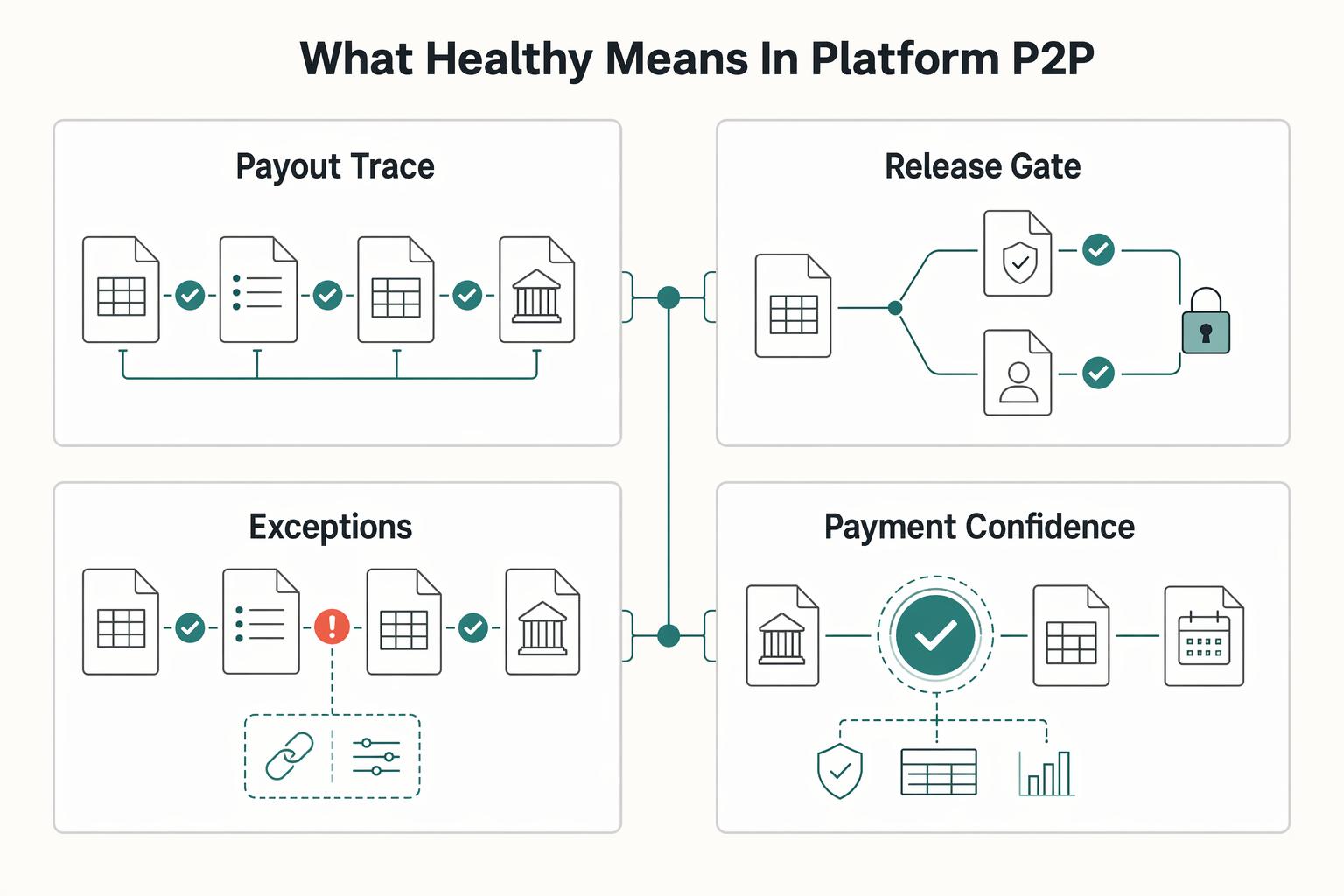
What healthy means in platform P2P#
A platform Procure-to-Pay (P2P) process is healthy only when you can prove the full path from requisition to payment, not just that money went out. If you cannot show who approved what, the process may be functional, but it is not healthy.
| Area | Functional | Healthy |
|---|---|---|
| Traceability | A payment, PO, or bill can be found somewhere | A Purchase Order (PO) links to the Purchase Requisition, related contract where applicable, receipt or acceptance record where required, billing document, and payment outcome |
| Approval speed | Requests move quickly | Approvals follow risk-based rules and are auditable, with clear user activity showing who approved and when |
| Exception handling | Mismatches are handled by email or overrides | PO and billing mismatches trigger holds until resolved under documented procedures |
| Payment confidence | AP usually gets payments out | Accounts Payable (AP) releases payment only when the payable amount, approval chain, and supporting records align |
The minimum control signals should show up on every transaction. Every PO should tie back to a valid Purchase Requisition and the related billing and payment records. In your Enterprise Resource Planning (ERP) record, you should be able to open one transaction and see the linked requisition, PO, submitted bill, and approval history.
Where matching is used, keep the rule explicit. 2-way matching checks PO and billing document. 3-way matching adds receipt verification. 4-way matching adds acceptance-document verification. If records do not match, payment stays on hold until resolved.
The same standard applies in Source-to-Pay (S2P), which spans sourcing through payment. Finance and product teams should be able to follow one chain across procurement and payment records instead of reconstructing it from inboxes and screenshots. That visibility matters when different teams see different parts of the transaction at different times. If one system shows paid and another shows pending, and no one can explain which record is authoritative, the control design is not healthy.
For a step-by-step walkthrough, see How to Build a Contractor Payment System for a Nursing or Allied Health Staffing Agency.
What to prepare before you implement the 5 steps#
Before you build anything, lock the controls, required data, compliance gates, and reliability rules in writing. If approval logic, vendor setup requirements, or payment-release conditions are still informal, implementation will only scale confusion.
1. Build the control documents#
Start by turning implied behavior into explicit policy. Your rollout should begin with a document pack that is clear enough to audit.
| Document | What it must settle before kickoff | What to verify |
|---|---|---|
| Approval matrix | Who can approve requisitions, PO changes, and billing exceptions, and who cannot release payment | Spend approval and payment release are separated |
| Supplier onboarding checklist | What identity, bank, tax, and compliance evidence is required before a supplier is usable | Each supplier is explicitly marked approved, conditional, or blocked |
| Vendor Setup requirements | Which fields and documents are mandatory in the vendor record | No active vendor has missing legal-entity or tax-status data |
| AP payment release policy | Which matching rule applies, what creates a hold, who can release it, and required evidence | Bills on hold are not payable until the hold is formally released |
Keep one rule unmistakable. PO approval is not payment authorization, and AP release should stay separate from spend approval.
2. Define the required data fields#
Set mandatory fields at requisition, onboarding, bill intake, and payment release before go-live. At minimum, lock legal entity, tax form where relevant, matching keys, and owner by transaction type.
For applicable U.S. reporting, Form W-9 collects the payee’s TIN. In foreign-status withholding or reporting contexts, distinguish W-8BEN for individuals from W-8BEN-E for entities, and select any other required form from the payee’s status. Do not require both by default. Resolve tax-documentation requirements before payment enablement.
For matching keys, use the identifiers your controls actually depend on. Run one dry-run transaction end to end, from requisition to PO to receipt where required to supplier bill. Confirm the same legal entity and supplier identity remain intact throughout.
3. Lock compliance prerequisites by market#
Define KYC, KYB, AML, and VAT validation requirements by market and supplier type before build, where required. The goal is one shared trigger set across Product, Finance, AP, and compliance partners.
Where business verification is required, document the institution, account type, jurisdiction, and customer category that trigger it. Bank customer-due-diligence rules do not automatically apply to every commercial supplier onboarding. Compliance and provider requirements should determine which beneficial-owner evidence is needed and who clears exceptions.
For EU VAT checks, define when VAT numbers are checked in VIES. Use it for EU cross-border registration checks, not as a universal tax validator outside the EU.
4. Set the technical prerequisites#
Use a durable payment operation ID and a controlled release record. Where the provider supports idempotency, follow the endpoint’s key scope and retention rules. Commit local deduplication with each financial state change; do not acknowledge a webhook before its durable processing or queuing succeeds. Resolve an unknown remote outcome before issuing a replacement instruction.
Also define a shared status taxonomy and reconciliation export cadence across ERP and payment rails based on your operating model. A practical pre-launch test is simple. Submit the same payment request twice with the same idempotency key. Then replay the same webhook twice. You should see one economic outcome and no duplicate execution in reconciliation records.
If you are designing approvals and status changes alongside your payment flow, How to Build a Deterministic Ledger for a Payment Platform is a useful reference for auditability.
How to split ownership without slowing approvals#
Clear ownership keeps handoffs moving without weakening control. Keep spend decisions and payment decisions separate so the process can move without weakening control.
An approved Purchase Requisition is the basis for creating a Purchase Order, not a payment authorization. Treat that line as a hard rule from day one.
Step 1. Assign decision rights by handoff#
Define ownership by handoff, then test it on real exceptions. Procurement and Accounts Payable (AP) play different roles in source-to-pay, so avoid a single catch-all approver group.
| Function | Primary decision right | Should not finalize |
|---|---|---|
| Procurement | Sourcing and purchasing decisions, including PO creation conditions | Payment release |
| Accounts Payable (AP) | Payment-side validation and payment execution approval | Supplier sourcing decisions |
Use a simple checkpoint. For one requisition, one PO change, and one billing exception, confirm who decides, who records it, and who can reverse it.
Step 2. Separate spend intent from payout execution#
Write this directly into your approval matrix and ERP workflow. PO approval confirms spend intent, not payout execution. AP should keep payment-side validation and release controls, even when payment proposals are automated.
Keep commitment and payment authority distinct in delegated approval policies. Record who can commit the company to a purchase, who confirms delivery and the payable amount, and who authorizes the payment instruction.
Step 3. Use tiered routing when queues get slow#
When queues slow down, do not strip out controls. Route lower-risk requests automatically under predefined workflow rules, and escalate higher-risk requests for additional approval.
Validation is straightforward. Review queue behavior and confirm routine requests are not sitting behind exceptions.
Step 4. Require evidence at every handoff#
Every handoff should answer three questions in the system: who approved, what changed, and which record governs the approval state. Chat and email can add context, but they should not be the approval record.
At minimum, store approver identity, old value, new value, and transaction record ID. Define tie-break rules in advance for conflicting records so exceptions are resolved quickly and consistently.
Related: Improve Payment Experience Across Your Partner Ecosystem.
Step 1 capture a complete purchase requisition#
If the requisition is weak, downstream exception handling becomes more likely. Capture the key facts at intake so it can move to PO creation and later AP review without rework. A Purchase Requisition is the authorized internal request to buy goods or services, and it is converted to a Purchase Order after required approvals.
Standardize the fields that drive later matching#
Use structured fields, not free-text requests, for the inputs that affect approval, PO creation, and bill review.
| Requisition input | Why it matters later | Minimum check at intake |
|---|---|---|
| Business purpose and product or service description | Gives approvers and AP clear buying intent | Description of goods or services is specific and usable |
| Supplier candidate | PO creation depends on a clear supplier reference | Supplier is identified consistently; new supplier is flagged |
| Cost center and budget context | Requisition items are commonly grouped and reviewed by cost center | Cost center is selected from a controlled list |
| Delivery or service details | Delivery and receipt checks depend on what was requested | Delivery details or service period is entered, with receipt or acceptance owner |
| Expected billing handling | AP later checks submitted charges against the PO and, where used, receipt | Request states expected bill structure, line, milestone, or summary |
| Supporting documentation | Missing evidence slows approvals and exception handling | Relevant quote, SOW, catalog, or supporting document is attached where applicable |
Two fields deserve extra attention: cost center and billing structure. Cost center drives assignment and review. Billing expectations should be set before PO creation, not discovered at payment-review time.
Reject incomplete requests before approval routing#
Reject incomplete requisitions early instead of letting Procurement or AP discover missing data later. Approval workflows already surface missing or incorrect requisition information and send exceptions back to requestors for correction.
At intake, stop requests with gaps like:
- missing supplier, missing goods or services description, or missing cost center
- missing delivery or service-period detail
- missing supporting documentation where applicable
- unresolved tax-documentation dependencies when your payment process depends on them
If payables will require tax documentation, flag that dependency before PO creation. Form W-9 is used to provide a correct TIN for U.S. reportable payments. Certain treaty-rate withholding claims on W-8BEN or W-8BEN-E depend on a U.S. or foreign TIN.
If quality is repeatedly poor, review intake form design and field rules first.
Set a ready-for-PO checkpoint#
Before you convert a requisition to a PO, use a clear checkpoint for required fields, supporting documents, and resolved approval issues.
That checkpoint reduces mismatch later in PO validation and AP posting. AP will verify billing details against the PO and, where applicable, goods receipt through 2-way or 3-way matching. Processing also requires a valid PO number and invoice number. If requisition intent is unclear, downstream review turns into cleanup instead of normal processing.
Step 2 complete supplier approval and vendor setup#
Treat Supplier Approval and Vendor Setup as one gate. The supplier should be both buyable and payable before payment is enabled. Running these as separate queues can create rework and payout risk.
Build one payable supplier record#
Build one record that covers legal identity, bank details, tax profile, and payout-verification inputs for the markets you operate. Use tax forms by profile, not as blanket requirements:
Form W-9is used to provide the correct TIN to a payer filing an information returnForm W-8BENdocuments a foreign individual’s status;Form W-8BEN-Egenerally documents a foreign entity’s status in applicable U.S. withholding and reporting contexts- Do not require either form for every supplier in every jurisdiction; route the required form from the supplier's tax profile
Before marking a supplier payable, verify that the legal name aligns across onboarding, tax documentation, and bank-account ownership details.
Gate payout enablement by market rules#
Approval to source is not the same as approval to move funds. If you use provider-managed payouts, treat provider verification as a hard prerequisite.
- Stripe states platforms collect required verification information, and payout requirements vary by country
- Adyen states users must be verified before processing payments, paying out funds, or offering business accounts, and requirements vary by jurisdiction, entity type, and product
Document KYB, KYC, and compliance requirements by program and market, including the policy version and provider capability that apply. A supplier approved for sourcing can still be blocked from payment while required verification is incomplete.
Define blocked vs conditional outcomes in your policy#
Document status logic so teams do not re-review the same supplier from scratch.
| Status | Use when | PO creation | Payment enablement | Document |
|---|---|---|---|---|
| Blocked | Identity, tax, bank, or risk issue is unresolved or unacceptable | No | No | Exact reason, owner, evidence reviewed |
| Conditionally approved | Supplier is acceptable for sourcing, but payout prerequisites remain open | Policy-dependent | No | Missing items, expiry or review trigger |
| Approved | Legal, tax, bank, and payout checks are complete for the intended program | Yes | Yes | Approval date, approver, approved payout route |
Validate onboarding-to-ERP sync before AP work starts#
Before AP starts work, confirm whether onboarding data lands in ERP without manual re-entry of core supplier fields. SAP describes initial supplier synchronization as the foundation for consistent supplier master data and notes that ongoing updates can pass automatically between systems.
Test with a real supplier, then test a bank-detail change path. If you use Dynamics 365 vendor bank account workflow, the documented prerequisite is version 10.0.32 or higher. If approval history for bank changes is not preserved, keep payout-detail updates under controlled review instead of open self-service.
Step 3 issue the purchase order with commitment controls#
Issue the Purchase Order (PO) from approved requisitions and approved suppliers, then control changes inside the same record. Speed should come from approved Purchase Requisition to PO conversion, not from off-record shortcuts.
1. Generate the PO from approved inputs#
Start with an approved requisition and a supplier approved for the purchase. The PO records the order’s commercial terms and should link back to that approval. Keep any conditional supplier status visible so authorization to purchase cannot automatically enable payment.
If manual entry is needed, keep it as an explicit exception path. Keep that path logged and reviewable so urgent cases do not become normal practice.
2. Put commitment rules inside the PO#
Encode the commitment at issuance, not later during bill review. At minimum, include the approved amount, relevant quantity or units, service or delivery period, and which changes require reapproval.
Use configured controls to validate delivery dates, price and quantity tolerances, and eligible suppliers. For example, Oracle Fusion Procurement documents an option to validate requested delivery dates against source-agreement dates. Verify the option and your tolerance configuration rather than assuming default behavior.
3. Amend in the ERP, not in email threads#
When scope, dates, or pricing change, amend the PO through your Enterprise Resource Planning (ERP) revision or change path. That keeps approval and revision history attached to the commitment record.
Use a change workflow that preserves the prior PO version, proposed changes, and required approvals. AP needs the approved version when matching the invoice; an email agreeing a new price should not silently replace that record.
4. Publish PO state changes to downstream teams#
Publish PO creation, approval, revision, and closure states to downstream systems. Preserve the PO reference and version so AP can tell whether an invoice matches the current approved commitment.
Verify this with a live test. Create, approve, and revise a PO, then confirm status and event propagation in the systems Product, Ops, and Finance actually use. Status labels and event semantics vary by platform, so validate the behavior in your own stack.
Step 4 validate receipt and invoice before release#
Use the PO record as a payment-release gate. Do not release payment until the submitted bill matches the Purchase Order (PO), and when receipt confirmation is required by policy, matches that record too.
1. Require three-way matching when receipt or acceptance is part of the deal#
Where you capture product receipt or service acceptance, require three-way matching so billed quantity is checked against matched receipt quantity, not only PO quantity. Accounts payable invoice matching compares invoice, PO, and receipt data to help ensure payment is made only for goods or services that were ordered and received or consumed.
If a spend type has no receipt or acceptance record, document that exception explicitly. Then run a live negative test. Submit a bill with an approved PO but no receipt and confirm your configured control flags or blocks it. Then post receipt or acceptance and confirm the status changes.
2. Define exact-match fields and tolerance-controlled fields up front#
Write PO Validation rules before AP starts clearing exceptions by habit. Define which fields must match exactly, for example supplier, legal entity, PO or PO line, currency, and defined service or delivery period where your policy requires them. Treat commercial variance fields, such as quantity, unit price, line amount, and total amount, as tolerance-controlled.
Tolerance rules can place matching holds when variance exceeds the configured amount or percentage, and a zero percentage tolerance disallows variance. Discrepancies can be reviewed against tolerance settings, with variance indicators when limits are exceeded. Use your own thresholds by spend type and risk. Do not copy example values as universal standards.
3. Use hard stops for risky mismatches and soft warnings for non-material errors#
Separate release blockers from cleanup issues so AP time goes to risk first.
| Validation issue | Recommended treatment | Why |
|---|---|---|
| Quantity or price variance exceeds configured tolerance | Hard stop with matching hold | Variances beyond tolerance are flagged for review, and held invoices are not payable until hold release |
| No matched receipt or acceptance where three-way matching is required | Hard stop | Three-way matching is used where invoices must match both PO lines and receipt lines |
| VAT number cannot be validated, or required tax identity is missing for the jurisdictional check you run | Hard stop pending review | Tax identity validity can be checked where relevant (for example, VIES in EU cross-border flows or the UK VAT check service) |
| Minor formatting issue that does not change payable amount or tax treatment | Soft warning | Fix it without turning payment release into a formatting queue |
If overrides are allowed, require justification, evidence, and traceable approver identity. Keep the evidence pack tied to the same transaction record.
4. Check tax and jurisdiction before release, then fix upstream mismatch causes#
Run tax and jurisdiction checks in the same pre-release gate. In EU cross-border flows, VIES can confirm VAT ID validity. EU guidance also states that, for transactions requiring an invoice, the supplier VAT ID is mentioned, with limited simplified-invoice exceptions. In the UK, VAT registration numbers can be checked and evidence of check timing can be retained.
Use VAT Validation as a release control for tax identity and billing data quality, but do not treat it as a standalone fix for reversals or tax exposure. If mismatch volume stays high, review upstream requisition quality, supplier setup, acceptance criteria, and PO line detail before adding more AP exception-handling capacity.
Step 5 release payment and reconcile to ledger records#
Passing invoice matching matters, but payment release should remain a separate control gate.
1. Stop payment until AP clears the final release gate#
Release payment only after AP confirms the bill is approved, payable, and clear of configured compliance holds. If your stack supports payment approval, use it as a real blocker, not a courtesy step. In Oracle Payables, payment processing can stop at Review Proposed Payments until approval is granted.
This is also where configured compliance holds should be enforced. If payout capability is paused because required tax or account information is missing, treat it as a hard stop. Keep the payment request out of the bank file or API queue.
Keep release evidence on the same transaction record: approver identity, approval timestamp, bill ID, Purchase Order (PO) reference, hold reason if any, and the resulting payment instruction ID.
2. Choose the rail path before you design exceptions#
Decide upfront whether payouts run as individual transfers or Payout Batches because that choice drives timing, finality, and exception handling.
| Rail path | Settlement behavior | What to document for exceptions |
|---|---|---|
| U.S. RTP credit transfer | Payments clear and settle individually in real time with immediate finality | Per-transfer retry rule, reject handling, and who can reinitiate a failed payment |
| Fedwire Funds transfer | Immediate, final, and irrevocable once processed | Approval for high-value release, bank reference capture, and no-retry rule after confirmed processing |
ACH or Same Day ACH Payout Batches | Batch-cleared, not individual real-time settlement | Batch ID, line-item mapping, return handling, and rules for partial batch failures |
Across rails, use the same control standard: document how failures are handled at the smallest traceable unit, whether that is the transfer or the batch line, not only at file level.
3. Make retries and status updates duplicate-safe#
Design Webhooks on the assumption that duplicate delivery can happen. Pair webhook processing with idempotent payment creation so retries do not create duplicate payouts.
Test a repeated create request, duplicate and out-of-order webhooks, and a timeout after the provider accepts the instruction. Confirm one intended payment, no repeated balance change, and recovery of the unknown outcome without issuing a new payment. A replayed event must not reapply its original financial effect.
4. Reconcile settlement back to ERP and AP every day#
Reconcile payout outcomes back to ERP and AP daily, and send unresolved breaks to an investigation queue. Distinguish an issued instruction, remittance advice, provider status, and bank settlement evidence. Write back the state supported by that evidence, including subsequent returns or reversals.
A workable daily pack includes:
- payment instruction ID or batch ID
- bill ID and PO reference
- remittance or settlement date
- bank or provider reference
- reconciliation status and owner for unresolved items
Set the reconciliation cutoff from your provider’s actual report window and your bank statement availability. Adyen’s Balance Platform payout report, for example, documents daily data availability around 2:00 AM CEST. Track late files and unresolved differences rather than assuming every payment is final at that cutoff.
Common failure modes and how to recover fast#
Common failures here usually come down to three controllable issues: weak requisition data, control overrides under deadline pressure, and status drift across systems. Recovery usually starts by fixing the first bad record, keeping release gates tightly governed, and rebuilding disputed status from system events and logs.
Step 1. Tighten requisition data before adding tooling#
If intake data is incomplete, faster approvals only move bad records downstream. Start with the fields that your order transmission and matching process actually require.
Review recent rejected, stuck, or reworked requests and make recurring missing fields required before submission. A useful rule from procurement practice is simple: without core data quality, you cannot get much value from the tools. Track whether Ordering-state stuck volume declines after this change.
Step 2. Enforce release gates and govern overrides#
Govern payment-hold overrides because they can bypass the evidence required for release. Give each override a named approver and limit its scope to the particular hold and transaction.
When an override is approved, log the reason, approver, timestamp, bill ID, PO reference, and hold type. Review exceptions daily so repeated reasons become policy fixes. Check that an operational override cannot bypass a separate payment block.
Step 3. Rebuild disputed status from webhooks and audit logs#
When system statuses conflict, reconstruct the event history and query the relevant system for its current state. A missing acknowledgement is an unknown outcome until checked; it does not prove that no order or payment was created.
Define one authoritative record per state, then reconstruct the timeline from provider queries, webhooks, request IDs, and audit logs. Verify the retry and event-retention windows of each integration. Logs show what your system attempted; provider and bank evidence establish the corresponding payment outcome.
Your next 30 days with a copy and paste checklist#
For the first month, lock approval gates and evidence requirements before you scale tooling. The goal is simple: every handoff from requisition to payment should be provable.
Week 1. Define owners and requisition rules#
Start with ownership and approval structure. You should always be able to see who approves each requisition and where it sits in approval, purchasing, receiving, or delivery. Document approval tiers by amount and relevant attributes, such as charge account, item category, and location, instead of relying on team memory.
Make the Purchase Requisition form hard to misuse. Require business purpose, supplier candidate, cost center, expected billing structure, and requester owner function. If AP will need a field for matching later, make it required now. Control check: separate duties so one person cannot request spend, approve it, and release payment.
Week 2. Finalize supplier approval and vendor setup#
Run Supplier Approval and Vendor Setup as one control gate. Treat a supplier as ready for financial transactions only after it is spend-authorized and has passed a documented review/approval workflow.
For U.S. tax onboarding, collect W-9 where applicable. In foreign-status contexts, distinguish W-8BEN for individuals and W-8BEN-E for entities, and route other forms from the actual tax status. Use VIES for relevant EU cross-border VAT checks, and apply AML and customer-due-diligence requirements according to the program and market.
Week 3. Implement PO issuance and mismatch escalation#
Issue a Purchase Order (PO) only after requisition approval and supplier approval. Document PO amendment rules so changes are made in the PO record, not only in email or chat.
Define PO Validation rules clearly: what must match exactly, what can vary within tolerance, and who can release holds. Where receipt data exists, use three-way matching. If billed quantity or price falls outside tolerance, place a matching hold, route escalation to a named owner, and keep payment blocked until release.
Week 4. Turn on payment gates and reconciliation reporting#
Release payment only after bill approval, hold clearance, and required compliance checks. PO approval is not payment authorization.
Enable Webhooks for real-time payment status events, and pair retries with idempotency keys to reduce duplicate payout operations. Give AP and Ops one reconciliation view that ties transaction records to ledger accounting data, and review it during the Payables period close process.
Copy and paste checklist#
-
Purchase Requisitiontemplate approved by Finance and Product - Ownership map shows approver by stage and approval tier by amount or category
- Supplier onboarding includes
Supplier Approval,Vendor Setup, documented review/approval, and spend-authorized status before financial use - U.S. tax collection rules route W-9, W-8BEN, W-8BEN-E, or other applicable forms by payee status
- EU cross-border VAT check process documented through VIES where relevant
-
Purchase Order (PO)issuance rules documented, including amendment rules and exception handling -
PO Validationrules define matching tolerances, hold conditions, and escalation owner - Receipt and bill validation rules enforced, including three-way matching where applicable
- Payment release tied to AP controls, hold release, and segregation of duties
-
Webhooks, idempotency keys, and reconciliation reporting are active for AP and Ops
Related reading: White-Label Checkout: How to Give Your Platform a Branded Payment Experience. If you want a working session to map these controls into your current ERP and payout flow, talk to Gruv.
Frequently Asked Questions
What are the five steps from requisition to payment in a platform PO system?
The five steps are to capture a purchase requisition, complete supplier approval and vendor setup, issue the purchase order, validate receipt and invoice, and release payment. Approval comes before PO generation, and payment release stays separate from spend approval.
What makes a PO system healthy instead of just functional?
A healthy system lets you prove the full chain from approved requisition through PO, receipt or acceptance where required, billing verification, and payment release. A functional system can still get money out, but if approvals, links, or exception controls are unclear, control quality is weak.
Where do most teams fail between PO issue and payment release?
Teams usually fail when workflows disconnect, intake data is weak, or status drifts across systems. That shows up as PO and invoice mismatches, missing receipt or acceptance evidence, manual overrides, and conflicting paid or pending statuses.
Which controls should always be in place before AP releases payment?
Before release, AP should confirm the bill is approved, payable, and clear of configured holds. The invoice should match the PO and, where policy requires it, the receipt or acceptance record. Variances beyond tolerance, missing required tax or identity checks, and missing receipt evidence should block payment. PO approval alone is not payment authorization.
How should Finance, AP, Product, and Engineering split ownership?
There is no universal ownership split, so define owners by decision type and evidence requirements. Keep procurement focused on sourcing and PO creation, and keep AP responsible for payment-side validation and payment execution approval. Spend intent and payout execution should remain separate, and every handoff should show who approved, what changed, and which record controls the state.
Do we need an ERP to run this process, or can we start with lighter systems?
You can start without a full ERP, because Procure-to-Pay is a process, not a required technology stack. Lighter systems can work if they preserve approvals, supplier records, matching checks, payment release controls, visibility, and auditability. ERP is one option for automation, not the only one.
Researched and edited by the Gruv editorial team. Gruv builds cross-border billing, payouts, and finance-operations software for global businesses.
Sources
- acquisition.gov/afars/2-10.-separation-dutiestrusted
- advocacy.sba.gov/2026/02/18/fincen-issues-exceptive-relief-to...trusted
- docs.stripe.com/api/idempotent_requeststrusted
- ecfr.gov/current/title-31/subtitle-B/chapter-X/part-1...trusted
- ecfr.gov/current/title-31/subtitle-B/chapter-X/part-1...trusted
- federalreserve.gov/paymentsystems/fedfunds_about.htmtrusted
- gao.gov/assets/gao-25-107721.pdftrusted
- gao.gov/greenbooktrusted
Educational content only. Not legal, tax, or financial advice.
Related Posts

The Freelance Payment Penalty: A Modeled Audit of Platform Fees, FX Spreads, and Payout Delays
The money rarely disappears through a single, easy-to-spot fee. The real loss is stacked. A marketplace takes its commission, a processor adds a charge for international cards, a bank or payment company converts the currency at a spread, a platform holds the funds before release, and a wire sheds a little to intermediaries on the way in. Each layer looks defensible on its own, but the worker feels the combined result as a smaller deposit and a later payday.

How to Respond to a Subpoena for Business Records
Move fast, but do not produce records on instinct. If you need to **respond to a subpoena for business records**, your immediate job is to control deadlines, preserve records, and make any later production defensible.
A US Expat's Guide to Investing in UCITS ETFs to Avoid PFIC Issues
The real problem is a two-system conflict. U.S. tax treatment can punish the wrong fund choice, while local product-access constraints can block the funds you want to buy in the first place. For **us expat ucits etfs**, the practical question is not "Which product is best?" It is "What can I access, report, and keep doing every year without guessing?" Use this four-part filter before any trade: