
Quick Answer
Define the commercial boundary first, then enforce one entitlement policy in UI, routes and backend operations. Keep core account status visible and required verification separate from upgrades. Set billing-state transitions, usage limits and exceptions explicitly; verify retry safety and staged rollout outcomes before expanding.
Set Freemium Boundaries Users Can Understand#
Step 1: Reframe the problem as a pricing decision, not a UI decision. Many teams get gating wrong when they treat it like a front-end toggle. The real question is commercial: which pricing tier or payment plan unlocks enough added value to improve unit economics without making users feel tricked?
Feature flags control release and exposure; entitlements define which account may use a capability under its plan, billing state, usage limit or approved exception. Both may influence access, but a release flag is not proof of a paid entitlement. Keep the packaging rule and its enforcement consistent across the UI and backend.
Step 2 puts one group of owners around the same decision#
This is not just a product call. Founders, revenue leaders, product, finance operators, and support need the same operating logic because each one sees a different failure mode. Product sees blocked usage. Revenue sees upgrade friction. Finance sees margin pressure. Support sees confused tickets when a prompt lands in the wrong place.
Before anyone builds a gate, make sure the team can answer three things in one sentence each:
- What customer value is free?
- What paid expansion is worth charging for?
- What metric should improve if this gate works?
If those answers differ across teams, stop there. Ad hoc checks can work for a while, but they rarely age well once plans, exceptions, and legacy users pile up.
Step 3 designs for momentum before restriction#
A freemium strategy works best when users get real value before you ask them to pay. The gate should appear after a user understands the outcome they are being asked to upgrade for, not before they trust the product. Good boundary visibility helps users self-serve before they hit a blocked action, and predictable fallback behavior keeps work moving when access is limited.
A useful rule is simple. If a capability is required to experience the core product value, avoid gating it early. Consider gating advanced scale, speed, automation, or team-level controls later, once the upgrade path is clear and compelling. That helps reduce the risk of turning power users into frustrated evaluators.
Free-plan cost matters alongside activation. Estimate infrastructure, support and abuse costs at the proposed limits, then compare them with expected paid expansion. A free offer that is expensive to serve needs a deliberate budget or tighter limits; adding a paywall without testing its effect can simply move the cost into support.
The checkpoint here is straightforward. You should be able to point to one subscription boundary, one expected business outcome, and one user moment where the gate feels like progress rather than punishment. If you cannot, the decision is still too technical and not commercial enough.
Keep the evidence for a gate with its plan definition, rather than spreading decisions across sales notes, component code and support tickets.
Set the monetization target before you touch a single gate#
Set the business goal first, then define the tier boundary, then implement the gate. If the next change has no named outcome, pause the build.
Step 1: Name one commercial target per gate. Pick one primary objective in plain language: upgrade rate, expansion revenue mix, support load from plan confusion, or margin lift tied to your freemium model. One gate should have one job, with a short approval note that states the target metric, affected subscription tier, and the user moment where the gate appears.
Step 2: Lock plan boundaries before feature flags. Treat entitlements as packaging rules first and technical checks second. Define what each subscription tier includes, map that to entitlements, and only then implement flags, prompts, or route checks so access stays aligned when plans change.
Step 3: Declare no-go constraints up front. Required identity, ownership and other compliance checks must not become paid bypasses. US bank customer-identification duties under 31 CFR 1020.220 apply to covered banks, not automatically every software platform. Confirm obligations for your role and markets. Users still need a clear view of money already moving through their account when an optional premium feature is unavailable.
Step 4: Keep first meaningful value in the base plan. If gating a capability prevents a new user from reaching a first successful outcome, keep it in the base payment plan. Gate advanced speed, scale, automation, or higher limits after users already understand the value they are upgrading for.
Worked boundary: free reconciliation and paid automation#
Suppose a hypothetical Free tier shows deposits and permits 20 manual matches a month, while Pro permits 500 matches and automatic rules. At the 21st attempted match, the backend checks the account’s entitlement and an atomic usage counter. If the limit is reached, it denies the new match and returns the reason; the UI offers an upgrade while leaving existing deposits and matches readable. Do not charge or consume quota for the denied action.
If two requests compete for the last remaining match, an atomic reservation or transaction must keep usage within the 20 limit. An interrupted request reuses its business-operation ID rather than spending quota twice. On a scheduled downgrade, preserve existing records, stop new paid automation at the effective time and explain the export or manual path. This keeps the paid boundary enforceable without deleting prior work.
Prepare the evidence pack before architecture changes#
Before you change any gate, confirm the friction is packaging, not reliability noise or mandatory compliance steps. Otherwise, failed payouts, webhook lag, or AML/KYB/VAT checkpoints can look like pricing signals and push you toward the wrong fix.
| Evidence area | What to gather | Why it matters |
|---|---|---|
| Map usage to real friction moments | Export feature usage by payment plan and subscription tier; match it to the exact moment users hit an upgrade prompt; add support tickets, chat transcripts, and sales notes tied to prompt confusion | For each proposed gate, name the feature, the blocked user moment, and the current support burden |
| Separate monetization friction from reliability incidents | Include webhooks, payout-failure records, and retry logs from the same operational console; capture payout status transitions and whether funds were returned | Use provider-specific status and retry rules; confirm actual arrival and return evidence |
| Mark unavoidable compliance and finance friction | Flag where AML reviews, KYB checks, or VAT validation already add delay before any paywall appears; also mark plan exceptions that create manual billing or revenue-recognition strain | CDD applies to covered financial institutions with exemptions/relief; VIES checks VAT registration, not every KYB obligation |
-
Map usage to real friction moments. Export feature usage by payment plan and subscription tier, then match it to the exact moment users hit an
upgrade prompt. Add support tickets, chat transcripts, and sales notes tied to prompt confusion. Do not claim causation unless your own funnel and ticket data supports it. For each proposed gate, you should be able to name the feature, the blocked user moment, and the current support burden. -
Separate monetization friction from reliability incidents. Include webhook-delivery, retry and payout-status records from the same window. Stripe live-mode automatic webhook retries can continue for up to three days; payout return timing depends on the method and provider. Confirm the actual status rather than interpreting a delay as a paywall problem.
-
Mark unavoidable compliance and finance friction. Record AML, KYB and tax checks separately from plan gates. For covered US financial institutions, beneficial-owner CDD under 31 CFR 1010.230 includes applicable exemptions and FinCEN’s February 2026 account-opening relief. That relief allows checks at the first account opening, when prior information’s reliability is questioned and as risk-based ongoing CDD requires; it does not remove other AML duties. VIES verifies VAT registration rather than completing KYB.
Decide what to gate with a value and risk matrix#
Gate for expansion value, not for basic trust. In most platforms, that means charging for advanced controls, scale features, or specialized commercial capability while keeping core money-movement visibility open.
Step 1. Classify each feature into four working buckets#
Classify each feature into four working buckets, then map each bucket to a default pricing tier. This is a practical decision tool, not a universal standard.
- Baseline utility: Keep in the base plan by default. Users still need to see account state, transaction state, and whether money arrived or failed.
- Advanced productivity: Strong paid-tier candidate. Feature gating is entitlement control tied to pricing, billing status, or usage, and advanced features are commonly used to drive upgrades.
- Scale controls: Usually higher tiers. Experimentation access and usage are often tiered, including controls that help teams scale A/B testing.
- Regulated workflows: Treat as operational access first, packaging second. If a workflow is required for compliance or core money-movement understanding, gate with caution.
| Candidate | Bucket | Suggested pricing tier | Upgrade intent | Power-user dependence | Abuse risk | Effort / support burden |
|---|---|---|---|---|---|---|
| Core transaction visibility | Baseline utility | Base | Low | High across all users | Low | Low effort, high trust impact if gated |
| Reconciliation status and deposit tracking | Baseline utility | Base or light limits only | Low to medium | High for finance ops | Medium | Medium support burden if hidden |
| Advanced analytics dashboard | Advanced productivity | Pro | Medium to high | Medium to high | Low | Moderate implementation, manageable support |
| Scaled A/B test controls | Scale controls | Pro / Enterprise | High for mature teams | High for power users | Medium | Moderate effort, training needed |
Use this as a judgment framework, not a rigid scorecard. If a feature is paid, verify users can still complete the core job on lower tiers.
Step 2. Pressure-test the trust boundary before launch#
Pressure-test the trust boundary before launch: gate advanced analytics and A/B controls, but keep core transaction visibility and reconciliation open unless you have a narrow, explicit reason not to.
That split is usually easier to defend. Advanced analysis and scaled testing are expansion value; deposit-status tracking and reconciliation clarity are trust signals. In Gruv-style virtual-account flows, tracking deposit status and reconciling clearly are core operational expectations. If those are hidden behind upgrade prompts, users can read normal async operations as product failure.
Red flag: a paid gate blocks diagnosis, not action. If users need the feature to answer "where is the money?" or "did this reconcile?", keep it open and monetize speed, automation, volume, or advanced controls around it.
Step 3. Package payments capabilities as modules#
Package payments capabilities as modules, not one monolithic premium bundle. For Gruv-like offers, Virtual Accounts, Payouts, and Merchant of Record are modular commercial choices, each with explicit entitlements and market/program qualifiers.
Use precise packaging language:
Virtual Accounts: define supported account details and currencies for the actual market/program.Payouts: state eligible destinations and methods from current program coverage.Merchant of Record: define the separate service and applicable market/program scope.
Before assigning any module to a tier, confirm current provider coverage and program configuration, then mirror those constraints in entitlement copy using qualifiers like "where supported."
Related reading: ARR vs MRR for Your Platform's Fundraising Story.
Choose hide or upgrade prompt based on user intent not preference#
Choose visibility by user intent. Hide an optional, irrelevant control when its absence does not obstruct the job. Keep a visible disabled state or contextual upgrade prompt when users need to understand an available capability and the reason it is blocked. Explain compliance holds separately.
Step 1. Choose hide when the blocked element is optional#
Use FeatureGate with mode="hide" when the blocked element is optional, low-discoverability, or likely to create dead-end clicks. If removing it still lets the user complete the current job, hide is usually the cleaner choice.
This works well for secondary panels, advanced controls, and add-on actions. Quick check: remove the gated element and confirm the page still makes sense and still supports the core task.
Do not hide controls users expect to persist, such as key buttons or primary filters. Hide what is irrelevant in the moment; keep core orientation controls stable.
| User situation | Gate behavior | Why |
|---|---|---|
| Optional advanced panel the user did not ask for | mode="hide" | Reduces clutter and dead-end clicks |
| User clicked a premium action and understands what is blocked | mode="replace" | Gives a clear next step at the point of intent |
| Key control users expect to persist on the page | Do not hide by default | Prevents orientation and trust issues |
Step 2. Use an upgrade prompt when intent is explicit#
Use an upgrade prompt replacement when intent is explicit. If the user clicked a premium action, opened a premium view, or requested an outcome beyond the base offer, mode="replace" is usually better than silent removal.
Keep the prompt contextual and dismissible, not a hard block over free content. The free path should remain usable, while the paid path is made explicit.
Step 3. Write upgrade copy so it feels diagnostic#
Write upgrade copy so it feels diagnostic, not generic. Include the current subscription tier, the required plan or entitlement, and the blocked outcome in plain language.
Verify every replacement state includes those three elements plus one clear CTA. If tier context, plan requirement, or next action is missing, the gate reads as arbitrary.
Implement centralized gating so code and billing logic do not drift#
After you choose hide versus prompt behavior, lock that decision into one entitlement layer so product access and billing rules stay aligned. Gating usually fails when plan logic is copied across components and drifts over time.
Step 1. Centralize business checks and keep components focused on rendering#
Use one entitlement policy service and let the UI consume its decision. In this illustrative pattern, useFeatureAccess is a hook name and FeatureGate a component name; they are not prescribed library APIs or a claim about Gruv implementation. Avoid scattered plan-string comparisons that drift from the backend policy.
Validate this directly: pick three gated features across different surfaces and trace each one back to a single useFeatureAccess decision. If components still read subscription tier or payment plan directly, drift risk is already present.
Step 2. Enforce access at both in-page and route layers#
Use FeatureGate for in-page presentation and a route-level guard for restricted screens. Enforce the entitlement again on every backend read or action that accesses the protected capability, including APIs and background jobs. A hidden button or guarded page does not secure a directly callable endpoint.
At the operation boundary, verify account identity, role, entitlement and any quota against authoritative state. Define how stale caches are invalidated and fail closed for unknown protected-action access while showing a recoverable loading state in the UI. Exercise direct URL, API and in-app paths; none should leak protected data or execute a paid action without authorization.
Step 3. Add contract tests before gate logic spreads#
Add contract tests for access behavior before gate logic spreads. Focus on drift prevention, not abstract coverage:
- Access granted: feature renders normally.
- Access denied:
FeatureGateshows the expected fallback. - Entitlement loading/unknown: UI avoids incorrect-state flashes.
- Full-page restriction: route-level denial is enforced.
Also define each feature flag once with clear metadata and an explicit owner so product, billing, and engineering interpret the same rule the same way. Feature flags reduce release risk and allow fast disablement, but only when the flag meaning is consistent everywhere.
Step 4. Connect access outcomes to operational records#
Treat billing webhooks as asynchronous signals, not instantaneous authority. Verify the signature, deduplicate processing and tolerate out-of-order delivery; retrieve current billing state when needed rather than letting an old event overwrite a newer entitlement. Reconcile periodically so a missed event does not leave permanent incorrect access. Product usage events separately show whether limits and premium capabilities were used.
When funds or balances are involved, reconcile against your ledger as the accounting source of truth. For each gated action, keep one traceable chain: access decision, product event, related webhook event (if billing changed), and ledger record (if money moved). That chain is how you find and fix the first point where product, billing, and operations diverge.
If your freemium model depends on clean upgrade paths, this guide to building a subscription billing engine for your B2B platform covers the core architecture and trade-offs.
Roll out in stages with hard verification checkpoints#
Roll out gating like a canary release: start with a small cohort, verify behavior, then expand only when conversion quality improves without added churn or ops noise.
| Stage | Action | Checkpoint |
|---|---|---|
| Initial rollout | Start with a percentage rollout behind a feature flag, not a global switch | If you have 10,000 eligible contexts, a 10% step reaches about 1,000 |
| Cohort quality | Segment power users based on pre-change behavior | Compare gated usage, upgrade conversion, and early churn signals for that segment separately before expanding |
| Operational integrity | Replay the same business operation, provider request and signed event | One charge and premium execution; retain attempt logs and deduplicate beyond provider key retention |
| Cross-functional review | Run a weekly cross-functional checkpoint while rollout percentage is changing | Review gated usage, upgrade conversion, support ticket volume tied to prompts, refund/dispute/reversal requests, and churn or activation-related signals |
| Placement adjustment | Move the gate later in the journey, or switch from a hard block to a contextual prompt | Use this if early cohorts show frustration without lift |
Step 1. Start with a percentage rollout behind a feature flag#
For example, 10% of 10,000 eligible accounts is about 1,000 exposed accounts if allocation is stable at account level. That is a rollout illustration, not a sufficient sample for proving conversion lift. Use predetermined duration, outcome maturity and guardrails; a canary can reveal operational errors without establishing causal monetization improvement.
Make cohort quality your first checkpoint, not raw blended conversion. Segment power users based on pre-change behavior, then compare gated usage, upgrade conversion, and early churn signals for that segment separately before expanding.
Step 2. Verify operational integrity before treating lift as real#
For a billed premium action, preserve a durable business-operation ID and retry the same provider request with the same idempotency key and parameters. Check one charge and one execution even after local retry, webhook redelivery and provider-key expiry. Provider request deduplication does not make local actions idempotent. Keep retry-attempt audit records without duplicating the business effect.
Verify paid, trial, grace, canceled-at-period-end and expired states against an explicit policy. A failed renewal may enter a defined grace state, not immediately revoke everything. An upgrade must not grant access solely because the browser returned from checkout. Define when refunds, disputes, scheduled downgrades and approved exceptions change access, and keep entitlement decisions independent of webhook arrival order.
Step 3. Run a weekly cross-functional checkpoint during rollout#
Run a weekly cross-functional checkpoint while rollout percentage is changing. Review gated usage, upgrade conversion, support ticket volume tied to prompts, refund/dispute/reversal requests, and churn or activation-related signals.
Use that review to reconcile evidence across product, rev ops, and finance before each expansion step. If conversion rises but expansion or payment outcomes do not line up, pause rollout and resolve the mismatch first.
Step 4. If early cohorts show frustration without lift, adjust gate placement before rewriting price copy. Repeated gate hits, rising ticket volume, and weak upgrades usually point to interruption design before messaging quality.
Move the gate later in the journey, or switch from a hard block to a contextual prompt, then retest. Fixing where the interruption happens first gives pricing and copy changes a fair test later.
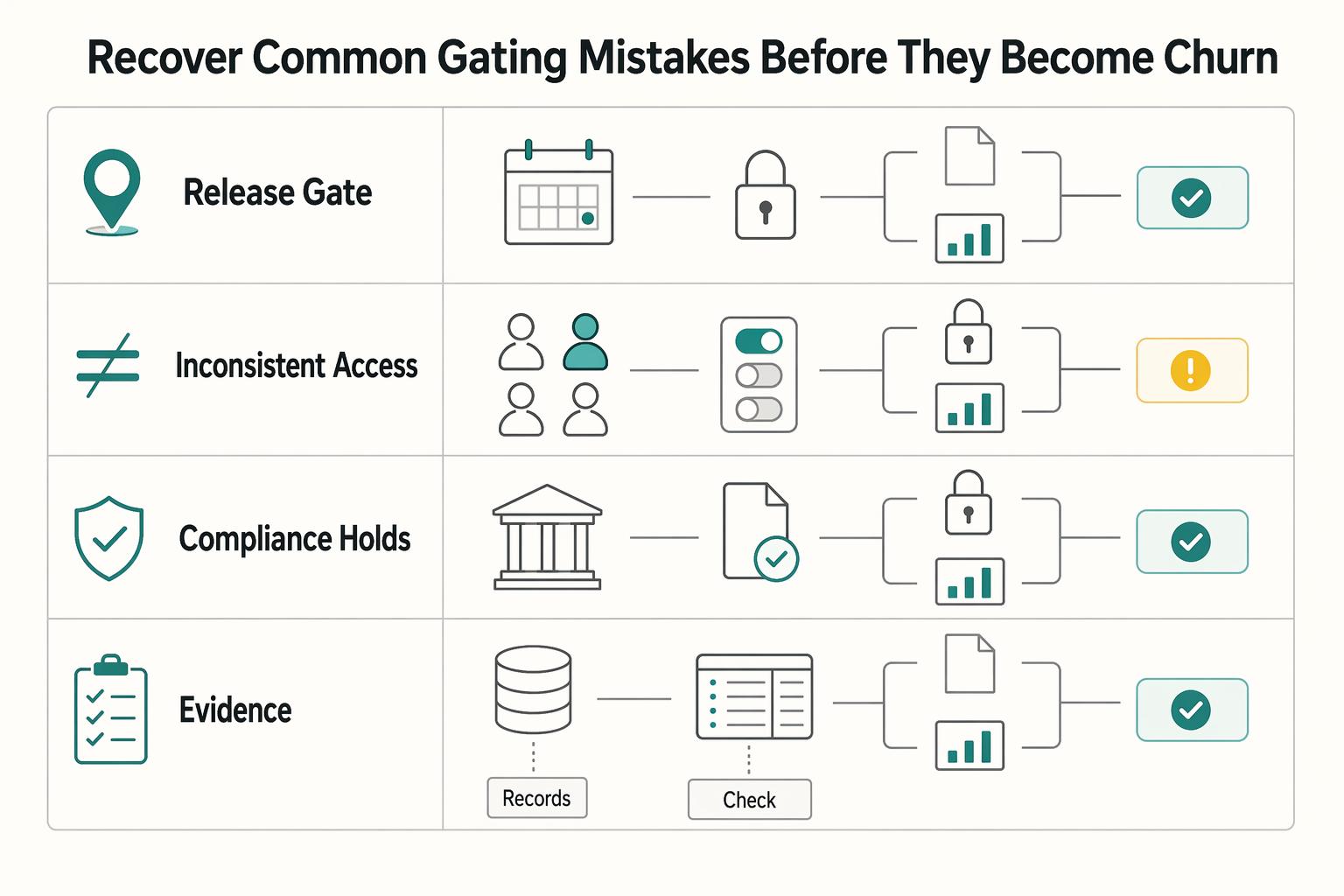
Recover from common gating mistakes before they become churn#
Most gating damage is recoverable if you fix placement quickly and verify the fix with evidence. If a gate feels unfair, check timing, consistency, compliance overlap, and auditability before rewriting price copy.
| Mistake | Recommended response | Checkpoint or evidence |
|---|---|---|
| Early gates in activation | Move early gates later in activation and keep first-value actions in the base payment plan | New accounts should complete a meaningful first action before hitting a paywall |
| Inconsistent access states across surfaces | Define one FeatureGate mode per gated capability and align route-level guard behavior for navigation entry, direct URL access, and fallback rendering | Support should reliably predict what users on the same tier should see |
| Compliance holds mixed with monetization prompts | Split KYC, AML, and KYB states from upgrade prompts | Required verification should not be interpreted as paid access |
| Success declared without audit evidence | Keep retained event logs and ledger-backed evidence so you can trace access decisions, upgrades, entitlement changes, and money-movement effects | Pause rollout or roll the gate back if reversals or support confusion increase and you cannot reconstruct the sequence |
-
Move early gates later in activation. Activation touches 100% of acquired users, and this is often where early retention loss is highest. If users have not reached the aha moment, keep first-value actions in the base
payment planand test a later interruption point. The checkpoint is simple: new accounts should complete a meaningful first action before hitting a paywall. -
Standardize lock behavior across surfaces. Inconsistent access states are an operational trust problem, not a cosmetic bug. Define one
FeatureGatemode per gated capability and alignroute-level guardbehavior for navigation entry, direct URL access, and fallback rendering. If support cannot reliably predict what users on the same tier should see, your gating rules are still inconsistent. -
Separate monetization gates from compliance holds. Required KYC, AML and KYB controls cannot be bypassed by an upgrade. Confirm which entity bears the duty and current exemptions or relief; provider tooling does not itself establish compliance. Explain the required verification separately from the optional paid capability.
-
Require audit evidence before calling a change successful. UI behavior alone is not enough. Keep retained event logs and
ledger-backed evidence so you can trace access decisions, upgrades, entitlement changes, and money-movement effects. If reversals or support confusion increase and you cannot reconstruct the sequence, pause rollout or roll the gate back.
For a step-by-step walkthrough, see Microservices Architecture for SaaS Without Finance and Compliance Surprises.
Use this checklist before every gate change#
Treat every gate change like a release that can move revenue, trust, and support load at once. If you cannot name the target outcome, rollback trigger, and owner for the gated capability in one short note, it is not ready to ship.
- Set the monetization metric and guardrails before build/release.
Choose one primary outcome, for example upgrade rate, expansion revenue, or reduced free-plan overuse, then define the guardrails that can stop rollout: trust risk, support capacity, and regression metrics. Your release policy should already define staged rollout settings, metric thresholds, and rollback behavior.
- Map each gated capability to tier logic and ownership.
For every gated item, document the pricing tier, rationale, and decision owner. If product, engineering, and marketing would explain the gate differently, fix packaging and ownership alignment before launch.
- Confirm architecture consistency from one access decision.
The same entitlement decision should drive useFeatureAccess, FeatureGate, and route-level guard coverage. Validate allowed, blocked, loading, and fallback states for each changed gate, and remove scattered if (user.plan...) checks that can drift from billing logic.
- Confirm operational traceability and retry safety.
Trace events and business effects separately. Stripe may prune an idempotency key after it is at least 24 hours old; reusing a pruned key can create a new request. Maintain durable local operation records and deduplicate business effects beyond provider retention, including manual retries and webhook replay. An audit log can contain several attempts while the charge and execution occur once.
- Launch progressively with explicit rollback and review timing.
Use a defined cohort plan, rollback triggers and review dates. Stripe automatically retries webhook delivery for up to three days in live mode; manual resend and local reprocessing require longer-lasting duplicate protection. Give delayed failures, refunds and customer behavior time to mature before a monetization conclusion.
Frequently Asked Questions
What is freemium architecture platform feature gating in platform terms, not just product UI terms?
At platform level, gating is entitlement control tied to pricing, billing status, or measured usage so access matches what an account pays for. It is not just hiding a button. The same decision should hold in the component, the page, and any backend action that actually executes the capability.
How do you implement feature gating without duplicating components?
Use a central entitlement policy and a thin UI adapter, such as the illustrative useFeatureAccess hook and FeatureGate component. Enforce the same policy on restricted routes and backend operations. Record an owner and checks for allowed, denied, unknown and fallback states. A release flag alone does not establish a paid entitlement.
When should a team hide a feature versus show an upgrade prompt?
Use this as a rule of thumb, not a universal rule: hide when showing the capability would add clutter and the user can still finish the current job without knowing it exists. Show a disabled state or upgrade prompt when the user should understand the capability exists but is unavailable, especially at a real expansion moment. If you show the block, explain why it is unavailable and how to regain access.
What are the most common feature-gating mistakes that hurt retention?
Common mistakes include inconsistent access states across surfaces, mixing compliance-required checks with monetization prompts, and declaring success without predefined evidence. Disabled states without a clear reason and next step create avoidable friction. If support cannot explain access outcomes consistently, your gate is not ready.
How do you gate features without frustrating power users who drive usage?
A practical approach is to keep the core job open and gate advanced capability layers, then roll out to a narrow cohort first. Define metrics upfront and watch behavior tied to outcomes, including upgrades, downgrades, reactivations, churn, and support tickets, before wider release. If heavy-user behavior worsens without monetization improvement, move the gate later or choose a different capability.
Which features should never be gated in a payments or compliance-heavy platform?
Required identity and ownership checks must not become paid bypasses. Identify the covered entity and applicable rules first. US beneficial-owner CDD under 31 CFR 1010.230 applies to covered financial institutions and is subject to exemptions and current relief; it is distinct from company BOI reporting. Keep required verification states separate from upgrade prompts.
How do you verify whether a new gate improved monetization or just shifted support burden?
Define the primary outcome and guardrails before launch. Compare comparable cohorts for upgrades, downgrades, churn, net revenue and support burden; simple before/after movement does not prove causation. Verify analytics freshness and subscription/refund maturity rather than assuming every tool refreshes within 24–48 hours.
Try a related tool
Researched and edited by the Gruv editorial team. Gruv builds cross-border billing, payouts, and finance-operations software for global businesses.
Sources
- docs.stripe.com/billing/entitlementstrusted
- docs.stripe.com/webhookstrusted
- ecfr.gov/current/title-31/subtitle-B/chapter-X/part-1...trusted
- ecfr.gov/current/title-31/subtitle-B/chapter-X/part-1...trusted
- europa.eu/youreurope/business/taxation/vat/check-vat-n...trusted
- fincen.gov/system/files/2026-02/FinCEN-Order-CCDExcepti...trusted
Educational content only. Not legal, tax, or financial advice.
Related Posts
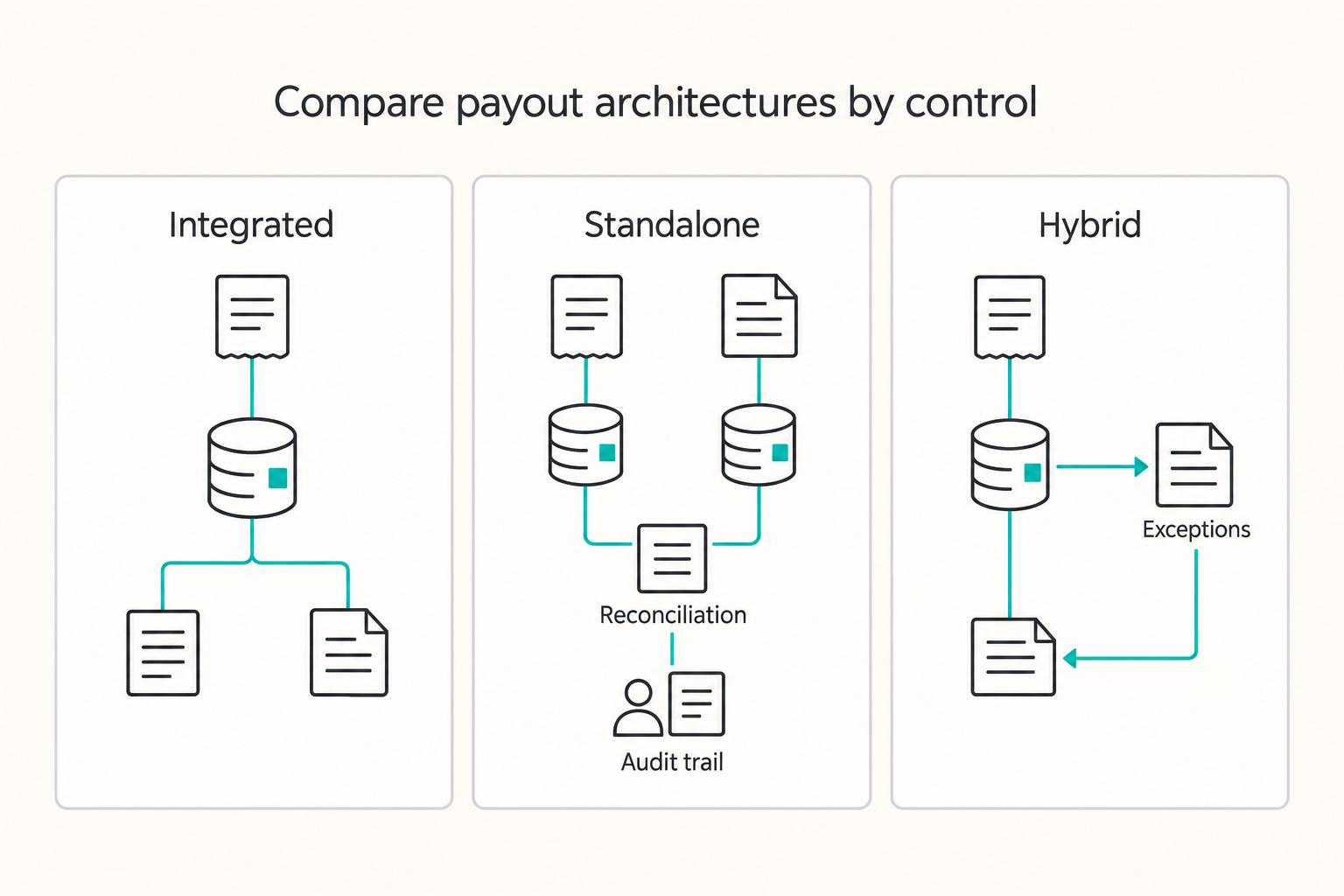
Integrated Payouts vs Standalone Payouts for Platform Architecture Decisions
Here, integrated means a provider supports both collection and payout in the platform’s funds flow. Standalone means a separate provider executes disbursements, funded from your platform or another payment system. Hybrid means multiple governed routes. These are working architecture definitions, not universal vendor product categories.

Host Payout Architecture for Short-Term Rental Platforms
Choose your payout architecture before you pick your next country. The usual break point is where host payments meet local payout-method coverage, identity checks, risk review, and finance close requirements.
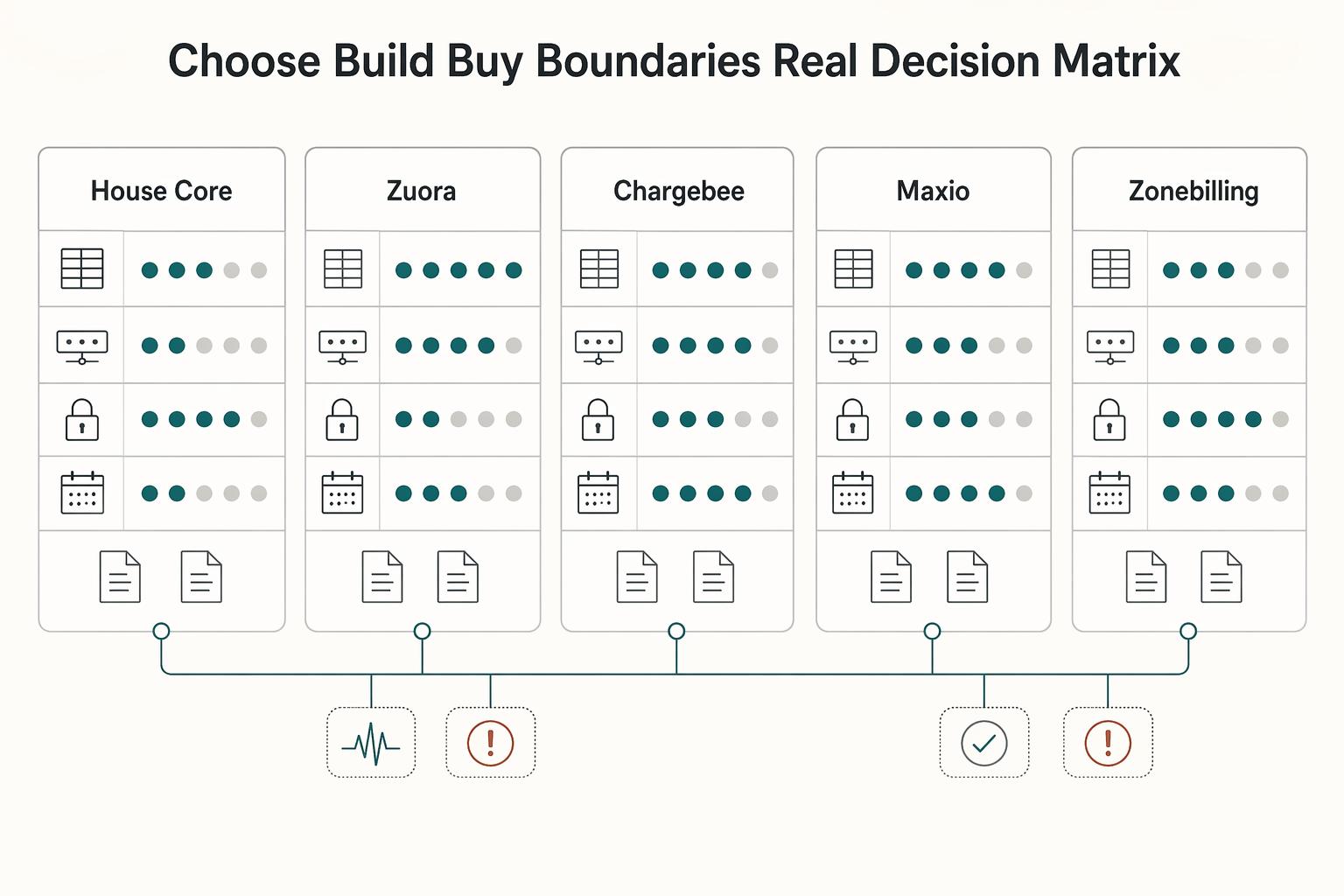
How to Build a Subscription Billing Engine for Your B2B Platform
If you are designing a B2B subscription billing engine, get the close and reconciliation model right before you chase product flexibility. A durable sequence is to define recurring billing scope (plans, billing periods, usage, and trials), then map settlement and payout reconciliation to transaction-level settlement outputs, and finally tie that discipline into month-end close controls. The real test is simple: finance should be able to trace invoices, payments, and payouts from source events through settlement records into reconciled close outputs without ad hoc spreadsheet rescue.