
Quick Answer
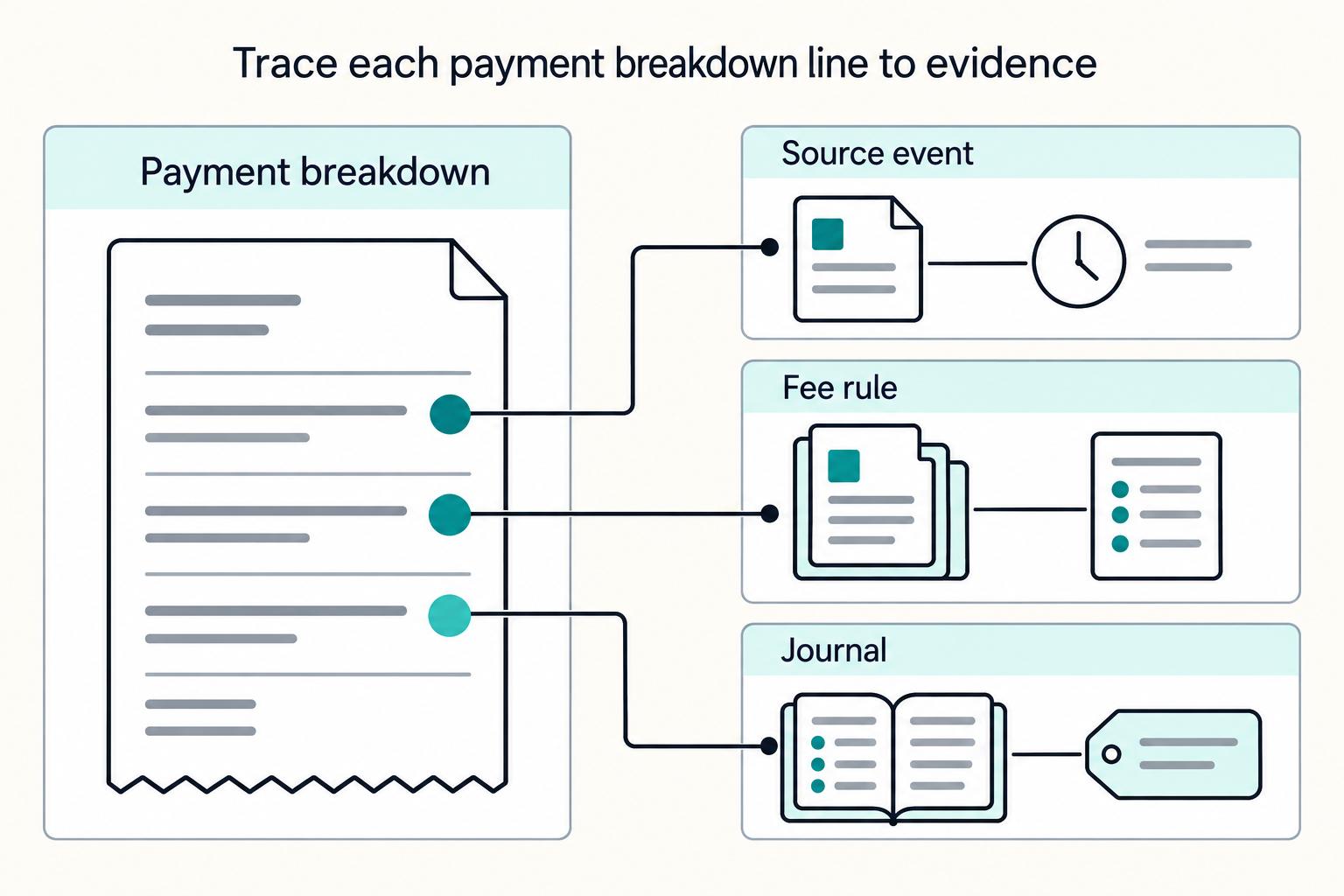
Show contractors a stable breakdown from gross amount to net payout, with each fee or markup listed separately, clear status labels, and plain reasons when values are estimated, pending, blocked, or final. The same line items, terms, and amounts should match internal records, approvals, and exports so finance can reconcile payouts without spreadsheet-only fixes and contractors can understand pay without opening a support ticket.
Why Contractors Need a Clear Fee Breakdown#
Your payment breakdown UI should answer two questions at a glance. Contractors should be able to see how an invoice turns into a net payout. Finance should be able to close the payout without manual cleanup. If the recipient view cannot be traced back to approval and accounting records, it is not transparent enough to run.
Payment operations often span onboarding, compliance, project tracking, and payout tools. That split creates coordination risk and lets important steps slip. Centralizing those workflows can reduce overhead, but only if the breakdown stays clear, traceable, and consistent across screens and exports. Start with one recent payout. Confirm that every visible amount ties to a recorded event before payment is released, including who approved it and whether the amount is final or still estimated.
A vendor feature list rarely shows how a specific contractor invoice becomes a net payout. Product, finance, and ops need the transaction-level math, status labels, and evidence path they can build and operate together.
This guide stays focused on three areas: payout disputes, ledger reconciliation, and net payout expectations. Use one rule throughout. The amount shown to the contractor should be explainable in the internal record that moves forward after approval and, where relevant, syncs to ERP after that approval step. If a fee is unknown, estimated, or blocked by compliance checks, say so plainly. Contract terms should shape payment logic before release, not just review it after the fact.
For a step-by-step walkthrough, see Platform Fee Structures: How to Price Your Marketplace Without Losing Contractors.
Set the scope of transparency before you design screens#
Set the boundary first. If you mix platform pricing with contractor payout math, you can recreate the same kind of transparency gap and information asymmetry described in platform-work research.
Separate platform pricing from payout transparency#
In this flow, keep platform pricing and payout transparency as separate questions. Buyer-facing pricing, such as subscription or service charges, belongs in commercial views. Payout transparency answers a different question: how did this invoice become this net payout?
Use a simple scope check. One reviewer should answer, "What does the company pay the platform?" Another should answer, "Why is my payout this amount?" If both answers depend on the same UI block, your scope is probably too loose.
Choose the first user and decision test#
Pick the first user for the first screen, even if the product will later serve multiple roles. Common roles can include contractor portal users, finance reviewers in a unified dashboard, and ops owners managing approval flow.
| Role | Primary need | Decision test |
|---|---|---|
| Contractor portal users | Understand net payout | Should understand net payout without opening a support ticket |
| Finance reviewers in a unified dashboard | Review and close | Should be able to review and close |
| Ops owners managing approval flow | See blockers and ownership | Should see blockers and ownership |
Set one decision test per role before design starts. Contractors should understand net payout without opening a support ticket. Finance should be able to review and close. Ops should see blockers and ownership. When one mockup tries to satisfy all three at once, important fields can disappear under generic labels.
Write one scope sentence and use it as a gate#
Write one scope sentence and use it as a design gate: "Every payout view shows gross amount, applied fees or markups, and final net payout."
Put that sentence in the product brief, ticket template, and design review checklist. Then validate every draft screen and export against it. If a required field has no source, raise it immediately, record the timeline impact, and assign an owner instead of designing around the gap. That is where hidden costs and budget confusion often start.
If you want a deeper dive, read Payment Transparency for Contractors: How to Build a Payout Tracker Your Recipients Trust.
Collect the inputs you need before UI work starts#
Do not start screen design until every payout field has three things: a policy source, a data source, and an owner. Without all three, the UI may look complete but break the first time finance or ops has to defend a real payout.
Map policy sources before UI work#
Start with policy artifacts: fee policy, contractor-classification policy, and any U.S. labor or tax notes your team already uses for U.S. payees. You do not need to resolve every edge case up front. You do need to keep product labels and logic from getting ahead of what finance and compliance can support.
Use one checkpoint for every line item: "Where is this rule written?" If no one can point to a policy source for fee ownership, withholding handling, or classification guardrails, pause UI work and assign the gap.
Name the authoritative data source for each field#
Next, inventory the systems that can prove the numbers and decide which one is authoritative for each field. Depending on your stack, candidates can include invoice-to-payment events, FX outputs that affect paid amounts, and ledger reconciliation exports.
Prioritize traceability over convenience. Each displayed amount and status should point to a policy rule, source event, ledger journal or provider record. Record changes to those values so finance can explain a correction without relying on screenshots alone.
Name the consumer of each field before defining it: contractor, support, finance or reconciliation. If a field has no decision or explanation purpose, remove it or mark it internal rather than adding another ambiguous status to the public breakdown.
Check legal, access, and retention constraints#
Confirm legal, access, and retention dependencies before final UI design. If you serve U.S. payees, identify which document and withholding requirements your compliance team actually uses, but do not guess forms, thresholds, or triggers without owner approval.
| Constraint | Check | Article detail |
|---|---|---|
| Applicable payment rule | Identify contract, tax and provider rules for this payout | Record owner, policy version and rule effective date |
| Access to evidence | Decide who can view or edit contractor and provider detail | Apply role-based access under the operator’s own security policy |
| Record retention | Set a retrieval and retention schedule | Use applicable law and the operator’s approved retention policy |
Verify who can view, edit, approve and export sensitive evidence, and how long the records must be retained. Use the operator’s own policy and applicable law; an external agency’s access workflow is not a template for a contractor payout UI.
Assign one owner per data element#
Assign one owner per data element before design starts: product for labels, finance for payout math and ledger tie-out, and compliance for policy gates. Make that explicit in a shared table with four required columns: field name, source system, policy source, and owner.
Add one design rule: complete all four columns for every displayed field. Assign an accountable owner for both the normal payout path and correction handling so product labels, finance rules, and support explanations do not drift apart.
Related: Same-Day ACH for Platforms: How to Speed Up Contractor Payments Without Wire Transfer Fees.
Define the canonical payment breakdown model#
Freeze one shared breakdown model before UI build-out. If the contractor portal, API, and exports describe the same payout differently, reconciliation turns into term-matching instead of number-matching.
Start with a baseline and show each delta#
Start with a declared baseline, then show each adjustment as a reproducible delta from that baseline. In practice, keep the baseline amount, each adjustment, and the final payable amount as distinct entries instead of blending everything into one number.
Use the model to explain the amount, not to act as the policy authority. The breakdown should show how the number was formed without pretending the UI made the underlying judgment.
Use one real payout as a checkpoint and ask product, finance, and ops to recompute the final payable amount from the baseline. If they cannot reach the same result from the visible entries, the model is still ambiguous.
Worked screen: a $1,000 contractor milestone#
Hypothetical policy and amounts, not Gruv production pricing: milestone gross $1,000.00; an approved $25.00 contractor-paid platform fee is deducted; net payable is $975.00. The provider charges the platform an $8.00 payout fee, shown separately as company-paid and excluded from the contractor calculation. No tax withholding is assumed in this example. The executed agreement and approved fee schedule, not the UI, decide who bears each fee.
| Contractor-facing line | Amount | State and proof |
|---|---|---|
| Approved milestone gross | +$1,000.00 | Work acceptance ID M-104; ledger gross line |
| Platform fee — contractor-paid | -$25.00 | Fee rule F-2, effective date and ledger deduction line |
| Net payable | =$975.00 | Calculated from the two lines above; payout instruction P-104 |
| Provider fee — paid by platform | $8.00 shown separately | Company expense line; does not reduce $975.00 |
| Payout status | Pending → paid or failed | Provider payout ID and last status timestamp; show a failed return separately |
The contractor view should explain the $975.00 without exposing internal account data. Finance can open the same payout ID to see journal IDs, fee policy version, provider events and an $8.00 company expense. If a provider later reports failure after an earlier paid status, do not overwrite the history: show a failed/returned state, owner and next action, then reconcile the provider result before any retry.
Use one line-item structure across every surface#
Use one line-item structure across every surface, even when the level of detail differs. The portal can use plain-language labels while internal views show more context, but both should map to the same underlying breakdown.
| Entry type | What it answers | Minimum shared treatment |
|---|---|---|
| Baseline amount | What amount all calculations start from | Always present as the reference point |
| Adjustment | What changed the amount after the baseline | Listed separately from the final amount |
| Final payable amount | What will be paid or was paid | Computed from the visible baseline and adjustments |
Standardize terms so each entry type carries one meaning across UI, exports, and internal review screens. The lesson is simple: classify once, then carry that classification through the full flow.
As a check, compare a reporting export to the UI for one payout. Every visible entry should map to a corresponding export field with the same meaning.
Lock the vocabulary before copywriting#
Lock the vocabulary before copywriting. If finance, ops, and the portal use different terms for the same concept, trust drops even when the math is right.
Create a short glossary with one approved label and definition for each entry type and value state. Then require those labels in the portal, dashboard, support macros, CSV headers, and specs. Add a state column to each entry so users can see when a value is preliminary versus finalized.
Review the same payout in portal, dashboard, and export views side by side. If reviewers have to mentally translate terms between surfaces, the vocabulary is not ready.
Show incomplete values instead of hiding them#
Show incomplete values explicitly, including "not yet available" states. Hiding an entry until provider data arrives creates avoidable trust issues. Keep the row visible and clearly mark when a value is not available yet.
If a key component is still incomplete, present the total as preliminary or delay final presentation to avoid false precision. At the same time, separate transparency from overexposure. Keep the calculation structure and entries consistent for users, while sensitive evidence and restricted internal details stay in controlled internal views.
The goal is straightforward: one payout record keeps the same structure across lifecycle stages, with only values and states changing.
Decide fee ownership rules and show them explicitly#
Fee ownership should be a policy decision, not a UI guess. Every deduction or company-paid fee shown before net payout should map to a governing document and a clear order of precedence so disputes are settled by policy, not wording.
Set document precedence before display rules#
Set document precedence before you write display rules. If contracts, rate artifacts, provider terms, or internal policy notes conflict, the UI needs one authority path.
For each fee-ownership rule, record the executed contractor agreement clause, approved fee schedule, version/effective date and approver. If those sources conflict, legal and finance must resolve precedence for this platform before the UI calculates a deduction. Keep a compact evidence pack:
- governing document and section
- precedence rank
- effective date
- assigned fee owner
- contractor-view treatment
- finance/export treatment
Run one payout scenario and ask product, finance, and compliance to identify the controlling source for each fee line. If they cite different sources, the rule set is not ready.
Turn policy into explicit display logic#
Turn policy into explicit if-then display logic. If your approved policy assigns a fee to the contractor, show it as a separate deduction before net payout. If the policy assigns it to the company, keep it visible and mark it company-paid.
Use variants only where your documented policy supports them, including payout method, corridor, or FX-management differences. The real test is whether each variant has a documented owner, a clear display treatment, and a verifiable rule trigger.
| Rule field | Why it matters |
|---|---|
| payout variant identifier | distinguishes when ownership logic changes |
| corridor or geography context | captures location-based differences when documented |
| FX state | separates estimated from final conversion impact |
| fee owner | determines deduction vs company-paid treatment |
| display label | keeps user-facing wording consistent |
Test one payout per variant and compare portal math with exports. If ownership labels and net-payout calculations do not match across surfaces, fix the rule implementation before rollout.
Treat withholding, holds, and overpayments as core states#
Treat overpayments and policy-defined exception states, such as withholding or holds, as first-class states in the breakdown. Show the adjustment, its reason, and whether the net amount is final or pending review; keep the underlying agreement and approved fee policy linked to the record.
If a withholding or hold decision is pending, keep the line visible and mark the status clearly so the difference from invoice amount is explainable. Avoid hidden adjustments, and do not present false precision when a value is not final.
Keep internal traceability strong for ownership and exception decisions. Log the policy version, actor, timestamp, prior value and new value when a fee or payout state changes.
Map each UI line to ledger reconciliation evidence#
If a payout line cannot be traced to system evidence during close, it is not ready for the UI. Treat each visible amount as a reconcilable record, not just a display value.
Map line items to evidence, not just totals#
Map evidence at the line-item level because reconciliation often happens on individual amounts, not just totals. Each visible line should resolve to its source event or fee-policy record, and to a journal reference once the financial effect is posted. Pending or estimated lines need a status and source, not a fabricated journal entry.
Use one ledger model across invoices, payments, and payouts so references stay consistent. Fragmented, spreadsheet-driven reconciliation is a known control risk, so avoid designs that depend on manual stitching across disconnected records.
| UI line | Minimum evidence to map | What to verify |
|---|---|---|
| Gross invoice amount | invoice record and source event ID; journal reference once posted | amount matches invoice source and posted ledger entry when applicable |
| Fee line | fee rule version and fee event ID; journal reference once posted | fee owner and amount match policy and accounting treatment |
| Tax or compliance hold | status event, governing record, journal reference if posted | UI status matches pending, confirmed, or held state |
| Net payout | payout instruction or execution record and event ID; settlement journal reference once posted | net amount matches visible math and posted payout entry when final |
Test one completed payout and one pending payout. Finance should be able to trace each line to its source and policy, then match posted lines to ledger evidence without product or ops intervention.
Join invoice, payment, and payout records with a trace key#
Link invoice, payment, and payout records with a shared trace key visible in the unified dashboard. The format is your choice. What matters is that reviewers can join related records without guesswork.
Design this for cross-reference review across contracts, tax records, and general ledger artifacts. If key IDs appear only in exports, teams can fall back to manual joins and spreadsheet-only reconciliation. Keep the contractor-facing view simple, but expose the trace key and key event references in internal finance and ops views.
Include approvals in the same evidence map#
If approvals are part of your controls, include them in the same evidence map for decision-driven changes such as exception handling, holds, or releases. Keep it focused on reviewable decisions rather than exhaustive metadata. A practical set can include:
- approval state before payout release
- approving actor or role
- decision timestamp
- related event or document reference
For one blocked-then-released payout, a reviewer should be able to confirm from the dashboard what changed, who approved it, and which ledger entry reflects the final state.
Set go-live criteria around traceability#
Set strict acceptance criteria before launch. Every visible payout line should have a source or policy record; posted financial effects should reconcile to ledger entries without spreadsheet-only fixes.
Exports can support review, but they should not introduce missing joins or become the only source of truth. Test using the records and statuses available at decision time, not hindsight-corrected data.
Use this go-live gate:
- each visible line has a source event or governing policy record and a clear state
- each posted financial effect resolves to a journal reference
- if approvals apply, checkpoints are visible with timestamps
- finance can reconcile a sample batch without spreadsheet-only repairs
If any item fails, fix traceability before rollout.
Need a reference implementation for status, traceability, and webhook-driven updates? Review Gruv Docs and map your fields to your ledger events before rollout.
Design contractor-facing breakdown states that prevent disputes#
Once internal traceability is solid, make payout states explicit for the contractor: what is final, what is pending, and what changed. When those states are vague, confusion follows.
Keep the structure stable across payout states#
Keep one stable breakdown structure across payout states, including in-flight payouts. Contractors should not have to relearn the screen every time the status changes.
Avoid catch-all labels that hide several changes in one line. Keep each visible change separately labeled so the path from total to payout stays easy to follow.
As a quick test, ask someone outside finance to explain what changed and what is expected to be paid from one completed payout view.
Use plain labels instead of internal shorthand#
Use contractor-facing language, not internal shorthand. A correct number with an unclear label can still be questioned. If a value is not final, mark it clearly as pending or estimated instead of showing a changing amount with no qualifier. Red flag: internal-only terms that require ops context to decode.
Explain blocked and in-review payouts directly#
Add explicit status messages whenever payout completion is blocked or still in review. As a baseline, include a plain reason, the current status, and a last-updated timestamp.
This is an operating control, not just polish. Manual or delayed data handling is a known source of delayed notifications and delayed decisions, so the portal should explain waiting states directly. For one delayed payout, confirm that the portal explains why it is pending without introducing unclear status wording.
Use a shareable payout detail view for support#
If you provide a shareable payout detail view, keep it aligned with the portal view for support handoffs and self-serve dispute review. Keep labels, amounts, and status wording consistent with the live screen.
If references are shown to recipients, keep them stable so support can match the case quickly without re-keying values from chat or screenshots.
One failure mode to check is that the export and live view use different labels or rounding. Test one handoff end to end to confirm both sides can resolve the case from the same visible data.
Design finance and ops views for approvals and exceptions#
Your finance and ops view should start from the contractor view, then add only what reviewers need to approve, resolve exceptions, and reconcile entries.
Start from the contractor view and add internal evidence#
Keep the same fee lines, labels, and statuses the contractor sees, then append internal trace fields for approvals and reconciliation. The goal is one shared breakdown, not two competing versions.
Use one completed payout as a check. A reviewer should be able to move from visible line items to approval, provider event, and ledger evidence without relabeling fields or exporting to a spreadsheet. Keep the approval record and its supporting evidence retrievable.
Segment exception queues by failure type#
Segment exception queues by failure type so each queue has a clear next action. Keep distinct failure patterns in separate queues rather than one mixed "issues" bucket, including a clear path for not-found record cases.
Each queue should expose the fields needed for its resolution path. If someone has to read freeform notes just to identify the failure type, the segmentation is too weak.
Set a rule for off-system exceptions#
Set one explicit internal rule for off-system exceptions so responsibilities and control checkpoints are clear. This is an operating control, not a legal threshold.
Treat off-system exceptions as tracked cases with responsibility, status, and attached evidence. That fits a control-first structure where responsibilities, program controls, and named failure cases are explicit rather than implied.
Allow overrides only for defined exception classes#
Use strict policy enforcement as the default, and if manual overrides are allowed, define them in your internal policy. Overrides should be traceable and rarer than normal-path resolution.
When an override is used, record enough context in the case file to reconstruct the decision. If external regulatory text is referenced, anchor the decision to your approved internal interpretation, especially when a source is marked authoritative but unofficial.
Handle FX, quote expiry, and cross-border tax edge cases#
Treat these issues as change control. If payout inputs can still move, show that clearly. If they do move, show a new state instead of silently replacing the old amount.
Mark FX certainty explicitly#
Label FX lines by certainty so users can tell what is still provisional and what is locked for the current attempt. Put that state next to the amount impact and resulting net payout, and do not rely on color alone.
Before execution, a reviewer should be able to tell from the UI alone whether the FX-adjusted amount can still change or is already confirmed.
Re-quote and relock when a quote is stale#
If your payout flow uses expiring quotes and a quote cannot be used at execution time, move the payout into an explicit re-quote state, then relock after refresh. Do not mutate the prior net payout in place.
Record prior and updated references, timestamps and state transitions as audit events. If required event logging fails, stop automated progression and route the payout to the operator’s exception workflow so a change does not become untraceable.
Gate withholding fields by applicability and role#
Show withholding fields only when they are enabled for that payout context. When withholding is in scope, show status, reason, and required next action. Otherwise, keep the breakdown clean.
Limit detailed withholding evidence by the operator’s access policy. Define who can view, edit, approve and export records, and keep retention aligned with the applicable legal and contractual requirements.
Show caveats before approval, not after exceptions#
If route-specific or program-specific constraints may affect payout behavior, show that caveat before method selection is locked. If exact behavior or data consumers are not confirmed yet, state that uncertainty plainly in the UI instead of implying a guaranteed outcome.
The final checkpoint is simple: the user should not first discover a route limitation only after the payout is already in an exception state.
Build failure handling for retries reversals and returns#
Treat payout failure handling as shared operational truth, not back-office cleanup. Contractors, support, and finance should see the same state progression, with each recovery action tied to a single attempt key to reduce duplicate risk during incidents.
Make payout failure states distinct#
Make retry, reversed, and returned explicit in both contractor-facing and internal views, with internal screens adding detail rather than changing the story. If a payout failed and will be retried, say that directly. If funds were later undone, show reversed. If funds came back after submission, show returned.
| State | What it means | What the user should infer |
|---|---|---|
| Retry pending | Prior attempt failed; replacement not sent yet | No new payout has been issued yet |
| Retry in progress | Replacement attempt exists and is processing | A retry is already underway |
| Reversed | A later-stage payout was negated | That payout no longer represents available funds |
| Returned | Funds came back after submission | Next action is required, such as reroute or reissue |
From the UI alone, support should be able to answer whether a replacement payout was already sent and whether the visible balance reflects the original payout or the corrected outcome.
Make idempotent retries obvious internally#
Make retry safety visible, not assumed. Operators should be able to see whether they are safely retrying one instruction or creating a second payout.
At minimum, show identifiers for the original payout, the current retry attempt, idempotency, provider events, and active attempt status in the internal view. Gate retry actions when an active replacement attempt already exists.
Treat delayed status as part of the same failure model as duplicates, reversals, and disputes. A legible retry chain helps your ledger and audit trail support trust and reconciliation during active incidents.
Recover in sequence, then reconcile the ledger#
Use a fixed sequence: detect failure, classify cause, reroute or retry, then post corrected ledger reconciliation entries. Do not jump from "failed" straight to "send again."
Choose the recovery path by cause class. Some failures should be retried on the same rail. Others require rerouting after confirming route and country availability. A provider terms page may list a service without guaranteeing that service is available in a particular country, so treat catalog presence as insufficient proof of execution availability.
After the recovery decision, post traceable ledger corrections. Keep the chain connected through the original payout ID, failed attempt ID, replacement or return reference, timestamps, triggering actor or service, cause class, and linked reconciliation entry IDs. That gives finance one consistent history to reconcile end to end. For the full breakdown, read How to Build a Deterministic Ledger for a Payment Platform.
Implement release checkpoints and instrumentation#
Do not launch this UI on confidence alone. Treat release as milestone-based gates with written evidence, then instrument early delivery so you can see whether the process is working in practice.
Set launch gates as real milestones#
Use release gates as true milestones, not reminders. For this rollout, keep each gate explicit as a necessary process step with clear acceptance criteria.
For each gate, record a named owner, target date, evidence artifact, and sign-off note in writing. Set dates under the team's actual operating calendar and approval policy.
Instrument the first release before production#
Track a consistent set of operational measures from day one, including throughput if you need a flow signal for cleanup load. Treat the specific metrics as internal decisions rather than requirements set by this evidence.
Start with clear definitions before setting targets. Define when a measure starts and stops, what event set it uses, and who owns the definition so teams can pull matching counts.
Run an edge-case review cadence#
Run a recurring edge-case review for ambiguous or exception-heavy cases. Use it to resolve unclear rules before they spread across new UI variants.
Close each review with a named owner, next review date, and required evidence updates. Use the cadence that fits the payout volume and exception risk of the live program.
Conclusion and copy-paste launch checklist#
A payout breakdown is credible only when every visible amount can be traced and reproduced in the same records finance uses to reconcile and close. If the portal looks clear but the payout cannot be matched through approvals, exception handling, and reconciliation, the clarity is cosmetic.
| Launch check | Requirement | Detail |
|---|---|---|
| Matching fields across every surface | Internal views and payout exports should show the same core amounts and status values used for matching and close | Validate with one real payout across those views |
| Approval rules in workflows | For higher-risk amount changes, consider separate preparation and approval under the operator's policy | Record who changed the amount, who approved it, and which rule required approval |
| Data matching before release | Use repeatable matching checks to catch improper payments before final approval | Confirm data matching is explicit before release |
| Exception states | Replace vague statuses with a clear reason, missing item, and next step | Show reason, missing contractor approval, fee-rule or provider evidence, owner and next action |
| Traceability through reconciliation | Walk one payout through available records: invoice, approval, payment, and reconciliation | If matching still depends on spreadsheet-only fixes or side-channel explanations, the flow is not ready |
| Operational checkpoints | If an ERP is used, keep its payout mapping and integration current | Keep exception/return states visible with a clear owner and next action |
Use the table as a review aid. Test the breakdown against real provider statuses, fee rules, and ledger records before making any launch decision.
- Confirm matching fields are consistent across every surface.
Internal views and payout exports should show the same core amounts and status values used for matching and close. Validate with one real payout across those views.
- Confirm approval rules are documented and reflected in workflows.
For higher-risk amount changes, consider separate preparation and approval under your operator policy. Record the changer, approver, and rule that required approval; simpler corrections may follow a different documented path.
- Confirm data matching is explicit before release.
Use repeatable matching checks to catch improper payments before final approval.
- Confirm exception states show explicit reasons.
Replace vague statuses with a reason, affected payout line and next action. Keep rejected and returned-from-review items visible, and prioritize missing contractor approval, fee-rule or provider evidence.
- Confirm each payout is traceable through reconciliation.
Walk one payout through available records (invoice, approval, payment, and reconciliation). If matching still depends on spreadsheet-only fixes or side-channel explanations, the flow is not ready.
- Confirm operational checkpoints stay current.
If the operator uses an ERP, keep its payout mapping and integration current. In all cases, keep exception and return states visible with a clear owner and next action.
Passing these six checks shows that the breakdown is internally traceable. Before release, also confirm the actual fee policy, provider-state mapping, permissions, and support workflow for the program. Fix any failed record path before widening the rollout.
Related reading: How to Maximize Your Xero Investment as a Payment Platform: Integrations and Automation Tips.
If you want to operationalize this checklist in a compliance-gated payout flow, explore Gruv Payouts to confirm market and program coverage.
Frequently Asked Questions
What should a contractor payment breakdown include at minimum?
There is no universal minimum field list, so define one for your platform and apply it consistently. Show a clear path from gross amount to net payout, each fee that changes the payout, the current payout status, and the final net amount or a clearly marked estimate. If a number is not final, label it plainly as estimated, pending, confirmed, reversed, or unknown.
Who should absorb payout, FX, and processing fees in a platform model?
There is no universal rule, so assign one owner per fee and keep that rule consistent. If ownership changes by payout method or corridor, show that before approval and repeat the same wording in payout details. A fee that appears only as a lower net payout with no owner or label creates a transparency gap.
How do we keep fee transparency accurate when FX rates change before settlement?
Treat FX as both a status issue and a calculation issue. If the rate can still move, mark the payout as estimated and show that the conversion impact is not final yet. Silent changes after the first view can erode trust quickly, especially in cross-border payments.
How do we make payout fees auditable for finance and ops teams?
Use one centralized record set so finance and ops work from the same source of truth. The contractor view, internal ops view, and reconciliation export should match on fee labels and amounts. Teams should be able to reproduce the same net payout from the same underlying records without ticket notes or spreadsheet-only adjustments.
What is the difference between pricing transparency and payout transparency?
Pricing transparency explains your commercial model and how costs can grow over time. For example, per-user pricing can compound as usage grows, while flat-rate pricing stays fixed. Payout transparency is transaction-level: it explains why this contractor receives this net amount on this payment.
When should a payout be blocked for compliance or tax reasons?
A compliance or tax hold should follow a specific provider, jurisdiction or approved platform rule. Show the rule-driven reason, owner, missing evidence and release condition. Unresolved classification alone is a review trigger, not a universal command to block every payout.
How should we show pending or unknown fees without eroding trust?
Show pending or unknown fees directly and explain why they are not final. A short plain-language note is better than a confident-looking net amount that later changes. Because disputes often depend on record quality, keep durable supporting records alongside payout details, including notes, progress updates, measurements, completion verification, and other proof-of-work documentation.
Researched and edited by the Gruv editorial team. Gruv builds cross-border billing, payouts, and finance-operations software for global businesses.
Sources
Educational content only. Not legal, tax, or financial advice.
Related Posts

The Freelance Payment Penalty: A Modeled Audit of Platform Fees, FX Spreads, and Payout Delays
The money rarely disappears through a single, easy-to-spot fee. The real loss is stacked. A marketplace takes its commission, a processor adds a charge for international cards, a bank or payment company converts the currency at a spread, a platform holds the funds before release, and a wire sheds a little to intermediaries on the way in. Each layer looks defensible on its own, but the worker feels the combined result as a smaller deposit and a later payday.

How to Respond to a Subpoena for Business Records
Move fast, but do not produce records on instinct. If you need to **respond to a subpoena for business records**, your immediate job is to control deadlines, preserve records, and make any later production defensible.
A US Expat's Guide to Investing in UCITS ETFs to Avoid PFIC Issues
The real problem is a two-system conflict. U.S. tax treatment can punish the wrong fund choice, while local product-access constraints can block the funds you want to buy in the first place. For **us expat ucits etfs**, the practical question is not "Which product is best?" It is "What can I access, report, and keep doing every year without guessing?" Use this four-part filter before any trade: