
Quick Answer
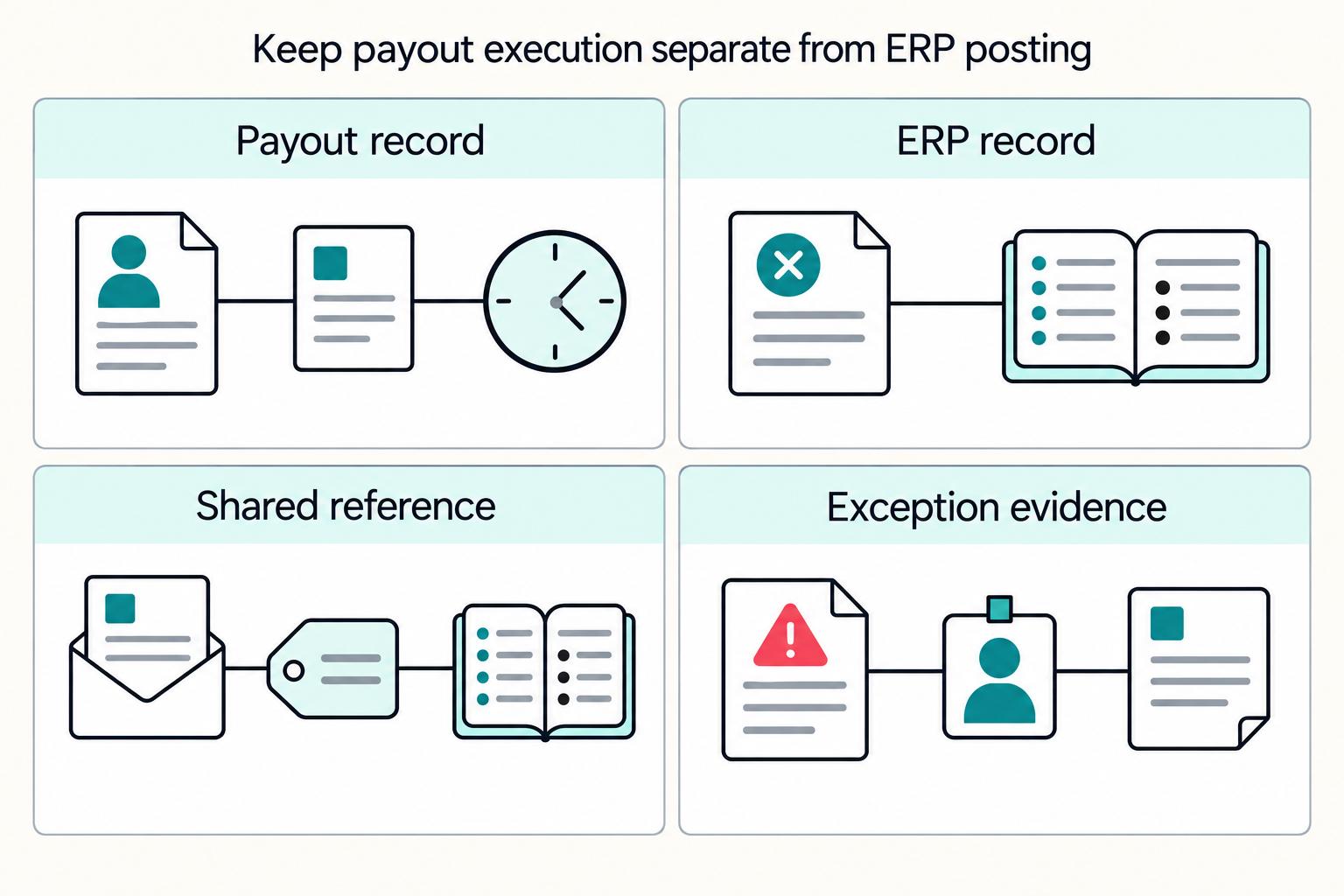
Keep supplier disbursement execution separate from ERP approval, payment documents and posting. Use a durable intent with distinct provider attempts and ERP artifacts, map each connector to its own AP records, and reconcile actual money movements. Resolve unknown outcomes before replacement, permit evidenced returns and recover unfinished event processing.
How ERP Integration Fits into Payout Operations#
Connecting NetSuite, SAP, or Microsoft Dynamics 365 to a payout system is more likely to hold up over time if you do three things from day one: prevent duplicate payouts, keep transaction-to-payout records traceable, and avoid brittle point-to-point integration debt.
For this integration, a payout is an outbound disbursement to a supplier, contractor or other beneficiary. It is distinct from a processor depositing collected sales into your own bank account. Decide which flow you are connecting before selecting provider objects, ERP records and reconciliation reports.
This guide is for CTOs, engineering leads, and solution architects making implementation decisions, not comparing vendor marketing. The goal is practical: choose an architecture, sequence implementation work, and define go-live checks you can run in production-like conditions. That includes replayed callbacks, duplicate protection, and clear links between ERP records and payout events.
Scope matters up front. This is about outbound payout integration, not only cash application or inbound payment matching. Cash application focuses on applying incoming payments to open invoices or ledger entries. Outbound disbursement orchestration can involve different ownership and different failure modes.
Stripe webhook delivery can retry for up to three days. Stripe event recovery via event listing is limited to the last 30 days. Event delivery can arrive out of order. Exactly-once and in-order assumptions are unsafe.
The design below supplies a shared control model; each connector still needs the record types, APIs and posting rules of the deployed ERP edition. Keep NetSuite vendor payments, SAP payment runs and Dynamics 365 Finance vendor journals distinct from customer cash application. Do not treat a successful accounting write as evidence that the bank executed a payment.
Separate cash application work from payout integration work#
Keep these as separate workstreams. Cash application settles receivables and applies payments to balances. Payout integration creates, tracks, and reconciles outbound disbursements. If your immediate risk is payout reliability and status traceability, design the payout lifecycle first, then extend Order-to-Cash analytics once that path is stable.
Define the boundary in business terms#
Cash application usually concerns incoming receipts and receivables. Dynamics 365 Finance settlement spans both AP and AR, so settlement alone does not identify fund direction. For outbound AP, map the supplier obligation and payment records rather than borrowing the customer-payment flow.
In practice, treat cash application as Accounts Receivable optimization, while payout orchestration is outbound money movement plus provider-status and exception handling.
Map where both processes touch shared records#
Both workflows touch Invoice, Reconciliation, and Audit Trail, but they touch them for different reasons.
| Record | Cash application focus | Payout integration focus |
|---|---|---|
| Invoice | Update settlement or payment application | Reference invoice context for why funds are sent |
| Reconciliation | Match incoming payments to open receivables | Match created payouts against transaction history and provider references |
| Audit Trail | Capture posting and application history | Capture status changes, retries, and event receipts |
Checkpoint: if you cannot link ERP records to the payout event trail with a stable reference, the workstreams are probably being mixed too early.
Prioritize the design that matches your risk#
If payout execution is your real risk, design around payout states first. Use states such as processing, posted, failed, returned, and canceled, and make the update path replay-safe. Webhook events can be delivered more than once, and undelivered events can be retried for up to three days. Validate with status payload samples, duplicate-event handling results, and record views tied back to ERP data.
Keep broad automation claims from blurring the boundary#
A common pattern is to emphasize automated matching, accuracy, and faster cash flow. That may help cash application, but it can still leave payout-state handling under-specified. A common failure mode is assuming invoice automation covers outbound payout complexity, then discovering gaps around returned payouts, duplicate event delivery, and status traceability.
For a step-by-step walkthrough, see NetSuite Subscription Billing Integration for Reliable Revenue Recognition and Cash Flow.
Gather prerequisites before touching production systems#
Do not start with production credentials. Lock down metadata, controls, and evidence requirements first, or you increase the risk of duplicate payouts and exceptions no one can trace.
Assemble the reference artifacts first#
Capture the deployed connector’s supported record types, fields, relationships and permissions. Use the ERP’s current metadata or record documentation for that API and edition. Pair the field dictionary with a payout-status taxonomy and an error taxonomy.
| System | Connector information to confirm | What to capture |
|---|---|---|
| NetSuite | Current metadata and record/API documentation for the deployed edition | Supported record types, fields, keys and relationships |
| SAP | Current metadata and record/API documentation for the deployed edition | Supported record types, fields, keys and relationships |
| Dynamics 365 Finance | Current metadata and record/API documentation for the deployed edition | Supported record types, fields, keys and relationships |
- a payout-status taxonomy with clear definitions for each state in your flow
- a shared error taxonomy for exception or dead-letter queues so operators can separate retryable transport failures from validation or business-rule failures
Verification point: trace one payout scenario from ERP source fields to payout request fields to the final output used at close. If different teams use different names for the same concept, normalize that now.
Confirm access, ownership, and environment separation#
Assign owners for every ERP, provider and credential. Confirm the nonproduction environments and licences actually available to the project; isolate their credentials and callbacks from live money movement. Agree on the deployment and approval process before connecting production.
| Environment check | Required evidence |
|---|---|
| Nonproduction access | Available environment, licence and owner |
| Credential separation | Distinct credentials and callbacks |
| Deployment path | Approval, verification and recovery owners |
Checkpoint: create a one-page access matrix with environment, integration owner, credential owner, rotation owner, and approval path.
Define integration controls before exposing endpoints#
Write your Webhooks policy before you register callback URLs. For production, require HTTPS. If events are signed, preserve the raw request body unchanged so signature verification still works.
Give each durable payout intent a stable business identity and store provider attempts separately. Use the selected API’s documented idempotency mechanism, scope and retention. An Idempotency-Key header is not a universal guarantee: validate the provider contract rather than assuming an HTTP header alone makes every write safe.
Set Retry Strategy and replay rules up front. Use exponential backoff with jitter for retryable requests. Assume providers retry undelivered webhooks. For Stripe, retries can continue for up to three days. Route unprocessed messages to an inspectable exception queue or dead-letter queue so operators can recover them.
Lock the launch evidence pack#
Before launch, agree on the exact proof artifacts: sample request and webhook payloads, report formats, and Audit Trail export expectations. For close support, require a settlement-style report that ties transactions to payout batches. CSV is a practical default.
Agree on audit evidence the deployed ERP can actually export. Test whether it captures the target record, actor, timestamp and before/after values you need, and retain the payout system’s own decision and processing history separately.
Go-live rule: if you cannot produce one clean packet linking the source record, payout event, report line, and audit evidence for a test payout, you are not ready for production.
If Acumatica is also in scope, see Acumatica for Payment Platforms: How to Integrate This Cloud ERP with Your Payout Infrastructure.
Choose your integration architecture with explicit tradeoffs#
Choose this before you write connector code. If you are supporting NetSuite, SAP, and Microsoft Dynamics 365 together, middleware is often the safer default as an anti-corruption layer, so the payout platform is less tightly coupled to each ERP's semantics. The tradeoff is real. You add latency and operational overhead, but you gain a controlled boundary for normalization and change management.
Compare change velocity and ownership first#
A direct ERP link is point-to-point integration. It can work when one team owns one ERP and the payout scope is narrow.
That changes when multiple ERP teams move at different speeds or use different status and field models. At that point, a middleware boundary can let each ERP map into a canonical payout contract instead of pushing ERP-specific rules into the payout domain. Microsoft's anti-corruption layer guidance describes this as a facade or adapter between subsystems with different semantics, specifically to avoid inheriting design constraints from outside systems.
A shared adapter boundary can keep each ERP’s field and workflow changes from leaking into the payout domain. It also becomes a dependency that needs availability, queue monitoring and recovery ownership.
Evaluate observability and blast radius, not just day-1 build speed#
Direct paths can be simpler to start, but incident tracing can end up scattered across the ERP, the payout provider, and connector logs.
A middleware product may centralize message inspection, but verify its retention, access controls and search fields against your incident workflow. Operators need to find a failed payout by its business identity, not only by an internal message ID.
For resilience, loose coupling matters. AWS Well-Architected guidance says loose coupling helps isolate failures across components. That matters when one ERP dependency slows down or fails. Treat platform protection limits as architecture constraints, not implementation details:
- Document the current account-level and API-specific concurrency limits for each connector.
- Throttle and queue independently per target so one ERP’s capacity does not stop unrelated flows.
- Verify retry guidance and avoid tight synchronous dependency chains.
Use direct integration only when scope is truly narrow#
Direct integration is usually most defensible when all three of these are true:
- Single ERP environment
- Narrow payout scope
- Strong in-house ERP engineering ownership
If you choose direct, keep it mostly asynchronous. Dynamics guidance says most recommended integration patterns are asynchronous, even when the user experience feels near real time. Once you need per-ERP status mapping and different protection or throttling behavior, direct is often no longer the lower-complexity path.
More broadly, multi-API designs can create duplicated IDs and duplicated data across systems. That is the kind of friction a middleware boundary is meant to reduce.
Make the decision with a checkpoint table#
| Architecture option | Failure blast radius | Change cost | Impact on close timelines |
|---|---|---|---|
| Direct point-to-point ERP to payout platform | Higher coupling, so dependency failures are more likely to propagate | Lower initial cost, but it can rise as ERP variants and mappings grow | More exposed to ERP-specific delays and fragmented incident tracing |
| Middleware hub with canonical payout model | Lower coupling with a better isolation boundary across systems | Higher upfront design and operations cost, with lower incremental change cost as integrations expand | More predictable tracking when normalization and message monitoring are centralized |
| Transitional hybrid (one direct ERP, middleware for new ERPs) | Medium, because the legacy direct path remains coupled | Medium, because migration cost is deferred | Mixed outcomes during close while legacy and normalized paths coexist |
Recommendation: for multi-ERP estates, middleware is usually the better default. For a single ERP with a narrow scope, direct can be acceptable if you document concurrency and protection limits, avoid tight synchronous dependency chains, and keep a clean boundary for future migration.
For a deeper SAP walkthrough, read SAP Integration for Payment Platforms: How to Connect Your Payout Infrastructure to SAP ERP.
Decide source of truth before defining statuses#
Set status ownership before you name statuses. Payout execution truth comes from payout-platform events. ERP truth starts when accounting state is accepted in the ERP.
Keep operational truth separate from accounting truth#
Use the provider object for the flow you selected. Stripe Global Payouts tracks OutboundPayments with statuses including processing, posted and returned. Posted means funds left its FinancialAccount; it does not guarantee receipt by the beneficiary. A return is a later, distinct money movement. Those objects differ from merchant-balance payouts and their po_ identifiers.
ERP accounting can record approval, a payment document, clearing and bank reconciliation at different steps. Configure the adapter around those steps and keep them separate from execution evidence. For example, Dynamics Finance vendor payments distinguishes creating journal payments, generating payment output and posting. Do not infer bank settlement from any one of these steps.
Use two linked records, not one blended status#
Keep one operational status record in your Payout Infrastructure and one accounting status record in the ERP or accounting integration layer, joined by a stable correlation ID you control.
Generate an immutable internal intent ID and link each provider attempt, financial transaction and ERP document to it. Record the identifier type and its account or entity scope. Provider references may arrive only after submission; preserve the intent ID through that gap. Descriptive memo text and ERP document numbers generated later are unsuitable as the primary identity.
Verification checkpoint: for any test payout, you should be able to trace from the provider event to the internal payout record to the ERP posting attempt and export matching audit evidence without resorting to manual spreadsheets.
Define valid transitions before you build exception queues#
Define valid transitions and terminal states before you build Exception Queues. Otherwise, operators end up with generic failure buckets that hide whether payout execution failed, ERP posting failed, or approval never happened.
A practical minimum is:
- Operational record: requested, submitted or processing, then the provider-specific outcome; permit a later confirmed return or reversal with its own financial event.
- Accounting record: awaiting approval or pending posting, then posted or a separately recorded rejection; track corrections and reversals as additional artifacts.
Reject duplicate or stale updates while allowing genuine later returns and reversals. A posted or paid label is not an immutable final state in every provider lifecycle. Keep provider execution and ERP posting separate: if money moved but posting failed, recover the accounting write without sending another payout.
Make sign-off on statuses and audit output a go-live gate#
Make finance and engineering sign-off on status definitions and Audit Trail output a hard go-live gate. This is an internal control, not a vendor-mandated requirement across all ERPs.
Finance should approve accounting acceptance, correction rules and close evidence. Engineering should approve authenticated intake, duplicate protection and recovery. Verify the ERP’s available audit exports with a sample transaction before promising that a named feature will supply the required evidence.
If those teams do not agree on the status dictionary and the required exportable audit evidence, you are not ready to ship.
Related: Microsoft Dynamics 365 for Payment Platforms: Finance Module Setup and Payout Integration Guide.
Normalize one canonical payout model across NetSuite SAP and Dynamics#
A canonical object provides an explicit contract between the payout domain and each ERP adapter. It reduces duplicated translation rules, but it cannot erase differences in legal entity, invoice settlement or posting behavior. Keep those differences in documented connector rules.
Build a strict canonical payout object#
Require intent ID, legal entity, beneficiary reference, amount, currency and execution state. Define accounting posting state separately. Provider references are required once assigned, with an explicit pre-submission null state; invoice allocations and fees may need child records rather than a single memo field.
Keep amount and currency paired and validate the target API’s amount format, precision and currency requirements. Store provider references separately from business identity. Free-form memo text cannot substitute for a typed reference.
Use posting_state for accounting state only, not for the provider execution lifecycle.
Map canonical fields to ERP target concepts#
Map to equivalent concepts in each ERP, not identical storage patterns. In NetSuite, external ID is a strong synchronization key and upsert anchor, but support is not universal across all record types. Confirm support on the specific record type before you finalize the key strategy.
In SAP, use explicit message mapping to connect equivalent fields and apply required format transforms.
In Dynamics 365, map through data entities and integration keys, with explicit control of direction and transforms. Destination defaults and unmapped fields are useful, but treat them as target-side behavior, not source truth.
| Field name | ERP target concept | Transformation rule | Validation rule | Failure handling |
|---|---|---|---|---|
| Beneficiary | ERP party or account reference | Resolve from canonical key via maintained crosswalk | Must resolve to one valid target record | Reject write and route to master-data exception |
| Amount + currency | ERP amount and currency pair | Transform format as needed, always as a pair | Both required in canonical, and the pair must remain consistent | Reject posting attempt |
| External reference | ERP integration or external key concept | Copy unchanged | Should be unique in target scope when used as the integration key | Block on collision |
| Provider reference | ERP reference or custom field concept | Store separately from external reference; allow null only when not yet assigned | Cannot replace external reference | Hold for enrichment or write as optional null |
| Invoice links | ERP invoice reference concept | Resolve by declared reference type and precedence | Must resolve uniquely per target context | Route to matching exception |
| Posting period + posting state | ERP period + accounting-state concept | Derive period per ERP rules and map state separately | Period must be open under target ERP checks | Route to accounting exception |
Define deterministic transformation rules#
For invoice links, store the reference type, value and legal-entity scope. Confirm which identifiers the target API accepts and how it resolves them. Apply one documented precedence rule per connector and reject ambiguous matches.
Treat memo and reference text as descriptive, not as matching keys. If a required destination value has no source, declare any Dynamics destination default or unmapped-field behavior explicitly.
Confirm the target operation’s posting-date and period rules in the deployed ERP. Record any default or automatic date adjustment explicitly and have finance approve its treatment. A closed period needs a known correction path; silently changing the intended period can obscure the accounting event.
Reject deployments until round-trip tests pass#
Make round-trip mapping a release gate: canonical object, target write, persisted record, normalized read-back and field comparison. Use supported validation tools where available and verify the chosen record’s external-ID behavior. Compare source values with target defaults and transformed values explicitly.
Pass only when required fields round-trip as expected for your tested payloads and optional fields have explicit null, default, or exclusion rules.
Build eventing and retries so replays never create duplicate payouts#
Authenticate incoming events before accepting them. Store delivery IDs to detect replay and separately identify the business or financial effect, because distinct events may describe the same effect. Outbound intent identity, provider attempt identity and ERP posting identity serve different purposes.
Make every payout write replay-safe#
For payout create or update calls, reuse the same idempotency key for the same business action across retries. Do not create a new key per retry attempt.
Persist authenticated incoming events in a durable inbox and process them with recoverable state. Mark processing complete only when the local effect or durable downstream task is recorded. Across systems, track acknowledgements and recover the unfinished leg; inserting a seen-event ID before a failed side effect must not make that effect disappear on replay.
- Durable payout intent and provider attempt identities for money movement
- Provider delivery ID for replay detection, plus business or financial event identity for effects
- Stable ERP posting identity with acknowledgement and read-back evidence
Checkpoint: replay the same outbound payload with the same key and confirm it resolves to the same operation result. Replay the same webhook event twice and confirm that no duplicate payout or downstream write is created.
Classify retries by failure type#
Retry only where the API contract makes the same attempt safe. A server error may follow execution; Stripe can cache the first response, including a 500, for an idempotency key. An expired key or changed provider route cannot resolve an unknown original outcome.
| Error class | Typical examples | What to do |
|---|---|---|
| Transient | Network timeout, temporary unavailability, HTTP 5xx, 429 Too many requests | Follow the specific API retry contract and bounded backoff; preserve attempt identity and resolve an unknown result before replacement. |
| Validation failure | Missing required fields, malformed payload | Fail fast, correct data, then resubmit intentionally |
| Business-rule rejection | Rule or policy rejection | Stop automatic retries and route to operator review |
If execution status is unclear after a failure, hold the case and verify records first instead of resubmitting blindly.
Send unresolved cases to exception queues with usable context#
Route unresolved events or commands to Exception Queues or a DLQ with operator-ready context, not a generic failed state. Include the provider event ID, idempotency key, external_reference, provider_reference if present, error class, receive count, last error message, and whether payout submission already happened.
Set redrive policy deliberately. maxReceiveCount controls when messages move to the DLQ. Values that are too low move work too early, while values that are too high can hide stuck messages.
Prove replay behavior before cutover#
Make replay and out-of-order simulation a release gate before production. Verify that retries, duplicates, and stale ordering do not produce duplicate payouts or duplicate accounting actions in your tests.
Run these checks before cutover:
- Replay the same webhook event multiple times.
- Deliver events out of order.
- Force transient failures and confirm retries reuse the same idempotency key.
- Push messages past the receive-count threshold and confirm the exception-queue triage context is complete.
For Stripe-backed flows, account for automatic retries of undelivered events for up to three days and backfill limits to the last 30 days.
Implement in phases with clear exit criteria#
Use a phased rollout with explicit go and no-go gates. Vendor guidance is consistent on this point: a structured phase rollout is usually safer than an ad hoc rollout, especially when payout posting, status updates, and accounting evidence must stay aligned.
Start with one ERP and one narrow payout path#
Start with one ERP path, such as NetSuite or SAP, and prove core flow integrity first: submit payout requests, receive statuses, and keep a basic Audit Trail. The phase exit is straightforward: for a sample of payouts, you can trace one end-to-end record path from request to provider reference to ERP-side record, with no duplicate actions and no missing references.
Keep the evidence chain inspectable. If your team cannot answer "what happened to this payout?" from the recorded identifiers, timestamps, and status history alone, do not expand scope yet.
Add reconciliation depth and exception handling in Dynamics#
After the first path is stable, prove reconciliation and exception handling in that same ERP before adding another. If Dynamics Finance is in scope, use its applicable reconciliation workspace and preserve joins between vendor payments, bank movements and ledger documents.
This phase should prove that exceptions are practical, not merely logged. Dynamics documentation describes a workspace that surfaces exceptions and routes users to corrective action. Your implementation should do the same in practice.
Set the applicable ERP and deployment readiness requirements before scheduling cutover. A payout connector’s own exit criteria should include unresolved execution states, duplicate protection, posting recovery and close evidence, alongside the platform’s required go-live procedure.
Expand to multi-entity and multi-currency only after Phase 2 closes cleanly#
Scale to multi-entity and multi-currency only after close support is consistently clean. In Dynamics 365 finance and operations, legal-entity planning is an early implementation step. That is a strong signal that entity boundaries and ownership need to be clear before you expand.
Before expansion, test legal entity, transaction currency and accounting currency separately. Product currency support does not prove that your connector allocates amounts, fees and exchange differences correctly.
Permit another provider attempt only after the original result is resolved and a replacement is authorized. Reference continuity alone does not make failover safe while the first provider might still execute.
Define exit criteria and enforce a hard stop rule#
Each phase needs a documented exit packet and a clear go or no-go decision. Dynamics implementation guidance and case-study patterns reinforce the same lesson: teams should stop go-live when readiness is not sufficient.
Use explicit exit checks for:
- status mismatches between payout-platform and ERP records
- breaks requiring manual correction
- queue aging for unresolved exceptions
- open defects affecting posting accuracy, duplicate prevention, or auditability
If exit checks fail, pause expansion and fix the root cause first. Expanding into more ERPs, entities, currencies, or additional provider paths before stability is proven usually increases cleanup effort and reduces finance confidence.
Add compliance and approval gates without stalling payout throughput#
Use risk-based gates where they can still change the outcome, then tune them by payout segment so controls do not turn into avoidable queue drag.
Place checks where they can still prevent the wrong outcome#
A practical operator pattern is three control points: before payout initiation, before provider submission, and before final ERP posting.
| Control point | Stage | Check focus |
|---|---|---|
| Before initiation | Payout enters the flow | Confirm the payout is eligible to enter the flow |
| Before provider submission | Release decision | Run checks that can still block or suspend release, especially when required originator or beneficiary data is missing or sanctions results are unresolved |
| Before final ERP posting | ERP posting | Record actual financial events under the approved accounting policy, including unauthorized movements. Raise the control breach separately; a failed release gate must not hide money already moved. |
This is an operator pattern, not a claim that every jurisdiction mandates exactly these three points. The checkpoint is simple: for any held payout, you can show which gate stopped it, which rule fired, and what data was missing.
Define approvals by risk profile, not one blanket threshold#
Route approvals by risk segment, not through one global queue. Segment by factors that change both risk and friction. Examples include cross-border versus domestic flow, legal entity versus individual, established corridor versus newly enabled corridor, and high-risk jurisdiction exposure.
Define approval rules from the actual risk and authority model. Verify that the deployed workflow supports the required conditions, escalation and separation of duties. A vendor example amount is not an approved payout threshold.
Log bypasses and escalations as first-class events#
Retain the override decision independently of the final posting: rule result, actor, timestamp, intent ID, approving identity and evidence reference. Verify which fields the ERP’s audit feature covers and capture the rest in the integration decision history.
A common operational risk is an invisible exception: the payout was released after an override, but only the final posting is visible. For sanctions-related actions, escalation paths should support action without delay instead of relying on a once-daily review queue.
Mark program variability clearly in specs and operator screens#
Document KYC, KYB, AML, and corridor behavior as program-specific, not universal. Verification requirements can vary by account profile, legal-entity type, and country or region, and legal-entity onboarding may require beneficial ownership identification at account opening.
Use explicit labels in configuration and docs:
- Where supported for provider or corridor capability
- When enabled for optional screening or approval features
- Required for this program for non-optional data and approvals
Provider coverage is not uniform across countries and feature sets. The tradeoff stays the same: stricter gates lower compliance risk but can increase queue latency, so tune by payout segment and jurisdiction coverage, then monitor queue aging by segment.
Operationalize reconciliation and reporting from day one#
Treat this as a day-one release requirement, not a post-launch cleanup task. If you cannot trace payout events, provider references, and ERP postings in daily operations and at period close, the integration is not ready for broad rollout.
Build daily and month-end packs around one traceable key#
Build the reconciliation pack around the internal intent, provider attempt and actual money movements. For Global Payouts, use the OutboundPayment and financial transaction references documented for that product. Merchant-balance payout reports and po_ references describe a different flow; use them only when reconciling those deposits.
Your daily pack should answer whether each payout moved through the provider states you track and was posted in ERP. Your month-end pack should add period-close controls. If SAP is in scope, include the fiscal year and posting period fields used for close statements.
Include at least these columns:
- Internal payout ID and immutable correlation ID
- Provider payout reference and provider status timestamp
- ERP document or journal reference and posting status
Invoiceor settlement reference where applicable- Exception code, current owner, created time, and age
A practical check is to start from a paid payout and trace it back to the transaction batch and forward to the ERP posting without guesswork.
Tie payout states to accounting artifacts#
Define an accounting expectation for each terminal or near-terminal payout state. A provider state such as paid should map to a clear ERP outcome: a posted artifact, an expected settlement effect, or an open exception with a named reason.
For an AP payment, link the supplier obligation, allocation and payment document. NetSuite’s Vendor Payment REST record illustrates applying a payment to a vendor bill; Dynamics uses vendor journal settlement. Preserve partial allocations and returns rather than assuming one payout always closes one invoice.
Assign owners and SLA windows before breaks appear#
Assign break-resolution ownership before exceptions start aging. Responsibility should be explicit across engineering and finance operations, with a defined escalation path when ownership is unclear.
Each exception needs an owner, last action, escalation time and a disposition record. Set response targets by consequence: an unknown money-movement result needs different handling from a delayed report export.
Gate rollout on clean reconciliation closes#
Do not move to general rollout until closes are clean across consecutive daily and month-end cycles. Clean closure means breaks are explained and tracked to disposition, not that manual work drops to zero.
If a break repeats, fix its mapping or recovery path before expanding. Confirm the reconciliation feature and record support in the deployed ERP version instead of designing a new connector around an old feature name.
Handle common failure modes and recovery without manual chaos#
Make recovery deterministic before production traffic exposes edge cases. You will not prevent every duplicate, stale callback, or partial-post failure, but you can route each one through a known path that reduces duplicate payouts and accounting drift.
Make duplicate processing harmless#
Use replay-safe processing at every boundary where requests or events can repeat. Keep an idempotency key on payout creation and keep the provider event ID on status ingestion so retries do not create new side effects.
Use native external-ID controls only on supported NetSuite record types. Oracle documents REST PUT with an external ID for create-or-update behavior. A repeatable upsert is not proof that the associated payment or invoice allocation has no duplicate effect; validate the chosen record and operation.
Apply the same duplicate-safe logic to webhook consumers, not only API requests. Stripe explicitly recommends ignoring already processed events and returning success, and it can resend undelivered events for up to three days.
Separate stale callbacks from real state changes#
Compare a late callback with the provider’s documented lifecycle and recorded effects. Ignore a stale duplicate, but accept an evidenced later return or reversal and record its separate financial effect. If events conflict, retrieve current state rather than choosing whichever callback arrived last.
Use provider versions or documented state semantics where available, alongside identifiers and timestamps. Arrival time and a last-seen timestamp alone cannot determine which financial effect occurred.
Record each provider endpoint’s documented acknowledgement, delivery retry and recovery contract. Set triage ownership and queue alerts from that contract; do not copy one provider’s retry schedule into another integration.
Class retries by failure type and stop automation at the accounting boundary#
Use a retry strategy that separates transient transport failures from business or accounting failures. Transient failures can retry in a controlled loop and then move to a dead-letter queue after the allowed receive attempts. Validation, mapping, and closed-period posting failures should go straight to operator review.
Use clear if X, do Y rules:
- If the provider shows paid but ERP posting failed, route it as an accounting-boundary exception and pause automatic reposting on that path until accounting review defines the correction.
- If ERP posting succeeded but platform acknowledgement failed, retry only the acknowledgement leg with the same correlation identifiers.
- If an ERP write times out, inspect the target using its stable posting identity before creating or updating another accounting artifact.
Compensating an integration step does not automatically undo money movement. An executed payout may be irreversible; request a supported cancellation or reversal only with authorization and track its actual result separately. Do not delete accounting evidence to make a partially completed flow appear rolled back.
Persist failed integration work and reprocess only the unfinished, safely repeatable leg after recovery. Confirm that the chosen middleware preserves the identifiers and completion state needed for that action.
Triage with operator context and close incidents with evidence#
Design the exception queue so operators can act without parsing raw payloads first. Include the correlation ID, provider event ID, payout ID, ERP target record type, attempt count, last error, next retry time, and a disposition field such as retry, dismiss, or accounting review.
Close incidents with a documented timeline, impact scope, corrective mapping or processing fix, and one prevention test added to the release criteria. For partial-post mismatches, include a replay test that proves the same event cannot create a second posting in the next release.
Related reading: Webhook Payment Automation for Platforms: Production-Safe Vendor Criteria.
Conclusion#
Reliable payout integration depends on decisions you make before you build connectors for NetSuite, SAP, or Microsoft Dynamics 365. The main ones are status ownership, canonical mapping, and failure recovery.
Start with one ERP pilot, prove replay safety and record-matching quality in test and early live traffic, then expand. Dynamics guidance explicitly calls for deciding on pilot rollouts, and many Dynamics projects use phased rollout; in practice, that approach can expose mapping and operational gaps before broader deployment.
- Confirm architecture choice (direct vs middleware) and document tradeoffs.
Document whether a direct adapter or a shared middleware boundary fits the current scope, team ownership and failure recovery. Confirm the supported API and authentication for each deployed ERP edition before implementing its connector.
- Approve canonical payout mapping for NetSuite, SAP, and Microsoft Dynamics.
Treat this as finance-and-engineering sign-off, not a connector-side assumption. Define the shared model and system-of-record boundaries clearly enough that posting and exception handling stay consistent across ERPs before wider rollout.
- Validate webhooks, idempotency keys, and retry strategy with replay testing.
Test duplicate delivery and retry paths, not only a single happy-path run. Stripe documents duplicate webhook deliveries and retries for up to 3 days in live mode, and it documents idempotency keys up to 255 characters that may be removed after at least 24 hours.
- Sign off compliance gates and audit trail outputs for finance and engineering.
Both teams should be able to identify what changed, why and which accounting artifacts were recorded. Verify the actual audit and export capabilities of each ERP edition, then retain integration evidence for any gaps.
- Pass close-readiness and exception-queue readiness before full rollout.
Validate reports for the actual provider product and money flow you use. Keep unresolved execution results and posting failures in an exception queue with identifiers, evidence, owner and recovery action. A report designed for merchant-balance deposits cannot be assumed to reconcile supplier disbursements.
Pilot first, verify replay and matching behavior under stress, then scale. That sequence can help reduce the risk of duplicate payouts, broken accounting joins, and expensive rework later.
When your ERP-first pilot is stable and you are ready to scale, compare your reconciliation and control requirements against Gruv Payouts.
Frequently Asked Questions
What is the difference between ERP Cash Application and payout integration, and why does it matter for architecture?
ERP Cash Application handles incoming-payment matching against open invoices in receivables. Payout integration handles outbound vendor or supplier payment execution and status tracking. It matters because the event sources, status progression, and controls differ, so outbound payout reliability should not inherit an order-to-cash design by default.
What is the minimum viable architecture to connect NetSuite, SAP, or Microsoft Dynamics 365 to a Payout System safely?
There is no single vendor-backed minimum architecture that is safe for every case. A practical baseline often includes an asynchronous submission path, idempotent request handling, an event or webhook consumer, an ERP posting adapter, and an exception queue with audit context. NetSuite supports both direct API and middleware patterns, so direct can work for a narrow single-ERP scope, while multi-ERP programs usually benefit from an early canonical model.
Which system should be source of truth for payout status and which should be source of truth for accounting state?
A practical pattern is to treat payout execution status and accounting posting state as separate truths linked by a stable correlation ID. Use provider or payout-platform events for execution status, and ERP records for accounting acceptance or posting state. If execution succeeds but posting fails, keep the split state explicit and match it later instead of resending the payout.
How should teams design Idempotency Keys and Retry Strategy to avoid duplicate payouts?
Maintain a durable payout intent with separate provider attempts and ERP posting identities. Follow each API’s idempotency scope and retention; Stripe may remove keys after at least 24 hours and caches the first result, including a 500. Resolve an unknown original result before replacement or rerouting. Retry only according to the provider contract, and recover accounting failures on the accounting leg.
What should teams do about webhook replays and delayed events?
Authenticate events, persist them durably and separate replay detection from effect completion. Deduplicate delivery IDs and business effects, acknowledge once safely accepted, and recover unfinished processing. Test a worker failure after intake as well as duplicate delivery; neither may lose a posting or create a second payout.
Which fields must be normalized across ERPs to make Reconciliation reliable?
There is no universal vendor-approved field list across ERPs. Define the smallest normalized set that can unambiguously join execution events, ERP postings, and exceptions. Common candidates include stable business identifiers, provider references, ERP target identifiers, normalized amount and currency values, and a posting-state marker with consistent meaning.
When should teams introduce Middleware instead of using direct ERP connectors?
Consider middleware when different ERP semantics, release cycles or operational ownership need a shared normalization boundary. Its queueing and observability can help, but it adds a dependency to operate. Direct integration can fit a narrow scope with a clear owner and an explicit adapter contract.
Researched and edited by the Gruv editorial team. Gruv builds cross-border billing, payouts, and finance-operations software for global businesses.
Sources
Includes 5 external sources outside the trusted-domain allowlist.
- docs.stripe.com/global-payouts/manage-payoutstrusted
- docs.stripe.com/api/idempotent_requeststrusted
- docs.oracle.com/en/cloud/saas/netsuite/ns-online-help/articl...external
- docs.oracle.com/en/cloud/saas/netsuite/ns-online-help/articl...external
- help.sap.com/docs/SAP_ERP/ba20fc74bc8c4669870d4da8e3d8b5a...external
- learn.microsoft.com/en-us/dynamics365/finance/cash-bank-manageme...external
- learn.microsoft.com/en-us/dynamics365/guidance/implementation-gu...external
Educational content only. Not legal, tax, or financial advice.
Related Posts

The Freelance Payment Penalty: A Modeled Audit of Platform Fees, FX Spreads, and Payout Delays
The money rarely disappears through a single, easy-to-spot fee. The real loss is stacked. A marketplace takes its commission, a processor adds a charge for international cards, a bank or payment company converts the currency at a spread, a platform holds the funds before release, and a wire sheds a little to intermediaries on the way in. Each layer looks defensible on its own, but the worker feels the combined result as a smaller deposit and a later payday.

How to Respond to a Subpoena for Business Records
Move fast, but do not produce records on instinct. If you need to **respond to a subpoena for business records**, your immediate job is to control deadlines, preserve records, and make any later production defensible.

A US Expat's Guide to Investing in UCITS ETFs to Avoid PFIC Issues
The real problem is a two-system conflict. U.S. tax treatment can punish the wrong fund choice, while local product-access constraints can block the funds you want to buy in the first place. For **us expat ucits etfs**, the practical question is not "Which product is best?" It is "What can I access, report, and keep doing every year without guessing?" Use this four-part filter before any trade: