
Quick Answer
Recover late payments without harming client relationships by treating reminders as a controlled process with clear ownership, stage based cadence, approved channels, and explicit stop and handoff rules. Automated Invoice Reminders work best when messages stay factual, provide one clear payment step, log every outcome in structured records, and route disputes, payment failures, or other sensitive exceptions to a human owner.
Recover late payments without damaging trust#
Run Automated Invoice Reminders as a controlled operating process, not a generic nudge feature. The goal is to recover overdue invoices more consistently while protecting client trust through documented, consistent handling.
Late payments strain day-to-day operations and growth plans, and manual follow-up burns staff time. Automation helps when it adds discipline. If reminder timing, tone, or frequency are sloppy, it can still damage relationships.
Start with the right operating promise#
The promise is not "contact clients more often." It is "follow up systematically, use consistent logic, and be able to explain every action later." If you need one operating rule, we recommend this: your team should know who owns the next action, we should be able to explain why each reminder fired, and our default should be to pause automation when your invoice state changes or a human exception starts.
Set visible rules for timing, tone, channel, and escalation. An Escalation Sequence can increase urgency as lateness grows, with example intervals such as 7, 14, 30, and 60 days overdue. Those intervals are examples, not a universal rule. What matters is escalating intentionally only when action is still needed.
Before you scale, verify one control: for any invoice, can your team see the last reminder, the channel used, and what happens next? If not, you are sending noise, not running controlled automation. We use that visibility as our minimum release gate, and we recommend you keep it in your weekly review.
Optimize for recovery and relationship health together#
Recovery and relationship health are linked. According to Xero's guide to reducing payment delays, clearer payment terms and timely follow-up both help reduce delays. Guidance published by the University of Minnesota and UVA Finance also treats receivables follow-up as a documented control process, not a one-off reminder. Data from your own AR queue should confirm whether cadence changes are improving payment behavior or only increasing reminder volume.
Scheduled email reminders are a practical place to start for upcoming or overdue invoices, but an email-only program can run into inbox fatigue. SMS is another channel, but it can fall short when context is thin or two-way interaction is missing. Multi-channel reminders can improve response rates when each touch has a clear purpose and the pacing stays restrained.
A useful quality check is simple: does each reminder give one obvious next step, and can your team see what happened next? High send volume alone is not a quality signal.
Define the scope beyond reminders#
At higher reminder volume, response rates can fall and operating costs can rise. That is why reminder operations should be designed as a scalable process, not treated as one-off outreach.
This guide focuses on building a reminder operation that scales without becoming careless: systematic follow-ups, documented handling, and enough control to support both cash recovery and client trust. For the broader collections posture, see How to Handle Late Payments: Collection Strategies That Preserve Client Relationships.
For a broader playbook on managing late-paying clients, see The Best Ways to Handle Late-Paying Clients.
Step 1 Prepare ownership, data, and system prerequisites#
Set ownership before you set cadence. Otherwise, reminder changes turn into ad hoc edits instead of one clear decision path.
Assign one decision path#
Define who can change reminder policy and when those changes happen. If you use an automated sequence, a concrete checkpoint pattern is due date, then +7, +14, and +30 days overdue.
Verify the Invoice Record can drive reminders#
Late payment starts after the due date, so the due date is the anchor field for reminder timing. Confirm each Invoice Record has clear payment terms, including a specific due date, accepted payment methods, and any late-fee policy.
Automated invoicing can send bills immediately after work completion or on recurring schedules to reduce delay-driven lateness and keep communication consistent.
Document pause and tone-change conditions#
Write down the conditions that should pause reminders or change message tone before launch, and apply them consistently across your reminder checkpoints.
Test baseline payment timing before scaling volume#
Record your current payment timing before broad rollout so you can measure whether reminders improve results. A published benchmark reports clients paying in about 28-29 days on average, roughly 9-10 days past due.
Step 2 Segment receivables and choose cadence by risk#
Do not run one reminder pattern for every open invoice. Segment receivables by observable risk, then map each segment to a dunning path your team can explain and maintain.
Build segments from data you can verify#
Start small. Build segments from fields that are consistently current in your records. If your data is split across billing, payment, and customer systems, fix that first or keep segmentation simple.
Stale or fragmented data can send accounts down the wrong path and slow collection. In practice, manual bridging across systems is a common AR failure mode that drains resources and delays cash collection.
Before you enable segment logic, sample invoices from each proposed segment and confirm the core fields are present and current. If key fields are often missing, reduce segment complexity until data quality improves.
Match cadence to risk pattern, not preference#
Use a lighter path for lower-risk invoices and a firmer path only when risk signals rise. The goal is consistent treatment that adapts to payer behavior, not a one-size-fits-all cadence.
Treat this as policy design, not a universal formula. If your current approach restarts the same soft sequence for accounts that are repeatedly late, segmentation is likely too blunt to be useful.
Also check platform fit. Some AI AR platforms are designed for higher invoice volumes, and at least one market comparison notes that certain platforms may be oversized for lower-volume teams.
Define stage gates and ownership clearly#
Document stages so reminders stay aligned with account status. One practical option is one owner per stage and one explicit exit condition, then tune the policy with outcomes.
If a stage has no explicit exit, invoices can linger and reminders can continue after status changes. Start with a short policy matrix, then refine it over time:
| Segment | Typical profile | Cadence direction | Allowed channels | Handoff trigger | Stop condition |
|---|---|---|---|---|---|
| Lower risk | Lower observed risk signals | Lighter follow-up | Policy-approved channels | No response after initial follow-up | Policy-defined status change |
| Medium risk | Mixed or rising risk signals | Standard, tightening as risk rises | Broader approved channels | Repeated non-response or new risk signal | Policy-defined status change or exception |
| Higher risk | Persistent elevated risk signals | Earlier escalation with human involvement | Full approved channels plus human outreach | Continued non-response or missed commitments | Policy-defined resolution, hold, or transfer |
Track whether segmentation improves collection speed, not just message volume. Use DSO as the operating checkpoint: DSO = Accounts Receivable / Total Credit Sales x Number of Days.
External references vary, but one benchmark cites median DSO at 36.70 (Q2 2025) and treats under 45 days as generally healthy. Use your own portfolio mix as the main decision signal.
Step 3 Choose channel by stage, not by vendor preference#
Pick channels based on the job you need done at each stage, then lock the sequencing rules before you turn automation on.
Map channels to the job at each stage#
Use email for clear documentation. Use SMS for short, immediate prompts. Where relevant, include traditional mail in your approved channel mix.
| Channel | Primary job | Handling note |
|---|---|---|
| Clear documentation | Use in the approved sequence by stage | |
| SMS | Short, immediate prompts | Use in the approved sequence by stage |
| Traditional mail | Use where relevant | Keep it in the approved channel mix |
| Additional later-stage channels | Later-stage balances | Treat as optional and write outcomes back to structured records |
Apply one decision rule and document it#
Use a simple policy tied to stage and payer behavior. Decide when an overdue account gets one reminder, multiple reminders, or escalation instead of repeating the same touch pattern.
For relationship-sensitive accounts, define a clear human handoff point. Operational failures like missed invoices, inconsistent outreach, and stalled coordination can damage customer trust.
Before any event-driven send, confirm the underlying invoice record is current. If record updates trigger notifications, finance, IT, operations, and support need shared ownership of the fields behind those triggers.
Set sequencing limits before activation#
Set per-stage sequencing rules before launch, including clear pause or escalation conditions so channels do not overlap into noise.
Then test the policy on recent invoices and confirm that the current stage, last outbound touch, and latest account outcome line up. This matters most in complex environments, where billing estates can span many integrations and undocumented dependencies.
| Setup | Effort | Recovery speed tradeoff | Relationship risk tradeoff |
|---|---|---|---|
| Single-channel (email only) | Lowest coordination effort | Depends on how quickly customers see and act on inbox messages | Risk rises if invoices are missed or follow-up is inconsistent |
| Single-channel (SMS only) | Low to moderate effort | Depends on response behavior and whether follow-up context is available | Risk rises if outreach context is unclear or inconsistent |
| Multi-Channel Reminders | Highest coordination effort because sequencing and record updates must stay aligned | Depends on keeping stage data and sequencing accurate across channels | Risk rises when sequencing and cross-team ownership are not explicit |
Step 4 Standardize reminder content and proof expectations#
Once channel sequencing is set, standardize message content and proof fields. In a dunning sequence, wording and timing work together. Unclear reminders can create avoidable back-and-forth, and weak collections handling can hurt retention as well as cash flow.
Draft templates by stage, not one generic reminder#
Use predefined templates for first, second, and third reminders so messaging stays consistent while urgency increases by stage. Keep tone factual, non-accusatory, and professional, with one clear next step in each message.
Match wording to invoice state. If an invoice is outstanding but not yet past due, avoid delinquent language. If it is past due, state that the agreed payment window has passed, restate the due date, and ask for the next action.
Before launch, test templates against real records and confirm they pull the original due date, current balance owed, and previous reminder history correctly.
Include a verified payment action in reminders#
Reduce payment friction by including a verified payment path or clear payment instructions in reminders. Test the payment action before activation so it resolves to the right invoice context. A stale or broken payment action can create extra support work when a payer is ready to act.
Define reminder proof fields for audit and follow-up#
Set a minimum proof standard for reminder execution so follow-up decisions are based on records, not memory. At a minimum, keep invoice context fields complete and current, including due date, current balance, and reminder history.
Review incomplete records on a regular cadence before you suppress or delay next-stage reminders.
Reserve exception-sensitive wording for approved review#
If account status changes the meaning of the message, avoid relying only on generic automated free text. Route those cases through approved wording and, where needed, human review. Also track delivery failures and retries so the process stays accurate and reliable.
Step 5 Capture every contact outcome as structured operations data#
Treat reminder outcomes as structured records first, then use notes only for context. If outcomes live in free text, suppression, escalation, and later audit review can become inconsistent.
A reminder sequence is easier to manage when outcomes are logged in a format that ops, product, and engineering can query. Manual follow-up already creates uneven timing and tone. If outcomes are also buried in free text, that same inconsistency can carry into collections decisions.
Model outcomes as records, not comments#
Use a small outcome object for every contact attempt. A practical starting point includes: attempt result, Promise-to-Pay status, blocker type, next action owner, and due timestamp.
| Field | Store as | Reason |
|---|---|---|
| attempt result | Structured field | Shows the latest contact result |
| Promise-to-Pay status | Structured field | Lets teams query commitment status |
| blocker type | Structured field | Keeps blockers queryable without reading notes |
| next action owner | Structured field | Makes ownership visible |
| due timestamp | Structured field | Makes next follow-up time visible |
Keep interaction outcomes separate from payment-state updates. A contact can end in different outcomes, including partial payment intent or a clear commitment, and each should be queryable without reading notes. If Promise-to-Pay is captured, store commitment details in structured fields instead of a single comment.
Write outcomes where operations teams actually work#
Write outcome data to the receivables system your operations team uses so the latest contact result, blocker, Promise-to-Pay status, owner, and next follow-up time are visible.
When payment status changes, link reminder outcomes to confirmed payment-state events when possible. This keeps reminder suppression tied to verified updates instead of assumptions drawn from conversation notes alone.
Add verification checks before state-changing actions#
Use explicit verification checks so retries and duplicates do not quietly distort status. In high-volume, manual, multi-step processes, these controls help reduce mistakes, duplicate payments, and unauthorized transactions.
Retry-safe handling is especially useful for webhook retries and repeated UI actions. Aim for behavior that prevents duplicate outcome records and surfaces conflicting updates for review.
A practical test is to replay recent events in staging and confirm that reminder counts, Promise-to-Pay totals, and next-action queues stay stable.
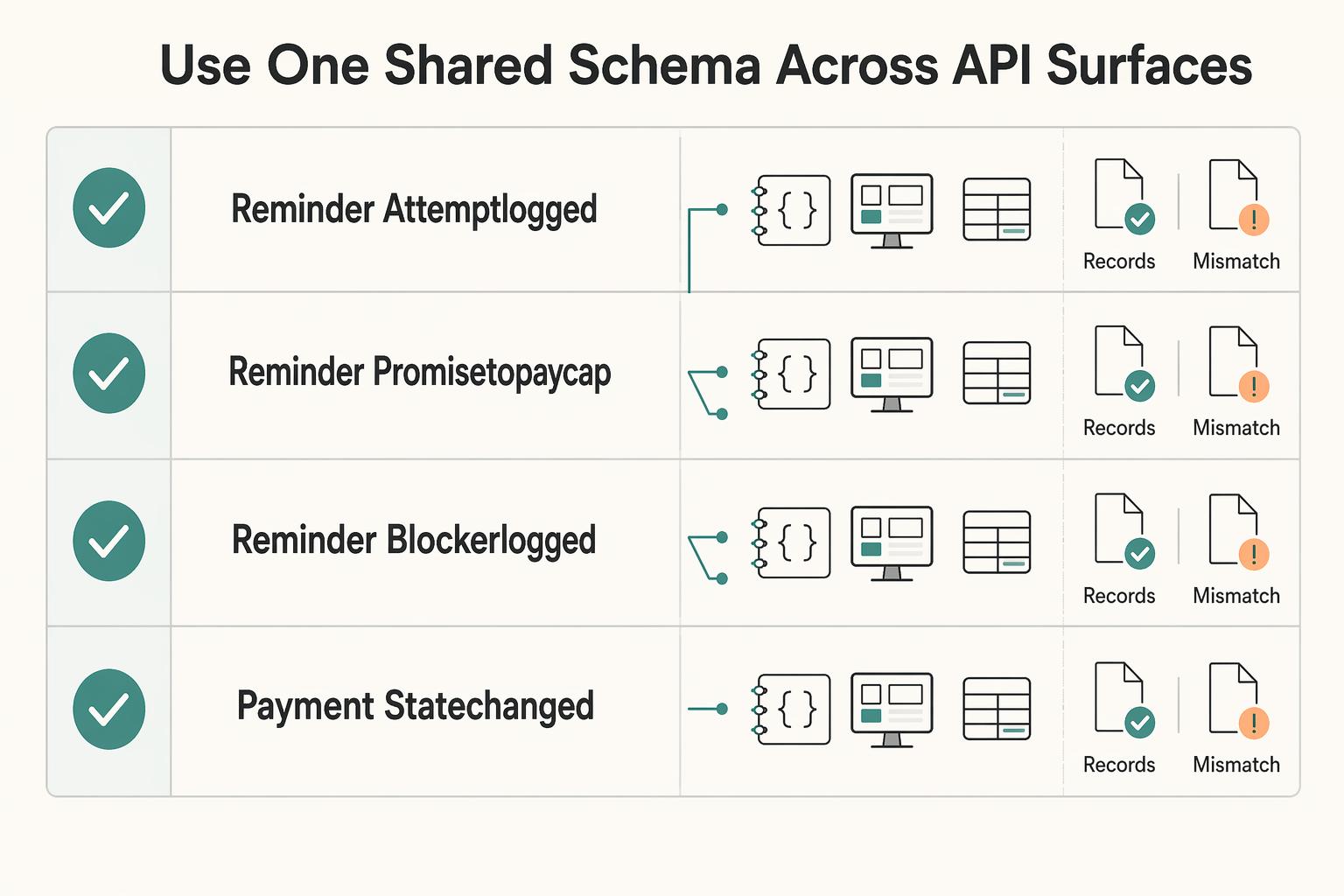
Use one shared schema across API and UI surfaces#
Use the same event names and core fields across webhooks, agent UI, and internal tools so audit review and debugging stay simpler.
| Event name | Core fields (example) | Source | Reliability note (example) | Audit retention |
|---|---|---|---|---|
reminder.attempt_logged | invoice_id, attempt_result, channel, occurred_at | Delivery webhook or UI action | Handle retries without creating duplicate attempt records | Retain per finance and audit policy |
reminder.promise_to_pay_captured | invoice_id, promise_status, promised_amount, promised_date, payer_name, channel, occurred_at | Voice or agent capture flow | Keep capture events replay-safe and review conflicting updates | Retain per finance and audit policy |
reminder.blocker_logged | invoice_id, blocker_type, next_action_owner, due_timestamp, occurred_at | Agent UI or workflow service | Prevent duplicate blocker entries for the same interaction | Retain per finance and audit policy |
payment.state_changed | invoice_id, payment_state, occurred_at | Payment event stream | Keep one state-change record per payment event | Retain per finance and audit policy |
The key decision is consistency, not a perfect field list. Outreach history, commitment capture, and payment updates should tell one coherent operational story.
Step 6 Connect reminders to payment, ledger, and settlement states#
The control point here is simple: change reminder behavior only when a documented payment-state signal tells you to, not just because someone replied. That keeps outreach consistent and closes visibility gaps.
Define one stop-or-hold policy per reminder route#
Write a short policy that names which recorded state can pause or suppress outreach for each route. Treat payer messages and reminder replies as context, not final payment proof. If you run reminders across email, SMS, and IVR, apply the same rule across channels so timing and tone stay aligned.
Record the evidence behind every reminder-state change#
When reminder behavior changes, log the triggering state and timestamp in structured fields on the invoice record. This avoids the tracked-in-notes problem that creates confusion during collections and review. Keep free-text notes for context, but make the decision path queryable.
Avoid one-size-fits-all automation in relationship-sensitive cases#
Rigid reminder logic can damage important client relationships and push teams back into manual follow-up. Use a documented hold or review path for sensitive cases while keeping the default reminder policy consistent.
The goal is controlled flexibility: automation by default, explicit exceptions when needed. Need a practical reference for reminder workflow controls? Review the Gruv docs.
Step 7 Set stop and handoff rules that protect relationships#
Make stop and handoff decisions explicit policy states, not inbox judgment. This helps keep communication workflows aligned with accounting reality.
Codify stop conditions on the Invoice Record#
Store stop conditions as structured values on the Invoice Record, with owner, timestamp, and evidence reference. If your policy uses stop states, define exactly who can set each state and whether it is temporary or final.
Keep the same control rule from Step 6: outreach changes only from documented payment-state signals. If reminders run from a client-facing tool, treat that layer as communication and use your accounting back-end as the settlement source of truth. In the provided comparison, HoneyBook is described as lacking an accounting engine, while QuickBooks is positioned as the financial back-end, so keep the source of truth explicit.
Define escalation triggers before pressure builds#
Escalation should come from documented triggers and stage windows, not ad hoc judgment. Define those triggers in fields and queries so the same account is evaluated consistently across channels.
Set thresholds as internal policy choices. There is no universal reminder cadence limit, cooldown window, or max-touch rule established here.
Route blockers to a human with full context#
Define a clear handoff point from automation to a named owner. The handoff should include enough context to act immediately: invoice status and age, recent outreach history, blocker history, active stop flags, and any commitment tracking you use.
The operating model is simple: automation handles routine follow-up, and exceptions move to human judgment when they cross your defined boundary. In the same comparison, QuickBooks is described as lacking proposal/contract features, so cross-tool ownership should be explicit.
Step 8 Handle high-friction exceptions without breaking trust#
High-friction exceptions should leave the standard reminder flow and move into a clearly owned exception path. If the blocker is a dispute, a payment failure, invalid payer contact, or a compliance review (such as KYC or AML), consider pausing routine Dunning and route the case to human review before further outreach.
Class the exception before sending anything else#
Do not treat every missed payment as the same problem. Collections automation should apply predefined rules consistently, but this is also the point where human judgment matters.
Use the Invoice Record to capture the exception class, owner, opened timestamp, last outbound message, and key invoice fields (vendor name, amount, due date). If those fields are incomplete, review whether the invoice should remain out of standard reminders until the record is complete.
| Exception class | Primary owner | Context to log | Message focus |
|---|---|---|---|
| Disputed charge | Finance ops or billing owner | Dispute context and invoice details | Acknowledge the issue and confirm the review path |
| Payment failure | Finance ops or payments ops | Failure event reference and invoice details | Confirm the failure and direct the client to the current payment path |
| Invalid payer contact | Account owner or operations | Delivery-failure signal and latest verified contact details | Request corrected billing contact details through a trusted channel |
| Compliance review (KYC/AML) | Compliance owner with ops visibility | Current review status plus invoice and counterparty details | Share a policy-safe status update without extra promises |
Match the message to the blocker#
Each exception message should state one clear next action and one named owner. That keeps outreach specific, can reduce duplicate follow-up, and avoids generic pressure when the real issue is dispute handling, payment-path validity, contact repair, or compliance review status.
Apply relationship guardrails for enterprise accounts#
For enterprise or high-sensitivity accounts, set exception outreach guardrails with the account team and compliance owners before continuing reminders. Keep ownership explicit, and document current status and next action to support a safe return to routine Dunning.
Log repeated failures as incidents, not just notes#
When the same blocker recurs, treat it as an incident so product and ops can fix root causes instead of repeating collections work. Missed or delayed follow-up is a known operational failure mode, and automated reporting should surface these patterns early.
Log details such as:
- exception class, invoice ID, owner, and timestamps
- source event or delivery-failure reference
- contact or payment-path data involved
- resolution taken and recurrence status
For a step-by-step walkthrough, see How to Invoice as a Freelancer Without Chasing Late Payments.
Step 9 Measure what matters each week and each month#
Track recovery outcomes and data quality together. If you only track collections outcomes, you can miss posting and reconciliation issues that create rework and hide risk. We review those gaps as operating defects because our goal is not more reminders; it is better recovery with less friction for your team and your clients.
Build one scorecard that mixes outcomes and data quality#
Use one scorecard across collections and finance. Start with core outcomes, then add data-quality checks so a "paid" status is backed by payment posting and reconciliation visibility.
| Metric | Definition | Owner | Target direction | Example trigger to investigate |
|---|---|---|---|---|
| Recovery rate | Share of overdue invoices that resolve to payment | Finance ops | Up | Sustained decline |
| Time-to-pay (or DSO) | Time from due date or first overdue touch to confirmed payment | Finance ops | Down | Sustained slowdown |
| Overdue aging movement | Whether balances move out of older aging buckets, including 30+ and 60+ days past due | Finance ops | Down in older buckets | 30+ or 60+ balances trend up |
| Manual touch rate | Share of invoices needing human intervention outside normal automation flows | Ops lead | Down | Rising trend without higher recovery |
| Posting and reconciliation exception rate | Payment events that are not fully posted or reconciled | Finance systems owner | Down | Backlog grows or stops aging down |
Review weekly for operations and monthly for policy#
Use a consistent review rhythm, for example a weekly ops review and a monthly policy review. In weekly ops, use automated reporting to spot trend changes early and confirm that reminder suppression follows confirmed payment posting and reconciliation updates, not just a UI status change.
Use the monthly policy review to log cadence or channel-rule changes, who approved them, and when. That gives you a clean before-and-after record when performance moves.
Treat metric conflicts as red flags#
When metrics move in opposite directions, investigate immediately. If recovery is flat while manual touches rise, the process may be creating work without improving resolution.
If time-to-pay improves while posting or reconciliation exceptions increase, treat it as an early warning. Verify cash-application quality before calling the change a win.
Related: What Is Dunning? A Platform Operator's Guide to Recovering Failed Recurring Payments.
Step 10 Common mistakes and how to recover fast#
Most reminder failures come from execution, not intent. Stop timing is unclear, retries and reminders overlap, messages are polite but vague, and teams cannot quickly see what happened next.
Tighten the stop signal#
Define a clear point where reminders stop once payment is recovered, and make sure that logic is applied consistently. If reminders continue after payment is resolved, your stop logic needs adjustment.
Check invoices that received reminders after payment and compare payment activity with reminder-send timing. This helps you separate stop-logic issues from message-timing issues.
Stop duplicate sends at the retry layer#
Retries should improve recovery, not stack duplicate reminders. Use retry handling that avoids repeat sends when the underlying state has not changed.
Review retry outcomes to confirm customers are not being over-contacted. Over-contacting without a plan can damage client relationships.
Rewrite vague reminders into one clear action#
Each reminder should state what is due, when it is due, and the single action needed to resolve it. If a retry has failed, include a direct path for the customer to update payment details.
Email works well for upcoming and overdue reminders. If email is ignored, escalate through additional channels such as SMS, in-app, or portal notifications, with urgency increasing while tone stays respectful.
A staged sequence can use checkpoints like 7, 14, 30, and 60 days. It should also have a clear endpoint after a grace period: recovery succeeds, or a last-resort account action is taken.
Make every outcome explainable#
If operators cannot explain an open invoice, they cannot improve recovery. Track reminder outcomes consistently so the current status and next action are clear to anyone picking up the account.
Review those records regularly for clarity, not perfection. Another operator should be able to open the invoice and understand the current state without reconstructing a long note trail.
Use this checklist to launch and verify#
Go live only when ownership, stage rules, process controls, relationship safeguards, and measurement are all in place. If one control is missing, pause the launch to avoid predictable failures like missed payments, reconciliation errors, and avoidable relationship friction.
Assign owners and complete the Invoice Record#
Set clear owners for reminder policy, stage-rule changes, and reminder behavior, with one named approver for any Dunning sequence update.
| Field | Before first send | Why it matters |
|---|---|---|
| due date | Verify on every invoice | Anchor field for reminder timing |
| amount | Verify on every invoice | Used to state what is due |
| payer contact channel | Verify on every invoice | Needed for reminder outreach |
| dispute status | Verify on every invoice | Active disputes should stop automation and route to human review |
| a direct payment path | Verify on every invoice | Each stage message should give one clear payment path |
Before the first send, verify that each invoice has the required operating fields:
- due date
- amount
- payer contact channel
- dispute status
- a direct payment path
Also document any internal exception rules that may pause or reroute outreach.
Publish segment rules before the first message#
Publish Dunning rules by segment before launch, including:
- stage name
- cadence
- channel sequence
- escalation trigger
- stop condition
A practical checkpoint pattern is Day 14, Day 30, and Day 45, with tone moving from gentle to firmer as invoices age. For each stage, make sure the message gives one clear payment path and one clear dispute route.
Implement and verify event controls#
Treat process reliability as a launch gate. Test the sequence end to end so stage timing, escalation triggers, and stop conditions work as designed.
In testing, confirm reminders follow the configured Day 14/Day 30/Day 45 checkpoints, configured stop conditions are enforced, and outreach stays predictable and professional.
Enforce relationship safeguards#
Build stop rules and handoff logic into the process, not just team guidance. At a minimum, stop automation for:
- confirmed payment
- active dispute review
- approved exception states
Route disputes to a human owner with prior contact context attached, and verify that a dispute raised mid-sequence blocks the next automated touch.
Run a fixed measurement cadence and log changes#
Use a consistent review rhythm, then log every rule change with:
- date
- approver
- old rule
- new rule
- before/after impact window
Track DSO, recovery, and operations together so improvements in one area do not hide damage in another.
Related reading: IndieHacker Platform Guide: How to Add Revenue Share Payments Without a Finance Team.
If you want a second pass on your escalation and exception workflow before launch, talk with Gruv.
Frequently Asked Questions
What reminder cadence works best for overdue invoices in a platform setting?
There is no single best cadence for every platform segment. A practical baseline is one pre due reminder about 3 to 5 days before the due date, then a consistent overdue sequence adapted to account context. Checkpoints such as due date, +7, +14, and +30 days overdue are examples, not universal rules.
How do you recover late payments without damaging client relationships?
Treat late payment as a resolution process, not automatic bad intent. Keep messages clear, respectful, and specific about what is due and the next action. Use consistent timing, documented handling, and human review for sensitive cases so outreach does not turn into noise.
When should automation escalate to a human collections owner?
Escalate when automation is no longer resolving the issue, especially for disputes, unanswered questions, repeated non response, or higher risk cases. Define the handoff point in advance and assign a named owner. Include invoice status and age, recent outreach, blocker history, active stop flags, and any commitment tracking in the handoff.
What data should every reminder attempt log in the invoice system?
Log the channel, timestamp, attempt result, and enough invoice context to explain what happened and what should happen next. A practical structured record includes Promise to Pay status, blocker type, next action owner, and due timestamp. Keep related invoice documents available to the AR team and avoid burying outcomes only in notes.
Which channel should you use first for each dunning stage?
There is no universal first channel rule for every account or stage. Start with the channel that best supports clear communication and reliable records for that stage, often email for documentation and SMS for short prompts. Then adjust by response pattern, account risk, and relationship sensitivity as urgency increases.
How do you prevent over-contacting clients while still improving recovery?
Prevent over contacting by using consistent timing, sequencing limits, and documented pause or escalation conditions. Make recent touches visible before another reminder is sent, and stop or hold outreach when documented payment state signals require it. If disputes or unanswered questions are active, move the account to human follow up instead of repeating automated nudges.
How quickly can a team implement automated reminders if data and events are already in place?
The guide does not support a universal implementation timeline. If data and events are already in place, focus on clear ownership, stage rules, structured tracking, verified stop conditions, and defined human handoff before launch. Go live only when those controls are in place.
Researched and edited by the Gruv editorial team. Gruv builds cross-border billing, payouts, and finance-operations software for global businesses.
Sources
Includes 4 external sources outside the trusted-domain allowlist.
- policy.umn.edu/finance/billingsreceivablestrusted
- policy.umn.edu/finance/billingreceivables-proc03trusted
- uvafinance.virginia.edu/sites/uvafinance/files/2021-08/AR-Accounts%2...trusted
- uvafinance.virginia.edu/sites/uvafinance/files/Credit-Collection_Pro...trusted
- billogram.com/invoice-to-cash-i2cexternal
- chargezoom.com/blog/what-is-a-dunning-sequenceexternal
- membersolutions.com/how-to-collect-past-due-invoicesexternal
- score.org/resource/blog-post/11-tips-handling-late-pay...external
Educational content only. Not legal, tax, or financial advice.
Related Posts

The Freelance Payment Penalty: A Modeled Audit of Platform Fees, FX Spreads, and Payout Delays
The money rarely disappears through a single, easy-to-spot fee. The real loss is stacked. A marketplace takes its commission, a processor adds a charge for international cards, a bank or payment company converts the currency at a spread, a platform holds the funds before release, and a wire sheds a little to intermediaries on the way in. Each layer looks defensible on its own, but the worker feels the combined result as a smaller deposit and a later payday.

How to Respond to a Subpoena for Business Records
Move fast, but do not produce records on instinct. If you need to **respond to a subpoena for business records**, your immediate job is to control deadlines, preserve records, and make any later production defensible.
A US Expat's Guide to Investing in UCITS ETFs to Avoid PFIC Issues
The real problem is a two-system conflict. U.S. tax treatment can punish the wrong fund choice, while local product-access constraints can block the funds you want to buy in the first place. For **us expat ucits etfs**, the practical question is not "Which product is best?" It is "What can I access, report, and keep doing every year without guessing?" Use this four-part filter before any trade: