
Quick Answer
Use Zapier for CRM updates, notifications and other follow-up actions after your authoritative system commits a subscriber change. Checkout completion alone may not confirm payment for delayed methods; check payment status and your access policy first. Keep retries in the billing provider, and make downstream actions safe to replay using durable business identities.
Where Zapier Fits in Subscriber Workflows#
The hard part of subscriber automation is deciding what Zapier can coordinate and what the billing source or your API must own. Set that boundary before connecting apps so a convenient CRM update cannot become an accidental access or payment decision.
Before you start#
Zapier is a strong fit for cross-tool automation. It describes Zaps as app-connected automation workflows, and it supports a large integration surface with 8,000+ apps. For subscriber operations, that usually means syncing payment processors, CRM records, and communication tools so billing data stays current without manual entry. That is the speed advantage.
The constraint matters just as much. Subscriber automation touches onboarding, billing, renewals, and cancellations, but not every event should trigger a direct no-code side effect. If you are responsible for architecture, integrations, or operational correctness, use this guide to set control boundaries before the first Zap goes live.
Set the scope around orchestration, not financial truth#
Zapier can connect events across your billing tool, CRM, support inbox, and internal notifications quickly. It also supports mixed no-code, low-code, and more technical integration approaches, which helps when your team needs customization rather than only point-and-click setup.
A practical checkpoint from day one is to prefer automations triggered by authoritative billing or API events, not by a form submit or a rep updating a CRM field. If the activation email, account access, and internal alert all depend on a payment succeeding, make sure the trigger comes from the payment confirmation path you trust most. That one choice reduces cleanup later.
Build in oversight before you build volume#
Zapier explicitly positions team automation with IT oversight, and that is the right lens for subscription work. You want clear ownership for status changes, retries, and audit evidence before anyone starts adding "just one more" sync.
An early risk is duplicate or conflicting updates across tools. A subscriber gets marked active in the CRM, but the billing state did not actually change, or two automations react to the same event. As you read the rest of this guide, think in terms of an evidence pack: webhook delivery IDs, API request logs, and the exact field mappings for subscriber ID, plan ID, invoice ID, and status.
Follow an implementation order that earns trust quickly#
Start with low-risk subscriber actions after replay controls and reconciliation are in place. Then add renewals, failed payments and cancellations, verifying the authoritative state before each downstream action.
This guide helps you make those calls in order: where Zapier fits, where your API should stay in charge, how to test before launch, what breaks first, and a checklist you can use before you expand the setup. For a step-by-step walkthrough, see How to Automate Client Onboarding with Notion and Zapier.
Decide the control boundary between Zapier and your API#
Keep Zapier on the orchestration side, and keep financial truth in your API. That boundary avoids much of the cleanup that follows a fast launch.
Keep Zapier in charge of coordination only#
Put Zapier and Zaps in charge of coordination only. They are a strong fit for cross-tool updates, internal alerts, CRM tagging, and post-event notifications after your API has already accepted the billing event. Zapier supports webhooks, API requests, and private app connections, but its API Request action still requires real HTTP and API knowledge. Treat that as a transport tool, not the place to decide who gets charged, paid, or approved.
Route state-changing actions through your System of Record first#
Route any state-changing action through your System of Record first. If an action affects balances, payouts, ledger entries, access tied to payment state, or any legal or compliance status, your API should commit it and return the result before a Zap does anything downstream.
A practical verification check is to pick one payment success path and confirm the API log shows the committed subscriber, invoice, or payout state before the Zap sends an email, updates the CRM, or creates an ops task. If a retry, duplicate webhook, or manual re-run could move money twice or create conflicting status, that action belongs on the API side, not in a direct no-code branch.
Keep KYC, KYB, AML, and tax-gated actions in controlled services#
Keep any required identity, tax or compliance decision in the service that owns it. Your API should expose the approved, blocked or pending result to Zapier, with the decision ID and timestamp. Send only the data needed for coordination; sensitive documents and tax identifiers belong in their approved storage system.
Your evidence pack here should be concrete: approval record, submitted form version, decision timestamp, and the ID that ties that decision back to the API event. Let Zapier distribute the result only after the API says approved, blocked, or pending review.
Prepare your event inventory and System of Record before building#
Set data ownership first: choose one authoritative System of Record for subscriber and billing state, then map every event and field that leaves it. If you skip this, billing, CRM, and support data drift quickly.
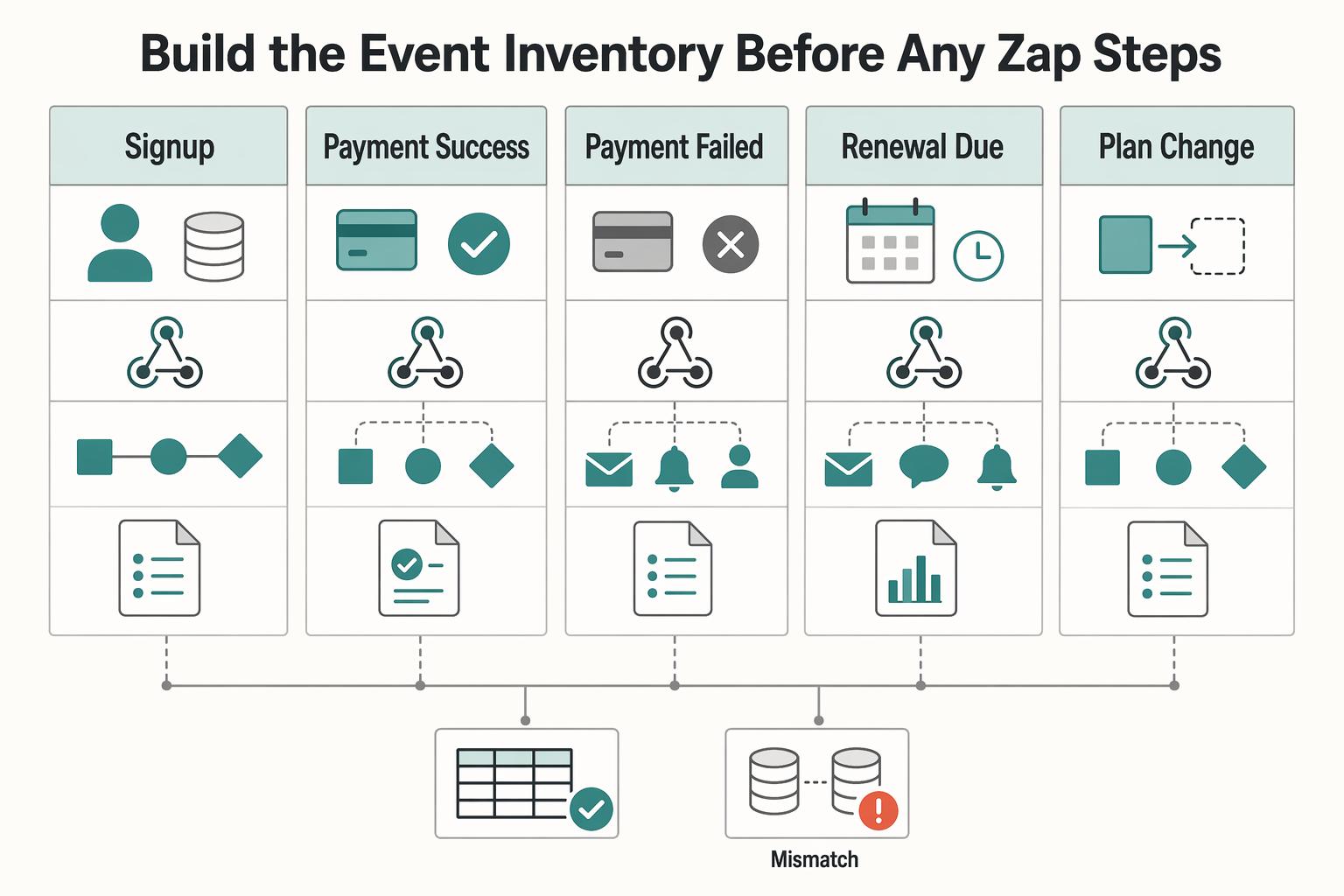
Build the event inventory before any Zap steps#
Create a working table your team can review line by line. For each event, define the owner of final state, trigger source, downstream targets, and evidence to retain.
| Event | Owner for final state | Trigger source | Downstream targets | Evidence to keep |
|---|---|---|---|---|
| Signup | API / authoritative source | app action or billing-created event | CRM, support inbox, internal alert | request log, subscriber ID |
| Payment success | API / authoritative source | webhook payload | CRM, access service, finance alert | webhook event ID, invoice ID, Audit Trail ref |
| Payment failed | API / authoritative source | webhook payload | CRM, dunning email tool, support queue | webhook event ID, failure status, Audit Trail ref |
| Renewal due | billing tool or API scheduler | scheduled trigger | CRM reminder, internal ops task | schedule ID, subscriber ID |
| Plan change | API / authoritative source | app action or billing confirmation | CRM, analytics, support tool | request log, old/new plan ID |
| Cancellation | API / authoritative source | app action or billing confirmation | CRM, messaging tool, support tool | request log, effective date, Audit Trail ref |
| Refund | API / authoritative source | refund webhook or API action | CRM, finance reporting | webhook event ID, invoice ID, reconciliation file link |
| Payout request | API / payout service | app action or internal approval | ops queue, finance tool | request log, approval record, Audit Trail ref |
This is not a universal schema. It is a decision tool. Any row with unclear ownership or two systems claiming final status is a launch risk.
Declare one System of Record and enforce write boundaries#
Treat your System of Record as the authoritative business-data source for subscriber status and billing state. Then mark other tools as either allowed to write specific non-billing fields or limited to mirrors.
A common pattern is API-owned billing state, with CRM and support writable for notes, tags, and case workflow. If support must trigger a billing-impacting correction, route it through the API and let mirrors update downstream.
Map fields before building actions#
Field drift is where many no-code automations fail. Map subscriber ID, plan ID, invoice ID, and status values across billing, API, CRM, and support tools before you build actions.
When one system emits names and another expects IDs, use Zapier lookup tables for translation. Keep canonical values explicit, and validate with one real payment-success path to confirm subscriber and invoice IDs survive every hop unchanged.
Define evidence artifacts and run replay checks pre-launch#
Before launch, define where request logs, webhook payload IDs, Audit Trail references, and reconciliation outputs are stored for each critical event. Zapier can help distribute records consistently, but you still need to decide what gets captured and where.
Verify webhook signatures before accepting events, then durably record accepted events for processing. Deduplicate by provider, account and event ID; commit the processed marker with the local state change so a crash cannot leave one without the other. Different events can describe the same business action, so also enforce the action’s durable identity. Replay tests should include a crash between receipt and commit.
If you use Stripe CLI, resend specific events to a selected webhook endpoint during testing, noting that resend is limited to events from the last 30 days. Replay checks will not guarantee production perfection, but they do catch common duplicate-write failures early.
Implement onboarding and subscription activation automations#
Start with low-risk, reversible automations: post-payment onboarding actions like welcome messages, CRM tagging, and internal task creation through Zaps.
Trigger from payment confirmation, not from the signup form#
For Stripe Checkout, inspect the session’s payment status and your entitlement policy rather than treating every checkout.session.completed event as proof of paid funds. Delayed methods can complete checkout while payment is pending; handle checkout.session.async_payment_succeeded and failure as separate outcomes. Stripe’s fulfillment guide explains these paths. Signup may start lead handling, while paid access waits for the required confirmed state.
Sequence activation in one direction#
Run activation in this order: payment confirmation, subscriber activation in your API, CRM or tag updates, then operator notification. This keeps downstream tools aligned to a confirmed active state instead of predicting one.
Keep the first Zaps low risk and visible#
Prioritize visible onboarding outcomes first, such as a welcome email, a paid-subscriber CRM tag, and an internal onboarding task. For early rollout, keep one trusted activation path so these actions mirror the same confirmed subscription state.
Gate Merchant of Record cases in the API before access changes#
In Merchant of Record flows, tax handling and core compliance obligations sit with the payment authority, so check the returned tax or compliance status in your API before changing access. Keep that gate in API logic, not in Zapier alone. If the required signal is missing, hold access and alert an operator. We covered this in detail in Building Subscription Revenue on a Marketplace Without Billing Gaps.
Implement renewals failed payments and dunning automations#
Renewals need explicit branches, and retry timing should stay in your billing platform. Use Zapier to react to confirmed billing state changes, not to predict outcomes.
Model renewal handling from authoritative webhook events#
Build branches from confirmed billing events: renewal success, retryable failure, payment-method update after a hard decline, retry success, retry exhaustion and cancellation. Zapier Paths should mirror the billing source and committed access policy rather than predict an outcome from a timer.
For each branch, map the same core records across systems and verify they stay aligned during testing. A practical check is one failed renewal and one recovered retry, then confirm those events reconcile across billing, your API entitlement record, CRM timeline, and notification log before adding more messaging.
Let the billing platform own retries, and let Zapier react to outcomes#
Keep payment retries in the billing provider. Stripe Smart Retries applies to eligible failures; some hard declines require a new payment method before another charge can execute. Use your configured schedule for retryable failures and a separate payment-method update path for nonretryable ones. Zapier should react to these outcomes rather than start its own collection loop.
Avoid timer-only dunning reminders in Zapier. If reminders are not tied to actual failure events, you can send failure emails after a payment already recovered. Also prevent duplicate customer notices if Stripe failed-payment emails or Chargebee dunning emails are enabled by assigning one primary customer messaging owner.
| Event | Retry owner | Customer message | Internal escalation | Provider state and entitlement decision |
|---|---|---|---|---|
| Renewal success | Billing platform | Receipt or renewal confirmation if needed | None | Active |
| Payment failure, retries remaining | Billing platform via Smart Retries or custom schedule | Failed payment notice only when a real failure event occurs | Support or ops alert for watchlist accounts | Past due or equivalent pending-retry state |
| Hard decline / new payment method required | Billing provider; customer updates method | Request a valid payment method; avoid promising another automatic charge | Support review if method update stalls | Invoice remains unpaid; access follows your documented grace policy |
| Retry success | Billing platform | Recovery or payment-updated message | Close any open task | Active |
| Retry exhaustion | Billing platform reaches configured recovery outcome; API applies access policy | Final dunning or access-change notice | Create operator review task | Provider may remain past_due, become unpaid or cancel; access follows your configured policy |
| Cancellation fallback | API after confirmed terminal billing state | Cancellation confirmation | Notify account owner if required | Canceled |
Apply your entitlement rule in the API, not in email logic#
Apply entitlement changes from the configured recovery outcome and current invoice or subscription state, not a raw attempt count. Some scheduled attempts do not execute a charge when the decline cannot be retried. Keep the provider’s billing status separate from your access policy, then let Zapier mirror the committed entitlement decision.
Evaluate the relevant invoice and subscription together with your grace-period policy before starting or stopping service. Pausing Stripe payment collection alone does not change subscription status, and a retry policy can end in unpaid, past_due or canceled. Your entitlement state should explain how each configured outcome affects access.
For high-value failed renewals, add a manual finance-ops review path before final cancellation. If you allow overrides, log them in your Audit Trail so access exceptions are tracked and reviewable.
Verify edge cases before you trust the flow in production#
Before production, test a retryable failure, a hard decline needing a new payment method, recovery before the next reminder, and each configured end-of-recovery outcome. Confirm provider state, API entitlements, CRM and messages agree, including any approved grace-period override.
Watch for mixed ownership as the main risk: Zapier timers running dunning while Stripe or Chargebee also retries and emails. That combination creates false failure notices, duplicate work, and access states that drift from the billing system. Related: A Guide to Dunning Management for Failed Payments.
Implement cancellations plan changes and downstream sync#
For cancellations and plan changes, keep ownership strict: let the billing platform decide money and timing, let your API confirm subscriber state, and then let Zapier mirror that final state to CRM and messaging. Pushing downstream updates before billing and API state settle is what creates access drift and wrong customer messages.
Model cancellations and plan changes as dated state transitions#
Treat cancellations and plan changes as dated state transitions, not instant side effects. In Stripe, cancellation timing can be immediate, period-end, or custom-day, and period-end cancellation is explicitly set with cancel_at_period_end=true. For scheduled changes, subscription schedule phases give clear effective-date boundaries because one phase ends when the next begins.
| Option | How it is described | Key note |
|---|---|---|
| Immediate cancellation | A cancellation timing option | Validate with an immediate-cancellation test case |
| Period-end cancellation | Set with cancel_at_period_end=true | Confirm API, CRM, and messaging reflect the same effective date |
| Custom-day cancellation | A cancellation timing option | Keep current state, scheduled next state, and effective date in your API |
| Subscription schedule phases | One phase ends when the next begins | Use phase boundaries for scheduled changes |
Keep current state, scheduled next state, and effective date in your API, then propagate that authoritative state through webhooks to downstream tools. Validate with test cases for immediate and period-end cancellation, and confirm API, CRM, and messaging all reflect the same effective date.
Apply upgrades and downgrades in the right order#
Use this order for upgrades and downgrades: apply billing changes first, confirm API state second, propagate through Zapier last. Stripe supports changing existing subscriptions without canceling and recreating, and billing-related updates can create prorations and invoices.
If a change should apply only after payment succeeds, use pending updates so the update is applied only when the new invoice is paid. Also keep proration logic precise: only changes that affect billable amounts in the current billing cycle create prorations.
Preserve a dispute-grade Audit Trail for every change#
Record every cancellation or plan change in an Audit Trail with at least previous plan, new plan, timestamp, actor/source, effective date, and cancellation reason. Use actor/source values that clearly separate self-serve, support, admin, and migration-originated changes.
Do not assume Stripe or Zapier will capture this full dispute-grade history by default; design this explicitly in your system.
Dual-write carefully when leaving a Legacy Billing System#
During migration, keep one billing engine authorized to charge each subscriber. Mirror status changes to the other system and reconcile effective dates, without enabling a second collection path. Retain failed mirror writes for retry; cut over only after parity and a rollback plan are verified.
Do not fully cut over while cancellation timing or effective-state outcomes still disagree between systems. For deeper migration sequencing, see How to Migrate Subscribers from a Legacy Billing System Without Downtime.
Add reliability controls for Idempotency Audit Trail and Reconciliation#
Make reliability explicit: retries should be safe, every state change should be traceable, and billing, access, and payout records should be reconcilable.
Enforce idempotency on every write endpoint a Zap can hit more than once#
Treat idempotency as mandatory on write endpoints that Zap retries can reach. An idempotency key lets the server recognize retries of the same request, and Stripe supports keys up to 255 characters.
Give each business action a durable identity, store its parameters and outcome, and reuse it on retries. Enforce uniqueness in the action store; provider keys expire, so a saved audit entry alone cannot prevent a later duplicate. Reconcile an unknown result before issuing a new request. Commit pending downstream work atomically with the local state change and processed-event marker, then dispatch it after commit. Track completion separately for each target.
Capture event lineage across Webhooks, API logs, and Zap history#
Store lineage so one incident can be traced end to end. Persist webhook event identifiers so you can retrieve original event details later, and keep the corresponding API change log and Audit Trail entry tied to the subscriber update.
| Source | What to retain | Limit or note |
|---|---|---|
| Webhooks | Webhook event identifiers and original event details | Persist the identifiers so you can retrieve event details later |
| API logs | API change log and Audit Trail entry | Tie both to the subscriber update |
| Zap history | Run history reference and run outcomes streamed to your monitoring endpoint when possible | Zapier only guarantees up to 60 days of run data and shows up to 10,000 runs |
For Zapier, retain the run history reference your setup exposes, and stream run outcomes to your monitoring endpoint when possible. Zap history is useful for operations, but Zapier only guarantees up to 60 days of run data and shows up to 10,000 runs, so keep your own durable trail.
Run a scheduled reconciliation job between billing, subscriber status, and payout-facing records#
Run reconciliation on a fixed schedule between billing truth, subscriber access state, CRM status, and payout-facing records. A daily cadence is an operating choice, not a vendor requirement, but it aligns well with webhook retries that can continue for up to three days in live mode.
If you use automatic payouts, Stripe preserves transaction-to-payout linkage, and the payout reconciliation report is designed to reconcile the transactions included in each payout batch. That makes settlement checks more reliable than reconstructing payout membership later.
Alert on a short list of drift patterns#
Add custom drift alarms for a small set of high-cost mismatches:
- active subscriber with canceled billing
- paid invoice with inactive access
- payout enabled without required compliance status
- CRM marked canceled while billing remains active
Treat these alarms as custom control logic, not native platform protection. When one fires, pause downstream propagation, resolve the mismatch, and write the resolution back to the Audit Trail with the related webhook and Zap history references.
Common failure modes and recovery actions#
Most production breakages come from four places: duplicate trigger paths, out-of-order billing events, compliance checks that finish after activation, and payout flags set from internal optimism instead of provider truth. Recover by fixing state in your authoritative system first, then syncing clean updates to Zapier, your CRM, and payout tools.
Disable duplicate trigger paths before you repair data#
Disable duplicate trigger paths first, then repair records. Zapier notes duplicate behavior differs between trigger and action steps, and a common cause is multiple Zaps using the same trigger. Start by searching Zap run history for a duplicated unique identifier such as subscriber ID, invoice ID, or email, then confirm whether more than one trigger path fired for one business event.
After you isolate the duplicate path, disable one branch and backfill through your API flow instead of manual CRM edits. If your billing source is Stripe, keep the event ID during investigation because Retrieve Event API access is only guaranteed for 30 days. Avoid replaying both branches during cleanup, or you can create a second duplicate cycle.
Enforce event ordering in the core system before syncing downstream#
Stripe does not guarantee webhook ordering or a shared object sequence number. Re-fetch the relevant subscription or invoice when needed and apply your access policy to its current state. Use object-specific versions only where the provider actually supplies them; timestamps alone are not a reliable total ordering. Preserve historical events for audit without letting an old snapshot overwrite current access.
Test this directly by sending two events out of order and confirming final subscriber state remains correct in billing and CRM. Do not rely on replay alone when ordering checks are missing.
Gate activation and downstream updates on compliance status where policy requires it#
Gate activation and downstream actions on compliance results when your policy requires it. If payment succeeds but an AML review, jurisdiction rule, or VAT Validation step is unresolved, hold access updates, CRM active tagging, and payout-related actions until the policy outcome is known. For EU VAT number checks, VIES is used to verify VAT number validity, but that does not make VAT validation universal for every subscriber.
Use a negative test as your checkpoint: a paid signup with a failed policy check should remain blocked in your authoritative system with a clear reason code.
Re-check payout readiness against provider requirements before re-enabling it in Payout Infrastructure#
Re-check provider status before re-enabling payout readiness in Payout Infrastructure. For Stripe connected accounts, payouts are not enabled until verification requirements are fulfilled and a payout method is attached, and payouts can be disabled if required information is not submitted by the current deadline. If an internal payout_ready=true flag was set too early, clear it, fetch current provider verification status, confirm KYC/KYB completion, and then re-enable only when prerequisites are satisfied.
Validate by comparing your internal payout-ready field against the provider's actual payouts-enabled state. If they conflict, treat the provider state as authoritative.
Conclusion and copy paste launch checklist#
The cleanest way to launch this is to let Zapier handle speed across billing, CRM, and messaging while your API and core billing source keep ownership of subscriber state, retries, and any write that could create financial or access mistakes. If you keep only one rule from this guide, keep that boundary hard.
Confirm the control boundary before you turn on live Zaps#
Your last prelaunch review should answer one uncomfortable question clearly: if a Zap replays, runs late, or runs twice, what can it safely touch? In production, Zaps are a strong fit for cross-system orchestration and notifications. They are usually not where teams keep canonical balances, entitlement state, or compliance gating.
Replay a prior run and confirm the action store recognizes the same business intent, including a retry after the provider’s idempotency retention window. Verify that pending downstream work resumes after a crash without repeating committed billing or access changes.
Test recovery paths, not just happy paths#
A subscriber renewal that succeeds is the easy case. The harder check is failed payment, retry success, retry exhaustion, and temporary webhook loss. If you use Stripe Billing, let Smart Retries own retry timing, then make sure your downstream messaging reacts only to real payment state changes.
Also test webhook recovery. Stripe can automatically resend undelivered events for up to three days, so you should know who checks for missed events and how you prevent a replay from creating a second note, task, or status change. Zapier can also replay failed steps up to 5 times, which is useful only if your downstream writes are retry-safe.
Prove you can investigate one subscriber event end to end#
Before launch, pick one renewal, one cancellation, or one failed invoice and build the evidence pack you would want during a dispute or ops review. At minimum, that pack should include the billing provider event ID, your subscriber and invoice IDs, the API request log, the resulting state change in your core system, the Zap history run, and where relevant the Zapier audit log entry showing who changed what and when. If you cannot assemble that in minutes, you are not ready.
Copy and use this checklist as your go-live gate:
- Control boundary approved for Zapier vs API ownership
- Event inventory and field mappings signed off across billing, CRM, and messaging
- Idempotency and webhook replay tests passed
- Dunning and renewal exception matrix implemented
- Reconciliation job and drift alerts live
- Audit Trail evidence pack verified for critical subscriber events
- Rollback and manual recovery steps documented for ops
One final red flag: do not treat Zap history as your source of truth. Use it as an execution log for troubleshooting, then reconcile against billing data and, where payouts matter, a payout reconciliation report. That is the difference between fast automation and quiet billing debt.
Frequently Asked Questions
Can Zapier automate subscription billing without code for a production platform?
Yes, if you use it for orchestration, not as the owner of financial truth. Zapier is well suited to sync billing, CRM, and messaging updates, but your API and core system should still own subscription state, money movement, compliance decisions, and any entitlement changes that matter if a dispute or replay happens later.
What should we automate first to reduce churn without risking billing integrity?
Start with failed-payment follow-up that listens to real billing status changes, plus internal alerts and CRM updates. If you use Stripe Billing, let Smart Retries handle the retry logic first, then have Zapier send the right message based on confirmed status changes such as payment failed, payment recovered, or retries exhausted by your policy, instead of guessing from a timer.
Where should no-code automation stop and API-owned logic begin?
If an action changes balances, the subscriber's canonical status, access rights, payout readiness, or compliance state, keep it in the API. Use Zaps for side effects like tagging a CRM record, posting an ops alert, or creating a support task after your API has already accepted and recorded the event.
How do we prevent duplicate updates between subscription billing and CRM systems?
Give each business event one authoritative trigger path and key everything off stable IDs such as subscriber ID, invoice ID, and provider event ID. Zapier trigger deduplication helps, but do not rely on it alone. Use Find or Create style actions where possible, and make API create or update calls idempotent so retries do not create a second subscription, note, or status change.
What is the minimum event and logging setup needed for an audit-ready launch?
A practical minimum is to capture the billing provider's webhook Event object ID, your internal subscriber and invoice IDs, the API request log entry, the resulting state change in your core system, and the Zap history run that handled the downstream sync. A good verification test is to pick one renewal or cancellation and prove you can trace it end to end, from webhook receipt to API write to CRM update, without gaps.
If webhooks fail temporarily, plan for undelivered-event recovery too, since Stripe can automatically resend for up to three days.
How should we handle failed payments and dunning without creating false customer alerts?
Tie customer messages to actual payment status transitions, not to a calendar reminder that fires whether payment recovered or not. A practical pattern is internal alert on first failure, provider-managed retries in the middle, then customer dunning only when the billing source confirms the payment is still failed or your policy says the retry path is exhausted.
One common mistake is sending a "your subscription is canceled" email before the API has actually paused entitlements and written the final state.
Try a related tool
Researched and edited by the Gruv editorial team. Gruv builds cross-border billing, payouts, and finance-operations software for global businesses.
Sources
Includes 4 external sources outside the trusted-domain allowlist.
- data.europa.eu/data/datasets/vies-vat-information-exchange-...trusted
- docs.stripe.com/billing/revenue-recovery/smart-retriestrusted
- docs.stripe.com/api/idempotent_requeststrusted
- help.zapier.com/hc/en-us/articles/8496291148685-View-and-man...external
- help.zapier.com/hc/en-us/articles/8496260269965-How-Zapier-h...external
- zapier.com/automation/subscription-automationexternal
- zapier.com/automation/subscription-automation/subscript...external
Educational content only. Not legal, tax, or financial advice.
Related Posts
How to Migrate Subscribers from a Legacy Billing System Without Downtime
A successful **subscription billing migration** should be boring to customers and calm for finance. You are not just moving records out of a legacy system. You are changing who can create charges, where invoice truth lives, and how finance will trust the first close. Done well, the move is largely invisible to customers, designed to avoid duplicate charging, and uneventful for the teams who have to run it.

Seven Subscription Billing Tools: Features and Pricing
The best subscription billing tool depends on what you sell, how you charge and who acts as seller to the customer. Start with those choices, then compare recovery, finance exports, implementation effort and price. A recurring invoice engine, a payment processor and a merchant of record perform different jobs; their headline fees cover different costs.

A Guide to Dunning Management for Failed Payments
If you run recurring invoices, failed payments are not back-office noise. They create cashflow gaps, force extra follow-up work, and increase **Involuntary Churn** when good clients lose access after payment friction.