
Quick Answer
Use Wise as the payment rail in a simple finance stack, not as your whole back office. The article recommends issuing invoices through an invoicing layer, keeping QuickBooks as the accounting record, and using Notion for operating context and evidence. Build compliance checks before payment details, reconcile monthly, and keep records ready for FBAR and residency support when relevant.
Why Wise is the Right Component for Your Financial Stack#
Use Wise as a payment rail with multi-currency receiving and conversion features, not as your entire finance setup. It makes sense when your biggest pain points are unclear FX costs, cross-border client payments, and getting paid without asking clients to send an international wire they may resist.
The practical case is straightforward. The service says it uses the live mid-market rate with an upfront fee, offers receiving account details in 24 currencies, lets businesses accept payments in 18+ currencies, and convert to 40+ currencies. That matters if you invoice abroad and want clients paying local details instead of figuring out an overseas transfer. The main tradeoff is speed versus cost. Bank transfer funding is usually the cheapest route, but it can be slower than card funding.
| Option | Pricing clarity | Speed expectations | Currency handling | Hold or dispute exposure | Bookkeeping fit |
|---|---|---|---|---|---|
| Multi-currency account | Upfront fee model with mid-market rate | Varies by route; bank transfer can be slower than cards | Strong for receiving and converting across currencies | No specific card-chargeback claim stated here | Good transaction source; keep your accounting ledger in QuickBooks |
| Traditional bank | Varies by bank and route | Varies by bank, cutoffs, and corridor | Depends on bank coverage | Varies by provider and product | Familiar reconciliation workflows |
| Payment processor | Fees are visible, but net can change after disputes | Funds may be pending before available | Varies by processor and setup | Stripe disputes can debit the amount plus a dispute fee; PayPal holds can make funds unusable | Requires tracking pending funds, disputes, and fees |
A clean setup is to use an invoicing layer to issue the bill, QuickBooks as the accounting record, and Notion to hold the operating context with properties like client, entity, invoice number, and tax year. If you need counterparty evidence, verify the firm on the FCA Financial Services Register: Wise Payments Limited is listed as an Authorised Electronic Money Institution under FRN 900507. In practice, the common failure mode is treating payment history as the accounting record. It is not.
Set the structure early so cleanup does not pile up later.
- Set a clean account structure by entity and purpose.
- Use one naming format for clients, invoice IDs, and currency balances.
- Label each transaction with client, invoice number, and business purpose.
- Reconcile into QuickBooks against statements on a fixed cadence.
- For country-specific invoicing or reporting rules, record the verified requirement for the client and jurisdiction.
Related: Wise Business vs Revolut Business for Cashflow Reliability.
Treat FBAR as an Operating Process and Keep Records Early#
If you are a U.S. person, treat FBAR as an operating process, not a tax-season scramble. Assume your cross-border setup may be reportable, confirm treatment with your preparer, and keep records before you need them.
The biggest failures are usually operational: missed aggregation, missed signature authority, and weak support for how you calculated each account's maximum value.
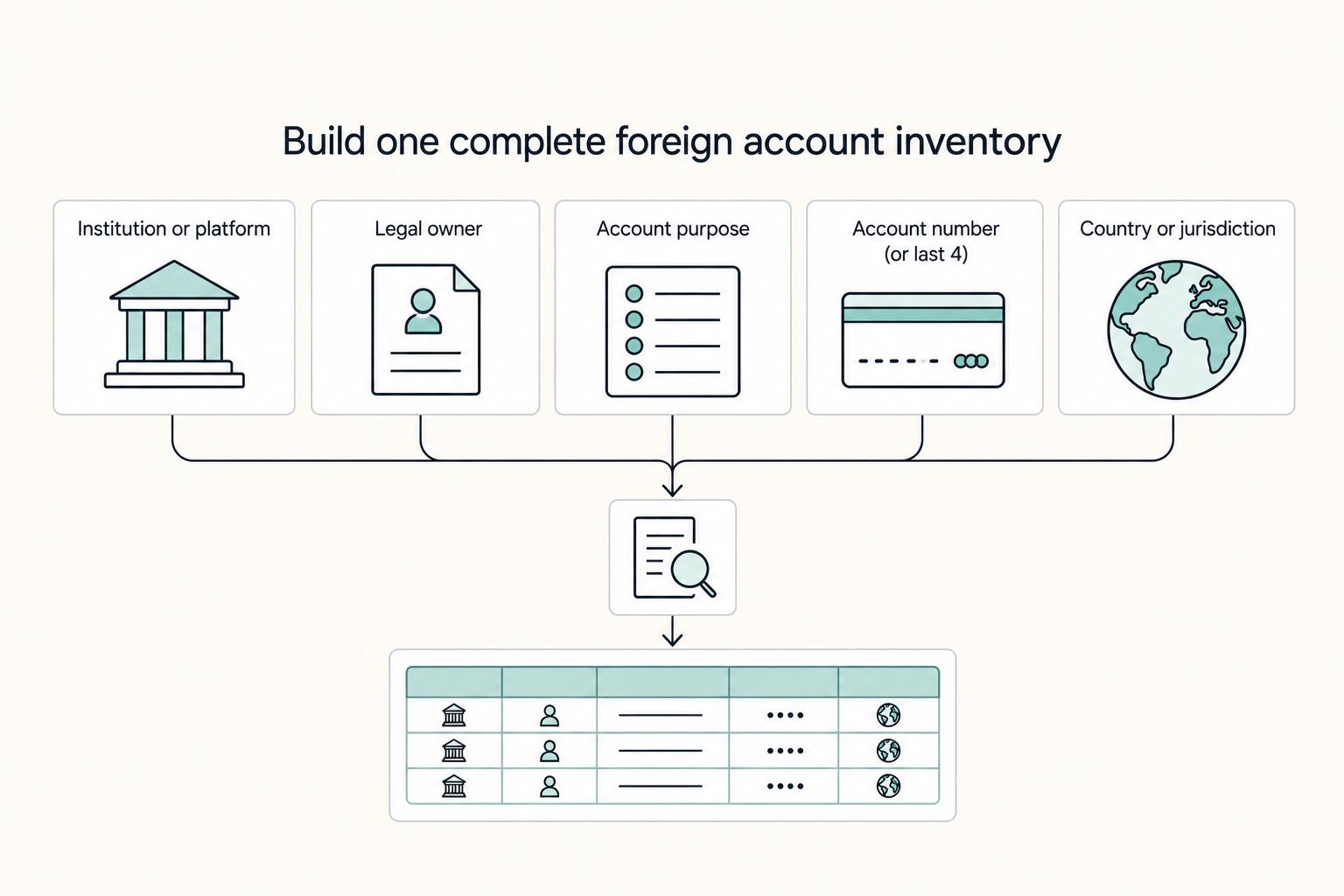
Step 1. Build one complete foreign account inventory#
Create one master inventory for every non-U.S. account you own, co-own, or can control, plus every platform where funds can sit under your name or authority. Include accounts where you have financial interest, signature authority, or both.
Track at least:
- Institution or platform
- Legal owner
- Account purpose
- Account number (or last 4)
- Country or jurisdiction
- Currencies held
- Financial interest vs signature authority
- Opened date and closed date (if applicable)
- Storage location for statements/screenshots
Run a quarterly reconciliation so you do not miss older or secondary accounts. Check bank apps, payment platforms, bookkeeping feeds, archived statements, and account-opening emails.
Step 2. Set a buffer and assign one escalation owner#
Use a fixed internal warning buffer below your verified filing trigger so you can react early. Keep one escalation owner for the year (you, if solo) who is responsible for acting when the buffer is crossed.
| When buffer is crossed | Required action | Detail |
|---|---|---|
| Monitoring | Move to monthly balance monitoring | All listed accounts |
| Preparer check | Confirm current filing trigger and due date | Also verify whether any signature-authority-only exception or extension applies |
| Account list rule | Freeze the year's account list rules | Add new foreign accounts the same day they are opened |
Do not rely on assumptions about extensions or exceptions. Verify applicability to your facts each year, including the filing trigger, deadline, and any exception treatment.
Step 3. Keep a monthly evidence pack you can hand off#
Keep a repeatable monthly pack so your filing data is defensible. For each account, capture the highest supportable balance, save the statement or screenshot, convert to U.S. dollars, and round up to the next whole dollar. Value each account separately. If no Treasury Financial Management Service rate is available, use another verifiable exchange rate and record the source.
Use consistent filenames and one tax-year folder, for example: 2026-01_FBAR_Wise_EUR_statement.pdf and 2026-01_FBAR_mastercalc.xlsx.
| Task | Owner | Output |
|---|---|---|
| Capture monthly statement or screenshot for each account | You or bookkeeper | PDF/image saved in tax-year folder |
| Convert each account's maximum value to USD and round up | You (or preparer support) | Master calculation sheet |
| Review for new accounts, closures, and signature-authority changes | You | Updated account inventory |
| Handoff year file before filing season | You | Filing-ready evidence pack |
If you have fewer than 25 accounts and cannot determine whether aggregate maximum values exceeded the threshold, instructions reference the "amount unknown" box (item 15a). Treat that as a fallback, not a substitute for monthly records.
You might also find this useful: A Deep Dive into Wise's API for Automated Payments.
How to Turn Wise into Your Tax Residency "Evidence Chain"#
Build your residency file like an operating process: monthly, documented, and easy to reconcile across tools. Your records can support your position, but they do not prove residency on their own.
| Test | Criteria stated in article |
|---|---|
| FEIE physical presence path | 330 full days in 12 consecutive months |
| Bona fide residence path | Requires an uninterrupted period that includes an entire tax year |
| Substantial presence | 31-day + 183-day weighted test |
Residency rules are jurisdiction-specific, and Wise states it cannot give personal tax advice. For U.S. positions, verify the exact test before you finalize your file: the FEIE physical presence path uses 330 full days in 12 consecutive months, the bona fide residence path requires an uninterrupted period that includes an entire tax year, and substantial presence uses the 31-day + 183-day weighted test. Confirm the current criteria for the tax year before you rely on the checklist.
Use three tools for three jobs#
Use Wise statements and exports as transaction evidence, QuickBooks as your ledger, and Notion as your audit log/checklist. Each month, save the statement PDF and transfer-list CSV for the same period, reconcile in QuickBooks, and log completion in Notion with links and timestamps.
| Workflow | What to record | Where to store | How it supports your claim |
|---|---|---|---|
| Monthly evidence capture | Statement PDF + transfer-list CSV (same date range) | Month folder + Notion row links | Preserves dated transaction history and references |
| Ledger reconciliation | Reconciled accounts + General Ledger for the period | QuickBooks report export + month folder | Shows accounting records match statements |
| Residency log | Claimed country/date range, invoice batch, reviewer, last edited timestamp | Notion database properties | Creates a consistent, reviewable narrative trail |
Statements include only transactions made via Wise currency accounts, and transfer-list exports from web are limited to up to a 365-day period, so capture exports on schedule. If you use Notion Enterprise, audit logs can add workspace activity history.
| Evidence item | Residency question it answers | Supporting document pair |
|---|---|---|
| Incoming client payment with invoice number in the transfer reference | Was this business income tied to a real contract and date? | Invoice PDF + transfer export |
| Local card spend near claimed home base | Were you physically present where you say you were? | Statement line item + travel calendar, lease, or utility bill |
| Pass-through payout to subcontractor or partner | Was all money in the account really your income? | Client agreement or invoice + outgoing payment proof |
| Country-of-residence verification file | Does your account profile match the country story you are telling? | Address proof + right-to-reside document |
Make each transaction type say one clear thing#
Keep funds separated before your records get noisy. Use Jars to separate major contracts and pass-through money, then log jar name, client, country, contract period, and invoice range in Notion, with contracts and invoices in the same month folder. This is documentation discipline, not legal escrow.
Use transfer references and notes consistently. Ask clients to include invoice numbers in payment references, and label outbound payments with counterparty and service month. For presence alignment, record your claimed country and dates each month, then check that against card activity and ATM usage for the same period. Most file weaknesses come from narrative drift, where claimed location, spending pattern, account verification documents, and mixed pass-through funds do not align.
If you want a deeper dive, read How to Use a Wise US Business Account to Satisfy 'Proof of Income' for Spain's Digital Nomad Visa. For a quick next step, try the free invoice generator.
Beyond the Bank Details: The Compliant Invoicing Workflow#
Run invoicing in this order: compliance checks first, invoice approval fields second, payment rails last. This keeps avoidable AP holds, fee surprises, and reconciliation messes out of your cashflow process.
1) Verify the client record before you draft#
Start from the client record, not your template. Confirm the legal entity name, billing address, AP contact, PO/vendor reference (if required), and any tax identifier the client needs on the invoice. For cross-border work, reserve a checklist line for the verified VAT/GST treatment and any required invoice wording.
Before you send, lock the payment-risk controls in writing: explicit due date, late-fee or interest language only after local enforceability checks, and a dispute file (contract, SOW, delivery email, acceptance evidence) saved in the same client folder. Most avoidable delays come from missing service period, approver, or PO/reference data.
2) Build the invoice for AP approval#
Use the invoice to answer AP's first-pass checks without follow-up.
| Invoice field | Why AP needs it | Where to source it |
|---|---|---|
| Client legal name and billing address | Matches vendor and approval records | Contract, onboarding form, AP instructions |
| Your legal name, business address, and tax ID (if required) | Supports vendor and audit records | Your registration and tax records |
| Invoice number, issue date, due date, currency | Prevents duplicates and sets payment timing | Your accounting template |
| Service description and service period | Confirms what was delivered and when | SOW, timesheet, delivery log, acceptance email |
| PO number or client reference (if required) | Prevents AP rejection/hold | Client PO or onboarding instructions |
| Tax treatment note and required wording | Supports correct internal coding | Verified tax treatment and invoice wording for the client and jurisdiction |
| Payment instructions mapped to invoice currency | Reduces rerouting and rework | Current receiving details in Wise |
| Accounting handoff note (invoice number + currency) | Keeps invoice-to-receipt matching clean | Your accounting system workflow (for example, QuickBooks) |
3) Add Wise payout instructions last, matched to invoice currency#
Only add payout rails after the invoice content is complete. Give payment details for the exact invoice currency, and avoid offering extra currency routes unless AP asks.
| Currency | Example fixed fee | Route |
|---|---|---|
| USD | 6.11 USD | wire/Swift |
| GBP | 2.16 GBP | Swift |
| EUR | 2.39 EUR | Swift |
Wise provides receiving details in 24 currencies, and rail type affects cost. The pricing pages separate domestic non-Swift/non-wire receiving from Swift/wire receiving, note that fees vary by currency, and list fixed-fee examples including 6.11 USD (USD wire/Swift), 2.16 GBP (GBP Swift), and 2.39 EUR (EUR Swift). If a client pays EUR via a Swift path outside SEPA, Wise notes additional Swift fees may apply on some routes.
Before sending, check current feature-specific pricing. If AP requests documentation, attach the current pricing view (including the regulator-standardized format when needed) to the approval note, then save it with the invoice PDF and remittance advice.
We covered this in detail in How to Connect Wise to QuickBooks for Automatic Reconciliation.
Conclusion: Control comes from your review protocol, records, and invoices#
Treat the payment account as a component, not an operating model. The real job is to pair CEO-level decision making with CFO-level discipline so cash flow, invoice chasing, and payment follow-up do not consume the time you need for client work.
A Wise Business account can fit cleanly into that stack because the company says it has no minimum balance, no monthly fees, and integrations with QuickBooks and other accounting tools. But tools do not create control on their own. Control comes from what you do every cycle: run a repeatable review protocol, keep documentation organized, and send invoices that are easy for a client to approve and pay.
| Area | Reactive operator | Business-of-one CEO |
|---|---|---|
| Workflow behavior | Sends payment details when asked and cleans up issues later | Reviews statements monthly, checks any internal reporting deadlines they track, and tests whether invoice, receipt, and statement agree |
| Documentation quality | Keeps records across email, downloads, and memory | Stores one evidence pack with the invoice, supporting agreement or scope, approval or acceptance proof, remittance detail, and statement copy |
| Payment reliability | Finds out about short, split, or late payments after month-end | Confirms currency, invoice number, payer details, and receiving details before send, then logs any exception the day funds arrive |
Those habits reduce payment friction, create a cleaner audit trail, and lower admin risk. One real failure mode to watch for is name confusion: if your search results start showing WISe or WISeR materials, verify that you are reading about the payments product, not unrelated healthcare programs with similar names.
Keep this closing checklist and reuse it.
- Review cadence: monthly check of balances, statements, exceptions, and any internal reporting deadlines you track.
- Records hygiene: one folder or note per invoice, with matching support documents attached.
- Invoice readiness: confirm client legal name, AP contact, invoice number, currency, and payment details before you send.
For a step-by-step walkthrough, see A Guide to Using Wise for Payroll for International Contractors.
Frequently Asked Questions
Is Wise automatically an FBAR account?
No, do not assume either yes or no. First verify whether your specific account is a foreign financial account for FBAR purposes, then test the aggregate maximum across all foreign accounts against the $10,000 threshold. Use the maximum value during the year, convert it to U.S. dollars, round up to the next whole dollar, and keep the exchange-rate source you used.
Does this account change your tax responsibility as a freelancer?
Usually not by itself. It changes how money moves, not what you owe. You still need to report income under the rules that apply to your residency and source of income, and if California is part of your fact pattern, the article says to split income by residency period and California source rules where relevant.
How should you handle international B2B invoicing?
Build the invoice for approval first and payment second. Verify the client legal name, billing address, AP contact, PO or vendor reference, service period, and tax wording before adding receiving details. Store the contract, statement of work, delivery email, and acceptance evidence with the invoice PDF, then book the same invoice number and currency into QuickBooks.
How should you split Wise and QuickBooks in day-to-day operations?
Use Wise to receive money and QuickBooks as the accounting record. The main control is a three-way match between the invoice number, receipt amount, and monthly statement. Test that workflow on a small batch before month-end and log any exception in Notion instead of trusting automation on day one.
Can the account help prove your location or residency position?
It can support your case, but it will not prove it by itself. Statements, card purchases, and transaction history can corroborate your location when they line up with travel records, lease documents, and local bills. Export monthly statements, label them by country and month, and link them to your residency evidence checklist in Notion.
What should you do before receiving a large payment?
Assume the main risk is documentation, not transfer size. Make sure the signed contract, invoice, service period, client approver, and remittance advice all line up, and confirm the payer will use receiving details that match the invoiced currency. Email AP a short confirmation of currency and invoice number, then reconcile the receipt to that invoice in QuickBooks the day it lands.
Try a related tool
Researched and edited by the Gruv editorial team. Gruv builds cross-border billing, payouts, and finance-operations software for global businesses.
Sources
- api.law.wisc.edu/repository-pdf/uwlaw-library-repository-omek...trusted
- bsaefiling.fincen.gov/docs/XMLUserGuide_FinCENFBAR.pdftrusted
- cms.gov/priorities/innovation/files/document/wiser-m...trusted
- congress.gov/108/chrg/CHRG-108shrg20396/CHRG-108shrg20396...trusted
- ecfr.gov/current/title-31/subtitle-B/chapter-X/part-1...trusted
- fincen.gov/system/files/2025-12/FBAR-FBAR-Filing-Requir...trusted
- fincen.gov/report-foreign-bank-and-financial-accountstrusted
- ftb.ca.gov/file/personal/residency-status/part-year-and...trusted
Educational content only. Not legal, tax, or financial advice.
Related Posts

The Freelance Payment Penalty: A Modeled Audit of Platform Fees, FX Spreads, and Payout Delays
The money rarely disappears through a single, easy-to-spot fee. The real loss is stacked. A marketplace takes its commission, a processor adds a charge for international cards, a bank or payment company converts the currency at a spread, a platform holds the funds before release, and a wire sheds a little to intermediaries on the way in. Each layer looks defensible on its own, but the worker feels the combined result as a smaller deposit and a later payday.

How to Respond to a Subpoena for Business Records
Move fast, but do not produce records on instinct. If you need to **respond to a subpoena for business records**, your immediate job is to control deadlines, preserve records, and make any later production defensible.

A US Expat's Guide to Investing in UCITS ETFs to Avoid PFIC Issues
The real problem is a two-system conflict. U.S. tax treatment can punish the wrong fund choice, while local product-access constraints can block the funds you want to buy in the first place. For **us expat ucits etfs**, the practical question is not "Which product is best?" It is "What can I access, report, and keep doing every year without guessing?" Use this four-part filter before any trade: