
Quick Answer
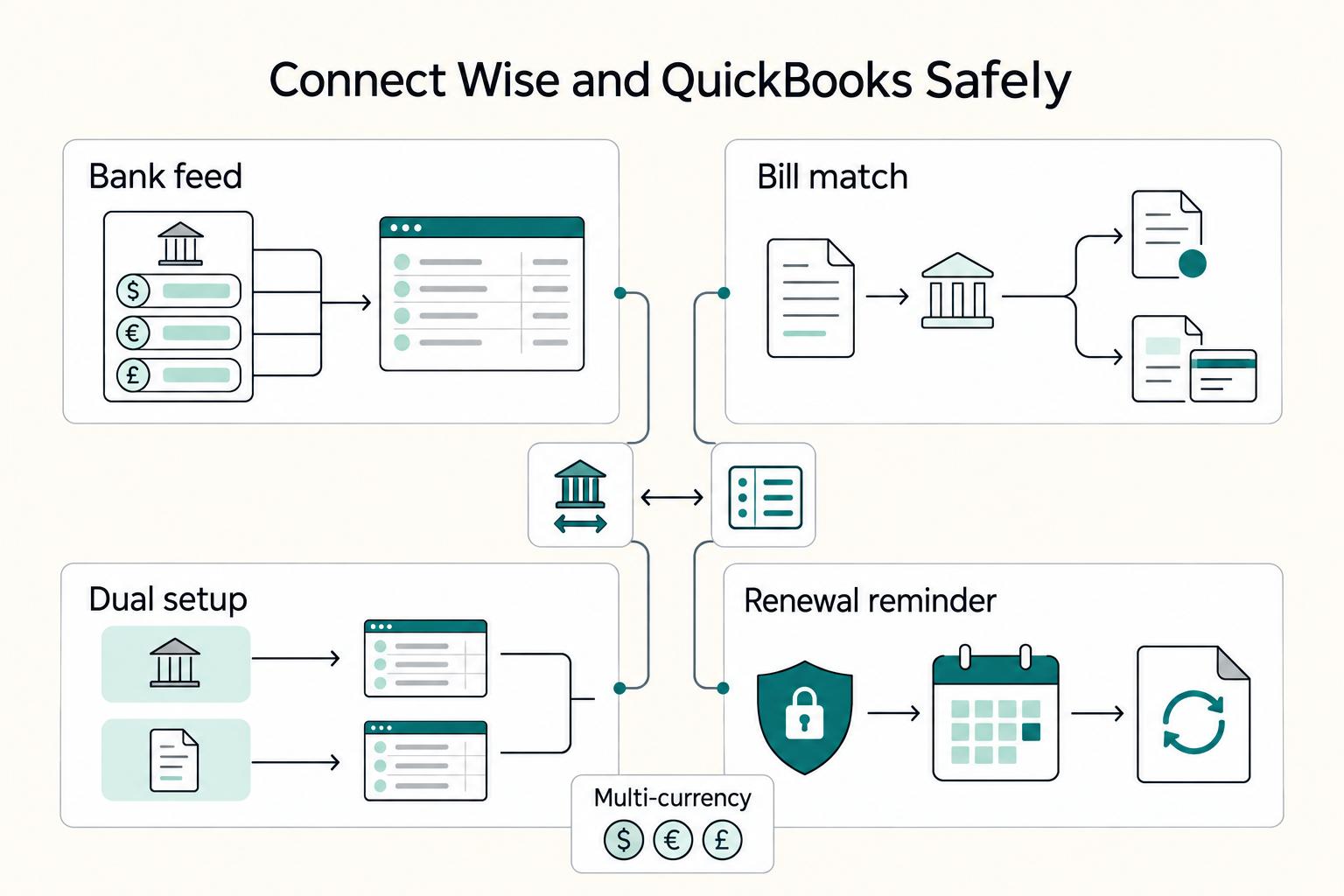
From QuickBooks Online Bank transactions, link the correct Wise regional option, authorize your business profile, select balances and an import date, then map to the intended currency accounts. Connect separately from Wise for unpaid supplier bills and payment-status updates. Review existing entries before adding feed items and reconcile each statement period separately.
Set up Wise and QuickBooks to make reconciliation more predictable#
Connect Wise to QuickBooks Online in two separate ways: use the QuickBooks bank feed to import Wise currency transactions, and connect from Wise if you want unpaid supplier bills and payment status linked. Map each currency account and review downloaded transactions before relying on the books.
| Connection element | Confirmed behavior | Control note |
|---|---|---|
| Bank feed syncing | QuickBooks can pull transactions from Wise currency accounts into Banking Transactions through the bank feed workflow | Managed by QuickBooks |
| Bill reconciliation | Bill payments you make in Wise can also auto-mark bills as paid in QuickBooks, and QuickBooks can record related fees as Bank Charges | Requires QuickBooks multi-currency enabled |
| Dual setup | You need separate connections if you want both bank-feed syncing and bill reconciliation | Document both connections and test each one independently |
| Data-sharing authorization | Wise states data-sharing authorization expires after 90 days | Add a renewal reminder to your weekly operations cadence |
A small studio may receive client payments, pay overseas suppliers and convert currencies through the same Wise account. The connection can reduce entry work, but the bookkeeper still needs to distinguish sales, supplier payments, fees and transfers.
This guide covers the Wise and QuickBooks Online connection, including access, currency mapping, first import, supplier bill payments and exception handling. Product availability depends on the actual region and subscription; check the current screens before authorizing changes.
A downloaded transaction is a statement item to review. Matching it links to an existing accounting entry; adding it creates a new one. Formal account reconciliation is the separate check against the statement’s opening and closing balances. A feed import or an automatic bill-paid flag alone does not complete that reconciliation.
| Risk area | What is confirmed | What you control |
|---|---|---|
| Feature scope | Two connection paths exist, and they provide different capabilities | Choose features intentionally, then map owners before launch |
| Setup design | You need separate connections if you want both bank-feed syncing and bill reconciliation | Document both connections and test each one independently |
| Plan requirements | Bill-marking automation requires QuickBooks multi-currency enabled | Verify your QuickBooks Online setup before enabling payment automation |
| Operations | Bank-feed syncing is managed by QuickBooks | Assign one owner for QuickBooks-side checks and exception triage |
| Continuity | Wise states data-sharing authorization expires after 90 days | Add a renewal reminder to your weekly operations cadence |
For a two-person creative studio, assign one setup owner and one accounting reviewer. The same person may cover both roles, but record when a setting changed and which transactions were checked. A currency or start-date mistake can duplicate activity even when the connection appears healthy.
Use the setup matrix, currency map and limited sample review to document the bank-feed and bill-payment paths. Preserve the existing ledger before importing more history.
Document the last reconciled statement date and the first transaction date you intend to import. Those boundaries give you a practical check when reconnecting or using a manual file later.
What do we know and what must you verify before trusting this integration?#
Use current Wise and Intuit documentation to distinguish supported features from settings that must be checked in your own account.
Confirm the business profile, QuickBooks company, region, plan, home currency and active currency accounts before authorizing a connection. Do not treat a familiar product name as proof that the selected account or feature is correct.
Keep a short setup matrix with the documented scope, the account-specific setting, the verification result and its owner.
| Area | Known now | Verify in tenant | Why this matters |
|---|---|---|---|
| Connection scope | Bank feed and bill-payment link are separate features | Which features are available to your actual profile and plan | Successful authorization on one path is not proof of the other |
| Imported records | Wise balances feed transaction review; unpaid supplier bills can appear in Wise | Selected balances, account currencies and import date | Avoid duplicate accounts and incorrect history |
| Timing | Bank feed is QuickBooks-managed; bill import can show unpaid bills in real time | Refresh delay and first/last imported transaction | Detect stale feeds rather than promising instant posting |
| Failure behavior | A connection issue does not establish payment success or failure | Current payment status, last posted item and support route | Avoid paying an already paid supplier twice |
| Legacy features | Wise advanced matching/card-expense settings are unavailable to new customers | Whether an existing account has them enabled | Prevent duplicate entries when another feed also imports activity |
Record the bank-feed path and the bill-payment path separately. Each has its own authorization and review checks, so a successful connection on one side does not prove the other is working.
Label remaining questions: earliest available feed history, refresh delay, currencies supported by your subscription and how refunds, fees and conversions appear. Resolve them from documentation or a limited review sample.
Assign an owner for account configuration, accounting decisions and support follow-up before importing or paying anything. Maintain an exception record with status and next action.
A connection marked successful is the start of verification: confirm the selected currency, import period and resulting ledger entries.
If a studio sees a missing transaction after setup, it can compare the dated Wise statement with QuickBooks’s imported date range and the existing register. That establishes whether the issue is a missing feed item, an unreviewed item or an accounting entry already present.
What should you prepare before you start the connection?#
Prepare access, currency accounts, import boundaries and an accounting reviewer before the first connection. Keep account credentials and payment authority separate from a shared mapping sheet.
Turn the setup matrix into a preflight checklist. Review existing feed connections, manual imports, opening balances and the last reconciliation so the new connection does not cover an already imported period without a duplicate check.
| Preflight area | Action you take now | Verification outcome |
|---|---|---|
| Access | Confirm authorized Wise Business and QuickBooks company access | Correct profile, company and operators |
| Currency and plan | Check home currency and eligible multicurrency features | Each selected balance has an appropriate currency account |
| Import boundary | Record last reconciliation and existing imported dates | Start date does not silently duplicate history |
| Mapping | List Wise balances, ledger accounts and fee/transfer treatment | One documented destination per currency balance |
| Ownership | Name setup, accounting-review and incident owners | Every difference has a decision path |
| Pilot | Select a limited legitimate sample and statement period | Can trace source, feed and posted result |
- Confirm authorized access. Select the intended Wise business profile and QuickBooks company; keep individual access and recovery details current.
- Check currencies before connecting. Verify the subscription supports the required feature. Intuit warns that enabling multicurrency cannot be undone; decide with the accounting owner and confirm home currency first.
- Define the import period. Retain the last reconciled statement and register export, then choose a start date and record any expected overlap.
- Create the mapping sheet. Map each Wise balance to its currency-specific ledger account, with separate treatment for fees, supplier payments and transfers.
- Assign review and support owners. Record where to route authorization, feed and accounting questions, and who approves corrections.
- Choose traceable samples. Use historical legitimate activity, an approved demonstration environment or a genuine small supplier payment that is already due and authorized. Do not create fake bills or force live payment failures.
Step 1 - Confirm Access, Currency Settings and Owners#
Use your authorized Wise Business profile and the correct QuickBooks Online company, with permissions appropriate to connection setup and review.
Avoid shared credentials. Verify the current admin and recovery process, then assign a person who can approve accounting corrections without granting every operator payment authority.
| Control area | What to lock now | Verification before mapping |
|---|---|---|
| Wise profile | Business identity, authorized operator and selected balances | Confirm intended business, not a personal or different company profile |
| QuickBooks access | Company, role and connection permissions | Confirm configuration and review authority |
| Currency | Home currency and multicurrency decision where needed | Understand irreversible setting and subscription eligibility |
| Ownership | Current admin and accounting reviewer | Document handover and supported app-ownership process |
| Support | Wise, Intuit and adviser routes by issue | Redacted reference, owner and next action recorded |
- Confirm the company and profile. Compare their displayed identities with the mapping sheet before approving either connection.
- Confirm permissions without disrupting work. Review approved roles and documented recovery; do not remove production access solely to test it.
- Approve the currency setup. Record home currency and required foreign-currency accounts before enabling irreversible multicurrency.
- Record the handover. Name who owns each connection and who reviews accounting outcomes; use supported ownership transfer when staffing changes.
- Set escalation triggers. A stale feed, wrong account, duplicate or unexplained bill status gets an owner and a dated support case.
If a colleague leaves, transfer supported app ownership and revoke the obsolete access through the relevant Wise or QuickBooks workflow. Confirm which connections remain active; do not remove unrelated feeds or delete posted records as part of an access change.
Step 2 - Connect the Bank Feed and Map Wise Currency Accounts#
Connect from QuickBooks for the bank feed, selecting the correct Wise regional option and mapping each selected currency balance to the intended QuickBooks account.
| Review queue | Where to review | Control action |
|---|---|---|
| Feed items awaiting review | Bank transactions for the selected currency account | Find an existing match before adding a new record |
| Supplier bill status | QuickBooks bill and Wise payment details | Confirm actual payment and fee entry |
| Missing history | Wise statement versus imported date range | Identify gaps before a controlled manual import |
| Posted differences | Account register and reconciliation records | Resolve duplicates or coding errors with the accounting reviewer |
In QuickBooks, open Accounting → Bank transactions → Link account, search for Wise and choose the option for the registered business address. Wise currently documents EU → Wise (European Union), US/Canada → Wise (US), UK → Wise (UK), and other regions → Wise (UK). Follow the current account prompts if labels change.
| Wise activity | QuickBooks treatment to verify | Operational use | Verification |
|---|---|---|---|
| Currency balance transactions | Matching currency-specific account feed | Statement review | Correct account, currency, range and opening balance |
| Client receipt | Existing invoice payment/deposit or new entry if appropriate | Keep A/R and cash consistent | Client obligation, gross receipt and fee separately explained |
| Supplier bill paid in Wise | Bill payment and Bank Charges through bill connection | Reduce manual bill updates | One payment against intended bill; amount and fee correct |
| Currency conversion | Transfer between owned balances plus fees/FX treatment | Avoid false sales or expense | Both sides and conversion statement reconcile |
| Refund or reversal | Linked correction using actual source records | Maintain original transaction trail | Reference, amount and accounting effect reviewed |
| Legacy advanced entries | Existing advanced matching/card-expense settings if available | Prevent competing creation rules | New customers cannot assume availability; avoid duplicate feed additions |
- Choose the correct region. Follow the documented regional Wise option for your registered business address. If a region choice fails, confirm it rather than repeatedly creating new account links.
- Authorize the intended balances. Select the Wise business profile and currencies, then the date from which QuickBooks should pull activity.
- Map each balance. Use the intended account in the correct currency and retain the mapping reference. The account label alone does not establish currency correctness.
- Check existing records. Compare opening balance, last reconciliation, manual imports and any active rules that might create entries.
- Review the first items. Use a small selection spanning receipts, payments, fees and a transfer where present. Verify amount, sign, date and currency, then match existing records or add only genuinely new activity.
- Keep an exception table. Record source reference, feed account, register reference, owner and next action. Recheck affected samples after any mapping change.
After the Wise authorization, review the business profile, balances and start date before confirming. Use the existing correctly denominated ledger account where appropriate; do not create a second account for the same balance accidentally. Refresh and inspect the first imported items before expanding review.
Worked receipt, fee and transfer checks#
Illustrative GBP example: a client invoice of £1,000 is fully collected, and the provider retains a £10 fee, leaving £990 in the Wise balance. Record the £1,000 client payment and £10 fee in the appropriate receipt/deposit workflow, then match the £990 statement item to that net result. The client is paid in full; the missing £10 is not automatically another amount to chase. If Wise instead shows a £1,000 credit and a separate £10 debit, match those two actual statement lines without also creating a £990 receipt.
If you then move £600 from Wise to your own GBP bank account with no fee in this illustrative transfer, the Wise balance falls from £990 to £390 and the bank balance rises by £600. It is a transfer between owned accounts, not another £600 of client revenue or a supplier expense. Match both sides to the same transfer. For currency conversions, preserve the amounts in both currencies, actual conversion rate and separately shown fees; let the accounting method handle any exchange difference.
Step 3 - Connect Supplier Bills and Verify a Controlled Sample#
For supplier-bill reconciliation, connect from Wise separately. Check an existing legitimate unpaid bill and confirm the resulting payment and fee entries before relying on wider automation.
| Pilot rule | What to log or verify | Fallback or decision |
|---|---|---|
| Traceable sample | Existing legitimate statements and authorized due bills | Test the two connection paths independently |
| Review before add | Find an existing bill payment, invoice payment or transfer | Match that record rather than creating a second |
| Exception record | Missing history, duplicates, currency or fee differences | Assign owner and next action |
| Scale decision | Explainable sample results and current account mappings | Increase use after material differences are resolved |
| Fallback | Dated gap and saved export | Import genuinely missing history with an overlap check; never replay payments merely because the feed is stale |
In Wise, open the business profile, then Settings → Accounting integrations → QuickBooks, or the current apps-and-software connection screen, and authorize the correct company. Review connection settings such as importing unpaid bills and marking paid bills. QuickBooks multicurrency must be enabled for bill-paid automation.
| Pilot control | What you run | What you verify |
|---|---|---|
| Unpaid bill import | Review bill supplier, currency and amount in Wise | Bill is genuinely outstanding before paying |
| Payment status | Check Wise payment details and QuickBooks bill payment | One actual payment applied to intended bill |
| Fee treatment | Review Bank Charges entry and source fee | One fee entry with correct amount/currency |
| Feed match | Compare downloaded debit with existing payment | No second expense or duplicate bill payment |
| Timing | Log payment and accounting-update times separately | Status latency does not trigger a duplicate payout |
| Statement close | Compare register with statement opening/closing balances | All differences explained; period reconciled separately |
- Confirm the imported bill. Verify supplier identity, amount, currency, due date and whether it has already been paid elsewhere.
- Check payment authority. Make only a genuine, due and approved supplier payment through the intended Wise workflow. Keep its reference and current status.
- Review the accounting update. Confirm the bill-paid entry and Bank Charges fee; a failed or pending payment needs investigation before any correction or repeat.
- Check the bank feed separately. Match its debit to the existing payment and fee treatment. Do not add another expense because the feed item has arrived later.
- Log timing and exceptions. Record source/payment, import and accounting-update times without treating them as the same event.
- Rehearse the fallback using saved records. Locate missing history and define non-overlapping file boundaries. An accounting fallback does not authorize paying a bill again.
A studio has already paid a £500 supplier bill through another provider, but the bill is still unpaid in QuickBooks. Wise can import it as unpaid. Check the payment evidence and record the existing payment correctly before initiating another one; the imported unpaid status is not proof that the supplier is still owed £500.
Expand use when each sampled item has one explainable accounting treatment, each currency balance maps correctly and exceptions have owners. A small pilot reduces exposure; it does not guarantee all future cases or make payment reversals available.
What Does the Connection Automate, and What Still Needs Review?#
Keep downloaded-transaction review, supplier-payment verification and formal statement reconciliation as distinct jobs. Observe refresh timing and use a review schedule that matches transaction volume.
The bank feed imports transactions; Wise’s bill connection can mark a bill paid and record fees. Neither promises that every receipt, refund, conversion or tax classification is correct without review. New customers do not have Wise’s legacy advanced matching/card-expense settings.
| Decision signal | Review in fixed windows | More frequent review |
|---|---|---|
| Feed freshness | Compare each review window with statement dates | Investigate an unexpected freshness gap promptly |
| Transaction volume | Small groups with explicit match/add checks | More frequent small reviews for high-volume activity |
| Bill payments | Review each authorized payment and associated fee | Track delayed status updates without paying again |
| Exception burden | Keep a dated queue and chosen closing window | Increase review/support attention when errors rise |
- Measure each path separately. Record bank-feed freshness and bill-status update timing. A real-time unpaid-bill list does not guarantee real-time bank-feed import.
- Review in fixed windows if helpful. Group downloaded items for accounting review; do not imply that Wise exposes a manual batch-sync switch.
- Keep payment checks live. A payment that is pending, failed or returned needs its own status and supplier-balance review even if the accounting entry already exists.
- Check before reauthorization or reconnecting. Retain last imported dates and account mapping. Review the first new items for overlap.
- Use manual history import selectively. Import only identified missing dates/transactions, keeping file references and mapping. When the feed recovers, match or exclude genuine duplicate downloaded items rather than adding them again.
- Retain the runbook. Record connections, currencies, owners, authorization expiry, review schedule and support contacts.
Common mistakes that cause reconciliation drift and how to recover fast#
Reconciliation differences can come from configuration, timing or bookkeeping. Identify the source item before changing settings or deleting entries.
After an initially clean setup, inspect changes in staff access, account mapping, import boundaries and automatic rules. A repeated small error can become a large closing-balance difference.
| Mistake pattern | Why it creates drift | Fast recovery move |
|---|---|---|
| Adding instead of matching | A second entry duplicates already recorded income or expense | Find the original payment/deposit and undo/review the duplicate appropriately |
| Wrong account/currency | The feed reaches a different balance or creates a second register | Confirm mapping and compare statements before altering posted history |
| Import overlap | Reconnect or manual file covers existing dates | Check references and amounts, import only missing items |
| Unpaid bill already paid elsewhere | Wise still sees the uncorrected unpaid bill | Record the evidenced original payment before another instruction |
| Unexplained fee or FX difference | Net cash differs from gross invoice or original currency | Separate fees and conversion/FX treatment; preserve source statement |
| Unclear owner | Nobody decides whether to correct the ledger or investigate payment | Assign accounting and support actions separately |
- Recheck the affected currency map. Confirm profile, company, account and period before making corrective changes.
- Review automation and access changes. Check bank rules and any legacy advanced settings that may create entries; restrict configuration changes to approved operators.
- Work the exception queue. Identify source, downloaded item and register record. Prioritize duplicates, wrong amounts and missing history, with an owner and a carried-forward explanation when unresolved.
- Correct using the appropriate workflow. A duplicate awaiting feed review may be excluded; an incorrect match/add may need Undo. Posted or reconciled records require accounting review before changes. Do not mass-delete a period or force a balancing entry.
- Resolve actual payment status separately. A stale feed is not payment failure. Confirm with Wise and the supplier balance before any repeat instruction.
- Use a controlled gap import only when needed. Preserve the downloaded file, selected dates and mapping, then check for overlap when the connection returns.
If a client invoice needs clearer fields or payment references, the free invoice generator can help prepare it. The bank feed still needs to match the actual collection to the recorded invoice payment.
Use this copy-paste checklist to run weekly and keep cashflow predictable#
Run a weekly checklist for access, feed freshness, bill payments and unresolved differences, then complete formal statement reconciliation for the chosen period.
Increase review frequency during a first connection, high transaction volume or an incident. A quiet feed is not proof of a quiet account: compare its latest transaction date with Wise’s statement.
| Control lane | What you do each run | What you verify before you close |
|---|---|---|
| Access/consent | Review owners and each connection’s current expiry | Authorized access and renewal plan current |
| Feed | Compare selected currency statement with latest imported date | Missing history and duplicate overlaps identified |
| Bill payments | Compare legitimate supplier payments, bill status and fees | Each payment and fee recorded once |
| Exceptions | Review unmatched, missing, duplicate and FX items | Owned carryover list with source references |
| Client collections | Check invoice payments and A/R balances | Paid invoices are not chased because bank cash is pending |
| Support/reconciliation | Record open cases; reconcile statement period separately | Payment status and ledger corrections have distinct evidence |
- Confirm access and consent. Review connection owners and displayed expiry; renew through the actual prompt before access lapses.
- Reconcile source activity. Compare currency statements, feeds and register entries, including transfers and fees. Confirm that downloaded items are matched or correctly added once.
- Check supplier payments. Verify bill-paid status and charges against actual Wise payment references, including anything paid outside Wise.
- Review exceptions. Keep amount, currency, reference, owner, next action and expected review date for every material difference.
- Check client collections. Separate unpaid invoice balances from paid collections awaiting settlement. Follow up only the genuinely outstanding amount; a fee or pending payout is not automatically a client underpayment.
- Finish statement reconciliation. Use the statement’s opening balance, ending balance and date. Investigate differences rather than entering an unexplained adjustment.
- Maintain recovery records. Save support cases and non-overlapping manual-import boundaries, then check recovered feed items before adding them.
Wise’s help guidance currently states that data-sharing authorization expires after ninety days. Record the actual consent expiry shown in each connection and set a reminder; reauthorize through the documented prompt and check the first returned items for continuity and overlap.
Frequently Asked Questions
How do I connect Wise to QuickBooks step by step without breaking my current books?
Confirm region, plan and currency setup. From QuickBooks Bank transactions, link the correct Wise regional option, authorize the intended business profile, select balances and an import start date, then map to the correct currency accounts. Connect separately from Wise for supplier bills. Review a small legitimate sample and check existing entries before adding new ones.
What actually syncs between Wise and QuickBooks Online?
The QuickBooks-managed feed imports Wise currency transactions into Bank transactions. The separate Wise connection can import unpaid supplier bills, mark bills paid when paid through its Pay Invoices workflow and record fees as Bank Charges. It does not provide a general inventory, payroll, reimbursement or customer-master export.
Which way do the bank-feed and bill-payment records flow?
Bank transactions move from Wise to QuickBooks’s feed. In the separate bill connection, unpaid QuickBooks bills can appear in Wise; payment through Wise can update their paid status in QuickBooks. Verify both paths separately. These features do not mean all records synchronize in both directions.
Is this integration truly automatic, or should I plan for manual batching controls?
The feed and bill-status updates can be automatic, but downloaded items still need the appropriate match/add review and the account still needs statement reconciliation. Observe actual refresh and posting delays. Review in small groups when needed; that is your operating procedure, not a documented Wise batch-sync switch.
What should I verify before trusting this integration in production for client invoicing?
Confirm the correct company, business profile, region, currency accounts, import period and current authorization. Verify existing entries, gross amounts, fees, transfers and bill-paid behavior on a limited legitimate sample. The connection does not create every client invoice or guarantee settlement timing.
How do I resolve differences between Wise activity and QuickBooks?
Compare the statement item, feed item and existing register entry using amount, currency, date and reference. Decide whether it is missing, duplicated, unmatched, a fee, a conversion or a timing difference. Import only genuinely missing history with an overlap check, and investigate posted duplicates with the accounting reviewer.
Who should own connection problems and accounting corrections?
Route Wise profile, authorization and bill-payment questions to Wise support; route QuickBooks feed, account mapping and ledger questions to Intuit support or your accounting adviser as appropriate. Keep a dated case with redacted references and screenshots. One internal owner tracks the issue until the records and any actual payment status are explained.
Watch
How to Connect Wise to QuickBooks the Risk-First Way
Try a related tool
Researched and edited by the Gruv editorial team. Gruv builds cross-border billing, payouts, and finance-operations software for global businesses.
Sources
Includes 2 external sources outside the trusted-domain allowlist.
Educational content only. Not legal, tax, or financial advice.
Related Posts

The Freelance Payment Penalty: A Modeled Audit of Platform Fees, FX Spreads, and Payout Delays
The money rarely disappears through a single, easy-to-spot fee. The real loss is stacked. A marketplace takes its commission, a processor adds a charge for international cards, a bank or payment company converts the currency at a spread, a platform holds the funds before release, and a wire sheds a little to intermediaries on the way in. Each layer looks defensible on its own, but the worker feels the combined result as a smaller deposit and a later payday.

How to Respond to a Subpoena for Business Records
Move fast, but do not produce records on instinct. If you need to **respond to a subpoena for business records**, your immediate job is to control deadlines, preserve records, and make any later production defensible.

A US Expat's Guide to Investing in UCITS ETFs to Avoid PFIC Issues
The real problem is a two-system conflict. U.S. tax treatment can punish the wrong fund choice, while local product-access constraints can block the funds you want to buy in the first place. For **us expat ucits etfs**, the practical question is not "Which product is best?" It is "What can I access, report, and keep doing every year without guessing?" Use this four-part filter before any trade: