
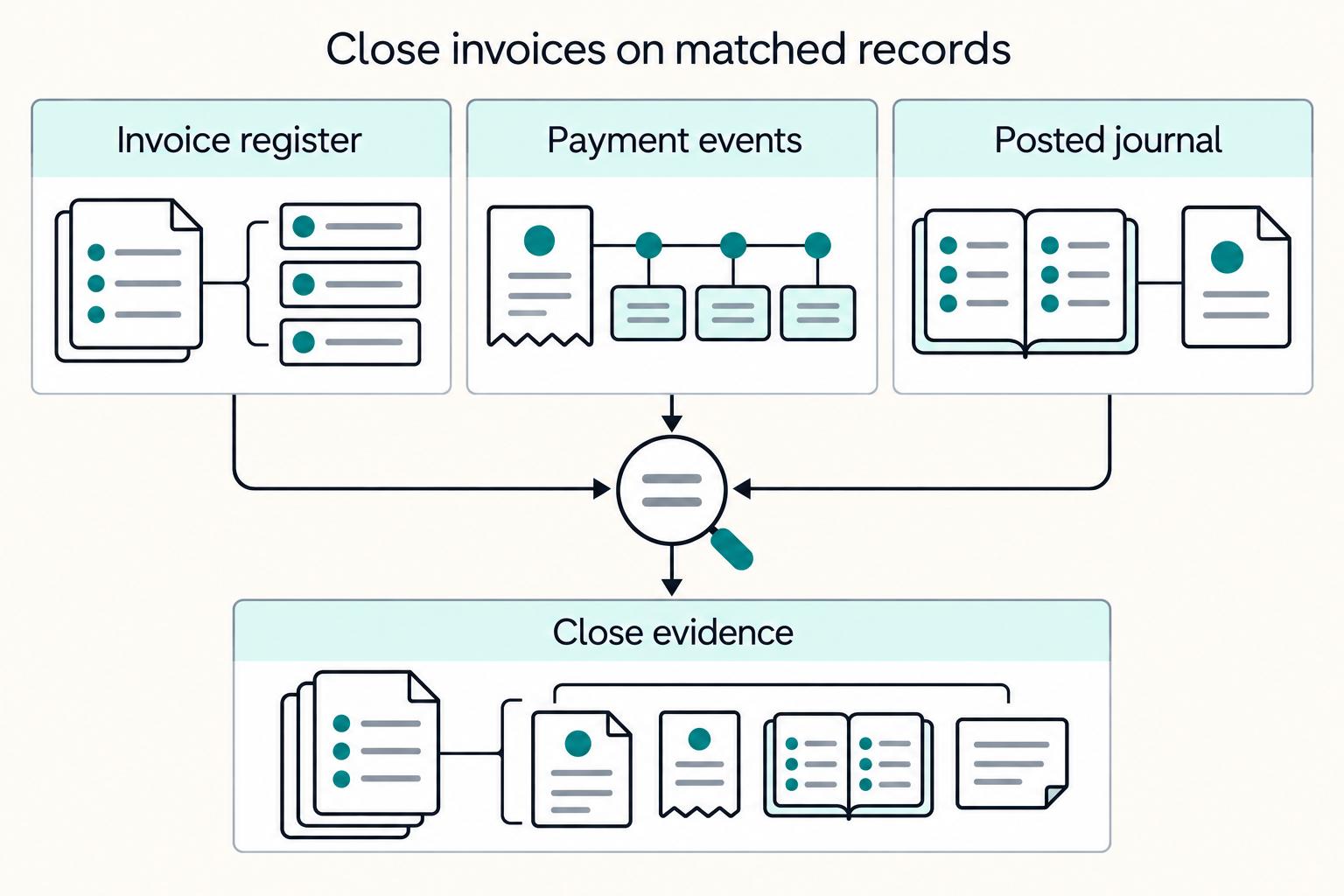
Quick Answer
Use a controlled sequence, not just a polished template. Start with one approved format, require a unique invoice number, and draft line items directly from the contract or SOW with explicit payment terms. Before sending, run a documentation gate so required tax and onboarding records are complete. Then assign one owner for each status from draft through closed. Final closure happens only after the invoice register, payment events, and posted ledger journal agree.
A professional invoice is not just a polished file#
A professional invoice is not just a polished file. It is the working record of what you delivered and what you are charging, so someone reviewing payment can understand the request without extra context.
Step 1 Start with the agreement, not the design#
At its core, an invoice is a statement of goods or services provided and the price. What makes it professional is not visual complexity. It is whether the document reflects the underlying agreement clearly: what work you did and what you are charging for. If a reviewer can compare the invoice to the contract or SOW and understand every line without asking for extra context, you are on solid ground.
That matters because clean formatting can hide weak inputs. Invoice software and templates can help you create and send invoices quickly. The tradeoff is that a good-looking invoice with vague service descriptions or inconsistent details can still go out, but create problems later.
Step 2 Build for reconciliation, not just delivery#
A strong invoice process does not stop once the document looks credible and reaches the client. The better test is what happens after payment arrives. Can your team tie the incoming funds back to the invoice without guessing? Can you explain a short payment, a late payment, or a disputed amount using records that already exist?
Use one simple checkpoint from the start. Each invoice should be understandable to someone outside the deal team and still traceable end to end. If matching depends on memory, inbox searches, or a note in a spreadsheet, the process is fragile. This article is built around a more useful standard: invoices that support reconciliation and clear reporting, not just client-facing presentation.
Step 3 Choose tools with the next stage in mind#
For low volume, a template-first approach can be enough. Invoice software or templates can work well when invoice counts are low and exceptions are rare.
As volume grows, finance and ops need more than a good PDF. They need invoice data that can be checked, stored, and reused consistently across issue, payment, reconciliation, and reporting. That is the shift this article makes, from formatting choices to an operations-ready invoicing process.
One scope note before you standardize anything in Gruv. Capabilities such as Virtual Accounts, Payouts, KYC, and tax workflows can vary by market and program. Do not design approvals or payment tracking around assumed features. Verify what your setup actually supports, then build your invoice process around that reality.
If invoice review depends on basic financial statements, How to Read a Balance Sheet for Freelancers and Small Teams helps align the invoice record with small-team cashflow review.
What to prepare before you issue a single invoice#
Before you send the first invoice, standardize one template and one payment-term policy. This is the fastest way to keep invoice details consistent and reduce avoidable follow-up.
Step 1 Lock one master template#
Pick one source format and make it the only approved starting point: Excel, Word, or invoice software/templates. The tool matters less than using the same base every time.
At minimum, require a unique invoice number, clear service descriptions, and specific payment terms in every invoice. If those fields vary, collection and review get harder immediately.
Step 2 Set payment terms before the first send#
Choose default terms up front, then make exceptions deliberately. Xero notes that shorter terms such as Net 7 or Net 14 instead of Net 30 can speed up payment collection.
If you use upfront payment, include it in the invoice terms rather than only in email; Xero also notes that a 50% upfront deposit is increasingly common. The operational goal is one clear default that people apply consistently.
Step 3 Run one real pre-send review#
Test the template with a real draft before your first live invoice. Confirm the invoice number is unique, service descriptions are clear, and payment terms are explicit.
If a reviewer still needs extra context to understand what is being billed or when payment is due, tighten the template before scaling. Related: Payment Reconciliation for Freelancers: How to Match Invoices to Bank Deposits.
Set your invoice standard so every invoice is machine-checkable#
Treat your invoice template as a record format, not a free-form document. Every invoice should be clear without extra email context and easy to sort, review, and compare.
Step 1: Lock one invoice-number rule. Use one numbering format and apply it consistently. Define the sequence source, who can issue numbers, and when a correction keeps the same number versus when it becomes a new invoice. Run a quick duplicate check on a small test batch before live use.
Step 2: Standardize line-item structure. Keep each line item in the same pattern: service period, quantity, unit rate, and billing description. This aligns with the structured fields commonly used in invoice templates (for example, descriptions, quantities, prices, expected delivery dates, and payment terms). Use wording that maps back to your agreement or work records so reviewers can verify what was billed.
Step 3: Fix payment-terms language. Use one approved phrasing style for payment terms and place it in the same location on every invoice. Include both the terms rule and the due date so expectations are explicit. Record client-specific exceptions as intentional overrides, not quiet template edits.
Step 4: Capture tax-relevant fields early. Invoicing supports both payment collection and tax recordkeeping, so define required tax/compliance fields up front. If relevant to your workflow, include fields such as VAT treatment, billing jurisdiction/entity, and whether W-8 or W-9 documentation is on file. Capturing this during invoicing reduces manual cleanup later.
For layout and field choices, How to Create a Professional-Looking Invoice covers the presentation layer after the control fields are clear.
Draft the invoice in a way finance can approve quickly#
Fast approval starts with a controlled draft: use your approved template, and do not improvise required fields.
Step 1 Start from the approved template and lock control fields#
Treat your approved template as the only valid baseline, even if you draft in different tools. Pull required fields from your record system, not memory, and verify they match before review.
That control matters because an invoice is both a payment request and a transaction record, and missing one key element can cause confusion, delays, or disputes. Use a quick pre-review check so finance is not blocked by avoidable field errors.
Step 2 Build line items from contracted scope and review for posting clarity#
Build each line item from the contract, statement of work, or approved work log. Keep entries itemized and clear, with service description, quantity, and price, plus service period where relevant, and state payment terms clearly.
Before sending, confirm two things: the billed work and rates match agreed scope, and the line wording is clear enough for downstream posting without extra back-and-forth.
Step 3 Use explicit approval and log rejection reasons when drafts fail review#
If your process requires finance approval, make sign-off explicit before send. When a draft is rejected, capture the reason in a short, consistent format so recurring defects are visible and fixable over time.
For mobile workflows, How to Create Invoices on Mobile helps test whether field capture still works away from a desktop.
Validate risk, compliance, and payout readiness before sending#
Before you send, treat readiness as an operations gate, not a formatting check. If required documents, status fields, or payout details are incomplete, hold the invoice and escalate before release.
Step 1 Apply a hard documentation gate before release#
Check that the invoice packet is complete based on your program rules, including required supporting documents and onboarding or tax records in your workflow. The release test is simple: another operator should be able to open the record and verify the invoice, support, and required statuses without side-channel follow-up.
If anything is missing or unclear, keep the invoice in a non-sent state and route it to the owner who can resolve it. This keeps issues out of collections and payout handling.
Step 2 Confirm payout handling readiness before money arrives#
If payout follows collection, validate payout readiness before sending the invoice. A buyer can approve and pay on time, but operations still stalls if payout details are unresolved when funds arrive.
Your checkpoint is whether the invoice record already includes the intended destination details and a current readiness status. If readiness is unknown, do not treat the invoice as operationally complete.
Step 3 Lock traceability for reconciliation and follow-up#
Define how this invoice will be tracked from release through collection and payout follow-up, and keep status history searchable (draft, sent, paid, overdue). Use consistent invoice IDs and clear payment terms so finance can reconcile and support tax workflows without guesswork.
Once the packet is complete, release the invoice, move it to sent, and record the send timestamp for follow-up tracking.
For a step-by-step walkthrough, see How to Create a 5-Year Financial Plan for Freelancers.
When does a template stop being enough#
A template stops being enough when formatting is no longer the bottleneck and manual tracking starts slowing payment follow-through and close, including delayed settlements.
Step 1 Compare what each mode actually solves#
Template-only invoicing (Canva, Excel, PDF) is mainly about document quality: clear, accurate, easy-to-read invoices with the right information in the right places. That matters, because poorly designed invoices can delay payment, and simple, correct invoices can help you get paid faster.
Operations-ready invoicing focuses on process control: one structured invoice record carried through send status, payment reconciliation, ledger posting, and exception handling. In some teams, that includes structured API writes, webhooks, and defined queues for mismatches, partial payments, or late payments.
Step 2 Use a practical decision table#
| Criteria | Template-only is usually enough when | Move to operations-ready invoicing when |
|---|---|---|
| Monthly volume | One operator can still track each invoice end to end without side systems | Handoffs or backlog make status unclear |
| Duplicate risk | invoice number control is easy to maintain manually | Duplicate invoice number issues start repeating |
| Reconciliation effort | Payments are easy to match without repeated lookup | Matching requires repeated manual research |
| Settlement latency visibility | Manual status checks are still workable | Delays are hard to see early and affect settlements |
| Audit evidence completeness | A document trail is enough for your current review needs | You need clearer status history and exception records |
Step 3 Switch when exceptions become routine#
Stay template-first while exceptions are rare and manual handling does not delay outcomes. Move to structured behavior once repeated duplicates, frequent partial or late payments, or unresolved payment reconciliation mismatches become normal operating work.
If you are unsure, trace recent invoices from send to payment to close. If ownership, matching, or status depends on memory, inbox search, or renamed files, the process has outgrown template-only invoicing.
For reporting handoff, How to Export Invoice Data to Excel covers the export step finance often needs after collection.
Send, track, and collect with explicit status ownership#
Treat this as an ownership problem first: each invoice status should have one owner and one clear exit check. That is what gives your team shared visibility into who owns the work, what is blocked, and which invoices are overdue.
Step 1 Define a short status set and assign one owner per status#
Keep the set small and practical, for example: draft, sent, viewed, paid, partially paid, overdue, disputed, closed. The labels can vary, but ownership and next action should always be clear.
| Status | Typical owner | Exit check |
|---|---|---|
| Draft | Invoice creator or reviewer | Required fields are complete and approved |
| Sent | Collections owner or account owner | Send recorded and follow-up date set |
| Viewed | Collections owner | Next collection step is assigned |
| Paid | Finance ops | Payment is recorded on the invoice |
| Partially paid | Finance ops | Remaining balance and next action are recorded |
| Overdue | Collections owner | Reminder sent and next follow-up date set |
| Disputed | Account owner plus finance ops | Dispute reason and owner are recorded |
| Closed | Finance ops | No open action remains on the invoice record |
Step 2 Update status from system events and keep reminders explicit#
Use your API workflow to keep status current as payment events happen. Invoice payment APIs can expose create, update, and search operations, which helps you record activity and investigate missing or unclear payments.
Keep send and follow-up timing explicit in the workflow. One documented approach is to send the payment request email a week before the payment due date, then use automated reminders to reduce late payment risk.
Step 3 Make partial payments an explicit decision path#
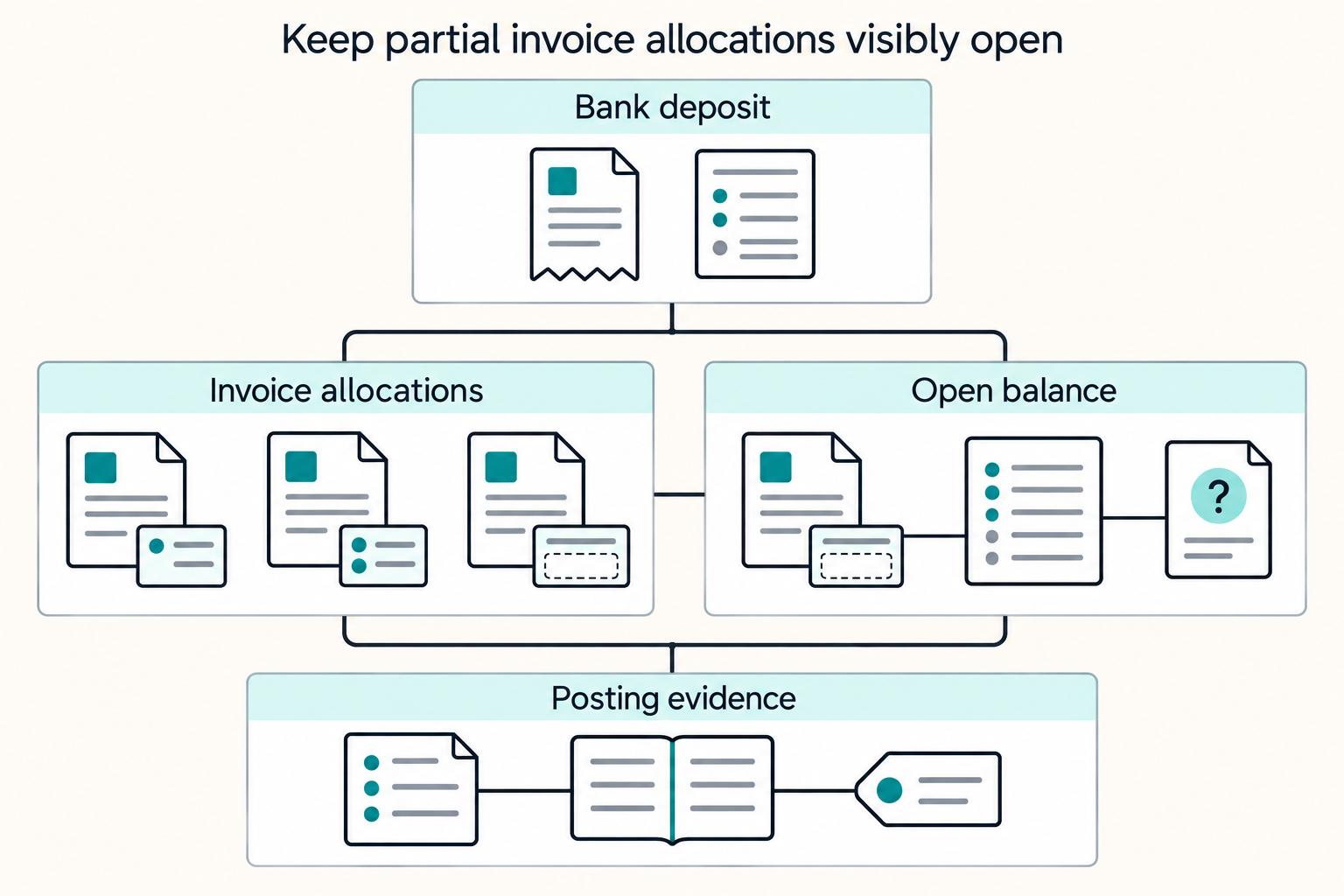
Partial payment should never sit in a vague middle state. Route it to a named owner with a documented next step, and keep the balance status visible in the same invoice record until resolution.
Your control check is simple: open any live invoice and confirm another operator can see the current status, owner, and next action without searching inboxes or chat.
When approvals involve more than one owner, How to Set Up Invoice Approval Workflows shows how to make status and sign-off explicit.
Reconcile and close with evidence, not assumptions#
A "paid" label is not closure. Close an invoice only when the invoice register, payment events, and posted ledger journals match, and every exception has a documented disposition.
Step 1 Match three records before you close#
Run a three-way check for each invoice: invoice register, bank/provider event history, and posted ledger journal. Confirm the invoice ID, paid amount, payment date, and provider or bank reference all point to the same transaction. If one source shows paid but the journal is missing, keep the invoice open.
Checkpoint: another operator should be able to trace any closed invoice from invoice artifact to payment event to posted journal without extra context.
Step 2 Assemble an evidence pack that survives audit review#
Keep one close packet per invoice with:
- Invoice artifact
- Payment event trail
- Settlement references
- Final
ledgerjournal ID - Tax tags your process depends on (including
1099/FBAR-relevant tags where applicable)
If foreign accounts are in scope, flag records for FBAR review during close. IRS guidance says certain U.S. persons with financial interest in, or authority over, foreign financial accounts must file an FBAR when aggregate foreign account value exceeds $10,000 at any point in the calendar year, using FinCEN's BSA E-Filing System. When reporting maximum account value, FinCEN instructions say to record U.S. dollars and round up to the next whole dollar.
Step 3 Track close quality, not just cash received#
Track these operating KPIs: unmatched payments, days-to-close, duplicate invoice attempts blocked, and percent auto-reconciled. Use trend movement to trigger action; if unmatched items rise or auto-reconciliation falls, review reference capture, duplicate prevention, and partial-payment handling before close pressure increases.
Related reading: A Guide to Invoice Factoring for Freelancers.
Conclusion#
A professional invoice is not mainly a design exercise. It is a controlled sequence: complete the record, state the terms clearly, check any required compliance details, send once, and keep enough evidence to explain what happened later. Use this close-ready checklist as your final pass before you call the cycle done:
- Confirm the invoice is complete and uniquely identifiable.
Check the basics first: your business information, client details, a unique invoice number, clear service descriptions, the amount due, and explicit payment terms. If the client's accounts payable team requires a PO number, add it before send rather than chase it later. Verification point: someone outside the draft process should be able to answer who owes what, for which work, and by when in under a minute. Common failure mode: a clean-looking invoice still gets delayed because a required field or reference is missing.
- Validate any compliance and tax gates that apply to this client or payment path.
Do not assume every invoice needs KYC, AML, W-8, W-9, or VAT handling, but where those checks are part of your process, finish them before release. The useful standard is simple: payments should run with built-in checks and records, not with missing paperwork patched in afterward. Verification point: the supporting document pack is attached or traceable to the invoice record. If this is incomplete, hold the send.
- Set payment terms that help collection instead of creating ambiguity.
A vague "due on receipt" note is weaker than specific terms with a due date. If you have room to standardize, shorter terms like Net 7 or Net 14 can improve collection compared with Net 30, and for larger projects a 50% upfront deposit can help cash flow before work starts. Recommendation: pick one default terms format and stick to it unless the contract says otherwise.
- Send with clear ownership for follow-up and posting.
Once the invoice goes out, make one person responsible for the next state change. If it goes overdue, a practical cadence is a polite reminder on day one after the due date, then a phone call in week two if payment still has not arrived. After payment activity appears, verify it in your accounting record before you treat the invoice as fully closed. Common failure mode: marking something "paid" from an email or portal event without checking the actual financial record.
- Resolve exceptions and save the evidence pack.
Before month end or reporting close, make sure partial payments, disputes, and changed amounts are actually dispositioned. Keep the invoice artifact, related payment references, and any compliance or tax records together so you can support reporting, audit questions, and client disputes without reconstructing the story from inboxes later.
That is the real finish line: not just an invoice sent, but an invoice that can be collected, explained, and defended.
Frequently Asked Questions
What must every professional freelance invoice include to be considered complete?
At minimum, treat an invoice as complete only when it shows the client's information, itemized services, the amount due, and explicit payment terms. That matches the basic purpose of an invoice as a formal payment request and shared record of completed work and cost. If another operator cannot tell who owes what, for which work, and by when, it is not ready.
How can we prevent duplicate invoice numbers when invoices are retried or resent?
Keep invoices accurate, timely, and complete so the payment record is clear if questions come up later.
What usually causes invoice-to-payment mismatches during payment reconciliation?
A common cause is invoices that are not clear, accurate, or timely about the work completed and amount owed. When those basics are weak, payment questions and disputes are more likely because the shared record is incomplete.
How should we standardize payment terms and due dates across clients?
State payment terms explicitly and use them consistently across invoices. Clear terms are not just formatting; they help keep follow-up and dispute handling consistent because both sides can reference the same record.
When should we move from Canva or QuickBooks templates to API-driven invoicing?
Keep invoices clear, polished, accurate, timely, and complete.
What checks should happen before an invoice is sent to avoid compliance or payout delays?
Confirm client information is complete, services are itemized correctly, amount due matches the completed work, and payment terms are present. Keep invoice records accurate and current so tax-related reporting and compliance are easier to maintain.
How do Virtual Accounts and webhooks change invoice tracking and reconciliation?
Treat the invoice as the shared record of completed work and amount owed, and keep that record accurate and timely.
Try a related tool
Researched and edited by the Gruv editorial team. Gruv builds cross-border billing, payouts, and finance-operations software for global businesses.
Sources
- bsaefiling.fincen.gov/docs/XMLUserGuide_FinCENFBAR.pdftrusted
- das.nebraska.gov/materiel/purchasing/120174%20O3/Falling%20Co...trusted
- fincen.gov/reporting-maximum-account-valuetrusted
- fincen.gov/report-foreign-bank-and-financial-accountstrusted
- gacc.nifc.gov/swcc/dispatch_logistics/dispatch/mobguide/Fu...trusted
- iga.in.gov/laws/2022/ic/titles/34trusted
- ilga.gov/documents/legislation/legisnet91/sbgroups/sb...trusted
- irs.gov/newsroom/details-on-reporting-foreign-bank-a...trusted
Educational content only. Not legal, tax, or financial advice.
Related Posts

How to Create a Professional-Looking Invoice
**Treat your invoice like a system for getting paid, not a one-off design artifact.** You are the CEO of a business-of-one, and invoicing is part of how you protect cashflow without adding more admin to your week. Once you stop optimizing for "make it look nice," you can focus on what often drives resend requests and payment delays: unclear information, fuzzy terms, and sloppy records.
Payment Reconciliation for Freelancers: How to Match Invoices to Bank Deposits
Payment reconciliation on freelancer platforms breaks down when a bank deposit cannot be tied, with confidence, to the right internal transaction. Your operating goal is simple: route each deposit into the right path, auto-match, manual review, or exception handling, and keep a record that can be traced from bank transfer through GL posting.
Create Invoices on Mobile Without Breaking Reconciliation
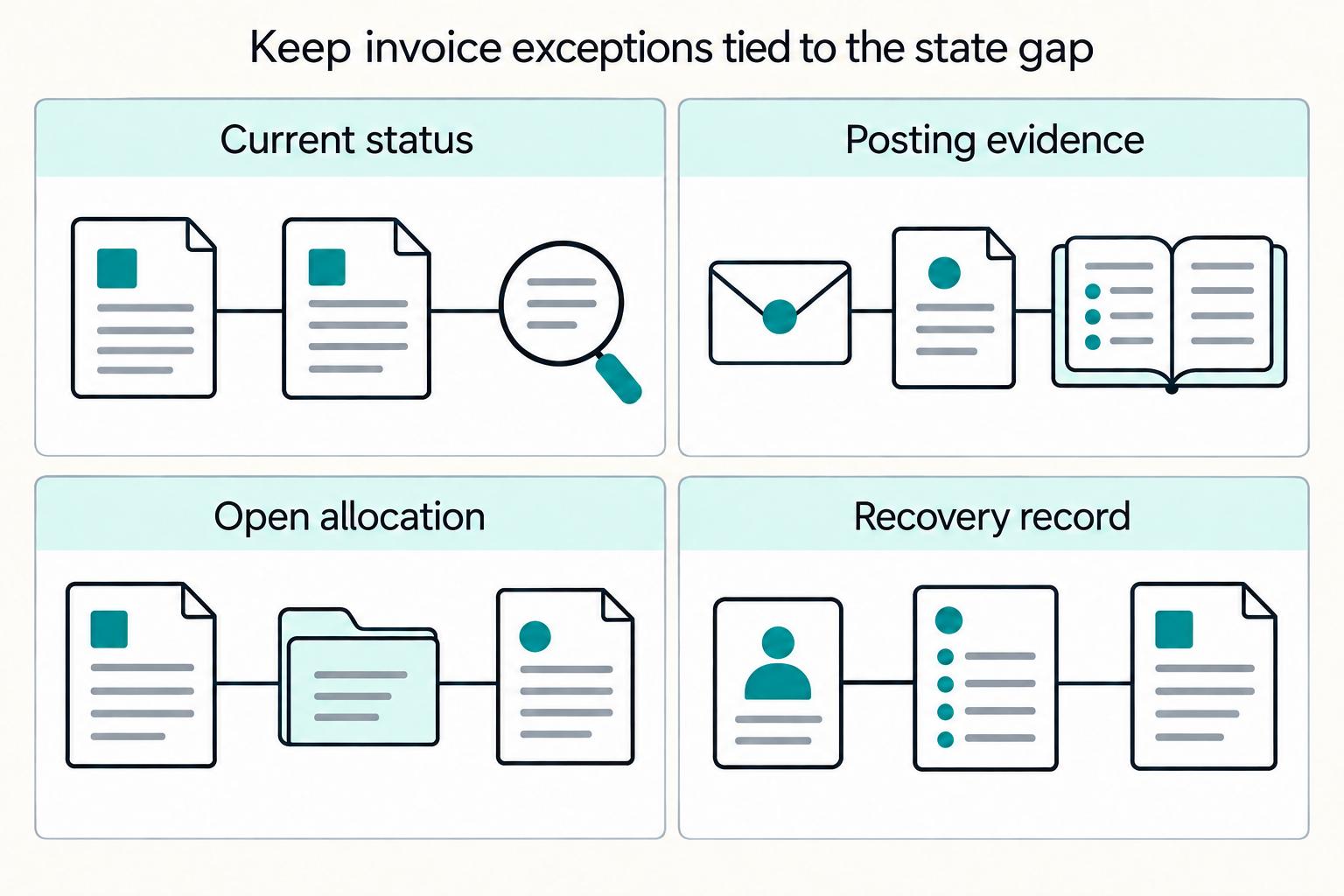
Yes, you can create and send invoices from iOS and Android without giving up finance control, but only if you judge the setup by its evidence trail, not just by how quickly an invoice can be sent. Xero explicitly supports creating and sending invoices from an iPhone, Android device, or tablet. QuickBooks describes phone-based invoice creation, sending, tracking, and sync back to the books.