
Quick Answer
Start by treating Spain invoices as gated operations: confirm registration evidence, enforce structured NIF and EU VAT ID fields, and block drafts with missing series or issue dates. Route each file as Spain domestic, EU business, or non-EU before tax logic is applied. Then run VAT and IRPF as separate approvals, and keep conflicting records non-final. For social-security exceptions, require a Certificate of Coverage before release.
Spanish freelancer invoicing should be treated as a compliance process first, not just a document-formatting task#
Spanish freelancer invoicing should be treated as a compliance process first, not just a document-formatting task. In Spain, each invoice can affect tax and registration records, and the evidence your team may need to defend how and why an invoice was issued or accepted.
This guide is for teams building repeatable controls across many invoice flows, not for one-off freelancer tips. The sequence is practical: eligibility checks, invoice data requirements, IVA/IRPF routing where applicable, evidence handling, and escalation when facts are unclear or conflicting.
Spanish invoicing also sits within broader autónomo obligations, including taxes, social security, invoicing, and ongoing duties. One early control is to separate status checks from formatting checks: tax residency should be assessed separately from visa status in cross-border setups.
Ownership should be explicit from day one, with a shared operating view across the functions that validate invoices, interpret ambiguous rules, and enforce workflow controls. That matters because public guidance signals change: Stripe describes 2027 Crea y Crece-related controls, including approved software, direct communication with the Spanish Tax Agency, and QR codes, while also stating that core mandatory invoice information remains required. Other materials discuss 2026 timing.
Use this guide as an operating reference, not legal advice. If registration status, VAT treatment, IRPF applicability, residency, or client tax facts are ambiguous, pause issuance or acceptance and escalate to local tax or legal counsel before the invoice enters production.
For the registration sequence that should happen before invoicing, see Become Freelancer Spain Autonomo 2026 with the Right Filing Sequence.
What to prepare before you let invoices flow#
Set your controls before the first live invoice. Fixing tax ID gaps, numbering issues, or missing evidence after invoicing starts is slower and riskier.
Step 1 Lock the minimum data pack#
Define non-waivable fields at the template level:
| Field | Control note |
|---|---|
| Invoice number and series | Non-waivable at the template level; a draft should not be finalized if required number or series is missing |
| Issue date | Non-waivable at the template level; a draft should not be finalized if the issue date is missing |
| Supplier and client tax identifiers | Keep in structured fields, not free-text notes; for intra-EU B2B include both VAT IDs/NIF-IVA |
| Issuer and client names | Part of the non-waivable template-level pack |
Keep tax identifiers in structured fields, not free-text notes. Add internal routing fields only after the mandatory pack is enforced. A draft should not be finalized if required number or series, issue date, or tax ID is missing.
Step 2 Assign owners before launch#
Treat ownership as an operating control, not an afterthought. A practical internal split can be:
- Finance Ops: completeness checks and numbering control
- Tax/Legal: interpretation when facts are unclear
- Product/Engineering: validation gates, templates, and audit logs
Word- or Excel-only exception handling weakens auditability and increases errors. Require a named approver and a recorded reason for each override.
Step 3 Decide what blocks issuance vs what can be corrected later#
Decide this up front, because teams get inconsistent fast when they are left to improvise. Missing tax IDs, missing issue dates, or non-consecutive numbering by series are strong candidates for issuance blocks.
Use tooling with a read-only audit trail and export options. Paper and electronic invoices are both valid only when authenticity, integrity, and legibility are ensured, so format alone is not enough.
Step 4 Publish a versioned Spain policy note#
Keep one short, versioned Spain policy note that states:
- Required invoice fields
- Exception approvers
- Record retention under your approved policy
- Verifactu-readiness tracking
Your checkpoint is traceability: each issued invoice should map back to the policy and template version in force at that time.
For the expense evidence side of the same workflow, see Deductible Expenses for Freelancers in Spain Under IRPF and VAT.
Can you invoice in Spain without being registered as autonomo#
Use this as an operations control: require clear, internally consistent registration evidence before you treat Spain-linked invoicing as routine. A definitive legal yes/no on invoicing without autonomo registration is not established. If the status story is incomplete or contradictory, hold the file and escalate instead of processing it in the normal queue.
Step 1 Set the default gate#
Make complete registration evidence the default entry condition for routine processing. This is not a legal rule. It is a defensible control when status is unclear.
Before finalizing an invoice, check that the worker profile, onboarding records, and invoice data tell one consistent story. If those records conflict, stop and route the case for specialist review.
Step 2 Classify census-only files as exceptions#
If a file relies on a Census of Entrepreneurs, Professionals, and Retainers reference without the rest of the evidence your policy requires, treat it as an exception case. Census-only status is not, by itself, a confirmed valid invoicing path, so confirm with Tax or Legal before treating it as one.
Assign an owner, document the gap, and keep the invoice on hold until Tax or counsel confirms how to proceed.
Step 3 Verify social-security exception claims with documents#
Teams often overread the claim and undercheck the proof here. Cross-border social-security coverage can be assigned under totalization agreements, which are designed to avoid dual social-security taxation by assigning coverage to one country and exempting the other. SSA's overview lists Spain as an agreement country, with an entry-into-force date shown as April 1, 1988.
If someone claims foreign coverage instead of local social-security coverage, require the actual Certificate of Coverage when relevant. An online request flow can check for missing or erroneous input before transmission, but a submitted request is not the same as an issued certificate.
Where facts suggest a possible worker-classification problem, do not use an invoicing exception to bypass that risk. Escalate it directly.
Step 4 Record exception rationale every time#
For any non-standard acceptance or rejection, add a short rationale to the evidence pack. Record the claimed basis, documents reviewed, decision owner, and why the case was treated as an exception.
Keep the rule consistent: if evidence is missing or contradictory, hold and escalate rather than improvise.
Related: A Deep Dive into Spain's 'Autónomo Tarifa Plana' for New Freelancers.
Build the invoice data model once and enforce it everywhere#
Once you clear the registration-status gate, treat invoice data as a controlled record, not a formatting task. Keep one canonical invoice record that every team uses instead of reconciling PDFs, email notes, and spreadsheet edits later.
Step 1 Define one canonical invoice record#
Use one schema that must be completed before issue or payment. As an internal control, include the commercial and tax fields your process relies on, such as invoice numbering, issue date, supplier and client fiscal details, taxable base, VAT (IVA), any withholding field your policy tracks, and total.
Keep this as an operating minimum, not a legal conclusion. Confirm which fields are legally mandatory in every Spain scenario with local tax counsel.
Verification point: the same field names and values should carry through creation, review, payout release, and ledger export. If those views disagree, the model is not working.
Step 2 Structure identity fields so routing does not depend on notes#
Routing quality drops when identity lives in notes. Store identity data in typed fields, not one free-text block. Capture legal name, country, entity type, identifier type, identifier value, and validation status.
If your policy tracks Spain local identifiers, such as NIF/CIF, keep them in dedicated fields. For EU B2B cases, keep a separate EU VAT number field and define your internal check workflow.
Verification point: domestic vs EU B2B routing should be clear from structured data alone. If operators must read PDFs or email threads to classify a case, control quality will degrade.
Step 3 Add line-level metadata for cross-border VAT decisions#
Header data alone may not be enough for audit-ready VAT handling. Each line should include service date, jurisdiction used for the tax decision, and selected tax treatment.
This becomes critical when you use OSS. OSS returns are additional filings and do not replace domestic VAT returns, and supplies that fall under the chosen OSS scheme must be declared through that OSS return. Without line-level tags, separating OSS and non-OSS flows is less reliable.
Step 4 Enforce blocking controls and auditable overrides#
If you use blocking controls, put them at creation or release, not only in review checklists. Typical controls include blocking when key identifier fields are blank, numbering logic breaks, or tax treatment changes after review.
If manual overrides are allowed, require explicit approval and log original value, edited value, approver, timestamp, and reason. For complex cross-border VAT treatment questions, route early for specialist review, including potential VAT Cross-border Rulings handling where relevant. If a CBR request is pursued, it should follow national VAT-ruling conditions in the participating Member State, and where multiple companies are involved, one company should submit on behalf of the others.
Bank setup affects evidence quality too; use The Best Bank Accounts for Freelancers in Spain when you map the payment trail.
Route each invoice by client scenario before calculating taxes#
Classify the client scenario first, then calculate VAT. Auto-route from verified client attributes, and send incomplete or conflicting records to an exception queue instead of approving them manually.
Step 1 Create three operational routes and keep them separate#
Use three operating buckets in your decision table as a control model: Spain domestic, EU business, and non-EU client. Treat these as control routes, not self-proving legal outcomes.
| Route | Minimum attributes to classify | Auto-route only if | Evidence to retain |
|---|---|---|---|
| Spain domestic | Client country = Spain | Country and tax profile are complete under your policy | Client snapshot, invoice record, override reviewer, if any |
| EU business | Client country in EU, business profile, and any EU VAT field in your model | Business status and configured validation checks are complete under your policy | Validation result, check date, reviewer, template version |
| Non-EU client | Client country outside EU, client and service profile complete | Non-EU status is clear and legal-basis field is completed by approved rule or review | Country proof, client profile, legal-basis memo, support files |
Verification point: reviewers should be able to see why a case landed in a branch from structured fields alone.
Step 2 Route from verified attributes, not assumptions#
Auto-routing should come from typed fields, not operator memory. Drive routing from country, entity type, identifier type and value, and validation status. If key validation fields are blank, stale, or failed, treat the case as an exception under your policy instead of auto-routing it as confirmed EU business.
For non-EU routing, do not encode a zero-VAT rule from memory or from old templates. Confirm Spain-specific zero-VAT rules with counsel-approved decision rules and require supporting evidence before approval.
Step 3 Tie each route to approved legal-basis and wording controls#
Add two required fields per route: legal-basis reference and wording-template version. This keeps legal rationale auditable and prevents free-typed invoice language.
Do not hardcode Article 196 of Directive 2006/112/CE, Inversion del sujeto pasivo, or Article 69 wording as universal requirements from this section alone. Use them only where your Tax/Legal owners have approved them for a specific scenario, with the related memo or checklist attached.
Step 4 Add cross-border escalation rules for OSS and complex cases#
Routing should also point toward filing treatment, not stop at invoice generation. If you opt into an OSS scheme, keep in mind: OSS is optional; if you use a scheme, all supplies under that scheme must be declared through its OSS return; and OSS returns are additional, not replacements for domestic VAT returns.
Add a filing flag, domestic, OSS, or reviewed exception, and store the Member State of identification when OSS applies. For complex cross-border cases, escalate early to VAT Cross-border Rulings (CBR): requests can be made in participating countries, including Spain, are filed where the requester is VAT-registered, must follow that country's national VAT-ruling conditions, and when several companies are involved, one company should submit on behalf of the others.
Apply VAT and IRPF with verification checkpoints#
Do not calculate taxes in one pass. Treat VAT and IRPF as separate approval checks, and keep the invoice blocked when either check lacks evidence.
VAT should follow the routed client facts. IRPF needs its own Spain-specific determination. If withholding applicability is unclear, pause issuance and route to Tax review instead of issuing a best-guess invoice.
Step 1 Separate the VAT check from the IRPF check#
Run VAT first using your routed scenario, for example domestic, EU business, or non-EU client. Store a structured result: VAT treatment, decision basis, and supporting evidence fields.
Run IRPF as a separate check with its own status. Do not let a VAT outcome imply an IRPF outcome. Use one VAT status field, one IRPF status field, and one issuance flag that stays blocked until both are approved or escalated.
| Check | Minimum evidence before send | Block if |
|---|---|---|
| VAT | Complete tax profile, client route, legal-basis reference for any 0% VAT outcome, EU VAT number where your policy requires it for EU business handling | Any required field is blank, stale, contradictory, or unsupported by approved rule |
| IRPF | Counterparty tax profile and approved Spain-specific rule or review outcome | Applicability is uncertain or based only on memory or prior invoice pattern |
| Override | Named approver, evidence reviewed, timestamp, and documented legal reference | Manual change was made without an approval trail |
Verification point: an auditor should be able to answer both "why was VAT set this way?" and "why was IRPF set this way?" from system fields and attachments.
Step 2 Enforce pre-send checkpoints before the invoice leaves draft#
Before anything leaves draft, make three checks non-optional.
First, confirm tax profile completeness under your policy, including supplier and client identifiers, country fields, entity type, and route outputs. If a 0% VAT result can pass with a blank legal-basis field, the control is incomplete.
Second, where your EU business path depends on a valid EU VAT number, require a current validation result or a reviewed exception. Do not let stale or failed validation pass by default.
Third, require an explicit legal basis for any 0% VAT use. Do not assume a specific article applies by default. Require the approved reference plus supporting memo or checklist. For complex cross-border cases, escalate early through VAT Cross-border Rulings (CBR): taxable persons can request advance rulings, requests are introduced in the participating EU country where they are VAT-registered, and national VAT-ruling conditions apply.
Step 3 Pause uncertain IRPF cases instead of issuing a best guess#
If IRPF applicability is unclear, keep the invoice in draft and route it to Tax review. Specific withholding rules, rates, or exemptions should be confirmed with Tax before proceeding, so keep the decision rule narrow.
Require a reason code when IRPF is set to applied, not applied, or pending review. Also block copy-forward behavior unless prior evidence is still valid under current policy.
For IRPF review, require a compact evidence pack: counterparty profile, relevant Spain-specific policy note or counsel instruction, and recorded reviewer decision. If that pack is missing, do not issue.
Step 4 Log every override and the legal basis behind it#
Overrides are tax decisions, not simple edits. Record who approved, what evidence was reviewed, when approval happened, and which legal reference supported the decision.
Be explicit about reviewed evidence: validation result, client snapshot, checklist version, memo, or cross-border review note. If the case is handled through OSS, also store the filing flag and Member State of identification. OSS is optional; if used, all supplies within that scheme must be declared through that OSS return, and OSS returns are additional to domestic VAT returns.
Step 5 Compare expected tax logic to issued values after issuance#
A post-issuance check is worth having because silent drift often shows up after draft controls have already passed. Compare expected tax logic from routing against the issued invoice values to catch rule drift, template defects, and manual edits.
Compare route, legal-basis field, VAT status, IRPF status, and cross-border flags against the final document. Review mismatches on a regular cadence before filing periods. If you use OSS, keep scheme cadence in view: quarterly for Union and non-Union schemes and monthly for the import scheme.
Before approving EU vs non-EU tax treatment, where your policy requires a VAT ID check, run a standardized pre-send check with the VAT Number Validator.
Handle EU and non-EU wording correctly on the invoice#
Once VAT routing is approved, lock invoice wording with the same discipline you use for tax values. The failure to prevent is simple: a route-consistent tax result paired with route-inconsistent legal text.
Step 1 Tie approved wording to the route, not operator memory#
Map approved snippets to routing outcomes, for example Spain domestic, qualifying European Union business, and non-EU client, and have the system select them automatically. For the EU business route, use your approved route-specific snippet and bind it to the same legal-basis field used for the VAT decision.
If wording is not approved for a route, block issuance. Do not allow manual legal-reference drafting under deadline pressure.
Step 2 Enforce template selection in the generator#
Populate legal wording from structured fields, not free text. Operators can edit commercial service descriptions, but legal-reference text should stay template-controlled by route.
Include an explicit exception path only: named approver, reason code, and stored memo. No silent overwrites.
Step 3 Store proof artifacts with each issued invoice#
Keep the evidence behind wording selection with the invoice record, not only the PDF. At minimum, retain client VAT-status evidence, jurisdiction proof, and the selected legal basis.
| Artifact | When or why to keep it |
|---|---|
| Client tax-profile snapshot | At issuance |
| EU VAT-status validation result | When your policy requires it |
| Jurisdiction evidence | Used for route selection |
| Template version ID and legal-basis code | Retain with the invoice record |
| OSS flag and Member State of identification | Also store if the flow uses OSS |
If the flow uses OSS, the OSS flag and the Member State of identification should be visible in the file. OSS includes rules on records and invoices, so that path should be visible in the case record.
Step 4 Review wording mismatches as compliance defects#
Treat wording mismatches as defects even when the amounts are correct. Run a post-issuance check that compares route, tax outcome, and wording template on the final document.
For each reviewed invoice, the record should answer: which route was used, which wording template was used, which legal basis was selected, and which evidence supported it. If cross-border cases stay ambiguous, escalate through VAT Cross-border Rulings where applicable: requests are filed in the participating EU country where the taxable person is VAT-registered and must follow that country's national VAT-ruling conditions.
Set ownership across Finance Ops, Tax, Legal, and Engineering#
Once route wording is locked, set explicit ownership so checks, interpretation, and system enforcement do not drift across teams.
Step 1 Assign one decision owner for each kind of question#
Use a practical split as an internal operating model, not as a legal RACI requirement. Finance Ops can run day-to-day checks and clear or hold records. Tax and Legal can handle interpretation when facts are unclear, especially if autónomo classification or registration evidence does not line up cleanly. Engineering can own the product controls that keep incomplete or contradictory records from moving forward.
Keep exception handling explicit. If a file is missing either registration checkpoint, route it to a named reviewer with a documented decision: Step 1 with Hacienda and Step 2 with Social Security (RETA).
Step 2 Map each owner to the Gruv control surface you actually use#
Ownership is clearer when it maps to the controls your team actually uses. Where supported in your Gruv setup, policy gates can block incomplete records before invoice issuance. Payout checks can act as a second gate if status changes after invoice creation. Keep audit-ready event logs so reviewers can trace who approved what and when.
In practice, Finance Ops can review the evidence pack, Tax or Legal can resolve interpretation questions, and Engineering can enforce idempotent execution so retries do not create duplicate outcomes.
Step 3 Put rule changes behind documented approval and test evidence#
Treat rule updates as controlled changes. Spain guidance describes six main self-employed types with different social-security, tax, and registration treatment, and misclassification can lead to tax or legal issues.
A practical baseline is:
- a documented rule change request with business reason
- Tax or Legal review before rollout
- test evidence for pass, fail, and exception outcomes
Also keep rule version history tied to invoice and payout decisions so you can explain why outcomes differed across cases.
Step 4 Minimize and mask personal data from the start#
In Gruv workflows, keep personal data collection limited to what is operationally necessary, and mask sensitive values in standard operator views. Store sensitive supporting documents in restricted-access, encrypted storage, with access limited to reviewers who need full detail for an exception or escalation.
For deductible-expense controls that carry across markets, see Freelancer Tax Deductions: How to Find, Document, and Defend Them.
Keep an audit trail that survives inspections and reconciliations#
Once ownership is set, keep a complete decision record so Finance can explain each invoice outcome from issuance through reconciliation.
Step 1 Set a retention rule you can defend#
Do not assume a specific Hacienda retention period without confirming with Tax, Legal, and Finance. Define an internal retention schedule and apply it consistently to invoices, approvals, and supporting records.
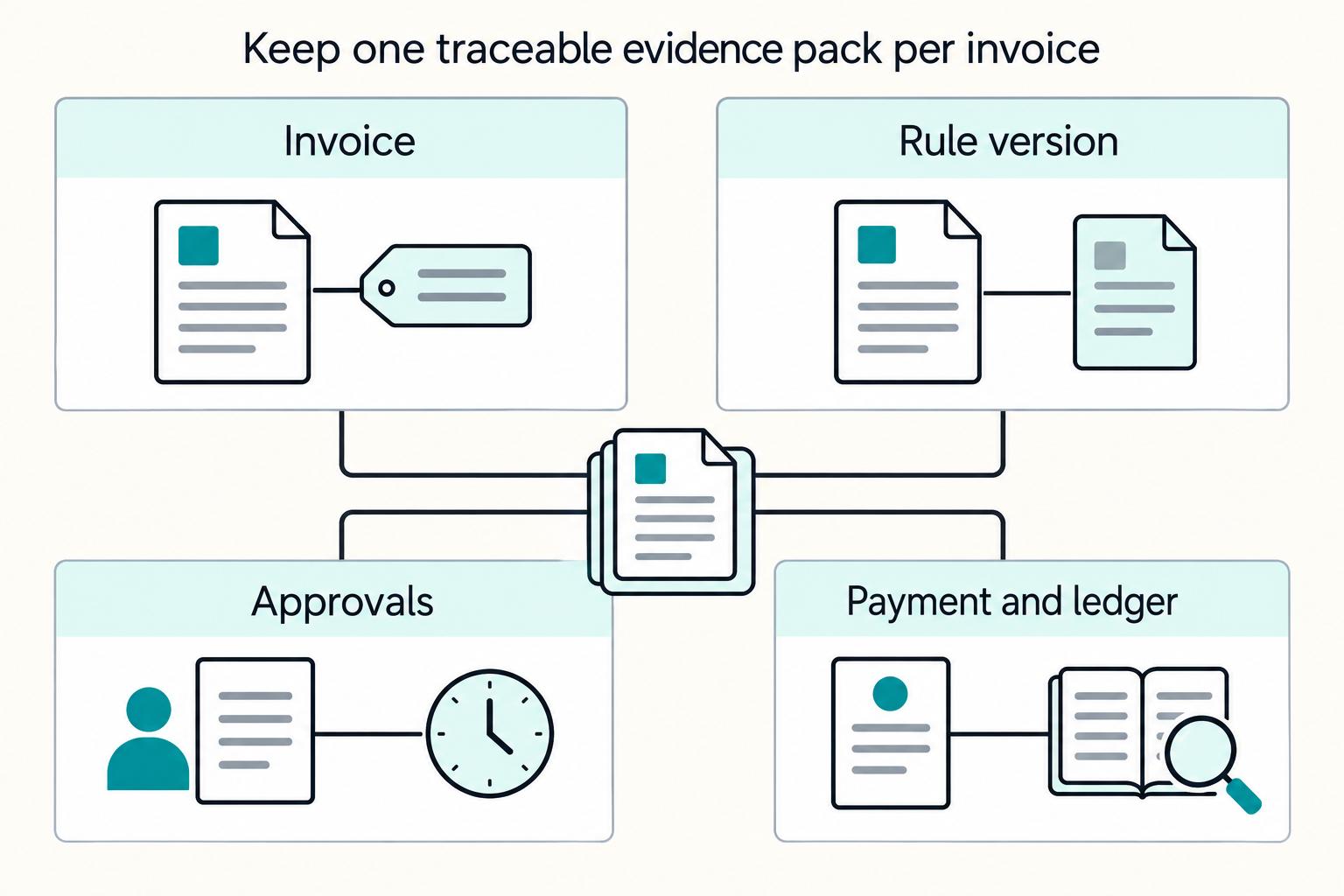
Step 2 Keep one evidence pack per invoice#
One durable internal-control setup is one case file per invoice. A reviewer should be able to reconstruct the decision without chasing email or chat history. Depending on your policy, keep materials such as the issued invoice, routing outcome, wording version, approvals with timestamps, and any exception memo together in one place.
Step 3 Record which source version informed the rule#
Store version details for any external source used in a decision, not just a link. For example, the EESC study includes traceable checkpoints such as DATE | 13/09/2021, PDF | 978-92-830-5404-7, and print | 978-92-830-5405-4, which makes it easier to confirm exactly what was reviewed.
Use the same caution signal from that document: it states the views are the authors', may not reflect official EESC opinion, and EESC does not guarantee data accuracy. If a rule depends only on that source, escalate before relying on it.
Step 4 Reconcile invoice, payment, and ledger records#
A clean audit trail is not just document storage. For internal control, make your process traceable from request to settlement. Link invoice state changes, payment confirmation, and ledger posting so mismatches are visible and explainable during reconciliation.
Common mistakes and how to recover without compounding risk#
When an invoice path breaks, reduce risk by pausing downstream actions and rebuilding the decision from verified evidence instead of patching text in place.
Step 1 Pause cases where status was not actually confirmed#
If an invoice moved forward before the worker's status was confirmed under your own process, treat it as a potential classification issue first and a billing issue second. Consider keeping the invoice non-final, pausing payout release, and reopening the case so Finance, Tax, or Legal can confirm whether the original routing still stands.
For cross-border Social Security scenarios, do not assume invoice wording resolves coverage. Totalization agreements are meant to assign coverage to one country and exempt Social Security taxes in the other, and SSA lists the U.S.-Spain agreement as in force from April 1, 1988. Use a real coverage artifact, such as a Certificate of Coverage, before closing the case.
Step 2 Reopen 0% VAT cases with no documented basis#
If 0% VAT was applied but the file has no documented basis, open a correction case and route it to Tax or Legal instead of reverse-engineering a justification. Record who approved the original treatment and require a written decision before the invoice is treated as final.
For 0% VAT cases, confirm Spain-specific VAT validity rules, including Article 69 or Directive 2006/112/CE application details, with Tax or Legal before approval. Recovery here is escalation and documentation, not guesswork.
Step 3 Hold identifier-related corrections until validation is rerun#
When key information is missing, do not try to clean it up with a visual skim. Keep the invoice non-final, collect the missing data from an authoritative record, and rerun validation before release. Do not rely on an email confirmation alone.
A useful control model is SSA's pre-transmission check for keying errors and missing information. Your case file should show where each identifier came from, when it was captured, and who validated it.
Step 4 Use controlled correction flow for off-system edits#
Off-system edits are a failure mode because they break the audit trail at the same time they change the document. Use controlled re-approval and a full audit annotation before releasing a corrected invoice. Record what changed, why it changed, and which evidence supported the change.
Also handle correction artifacts through approved secure channels. SSA explicitly notes web submissions cannot be guaranteed against interception or decryption. Treat that as an operational warning for sensitive invoice-recovery material.
For a step-by-step walkthrough, see How to Invoice as a Freelancer Without Chasing Late Payments.
Escalation triggers that should never be handled ad hoc#
Some invoice cases should stop normal handling immediately: when tax signals conflict, exception paths lack stable documentation, or Tax and Legal do not align.
| Trigger | Immediate action | Evidence to include |
|---|---|---|
| Client requests EU treatment but the EU VAT number fails validation | Keep the invoice non-final and escalate | Validation result, identifier as submitted, country-routing facts, requested VAT treatment, and exception approver |
| Repeated Spain-specific census-labeled exception use without consistent documentation | Escalate for a formal policy decision instead of approving case by case | Compare the current exception file with the last approved one |
| Requests to bypass invoice wording or conflicts between Tax and Legal on VAT (IVA) or IRPF treatment | Do not issue the invoice until there is a written decision | Written decision, including specialist counsel when required |
Step 1 Freeze contradictory client tax signals#
If a client requests EU treatment but the EU VAT number fails validation, treat it as a contradiction and keep the invoice non-final. A failed validation check does not, by itself, determine the VAT outcome.
Escalate with a complete evidence pack: validation result, identifier as submitted, country-routing facts, requested VAT treatment, and exception approver. For genuinely complex cross-border VAT treatment, route for specialist review and consider whether a VAT Cross-border Ruling is appropriate in the participating EU country where the requester is VAT-registered, following that country's VAT-ruling conditions. If multiple companies are involved, one company should file on behalf of the others.
Step 2 Stop recurring exception use without stable documents#
Repeated exceptions without stable documentation are usually a policy problem, not a frontline problem. If teams repeatedly use Spain-specific census-labeled exception paths without consistent documentation, escalate instead of approving case by case. Do not infer compliance from the census label alone without written confirmation of any Spain-specific census requirement.
Use a control check: compare the current exception file with the last approved one. If documents, rationale, or approver ownership keep changing, escalate for a formal policy decision.
Step 3 Block wording bypasses and owner conflicts before issuance#
Requests to bypass invoice wording that teams associate with "Inversion del sujeto pasivo" or Directive 2006/112/CE references should not be handled in frontline operations. Mandatory wording for Spain should be decided by Tax or Legal, not inferred by frontline teams.
Apply the same escalation when Tax and Legal conflict on VAT (IVA) or IRPF treatment. If OSS is part of the dispute, remember OSS is optional, but if selected, all supplies in that scheme must be declared through OSS, and OSS returns are additional to domestic VAT returns. No invoice should issue until there is a written decision, including specialist counsel when required.
Conclusion and copy-paste launch checklist#
Treat Spanish invoicing as a compliance control process, not a formatting task. Launch only the rules you can evidence, and hold the rest for Tax or Legal approval.
Freeze any Spain-specific tax rule that has not been confirmed by local counsel, including whether Autónomo, Hacienda, or Social Security eligibility gates are required, which invoice fields are mandatory, how VAT (IVA) and IRPF routing should work, and when Article 69 of the VAT Law or Article 196 of Directive 2006/112/CE would apply. Mark these as pending local approval rather than letting teams infer policy from templates.
Stand up the cross-border Social Security controls you can support now. Totalization agreements are intended to assign coverage to one country and reduce dual Social Security taxation, and a Certificate of Coverage is the proof artifact for exemption from the other country's Social Security taxes. For U.S.-Spain scenarios, the U.S.-Spain agreement is listed as in force from April 1, 1988, so add an early Certificate of Coverage checkpoint before treating a case as exempt. Use the online data-validation step to catch missing or keyed errors, and limit stored web-submission data because SSA notes confidentiality limits on web transmission.
Launch with a clear evidence record and named owners across Finance Ops, Tax, Legal, and Engineering. If you cannot reconstruct a sample case end to end, do not scale automation yet. For registration background, use A Guide to the 'Autónomo' System for Freelancers in Spain.
Copy-paste launch checklist#
- Any proposed Autónomo, Hacienda, or Social Security eligibility gate is either locally validated or explicitly marked as pending local counsel confirmation
- Any proposed NIF/CIF/NIE and client tax field requirements are marked pending until local requirements are approved
- VAT (IVA) and IRPF routing rules are documented as drafts and blocked from production until written Tax or Legal sign-off
- Any legal wording tied to Article 69 of the VAT Law or Article 196 of Directive 2006/112/CE is marked pending and not automated until local approval
- Exception queue and escalation owners are defined across Finance Ops, Tax, Legal, and Engineering
- Audit evidence pack and reconciliation checks are running before scale-up
- Cross-border cases include a Certificate of Coverage checkpoint where totalization or Social Security exemption could apply before a case is treated as exempt
- No production rule depends on operator guesswork or free-typed legal wording
If you are turning this checklist into repeatable controls across invoice and payout operations, review the integration paths in Gruv Docs.
Frequently Asked Questions
Can a freelancer invoice in Spain without being registered as Autónomo?
Whether invoicing without full Autónomo registration is allowed in Spain depends on local registration rules — do not treat any alternative as an approved default path without written Tax or Legal sign-off. If a case depends on a local registration exception, hold issuance and require written Tax or Legal sign-off with supporting documents. For registration background, see A Guide to the 'Autónomo' System for Freelancers in Spain.
What exact fields must appear on a compliant invoice for Spain-based work?
The current grounding does not support a definitive Spain-specific invoice field list. Use an approved template owned by Finance Ops and Tax, and verify every issued invoice against that template instead of allowing ad hoc formatting. A document can look complete but still miss identifiers or tax lines your controls require.
When does IRPF withholding apply, and who remits it?
IRPF withholding applicability and remittance responsibilities require confirmation with Tax before issuance. If IRPF treatment is unclear, pause issuance and document who made the decision and what evidence they used. A short hold is usually lower risk than a correction cycle.
When can VAT (IVA) be treated as 0% for EU or non-EU clients?
Do not justify zero VAT from OSS alone without confirming Spain-specific 0% VAT eligibility for freelance services with Tax or Legal. What is supported: OSS is optional, but if a taxable person opts in, all supplies under that scheme must be declared through OSS returns, with quarterly filing for Union and non-Union schemes and monthly filing for the import scheme. For complex cross-border treatment, a VAT Cross-border Ruling can be considered where the requester is VAT-registered in a participating country such as Spain, under that country's VAT-ruling conditions.
What wording is required for Inversion del sujeto pasivo cases?
The exact Spain-required invoice wording for Inversion del sujeto pasivo should be confirmed with Tax or Legal before use. Do not allow frontline teams to free-type legal wording under deadline pressure. Use a locked wording library approved by Tax or Legal, and escalate any requested change.
How long should invoice records and supporting documents be retained?
Confirm the Spain-specific statutory retention period with Hacienda or local Tax counsel. Keep consistent documentation for each case: issued invoice, tax-routing decision, tax-status checks, approvals, and any exception memo. For platforms, note that EU OSS materials indicate record-keeping duties can apply even when a marketplace is not treated as a deemed supplier.
What should teams do now to prepare for Verifactu-related process changes?
Confirm Verifactu deadlines, technical specifications, and mandatory implementation steps with Hacienda or Tax counsel. Prepare at the process level: maintain versioned templates, preserve edit and approval logs, and attach tax-routing decisions to each invoice. A practical readiness check is whether you can reconstruct which rule version, approver decision, and supporting documents produced the final treatment.
Try a related tool
Researched and edited by the Gruv editorial team. Gruv builds cross-border billing, payouts, and finance-operations software for global businesses.
Sources
- eesc.europa.eu/sites/default/files/files/qe-05-21-286-en-n_...trusted
- ela.europa.eu/sites/default/files/2021-09/Study%20Practice...trusted
- middlebury.edu/institute/sites/default/files/2020-07/MIIS%2...trusted
- ssa.gov/international/Agreement_Pamphlets/italy.htmltrusted
- ssa.gov/international/CoC_link.htmltrusted
- stripe.com/resources/more/how-to-create-an-invoice-spaintrusted
- taxation-customs.ec.europa.eu/archives/taxable-persons/vat-cross-border-ru...trusted
- vat-one-stop-shop.ec.europa.eu/one-stop-shop_entrusted
Educational content only. Not legal, tax, or financial advice.
Related Posts
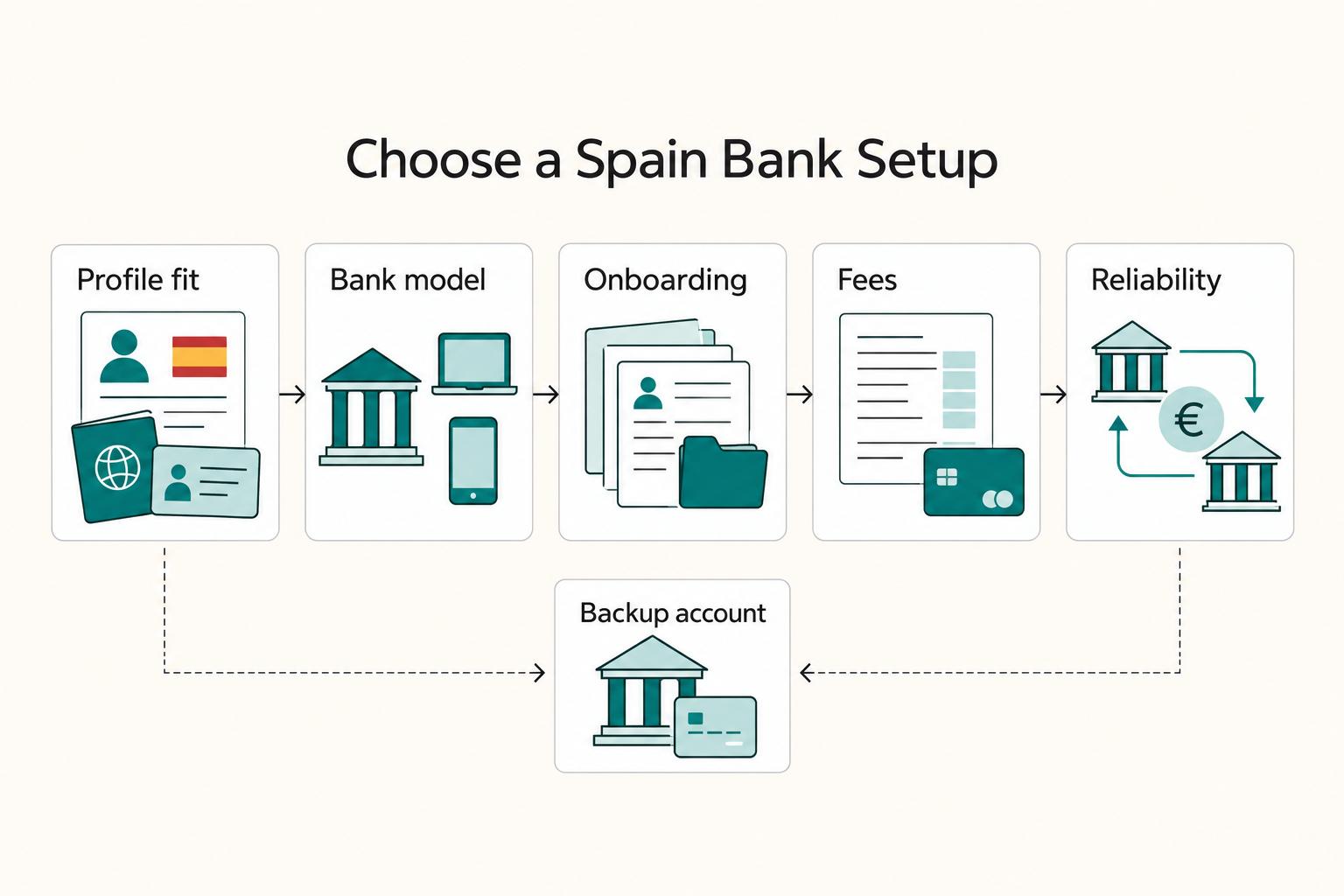
Freelancer Bank Accounts in Spain: Choosing a Primary and Backup Setup
Choose your setup as a risk decision, not a brand ranking. Pick one primary account for daily inflows and keep one backup account active in the same planning session.
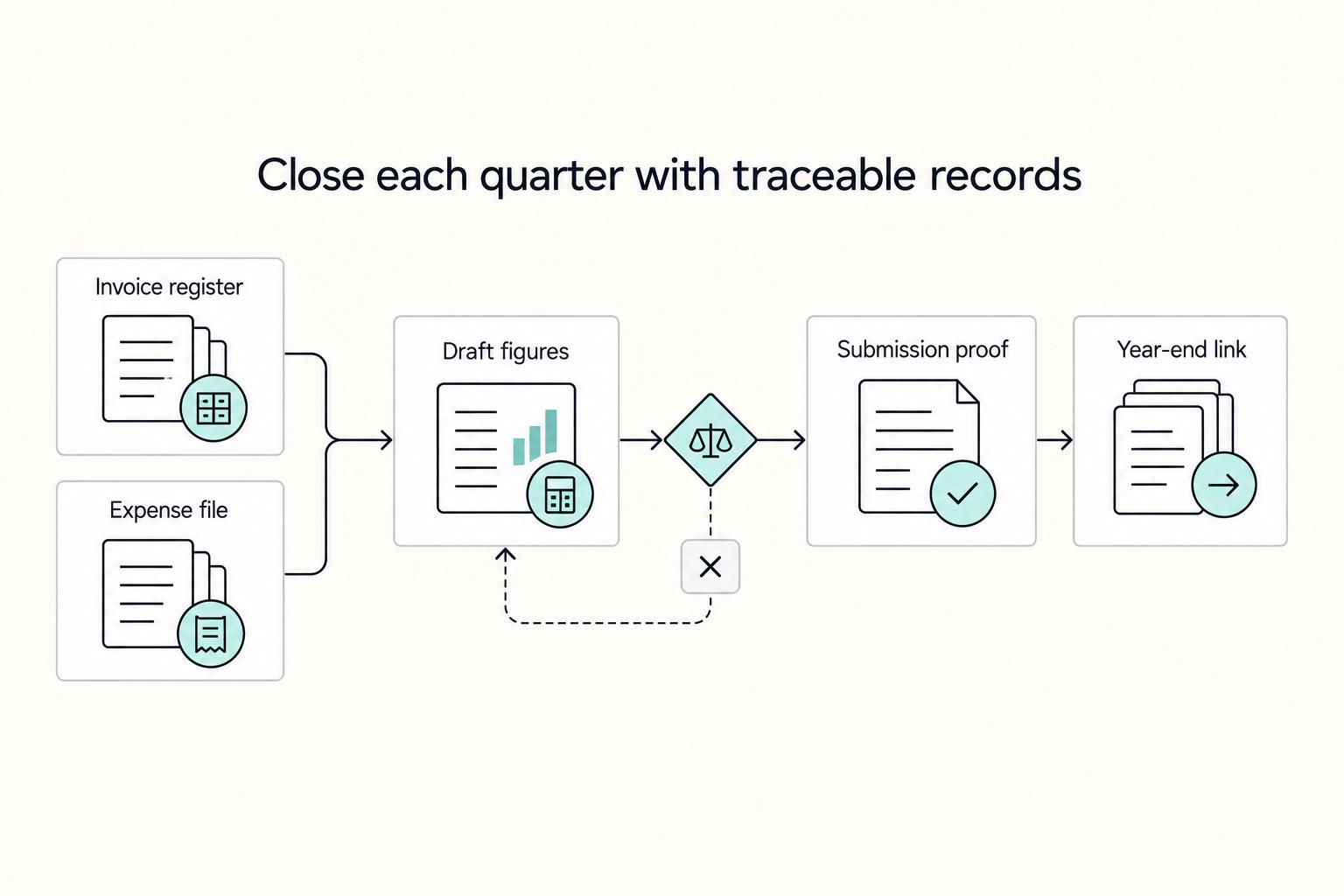
Spain Autonomo System for Freelancers Who Want Compliance Control
Low-stress compliance comes from predictable execution, not tax-shortcut bets. Keep filings clean, document decisions, and set escalation triggers before deadlines.
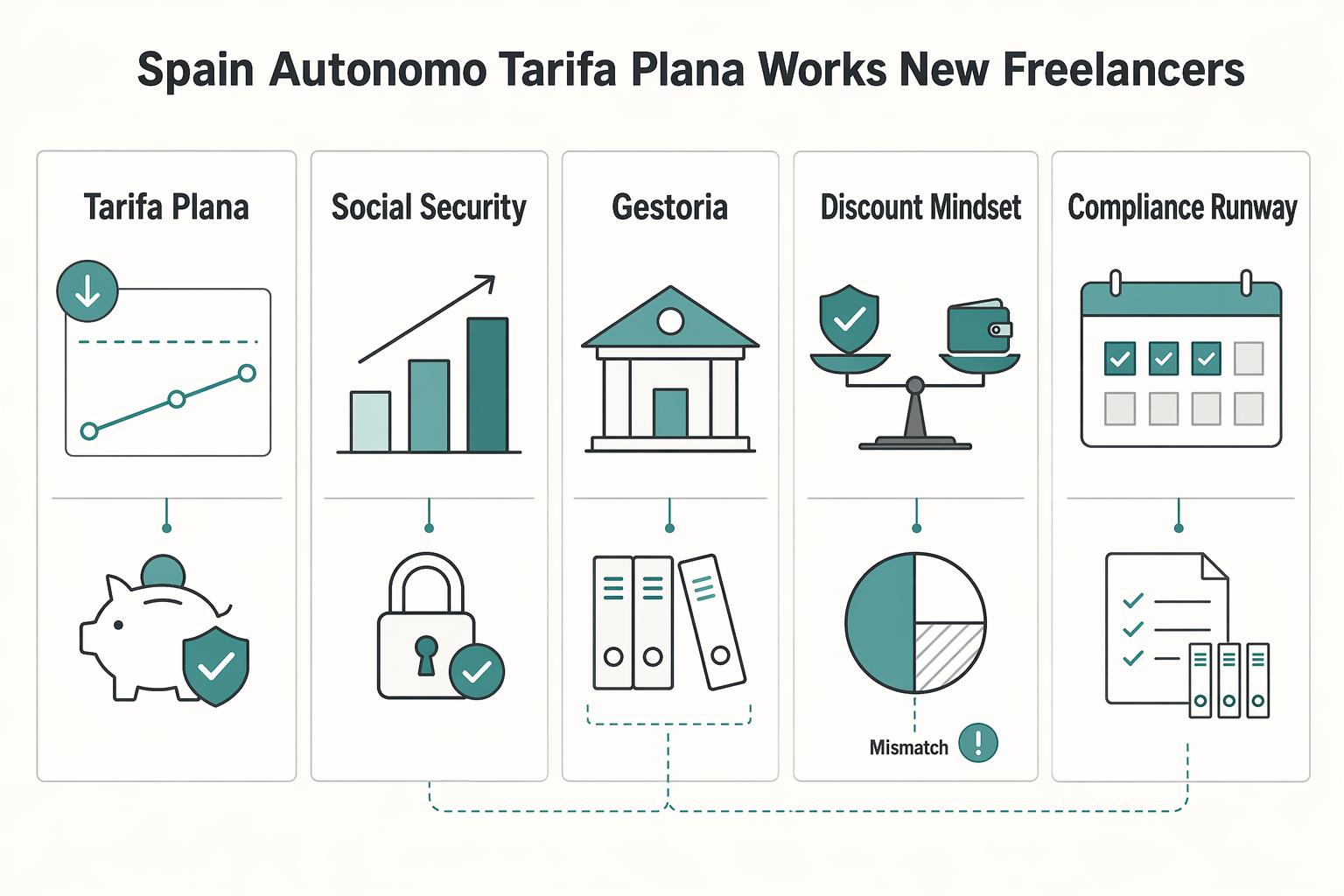
Spain’s Autónomo Tarifa Plana for New Freelancers in 2026
Use the tarifa plana to buy compliance control, not lifestyle drift. The discounted phase, often around **€80/month**, gives you room to set up the unglamorous parts properly. That matters because your social security cost later moves into a more normal **€230 to €530/month** range.