
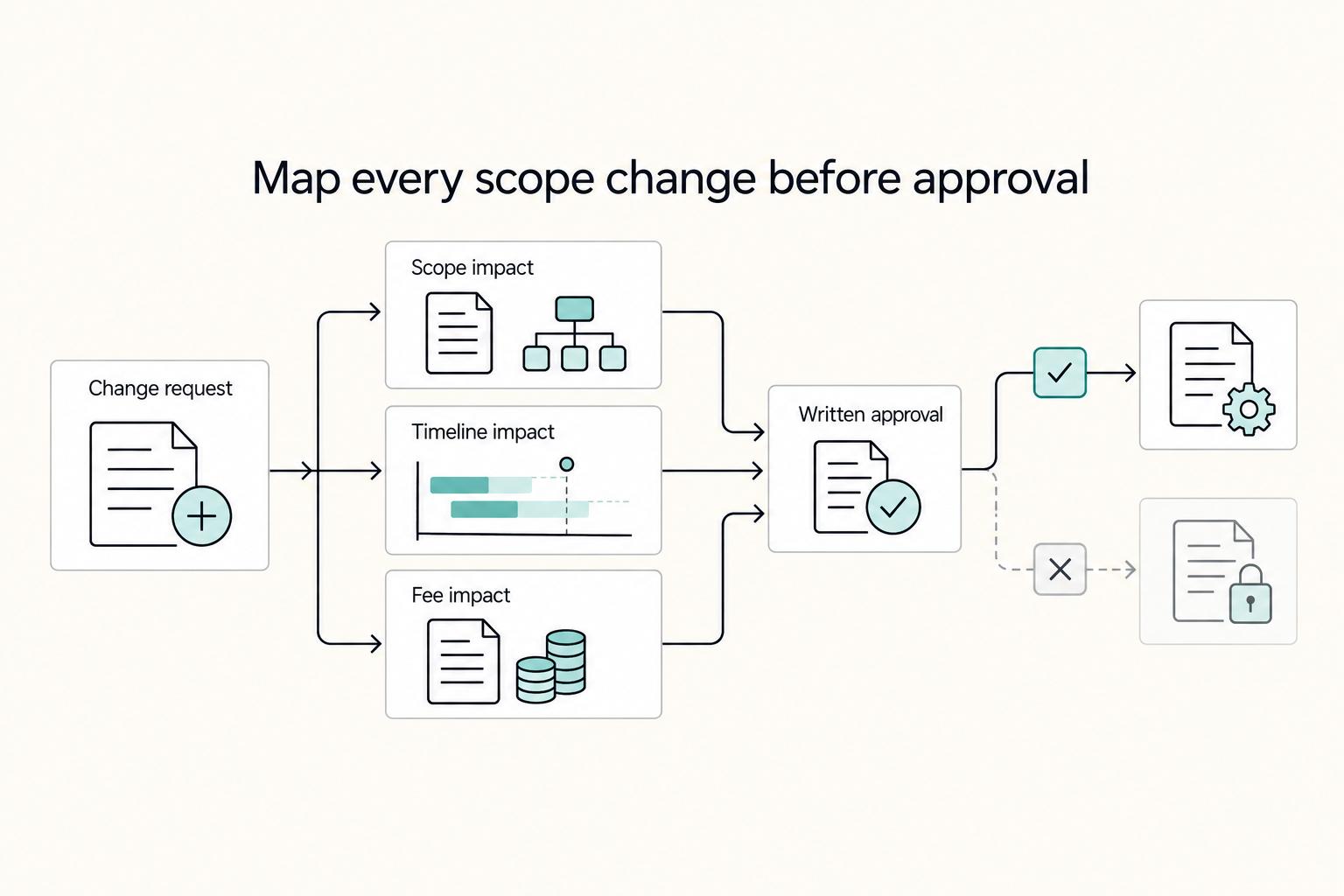
Quick Answer
Pause changed work, run change control, and restart only after written approval is filed. A freelance change order works when you map the request to the active SOW, document only the delta in a Contract Addendum, and connect delivery milestones to billing triggers. Keep one complete Project Record so scope, approval, invoicing, and payment evidence stay aligned if timing or fee disputes appear later.
Start here and protect scope in 15 minutes#
When a client request changes Deliverables, Timeline, or Budget, stop treating it like routine project chatter. Move it into a formal change-order process right away. If you keep working under informal terms, payment, timing, and acceptance disputes get much harder to unwind later.
Your start gate is simple. Compare the request to the current scope baseline, draft only the actual delta, and do not restart affected work until written approval is in your file. If your Written Contract says amendments must be in signed writing, treat verbal approval or loose chat messages as discussion, not authorization.
Before you start#
Before you draft anything, pull four inputs into one Project Record: your written contract, the active SOW version, the latest approved deliverables baseline, and the client request in writing. Keep them together with a version log. You want to see what changed and when.
| Project input | What it shows | Record note |
|---|---|---|
| Written contract | Amendment rule and controlling terms | Keep it in the Project Record |
| Active SOW version | Current scope baseline | Use it to map the request line by line |
| Latest approved deliverables baseline | What output was already approved | Compare changes against this baseline |
| Client request in writing | Exact wording of the new ask | If the request came in on a call, send a recap and ask the client to confirm the wording in email or Slack |
The active SOW is your anchor because it gives you the current scope baseline. That gives you a usable reference for deciding whether the new ask stays inside scope or changes the deal. If the request came in on a call, send a recap right away and ask the client to confirm the wording in email or Slack. Drafting from memory is a common way to create mismatches.
Run the first four steps#
Step 1: Capture the request text exactly. Copy the client's request verbatim into the Project Record. If you need to summarize it, keep the original text beside your summary, not instead of it. The test is whether someone else could open the file and tell what was requested, by whom, and on what date. If that trail is fuzzy, you do not have a usable input yet.
Step 2: Classify each item against the active SOW. Go line by line and mark every requested item as unchanged, new, or unclear. A clarification can usually keep moving when it fits the same scope line and does not change acceptance criteria, milestone dates, or price. If the ask adds a net-new deliverable, changes a technical requirement, moves timing, or affects fees, treat it as a scope change. If part of the request is vague, mark it unclear and pause the affected tasks until it is clarified in writing.
Step 3: Draft the scope and commercial deltas. Rewrite only the changed parts, and write them in result-based language that can be checked later. For each changed deliverable, define the revised output, the due date, and the fee impact or invoice trigger tied to that output. Include enough technical and pricing detail that the client can approve the change as a real decision, not a placeholder. You want terms that are measurable enough to deliver, review, and bill without a second interpretation fight.
Step 4: Require written approval before resuming affected work. Send a decision-ready packet with the revised scope text, budget update, timeline update, and approval document. Then hold the changed work. If your contract or governing law requires signed written amendments, get signatures from both sides before you treat the change as approved. A call recap, a Slack thumbs-up, or "go ahead for now" is not a strong substitute when signed changes are required.
Use this quick split. If the client is clarifying existing work and the acceptance standard, milestone date, and budget stay the same, keep unaffected work moving. If Deliverables, Timeline, or Budget change, or you cannot map the request cleanly to an existing SOW line, pause the affected work and route it through change control. Before you restart, run this final control check.
Pass or fail before execution#
| Check | Required record | Status |
|---|---|---|
| Approval | Signed terms are filed, or the written approval matches the contract's amendment rule | Pass |
| Budget update | Revised fee or invoice trigger is explicit | Pass |
| Timeline update | Changed milestone or delivery date is explicit | Pass |
| Version trail | Request text, draft terms, approval email, signed file, and log entry are complete | Pass |
| Affected work restarted early | One of those records is still missing | Fail |
If any required record is missing, treat it as a fail. Do not tell yourself you will clean it up later. Fix the record first, then restart. That habit does more to reduce disputes than any wording tweak you make after the fact.
Define what triggers a Change Order#
Start with one decision: is this a clarification, or did the client actually move the deal? If the request changes Deliverables, Timeline, Budget, or another contract term, treat it as a change and pause affected work until it is approved.
Step 1: Verify the active baseline first. Confirm the active Written Contract and current SOW version, then log the client request in your Project Record. Map each request line against the current scope and milestone plan, and classify it as in-scope, net new, or unclear. Your checkpoint is simple: you should be able to point to the exact SOW line the request matches. If you cannot, do not guess.
Step 2: Run a clarification vs scope-change check. A clarification explains existing agreed work. A scope change alters what was agreed, even when the ask sounds small. Uncontrolled scope expansion rarely arrives all at once; it usually shows up as small, reasonable-sounding requests that stack up over time.
| Check | Clarification | Scope change |
|---|---|---|
| Scope fit | Explains existing agreed work | Adds, omits, substitutes, or cannot be tied cleanly to current scope |
| Schedule impact | No timeline movement | Timeline or delivery timing changes |
| Cost impact | No price or billing change | Price, billing, or paid-work scope changes |
| Contract impact | No contract term changes | One or more contract terms change |
| Path | Log and continue under current terms | Route to change order approval before executing changed terms |
Freeze any unclear line until the client confirms the output, exclusions, dependency owner, and acceptance test in writing.
Step 3: Reply in a decision-ready format. State the request, classification, and impact before you draft final paperwork. If terms changed, route it through a change control process before changed work proceeds.
- Acknowledge the request.
- State what changed: added, removed, substituted, or clarified.
- State schedule and cost impact, or explicitly confirm no impact.
- State that changed terms require approval before the changed work proceeds.
Step 4: Apply the decision rule and log it. If any material term moved, formalize the change in writing and get mutual agreement on the terms. If nothing material moved, log it as a clarification in the Project Record and continue under existing terms. Record the timestamp, approver name, and affected task IDs so your delivery history and billing record still match later.
Gather what you need before you draft#
Do not draft the addendum until your intake packet is complete. Start from a verified baseline and documented scope, timeline, and cost impact so the change order works in practice, not just on paper.
Step 1. Assemble one controlling folder#
Build one source-of-truth folder before you write terms: the active Written Contract version, active SOW version, latest approved deliverables baseline, and the exact request thread. If your SOW sits under a master agreement, confirm the correct child SOW is tied to the correct parent agreement.
Quick test: another person should be able to open the folder and identify which contract controls, which SOW controls, what baseline was approved, and where the request originated.
Step 2. Map each requested change before drafting language#
Map each requested item to project impact before writing scope text. Keep the mapping simple, but explicit.
| Requested change (client wording) | Affected deliverable | Affected milestone | Dependency touched | Acceptance criteria status |
|---|---|---|---|---|
| Requested item pending confirmation | Deliverable pending confirmation | Milestone or date pending confirmation | Dependency pending confirmation | Defined or unclear |
Keep client wording verbatim in your notes. If any row is Unclear, pause and clarify it in writing before drafting.
Step 3. Pre-fill commercial terms#
Set commercial inputs before drafting: revised fee, billing currency, payment method, invoice trigger, and fee-owner signoff. If pricing is not approved, the draft is not ready.
Use verifiable trigger language, such as milestone acceptance, instead of vague wording like "pay after completion."
Step 4. Assign owners and enforce the execution gate#
Assign one owner to each control point: scope validation, commercial approval, and approval-packet send. Then enforce one gate: no changed work starts until written approval is filed in the Project Record.
Final checkpoint before execution: the approval packet, approval message, and final signed file are all in the same folder.
Related reading: How to Write a Follow-Up Email That Closes the Deal.
Step 1 classify the request and freeze ambiguity#
Classify each request line before pricing or drafting so ambiguous items do not slip into approved work. Against the active SOW and latest approved deliverables baseline, use working labels in-scope, out-of-scope, or unclear, and treat every unclear line as on hold. Use a line-by-line table so mixed requests are not bundled into one yes-or-no decision.
| Request line | Scope label | Next action |
|---|---|---|
| Client wording (verbatim) | in-scope / out-of-scope / unclear | leave as-is / move to pricing / send clarification |
Write one controlled change statement#
After labeling, write one short change statement that captures what is added, replaced, removed, deferred, and which milestone or acceptance criteria are affected. If you cannot state those fields clearly, pause and clarify before moving forward.
Send a clarification script and hold unclear items#
For any fuzzy line, send one written clarification note and keep that item parked until answered. Your note should confirm:
- The requested output in concrete terms.
- What is excluded and remains unchanged.
- Dependencies, inputs, or client review needed.
- Whether the item is approved for quoting now or still under discussion.
Use a hard checkpoint: if a neutral reviewer cannot map each request line to a scope label and next action, this step is not complete.
Keep this minimum audit trail in the Project Record: source request, classification table, clarification thread, decision log, and handoff note to pricing and timeline. If a request depends on Federal Register legal research, keep the official PDF from govinfo.gov in the record, not just the FederalRegister.gov XML rendition.
Step 2 decide price and timeline with clear tradeoffs#
Use one decision rule: if scope or speed changes, update price, delivery terms, or both in writing before work resumes. A change order is not automatically a price increase. It can raise fees, lower fees, or only move dates, as long as the addendum matches the actual change.
When you present options, keep the revised scope identical in both. Change only budget and timeline so the client is choosing a real tradeoff instead of comparing different scopes. Price by effort type, not by email length.
| Decision point | Option A keep timeline | Option B keep budget |
|---|---|---|
| Revised deliverables | Same revised scope | Same revised scope |
| Budget | Higher fee for added effort or schedule compression | Smaller increase (or no increase beyond approved added work) |
| Timeline | Original or near-original deadline | Later delivery date |
| When to choose | Deadline cannot move (launch, event, dependency window) | Spend cap cannot move and delay is acceptable |
| Main risk | Compressed reviews increase coordination and rework risk if feedback is late | Later completion can delay dependent milestones |
| Dependency rule | Client inputs/approvals must arrive on stated dates | Same dependency rule, with less compression buffer |
| Request type | Price treatment | Timeline treatment |
|---|---|---|
| Net-new deliverable | Add cost for distinct added work | Add time as needed; define a new acceptance check |
| Accelerated turnaround | Price the compression effort (resource load, parallel work, shorter review windows) | Keep the earlier date only if compression assumptions are met |
| Added revision cycle | Add recurring execution cost for the extra round | Add review or iteration time for that round |
| Dependency-driven rework | Price reperformed or obsolete work and impacts to unchanged work | Re-date affected milestones tied to that rework |
Write timeline controls in plain language: list required client inputs, review windows, and signoff checkpoints. State that if required inputs or approvals arrive late, affected milestones and downstream delivery dates move accordingly.
Align invoices to delivery events before sending. Use measurable performance triggers, such as approved wireframes, delivery of a revised mockup set, or acceptance of a named milestone. Do not rely on signing alone or simple time passage.
Before you send#
Before the draft goes out, run three checks against the invoice and milestone logic:
- Confirm each revised milestone has a matching invoice trigger in the addendum.
- Confirm trigger order matches the real sequence of work and approvals.
- Confirm amount, payment date, and delivery event match your invoice draft.
If local freelancer-payment rules apply, recheck thresholds after the change using the relevant authority guidance in your jurisdiction, such as NYC or Illinois.
Step 3 write the Contract Addendum line by line#
Draft only the delta once price, dates, and invoice triggers are set. Write each changed line so it is testable, billable, and date-anchored; if a line fails any check, revise it before sending.
| Addendum part | Include | Control check |
|---|---|---|
| Document identification | Addendum title, addendum ID, effective date, legal party names, base agreement title, and base agreement date | A third party should be able to match the addendum to one specific signed baseline |
| Scope change lines | Changed deliverable, acceptance test, dependency owner, and revised milestone anchor date | Each changed line should be testable, billable, and date-anchored |
| Payment lines | Amount, trigger event, invoice timing, and payment instructions when relevant to the project | Tie invoicing to actual execution, such as approval of a named milestone or delivery of a named file set |
| Closing terms | State that all base terms remain in force except where changed and include signature blocks for all parties | Party names and document labels should exactly match the original contract |
A contract addendum sits alongside the original agreement, updates specific terms, and leaves the rest in force. Use it when a change affects rights, obligations, timelines, or payment terms. If an undocumented change could affect a dispute outcome, put it in writing now.
- Identify the deal exactly before you touch scope.
Start with the addendum title, addendum ID, and effective date. Then list legal party names exactly as they appear in the signed contract, plus the base agreement title and base agreement date. If work is split between a master contract and an SOW, copy those labels word for word and keep references aligned with your change control in an Agile SOW.
Use one check: can a third party match this addendum to one specific signed baseline without asking what you meant? If not, fix document-control fields before drafting scope language.
- Write scope changes as line items, not paragraphs.
Give each changed deliverable its own line and use the same four fields every time:
- Changed deliverable
- Acceptance test
- Dependency owner
- Revised milestone anchor date
This is what makes the line testable later. If a fact is still open, mark it as pending verification and route it back to the owner instead of guessing. Do not insert rough numbers, estimated dates, or implied obligations just to make the draft look complete. Minor typo or formatting corrections can often be handled without this formal step, but changes to what either side owes should be documented formally.
- Map each commercial term to a real trigger event.
For each payment line, include the same core details:
- Amount
- Trigger event
- Invoice timing
- Payment instructions, including currency and rail details only when relevant to this project
Use trigger events tied to actual execution, such as approval of a named milestone or delivery of a named file set. If it fits your deal, timing can be plain, for example: "payable 14 days EOM." A common failure mode is pricing the work without stating the event that allows invoicing. For a quick scope-to-billing sense check, review these freelance contract red flags before sending.
- Close for enforceability, then run a pre-send validation pass.
State that all base terms remain in force except where changed in this addendum. Include signature blocks for all parties, since signatures are required for binding effect. Then flag and fix any line that is:
- Not testable: no measurable acceptance check or no named deliverable
- Not billable: no amount, no invoice trigger, or no payment timing
- Not date-anchored: no effective date, milestone date, or dependency date
- Not document-matched: party names or document labels do not exactly match the original contract
Templates can speed drafting, but they should not make legal decisions for you. If a change is large, sensitive, or likely to be disputed, treat the template as a draft and get legal review before signature.
Step 4 lock the legal clauses clients forget to revisit#
Before signature, run a legal consistency pass, not just a scope-and-price pass. Scope edits can quietly affect termination rights, liability allocation, indemnity responsibility, and dispute enforceability.
| Clause | Recheck focus | What to confirm |
|---|---|---|
| Termination rights | Cancellation or termination triggers, notice flow, and when either side can stop performance | Clause still matches new approvals or phases |
| Limitation of liability | Whether liability-limiting wording still fits the revised work | What liability is limited and where responsibility still sits |
| Indemnification | Whether the scope change shifted who controls inputs, outputs, or approvals | Indemnity wording reflects that shift |
| Dispute terms | Governing law, forum selection, and continued performance during disputes | Addendum does not conflict with the base contract |
Use this sequence while the addendum is still editable:
- Termination rights: recheck trigger events.
If scope changes alter approvals, phases, or delivery flow, confirm termination triggers and notice mechanics still match how the work will actually run.
- Limitation of liability: recheck exposure fit.
When risk shifts, verify liability-limiting language still fits the revised work and still clearly states what is limited versus what remains each party's responsibility.
- Indemnification: recheck responsibility shifts.
If control of inputs, outputs, or approvals moved, update indemnity language so it tracks that new allocation instead of old assumptions.
- Dispute terms (governing law and forum): recheck enforcement alignment.
Confirm the addendum does not conflict with the base contract on governing law (which law applies) or forum selection (where disputes are decided), and does not break any continued-performance workflow already in the contract.
Then run a side-by-side conflict pass against the master agreement. Resolve clashes before signature by stating which document controls through an order-of-precedence rule, confirming inconsistent terms are superseded, and keeping unchanged terms in force. Final control step: if your contract requires signed written modifications, do not rely on email-only approval. Save the approved clause version in the Project Record and route signatures through the formal change-order workflow.
Step 5 handle cross-border payment and tax friction upfront#
That legal consistency check only works if the revised commercial terms can actually be executed. Do not restart changed work until payment terms are usable by the client's finance team, not just acceptable in principle.
| Control point | What to lock | Evidence to keep |
|---|---|---|
| Currency-to-settlement path | Invoice currency, settlement currency, what happens if payment is sent in a different currency, and who covers conversion or transfer costs | Signed addendum; final invoice version |
| Payment rail | Required details for the chosen bank transfer or platform payment method, plus who initiates payment on the client side | Payment instructions sent to the client |
| Failed-transfer rule | Who re-initiates payment, how correction or resend fees are handled, and that payment is complete only when funds land in the agreed receiving account | Transfer proof or remittance confirmation; correction trail |
For cross-border projects, define one complete path from invoice to settled funds. If a client contact, project lead, and accounts payable person would each read the packet differently, tighten it before signature.
Step 1. Lock the currency-to-settlement path#
First, confirm you have a workable international payment account for the method you are using. Treat that as a start checkpoint, not an afterthought. If your receiving details are still being opened, renamed, or verified, complete an account readiness check before you approve the restart.
Then make the addendum and invoice packet internally consistent: invoice currency, settlement currency, what happens if payment is sent in a different currency, and who covers conversion or transfer costs. Keep all of that in one place. If those terms are split across chat, email, and invoice notes, you are still exposed.
A useful check here is simple: can the payer tell, from the signed terms alone, what currency to send and what account should receive it? If not, the path is not locked. Also share only the information the chosen method needs. Over-sharing payment data can create confusion or unnecessary risk.
Step 2. Choose and verify the payment rail#
Confirm the payment rail with the team that will actually release funds. Method choice is a tradeoff across speed, cost, security, and professionalism, so make the choice explicit instead of assuming "bank transfer" or "platform" means the same thing to everyone. Use this receiving international payments setup guide if you need a practical cross-check before you lock the rail.
To keep processing from stalling, use a method-based checklist:
- Bank transfer: include legal name, bank name and address, account number or IBAN, SWIFT/BIC code, account currency, and the payment reference to include.
- Platform payment: include the account email, account ID, or payment link tied to the account, the exact payment target details, required reference format, and who initiates payment on the client side.
Your verification point is whether finance can confirm the exact rail and the exact destination without follow-up questions. A common failure mode is delay caused by incorrect details or unclear instructions. Do not treat "AP will sort it out later" as a completed payment setup.
Step 3. Write the failed-transfer rule and keep a tight record trail#
Add a clear failed-transfer procedure: who re-initiates payment, how correction or resend fees are handled, and that payment is complete only when funds land in the agreed receiving account. Keep that rule strict. If funds bounce, sit in review, or land in the wrong place, the restart gate does not reopen just because the client says they already tried.
Keep tax wording narrow and operational. Document only the invoicing assumptions and details you are already using, such as the invoice fields, payer references, and any VAT or withholding entries the payer requires to process the invoice. Do not turn the addendum into a tax memo or leave unresolved interpretation sitting in the payment section.
Keep an evidence pack for this step so you can prove what was sent, paid, and corrected:
- signed addendum
- final invoice version
- payment instructions sent to the client
- transfer proof or remittance confirmation
- correction trail for any returned or amended payment details
Pause rule: if currency, payment rail, fee ownership, account identity, or invoice handling is unresolved, do not restart changed work. If you are delivering changed scope without a workable way to get paid, you are carrying a preventable business risk.
Related: How to Build and Manage a Team of Freelance Creatives.
Step 6 send the change order and control execution risk#
Do not restart changed work until revised terms are sent, written approval is received, and that approval is filed with the addendum and Project Record. This is the execution gate: if the approved version is unclear, delivery and billing risk rises fast.
Treat the send step as a control point, not a courtesy email. Use one check: can someone outside the thread read the packet once and identify what changed, what it costs, what date moved, and what action is required to approve it?
Step 1. Send a decision-ready approval packet#
Send one decision-ready packet: a summary message plus the Contract Addendum attachment. In that message, state:
- what changed from the current SOW or deliverables
- the impact on price
- the impact on timeline or milestones
- the exact approval action required, for example, sign the PDF or reply from the written approval workflow your client actually uses
If you present options, keep them directly comparable and mark your recommended choice. Send the packet to the person who can actually move it forward. If more than one reviewer is involved, say that clearly so the packet does not stall in forwarding.
Step 2. Hold affected tasks and separate them from in-scope work#
While approval is pending, hold changed tasks and label them clearly in your tracker. Keep unaffected tasks separate by task, milestone, or deliverable so you can keep moving without quietly expanding scope.
Do not treat informal "go ahead for now" messages as approval to restart changed work. If the line between existing and changed work is unclear, pause additional work until terms are explicit.
Use task-level separation, not blended cards. If part of a work item is old scope and part is changed scope, split task IDs or labels so your record trail shows what stayed in scope, what was held, and what restarted after approval.
Step 3. Run the same restart workflow every time#
Use one repeatable sequence every time: pause, recalculate, send revised terms, confirm written approval, then restart only against approved language. If timing shifts before approval, revalidate fees and dates before resuming.
If scope and timing become too fluid for a clean fixed-fee amendment, restate the changed portion as time-based work. The tradeoff is more admin overhead, but that is often safer than absorbing extra work informally and disputing it later.
Before restart, archive one complete approval trail in your Project Record folder: original request, summary message, addendum sent, written approval, signed file, hold notice, and any revised invoice. Then confirm your team, tracker, and working file all point to the same current signed version. You might also find this useful: How to Structure a 'Change Control' Process in an SOW for an Agile Development Project.
Step 7 execute only against approved terms#
Only restart changed work when approval is documented and the active file set is final. If approval status, effective terms, or working version is unclear, keep affected work paused.
Step 1. Confirm the restart gate#
Use the approved addendum and updated SOW as your execution baseline. Before you resume, confirm written approval, effective terms, and the current version label in your Project Record so no one restarts from an older draft.
Step 2. Re-baseline every live task#
Map each live task and milestone to an approved deliverable and acceptance check in the updated scope. If a task does not map to approved language, park it until the terms are clarified in writing.
Step 3. Bill from approved lines and keep one complete record#
Invoice from approved lines only: each billed item should map to a contract line, milestone trigger, or deliverable approval. Keep one complete paper trail with status updates, delivery evidence, approval messages, invoice revisions, and payment confirmations, and save corrections as new versions so the history stays intact.
If new work or delivery activity is not tied to approved terms, pause it and run a new change-order cycle.
Fix common mistakes before they cost you money#
Most change-order problems come from a few repeat mistakes, not edge cases. When any of these appears, pause changed work and restart only after your active SOW/addendum, payment terms, and written approval record are aligned.
1) Verbal extras#
Treat verbal-only requests as out of scope until they are written and approved. Risk signal: You hear "just add this" in a call, chat, or meeting, and work starts before terms are written. Immediate recovery action: Pause the extra work. Send a written recap of the requested deliverable, timeline impact, fee impact, and what stays out of scope, then issue the updated addendum or SOW for approval. Proof to file: Save the original request, your recap, the addendum version, and the approval record. Restart only when the changed scope is signed and effective.
2) Vague scope#
If a changed item is not specific and checkable, do not execute it yet. Risk signal: Your update uses broad wording like "support," "optimize," or "a few revisions" without a clear deliverable or acceptance criteria. Immediate recovery action: Pause affected tasks and rewrite each changed item in checkable terms: deliverable, acceptance criteria, due date, and owner. If new asks keep appearing, treat them as out of scope until they are clearly written. Proof to file: Keep the finalized redraft with version labels and client confirmation. Each changed task should map to one active SOW line and one acceptance check.
3) Missing payment terms#
Approved scope without clear billing terms is still a collection risk. Risk signal: Scope is approved, but revised fee lines, invoice triggers, payment method, or upfront payment terms are missing. Immediate recovery action: Hold changed delivery and send corrected commercial terms. Tie each fee line to a trigger, such as signature, milestone approval, or final acceptance. Proof to file: Store the signed addendum version, corrected invoice draft, and payment-due confirmation. If you cannot invoice directly from signed language, tighten the payment clause before proceeding.
4) Unsigned updates#
Drafts and message threads are not a safe operating baseline. Risk signal: You have revisions in progress but no current signed version. Immediate recovery action: Stop using draft files as active terms. Consolidate edits into one clean addendum, send it for signature, and mark prior drafts as superseded. Proof to file: Keep the final signed PDF, signature page, effective date, and superseded drafts in one project folder to prevent version drift.
| Common mistake | What you might assume | Defensible correction |
|---|---|---|
| Verbal extra | "We both know what we agreed." | Send a written recap, issue an addendum, and wait for approval. |
| Vague scope | "We can sort details out during delivery." | Rewrite into specific deliverables with acceptance criteria. |
| Missing payment terms | "The old billing setup still applies." | Restate fee lines, invoice triggers, and any upfront payment term. |
| Unsigned updates | "This draft is close enough." | Work only from one current signed version. |
Before resuming changed work, run this reset check once:
- active SOW or signed addendum version matches the work you are about to do
- each changed deliverable has acceptance criteria and an owner
- each fee line has an invoice trigger and any required upfront payment term
- approval record is written, filed, and tied to the effective document
If any item fails, keep changed work on hold until approved terms are active.
Copy and paste this Change Order checklist#
Use this as your final restart gate after you fix obvious gaps. Keep changed work paused until the checklist passes. Pass means the required artifacts are attached to your Project Record, dated, and tied to the active change document. Fail means do not restart changed tasks yet.
Step 1. Reject weak proof before you check anything off#
Use this table as a pass/fail screen, not a memory aid. If a line cannot be supported by one current file set, mark it fail and keep changed work on hold.
| Checklist line | What counts as proof | Common weak proof to reject |
|---|---|---|
| Baseline docs | Active contract or SOW, latest approved revision label, original request message, change ID | Old draft, unlabeled PDF, "latest version" with no version label |
| Scope delta | Written comparison of changed deliverables, timeline impact, and budget impact | Call notes without a deliverable list, "small update" in chat |
| Approvals | Signed addendum or written approval record with an effective date | "Looks good" message from someone not designated to approve scope or price |
| Execution controls | Documented restart condition, invoice trigger, payment terms, archived final file set | Verbal go-ahead, unsigned markup, missing invoice event |
| Delivery plan | Updated milestone date, dependency notes, owner for the first restarted task | Generic task list with no date or owner |
Step 2. Run the gate checklist#
Work through the list in order. Check whether delivery, billing, and approval records all point to the same live document.
- Verify baseline docs. Attach the active contract or SOW, latest approved version label, client request message, and internal change ID.
- Confirm the scope delta. Attach one written comparison that shows changed deliverables, revised timeline, and budget impact.
- Confirm approvals. Attach the signed addendum or other written approval record with the effective date.
- Confirm execution controls. Attach invoice trigger, payment terms for changed work, restart condition, and archived final file set that replaced drafts.
- Confirm the delivery plan. Attach next milestone date, dependency notes, and the named owner for the first restarted task.
Quick check: open the file you plan to work from and confirm its name, version label, and approval record match what is attached in the Project Record.
Step 3. Restart only after a clean pass#
Restart only when each changed task maps to one approved scope line in one active document. If anything is missing, hold changed work and complete the record first. Once every item passes, generate the revised SOW or addendum in your SOW generator and send that version forward. Want a quick next step? Try the SOW generator.
This handoff is where errors often return. If your task tracker, invoice draft, or delivery file names still point to an older draft, you do not have a clean pass yet.
Close the loop and make this your default operating habit#
The FAQ covers edge cases, but day-to-day protection comes from one repeatable sequence: trigger -> action -> proof. If a request changes scope, timeline, price, or acceptance terms, pause affected work and run these four steps before restart and closeout.
| Step | Core action | Done when |
|---|---|---|
| Classify the request | Compare the request against the active SOW, label each item as in scope, net new, or unclear, and pause unclear or changed task IDs | The client request is saved, the scope comparison is written, and paused items are visible in your tracker |
| Draft from your standard files | Build the update from your template and checklist and carry forward the original contract date, project name, addendum number, effective date, revised fee, milestone dates, invoice trigger, and payment method | The draft addendum and checklist are versioned, filed, and match the exact file you send for approval |
| Confirm approval before restart | Send one approval packet with the summary, final PDF, and the exact option the client is approving | Written approval, signed file or signature record, and approval date are filed in the Project Record |
| Close the loop | Match signed terms to delivery proof, invoice line items, and payment records | Request, draft, approval, final signed file, invoice copy, and payment proof are stored together in the Project Record |
- Step 1: Classify the request.
Compare the request against the active SOW and label each item as in scope, net new, or unclear. Pause unclear or changed task IDs until terms are updated. This is where drift usually starts: a message can sound minor while still changing output, review rounds, or approval criteria. Done when: the client request is saved, the scope comparison is written, and paused items are visible in your tracker.
- Step 2: Draft from your standard files.
Build the update from your template and checklist, not memory. Carry forward the original contract date, project name, addendum number, effective date, revised fee, milestone dates, invoice trigger, and payment method. The file you send for approval should already be the file you can store, invoice from, and execute against. Done when: the draft addendum and checklist are versioned, filed, and match the exact file you send for approval.
- Step 3: Confirm approval before restart.
Send one approval packet with the summary, final PDF, and the exact option the client is approving. Do not restart on informal confirmations. A vague "looks good," a chat thumbs-up, or a meeting recap without a clear final document can leave weak proof if price, timing, or deliverables are disputed later. Done when: written approval, signed file or signature record, and approval date are filed in the Project Record.
- Step 4: Close the loop.
Before marking the change complete, match signed terms to delivery proof, invoice line items, and payment records. Think in artifacts, not memory: what was approved, what was delivered, what triggered billing, and what was paid. Done when: request, draft, approval, final signed file, invoice copy, and payment proof are stored together in the Project Record. Set retention timing for your tax or recordkeeping obligations.
Run one fast audit before moving on: each changed deliverable maps to one signed line, each invoice line maps to one trigger, and each payment has confirmation in the same folder. If anything is missing, treat it as risk, not admin backlog, and fix it before the next request lands. The hardest part is rarely drafting the document; it is stopping work consistently when the paper trail is incomplete.
Set up reusable files in your contract folder now so your next change order runs on habit, not improvisation. For a practical control walkthrough, see How to Handle a Data Breach in Your Freelance Business.
Frequently Asked Questions
When is a change order mandatory?
Use a change order when the client asks for added or changed work after the original contract is already in effect (agreed and signed). Put the change in writing and capture the updated requirements, timing, services/materials, and budget.
Can you start early with verbal approval?
You can, but you take on payment and dispute risk. The safer checkpoint is to pause changed work until the client signs the change order, then keep that written record as proof you can enforce and refer to.
What is the practical difference between a Change Order and a Contract Addendum?
The label matters less than the function. Whether you call it a change order or addendum, use a written, signed update that clearly records what changed and ties it back to the active contract.
What counts as a valid client signature?
Follow the approval method your contract sets, confirm the signer has authority, and avoid relying on vague “approved” messages for scope, price, or timing changes.
Should you handle small requests informally?
Keep it informal only for true clarifications that do not change scope or pay. Once requests add work, use a written signed change order; otherwise scope creep can turn into unpaid work, especially on flat-fee projects. If the request is a revision, whether you owe it depends on what the contract says.
Should you bundle changes or split them into separate updates?
Bundle or split based on what your contract allows, but keep each change written and signed before the related work starts.
What matters most on cross-border payment and tax terms?
For changed work, make the payment and tax terms explicit in writing before you restart.
Can you rely on one template for every country and dispute setup?
No. Do not assume one template works everywhere. Keep a contract-first approach: use written agreements, record changes in signed writing, and verify local legal or tax requirements before relying on template language.
Watch
How to Write a Freelance Change Order
Try a related tool
Researched and edited by the Gruv editorial team. Gruv builds cross-border billing, payouts, and finance-operations software for global businesses.
Sources
- acquisition.gov/far/subpart-43.2trusted
- acquisition.gov/far/52.215-8trusted
- digitalcommons.law.buffalo.edu/journal_articles/1128trusted
- federalregister.gov/documents/2021/05/06/2021-09518/independent-...trusted
- ilga.gov/legislation/103/SB/10300SB2041.htmtrusted
- irs.gov/pub/irs-access/p2104_accessible.pdftrusted
- labor.illinois.gov/laws-rules/legal/freelance-worker-protection...trusted
- law.cornell.edu/wex/forum_selection_clausetrusted
Educational content only. Not legal, tax, or financial advice.
Related Posts

Germany Freelance Visa Application Path for Freiberufler and Gewerbe
Choose your track before you collect documents. That first decision determines what your file needs to prove and which label should appear everywhere: `Freiberufler` for liberal-profession services, or `Selbständiger/Gewerbetreibender` for business and trade activity.
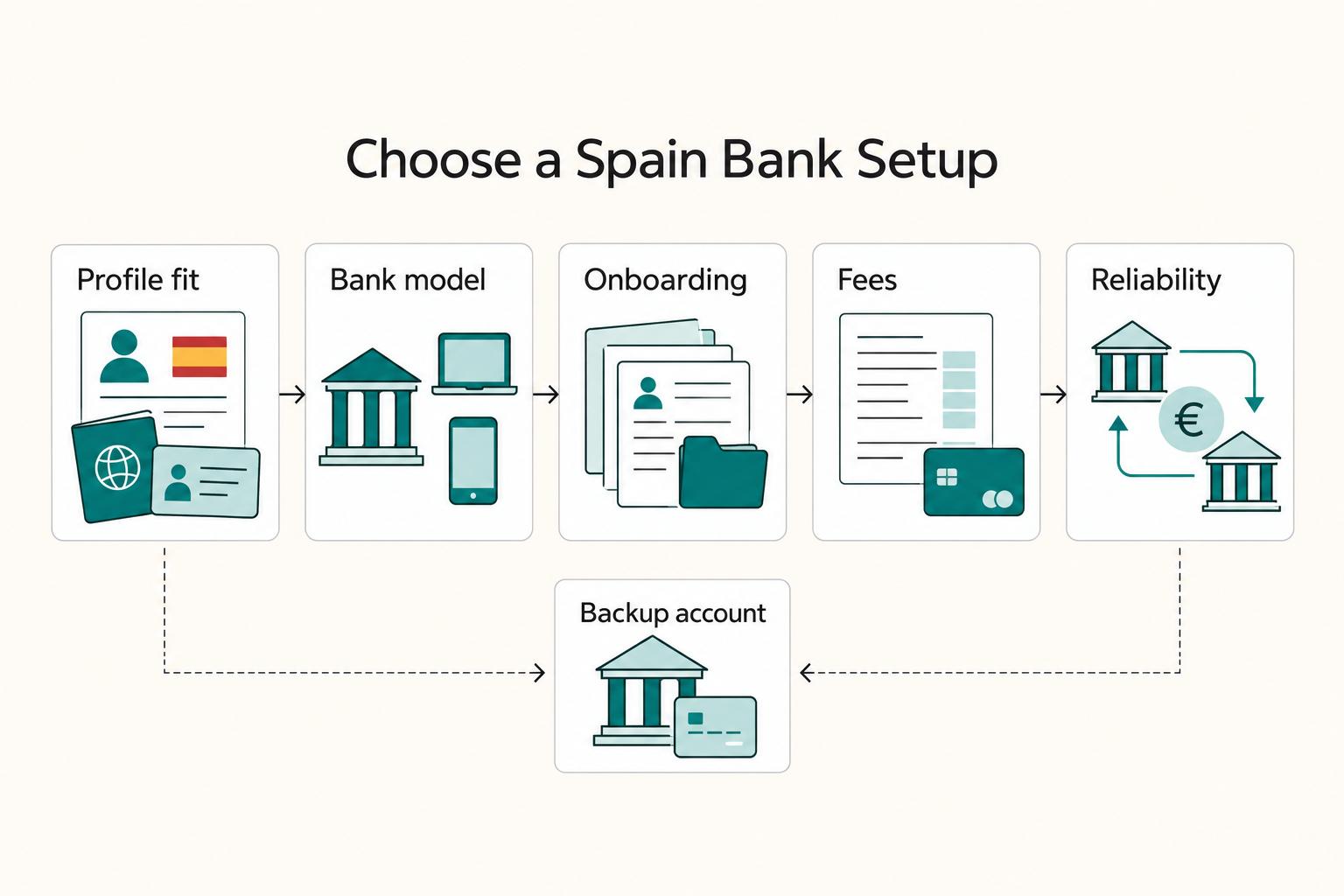
Freelancer Bank Accounts in Spain: Choosing a Primary and Backup Setup
Choose your setup as a risk decision, not a brand ranking. Pick one primary account for daily inflows and keep one backup account active in the same planning session.

The Freelance Payment Penalty: A Modeled Audit of Platform Fees, FX Spreads, and Payout Delays
The money rarely disappears through a single, easy-to-spot fee. The real loss is stacked. A marketplace takes its commission, a processor adds a charge for international cards, a bank or payment company converts the currency at a spread, a platform holds the funds before release, and a wire sheds a little to intermediaries on the way in. Each layer looks defensible on its own, but the worker feels the combined result as a smaller deposit and a later payday.