
Quick Answer
Write a freelance follow-up email that closes deals by running a simple system, not improvising. Start by labeling lead state, choose one commitment, send a short message with context, value, one CTA, and a by-when, then log the next action. Use clear stop rules, and when you get a “yes,” convert it into written scope, paperwork, payment, and kickoff steps.
Your 10-Minute Deal-Closing Follow-Up System (so you stop chasing and start closing)#
Run every freelance follow-up email like a mini sales process that turns uncertainty into one clear next step. As the CEO of a business-of-one, your job is to turn messy inbox threads into clean decisions you can actually plan around.
You are not "reminding" someone you exist. You are reducing ambiguity. Leads stall when nobody names the next step, the owner, or the decision point.
A good follow-up turns a vague "sounds good" into a concrete action like booking a call, approving the scope, or confirming who signs off.
The system in 6 blocks (copy this into your workflow)#
Treat this as your default sequence, in order. Get creative only after you run the system.
| Block | What you decide | What it prevents | Output you need |
|---|---|---|---|
| Lead state | Where the lead sits right now | Random acts of following up | One label (example: post-call, proposal sent) |
| Cadence | When you will follow up next | Overthinking, inbox limbo | A single "next touch" date |
| Thread/channel | Same thread, new thread, or other channel | Lost context, messy handoffs | One deliberate lane for the next message |
| Message template | What your email must include | Rambling sales emails | Context + outcome + one CTA + a simple by-when |
| Next-step definition | What "progress" looks like for this step | Endless "circling back" | One specific next action (book, approve, confirm) |
| Tracking | Where you log it | Memory-based selling | A note in your CRM/spreadsheet |
A CRM (Customer Relationship Management) system gives you one clear place to see every interaction. That beats sticky notes and guesswork when message volume grows.
Your execution loop (what you actually do)#
Step 1: Label the lead state. Do not write a word until you can describe the current moment in one phrase.
Step 2: Pick one commitment. Example CTAs: "Reply with the right approver," "Choose a call time," or "Confirm you want me to send the next version for review."
Step 3: Send a short, scannable follow-up email. One outcome, one ask, one by-when. No "just checking in."
Step 4: Log it immediately. Update last touch, next touch, and what you're waiting on. This turns your client communication into a clear record you can act on.
Example: a lead says "looks good" after a call, then goes quiet. You send a single-CTA follow-up to confirm the approver and the next step. If they answer, you advance. If they do not, you still control the next move because your system does.
Prerequisites: Set up your follow-up "control panel" before you hit send#
Set up one simple "control panel" (a CRM or spreadsheet) so your follow-ups are fast, consistent, and easy to track. The execution loop only works if you have a place to run it from. This prep turns follow-up from improvisation into a lightweight system you can trust under pressure.
Step 1: Build a pipeline tracker you can treat like an audit log#
Pick one home base (a CRM or a spreadsheet) and commit to it. Treat it like a ledger: one line per lead, updated the same day you send client communication. People forget. Systems do not.
Keep it simple. Track just enough to answer: where things stand, what you last sent, what you will do next, and any notes that affect your next message.
Check: you can open the tracker and know exactly what to send next in under a minute.
Step 2: Pre-write reusable email building blocks (so you never "wing it")#
Create four paste-ready blocks you can drop into any follow-up email:
| Block | What to paste |
|---|---|
| Context recap | "Quick recap: we discussed X and I sent Y." |
| Outcome/value | "This gets you Z outcome, with A constraint handled." |
| Single CTA | one action only (reply, approve, book) |
| Decision date | a clear "by (day)" to prevent inbox limbo |
That is enough to stop winging it without making every message sound canned.
Example: a lead replies "Looks good" and disappears. You paste your blocks, ask one decision ("Confirm who approves the next step"), set a decision date, and move on.
If you do cold outreach as part of your funnel, keep these blocks compatible with your first-touch messaging so the thread stays consistent. See: How to Write a Cold Email That Actually Gets Clients.
Step 3: Keep your handoff inputs ready (so follow-up can progress)#
Tight processes reduce hiccups. One project-management source puts it bluntly: "When content is missing, your work comes to a halt," so do not wait until after the follow-up thread starts to figure out what you need.
Keep a ready-to-send checklist of the common inputs that unblock progress, like content files and access details (for example, logins to tools such as WordPress or a hosting/control panel). When a lead says "Yes," you can immediately reply with a clean request instead of starting from scratch.
If you want a deeper dive, read Sole Trader vs. Limited Company: A Guide for UK Freelancers.
Step 1 - Classify the lead state (so you don't send the wrong follow-up)#
Before you write the email, classify the moment. A message after a first interaction, a proposal, a verbal yes, or a stalled review should not all sound the same. Capture the email early, then match your message to the actual state of the deal.
1) Make sure you can actually follow up (collect the email)#
If you don't collect an email address after the first interaction, you're basically choosing to lose the thread. Ask for it while the customer is right there, then store it somewhere you'll actually use.
2) Refuse to mix messages (one email, one job, one ask)#
Here's the operator move: if you can't say what you're following up about in one sentence, you can't write a clean follow-up email. You'll hedge, stack CTAs, and drift into "maybe" land.
Use a simple mental mapping so your next message stays aligned:
| What just happened | Your job in the follow-up email | One "close gate" ask (pick one) |
|---|---|---|
| They showed interest | Re-state their goal and how you help | "Reply with the best email to send details to." |
| They asked a question | Answer it and confirm what they want next | "Is this what you were looking for, yes or no?" |
| They went quiet | Bring the thread back with a specific option | "Should I close this out, or do you want to continue?" |
Check: you can look at any contact and answer, in under a minute, "What do they want, what value am I offering, and what single next commitment am I asking for?"
Step 2 - When should you follow up - and how many is enough?#
Tie your timing to the lead's state, and decide in advance when you stop. Once each lead has a state, cadence stops being emotional. It becomes an operating rule.
Build your default cadence (then adjust only with evidence)#
Start with a simple rule: follow up soon after high-intent moments, and space touches farther apart as the thread goes colder. Track "last touch" and "next touch" in your pipeline so you can run the system without burning energy on guesswork.
Location Rebel puts the principle bluntly: "Just sending one email isn't going to get you much progress. Most people aren't ready to buy right away." Use that as permission to follow up like a professional, not like someone begging for attention.
Use this as your safe structure, without locking yourself into specific day counts:
| Lead state | Cadence pattern | What you send |
|---|---|---|
| Post-call | Recap soon after, then a short follow-up once they've had time to forward internally | Decisions, owners, next step |
| Proposal/SOW sent | A few follow-ups with widening gaps (early, mid, final) | "Approve or change" gate |
| Verbal yes | Quick follow-up while urgency is real | SOW approval plus payment trigger |
| Procurement/legal | Follow their review cycle, not your anxiety | Clause-specific unblock request |
Set stop conditions and make every touch decisive#
Decide your stop rule before you feel desperate. Pick a maximum number of total touches and a maximum time window based on (1) deal size, (2) time cost per touch, and (3) opportunity cost in your pipeline.
When you hit the cap, send a clear "close the loop" note and close the file unless they re-engage.
Every follow-up email must ask for one decision that advances paperwork. No "just checking in." Examples that actually move deals:
- "Reply 'approved' and I'll countersign the Statement of Work (SOW)."
- "Which should we use for Governing Law and Jurisdiction: your template, or mine?"
- "Reply yes and I'll send the invoice to the billing contact."
If legal stalls the deal, build a procurement branch that names the blocker. Ask about the DPA, Work for Hire, or Assignment of Rights directly, and request the owner and next review step.
Example: if a client says, "Legal is looking," do not send generic nudges. Send: "Who owns the DPA review, and what do they need from me to close it?"
Check: you can point to your tracker and justify why the next touch happens when it happens, what decision you asked for, and when you will stop.
Step 3 - Should you follow up in the same thread or start a new one?#
Keep the same thread when the recipient needs continuity to make a decision, and start a new thread when the thread itself creates friction. Cadence is only half the job. The other half is making it easy for the buyer to act.
Use a simple decision rule (continuity vs clarity)#
Run this like an operator. Decide based on the reader's workload, not your preference.
| If you want the reader to... | Use... | Why it works | Typical examples you can reference (not re-litigate) |
|---|---|---|---|
| Find the last doc, scan context, and approve | Same thread | You reduce searching and preserve the decision trail | "See the latest doc/proposal," scope and timeline confirmations, open questions you're closing |
| Make a fresh decision fast | New thread | You reset attention with a clean subject line and a single gate | "Next step" approval request, proceed vs pause decision, looping in billing/finance as a new stakeholder |
Follow-up works because most people do not do it consistently. As B2B Hero puts it, "Most cold emails aren't followed up on: that's a fact." Your edge comes from disciplined client communication, not cleverness.
Use subject lines that name the gate (and nothing else)#
When you start a new thread, write a subject line that signals the next commitment in plain language. Use these patterns:
- Next step: approve proposal + confirm start date
- Quick decision: proceed or pause?
- Review needed: confirm scope + timeline
Example: you sent a proposal, then the thread turned into five replies about timing, then someone CC'd finance. Do not force a new billing contact to spelunk. Start a new email with "Next step: approve proposal + confirm billing contact," then paste a two-line recap and one CTA.
Channel escalation (keep it boring): if email is not getting a reply, escalate one level (a short LinkedIn message or a quick call) and reference the exact subject line you want them to search. Ask for the right owner if procurement sits in the loop.
Check: you can answer, in one sentence, why you chose this thread, what decision you requested, and what your next escalation step is if they stay silent.
Step 4 - What should a freelance follow-up email include (to close, not "nudge")?#
A strong follow-up is short, polite, and useful. If it directly continues the same conversation, it's usually more organized to keep it in the same thread so the full history stays together.
This matters because inboxes stay brutal (Skrapp reports roughly 333 billion daily emails sent and received in 2022, projected to rise to 392.5 billion by 2026). Clarity wins.
Use a simple structure you can run without thinking#
Salesmate describes a good follow-up email as short, polite, and adding value with context. One easy way to do that is:
| Part | What to write | Example (edit to your deal) |
|---|---|---|
| 1) Context | What you sent or discussed, in one sentence | "Following up on the proposal I sent after our call." |
| 2) Value | What they get or what changed since your last note | "Happy to adjust scope or timeline if priorities shifted." |
| 3) Next step | One clear action they can take | "Should I send a revised version, or are you ready to move forward?" |
| 4) (Optional) Timing | A respectful timeframe, when it helps | "If you're aiming for a start next week, a quick reply today or tomorrow keeps that on track." |
Timing (and how many follow-ups is "normal")#
Salesmate suggests follow-up timing varies by context: 24-48 hours after a meeting, 3-5 days for proposals, and a week for job applications. Also, potential responses typically come after the 2nd-4th follow-up, not the first outreach, and Salesmate reports studies where even one follow-up can increase replies (reported as an 85% jump versus sending a single message).
| Situation | Suggested timing |
|---|---|
| After a meeting | 24-48 hours |
| Proposals | 3-5 days |
| Job applications | a week |
Copy/paste templates (edit brackets only)#
- After a meeting: "Thanks again for your time. Quick recap: [one-line context]. The next step is [one clear step]. Are you good with that?"
- Proposal follow-up: "Following up on the proposal I sent on [day]. If helpful, I can [small value add]. Should I [option A] or [option B]?"
- No response, still warm: "Circling back on [topic]. If this isn't a priority right now, no worries. Do you want me to follow up later, or close the loop for now?"
Not-pushy language that still moves the deal forward:
| Replace | With |
|---|---|
| "Just checking in..." | "To keep things moving..." |
| "Any thoughts?" | "Which direction should I take: A or B?" |
Example: finance joins late and asks for "one more doc." Make it easy to find what they need, ask for one clear next step, and keep it in the same thread if it's part of the same conversation.
Check: you can highlight the single next step you requested in five words or less. If you cannot, rewrite before you send.
Step 5 - Turn the reply into a controlled close (SOW → payment → kickoff) without surprises#
Convert every "yes" (or even a "sounds good") into a written, step-by-step close that confirms scope, paperwork, payment, and kickoff in one message. The follow-up got a reply. Now you lock the deal down so nobody invents a different reality in their head.
Step 1: Send the 3-part confirmation message (immediately)#
When they respond, reply with a compact "agreement recap + next steps" that turns conversation into commitments. Use this structure:
| Part | What you say | Why it works in the sales process |
|---|---|---|
| 1) Here's what we agreed | Restate scope and timeline from the SOW (only the essentials) | Prevents "That's not what I meant" scope creep |
| 2) Here's what happens next | List the exact admin actions (approval step, invoice step, NDA/DPA if applicable) | Makes the path to "closed" obvious for the client communication chain |
| 3) Here's the kickoff date if we complete steps by X | Offer a specific kickoff window tied to completion of steps | Protects your calendar without sounding pushy |
Copy/paste reply (edit brackets): "Perfect. Here's what we're aligned on: [deliverables] delivered by [timeline]. Next steps on my side: I'll send [final SOW / invoice] once you confirm [SOW approval route]. If your team needs an [NDA/DPA], send the preferred version and I'll review it. If we complete those steps by [decision date], I'll hold [kickoff day] for kickoff."
Check: you can describe "done" in one sentence (example: "SOW approved + billing confirmed = kickoff booked").
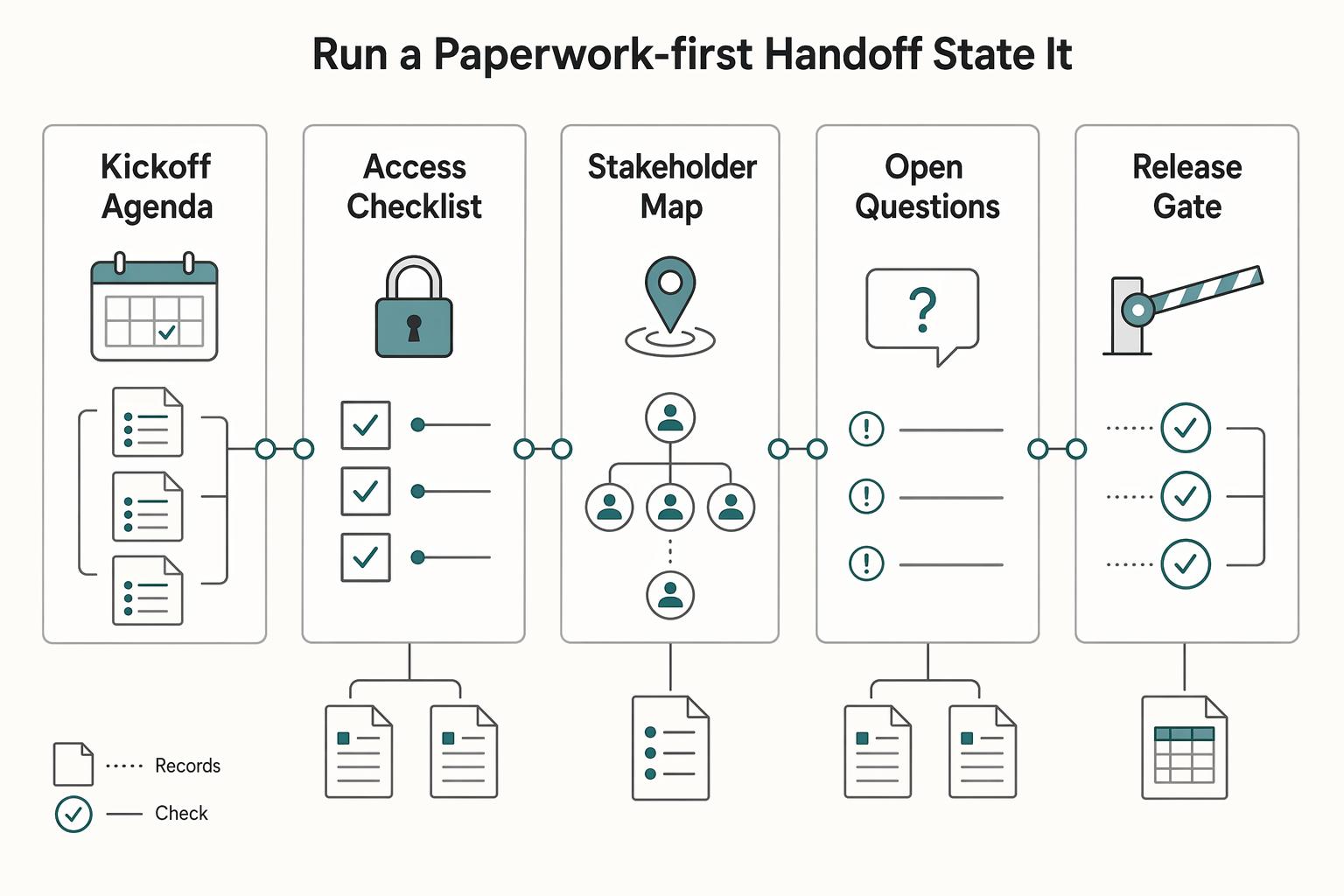
Step 2: Run a paperwork-first handoff (state it, don't imply it)#
Decide your start policy and state it plainly. Many operators separate planning from production so nobody confuses "we met" with "work started."
| Item | Category |
|---|---|
| Kickoff agenda | Planning you can start |
| Access checklist | Planning you can start |
| Stakeholder map | Planning you can start |
| Open questions | Planning you can start |
| written SOW approval path | Production you delay until triggers |
| any required NDA/DPA | Production you delay until triggers |
| agreed payment trigger | Production you delay until triggers (for example, a deposit or a first milestone) |
If they push "start now, paperwork later," use this script: "I can start kickoff planning now so we keep momentum. I'll begin production work once we finish SOW sign-off and the agreed payment step. Who should own each piece on your side?"
Cross-border payment uncertainty: keep it boring and trackable. Offer two rails (payment link or bank transfer), ask for the billing contact, and request remittance confirmation (invoice ID plus proof of payment reference). That way "finance is processing it" turns into a verifiable status.
Record the commitment trail: save the approval email, store the final SOW version, and capture any key term confirmations that affect scope, timeline, or delivery in writing. This keeps the deal memory consistent when new stakeholders join late.
Step 6: No reply? Escalate cleanly, protect your time, and close the loop professionally#
Have a repeatable plan for non-responses so silence stops stealing your calendar. If nobody replies, the goal is not to send more emails. The goal is to surface the owner, confirm the status, or close the file cleanly.
Step 1: Escalate without drama (and without guessing)#
Do not wing it based on mood. Use a consistent, low-friction approach and log the next action in your tracker.
Instead of a rigid "follow-up #1/#2/#3" sequence, pick from a few simple moves based on what you're trying to learn:
- Reply in the same thread with one clear question or CTA.
- Confirm you have the right person (or copy in the appropriate stakeholder) if ownership seems unclear.
- Try a different channel when it's genuinely a channel issue (for example, a quick call or message), and keep it focused on confirming receipt and the next step.
Channel note: many people treat calls as more disruptive. As Ask a Manager puts it, "in general there has been a cultural shift away from phone calls and toward other methods of communication." Use a call to confirm receipt, not to pressure.
Step 2: Send a "close-the-file" email that protects leverage#
Your final email should make it easy to choose a path forward and just as easy to pause.
Template (edit to fit your situation): "Hi their name, looping back on the proposal for the project. To keep my schedule clean, please choose one: 1) Reply 'go' by your deadline date and I'll send the next steps. 2) If now isn't the right time, reply 'pause' and I'll close this out on my side. If you want to restart later, reply to this thread with your target start window and I'll confirm availability."
Check: if they do not choose option 1 or 2, you close the file on your side.
If they reappear later, restart with clarity, not excitement. Reconfirm scope, timeline, and expectations in writing, then proceed from there.
Example: they ghost, then ask, "Can you send a few more ideas?" You respond: "Happy to. I can do that inside a paid discovery, or we can restart by confirming scope and next steps first." That keeps client communication professional, protects your time, and keeps closing predictable.
Step 7 - Common follow-up mistakes (and how to recover fast)#
Recover from follow-up mistakes by making the next step obvious: one CTA and a clean written record of what changed. You will occasionally create a messy thread yourself. The recovery play is to collapse it back into a single decision and a clean record.
Step 1: Collapse the chaos back to one action (CTA)#
The fastest way to stall a deal is stacking requests: "Can you review, also schedule, also answer..." People freeze because they cannot see the next move.
Recovery play: send a correction email that names the mistake and gives one action. Keep it in the same thread so the history stays attached.
Also fix the easy thread killers while you're here: vague subject lines and threads going off-topic. If the subject no longer matches the decision, update it. If the thread has drifted, restate scope and the exact next step.
If the gate is approval: "Reply 'approved' to the Statement of Work (SOW) and I'll send the invoice and kickoff steps." If the gate is scheduling: "Please reply with which slot you want: (A) [time] or (B) [time]."
Check: you should see a single, binary reply (approved, yes to a slot, or a concrete objection you can resolve).
Step 2: Consolidate terms, change the variable, and rebuild a clean record#
Scattered negotiation kills momentum and creates a documentation mess. You do not want key contract terms debated across ten replies with half-answers.
Recovery play: consolidate into one "redline summary" message and propose one short call with an agenda. Use this operator format:
- Summary of proposed edits (bullets, plain English, one line per point)
- Open decisions (what you need them to confirm)
- Call agenda (point list, decision goal)
- Next gate (approve revised SOW, then invoice)
If "same message, louder" fails (you keep forwarding the same follow-up email), change one variable instead:
| If you're stuck because... | Change this variable | Example operator line |
|---|---|---|
| You have the wrong owner | Add stakeholder | "Who owns DPA review on your side? Happy to loop them in." |
| The thread feels buried (or the subject is vague) | New subject line | "Next step: SOW approval (or pause)" |
| Time keeps slipping | New decision date | "If we want a [start window], I need approval by [day]." |
| Legal needs specifics | Name the blocker | "We're blocked on the Work for Hire clause. Do you prefer your template or my SOW language?" |
Two more common thread mistakes to avoid while you clean things up: keeping threads alive way too long and the reply-all disaster. If the loop is dragging, propose a single decision point (approve, revise, or pause). And be deliberate about who's on the thread before you hit reply-all.
One more common pitfall: starting work before payment clarity. If needed, pause production, send a written checkpoint tied to SOW deliverables, and require the agreed payment trigger before you resume.
Example: the client says "Go ahead, we'll sort invoicing later." You respond: "I can hold the kickoff slot, but I'll start production once the SOW is approved and the first payment trigger clears."
Final mistake: a weak documentation trail (or sharing sensitive information in the thread). Summarize the latest agreement in writing, store it with the current SOW version, and keep sensitive details out of the email thread when they don't belong there. This one habit upgrades your client communication from inbox chaos to professional operations.
Close the deal like an operator: your copy/paste follow-up checklist#
Run your follow-up like a small system, not a clever one-liner, so every touch adds value, moves things forward, and keeps a clear history. This is the condensed playbook you can run under pressure.
A follow-up works best when you treat it as part of an operating loop, not an afterthought. It's also not just copywriting: deliverability, timing, and value matter too. Sales often takes multiple touches after an initial meeting, yet many people stop after one attempt. You win by out-operating, not out-writing.
Step 1: Classify and schedule (so you stop "random acts of following up")#
Copy/paste this per lead into your tracker. Treat it as your working checklist, then tailor it to your offer and risk tolerance:
- Lead stage set (use your own labels consistently)
- Next touch planned (timing chosen and noted, so you're not guessing)
- Thread decision made (same thread vs new subject line)
- Email contains: context + value + a clear next step (CTA)
- "Next gate" is explicit (what you need from them to move forward)
- Risk flags checked (payment, scope creep, stakeholders, procurement)
- Escalation plan noted (if they don't reply, what you'll try next, if appropriate)
- Latest materials saved (what you sent, when you sent it, and the current version)
If you run cold outreach, treat "cold → warm" as its own stage with its own messaging rules. Keep it separate from proposal follow-ups. Use this guide when you need to generate warm replies: How to Write a Cold Email That Actually Gets Clients.
Step 2: Decide thread vs new email (so the recipient can act fast)#
Whether you follow up in the same thread or a new one depends on the context and what you're sending. If it's directly related, staying in the same thread helps the recipient see the full history. If you're introducing a new topic or shifting the conversation, a new thread can be clearer.
| Decision | Use the same thread when | Start a new email when |
|---|---|---|
| Best for | Direct continuation | New topic or reset needed |
| Example | "Re: Proposal" | "Next step to move forward" |
Example: a client said "yes" on a call, then went quiet. Your next follow-up should make the next step easy to complete: restate the context, add value, and ask for one clear action (for example, a simple written confirmation so you can send the next steps). Then log what happened so you can improve your closing playbook without guessing.
Frequently Asked Questions
How many follow-up emails should a freelancer send before stopping?
In general, follow up until you either get a decision or you stop having anything new to add, then close the loop cleanly. Do not chase endlessly just to “be persistent,” because repeated check-ins can “very quickly cross over into bothersome” and damage the relationship (Kelsey Ogletree). Use a stop rule you can defend operationally, then send a close-the-file email with a reopen path.
When should I send a follow-up email after a proposal or pitch?
Wait long enough that your email had a fair shot, and do not panic-send a follow-up. Kelsey Ogletree’s guideline stays simple: “If the answer is less than seven days, leave it alone.” If the client gave a specific review timeline, follow their timeline instead.
Should I follow up in the same email thread or start a new one?
Use the same thread when continuity matters (proposal attached, SOW redlines, legal terms like Termination or Limitation of Liability). Consider starting a new thread when the old one buries the decision, you need a clearer subject line, or you need to loop in billing, procurement, or legal. Pick the option that reduces search cost for the recipient.
What should a freelance follow-up email include to get a yes?
Include a legitimate reason, a single next action, and a clear timing ask. Jovancicmil puts it plainly: “Always follow up for a legitimate reason,” such as “provide additional information that may be useful to the client.” Then drive to one gate: approve the SOW, confirm the next call time, or confirm you should pause.
How do I follow up without sounding pushy or desperate?
Try not to “check in.” Give the recipient a clean choice tied to their timeline: proceed with option A, proceed with option B, or park it. Keep your client communication specific, and avoid packing crucial missing info from the original message or irrelevant details into the follow-up.
What do I do if there is still no response after multiple follow-ups?
Assume silence can mean “not now” or “not ever,” and plan for both. Kat Boogaard notes that many times “you won’t hear back… right away. Or at all,” but she still encourages following up with caveats. Send a final close-the-loop note that ends the chasing, documents the state, and invites them to re-engage when ready.
How do follow-ups help close deals (not just get replies)?
Follow-ups create decisions by reducing ambiguity, not by increasing pressure. A good follow-up turns inbox limbo into a binary outcome: SOW approved, call booked, or file paused. If a client stalls after a verbal yes, set the close gate: “Reply ‘approved’ to the SOW and I’ll send the invoice and kickoff steps.”
Try a related tool
Researched and edited by the Gruv editorial team. Gruv builds cross-border billing, payouts, and finance-operations software for global businesses.
Sources
Includes 7 external sources outside the trusted-domain allowlist.
- academia.edu/123753344/Tools_of_Titans_Timothy_Ferrisstrusted
- lifebydesign.online/leads/lead-recycling-systemexternal
- lifebydesign.online/leads/lead-recycling-systemexternal
- linkedin.com/posts/gabbybeckford_the-thing-people-forget-...external
- skrapp.io/blog/follow-up-emailexternal
- skrapp.io/blog/follow-up-emailexternal
- thefreelancersyear.com/blog/following-up-editors-guideexternal
- thefreelancersyear.com/blog/following-up-editors-guideexternal
Educational content only. Not legal, tax, or financial advice.
Related Posts
How to Write a Cold Email That Actually Gets Clients
If you want this channel to produce clients, track movement through your pipeline, not noise in your inbox. The goal is simple: move the right prospects from researched to contacted to qualified reply to booked call to signed project.

Sole Trader vs Limited Company UK for Freelancers
If you need a practical starting rule, choose sole trader for a faster start and lighter admin. Choose a limited company when legal separation and company-level compliance are worth the extra work.

The Freelance Payment Penalty: A Modeled Audit of Platform Fees, FX Spreads, and Payout Delays
The money rarely disappears through a single, easy-to-spot fee. The real loss is stacked. A marketplace takes its commission, a processor adds a charge for international cards, a bank or payment company converts the currency at a spread, a platform holds the funds before release, and a wire sheds a little to intermediaries on the way in. Each layer looks defensible on its own, but the worker feels the combined result as a smaller deposit and a later payday.