
Quick Answer
Run a short pilot across Notion, Evernote, Microsoft OneNote, and your other finalists, then keep one primary record app. Score capture speed, retrieval speed, cross-device sync, structure depth, and handoff quality, and fail any option that cannot surface one recent note and one older note quickly. Use the 14-day rollout only after that pass/fail check, with Week 1 migration and Week 2 live-client usage.
Start here and pick one app in one sitting#
Make this decision in one sitting, then move on. One primary note app, used as the default place for client decisions, follow-ups, and reference notes, does more to cut missed details, messy handoffs, and tool churn than another week of comparing screenshots ever will.
There is no universal winner, and that is the point. The right fit depends on the shape of your work, the devices you actually use, and how often you need to pull up an older note while a client is waiting. What matters is not whether an app looks powerful in a roundup. It is whether your notes stay usable when delivery gets busy.
Roundups are fine for discovery, but they are a weak way to make the final call. Different lists use different scopes, some lean on affiliate relationships, and many flatten real tradeoffs into a single ranking. Use them to build a shortlist, then switch back to your own work and make the choice there.
A quick pass is enough:
- Workload shape: Map the next two weeks into live meetings, research capture, drafting, and handoff notes. If quick capture is the main pain point, favor low-friction input. If the bigger problem is losing context later, favor stronger organization and search.
- Device mix: On each candidate, create a note, find it again, and share it from every device you actually use. Test templates, organization, search, calendar linking, web clipping, and collaboration where those features exist.
- Retrieval pressure: Test one recent client question and one older one. If either fails, reject that app for primary records.
- Bias check and commitment: Keep a small comparison table with pass-or-fail notes, choose one app, and set a review date.
The rest of this guide is built for that decision. It stays focused on the parts generic listicles usually skip: failure modes, practical tradeoffs, and a rollout you can test without disrupting client delivery. The goal is simple: pick one tool, pressure-test it against real work, and stop carrying open loops about your notes.
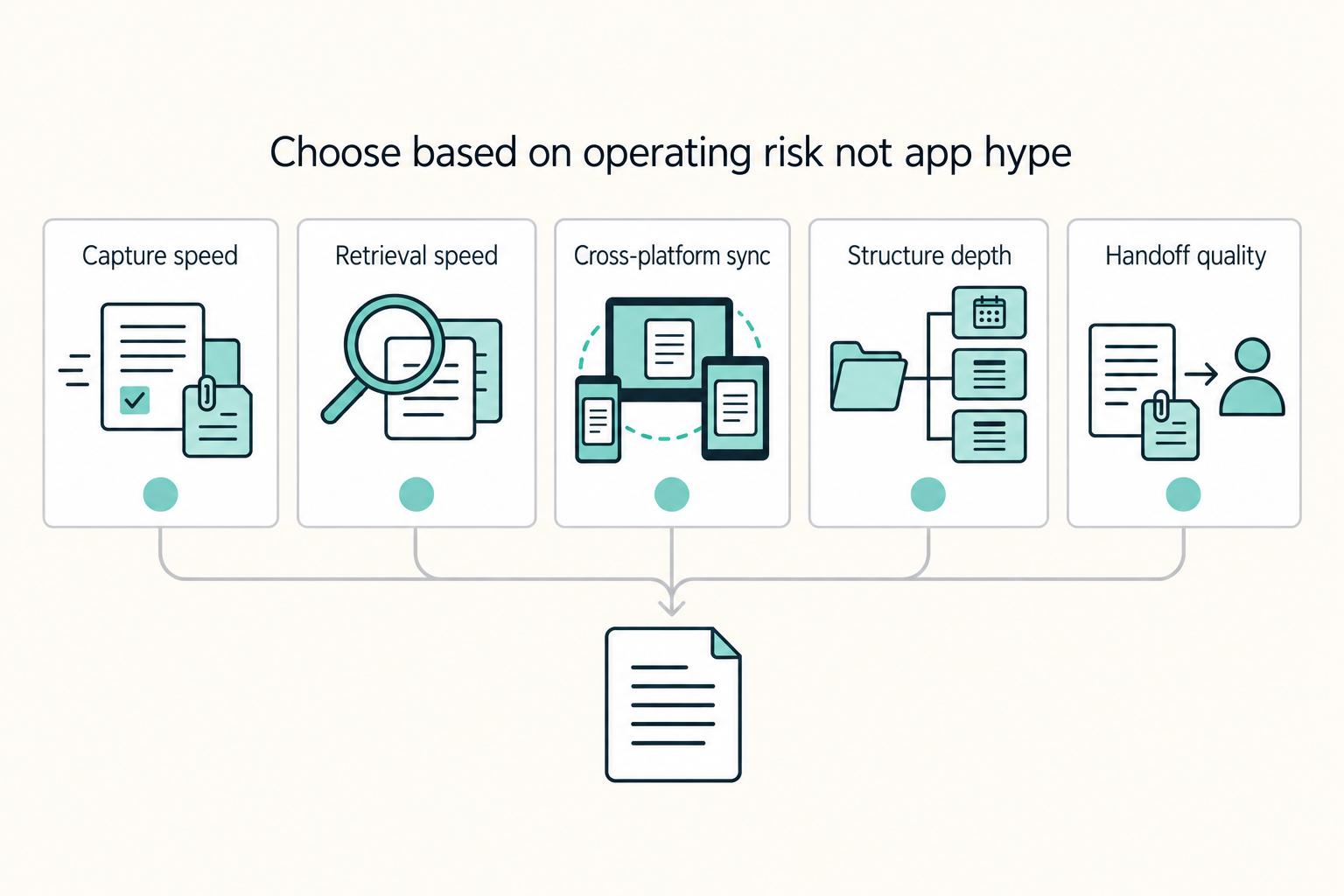
Choose based on operating risk not app hype#
Choose the app that fails least under pressure. For freelancers, the real risk is not missing out on a clever feature. It is losing a decision, missing a follow-up, or failing to reconstruct context when a client needs an answer now.
| Setup style | Trial focus | What to check |
|---|---|---|
| Database-first option | Test integration fit early | Whether client email and attachments can feed your tracking setup |
| Notebook-first option | Test clarity over a full week | Friction in formatting, interface clarity, sync behavior, and follow-through |
| Search-first option | Run capture-first tasks | Retrieval and handoff quality under pressure |
| Local-file option | Run the same tasks | Whether repeated capture and retrieval stay consistent over time |
That is why hype is such a poor filter. Marketing pages show possibility. Delivery work exposes reliability. The useful question is not, "What can this app do?" It is, "What breaks when I am busy, switching devices, and trying to move quickly?"
Independent work already splits your attention across calls, revisions, research, and admin. A note app either absorbs some of that strain or adds to it. If your notes directly support client delivery, that is the standard that matters. If you only want a light personal journal, you can relax this test. If the notes affect deadlines, scope, or handoff quality, do not.
Run this five-point check before you commit:
- Capture speed: Log a live decision, next action, and related file while multitasking.
- Retrieval speed: Pull one recent client note and one older note under time pressure.
- Cross-platform sync: Repeat capture and retrieval on the devices you actually use.
- Structure depth: Check whether meetings, deliverables, and history stay clear as notes accumulate.
- Handoff quality: Share a summary with actions and files, then verify someone else can continue without extra explanation.
Treat retrieval as the gate. If you cannot reliably find past client notes quickly during delivery, that setup is risky for client work no matter how elegant the interface looks. This matters more than aesthetics, templates, or any single advanced feature.
Once you have that risk filter in place, compare the main setup styles rather than the marketing language. Run the same client scenario across the tools you are considering, then score all five checklist points:
- Database-first option: Test integration fit early, including whether client email and attachments can feed your tracking setup.
- Notebook-first option: Test clarity over a full week and watch for friction in formatting, interface clarity, sync behavior, and follow-through.
- Search-first option: Run capture-first tasks, then pressure-test retrieval and handoff quality.
- Local-file option: Run the same tasks and check whether repeated capture and retrieval stay consistent over time.
Write down pass-or-fail notes from each trial. It sounds small, but it changes the quality of the decision. It keeps you from app-hopping when a shiny feature appears, and it pushes the final choice back to delivery reliability instead of preference theater.
That same discipline also makes the next section more useful. A comparison table is not there to decide for you. It is there to surface what you know, what you do not know, and where the real risk still sits.
Use one comparison table before reading app details#
Use one comparison table before you get lost in app-by-app detail. It is not a verdict, and it is not trying to crown a winner. It is a way to keep assumptions from sneaking in while you evaluate tools that solve different problems in very different ways.
Treat each row as a working hypothesis. If a cell is unverified, leave it that way and plan a short hands-on test. Do not fill gaps with memory, brand familiarity, or a roundup headline. That discipline matters because some of these tools have a clear fit, while others only have enough evidence to justify a cautious trial.
| App | Best for | Platform spread | Offline behavior | Organization model | Capture modes | Major tradeoff | Choose this if |
|---|---|---|---|---|---|---|---|
| Notion | Project managers, students, freelancers | Verify in-app | Verify in-app | Customizable workspace with task management | Verify in-app | 2025 snapshot lists Free, then $10/mo Plus; confirm current plans before rollout | You want flexible structure and will test it against real client deadlines |
| Evernote | Students, freelancers, teams | Verify in-app | Verify in-app | Note-taking, organizing, and task management | Verify in-app | 2025 snapshot lists Free, then $14.99/mo; verify current cost and fit | You want general-purpose notes plus an explicit retrieval stress test |
| Microsoft OneNote | Confirm fit directly | Verify in-app | Verify in-app | Confirm pricing details | Verify in-app | Only a 2025 price snapshot is confirmed here at $6.99/mo; verify capabilities before rollout | You will run a full pilot before trusting it for client records |
| Obsidian | Writers, software developers | Verify in-app | Verify in-app | Linking notes, customizable setup, local files | Verify in-app | 2025 snapshot lists Free, then $50/yr/user for commercial use; check current terms | Linked notes and local-file control match how you retrieve past decisions |
| NotePlan | Confirm fit directly | Verify in-app | Verify in-app | Confirm pricing details | Verify in-app | Price snapshot only: 7-day trial, then $9.99/mo | You are willing to test with limited evidence before committing |
| Agenda | Confirm fit directly | Unsupported in provided excerpts | Unsupported in provided excerpts | Unsupported in provided excerpts | Unsupported in provided excerpts | Data-gap risk is high until you test with real client notes | Use only after a hands-on pilot fills the missing evidence |
| Nebo | Confirm fit directly | Unsupported in provided excerpts | Unsupported in provided excerpts | Unsupported in provided excerpts | Unsupported in provided excerpts | Data-gap risk is high until you test with real client notes | Use only after a hands-on pilot fills the missing evidence |
| Notability | Confirm fit directly | Unsupported in provided excerpts | Unsupported in provided excerpts | Unsupported in provided excerpts | Unsupported in provided excerpts | Data-gap risk is high until you test with real client notes | Use only after a hands-on pilot fills the missing evidence |
| Craft | Confirm fit directly | Unsupported in provided excerpts | Unsupported in provided excerpts | Unsupported in provided excerpts | Unsupported in provided excerpts | Data-gap risk is high until you test with real client notes | Use only after a hands-on pilot fills the missing evidence |
Method note: this table weights freelancer use cases first, especially reducing missed details and deadline slips. The comparison material behind it uses different scopes, and one published comparison is limited to AI note-taking apps with affiliate disclosure language. Treat rankings as input, not as a verdict.
The practical rule is straightforward. If a row has several unverified cells, do not trust it with active client work until a short trial fills those gaps. That is not harsh. It is how you keep uncertainty visible. It is also why the app sections below do not all carry the same level of confidence. Some have a solid decision shape here. Others are better handled as narrow tests until your own evidence catches up.
Notion for freelancers who need connected client records#
Choose Notion when connected records are the point of the tool, not just a nice extra. It earns its place when one client workspace needs to hold onboarding details, meeting notes, tasks, and delivery checklists together. If that is the problem you need to solve, it can be the cleanest way to keep context from scattering.
This is not a blanket recommendation. Notion is strongest when your records need structure, relationships, and collaboration. If your work is mostly simple notes you need to capture fast and revisit quickly, all that flexibility can turn into overhead.
The tradeoff is easy to miss at first. Flexibility feels powerful in the abstract, but it also creates more choices at the exact moment you should be capturing work. That is why this tool fits a specific kind of freelance operating style. If you want one place where client records connect to tasks and views, the setup effort can pay off. If you want lighter notebook-style capture with faster adoption, Microsoft OneNote is usually the easier starting point.
Use these checkpoints before you commit:
- Positioning check: This option is framed around structured databases, while OneNote is framed around flexible digital notebooks and freeform notes.
- Adoption risk check: Flexibility can create early friction, and steep learning time can lower productivity if setup gets too complex.
- Organization check: Confirm your records are easy to retrieve with filters, views, tags, and custom search.
- Integration check: In one third-party setup, invoice-reply emails with attachments can populate a finance tracker. Treat this as integration-dependent and verify it in your own stack before relying on it.
In practice, the question is simple: do you need connected records badly enough to justify the extra setup? If the answer is yes, Notion belongs on the shortlist. If the answer is no, you may be paying complexity tax for no real gain.
A useful decision rule follows from that. Choose it only after a real trial proves retrieval is reliable. If structured databases and collaboration are requirements for client records, the setup may be worth it. If you mainly want easier adoption and a simpler notes-and-notebooks model, default to OneNote first and only move up in complexity when the work demands it.
Evernote for research capture and retrieval speed#
Evernote is the right candidate when the bottleneck is not taking notes but finding the right note fast. If your work involves proposal writing, competitor scans, source collection, or reference-heavy client projects, that emphasis on capture and retrieval can matter more than a highly customizable workspace.
Its practical appeal is straightforward. You can capture material from the browser, keep notes and tasks together, and lean on search instead of trying to remember exactly where something was filed. For research-heavy freelance work, that often beats visual polish or elaborate structure.
That said, the fit depends less on the broad promise and more on how you actually retrieve information under pressure. The app positions itself as one place for notes, tasks, and schedule, and its search supports Boolean logic plus field operators like intitle:, tag:, notebook:, and created:. Those operators are valuable only if they line up with how you think during live work. If they feel natural, retrieval speeds up. If they do not, you can still end up with a pile of clipped material that is harder to reuse than it looked in the demo.
The main tradeoff is organizational discipline. Each note lives in one notebook, so cross-project retrieval depends heavily on tagging. That sounds manageable until one idea spans more than one client or more than one offer. If the tagging habit slips, the whole retrieval promise starts to weaken. And if the fit is wrong, the cost shows up later in migration and rebuild work while delivery is still moving.
A real test makes this easier to judge. Before drafting a proposal, clip competitor examples, tag notes by client and offer type, and keep call highlights in the same setup so one filtered search can surface what you need. Then run the exact same notes through another contender and compare not just the result but the path it took to get there. Faster retrieval is not just about search power. It is about whether the tool supports the way you remember.
Before you decide, run a retrieval checkpoint with the same notes and queries in at least one competing app. Include one date-range test such as created:20250101..20250331, then repeat with one title query and one tag query. If you work across many clients, add saved searches and see whether retrieval still holds up under normal pressure instead of looking good only in a clean demo case.
If that test lands well, Evernote deserves serious consideration. If the search language never feels natural, the advantage thins out fast, and a simpler notebook or a more structured setup may serve you better.
Microsoft OneNote for a strong free cross-platform baseline#
Treat Microsoft OneNote as the control in your evaluation, not an automatic winner. That may sound modest, but it is useful. A baseline app gives you something clear and familiar to compare against when other tools promise deeper structure, better search, or more customization.
That framing matters because the grounded evidence here is narrower than people often assume. It does not confirm official pricing, sync reliability, cross-platform quality, or a lighter learning curve, so those points should stay open until your own testing answers them. OneNote is often recommended from habit, familiarity, or personal preference. None of those are the same as side-by-side proof.
What is supported is simpler and more useful: at least one direct comparison says OneNote and Evernote share core note-management capabilities. That is enough to justify a real trial. It is not enough to assume it will automatically suit client records better than the other options.
The clean way to use OneNote is as a benchmark. Build one dedicated notes space per client and reuse the same meeting-note layout each time: scope, decisions, and next actions. That will quickly show you whether the notebook model feels natural or whether it starts to blur as notes pile up. Use it to answer a concrete question: can a straightforward notebook setup stay clear enough for your work without extra complexity?
That is where this app can be especially valuable. If a simpler structure already handles capture and retrieval well, you may not need a more elaborate tool at all. And if it does not, you will know why you are moving to something else instead of upgrading on instinct.
The bigger risk is selection drift. Personal productivity stories can be helpful context, but they are not controlled evidence. One person may love a notebook layout. Another may swear by linked notes or databases. That tells you very little about what will hold up during your own week of calls, revisions, and follow-up.
Use a disciplined check instead. Run the same retrieval drill across your finalists with one recent note and one older note, and confirm you can find each quickly without digging. Keep OneNote only if that test shows clean retrieval and low overhead during real client load. If research capture works better elsewhere, keep that. Move to deeper tools only when your notes truly demand the added structure.
Obsidian for private local-first knowledge systems#
Obsidian is worth it when file ownership and long-term reuse matter more than quick setup. It is local-first, so notes live as plain text Markdown files on your computer, work offline, and connect through backlinks. If that model already matches how you think, the appeal is obvious: your notes stay close to you, and the structure can grow with the work instead of being locked inside a single hosted workspace.
The upside is not just privacy or control. It is retrieval depth over time. Bidirectional links and Graph View can help you reuse past client thinking in new proposals and delivery work instead of rebuilding context from scratch. That is especially useful when projects repeat patterns across industries, scopes, or client types.
The tradeoff is setup overhead, and it is a real one. Obsidian and Notion are often grouped together as power-user tools, with Notion generally seen as more user-friendly, and early over-customization can slow execution. That is the common failure mode here. People start with a note app and end up designing a whole personal knowledge setup before they have captured a week of real work.
Take a smaller, stricter approach instead. Start with recurring notes you actually use, such as meeting notes, proposal drafts, and retrospectives. Link them so decisions carry forward. Keep the setup lean enough that you can still capture quickly during live work. If you feel pulled into installing plugins before retrieval is already working, take that as a warning sign, not a sign of progress.
A few checks matter before you trust it with client records:
- Rollout checks: Confirm templates work for recurring client notes, and test whether search operators or regex are enough for retrieval under pressure.
- Tradeoff to manage: Plugin choice overload can create decision fatigue if you do not limit what you install.
- Cost and scope check: One review cites a
$50/yearcommercial license and optional sync at$4 per user per monthwith annual billing. Validate whether those add-ons are worth it in your trial. - Failure mode check: DIY setups are sometimes framed as taking
20-40 hours, while guided options are sometimes framed as much faster, for example30 minutes. Use both as planning ranges, then track your own setup time.
One practical setup is one vault for active client work with three reusable note types: discovery call, proposal outline, and delivery retrospective. Link those notes weekly, then run saved searches to recover prior assumptions, scope changes, and next actions with less manual hunting. That kind of small, repeatable structure is where Obsidian earns its keep.
If you handle sensitive client material, compare it with alternatives like Notion on local storage and collaboration expectations before rollout. Then check what changes when sync or collaboration is enabled. Keep it only if retrieval stays reliable after templates and links are in place. If the setup keeps pulling you back into configuration, it is probably too much tool for the way you need to work right now.
NotePlan and Agenda for calendar-driven client work#
When your week is driven by dates, the real question is whether time and context stay together. If most of your work revolves around check-ins, status calls, due dates, and follow-ups, that matters more than elegant organization on paper.
On that standard, NotePlan is the clearer test candidate in this set. It combines notes, tasks, and calendar views, supports daily, weekly, monthly, and yearly notes, auto-generates daily pages, and syncs tasks into its built-in calendar. It also supports drag-and-drop rescheduling with filters by date, project, or tag. That collection of features makes sense when you want notes to sit directly beside the schedule that produced them.
That does not make it a blind recommendation. It makes it a focused one. If your day is calendar-led, this is one of the few options here where the structure itself matches the work. If your day is not calendar-led, the main strength may not matter enough to justify the choice.
Agenda is a different story. Its features, pricing, and platform fit are worth confirming directly before treating it as a default recommendation. Keep it in test mode until your own use fills those gaps.
A simple trial will tell you more than a feature list. For Tuesday and Thursday client check-ins, capture decisions and next actions on those dates, then place follow-up tasks on the actual due dates. At week end, open one calendar view and see whether you can reconstruct the full client timeline without extra hunting. If that reduces context switching, the calendar-led model may be worth keeping. If not, you are probably better off with stronger search or a cleaner notebook setup.
Use two rollout checks before you decide:
- Continuity check: On a given date, can you see note context and pending tasks together?
- Reschedule check: Can you move upcoming tasks quickly and filter by date, project, or tag without losing context?
One tradeoff needs special attention. NotePlan is listed for Mac, iPhone, iPad, and Web, so explicit Windows or Android fit is not confirmed. That matters if you move across devices often. Decision rule: if your day is driven by the calendar, test NotePlan first and keep Agenda in pilot mode until your own results say otherwise. If your day is driven by research and later retrieval, give more weight to the tool that wins the search test instead.
Nebo and Notability for handwriting and annotation workflows#
Handwriting tools only deserve a place if they reduce cleanup after the meeting. If they create a second round of typing, sorting, and reconstruction, they are not helping no matter how pleasant they feel in the moment.
That is the right lens for Nebo and Notability. They are reasonable trial options when your work depends on stylus notes, live markup, and document review, but they should be judged on whether they keep the next action clear. The goal is not prettier notes. The goal is less follow-up friction.
Keep the scope narrow. The support here is iPad-centered. Both apps appear in recent iPad note-app coverage, iPad workflows include stylus capture, and Notability is explicitly associated with PDF annotation. That is enough to justify a handwriting-and-annotation test. It is not enough to assume broad cross-platform behavior or to make either one your default client record without further proof.
The split between the two is practical. Nebo is the stronger candidate when you think fastest in handwritten form during calls, reviews, and planning. Notability is the better candidate when the main task is annotating client documents, especially PDFs, during review cycles. That is a useful distinction because handwriting and annotation often get bundled together even when the job to be done is different.
Before you decide, run a constraint check based on real work rather than preference:
- Input check: Run one real call with stylus input and one with keyboard input in the same app. Keep the mode that preserves more detail with less cleanup.
- Annotation check: Mark up a real brief live, then produce and share a same-day action list. If this requires heavy retyping, treat it as a warning sign.
- Handwriting-conversion expectation check: If your process depends on automatic handwriting conversion, treat it as unverified until your trial confirms it.
- Device-scope check: Since this guide is iPad-focused, treat non-iPad behavior as unknown until tested in your setup.
A good trial is simple: annotate a weekly client brief live, flag scope risks in place, and capture follow-ups beside each section so notes and next actions stay connected in one pass. If that works without later rework, the tool may deserve a place. If it turns live markup into extra admin, keep it out of the critical path and use a more dependable primary record instead.
Craft and Danger Notes for narrow specialized use cases#
Treat these as secondary tools until they prove otherwise. That is not a knock on either one. It is just the right conclusion from the evidence available here.
Craft appears in a 2026 AI meeting note-taker roundup, but concrete features are not evaluated there. Specific features, pricing, and platform behavior for Danger Notes are not validated here. With that much uncertainty, using either one as the default home for client records would add avoidable risk.
There is still a sensible way to use them. If you like Craft for draft-stage writing, keep it there and move approved decisions into your primary record app. If you are curious about Danger Notes, keep it in trial mode until it shows dependable continuity rather than interesting capture alone. Specialized tools can help, but only if they do not become the only place where the final answer lives.
A concrete example makes the rule clearer. If you draft a thought piece in Craft, tighten the argument and identify actions there, then store final decisions, owners, and deadlines in your main record. That way the specialized tool supports the work without becoming the archive of record.
Before you expand either tool beyond side use, run these checks:
- Retrieval check: After one week, can you find the exact decision and related action items quickly?
- Continuity check: Can someone else reconstruct what was decided from the primary record alone?
- Consent check: If a tool uses bot-based meeting capture, confirm whether participant disclosure is required.
- Permission check: If a tool uses system-based local capture, verify audio and screen permissions fit your device policy.
- Scope check: Treat roundup counts such as 7, 8, or 12 apps as non-comparable methods, not a universal ranking.
The red flag is simple. If retrieval or continuity fails in your actual use, keep the tool secondary and keep official client history in the app that already passes handoff and follow-through tests.
Roll out your chosen app in 14 days without breaking client delivery#
Do not migrate everything in one heroic weekend. A cautious 14-day rollout is safer because it protects active client delivery while you learn the tool, fix naming, and prove retrieval before old notes are fully moved over.
| Phase | Main action | Check or outcome |
|---|---|---|
| Day 1 | Set your folder or notebook structure around active clients and current deliverables | Structure before import keeps you from dragging old chaos into a new app |
| Day 2 | Define templates for recurring notes such as calls, scope changes, and follow-ups | Templates before heavy use keep live notes consistent |
| Day 3 | Configure retrieval tools you will actually use, including filters, views, tags, and custom searches | Think about how you will find information later, not just where you will put it today |
| Day 4-5 | Import a limited, high-priority note set first, then expand | Keep Week 1 intentionally narrow |
| Day 6-7 | Verify imported areas for missing items, duplicates, and unclear titles | Build a short migration evidence pack and keep an exceptions list with owner and due date for anything still pending |
| Week 2 | Capture notes live in client calls and review meetings, confirm cross-device access, run at least one offline-mode check, and keep a weekly summary note | Before completion, run a retrieval drill and an optional continuity check |
The purpose of this rollout is not perfection. It is to establish one dependable primary record, verify retrieval and handoff, and only then expand what you migrate. If you still need a secondary drafting app during the transition, keep it in a draft-only lane so final decisions still land in one place.
Treat the timeline as practical guidance rather than a rigid rule. What counts as success is simple: notes are captured consistently, easy to retrieve, and clear enough for handoff without slowing client work.
Week 1, set the structure without over-migrating.
Day 1: Set your folder or notebook structure around active clients and current deliverables.
Day 2: Define templates for recurring notes such as calls, scope changes, and follow-ups.
Day 3: Configure retrieval tools you will actually use, including filters, views, tags, and custom searches.
Day 4-5: Import a limited, high-priority note set first, then expand.
Day 6-7: Verify imported areas for missing items, duplicates, and unclear titles.
The order matters. Structure before import keeps you from dragging old chaos into a new app. Templates before heavy use keep live notes consistent. Retrieval tools before full rollout force you to think about how you will find information later, not just where you will put it today.
Keep Week 1 intentionally narrow. Move active clients, open deliverables, recurring meetings, and key reference docs first. Leave cold archives alone until the new setup proves itself. That restraint matters because most bad migrations fail for boring reasons: mixed naming, duplicate notes, unclear ownership, and false confidence that everything copied over cleanly.
By the end of Week 1, build a short migration evidence pack: active clients, open deliverables, recurring meetings, and key reference docs moved and verified. Keep an exceptions list with owner and due date for anything still pending. That list is not busywork. It is what stops half-migrated notes from turning into hidden risk.
Week 2, run live work through the new setup.
Now move from setup to proof. Capture notes live in client calls and review meetings. Run a regular closeout review to clean titles, confirm tags, and capture follow-up actions. Confirm cross-device access during the week, including at least one offline-mode check. Test one integration handoff that matters for follow-up, such as a trigger-based step that creates CRM and invoice-draft follow-up actions. Keep a weekly summary note of what failed, what you fixed, and what still feels slow.
This is where the real decision happens. A tool can look fine with imported notes and still fail the moment live delivery starts. That is why Week 2 matters more than Week 1. You are no longer testing whether the app can store information. You are testing whether it can keep up with you.
Use a short daily review during this week. At the end of each day, check three things: were decisions captured, were next actions obvious, and could you find the note again without scrolling? If any of those answers keep coming back weak, pause the migration and fix the structure before you move more history into it.
Before you call the rollout complete, run two checks:
- Retrieval drill: Find recent and older notes using configured retrieval tools, not manual scrolling.
- Continuity check (optional): Draft a handoff summary from recent work with decisions, open actions, owners, and note locations.
If you keep losing time searching for older notes, stop and fix organization first. That is not failure. That is exactly what a phased rollout is for. If friction stays high after a reasonable round of adjustments, keep the app secondary and continue with the setup that already supports reliable retrieval and continuity.
As you migrate notes, lock your scope terms into a reusable template so the same client basics do not have to be rebuilt every time. That one habit does more to stabilize a note system than most people expect, because it reduces drift in how information gets named and revisited.
Avoid the mistakes that make freelancers abandon systems#
Most abandoned note systems fail for the same few reasons. The good news is that they are usually avoidable if you decide early what the tool is for and what it is not for. The goal is stable capture and dependable retrieval, not an endlessly improving setup.
The pattern behind most failures is familiar. People choose based on hype, overbuild before the basics work, or split decisions across too many places. The fix is usually less dramatic than the failure: tighten the primary record, test retrieval in real work, and stop optimizing the wrong layer.
- Choosing from trend lists instead of your own tests
Recommendation lists are useful for discovery, but they should not make the final decision, especially when a source has affiliate relationships. Use the same retrieval test in each candidate: find one recent client note and one older note before you switch. If a tool cannot pass that basic test, very little else about it matters.
- Chasing edge features before baseline reliability
Start with the boring essentials first: filters, views, tags, custom search, and dependable access across your real device mix. Compare your top finalists on those basics before you spend time on advanced extras. A clever feature does not help if you still cannot find last month's scope change during a client call.
- Stacking tools without a clear primary record
Overlapping tools blur where final decisions live. That is when follow-ups get missed and handoffs get fuzzy. Keep one primary record and treat other apps as support lanes, not competing archives. Draft elsewhere if you need to, annotate elsewhere if it helps, but finalize in one place.
- Accepting partner-led recommendations without a fit check
Affiliate or partner relationships do not automatically invalidate advice, but they are a reason to verify fit yourself. Confirm your device mix, sync continuity, and working constraints before adopting any setup. The more your business depends on clean follow-through, the less you can outsource this choice to someone else's ranking.
There is also a quieter failure mode that shows up after the first week: endless reorganizing. If you keep rearranging structure but still lose time finding decisions, stop changing features and tighten naming, tags, and retrieval habits inside one primary record. That is usually where the real fix is. Most freelancers do not need a better note app at that point. They need a steadier way of using the one they already chose.
Pick one app and prove it with a two-week stress test#
Make the choice smaller than it feels. You do not need a forever answer. You need one tool that survives normal client pressure with the least friction.
Set a short decision window, pick one primary record app for that window, pause new tool experiments, and run your normal client load through it. That keeps the result tied to fit rather than switching noise. A two-week stress test is long enough to expose weak retrieval, awkward capture, and setup fatigue without locking you into months of sunk cost.
Use one simple scorecard for the full window:
- Start-up friction: On day one, check how long it takes to reach your first real client note. If setup drags past 30 minutes before useful capture, mark a risk.
- Daily five-factor check: Rate capture speed, sync reliability, organization fit, pricing comfort, and completion outcomes.
- Continuity check: Open the same note on another device regularly and confirm updates are there.
- Week-one reality check: If you are already avoiding the app after a week, count that as evidence.
Keep a short log with date, note type, client context, what worked, what broke, and how easy follow-ups were to recover. Then make one call at the end: keep, adjust, or replace. Keep only the tools that hold up under normal client load, and document your final selection criteria so the next tool decision is easier and less emotional.
Frequently Asked Questions
What is the best free note-taking app for freelancers?
There is no universal free winner. Microsoft OneNote is sometimes described as free-form and sometimes as included with Microsoft 365, so verify current access in your own account. Treat free entry as a starting point, then keep the app that passes your retrieval and handoff tests.
How should freelancers choose between Notion, Evernote, Microsoft OneNote, and Obsidian?
Start with your real work pattern, then run the same test across all finalists. Notion is described as strong for custom systems and databases, Evernote as strong for retrieval, and OneNote as strong on notebook-section-page structure with broad device sync. Obsidian can stay on your shortlist, but rely on direct testing before committing.
Which app is best for meeting-heavy freelance work?
No single app is proven best for every meeting-heavy freelancer here. Run a one-week pilot: capture live call notes, add follow-up tags where available, and confirm you can recover decisions quickly during client updates. If that fails, switch before migrating more notes.
Which features matter most for freelancers: sync, search, tags, calendar, or handwriting?
Prioritize retrieval first, because weak note systems can let details slip and lead to missed deadlines and stress. The strongest validated priorities here are cross-platform sync, search, and tag-based organization. Calendar and handwriting features matter when your daily work clearly depends on them.
Are Mac-focused options like NotePlan and Agenda worth it if I work cross-platform?
Do not assume cross-platform behavior for NotePlan or Agenda is validated. If cross-platform continuity is non-negotiable, prioritize tools with explicit multi-device sync support and test your real device mix before migration. Do not assume compatibility from rankings alone.
Should I keep one app for everything or split capture and long-term knowledge into two tools?
This guide does not establish a universal winner between one-app and split-app setups. A practical default is one primary record for decisions, owners, and deadlines, with secondary apps used only for temporary capture. If split capture creates retrieval or handoff friction, consolidate back to one primary record.
Try a related tool
Researched and edited by the Gruv editorial team. Gruv builds cross-border billing, payouts, and finance-operations software for global businesses.
Sources
Includes 5 external sources outside the trusted-domain allowlist.
Educational content only. Not legal, tax, or financial advice.
Related Posts

The Freelance Payment Penalty: A Modeled Audit of Platform Fees, FX Spreads, and Payout Delays
The money rarely disappears through a single, easy-to-spot fee. The real loss is stacked. A marketplace takes its commission, a processor adds a charge for international cards, a bank or payment company converts the currency at a spread, a platform holds the funds before release, and a wire sheds a little to intermediaries on the way in. Each layer looks defensible on its own, but the worker feels the combined result as a smaller deposit and a later payday.

How to Respond to a Subpoena for Business Records
Move fast, but do not produce records on instinct. If you need to **respond to a subpoena for business records**, your immediate job is to control deadlines, preserve records, and make any later production defensible.

A US Expat's Guide to Investing in UCITS ETFs to Avoid PFIC Issues
The real problem is a two-system conflict. U.S. tax treatment can punish the wrong fund choice, while local product-access constraints can block the funds you want to buy in the first place. For **us expat ucits etfs**, the practical question is not "Which product is best?" It is "What can I access, report, and keep doing every year without guessing?" Use this four-part filter before any trade: