
Quick Answer
Start by choosing the payout route your finance team can reconcile with the least friction. For Shopify payouts explained seller alternatives, the practical choice is between Shopify Payments, third-party gateways like PayPal or Amazon Pay, and manual payments such as bank transfers. Each route changes who pays out to your bank, where status is visible, and how much matching work appears at month end. Use a market-specific test transaction and confirm order record, payout reference, and final bank deposit before rollout.
Treat payout setup as an operating decision, not a checkout task#
Treat payout setup as an operating decision, not a checkout task. The real question is not just how customers pay. It is who sends money to your bank account, which parts of the payment trail you can review, and how much cleanup your team inherits when you add countries, providers, or offline methods.
Shopify gives merchants more than one payment option, and this is where a lot of payout advice gets too shallow. Shopify Payments is Shopify's integrated payment system for accepting online payments, but it is not the only route. You can also choose other payout routes beyond Shopify Payments. All of them can help you sell, but they can create very different visibility, settlement paths, and reconciliation work after checkout.
That difference matters because payouts are not the same thing as sales. Processing fees and other transaction costs can be deducted before funds reach your bank account, so the deposit you see is often a net figure rather than a clean mirror of gross orders. If leadership tracks only sales volume and assumes the bank deposit should match, you get false alarms, bad cash timing forecasts, and messy month-end reviews. The practical rule is simple: model the money movement first, then approve the rollout.
You should also assume that country and provider details need to be checked before launch, even when the storefront setup looks straightforward. This article stays close to what is clearly established in the available guidance and calls out where you still need deeper country-level or provider-level verification. That matters most when someone says "Shopify pays out like this everywhere" or when a partner reuses fee or timing assumptions from one market in another.
Pricing is a good example. One UK fee explainer quotes domestic card pricing for the built-in option from 2% + 25p on Basic to 1.5% + 25p on Advanced, with a quoted 2% surcharge for international cards. That is useful as a reminder that plan and card mix change payout math, but it is not a universal rule you should copy into a global model. Use figures like that as a verification prompt, not as policy.
From here, we will separate the three seller payout routes that actually show up in practice: Shopify Payments, third-party payment gateways, and manual payments. Then we will look at the parts founders usually underestimate: timing, deductions, visibility, and the extra work created when money settles outside the cleanest path.
Related: eCommerce Reseller Payouts: How Marketplace Platforms Pay Third-Party Sellers Compliantly.
Build the mental model before choosing a payout path#
Build the model first: do not treat order confirmation and cash availability as the same operating event.
| Item | What to document |
|---|---|
| Payout provider | which provider sends funds to your bank |
| Deductions or adjustments | which deductions or adjustments can change the final deposit |
| Visibility checkpoints | where each checkpoint is visible across admin, provider, and bank records |
| Pre-launch verification owner | who owns pre-launch verification |
If finance, operations, and leadership are reading different surfaces, the same payout can look like three different stories. Align teams on one payout-level view before launch. At minimum, document:
- which provider sends funds to your bank
- which deductions or adjustments can change the final deposit
- where each checkpoint is visible across admin, provider, and bank records
- who owns pre-launch verification
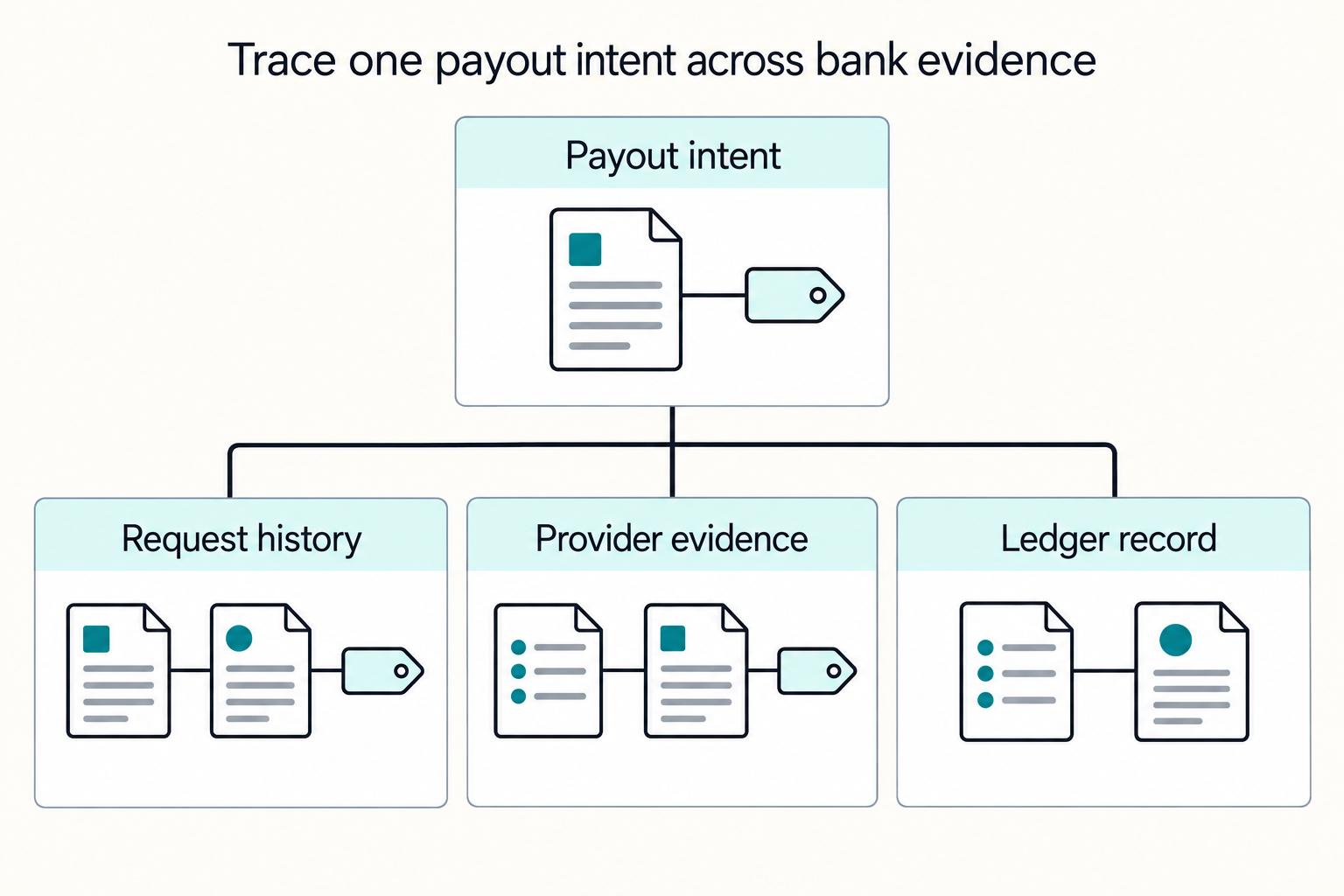
Then validate the model with evidence, not assumptions. Run a small live test, trace it end to end, and keep the records your team will use for reconciliation.
For marketplace payout architecture beyond Shopify, see How to Build a SaaS Marketplace That Manages Subscriptions and Contractor Payouts.
Compare the three payout routes sellers actually use#
Choose the route that gives finance the shortest path from order ID to payout record to bank deposit, not the one with the fewest setup clicks.
| Route | Who pays out to your bank | What appears in Shopify admin | Payout timing control | Fee exposure type | Operational overhead |
|---|---|---|---|---|---|
| Shopify Payments | Shopify | A third-party comparison describes a more centralized view where "orders, payments, refunds, and payouts stay in one dashboard." Treat that as directional and verify in your own account. | Provider-set in practice under one primary provider relationship. | Processing deductions and adjustments are concentrated in one provider relationship. | Usually lower reconciliation friction when this route is available for your market and payment mix. |
| Third-party payment gateways such as PayPal or Amazon Pay | The external provider pays out. | Visibility is often split across Shopify, the gateway dashboard, and the bank record. | Provider-set and gateway-specific. | More variable. PayPal's US business pricing shows multiple checkout options and example pricing such as 2.89% + $0.29 per transaction for card processing and 3.49% for PayPal or Venmo payments. A third-party comparison also says some non-native setups inside Shopify can add 0.5% to 2.0% platform fees. | Medium to high, because finance often has to match records across systems. |
| Manual payments such as bank transfers or money orders | No card or wallet provider is paying out; the buyer sends funds directly to you. | Shopify can hold the order record, while payment confirmation and deposit evidence sit outside normal provider payout surfaces. | You can control when you mark paid, but not when a buyer initiates payment or when funds fully clear. | Bank charges, transfer costs, and staff time rather than a standard online processing-fee pattern. | Highest; exceptions usually require manual review and proof of payment. |
The practical difference is reconciliation surface area. One provider relationship can simplify month-end close; external gateways usually mean split reporting and split escalation paths.
PayPal shows why "third-party gateway" is not one uniform bucket. Its US business pricing says merchants can "Offer PayPal payments, process cards, or do both," and its US merchant fee schedule includes a PayPal Payouts section. Model fees and timing from the exact products you enabled, and save the source documents in your launch pack: PayPal Merchant Fees (last updated February 9, 2026) and PayPal Consumer Fees (last updated February 19, 2026).
For accelerated checkout labels, do not assume the checkout name alone tells finance who settles funds. Confirm payout ownership in live settings, then run a small real transaction and capture three artifacts: the Shopify order record, the provider-side payment or payout reference, and the final bank deposit.
If two routes are commercially acceptable, pick the one that minimizes reconciliation handoffs. That choice usually has more operational impact than the checkout badge the buyer clicked.
For a step-by-step walkthrough, see What Is a Demand-Side Platform (DSP)? How Programmatic Ad Platforms Manage Publisher Payouts.
Map timing realities by market and payment method#
Do not treat payout timing as one universal rule. Once you pick the route that pays your bank account, map three separate clocks for that route in that market: capture, settlement eligibility, and bank posting.
| Clock | What it answers | Verify in |
|---|---|---|
| Capture clock | When was the customer payment captured? | Shopify order and payment record |
| Settlement clock | When did funds become eligible to move, and when was transfer marked sent? | Shopify payout settings (where applicable) or the gateway dashboard/terms |
| Bank posting clock | When did the bank actually post the deposit? | Bank statement or banking portal |
Check timing at the market level each time, not by copying assumptions from a prior launch. For native payouts, confirm live account settings and country guidance in the Shopify Help Center and your account. For third-party gateways, confirm provider-specific payout behavior in that provider's own surfaces. For manual methods, treat "awaiting payment" as pending until funds are actually cleared.
The common failure is collapsing these clocks into one promised timeline. A rough "about X days" estimate often becomes a finance forecast, then normal variation gets treated like an exception. If you rely on cutoff logic or weekend grouping, label it as an assumption until live tests confirm it.
Before go-live, run one real test per market and payment route and save the evidence in your launch pack: capture time, funds-ready signal, transfer-sent timestamp, and bank-posted timestamp. That gives you a usable operating baseline instead of inherited folklore.
For European bank routing, use What Is an IBAN Number? How Platforms Use IBANs to Send Error-Free European Payouts.
Explain why payouts are lower than sales and how to reconcile cleanly#
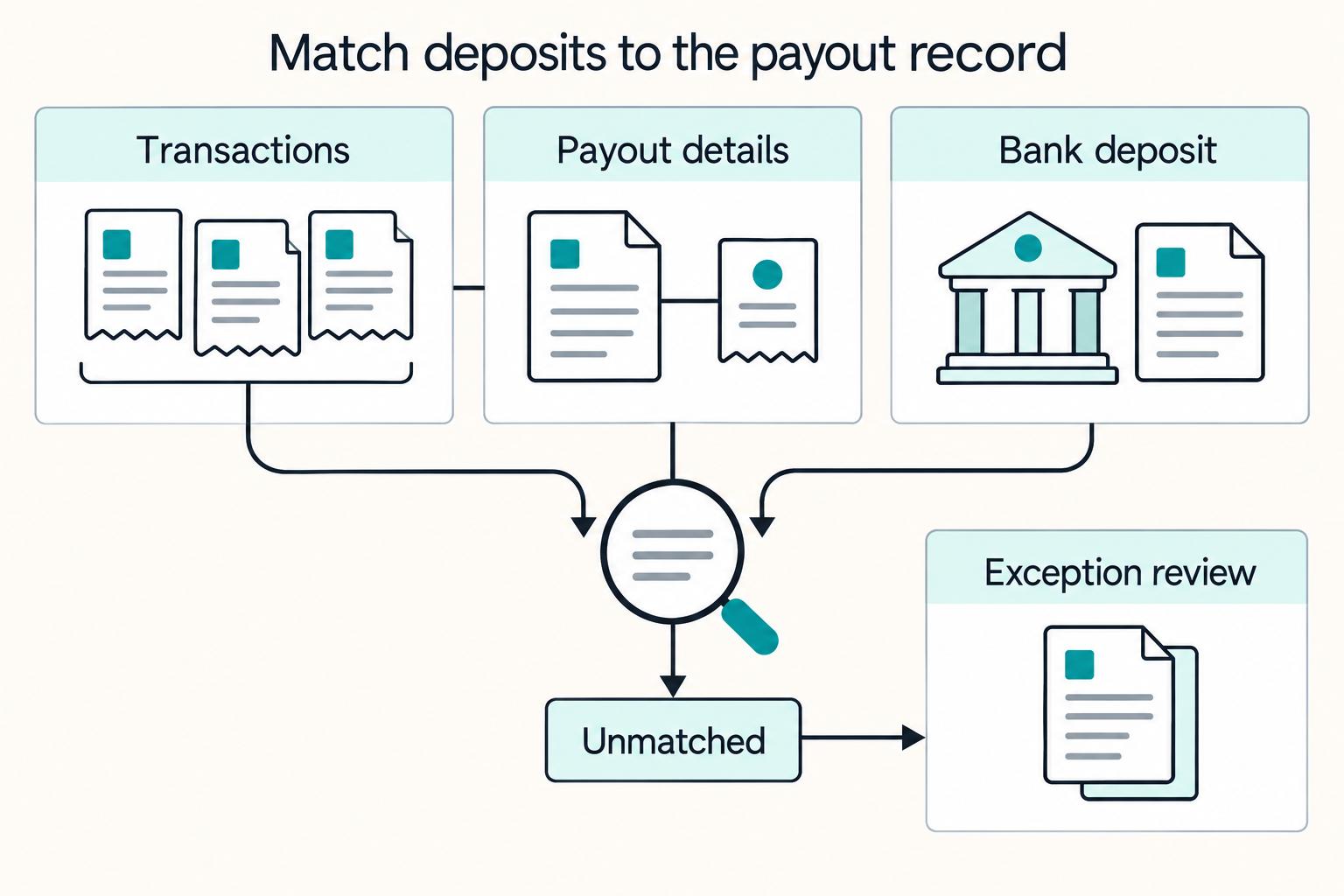
A Shopify Payments deposit should be reconciled to its payout record, not to same-day gross sales. Most "lower than sales" flags come from comparing the wrong surfaces, not from an actual payout failure.
In Shopify Payments, the payout amount is the net result shown in payout details, and Shopify can group activity into payouts rather than mirroring your day's gross order total one-to-one. Your store can also sell in one currency and receive payouts in another, and in some countries a minimum payout amount applies before a payout is issued. Together, those mechanics explain why bank deposits often differ from headline sales totals.
Read the surfaces in the right order#
Use Shopify admin in this sequence so expected differences do not get mislabeled as errors:
| Step | Where | Check |
|---|---|---|
| 1 | transactions view | confirm which captured payments belong to Shopify Payments |
| 2 | payout details and payout fees | see what activity was included in that payout and how the net amount was formed |
| 3 | bank deposit | match the payout record (ID and amount) to the bank deposit |
| 4 | payout troubleshooting path | escalate only true exceptions after this match for lower or missing payouts |
- Start in the transactions view and confirm which captured payments belong to Shopify Payments.
- Open payout details and payout fees to see what activity was included in that payout and how the net amount was formed.
- Match the payout record (ID and amount) to the bank deposit.
- Escalate only true exceptions after this match, using Shopify's payout troubleshooting path for lower or missing payouts.
A simple control helps teams stay consistent: require a monthly reconciliation pack with payout IDs, linked order references, and short exception notes for anything unresolved.
Choose by scenario instead of one global default#
Do not lock into one payout operating model across every market. A market-specific setup is usually easier to run when local payment methods, schedules, or reconciliation workflows differ.
Shopify already uses region-based configuration in other parts of operations: shipping zones group countries or regions, and rates are configured per zone. Use the same operating logic here. If two markets behave differently, run separate market configurations instead of forcing one global policy and managing constant exceptions.
Where manual methods make sense#
Manual methods can work, but treat them as an operations decision, not a simple toggle. The workload can include cross-referencing sales, calculating commissions, deducting fees, and executing transfers.
One consignor-payout guide describes manual payouts as a major time drain and gives example effort ranges: 4-6 hours monthly for 15 consignors, and about a full day monthly at 50 consignors. Those are examples, not universal benchmarks, but they are a practical warning for finance planning.
If you use manual methods, define process ownership before launch:
- who verifies payment evidence and when orders are cleared
- who handles exceptions and unmatched transfers
- what records finance uses at reconciliation time
Go or no-go checks#
Use this checklist before launch:
- Payout visibility requirement: is settlement status clearly trackable in your chosen workflow?
- Delay tolerance: can this market absorb manual review or method-specific payout timing?
- Finance bandwidth: who owns recurring cross-checks, deductions, and transfer validation?
- Escalation ownership: when funds are late or unmatched, is the next owner explicit?
If any answer is vague, treat that as a no-go until the market setup is documented clearly.
For reconciliation design after payout setup, see Account Reconciliation for Payment Platforms: How to Automate the Match Between Payouts and GL Entries.
Handle payout delays with an operator triage sequence#
Use this as an internal operator playbook, not official Shopify payout-delay policy from the excerpts. When a payout looks late, run immediate triage in the first 30 to 60 minutes and confirm facts before escalating.
| Evidence item | When used |
|---|---|
| payout or transaction reference | build an escalation-ready evidence pack |
| affected order IDs | build an escalation-ready evidence pack |
| capture timestamps | build an escalation-ready evidence pack |
| relevant Shopify admin alerts | build an escalation-ready evidence pack |
| external-provider status screenshots | build an escalation-ready evidence pack when applicable |
| bank date range already reviewed | build an escalation-ready evidence pack |
Start in Shopify admin and capture the basics first:
- account alerts or notices
- payout status
- affected order capture dates
Then classify the delay using your own operating model: whether it looks like settlement timing, your team's cutoff or weekend grouping logic (including Coordinated Universal Time (UTC) handling if you use it), or downstream bank posting lag.
If the route is external, such as PayPal Express Checkout or Amazon Pay, check that provider dashboard as a separate step before you open tickets.
Build an escalation-ready evidence pack:
- payout or transaction reference
- affected order IDs
- capture timestamps
- relevant
Shopify adminalerts - external-provider status screenshots (when applicable)
- bank date range already reviewed
For correspondent-bank costs, see Intermediary Bank Explained: How Correspondent Banking Adds Fees to Your Payouts.
Decide when to add alternatives beyond native Shopify payout flows#
Add alternatives when payout issues are recurring and structural, not just occasional tickets. The trigger is a pattern: multi-country expansion, fragmented reporting across Shopify Payments and external gateways, or repeated reconciliation exceptions that keep forcing manual cleanup.
Use a practical test: if your team cannot consistently explain deposits from payout reports and provider dashboards without recurring spreadsheet stitching, your current setup is likely too thin for current complexity. That risk tends to rise as you operate across more channels and markets, and some commentary on embedded financial tools notes they may stop being sufficient as business complexity grows.
Start with the lightest architecture that solves the failure mode. For some programs, a dedicated bank transfers intake path is enough; for others, a compliance-gated payout orchestration layer with explicit status tracking, audit trails, and controlled retry handling is a better fit. Keep this bounded by market and provider reality, because coverage, compliance conditions, and rail availability vary.
Before you add an alternative path, require clear evidence of repeated exceptions, a durable status source by payout or transfer reference, and an approval trail for manual interventions. Also separate timing from architecture: if a processor can hold proceeds for up to seven days before funds are sent to a bank account, that delay alone is not proof you need a new payout stack.
For international routing identifiers, see What Is a SWIFT Code? How Platforms Use BIC Codes to Route International Payouts.
Conclusion#
The practical answer is not to force one payout setup across every market. The better move is to choose a market-specific model that gives you the right balance of visibility, timing confidence, and reconciliation effort for that country, provider mix, and finance team.
If you can use Shopify Payments in a market and your priority is cleaner day-to-day operations, the strongest argument for it is centralization. A third-party explainer describes it as letting merchants accept payments directly without relying on third-party gateways, and as giving one dashboard for transactions, refunds, and payouts. That matters because split payout surfaces can cost teams time, increase delay confusion, and trigger escalations that turn out to be reporting issues. The tradeoff is that centralization should not be mistaken for universal predictability across countries or banks.
Before each launch, document the decision instead of relying on whoever set up the last store. A simple matrix is usually enough if it forces the right checks:
- payout visibility required by finance
- acceptable delay tolerance from capture to bank posting
- reconciliation workload across native, external, and manual methods
- owner for exceptions, provider questions, and bank follow-up
Then add one timing verification step that someone actually signs off on. The key checkpoint is not a generic internet estimate. Even though one third-party source says payouts typically arrive after a short waiting period of 1-3 business days, that is not an official Shopify-wide guarantee. Treat that figure as directional only, and confirm the live settings and provider terms that apply to the market you are launching.
The other control that pays for itself is a repeatable reconciliation checklist. At minimum, require a monthly pack that ties bank deposits back to payout identifiers, order references, and exception notes. A common failure mode is comparing a bank deposit to same-day sales and calling the gap an error. If your team instead matches at the payout level and keeps notes on expected differences, you can reduce false alarms.
Where complexity starts to spread across the native provider, outside gateways, and manual payment flows, it is reasonable to evaluate alternatives to Shopify Payments. The goal is to improve status tracking, auditability, and control without assuming broader coverage than you have actually verified. Keep your claims and rollout assumptions tight: verify each market, each provider, and each bank path before finance depends on it.
Frequently Asked Questions
How do Shopify sellers actually get paid from checkout to bank account?
If an order is processed through Shopify Payments, eligible funds are transferred to the payout bank account you set up for that service. That account must meet the bank account requirements for your country, and a Shopify Balance account can also receive those payouts. If you use manual payment methods such as cash, COD, or bank transfers, those are handled as manual methods rather than Shopify Payments payouts.
Why is my Shopify payout lower than my sales total?
Because gross sales and payouts are not the same number. A payout is the transfer of eligible funds to your payout bank account. That total can differ if your payout currency is different from the currency you sell in or if your country has a minimum payout amount before funds are issued. The practical check is to compare the payout view to the bank deposit, not to sales totals alone.
How long do Shopify payouts take to arrive in practice?
Do not plan around one universal timing rule. There is a difference between funds becoming eligible for payout and your bank actually posting the transfer, and there is no single fixed arrival window across all cases. The reliable checkpoint is your Shopify Payments payout details plus your bank's own posting behavior.
What changes when I use third-party gateways instead of Shopify Payments?
The main change is that you should not assume the native route’s rules apply to those orders. Shopify says orders processed through Shopify Payments are not charged third-party transaction fees, but that statement should not be extended to other gateways unless the provider documentation says so. In practice, verify the external provider's terms directly before finance treats it like the built-in flow.
Can I choose daily, weekly, or monthly payout frequency in every country?
No universal rule is safe here. Country requirements differ, and Shopify also notes that some countries have a minimum payout amount for Shopify Payments. Before launch, check the payout options actually available in your account for that country instead of assuming the same schedule will carry across markets.
What should I check first when a payout seems delayed?
Start by confirming the payment route. If the order went through Shopify Payments, verify the configured payout bank account. Make sure it meets your country's requirements, and check whether a minimum payout amount or different payout currency is affecting what you expect to see. If the order used a manual method or a third-party gateway, treat that as a separate path first because a Shopify Payments payout may not be the right place to look.
Try a related tool
Researched and edited by the Gruv editorial team. Gruv builds cross-border billing, payouts, and finance-operations software for global businesses.
Sources
Includes 4 external sources outside the trusted-domain allowlist.
- digitalcommons.du.edu/cgi/viewcontent.cgitrusted
- paypal.com/us/business/feestrusted
- paypal.com/us/business/paypal-business-feestrusted
- sec.gov/Archives/edgar/data/1594805/0001594805220000...trusted
- airwallex.com/uk/blog/shopify-payments-fees-explainedexternal
- anna.money/blog/guides/how-do-shopify-payouts-workexternal
- aspireapp.com/us/blog/stripe-vs-shopifyexternal
- bain.com/insights/embedded-financeexternal
Educational content only. Not legal, tax, or financial advice.
Related Posts

How PROs Collect Performance Royalties and How Platforms Distribute Payouts
Treat this as an infrastructure decision, not a music-rights explainer. If you cannot connect PRO collection to a payout process you can verify, reconcile, and audit, you are not ready to ship a royalties product, no matter how strong the demand story looks.

How Marketplace Platforms Pay Third-Party Sellers Compliantly
Generic marketplace payout advice usually skips the part that breaks in production. Paying many sellers is not just moving money out. It is deciding who gets paid, when they become eligible, what happens when a buyer disputes a payment, and how finance proves every release later. If you are working on **ecommerce reseller payouts marketplace platforms pay third-party sellers**, this guide is for the marketplace operator, not for solo freelancer banking tips.
How Intermediary and Correspondent Banks Change Payout Outcomes
Intermediary and correspondent bank payout fees are often a settlement-path issue, not random noise. When your sending bank and receiving bank are not directly connected, other banks can enter the path, and each handoff can change what the beneficiary receives.