
Quick Answer
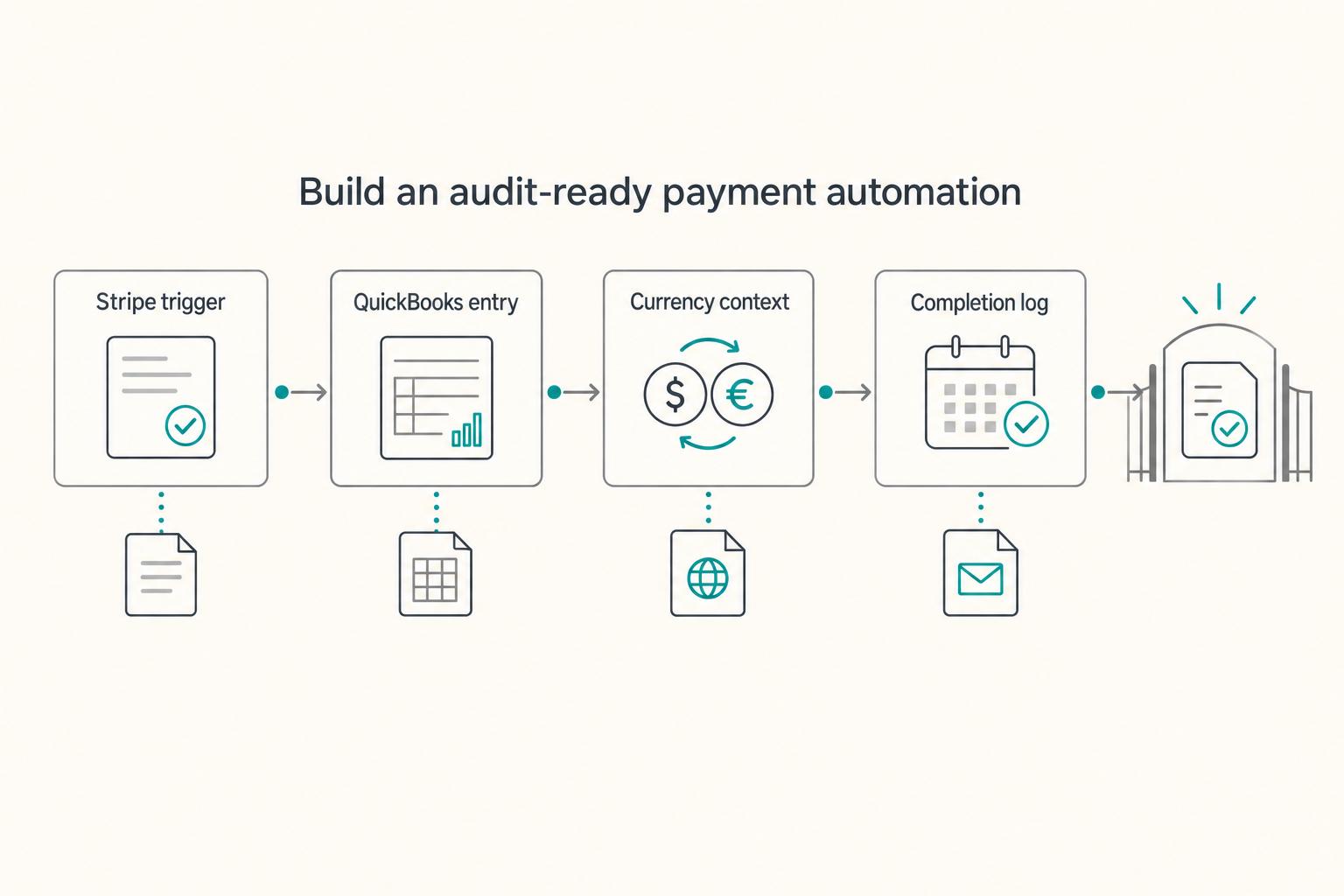
Choose one confirmed Stripe payment flow. Resolve the QuickBooks customer and invoice, claim a durable accounting-operation key, then create either a sales receipt for a new paid sale or a payment against an existing invoice. Save the destination ID, keep fees and payouts separate, check uncertain writes before retrying, and reconcile processor balances to ledger and bank. Record Wise conversions independently with both currencies, fees and references.
Automating Your Freelance Finances: A Zapier Workflow for Connecting Stripe, QuickBooks, and Wise#
Start with one payment flow you understand, then automate its accounting record without losing the source reference. Stripe captures payments, QuickBooks holds the books, Zapier connects the selected steps, and Wise records any separate cross-border balance or conversion activity.
A successful Zap run only shows that its configured steps ran. It does not prove that the right customer, currency, invoice or gross amount was recorded, or that the bank deposit reconciles. Check those relationships before expanding the workflow.
Manual bookkeeping can be appropriate at low volume. Automation helps when the mapping is repeatable and someone owns exceptions. Design for a payment that succeeds while the ledger write fails, a replay, a refund and a settlement that arrives in the next period.
This guide gives you a practical operating model. You will map money events to accounting events, define where each event belongs, and automate only what you can trace and reconcile. The goal is not convenience for its own sake. The goal is a finance workflow that produces records you can explain later without digging through a dozen dashboards.
Automation is powerful, but it is not neutral. Done well, it reduces repetitive work while preserving control. Done too early, it spreads the wrong setup across every transaction.
What This Stack Does (and Why These Three Tools)#
Each tool should have one job. Keep the boundaries clear before you touch triggers or field mapping.
| Tool | Role in the workflow |
|---|---|
| Stripe | Payment source for client transactions and payout events |
| Zapier | Automation layer that moves and transforms data between systems |
| QuickBooks | Accounting ledger where transactions are categorized for reporting and reconciliation |
| Wise | Cross-border account and conversion layer where relevant for international flows |
Choose one owner for each accounting event so overlapping connectors and bank feeds do not record the same revenue twice.
Stripe captures payment events. QuickBooks holds the accounting truth. Zapier moves data between them based on rules. Wise adds cross-border movement and FX context when your business needs it. Once you name those roles, you can also spot where teams get into trouble:
- They treat Stripe as a ledger instead of a source.
- They treat QuickBooks as a reporting dashboard instead of the system of record.
- They treat Zapier as "set it and forget it" instead of a controlled pipeline with logs and recovery.
- They treat Wise as invisible plumbing instead of a balance and conversion trail that may matter later.
When roles are blurred, errors multiply. When roles are explicit, month-end close becomes predictable and tracebacks get easier.
What You'll Get by the End of This Guide#
By the end, you will have a practical blueprint you can adapt to your own setup.
- A Stripe to Zapier to QuickBooks flow you can implement with clear control points
- A method for deciding which fields must move and which should stay system-specific
- A compliance-first checklist for cross-border cases involving foreign account reporting questions
- A monthly reconciliation rhythm that catches drift before it turns into a year-end problem
Start with a narrow flow whose accounting treatment is clear. Keep uncertain cases in a review queue rather than guessing or blocking all useful automation until every business decision is final.
Record the current legal owner of the connected accounts and ledger. If you later change entity or tax treatment, update the account and accounting design deliberately. An LLC is not a prerequisite for building a bookkeeping workflow.
Build this once with discipline, then keep maintenance low.
Why a successful automation can still produce wrong books#
A setup demonstration usually follows one uncomplicated payment. Your workflow also needs invoice matching, fee separation, failure recovery and settlement reconciliation.
Check account ownership, accounting policy and available integration fields before enabling writes. Tax and reporting requirements inform which records to preserve, while connector limitations determine which steps can actually run.
Automation is an amplifier. If the underlying accounting model is solid, automation compounds consistency. If the model is unclear, automation compounds mistakes at speed. Neither Stripe nor Zapier can rescue a chart of accounts that does not match how you report income. They can only push more entries into the wrong places.
First define the posting you intend to make, then connect and test that posting.
The Real Failure Mode: Automating the Wrong Thing First#
The visible pain is manual work, so freelancers naturally attack manual work first. That instinct is understandable, but it gets expensive.
Errors can be technical or accounting errors: the wrong amount unit, duplicate connector, customer mismatch or a timeout after a successful write. Record the expected result and a way to inspect it before activation.
Run the build in this order:
- Account ownership: Identify the current business and connected accounts.
- Stage 2 - Compliance baseline: Clarify which recurring obligations apply to your setup.
- Stage 3 - QuickBooks architecture: Build categories to match your filing reality.
- Controlled automation: Pilot the flow once its relevant mapping is clear.
This sequence is a practical design aid. Work through the questions that affect this flow without treating every unrelated annual filing as a launch prerequisite.
Why Sequence Matters More Than Speed#
Speed only helps when direction is right. A same-day Zap launch can still create months of cleanup if classifications are wrong, references are missing, or payout timing is misunderstood.
Sequence matters because finance systems have compounding effects. Once automated entries start landing in QuickBooks, they become the default reality for reporting, reconciliation, and decision-making. If the foundation is weak, automation creates silent drift. That drift is dangerous because it looks like progress while it builds reconciliation debt in the background.
Use the sections to document your posting policy and exception handling. A limited pilot can proceed when its relevant mapping and permissions are settled.
Build the frame first. Then do the wiring.
How business structure affects the records you keep#
Business structure affects account ownership and tax reporting. It does not by itself determine whether a Zap is legal or require a particular entity before automation.
Connect the ledger for the business whose transactions you are recording. Keep personal transfers and owner contributions separate from customer receipts.
Business structure is the legal and tax form under which you operate. That choice influences how income is reported, which returns you file, and what records must be easy to produce. Your workflow can run every day while still producing records that are hard to defend if it ignores that context.
Use this pre-build lens before you configure integrations:
| Your situation | What to clarify before automating |
|---|---|
| You have self-employment income | Whether Schedule SE (Form 1040) applies based on net earnings |
| You are choosing an entity type | Which filing and recordkeeping expectations come with that choice |
| You have more than one owner | How ownership, distributions, and reporting responsibilities are tracked |
| You are focused on liability separation | Which structure and operating practices support that separation in your state |
Use these questions to define the accounting distinctions relevant to your business. You can keep reliable records for the current setup while a future entity decision remains open.
Why Structure Affects Your Tax Obligations Before Automation Even Starts#
For U.S. self-employed individuals, Schedule SE generally applies at $400 or more in net self-employment earnings. The standard combined rate is 15.3%, but it is not a flat percentage of every Stripe receipt: net earnings are calculated under tax rules, the Social Security portion has an annual wage base, and additional Medicare tax can apply. Record gross receipts, expenses and owner movements accurately rather than calculating a universal tax deduction per payment.
That obligation exists whether your workflow is manual or automated. Automation only changes how cleanly you track the events behind the filing.
Schedule SE also supports Social Security records. Keep the transaction trail needed for income and expense reporting; the Zap itself does not determine the return or benefit calculation.
The Rule Before You Build Anything#
Before enabling a write, define the destination company, transaction type, amount basis, currency and account mapping. Keep that configuration documented so it can be changed deliberately if your setup changes.
Use this rule as your guardrail:
- Identify the account and ledger owner.
- Document the relevant posting and reporting policy.
- Configure the destination accounts and references.
- Pilot the flow, then reconcile and maintain it.
An entity review may affect future account ownership or reporting. It need not prevent documenting and reconciling transactions under your current arrangement.
Structure is not background context. It is a build input.
What Is Your Compliance Baseline - and How Do You Know What You Owe?#
Maintain a separate calendar for filings and checks that actually apply to your business, accounts and customers. Some are annual; others depend on formation, changes or transaction dates.
Use that calendar to identify records worth capturing, such as account details and balances. A payment Zap is not a substitute for filing or an automatic determination that a filing is required.
Many freelancers stop at expense tracking and quarterly planning. That is necessary, but it is not complete when your setup includes an entity, cross-border clients, or accounts that may trigger foreign reporting obligations. In those cases, the compliance surface is wider than basic bookkeeping, and "close enough" recordkeeping becomes a liability.
Record applicability, owner and deadline for each requirement. Preserve the relevant account and transaction information as the workflow runs.
FATCA, FBAR, and the Foreign Account Problem#
Two obligations are commonly confused because they both involve foreign assets or accounts. Treat them as separate tracks from day one.
| Aspect | FATCA / Form 8938 | FBAR / FinCEN Form 114 |
|---|---|---|
| Where it is filed | Attached to the annual tax return and filed with the IRS | Filed with FinCEN, not the IRS |
| Thresholds mentioned here | Individuals: domestic unmarried/separate $50,000 year-end/$75,000 anytime; domestic joint $100,000/$150,000; qualifying abroad unmarried/separate $200,000/$300,000, joint $400,000/$600,000. Specified domestic entities: $50,000/$75,000. | Applies when aggregate account value exceeds $10,000 at any point during the calendar year |
| Relationship between the two | Can apply alongside FBAR | Separate from Form 8938; one does not replace the other |
FATCA (Foreign Account Tax Compliance Act) reporting can require certain US taxpayers to disclose specified foreign financial assets to the IRS on Form 8938, attached to the annual tax return. It is not filed separately.
Thresholds mentioned here to keep in view are:
- The applicable Form 8938 threshold depends on filing status and qualifying residence abroad; use the IRS comparison for the year-end and anytime tests.
- Specified domestic entities have their own definition; not every business automatically qualifies.
Form 8938 is generally attached to the required income-tax return; if you do not have to file that return, Form 8938 is generally not required. A threshold review needs the relevant taxpayer category and qualifying assets, not just the amount converted through Wise.
FBAR (FinCEN Form 114) is different. It is filed with FinCEN, not the IRS. The IRS is explicit that Form 8938 and FBAR can both apply, and one does not replace the other.
This matters operationally because the data you need to support each obligation may live across Stripe, Wise, QuickBooks, and bank records. If your system collapses conversions, transfers, and settlements into a single "net deposit" story, you can end up with books that look tidy but cannot answer basic compliance questions later.
Do not infer foreign-account status from the Wise brand, an IBAN or the destination of a transfer. Identify the actual product, account-holding institution/entity, jurisdiction and rights from your documents. Assess FBAR and Form 8938 separately; the records below support that review without declaring every Wise balance foreign.
Your Annual Compliance Checklist#
This is an annual control. The win is not reading it once. The win is turning it into calendarized work so nothing depends on memory.
| Annual review item | What to confirm |
|---|---|
| Entity filing | Annual state filing requirements and fees for your entity |
| Multi-state registration | Whether your activity triggers registration obligations in additional states |
| Beneficial ownership reporting | U.S.-created entities exempt under current federal BOI rule; assess foreign-formed registered entities and any event-based deadlines |
| FBAR (FinCEN Form 114) | Whether aggregate foreign financial account balances crossed applicable thresholds at any point in the year |
| Form 8938 | With a CPA, whether specified foreign financial assets exceeded the applicable threshold and whether it must be attached to the annual return |
| VAT treatment | Client-by-client treatment in relevant jurisdictions, especially where B2B and B2C treatment differs |
If you keep this as a working checklist, the same items belong on it:
- Entity filing: Confirm annual state filing requirements and fees for your entity.
- Multi-state registration: Confirm whether your activity triggers registration obligations in additional states.
- Beneficial ownership: Record applicability under current federal and separate state rules; this is not an annual federal filing for every domestic LLC.
- FBAR (FinCEN Form 114): Review whether aggregate foreign financial account balances crossed applicable thresholds at any point in the year.
- Form 8938: Review with a CPA if specified foreign financial assets exceeded the applicable threshold and attach to the annual return if required.
- VAT treatment: Confirm client-by-client treatment in relevant jurisdictions, especially where B2B and B2C treatment differs.
One execution rule makes this usable: run the review before tax season pressure starts. The best time to resolve missing records is when you still have time to collect them cleanly.
If you invoice EU clients, validate VAT treatment before finalizing invoice templates and automation mapping. Rules vary by jurisdiction and customer type, so assumptions made early can create avoidable rework later.
If you need broader context for EU expansion, The Legal Considerations of Expanding a SaaS Business to the EU covers additional cross-border issues to review with counsel and tax advisors.
A baseline is useful only if it turns into action. Assign each line item an owner, a date, and a recurring reminder.
How Do You Set Up QuickBooks So Your Chart of Accounts Matches Your Tax Return?#
Build a chart of accounts that supports useful financial reports and a documented mapping to tax reporting. It need not reproduce every tax-return line as a separate account.
Use stable categories for customer receipts, processor fees, refunds, owner transfers and FX differences. A payout is usually a transfer of already recorded funds, not a second sale.
Chart of accounts means the category structure QuickBooks uses to classify transactions. Every payout, fee, owner movement, and conversion event lands somewhere in that structure. Category quality determines reporting quality.
Treat category decisions as policy decisions. Make them once with intent, document them, and then let automation apply them consistently. If you skip the policy step, you end up making category decisions transaction by transaction, which is exactly the kind of work automation was supposed to eliminate.
Match Your Entity Type to Your Filing Form#
Start by mapping entity treatment to filing form and accounting distinctions:
| Entity type | IRS filing | QuickBooks setup focus |
|---|---|---|
| Sole proprietor / default disregarded SMLLC with individual trade-or-business owner | Schedule C (personal return) | Support gross receipts and expense mapping without requiring a one-account-per-return-line chart |
| S Corporation | Form 1120-S (information return) | Separate wages and shareholder distributions in distinct categories |
| Multi-Member LLC (Partnership) | Form 1065 (information return) | Track income, deductions, and partner-related activity in categories that support partnership reporting |
A U.S. single-member LLC is generally disregarded for federal income-tax purposes unless it elects corporate treatment. An individual owner commonly reports a trade or business on Schedule C; other activities or owners can use different returns. Entity label alone does not settle every filing.
For S corporations, operational distinctions matter. If you are both owner and employee, wages and shareholder distributions are different events and should not be booked to the same category. Even if the money ends up in the same personal account, the accounting story still needs to reflect what happened.
For multi-member LLCs taxed as partnerships, classification choices affect filing and category design. Once classification is established, category logic should follow that decision consistently. Consistency is what keeps partner-related reporting from turning into a spreadsheet rescue mission later.
Stripe Labels and Wise Conversions Need Dedicated Categories#
Two flows are repeatedly misclassified when freelancers automate too early: Stripe income flows and Wise conversion activity.
For a new paid sale, record the gross customer amount in the appropriate sale/receipt transaction and destination clearing account. If an invoice already records the sale, apply the payment to it instead of creating another sale. Taxes, deposits and deferred revenue need their intended treatment rather than being forced into service revenue.
Wise conversion activity is different from ordinary operating revenue. Conversions and related fees often need dedicated treatment so FX activity is visible and does not distort service revenue reporting. Clean separation helps month-end reconciliation and keeps filing conversations focused on facts instead of reconstruction.
Use this pre-launch mapping table:
| Transaction type | QuickBooks category approach | Filing context |
|---|---|---|
| Stripe client payments for services | New-sale receipt or payment against existing invoice, gross amount with tax/fee treatment separated | For Schedule C filers, aligns with gross receipts in Part I |
| Stripe payouts | Transfer from processor clearing to bank, matched to statement | Avoid recording the same sale again |
| Wise conversions and conversion-related fees | Dedicated FX-related categories, including fee separation where used | Treatment may vary by facts and filing form; confirm with CPA |
Before launch, test representative payments in an appropriate controlled setup and inspect the destination records. Include replay, existing-invoice payment, refund, a fee and an uncertain write.
Compare actual records with the expected pattern before enabling the recurring flow. Keep exceptions manual where the connector cannot express the required posting.
How Do You Build a Stripe → Zapier → QuickBooks Workflow That's Actually Audit-Ready?#
An audit-ready workflow gives you three things every time: a clear source event, a correct ledger destination, and a recoverable failure path.
A control must prevent duplicate accounting records, not merely duplicate notifications. Memo fields provide a traceable reference but do not enforce uniqueness.
Choose the accounting path and inspect the current actions and fields available in your connected accounts before building the Zap.
Four Steps, Each With a Control Purpose#
Use this sequence so each step has a control purpose, not just an automation purpose.
| Step | Action | Key detail |
|---|---|---|
| 1 | Identify confirmed payment | Choose one authoritative flow; do not treat unpaid Checkout completion as success |
| 2 | Claim operation key and resolve mapping | Persist source key and customer/invoice/account mapping before the financial write |
| 3 | Write correct QuickBooks record | Sales receipt for new paid sale or payment against existing invoice; inspect currency/amount units |
| 4 | Record completion and separate settlements | Save destination ID; record fees, refunds, payout and Wise movements separately as needed |
If you prefer it as a build order, use the same sequence below:
- Select a Stripe trigger whose sample proves a successful payment, with live/test mode and account recorded.
- Resolve customer/invoice/account references and claim the accounting-operation key.
- Create the intended QuickBooks object, then persist its ID and operation status.
- Record any separate fee, adjustment, settlement or Wise conversion operation, then notify the owner without replaying the financial write for notification failure.
This pattern stays simple on purpose. Complexity is not the goal. Predictability is.
A useful mindset here is "design for the boring case." Most transactions should follow one repeatable path. Exceptions will still happen, but you will spot them faster when the standard flow is consistent.
Configure the posting path before enabling the Zap#
The current Zapier integration exposes QuickBooks Online Create Sales Receipt and Create Payment actions, including payment-to-invoice mapping. Select the customer and item/account references from your company, rather than inserting a category label where an ID is required. If an existing invoice already records the sale, Create Payment applies its gross payment; for a new paid sale, a sales receipt records the sale and receipt together. Do not create both for the same sale.
| Field or decision | Mapping to record |
|---|---|
| Source identity | Stripe account, live/test mode, payment/charge ID and accounting operation |
| Customer/invoice | Resolved QuickBooks customer and existing invoice ID where applicable |
| Amount/currency | Inspect trigger units; raw Stripe amounts normally use smallest currency units with currency-specific exceptions, so do not blindly divide every value by 100 |
| Destination | Correct sales item/account references and deposit/clearing account |
| Cross-currency record | Original and settlement currency, exchange rate, fee, conversion ID and destination amount |
| Completion | QuickBooks object ID, run ID, time and operation status |
Confirm that your QuickBooks edition and selected Zapier action support the currencies and fields needed. Multicurrency can have irreversible settings, so check the company configuration before enabling it. If the action cannot express the required conversion or fee posting, use a reviewed manual entry or a suitable existing connector/API path; do not disguise a foreign amount as the home-currency amount.
For a raw Stripe webhook flow, Stripe documents duplicate delivery and events arriving out of order. Log event IDs, also deduplicate the underlying accounting operation, verify signatures where you receive webhooks directly, and retrieve the object if needed. A paid Checkout session and its PaymentIntent must not become two sales. Delayed payment methods require confirmed success; Checkout completion alone can still be unpaid.
A payment and payout example#
Suppose a $1,000 invoice is already in QuickBooks and the customer pays it through Stripe. Apply $1,000 to the invoice into Stripe clearing; do not create $1,000 of new revenue again. With an assumed $30 processor fee, record the fee separately, leaving $970 in clearing. When the $970 payout reaches the bank, record or match a $970 transfer from clearing. The bank feed should match that transfer, not add another $970 sale. The $30 is an illustrative fee, not a quoted Stripe rate.
If those funds then move through Wise, keep that transfer separate from the sale. For an illustrative conversion of $970, a $5 fee and an assumed €0.90 per remaining dollar produce €868.50 from $965. Preserve the transfer/conversion IDs, both currencies, fee and rate. Any realised exchange difference depends on the carrying value and accounting policy; €868.50 is not additional service revenue. Partial refunds, disputes and fee adjustments need separate operations linked to the original sale.
Before enabling your Zap, inspect one normal payment, a duplicate delivery, an existing-invoice payment, a failed write and an uncertain timeout. Confirm expected object counts, customer, gross amount, currency and clearing balance. Then inspect a refund and payout. Limit launch to that verified path, route unsupported cases for review, and retain a way to disable writes while preserving incoming source events.
Three Operational Disciplines That Make It Audit-Ready#
Deduplication: Use an accounting-operation key such as Stripe account plus PaymentIntent/charge ID plus operation type, with event ID retained separately. Different payment events can describe the same sale. Use a durable mapping from that key to the QuickBooks object ID and prevent concurrent writes for the same key. A search-then-create pair can race; serialize processing or use a store that can claim the key atomically. A memo or reference alone is not a uniqueness constraint.
Recovery: Inspect Zap History and replay behaviour for the failed step. A timeout can occur after QuickBooks has committed the write. Check the operation mapping and destination record before retrying; if it exists, bind its ID rather than creating another. Fix missing customer/account mapping or expired credentials, then replay the affected safe step. Track pending, completed and failed operations so an alert or log failure does not cause a second financial write.
Traceability: Retain Stripe account, payment/charge, balance-transaction and payout identifiers where available; customer and invoice references; source amount and currency; destination object ID; and run time/status. Restrict access to these records and keep card or bank secrets out of memos and alerts.
Assign an owner to the exception queue. A periodic reconciliation remains necessary even when every run reports success.
A monthly three-way reconciliation keeps the system honest:
| Data source | Reconciliation check |
|---|---|
| Stripe balance/payout report | Gross payments, fees, refunds, adjustments, opening/closing balance and payout membership |
| QuickBooks | Same events in the clearing account and intended revenue/receivable/expense treatment |
| Bank/Wise statements | Payout arrival and transfer references, with currency and timing differences explained |
Explain differences through specific items: fees, refunds, disputes, reserves, transfers, currency conversion or cutoff timing. Unsettled payments and opening/closing processor balances mean monthly sales and monthly bank deposits need not be equal.
Clean recordkeeping is operational risk control. If you cannot trace and reconcile routine flows, you are relying on hope during filing season.
If your operation needs stronger cross-border rails, Gruv's virtual accounts and payout tools can be evaluated as an infrastructure option, with market and program availability confirmed for your case.
Does Wise Count as a Foreign Financial Account - and What Does That Mean for Your Automation?#
Keep the Wise balance and conversion trail where it is part of your workflow, then assess foreign reporting from the actual account documents.
Wise often feels like a transfer utility in daily operations. From a compliance perspective, that assumption can be risky. If your setup involves an account at a financial institution outside the United States, it may be treated as a foreign financial account under applicable rules.
Preserve account holder, relevant institution/entity and location, account identifier, statement dates and balances. A payment-service label alone does not settle whether the account falls within a foreign-reporting definition.
The FBAR Basics Every Wise User Needs to Know#
A U.S. person generally files FBAR when they have a financial interest in or signature authority over foreign financial accounts and the aggregate value exceeds $10,000 at any time during the calendar year, subject to the applicable exceptions.
"At any point" is the operational detail people miss. A temporary balance spike can create the filing obligation even if year-end balances are lower. That makes record quality and visibility more important than most freelancers expect.
Core mechanics to keep straight:
- Filing system: FinCEN BSA E-Filing System, not the IRS
- Due date: April 15, with an automatic extension to October 15
- Relationship to FATCA: Form 8938 and FBAR are separate requirements; one does not satisfy the other
This is why workflow design matters. If your records only show net deposits after conversion, you may lose visibility needed for accurate reporting assessments. You do not want to discover that you need detail after you have already summarized it away.
What This Means for Your Automation#
Treat Wise activity as ledger activity, not as invisible plumbing. If it touches balances, conversions, or settlement timing, it belongs in your accounting trail.
Start with three policy decisions and apply them consistently:
- If you hold a Wise balance, record the relevant asset account per currency where supported; a transfer-only use may need a different design.
- Record conversion events separately from ordinary service revenue.
- Preserve conversion context so pre-conversion amount, rate, and post-conversion result can be traced.
A compact logging model can look like this:
| Data point to capture | Why it matters |
|---|---|
| Pre-conversion amount in original currency | Preserves the original amount and currency trail |
| Exchange rate applied at conversion | Supports consistent FX treatment and review |
| Post-conversion amount in settlement currency | Connects conversion output to bank deposits |
| Conversion timestamp | Supports period alignment and reconciliation |
| Conversion/transfer ID and fee | Links both sides and separates fees from principal |
| Account identifiers and statement balance | Supports reconciliation and account-level reporting assessment |
If your automation logs only final deposit values, you lose decision-grade detail. You may still have records, but not records that answer the right questions quickly.
Retain the account evidence while classification is checked. An unresolved filing question should not make conversion or balance history disappear from the books.
Maintain the workflow after launch#
A durable freelance finance system is built in stages, and each stage removes a specific class of risk before the next one begins.
Keep the current configuration and review it after connector changes, new currencies or changes in how you receive payment.
Account ownership and reporting context#
Record the business owner and reporting context of the accounts used for this flow. Keep a separate calendar for applicable filing obligations.
| Stage | What you do | Why it cannot wait |
|---|---|---|
| 1. Account context | Confirm legal and tax setup and how funds are held and received | Contracting, account setup, and reporting flow depend on this foundation |
| 2. Reporting context | Record applicable filings and event-based deadlines separately from the payment workflow | Automation is only "helpful" if it captures the information your obligations require |
Keep one distinction explicit at Stage 2: Form 8938 and FBAR are separate obligations with separate thresholds and filing paths. Evaluate both independently when foreign assets or accounts are involved.
This is also where you decide what "done" means for recordkeeping. Not perfect. Defensible and repeatable. If a future version of you had to explain a transaction, what would they need to see in the trail? Build to that standard before you scale volume with automation.
Stage 3 → 4: Align Before You Fire the First Zap#
Once the relevant accounting mapping is clear, configure a limited flow and verify its records before enabling broader automation.
Stage 3 - Accounting alignment: Configure chart of accounts so categories map to filing needs before any automated posting begins. This makes reports usable from day one and prevents the "miscellaneous bucket" problem that hides issues until year-end.
At this stage, you are also setting expectations for how exceptions are handled. Refunds, disputes, fee adjustments, and cross-currency movement should not be "special" every time they happen. Decide how they will be categorized and documented, then keep that policy consistent.
Stage 4 - Automation with controls: Activate Stripe to Zapier to QuickBooks flows with deduplication, error alerts, traceable references, and monthly three-way reconciliation. If reconciliation is missing, automation is incomplete. You are not just moving data. You are creating a repeatable evidence chain that matches what actually happened.
The useful result is a traceable chain from customer payment to accounting record, settlement and bank deposit.
Review exceptions promptly and reconcile on a cadence suited to transaction volume. Monthly close is a useful minimum routine for many small businesses.
If you want support building this into a cross-border setup, Talk to the Gruv team to assess whether their virtual accounts, FX, and payout infrastructure fits your operating model and market availability.
Frequently Asked Questions
What is the Corporate Transparency Act and does it apply to freelancers with an LLC?
Under FinCEN’s current rule, entities created in the United States and their beneficial owners are exempt from federal BOI reporting. Certain foreign-formed entities registered to do business in the United States can still be reporting companies unless exempt. This is not a recurring annual federal BOI filing for every U.S. LLC; check the current FinCEN guidance for the applicable rule.
Does a freelancer need an LLC before using Stripe?
Not necessarily. Stripe requirements can vary by policy and location, so verify account requirements for your specific setup.
How do I connect Stripe to QuickBooks for a single-member LLC without creating tax record errors?
Choose the posting by the underlying event: a sales receipt for a new paid sale, or a payment linked to an existing invoice. Keep a Stripe clearing account, separate fees and adjustments, and a durable deduplication record tied to the QuickBooks object ID. Then reconcile payments, processor balance activity, payouts and bank deposits; a memo ID alone does not prevent duplicates.
Do I need to report a Wise account on an FBAR?
A U.S. person may need FBAR where they have a financial interest in or signature authority over reportable foreign accounts and aggregate value exceeds $10,000 at any time in the calendar year. Whether your Wise product is such an account depends on its actual institution, location and rights, not the Wise brand alone.
How does VAT work when a US freelancer invoices an EU client?
VAT treatment depends on who the customer is, where parties are located, and which jurisdictional rules apply to the service. B2B and B2C treatment can differ, and assumptions made from one client scenario do not always transfer cleanly to another.
What records does a freelancer need to keep for IRS compliance?
Keep records that substantiate income and expenses and show what each transaction was for. At a minimum, preserve payment records, invoices, expense documentation, and the accounting entries that connect those documents to your books.
Does Zapier create a tax record when it moves data between Stripe and QuickBooks?
Zapier run records can be supporting evidence of what the automation did, but they do not replace invoices, account statements and correct books. Preserve source documents and destination records so a transaction can be reconstructed even after a run log is unavailable.
Try a related tool
Researched and edited by the Gruv editorial team. Gruv builds cross-border billing, payouts, and finance-operations software for global businesses.
Sources
Includes 3 external sources outside the trusted-domain allowlist.
- docs.stripe.com/webhookstrusted
- docs.stripe.com/reports/payout-reconciliationtrusted
- fincen.gov/boitrusted
- irs.gov/businesses/comparison-of-form-8938-and-fbar-...trusted
- irs.gov/businesses/small-businesses-self-employed/re...trusted
- help.zapier.com/hc/en-us/articles/8496000012301-Common-Probl...external
- help.zapier.com/hc/en-us/articles/19220226086797-What-is-replayexternal
- quickbooks.intuit.com/learn-support/en-ca/help-article/multicurren...external
Educational content only. Not legal, tax, or financial advice.
Related Posts

How to Structure an LLC for a Freelance Writing Business
Start here when speed and simplicity matter more than entity admin. Keep setup light, focus on winning and serving clients, and use insurance with a clear view of what it can and cannot do.
ADA Website Compliance for Small Businesses Serving the Public
If you run a business with zero employees, ADA risk can still come from customer access to your website, not from hiring.
The Legal Considerations of Expanding a SaaS Business to the EU
Before you sell into the EU, decide your exposure, assign clear owners, and define what proof you can show on demand. For SaaS expansion to the EU, this is not abstract risk management; it affects buyer confidence during procurement and legal review, and how well your team handles diligence when questions get specific. Start with scope.