
Quick Answer
A freelance client onboarding checklist helps you get signed, paid, and protected by turning a new project into a repeatable process. Use simple Go/No-Go gates: lock scope with a signed-off SOW, execute the right agreement stack, confirm payment cleared before work begins, and collect required inputs and verified access. Choose a Standard or Enhanced lane based on risk and operational friction.
Stop "winging it": a simple two-lane onboarding setup that helps you get signed, paid, and protected#
Run onboarding the same way every time, or you will pay for avoidable chaos later. The point of a freelance client onboarding checklist is simple: turn a promising deal into a controlled start where scope is clear, payment is confirmed, and delivery begins without guesswork.
Client onboarding is the bridge between "yes" and a real operating setup. Keep it short, structured, and documented. You are building trust, but you are also building records you can point to when someone asks what was approved, when it was approved, and what was paid.
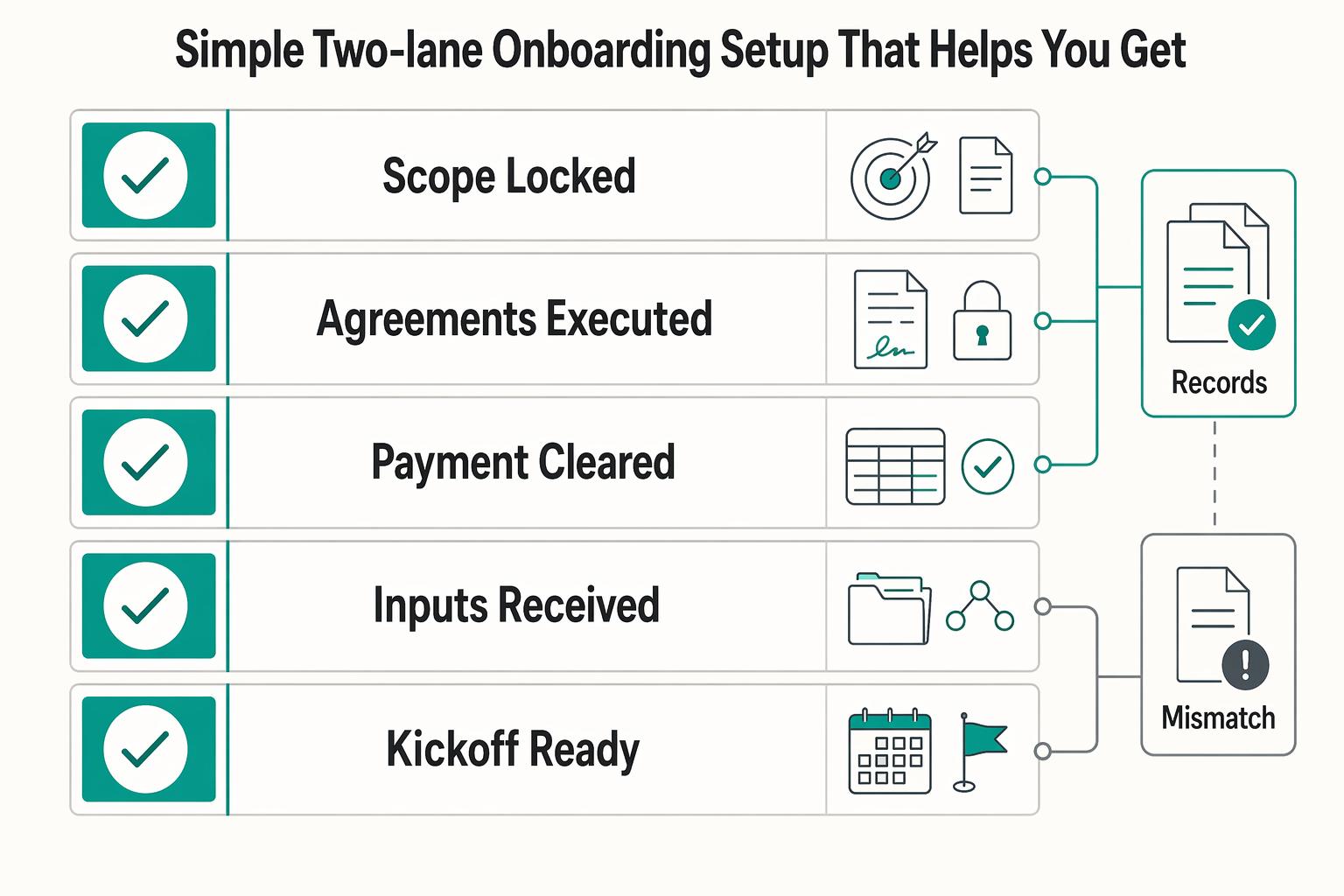
Use a Go/No-Go gate system as your default. Not a rigid rule, just a practical system you can enforce. Every gate produces one explicit output. No output, no progress.
A clean sequence looks like this:
- Scope locked: a Statement of Work (SOW) that defines deliverables, assumptions, exclusions, and acceptance.
- Agreements executed: signatures completed and stored in one place.
- Payment cleared: invoice linked to confirmed funds.
- Inputs received: required assets, access, and decisions collected.
- Kickoff ready: next actions assigned with no unresolved blockers.
This setup does two things at once. It keeps your delivery work clean, and it keeps your business records clean. Both matter when timelines slip, stakeholders change, or payment gets "stuck in process."
Then choose one of two lanes based on risk, not optimism.
| Lane | When it fits | What you tighten |
|---|---|---|
| Standard (low risk) | Clear requirements, fixed scope, straightforward execution | One approval path, one kickoff, simple intake |
| Enhanced (higher risk) | Cross-border work, larger budgets, retainers, regulated environments, fuzzy requirements | Written assumptions, stricter approvals, "no inputs/no start," earlier payment confirmation |
Your real output is an audit trail. You want a chronological record from quote to receipt, plus clear approvals and handoffs. That keeps you out of resend loops and puts you in control of kickoff.
If you want a deposit default you can enforce, read: Why You Should Always Get a Deposit (And How to Ask for It).
Choose your lane fast: a simple decision tree that helps avoid expensive "yeses"#
Choose your lane before you send anything operational. A quick risk pass protects your time and prevents friendly ambiguity from turning into real cost later.
Use this decision rule: if the project adds legal complexity, payment friction, or unclear control, run Enhanced. If it does not, run Standard. The goal is proportional process. Tighten only what needs tightening.
Step 1: Score the project (fast)#
Run this scan before onboarding starts. One "Yes" can be manageable. Several "Yes" answers usually means Enhanced.
| Risk signal | Ask yourself | If "Yes," do this |
|---|---|---|
| Cross-border | Will work run across a different jurisdiction or involve multi-currency payment? | Expect operational friction and tighten records and approvals |
| Scope shape | Is the SOW open-ended, retainer-based, or still unclear? | Add explicit change control and extra approval checkpoints |
| Compliance asks | Did the client request an NDA or DPA, or mention compliance workflows? | Build required documents into the agreement stack early |
| Payment process | Do they pay through procurement/AP and require a PO? | Confirm PO requirements before invoicing to avoid rejections |
| Access risk | Will your work require elevated access to sensitive systems? | Limit permissions and document access responsibilities |
The point is not to overthink this. You are just deciding how strict your gates need to be before you commit your calendar.
Step 2: Lane selection (clear defaults)#
Pick fast, then set expectations to match. When you choose a lane, you are also choosing how you will handle approvals, changes, and "we thought this was included" moments.
Standard Lane fits when the scope is fixed, the approval chain is simple, access is routine, and payment is straightforward. You still run the gates, but you keep the paperwork lean and the handoffs quick.
Enhanced Lane is the default when cross-border constraints, procurement layers, compliance paperwork, or unclear requirements can expand the work. You are not being difficult. You are matching your process to the real risk in the engagement.
Step 3: Red-flag questions (ask before you accept)#
Ask these before the project is marked live:
- "Who signs the agreement, and who authorizes payment?"
- "What is the approval path, who is in it, and what counts as approval?"
- "Do you require a PO number or vendor onboarding before invoice processing?"
If those answers are vague, pause and tighten the lane. If cross-border terms are already in play, keep your clauses sharp: The Ironclad International Freelance Contract: 10 Clauses You Cannot Ignore.
Gate 1 - Scope clarity: lock the SOW before you touch the work#
Gate 1 turns intent into a scope baseline you can actually run a project against. If scope is loose, every other gate gets weaker. Payment discussions get messy, approvals get political, and delivery turns into "we'll figure it out as we go," which usually means you figure it out for free.
A Statement of Work (SOW) is the project document that captures requirements, deliverables, timeline, payment terms, and acceptance criteria. Keep it lean and enforceable. You do not need a long document. You need one that is specific enough to stop avoidable scope disputes before they start.
Input → Steps → Output#
Start with what you already know, then formalize it quickly.
- Input: discovery notes, client objectives, constraints, known risks.
- Steps: draft scope packet, review live, revise, confirm approval in writing.
- Output: a signed-off scope baseline you can reference during delivery.
A practical way to run the review: walk the client through the SOW top to bottom, then ask them to repeat back what they believe they are buying. If there is a mismatch, fix it in the document, not in a Slack thread.
My "minimum viable SOW" fields (copy/paste)#
Use this as your baseline and scale up only when risk requires it. The goal is coverage, not length.
| SOW field | What to define |
|---|---|
| Deliverables | Named outputs you will hand over |
| Timeline | Milestones and what triggers each one |
| Assumptions and dependencies | What the client must provide for work to continue |
| Acceptance criteria | Objective definition of done |
| Not included | Explicit exclusions that prevent silent scope expansion |
If you want this to hold up operationally, write it so a third party could read it and understand what gets delivered, what does not, and what "approved" actually means.
Two clauses that help prevent repeat scope fights#
These two clauses help reduce recurring disputes by turning "maybe" into a documented process:
- Written change control: out-of-scope work starts only after a written change request is approved by both sides.
- Client-caused delays: if required client inputs or approvals are late, delivery dates shift accordingly.
You are not trying to win arguments later. You are trying to remove the argument entirely by making scope changes boring and procedural.
Approval point (make it unambiguous)#
Capture one dated approval artifact and store it with the SOW. Treat it like a receipt.
- Acceptable proof: signed document, explicit email approval, or meeting recap with written confirmation.
- Store it in the client folder with the same naming pattern you use for agreements and invoices.
If your client has multiple stakeholders, your approval artifact matters even more. It lets you point to the actual approver and the approved version when someone new shows up and tries to reopen decisions.
Gate 2 - Legal protection: sign the right agreement stack (without law-schooling yourself)#
Use the smallest agreement stack that covers the real risk. Overbuilding legal paperwork slows starts. Underbuilding creates exposure you cannot price correctly.
Gate 1 gave you scope clarity. Gate 2 makes that scope enforceable by pairing the right documents with the right signer. The operational goal is simple: by the time you start work, you know what governs the relationship, you know what governs this specific project, and you have proof that the right person agreed.
Input → Steps → Output#
Keep this sequence tight so the legal thread does not sprawl across weeks of "we're reviewing."
- Input: approved SOW and any client legal requirements (confidentiality, data handling, vendor terms).
- Steps: choose agreement stack, verify key clauses, confirm signatory authority, execute and archive final documents.
- Output: fully executed agreements aligned to the approved scope.
If the client insists on their paper, treat it like a lane decision. You might still proceed, but you should expect more back-and-forth, more signatory confusion, and more delays unless you run the gate hard.
Pick your agreement stack (simple defaults)#
Start with the baseline and add only what the engagement requires.
- Baseline: MSA/contract for relationship terms plus SOW for project specifics.
- Combined format option: if you use one combined agreement, keep SOW detail explicit so execution is still testable.
- Add NDA: when confidential information must be shared under explicit obligations.
- Add DPA: when you process personal data on the client's behalf. If EU/UK personal data is involved, treat this as a core compliance step.
The point is not to collect documents. The point is to have the right obligations in writing before you are exposed to them in practice.
Clauses to confirm before you sign#
Run this pass/fail check before final signature.
| Clause | What it controls | Your check |
|---|---|---|
| Governing Law | Which law applies in disputes | You can identify it and accept it |
| Forum / Jurisdiction or Arbitration | Where and how disputes are resolved | You understand the venue or process |
| Limitation of Liability | Financial exposure limits | A cap exists and is not undefined |
| Force majeure (when relevant) | Performance relief during extraordinary events | The clause is present or the risk is accepted knowingly |
| Work made for hire / rights language | Ownership of deliverables | Ownership intent is explicit |
You are not trying to spot every edge case. You are confirming the parts that can quietly change the risk profile of the entire deal.
Execution checklist (avoid preventable mess)#
Execution is where "we're covered" turns into "we actually have it." Keep it boring and consistent.
- Confirm the legal entity name matches the entity that pays.
- Confirm the signer has authority to bind the company.
- Save final signed files and signature evidence in the same system as scope and payment records.
Once this gate is closed, you should be able to answer, quickly and confidently, "What did we sign, which version, and where is it stored?"
If you want a faster first draft before legal review, start with the freelance contract generator and tailor it to your lane and SOW.
Gate 3 - Payment cleared: deposit policy + payment method decision matrix (no exceptions by default)#
No cleared payment, no start. This gate protects cashflow and keeps you out of the trap where you are "almost kicked off" for weeks while you quietly deliver anyway.
Paperwork alone does not reduce risk. Payment confirmation does. Treat this as a hard stop in your process, not a negotiable preference you revisit every time a client asks.
Input → Steps → Output#
Run the same payment flow every time so you are not reinventing policy mid-deal.
- Input: project size, selected lane, and available payment rails.
- Steps: choose upfront structure, issue invoice, verify cleared funds, log payment-cleared status tied to invoice and project.
- Output: timestamped payment cleared record mapped to a specific invoice.
The operational win here is clarity. Everyone knows what needs to happen next, and nobody is guessing whether you are "okay to start."
Upfront structure (rules that scale)#
Upfront payment means collecting funds before delivery begins. Pick the structure that matches the shape of the scope, then state it plainly in the SOW and invoice workflow so it is not a surprise.
| Project shape | Upfront structure | Note |
|---|---|---|
| Fixed and smaller scope | One upfront amount | Tends to work cleanly |
| Multi-week scope | Tie invoices to milestones | Both sides can track progress and payments |
| Ongoing monthly work | Predictable cadence with the first cycle collected upfront | So you are not financing the relationship at the start |
Whatever structure you use, enforce the same principle: production begins after funds clear.
Payment method matrix (choose intentionally)#
| Payment method | What's true | Your safe default |
|---|---|---|
| Card | Cardholders can dispute charges, which can trigger a chargeback process | Use when speed matters and dispute exposure is acceptable |
| Wire transfer | Wire transfers are typically irrevocable once completed | Use when payment finality matters most |
| International wire | Funds may pass through intermediary banks, and fees can reduce what lands | Add buffer time and verify amount received before kickoff |
For cross-border invoices, set expectations early. Intermediary bank fees can reduce net receipt, and FX spread can affect conversion outcomes. The only number that matters operationally is what actually arrives before you start.
Invoice requirements (so payment doesn't stall)#
Give AP what it needs the first time. This is one of those small admin steps that saves you days of limbo later.
- Your legal name and address.
- Invoice date and invoice number.
- Payment terms (for example, Net 30 means due within 30 calendar days from invoice date).
- Any client-required fields, including PO details when required.
If the client has a vendor onboarding process, treat it as part of this gate. "We submitted your invoice" is not the same as "you will get paid."
If payment doesn't clear: the pause checklist#
Keep this response consistent and non-emotional. You are not escalating conflict. You are enforcing the system.
- Pause kickoff and delivery timelines.
- Reconfirm the operating rule: work starts after funds clear.
- Keep intake and admin moving if useful, but keep production closed.
If you need language you can use to request upfront payment without friction, see: Why You Should Always Get a Deposit (And How to Ask for It).
Gate 4 - Inputs received: client intake + access handover without collecting risky data you don't need#
Kickoff is not a calendar event. Kickoff is a readiness state. You are ready only when the brief is complete and access is verified.
This final gate prevents "waiting mode," where your timeline slips because you are blocked on basics that should have been collected up front. It also keeps your data handling clean by collecting only what is necessary and limiting access to what delivery requires.
Input → Steps → Output#
Treat intake and access as one operational handoff. If you separate them, you usually end up starting work without the information or permissions you assumed you would have.
- Input: project type and required assets.
- Steps: send intake request, send access checklist, validate completeness, resolve blockers.
- Output: decision-ready requirements brief and verified access with PII-minimized storage.
This is also where you protect your attention. A single "source of truth" document - intake answers plus links - beats scattered messages every time.
Client intake questionnaire (core sections)#
Ask for decisions, not essays. A useful intake packet shortens kickoff and reduces rework by forcing alignment before you invest effort.
| Intake section | What to collect |
|---|---|
| Goals and success | Primary objective, target audience, constraints, references |
| Brand and voice | Current assets, voice rules, and explicit must keep and must avoid guidance |
| Stakeholders | Names, roles, and one approval path with clear review order |
Common intake forms usually cover scope, preferences, budget context, and required assets. Keep those foundations, then remove anything you do not need. Every extra question increases the odds the client delays the whole packet.
Validation rule: if missing assets, unclear approvals, or undefined success criteria block delivery, pause and resolve them before kickoff.
Implementation options (pick one)#
| Option | Best when | Safe operating rule |
|---|---|---|
| Structured intake form already in your stack | You need fast, comparable answers | Ask only what is required and request file links instead of sensitive raw data |
| Structured shared doc or PDF | Client procurement blocks form tooling | Keep the same sections and assign one accountable owner |
Pick one format per engagement and stick to it. The tool matters less than consistency and completeness.
Access handover checklist (avoid "waiting mode")#
Use least privilege from day one. Request only the minimum access needed to complete the SOW, and be explicit about what "access granted" means so you do not find out mid-delivery that you can log in but cannot do anything useful.
- List required systems explicitly (analytics, CMS, drive, ad platform, email tools, and other in-scope systems).
- Verify access quality before kickoff (login works, role is correct, key views are reachable).
- Do not exchange passwords directly. Ask the client to provision accounts correctly and use a password manager for credential management.
If access stalls, use clear boundary language and escalate early: Setting Boundaries with Clients: A Guide for Freelancers.
When scope and invoicing details are already aligned, send an AP-ready invoice with complete entity, PO, and terms fields using the free invoice generator.
Try a related tool
Researched and edited by the Gruv editorial team. Gruv builds cross-border billing, payouts, and finance-operations software for global businesses.
Sources
- acquisition.gov/far/32.905trusted
- copyright.gov/circs/circ30.pdftrusted
- csrc.nist.gov/glossary/term/least_privilegetrusted
- dol.gov/newsroom/releases/whd/whd20250501trusted
- irs.gov/forms-pubs/about-form-w-9trusted
- irs.gov/forms-pubs/about-form-1099-nectrusted
- justice.gov/usao-ndga/protecting-yourself-while-using-in...trusted
- secretservice.gov/investigations/cyber/passwordtrusted
Educational content only. Not legal, tax, or financial advice.
Related Posts

International Freelance Contract Clauses for Payment and Dispute Control
Send a written contract before any work starts. In cross-border freelance work, this is one of the simplest ways to reduce misunderstandings and protect the terms that matter most.

Why You Should Always Get a Deposit (And How to Ask for It)
Make one rule non-negotiable: no production work starts until the [consulting agreement](/tools/freelance-contract-generator) is signed and the [deposit invoice](/tools/free-invoice-generator) is marked paid. That single gate does three jobs at once. It gives you a clean release point, reduces non-payment risk, and gives you a consistent answer when a client asks for an exception.
Setting Boundaries With Clients as a Freelancer
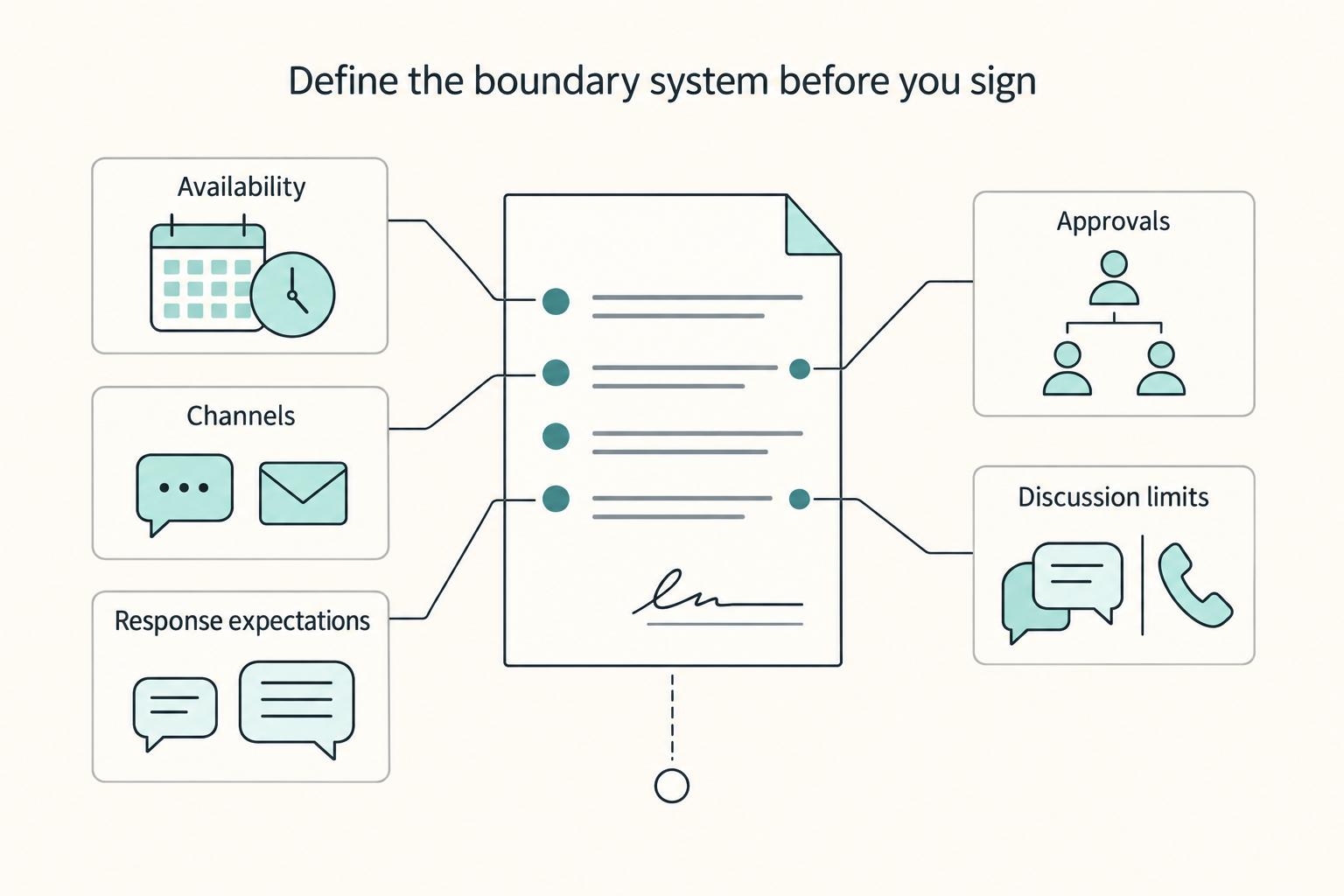
If you want stronger client relationships, treat boundaries as delivery rules, not personal preferences. Clear limits protect trust because they tell the client how work moves, where decisions happen, and what changes require a reset instead of a rushed yes.