
Quick Answer
Where your account supports it, receive the client’s currency and choose conversion separately. Compare the net receipt across collection, settlement, FX, and withdrawal; confirm account-country and currency eligibility first. Match each invoice to the posted balance and bank deposit, and set conversion triggers around cash needs and currency exposure.
Separate Collection from Conversion#
To get paid in multiple currencies, first check whether your account can receive and hold the client’s currency. Where that route is supported, separate receipt from conversion so you can choose when to convert for expenses or home-currency cash needs. Holding currency also exposes you to exchange-rate changes and the account’s protection and access terms.
That single rule gives you more control over timing, makes fees easier to review, and leaves cleaner records for reconciliation. When collection and conversion are bundled into a default flow, those checks get much harder.
Keep the first decision simple#
Start with a simpler question than "which provider is best." Ask: where does the money land before FX happens? Some processors convert incoming funds into your default settlement currency when the customer pays in a different one. PayPal also documents automatic conversion for payments received in another currency. Sometimes that path is fine, but it should be deliberate, not accidental.
A multi-currency setup changes that control point. Balances can build in additional currencies so you can hold first and convert later. That does not remove every problem, but it moves the key decision from a hidden default to a step you can review.
| Path | Control point | Fee visibility | Audit trail quality | Recovery difficulty |
|---|---|---|---|---|
| Automatic conversion path | Account or provider defaults trigger FX | Often clearest after settlement details post | Can be weaker when receipt and conversion are bundled | Can be higher once funds are already converted |
| Planned conversion path | You decide after receipt when conversion happens | Better, because conversion is a separate step | Stronger, because quote, timestamp, amount, and fee are easier to match | Often lower, because you can adjust before the next payment |
This is a control claim, not a blanket "always cheaper" claim. When you control the conversion point, you can compare options, time the conversion on purpose, and explain the result when someone asks what happened.
A useful mental model is this: receipt is one event, conversion is another, payout is a third. If your route keeps those events visible, month-end review gets easier. If your route merges them, the work moves downstream into support threads, manual reconstruction, and guesswork.
Define the route before you invoice#
Think in routes, not tools. A route is the full path from payer to usable cash. Use this route definition checklist, then keep it narrow. Use one verified route per corridor.
| Route field | What to capture |
|---|---|
| Payer type | Card payer, bank-transfer payer, marketplace payout, or platform client |
| Receive currency | What the client will actually send |
| Conversion trigger | Immediate, manual on receipt, scheduled batch, or only when needed |
| Payout route | Destination account and payout currency |
| Fallback | Backup path if the primary route auto-converts, delays, or fails |
That matters because "we use Stripe" or "we use Wise" is not a route description. It does not tell you whether the payer used card or bank transfer, which currency posted to balance, whether settlement forced FX, or whether payout introduced another conversion step. A route definition does.
For a supported bank-transfer route, share the receiving details for the client’s currency and check that funds post to that balance. Wise distinguishes currencies you can hold from currencies and rails you can receive on; account country, account type, and existing account details affect availability. Check the exact currency and local or Swift route before issuing an invoice.
If you have recurring clients, do not let each invoice start from scratch. Reuse the same approved route description each time so the payment path stays stable and the evidence stays comparable.
Test before scale and keep proof#
Treat testing before scale as a hard rule. Run one small live payment through each route before you put real volume through it. Sandbox testing helps before go-live, but settlement behavior still needs live verification.
Start by confirming that funds posted to the expected currency balance and checking payment details for conversion-fee lines. Stripe notes that separate conversion-fee lines make this easier to verify. If you expected no FX but see conversion fees, stop and reroute that corridor. Then build a compact evidence pack from day one:
- payment or transfer ID
- timestamp
- amount and currency
- route settings in force
- screenshot or export of balance outcome and fee lines
Stripe's go-live guidance recommends logging important data on your side, even if it feels redundant. That habit can make reconciliation and troubleshooting faster.
Do not wait until something goes wrong to decide what proof you need. By then, the missing item is usually the exact thing you need to explain route behavior: the route version, the quote screen, the payout ID, or the settlement line that showed an unexpected currency.
Use this operating rule throughout the guide: collect in the sender's currency, verify where funds land, convert intentionally, and keep the proof.
If you want a deeper dive, read Stripe vs. PayPal vs. Wise: The 2026 Battle for Best Freelancer Payments.
What to Prepare Before You Start#
Before you send the first invoice, build one complete route file per corridor and treat incomplete setup as no-go. That is how you keep receipt, conversion, and payout as separate steps you can inspect and explain.
Your core artifact is a route matrix. Make these fields mandatory for every row: payer type, corridor, receive route, conversion owner, payout route, fallback route, evidence location, and owner.
Treat the matrix as an operating document, not a one-time setup note. If a route changes, the matrix changes. If a fallback is missing, the route is not ready. If ownership is unclear, the row is incomplete even if the payment method itself works.
| Scenario | Prep depth | Output required before first invoice |
|---|---|---|
| Solo freelancer, occasional cross-border invoice | Light but complete | 1 route row, 1 receive route, 1 fallback route, 1 evidence folder |
| Solo freelancer, recurring cross-border clients | Moderate | Route rows per corridor, named conversion owner, saved test result per corridor, recurring records routine |
| Small team, recurring cross-border flow | Full | Shared matrix, named owner per corridor, explicit go/no-go gate, reconciliation trail, compliance notes with stored source record |
A good route file should let someone else understand the plan without asking you to explain it live. That means the row should tell them what the payer does, where funds should land, who approves conversion, what proof is required, and what to do if the route drifts.
Readiness checklist#
Use this checklist to decide whether a corridor is actually ready or only looks ready.
| Area | Key checks | Not ready if... |
|---|---|---|
| Account readiness | Confirm the exact receive route, confirm the payout route is mapped to the same corridor row, and fix inconsistent account or entity naming before go-live | Invoice entity name, receiving account name, and payout account records do not line up |
| Corridor test readiness | Run one small live test, check where funds land and whether conversion happened, and check whether the payer sees the total in their local currency before completion | Unexpected base-currency settlement or an unplanned conversion fee appears |
| Controls/compliance readiness | Assign one conversion owner, record manual or automatic conversion settings, and resolve the jurisdiction-specific account and reporting requirements before enabling the route | Conversion ownership is implicit or pending review is not marked explicitly |
| Records readiness | Create the corridor evidence location before the first payment, store payment ID, timestamp, invoice copy, amount and currency, balance outcome export or screenshot, and visible fee or conversion details, and require one accountable owner | You need to search across inboxes, chat logs, and dashboards to reconstruct one payment |
Account readiness
- Confirm the exact receive route you will give the payer for each corridor.
- Confirm the payout route exists and is mapped to the same corridor row.
- If account or entity naming is inconsistent across your systems, pause and fix it before go-live.
A route can fail for administrative reasons before it fails for FX reasons. If invoice entity name, receiving account name, and payout account records do not line up, support and reconciliation can get slower.
Corridor test readiness
- Run one small live test per corridor before real volume.
- Check where funds land and whether conversion happened.
- Check whether the payer sees the total in their local currency before completion.
- Treat any unexpected base-currency settlement or unplanned conversion fee as unverified corridor status.
Do not mark a corridor ready because the dashboard setting looks correct. Mark it ready only when the test result matches the plan.
Controls/compliance readiness
- Assign one conversion owner per corridor. Do not leave this implicit.
- Record whether conversion is manual, scheduled, or triggered by settlement behavior.
- Record the account eligibility and reporting requirements for the actual payer, recipient, and jurisdiction; link the applicable provider or official guidance.
- Keep unresolved requirements assigned to a named owner and block the affected route until they are resolved.
The point of pending-review labels is not to sound incomplete. It is to stop half-verified assumptions from becoming operating policy.
Records readiness
- Create the corridor evidence location before the first payment.
- Store payment ID, timestamp, invoice copy, amount and currency, balance outcome export or screenshot, and visible fee or conversion details.
- Require one accountable owner for each corridor row and its evidence trail.
If you need to search across inboxes, chat logs, and dashboards to reconstruct one payment, your records process is not ready yet.
Go/No-Go gate#
Keep this gate strict.
- No-go: unresolved identity or account mismatch, unverified corridor behavior, unclear conversion owner, missing fallback route, or missing reconciliation evidence location.
- Go: the corridor test matches the expected receive and settlement path, conversion ownership is explicit, and evidence storage is ready. Resolve compliance review items or obtain an approved, permissible nonblocking disposition; mandatory legal or provider restrictions still block the route.
The most useful part of a go/no-go gate is that it forces you to treat ambiguity as risk. "Probably fine" is not a route status. Either the corridor passed a live test and has a fallback, or it did not. That is the difference between "money arrived" and "money arrived exactly as planned, and you can prove why."
You might also find this useful: Decoding International Wire Transfers: Why You're Losing Money.
Decide Where to Hold Balances and When to Convert#
Use a corridor-first rule: receive in the earned currency where supported, then convert according to cash needs and your exposure limit. Document the hold account, conversion trigger, venue, payout destination, and fallback. A currency balance is useful when it matches upcoming spending; it is not automatically the cheapest or safest place to keep all earnings.
That rule helps keep you from making FX decisions by habit. If a corridor normally pays out in the same currency it collects in, holding should be the default. If another corridor always ends in a different payout currency, make that conversion step explicit instead of letting settlement pick it for you.
Step 1: Define the corridor before volume#
Treat each currency pair as its own decision, not a global habit.
- Presentment currency: what the customer pays in.
- Settlement currency: what your account receives in.
- On Stripe, if charge currency and settlement currency differ, Stripe converts to settlement currency.
- Without Stripe multi-currency settlement enabled, Stripe says incoming funds are automatically converted to your home-country default currency.
- If you use Stripe multi-currency settlement, configure a separate supported bank account for each settlement currency you want to receive.
If any part of that setup is missing, treat the corridor as unapproved until you retest it.
Also keep the sequence visible in your notes: invoice currency, charge or transfer currency, posted balance currency, and payout currency. Those steps may match, or they may not. When they do not, the route needs closer review because that is where hidden FX can enter.
Step 2: Pick the conversion model on purpose#
Choose the model that matches how you actually use the funds, not the one your provider happens to make easiest.
| Criteria | Hold then convert | Convert on receipt |
|---|---|---|
| FX timing control | You decide timing, for example scheduled or obligation-based | Timing is set by settlement or payout behavior |
| Fee transparency | Clearer when your venue shows rate and fee before execution, for example Wise states mid-market rate with upfront fee display | Can be harder to inspect when FX is embedded in settlement or payout |
| Reconciliation clarity | Receipt, conversion, and payout stay as separate records | Fewer visible steps, but less FX traceability |
| Operational risk | You hold rate exposure while funds sit | Lower holding window, but can increase forced-conversion risk and possible extra conversion legs |
Availability depends on the account. Wise separates holding, local receiving, and Swift receiving, with country and account restrictions. Shopify Payments multi-currency payouts require an eligible region, supported bank accounts, and an Advanced or Plus plan; other plans can sell in multiple currencies while converting payouts to the domestic currency. Include any non-domestic payout fee in the comparison.
When you compare the two models, ask operational questions instead of abstract ones. Who approves the conversion? Where will the proof live? Can the route survive a provider settings change without silent FX? If those answers are weak, the simpler-looking model can end up being harder to manage.
Step 3: Write enforceable policy language#
Once you know the model, write the rule so people can actually follow it.
| Policy item | Requirement |
|---|---|
| Default rule | Hold the earned currency when you have near-term same-currency use or want conversion done in one approved venue |
| Exception approval | If converting on receipt, record who approved it and why, for example an unsupported settlement path |
| Retest trigger | Retest after provider setting changes, bank-account changes, entity changes, or plan changes |
| Evidence required | Invoice, payment ID, timestamp, balance outcome, fee or quote details, payout record, and the reason the decision matched policy |
For U.S. tax reporting in dollars, the IRS generally requires the rate prevailing when an item is received, paid, or accrued under your accounting method. Keep that date and exchange-rate source. Holding foreign currency and converting it later does not, by itself, postpone recognition of the income.
Write your policy in words an operator can apply quickly. "Use the cheapest route" is not enforceable. "Hold by default unless the corridor is documented as convert-on-receipt and the approver is named" is.
Step 4: Verify forced conversion and double-conversion risk#
Before you scale a corridor, check for the failure modes that usually get missed.
- Confirm funds post in the expected settlement currency, not your default home currency.
- Check balance and payout details for automatic FX at receipt.
- Check later legs for a second conversion, including platform or application-fee flows in some scenarios.
- Confirm the payout destination is active and correct for that corridor.
- Mark a corridor approved only after the live test, owner signoff, and evidence upload.
The key here is to inspect the entire route, not just the first visible step. A route can look correct at collection and still convert later during settlement, fees, or payout. That is why the approval test needs to follow the money through to final usable cash.
If a second conversion appears, move the corridor back to unapproved, switch to fallback, and retest before sending more volume.
We covered this in The Best Way for a US Citizen to Get Paid by a Brazilian Company.
Set Up Receiving Details Without Forced FX#
Your receiving details are a control point for avoiding forced conversion. Standardize each corridor and approve it only after a live inbound test confirms that funds arrive without surprise FX.
Step 1: Enable only routes that meet all three prerequisites#
For card-processor corridors, confirm settlement-currency support for the account country and payment method, then configure the required matching-currency payout account. For bank-transfer receiving, check the receiving details and permitted payer route instead; card acquiring prerequisites do not describe every bank account path.
Check how the selected product handles an unsupported currency or a missing payout account. It may convert, reject, or hold the payment under its rules. Record that behavior before enabling the corridor; a matching currency label alone does not establish a same-currency payout route.
Keep the scope tight at first. It is better to have fewer approved corridors with clean behavior than a wider set of routes that all need explanation later.
Step 2: Prove the corridor with a small inbound test#
Do not mark a corridor usable until a small inbound test proves it. Approve the route only if you can verify:
- the posted currency matches expectation
- no unexpected FX appears at receipt or payout
- fee lines are visible enough for later reconciliation
- the receiving account holds the incoming currency instead of auto-converting on arrival
Even when the processor setup looks right, auto-conversion in the receiving account recreates the same margin loss you were trying to avoid.
As part of the test, compare what the payer sent, what your account posted, and what any later payout received. If those three records do not line up with the route plan, keep the corridor in test status.
Step 3: Choose and document the collection path by corridor#
Once the receive side is verified, choose the collection path by corridor and document it so routing does not become ad hoc.
| Collection path | Conversion control | Approval condition | Documentation requirement |
|---|---|---|---|
| Card-first collection | Controlled only when the three like-for-like conditions are met and configured | Keep in test status until posted currency, payout behavior, and FX checks match the route plan | Record the route, payout account, fallback path, and owner |
| Bank receiving details | Controlled only when incoming funds are received in the expected currency and not auto-converted on arrival | Keep in test status until posted currency and FX checks match the route plan | Record the route, account details, fallback path, and owner |
This is where standardization matters most. If one client in the same corridor pays by card and another pays by bank transfer because nobody documented the preferred path, you end up comparing two different routes and two different verification records.
Step 4: Lock and version the payer instruction block#
Treat payer instructions as a locked onboarding artifact, not free text. For each corridor, keep these fields fixed: beneficiary, account details, reference format, fallback path, and escalation contact.
Version the instruction block whenever any field changes, and retire the previous version.
That protects you from quiet drift. If a beneficiary name changes, a reference format changes, or a fallback route changes, the instruction block should change with it. Otherwise, old copies keep circulating and new errors look random when they are really version-control problems.
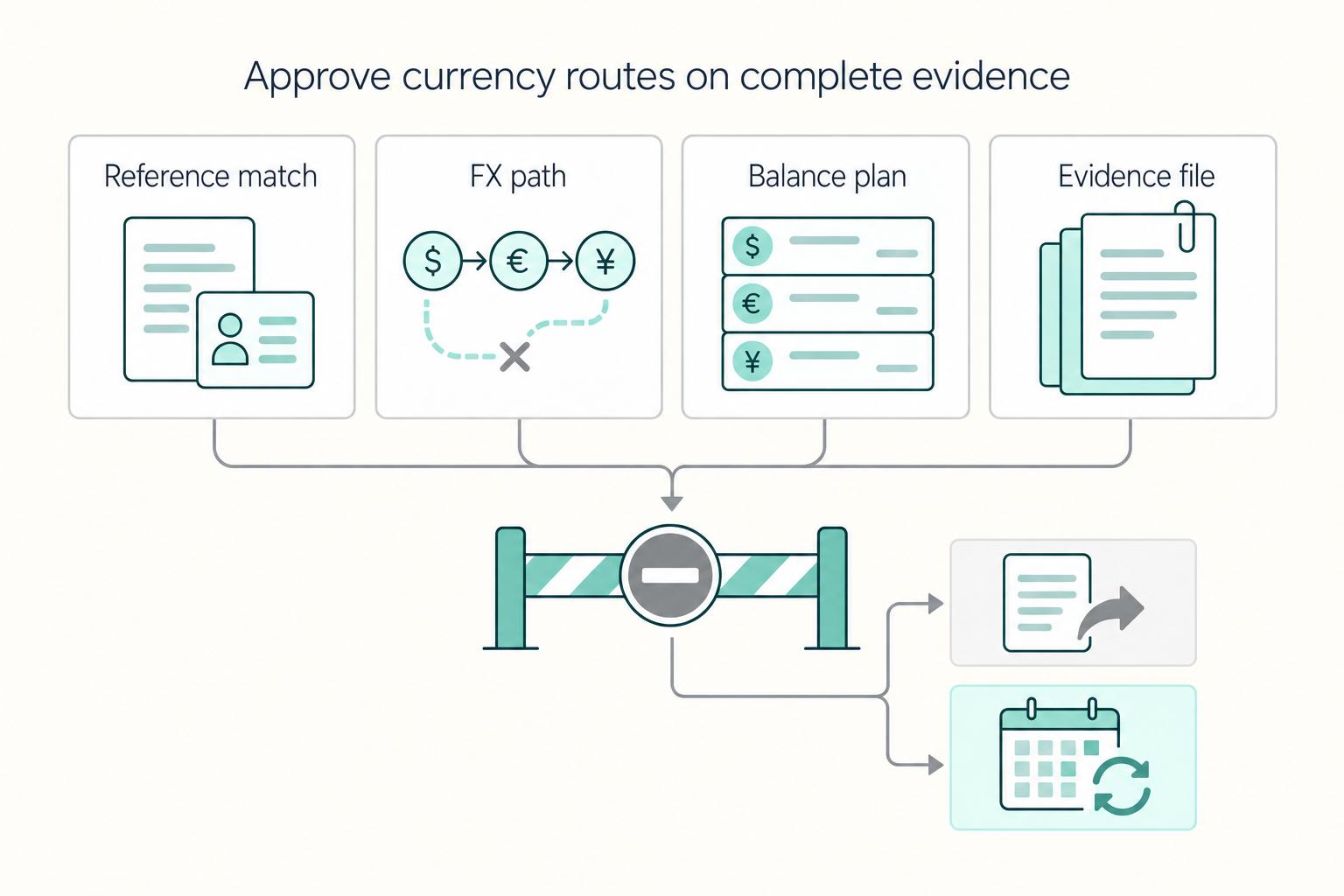
Step 5: Approve the route only on complete evidence#
A route is approved only when the live test evidence is complete. Your approved-route record should include corridor, collection path, payout account, observed posting currency, forced-FX check result, fallback path, and owner signoff.
Approval should mean more than "someone looked at it." It should mean the route was tested, documented, and linked to an evidence set that another reviewer can follow without interpretation.
Short operational playbook
| Failure mode | Immediate corrective action | Prevention control |
|---|---|---|
| Name or reference mismatch | Resend the locked instruction block and require the exact reference format | Use templates with locked payer fields |
| Hidden double conversion | Move the corridor back to unapproved, switch new volume to fallback, and retest with a small amount | Check both receipt and payout legs for FX on every corridor test |
| Fragmented balances | Pause new low-volume routes and consolidate activity into approved corridors | Review active corridors on a fixed cadence and retire stale instruction sets |
| Missing evidence | Collect payment ID, timestamp, route version, posting proof, and visible fee or FX lines into one case file | Require evidence upload before route approval |
If any check fails, freeze that corridor, fix the setup, and retest before you send more volume.
Need the full breakdown? Read The Best Way for a UK Freelancer to Get Paid by an Australian Client.
Configure Settlement and Payout Paths the Right Way#
A clean collection path is not enough if conversion happens later in settlement or payout. Treat payout routing as its own controlled process, and treat route-level FX behavior as unknown until you verify it.
Map live routes only.#
For each corridor, record source currency, held currency, payout destination, payout method, route version, fallback route, escalation owner, and any FX-control details still marked unknown.
If a route version is no longer approved, remove it from normal operating instructions so it is not reused.
Test settlement and payout with low-value live transactions.#
Compare posted balance currency, settlement currency, payout currency, fee lines, and the final receipt or bank statement. If results differ from your intended flow, freeze the route and move new volume to fallback.
Test to final arrival, not only to an internal balance.
Keep one verified conversion step per corridor.#
When possible, keep conversion in one approved step. Log the actual conversion charge and the fee rule behind it. If the quoted total does not explain the deduction, resolve that difference before enabling further volume.
Mark any unverified conversion point as Unknown until tested.
Define the payout sequence so nobody improvises.#
Example sequence: receive in client currency -> hold in same currency -> convert once after review -> send payout. Your approved-route record should mark which step may convert and which steps must not.
Use this sequence as an operating template, then confirm behavior with live evidence.
Verify settings with live proof, not dashboard labels.#
Keep one evidence pack per route version: payment or payout ID, timestamp, posted currency, fee or FX lines, arrival proof, and descriptor.
Dashboard labels show configuration intent; live results confirm actual behavior.
Assign escalation ownership.#
One named owner per route should handle support and approval decisions when behavior drifts.
That owner should decide whether the route stays live, moves to fallback, or needs a fresh test before reuse.
Apply the rules for the actual payment type and parties. A client invoice collected by a business is not automatically a consumer remittance transfer, so receiving-account controls and business reporting obligations should be checked on their own terms.
| Payout route type | Who controls FX | Conversion checkpoint | What to capture as evidence | Preferred fallback |
|---|---|---|---|---|
| Card processor payout | The processor converts when presentment and settlement differ; you choose among supported settlement settings | Confirm supported charge/settlement currency pairs and the configured payout account | Charge ID, payout ID, posted currency, payout currency, fee or FX lines, statement descriptor | Use the corridor's pre-approved fallback route |
| Platform payout | The platform’s contract and payout settings determine conversion; the recipient chooses only supported options | Confirm the platform’s quote and destination-currency rules | Settlement report, payout receipt, fee or FX proof, route version | Use the corridor's pre-approved fallback route |
| Direct bank transfer | Sending, intermediary, or receiving banks may convert according to the instruction and account currency | Confirm sending instructions and beneficiary account acceptance | Transfer reference, bank advice, posted currency, beneficiary statement, arrival timestamp | Use the corridor's pre-approved fallback route |
| Multi-currency account path | You can choose in-account conversion where holding is supported; withdrawal can introduce a separate conversion | Confirm holding eligibility and each onward withdrawal leg | Balance proof, transfer receipt, conversion record if any, arrival statement | Use the corridor's pre-approved fallback route |
Use this recovery checklist when a route fails:
- Double conversion: pause the route, move new payouts to fallback, identify both conversion points, and retest with a minimal amount.
- Descriptor mismatch: map payout ID to bank statement and update reconciliation notes.
- Unsupported pair: disable the path until a supported configuration is verified. For new volume, use a verified supported fallback; reconcile any uncertain original transfer before resending so the fallback does not create a duplicate.
- Post-settings drift: treat any account, compliance, beneficiary, or payout-setting change as a new route version and rerun low-value tests.
After any account, compliance, or settings change, do not resume full volume until the payout path passes a fresh live retest.
Related: The Best Multi-Currency Accounts for Digital Nomads and Freelancers.
Step-by-Step "Invoice to Cash" Flow You Can Reuse#
Use this cycle as a baseline for each corridor: invoice -> collect -> hold -> convert once -> payout. If conversion appears before your planned convert step, pause that route and retest before sending more volume through it.
Consistency matters more than speed here. When every corridor uses the same review rhythm, exceptions become obvious faster because they break a familiar pattern.
| Path | Forced-FX risk | Speed | Evidence to log | Best use case |
|---|---|---|---|---|
| Card checkout | Unknown until live-tested for that corridor | Depends on your checkout, settlement, and payout setup | Invoice and payment IDs, settlement and payout records, posted currency, fee or FX lines, descriptor | You need a checkout flow and that corridor already passed live route testing |
| Bank transfer to receiving details (where supported) | Unknown until both sending and receiving sides are tested | Depends on bank rails and account path | Invoice ID, transfer reference, receiving account details used, posted currency, bank receipt or advice, arrival proof | You want direct route control, or card testing showed unplanned conversion |
Step 1: Invoice in the client currency.#
Use card checkout only for approved corridors; otherwise, use bank receiving details where supported. Open the actual payment link, check mobile checkout, and confirm its payment currency matches the invoice. Then trace the test through settlement and payout, since checkout alone does not show whether conversion happens later.
The invoice should match the route, not force the route to adapt afterward. If the approved route expects bank transfer, do not switch to card for convenience without retesting.
Step 2: Collect on the approved route.#
For any new corridor, run a low-value live test first. If you see unplanned FX during card settlement or payout, stop using card on that corridor and route new invoices to transfer until the retest passes. Verification: Confirm the posted balance or receipt is in the invoiced currency and that no unexpected conversion appears at collection.
At this step, your goal is simple: did the money enter through the path you expected, in the currency you expected? If not, stop before the problem compounds.
Step 3: Hold in the collected currency.#
Where holding is supported, retain the earned currency until the documented spending or cash requirement triggers conversion. Record the posted currency, amount, payment reference, and receipt time; review the balance against your exposure limit rather than holding it indefinitely by default.
Holding is not passive. It is a controlled waiting state. The route should already define what event moves the funds to the conversion step and how approval is handled.
Step 4: Convert once, with approval.#
Convert at the designated step after the required approval of the live quote. Save the source and target amounts, fee currency, expiry, timestamp, and approval record so the final receipt can be compared with the approved transaction.
If the quote expires or the route has changed since the last test, pause and recheck rather than forcing the conversion through on stale assumptions.
Step 5: Payout and close.#
Send payout only through the approved route, then run an independent arrival check before you close the cycle. Verification: Store payout proof in one reconciliation location and capture the payout identifiers and arrival details your support process requires.
Closing the cycle should mean the file is complete, not just that the money moved. If the payout landed but the evidence is scattered, the route is still operationally weak.
Related reading: Build a Get-Paid Financial Architecture for Offshore Companies.
Before you scale, map your exact receive-hold-convert-withdraw path and validate each status transition in the Gruv docs.
Fees, FX, and Timing - How to Minimize Unknowns#
Unknown costs often come from mixed conversion paths and weak records, not from one clearly planned exchange. To handle multi-currency payments with fewer surprises, set one planned conversion point per corridor, review that corridor on a routine cadence, and send exceptions to a documented fallback.
Step 1: Set one standard route per corridor#
Set one standard route per corridor and treat every other route as an exception. This matters because FX is triggered when the starting currency and destination currency differ, and it can show up in payments, transfers, payouts, application fees, and other transaction types.
Use this decision table as your baseline:
| Path | FX control | Cost visibility | Timing control | Main risk | Required proof artifacts |
|---|---|---|---|---|---|
| Card or checkout with multi-currency settlement where supported | High when collection, accrual, and payout stay in the same currency | Medium to high when fee lines are shown separately | Medium, based on settlement and payout setup | Hidden conversion if the route falls back to provider FX | Invoice or payment ID, settlement record, payout record, posted balance currency, fee lines, payout currency proof |
| Bank transfer to receiving details, then hold and convert once later in an account that supports multiple currencies | High | High when fees are shown upfront | High, because you choose when to convert | Possible delays or unsupported currency/account combinations | Invoice ID, bank transfer reference, arrival proof, held currency record, rate quote ID (if used), timestamp, fee line, conversion receipt |
| Provider converts during payment, transfer, or payout | Low | Medium when the FX fee is shown as its own line item | Low | Mixed conversion paths and hard-to-explain fee drift | Transaction detail page, FX fee line item, source and destination currency, net settled amount, payout evidence |
If a route cannot prove same-currency receipt or clearly show its FX line, do not keep it as your standard path.
A standard path should reduce decision fatigue. Once a corridor is approved, daily handling should look almost boring: same route, same proof fields, same review sequence.
Step 2: Run a corridor variance check on schedule#
Run a corridor variance check on a routine schedule, and keep true exceptions out of the normal lane. Check four items each cycle: expected settlement currency versus actual, planned conversion count versus executed conversions, expected fee pattern versus posted fee pattern, and collection-to-payout timing.
Your goal is drift detection, not market prediction. If you see two conversions where your plan allows one, or settlement lands in a different currency than the invoice, pause that route and fix it before sending more volume.
Variance review works best when the comparison is simple. Compare the route plan to the route result. If they differ, classify the issue, move the corridor to fallback if needed, and document the next test date.
Step 3: Use a documented fallback for exceptions#
For exceptions, use a documented fallback: receive, hold, convert once, then payout. That gives you one FX event to approve and reconcile when a checkout, platform setting, or payout path starts converting unexpectedly.
Treat quoted conversion as time-sensitive. Save the expiry and any early-invalidation conditions returned by the selected product. If the quote has expired or become invalid before submission, requote and retain both records; do not apply one provider’s lock duration or market-movement threshold to every route.
Keep unresolved pricing fields in your corridor sheet instead of stale copied numbers:
- Record the quoted conversion rate and each provider fee in its charged currency.
- Check whether a volume discount or threshold applies to this account and transfer before including it in the forecast.
The practical goal is not to freeze every route forever. It is to keep exceptions from silently becoming the new default.
Step 4: Assign ownership for logging, approval, and review#
Clear ownership keeps small mismatches from turning into long support threads. Use this minimum checklist:
- Operator: Log currency pair, source amount, destination estimate, quote ID, timestamp, visible fee line, and final transaction ID.
- Approver: Confirm this is the one planned conversion point and that the quote or disclosure is stored in a retainable form.
- Month-end reviewer: Compare actual fees and settled currency against plan, flag drift, and reroute any unstable corridor to receive-hold-convert-once.
The U.S. consumer remittance rule applies to eligible personal, family, or household transfers sent by a consumer in a U.S. state to a foreign recipient, not ordinary business invoice collection. For a covered transfer, the 30-minute cancellation right requires an identifiable request and funds not already picked up or deposited. Keep the applicable disclosures and cancellation record with that transfer.
Ownership should also answer one basic question fast: who decides whether this route is still safe to use tomorrow? If nobody can answer that, the corridor is under-controlled.
For a step-by-step walkthrough, see How to Get Paid in Crypto as a Freelancer (and Manage the Risks).
Common Mistakes and How to Recover#
Before resending an uncertain payment, establish whether the original succeeded, failed, or remains pending through the provider and your records. Only then correct or retry that action under its retry rules. A fallback route can carry future volume after a low-value test; switching routes is not proof that the original payment stopped.
That sequence helps keep one routing error from becoming a larger cash-flow problem. It also makes support cases easier, because you can show what changed and where the route diverged.
| Signal | First action | Fallback path | Evidence to capture |
|---|---|---|---|
| Unexpected FX on receipt or payout | Compare charge currency to settlement currency, then check payment details for a conversion-fee line item. | If supported, enable multi-currency settlement and route payouts to matching-currency bank accounts; otherwise, consider a receive-hold-convert-once route. | Transaction ID, balance transaction source ID, fee line, timestamp, descriptor, test outcome. |
| Payout paused or verification hold | Check outstanding requirements and review the active support case thread. | Complete the provider’s outstanding requirements using its supported verification method; use micro-deposits only when offered for that account | Support case reference, requirement screenshots, verification status, timestamps, test outcome. |
| Checkout currency and payout currency misaligned | Confirm destination account settlement currency and current payout settings. | Move that corridor to same-currency receipt, then convert once on purpose. | Payment ID, payout record, posted balance currency, fee line, timestamp, test outcome. |
| Incomplete records at month-end | Export itemized transaction history immediately instead of reconstructing later. | Consolidate exports, receipts, and transfer confirmations into one incident folder. | CSV export, transfer confirmation PDF, banking partner reference (if relevant), timestamps, descriptors. |
| Exception sprawl across one corridor | Freeze ad hoc routing and isolate the unstable path. | Revert to your documented receive-hold-convert-once route and retest at low value. | Exception log entry, approver note, support case reference if opened, retest result. |
Use one evidence-pack standard for every incident: transaction IDs, fee lines, timestamps, descriptors, support case references, transfer-confirmation banking partner references when relevant, and test outcomes.
A simple incident log helps here. Record what changed, what failed, which fallback you used, what the low-value retest showed, and who signed off on reopening the corridor. That keeps repeated failures from looking unrelated.
Keep records long enough to substantiate income and identify business transactions, and keep jurisdiction-specific filing requirements marked unresolved until they are verified. If the same failure happens twice, update the checklist and route matrix before you use that corridor again.
This pairs well with our guide on How to Manage Your Finances Across Multiple Currencies.
Conclusion and Copy-Paste Checklist#
Use one operating rule every time: collect in the client currency, hold when useful, convert once, and withdraw through tested paths. Do not scale a corridor until a low-value live test gives you complete evidence.
Map the corridor#
Action: Document the full route: invoice currency, receiving account, hold currency, conversion point, and withdrawal account. Name who approves corridor changes. Verification: The owner can state exactly where FX should happen and where it must not happen. Outcome: You can test and defend a defined route instead of relying on assumptions.
If the owner cannot describe the route in one pass from invoice to payout, the route is not ready.
Run a low-value live test#
Action: Send one small real invoice or transfer through the exact path you plan to scale. Verification: Confirm the balance posts in the received currency, then check for a conversion line, fee line, payout descriptor, transaction ID, timestamp, and quote reference if conversion occurred. Outcome: You identify the real conversion point before forced FX compounds.
Do not substitute a similar route or an old test result. Use the exact live path you expect to use in normal volume.
Lock the evidence pack#
Action: Store proof for each tested corridor: receiving details used, transaction record, payout record, fee line, and reconciliation notes. Name who signs off reconciliation evidence. Verification: Another reviewer, or future you, can trace invoice to balance to payout without guesswork. Outcome: Reconciliation is cleaner and issue resolution is faster.
The evidence pack should live in one known place so you do not need to reconstruct it later.
Pause on unexpected behavior#
Action: Pause scale-up when a test shows automatic conversion, missing references, mismatched payout currency, incomplete evidence, or a sanctions flag involving blocked persons or sanctioned jurisdictions. Keep provider fee behavior marked unresolved until verified. Verification: Reproduce the issue, document the cause, apply the fix, and pass a retest before resuming volume. Outcome: A single corridor failure does not spread into wider cash-flow risk.
The pause matters. It creates space to fix the route before the same issue repeats across several payments.
Run a regular review loop and refresh compliance checks#
Action: On a set cadence (for example, monthly), review corridor exceptions, retest dates, and missing evidence. Keep applicable sanctions, recordkeeping, reporting, and licensing requirements marked unresolved until jurisdiction review confirms them. If U.S. rules apply, OFAC states sanctions obligations apply equally to fiat and virtual-currency transactions. Verification: Every active corridor has a recent test date, complete evidence, and a named owner. Outcome: Your setup stays reliable as client mix, banks, and provider behavior change.
This review loop is also where you retire stale routes, refresh unresolved review items, and keep testing and auditing evidence current.
If you want help confirming corridor coverage, policy gates, and payout workflow fit for your setup, contact Gruv.
Frequently Asked Questions
What is a multi-currency account, and when do you actually need one?
You usually need one when your client currency, spend currency, and home-currency cash needs do not match. Depending on provider and settings, it can let you receive and hold by currency, so conversion is more of an explicit decision than an automatic side effect. Test with one low-value invoice or transfer and confirm the balance posts in the received currency. Log the transfer or payout reference, fee line, quote reference if any, and timestamp, then rerun after you change receiving details, payout settings, or wallet settings. In practice, the account is useful when you want your route to pause between receipt and conversion. That pause is what gives you review time, not just another balance screen.
Where does automatic FX usually sneak in?
It usually appears wherever the starting currency and destination currency differ. Stripe states conversion happens when charge currency and settlement currency differ, and PayPal Business lets you set Payment Receiving Preferences to auto-convert or accept in the received currency. Run one low-value payment through the exact corridor, then check for a conversion line or fee line. Save the fee line, payout descriptor, any quote or rate screen used, and the timestamp, then rerun after settings or bank-account changes. The key phrase is exact corridor. A successful test on one path does not prove a different payout account, settlement setting, or receiving route will behave the same way.
How do store, presentment, and payout currencies differ?
Presentment currency is the currency charged to the customer; settlement or payout currency is the currency paid to you. A store’s base pricing currency can differ from both when checkout offers local currencies. Trace a low-value payment to the posted balance and bank deposit, keeping its transaction ID, fee lines, and actual currencies. If you only check the storefront or checkout page, you are only confirming the first step. You still need to confirm where the money actually settled.
Which provider should you test first for a new corridor?
Start with the option that gives you the clearest control over where conversion happens, then validate it with a low-value live receipt. Use the same logging fields for each provider so your comparison stays operational, not marketing-based. After any account review, settings change, or bank update, rerun the same corridor test. That way, your comparison stays fair. You are not asking which brand sounds simpler. You are asking which route gave you same-currency receipt, visible fee detail, and a clean payout path. Provider | Receiving details availability | FX control point | Fee transparency | Test-first corridor Stripe | Settlement currencies depend on account country, payment method, and eligible bank accounts | Align supported presentment and settlement currencies and configure the payout bank account | Check the applicable fee schedule and itemized balance transaction | Card checkout routes where you can keep charge and settlement aligned Wise | Local and Swift receiving details vary by currency, country, and account eligibility | Choose conversion after receipt where the account supports holding | Fees are shown upfront before conversion confirmation | Bank-transfer routes where same-currency receiving details are available PayPal | Supported currency balances and receiving preferences depend on the account market | Depends on Payment Receiving Preferences and wallet currency setup | Check the transaction exchange rate, conversion spread, and applicable fee schedule | Client-required PayPal routes where you can accept in the received currency without auto-conversion in your settings
Should you convert now or hold the balance?
Convert when you have a real obligation in another currency or a quote you are willing to accept. Hold when near-term spending stays in that same currency, so you avoid an extra conversion event and extra reconciliation. Test with a small conversion first, review the details before confirming, and log the quote reference if available, fee line, balance change, and timestamp. Rerun when client mix, payout routes, or foreign-currency settings change, because those shifts can move the real conversion point. A useful check is to ask whether conversion solves a current need or just follows a default habit. If it is habit, review the route before you convert.
Watch
How Freelancers Can Get Paid in Multiple Currencies
Try a related tool
Researched and edited by the Gruv editorial team. Gruv builds cross-border billing, payouts, and finance-operations software for global businesses.
Sources
Includes 1 external source outside the trusted-domain allowlist.
- consumerfinance.gov/rules-policy/regulations/1005/30trusted
- consumerfinance.gov/rules-policy/regulations/1005/34trusted
- docs.stripe.com/currenciestrusted
- irs.gov/individuals/international-taxpayers/foreign-...trusted
- paypal.com/sg/cshelp/article/what-are-payment-receiving...trusted
- wise.com/help/articles/2897238/which-currencies-can-i...trusted
- wise.com/help/articles/2813542/where-do-i-need-to-liv...trusted
- help.shopify.com/en/manual/payments/shopify-payments/store-cu...external
Educational content only. Not legal, tax, or financial advice.
Related Posts

Stripe vs PayPal vs Wise for Freelancers in 2026
Cashflow reliability matters more than brand familiarity. If money arrives later than expected, gets reduced by fees, or loses value during conversion, margin disappears even when the client technically paid on time.
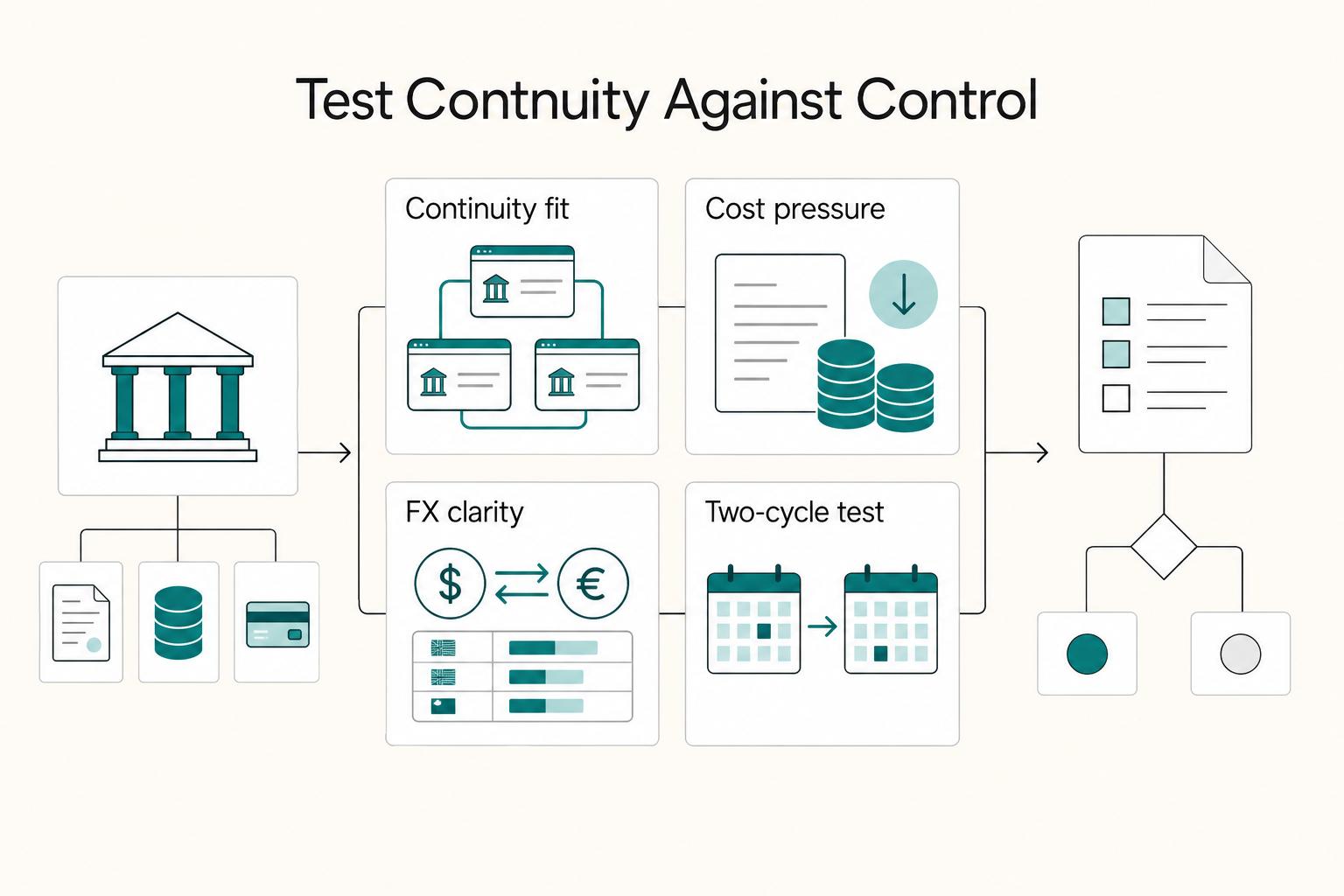
Multicurrency Business Accounts for UK Freelancers and Small Companies
A multicurrency account can let a freelance business receive foreign client payments, keep the original currency and convert only the portion needed for local bills. The important choice is the exact product and market. A personal travel account, a UK business account and a US business edition can share a brand while having different eligibility, fees and protections.

Why International Wire Transfers Arrive Short and How to Reduce Fee Leakage
Most money lost on cross-border payments does not disappear in one obvious charge. It leaks out in small deductions at different points along the route. The client may pay an outgoing fee at their bank. One or more correspondent banks may take a cut as the payment moves across SWIFT. Your own bank may charge to receive it. If a currency conversion happens anywhere along the way, that can add more drag. By the time the funds land, the amount credited can be lower than the amount invoiced even when the client is sure they paid in full.