
Quick Answer
Two-factor authentication verifies identity using two different factor categories. Secure primary email, banking, payout and domain accounts first. Prefer supported passkeys or FIDO/WebAuthn security keys for phishing resistance; app codes and SMS remain phishable. Set up recovery and test a fresh sign-in while keeping a working session open.
How 2FA adds a second layer of protection#
Two-Factor Authentication (2FA) is a practical way to reduce avoidable account risk. It adds a second identity check, so a stolen password is less likely to lead to unauthorized access to billing, payouts, or client delivery.
Two-factor authentication verifies identity with two different factor categories, such as a password and possession of a registered security key. It is a subset of multi-factor authentication, which uses two or more factors. A passkey unlocked with a device PIN or biometric can combine possession and local verification without requiring a separate password prompt.
For independent professionals, a practical starting point is three account groups:
- Personal identity anchors, especially primary email.
- Business-critical tools used to deliver client work.
- Financial surfaces, including banking, invoicing, payout platforms, and domain access.
By the end of this article, success should be concrete:
- A strong primary method is active on each high-impact account.
- A backup access path is configured and tested.
- A recovery checklist is documented so you know what to do first after lockout.
2FA reduces the risk from stolen passwords, but the method matters. Ordinary one-time codes and push approvals can be phished or misused. Prefer phishing-resistant authentication for important accounts, and protect recovery routes as carefully as the primary sign-in.
Use this guide with an account list open. Secure your most important accounts, confirm primary and backup access, and record the provider-specific recovery route. The checklists below also cover device replacement, shared access and maintenance.
Understand factors, prompts and passkeys#
Two passwords are still one factor category. Conversely, two factors can operate through one device: possession of a registered cryptographic credential plus its required local PIN or biometric unlock. Count the proof being verified, not the number of screens or gadgets.
| Factor type | Examples |
|---|---|
| Something you know | password, PIN, or passphrase |
| Something you have | smartphone authenticator app, physical security key, or hardware token |
| Something you are | biometrics such as fingerprint or facial recognition |
Microsoft’s 2FA overview describes knowledge, possession and biometric factors. A biometric is commonly used to unlock a device-held credential; do not assume any fingerprint prompt, by itself, establishes remote account MFA. Check the provider’s actual authentication flow.
Use these categories when you review settings:
- Something you know: password, PIN, or passphrase.
- Something you have: smartphone authenticator app, physical security key, or hardware token.
- Something you are: biometrics such as fingerprint or facial recognition.
Do not trust labels alone. Two-step verification can describe strong two-factor sign-in, but the label does not guarantee separation. Confirm that the second factor is truly different from the first.
This distinction protects continuity. A separate second factor can still block unauthorized access when a password is exposed. Keep a simple access record with each account factor pair, backup method, and last sign-in test date.
Keep your current working session available while testing a fresh sign-in in another browser profile or device. Confirm the enrolled method is used; trusted sessions may not prompt every time, and a supported passkey flow may replace password-plus-code rather than display two prompts.
When settings are unclear, run a quick separation test before you trust the setup:
- Identify the credential or factor categories the provider verifies.
- Check how the registered device, key or app is unlocked and protected.
- Check whether password reset or a weak fallback can bypass the stronger method.
This prevents a common setup mistake: assuming two steps always means two factors. In practice, lockout recovery can take longer when nobody documented which factor pair was actually active. Write down what was enabled, what fallback exists, and who owns the account. That simple record can turn a confusing outage into a shorter recovery task. For related credential hygiene, see The Best Password Managers for Freelancers and Teams.
What 2FA Protects You From and What It Does Not#
2FA lowers unauthorized-access risk, but it does not remove risk. Use it as a strong control, then back it with disciplined account habits.
A second factor can stop an attacker who has only your password. A phishing site can still relay an app code or trick you into approving a push. Malware or a stolen authenticated session may bypass the login challenge altogether. CISA recommends phishing-resistant MFA, such as FIDO/WebAuthn, where supported.
2FA is important, but it is only part of the solution. To keep it effective, pair the control with user education and awareness.
After a factor, phone or recovery change, test the intended sign-in method and review available fallbacks. Keep an existing session until the replacement works. If an account is compromised, follow containment steps rather than relying on a successful login test alone.
Use a simple if-then rule to avoid confusion during incidents:
- If the prompt is unexpected, deny it and verify account activity before trying again.
- If sign-in fails on a critical account, follow the documented recovery steps before changing more settings.
- If recovery also fails, move to the provider recovery path and log what blocked access.
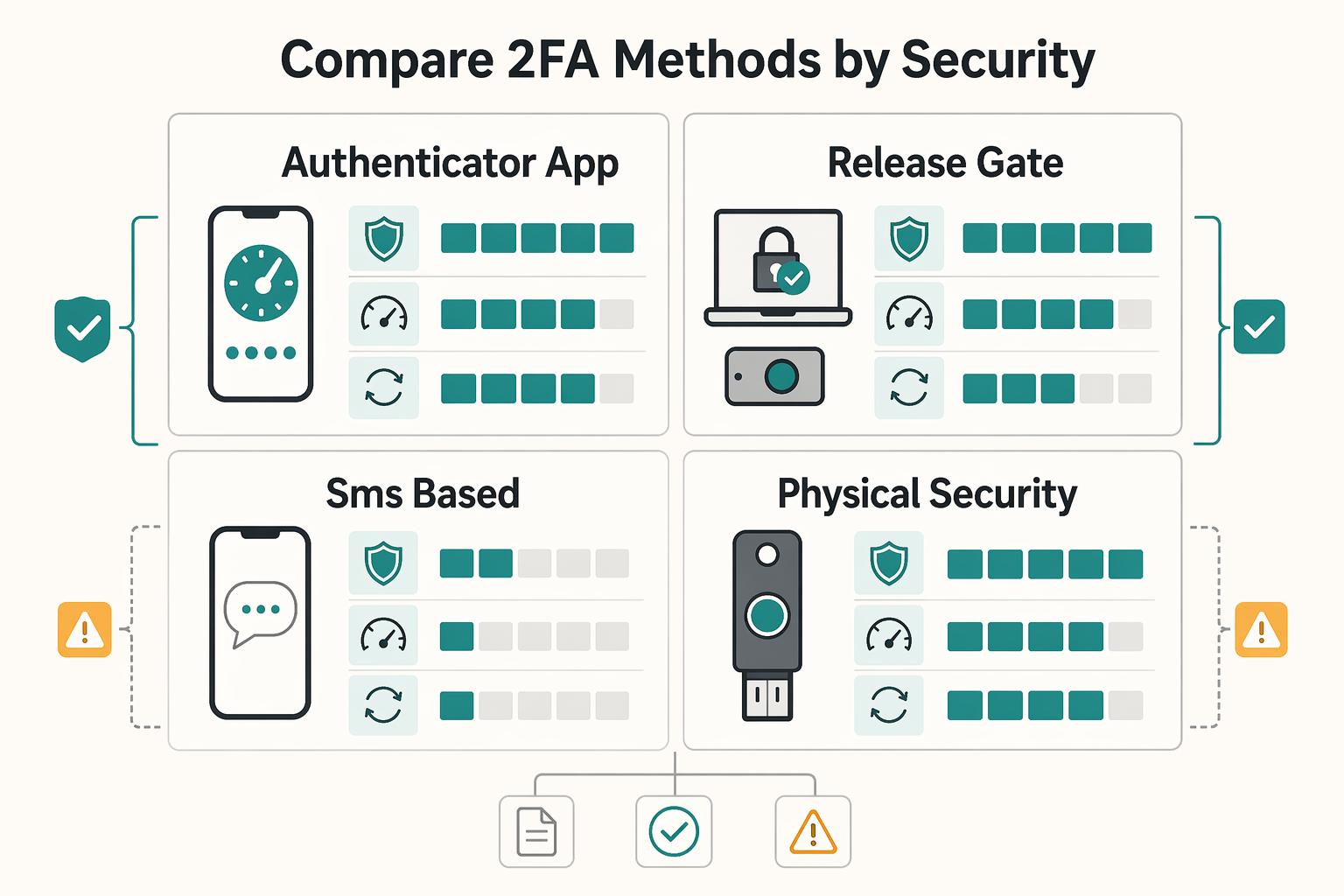
Compare 2FA Methods by Security, Friction, and Recovery Risk#
Prefer a supported passkey or FIDO/WebAuthn security key for high-impact accounts. If unavailable, use app-based codes or push with number matching where offered; SMS provides coverage when stronger choices are unavailable. Adding an SMS fallback to an otherwise strong account can leave a weaker entry route, so review whether the provider lets you remove it safely.
The method choice drives most of the real-world protection because the strength of 2FA depends on the quality of the second factor. These options can all be used as second factors, but they differ under phishing pressure, device loss, and recovery stress.
| Method | Security tradeoff | Daily friction | Recovery consideration | Practical note |
|---|---|---|---|---|
| Authenticator app: one-time codes | Avoids SIM delivery but codes can be phished | Open app and enter current code | Back up or re-enrol using the provider/app instructions | Protect the app and any synced account; not phishing-resistant |
| Push notification approval | Simple approval can be abused through repeated prompts; number matching helps but is not phishing-resistant | Approve the requested sign-in after checking context | Keep a separate supported backup route | Never approve an unexpected request, even when a caller asks |
| SMS-based authentication | Exposed to number takeover, message interception and phishing | Receive and enter text code | Depends on number control and delivery | Use when stronger methods are unavailable; review fallback exposure |
| FIDO/WebAuthn security key | Phishing-resistant cryptographic sign-in tied to the legitimate service | Connect/tap the compatible key; PIN may be required | Enrol a spare key or supported alternative | A hardware token that only displays OTP codes does not have this protection |
| Passkey on a device or supported sync service | Phishing-resistant sign-in; recovery/sync account still matters | Unlock with device PIN or biometric | Check another enrolled device, backup key and sync recovery | May replace the password and second prompt; support varies |
Before standardizing on one method for important accounts:
- Test a fresh sign-in while retaining a working session.
- Test a supported backup method without deleting the primary method or initiating a destructive reset.
- Record the method, fallback, recovery location and last test date; mark any single-use code consumed.
If SMS is your only option today, enable it now. Then move that account to an app or key as soon as support appears.
Use this tradeoff lens when comparing methods on a real account:
- Security strength under phishing pressure.
- Friction for everyday sign-in.
- Recovery speed when a phone is lost.
- Dependence on one provider channel, such as SMS delivery.
That lens keeps decisions practical. A method that looks strong but has no tested recovery path can fail at the worst moment. A method with low friction but poor prompt discipline can also fail. The best choice is the strongest option your provider supports that your team can run consistently with verified fallback.
If your account estate is mixed, do not wait for perfect consistency. Secure high-impact accounts first with stronger factors, then phase the rest toward the same baseline as options appear.
Which 2FA Method Should You Choose First#
Start with account impact and supported methods. Prefer a passkey or FIDO/WebAuthn key for primary email, administrator access and money movement. If these are unavailable, enable a supported app method and plan the next improvement. Configure recovery before relying on the new method.
Your first method does not have to be final. Treat the first setup as the best available choice now, with a clear review path.
| Account criticality | Preferred first method | Strength against password compromise | Recovery difficulty | Practical decision |
|---|---|---|---|---|
| High: admin email, banking, domain registrar | Supported passkey or FIDO/WebAuthn security key | Phishing-resistant sign-in; protect recovery too | Varies by backup setup | Enroll primary and backup access early |
| Medium: invoicing, cloud docs, client tools | Passkey/key, otherwise app code or push with number matching | App codes and ordinary push remain phishable | Varies by backup setup | Use an available method first, then refine setup |
| Lower: low-impact accounts | Strongest available method; SMS if stronger options unavailable | Better than password-only access | Varies | Enable now, then review other options later |
If you use push approvals, enforce prompt discipline:
- Approve only sign-ins you initiated.
- Reject unexpected prompts.
- If prompts repeat unexpectedly, pause approvals and secure the account before continuing.
If SMS is the available option, enable it and record a review date for stronger methods. Test it without losing your current session. A successful SMS test does not remove the risks of number takeover or a weak recovery route.
A practical sequence for first-time rollout looks like this:
- Rank accounts by impact if compromised.
- Apply an available 2FA method to the top tier first.
- Configure fallback before closing each account.
- Run a live sign-in test while details are still fresh.
- Record ownership and next review date.
This approach helps avoid spending time perfecting low-impact accounts while high-impact ones stay weak. In access control, order matters as much as method.
The First 30 Minutes Setup Checklist for Solo Operators#
Use the first 30 minutes to finish one or two high-impact accounts if that is realistic. Setup and recovery differ by provider; this is a starting session, not a promise to complete your whole account list.
Pick a starting order based on which accounts are most critical to your work.
For each account, setup is complete only when these checkpoints are done:
Supported flow active: confirm the intended MFA or passkey sign-in is enrolled; enable a separate 2FA setting where the provider requires it.Method tested: verify the intended authentication flow in a fresh sign-in, including local verification where required for a passkey.Backup access configured: if backup codes are offered, store them in your chosen secure location.
Keep short notes as you go so recovery does not rely on memory:
- Account name
- Active method and fallback method
- Storage location for backup codes
Keep the current session open and test in a fresh browser profile or device. A code flow asks for the current code; a key may require connection and touch, and a passkey may use a device unlock. Check the actual flow rather than expecting a code for every method.
Method options can vary by implementation. Document what is available today, enable the strongest practical option, and set a dated reminder to upgrade when stronger options are added.
If setup stalls, retain working access and record the blocker and next action. You can secure another account while waiting for provider support; an unresolved migration does not justify disabling the protection that still works.
Use this simple completion test before you mark any account done:
- You can sign in with the primary factor path.
- You can still sign in with the fallback path.
- You know exactly where recovery data is stored.
That test keeps the session outcome measurable. At the end of 30 minutes, you should have fewer unknowns, not just more toggles switched on.
If you need to stop the setup session, record which account is next, what is active and what remains untested. Store recovery secrets securely; your ordinary checklist should contain locations and status, not the codes themselves.
Build a Recovery Kit So 2FA Does Not Lock You Out#
Prepare recovery while access still works. A backup key, another enrolled device or provider-issued recovery codes may help, depending on the service. Recovery is a separate potential route into the account, so avoid making it easier to compromise than your primary method.
| Recovery evidence item | What to store | Why it matters during lockout |
|---|---|---|
| Provider-issued recovery codes | Store the secrets securely; record generation date and location in the checklist | May permit access when the usual factor is unavailable; follow provider rules |
| Device inventory | Primary and backup devices that can approve sign-in | Can reduce guesswork about which device still has access |
| Support escalation path | Provider help path, account identifiers, and contact route | Can save time when self-service recovery fails |
| Identity proof requirements | Record the official ownership-verification procedure; avoid unnecessary copies of identity documents | Can help reduce failed recovery attempts and delays |
An encrypted vault and a securely stored offline copy can provide redundancy, but check for circular dependence: a recovery code is unhelpful if the only vault holding it requires the lost device. Keep secrets out of shared work documents and separate spare keys from the primary device.
Define break-glass rules before an incident:
- State when backup factors are allowed, such as lost device, failed primary sign-in, or urgent access needs.
- If another person can assist, name who can approve emergency recovery actions and where that approval is logged.
- After emergency access, revoke lost or exposed credentials and replace consumed or exposed recovery codes according to the provider instructions.
Choose a review cadence such as quarterly for important accounts. Test a supported backup sign-in on a separate browser or device while retaining working access. Avoid deliberately locking the account or running a full identity-reset process merely to prove a checklist item.
Recovery quality is easiest to judge with one question: could you regain access today without your primary phone? If the answer is uncertain, your recovery kit is incomplete.
Keep provider variation in mind. Recovery and device replacement steps can differ across platforms, and common business platforms may use methods such as authenticator apps or passkeys, so store account-specific notes instead of one generic process. The key is speed and clarity during stress: where to go, what to submit, and which fallback path to try first.
A practical drill script can be short:
- Pick one important account and retain a working session.
- Set the usual device aside without deleting its credentials.
- Use a supported backup sign-in method in a fresh browser or device.
- Confirm access and mark any recovery code used.
- Update the checklist, replace consumed codes where needed and fix gaps.
Example: you enrol a primary and spare FIDO key for your email account, then test the spare in a fresh browser while your existing session remains open. Keep the spare somewhere other than the laptop bag holding the primary. On a different service using Google-style backup codes, a test consumes one code; mark it used. Google says generating a new set invalidates the old set, so replace every stored copy if you refresh it. Check each provider’s own rules rather than assuming identical behaviour.
This turns recovery from theory into evidence. You do not need complex documentation. You need current details that work when you are under time pressure.
Stop Common 2FA Failure Modes in Daily Operations#
Daily behavior decides whether 2FA works when it matters. Treat each login prompt as a verification step, not routine noise.
For any second-factor approval, check context before you continue. If a request is unexpected or does not match the app or site you just opened, do not approve it.
Do not normalize unexpected prompts. If sign-in requests appear that you did not initiate, pause and verify account activity before continuing.
Use SMS intentionally. It is a common 2FA method, and 2FA is still better than password-only access because a stolen or guessed password is not enough on its own. Recheck available factor methods during regular reviews and keep recovery details current.
Add one daily checkpoint for high-impact accounts: if anything about a sign-in request feels off, pause and verify before proceeding.
Common failure pattern to avoid:
- A password is stolen or guessed.
- A second-factor request is approved without verification.
- An attacker gains access.
Common prevention pattern:
- Treat every second-factor prompt as a verification step.
- Do not approve requests you did not initiate.
- Keep factor and recovery settings current.
- Include phishing training in routine security practice.
These habits help preserve your setup, but prompt discipline cannot make an ordinary push approval phishing-resistant. Upgrade the method where the provider supports it and keep devices and browsers updated.
Handle Travel, New Devices, and Number Changes Without Panic#
Lockouts can happen during transitions, not just routine days. Travel, phone replacement, and number changes can expose weak fallback paths.
| Transition | Primary action | Verification step |
|---|---|---|
| Before travel | Sign in to primary email with a non-SMS factor; confirm recovery access works without the primary SIM | Test one high-priority account while SMS is unavailable |
| New phone | Migrate authenticator app entries first | Validate high-priority accounts before wiping the old phone; keep both phones available until critical accounts pass a live sign-in test |
| Number change | Update the number immediately if any account still depends on SMS-based authentication | Run a live sign-in test; confirm the update is complete across your critical account list |
Continuity depends on one principle: keep at least one verified sign-in path that does not rely on your primary SIM. That principle can reduce stress during travel days and hardware changes.
Before travel, verify access without your primary SIM#
Travel can interrupt calls and texts, and a SIM-swap incident can do the same, which can block verification codes on short notice. Run a short pre-travel check while you still have time to fix gaps.
- Sign in to primary email with a non-SMS factor.
- Confirm recovery access works without the primary SIM.
- Test one high-priority account while SMS is unavailable.
- Record what passed and what needs follow-up.
If a test fails, fix that account before departure or document a fallback order you can execute under pressure. The goal is not perfection. The goal is no surprises when you are away from your normal setup.
Move to a new phone in two passes#
Migrate authenticator app entries first, then validate high-priority accounts before wiping the old phone. Start with accounts that unlock others, such as primary email and core financial logins.
If a phone is lost or stolen, use a trusted device and the provider’s official recovery path. After regaining access, revoke its sessions and enrolled credentials, remove it from trusted-device lists, and replace exposed passwords or recovery secrets as appropriate. If the phone held a synced authenticator, review the sync account too. An unrelated physical key does not need replacement solely because the phone is missing.
During migration, keep both phones available until critical accounts pass a live sign-in test. Deleting old device data too early can trigger lockouts.
Treat number changes as access events#
If any account still depends on SMS-based authentication, update the number immediately and run a live sign-in test. This can reduce lockout risk during urgent access.
Keep provider caveats in mind: factor options and SMS support can vary by provider, region, plan, or service and can change over time. An eSIM is still a SIM, so resilience comes from tested backup factors and verified recovery access.
After a number change, run through your critical account list and confirm the update is complete. Partial updates create hidden risk because some accounts still point to the old number while others do not.
Apply 2FA to Finance-Critical Workflows and Shared Access#
Start where a single account compromise can move money. Priority goes to banking, payout approvals, invoicing controls, and the accounts that can reset those logins.
| Rollout step | Priority target | Action |
|---|---|---|
| 1 | Reset authority accounts, especially primary email and admin access | Secure these first |
| 2 | Direct money movement accounts | Secure these next |
| 3 | Invoicing and payout support tools | Secure these after that |
| 4 | Shared actions | Enforce individual sign-in and approval separation |
Use phishing-resistant passkeys or FIDO/WebAuthn keys where supported. App codes avoid SMS delivery risks but can still be phished; push number matching helps against approval fatigue without providing full phishing resistance. Evaluate fallback and account-reset settings alongside the primary method.
Give each collaborator individual access where supported. For important payment or destination changes, use the available approval controls and verify requests through a trusted channel. A solo operator may need a deliberate second check; do not invent a second approver where none exists.
Keep an audit-ready change log for access and factor updates. Record what changed, who requested it, who approved it, and when it was reviewed. Before standardizing policy across tools, confirm your required factors are supported.
A practical rollout sequence for finance-critical access:
- Secure reset authority accounts first, especially primary email and admin access.
- Secure direct money movement accounts next.
- Secure invoicing and payout support tools after that.
- Enforce individual sign-in and approval separation on shared actions.
This sequence prioritizes high-value access first, then broadens coverage.
Also define escalation ownership before incidents happen. When a factor change request appears on a finance-critical account, someone should validate request legitimacy before approval. That pause step adds a risk-based check before approval.
Set a Quarterly 2FA Maintenance Cadence#
Choose a maintenance rhythm that fits your accounts and activity, such as quarterly for critical access. It is a policy choice, not a universal requirement. Include passkeys, keys, apps and recovery methods rather than checking only authenticator apps.
Treat each review as a health check, not a documentation task. Start with critical accounts, then verify authentication setup, then clean up follow-up items.
Checklist for critical access#
- Confirm each critical account’s intended primary and backup sign-in methods work.
- Review factor enrolments, recovery contacts and trusted devices; remove obsolete access.
- For time-based app-code failures, check the selected account and device time; other methods do not share that time-sync requirement.
- When re-enrolling an app, verify the legitimate setup page and protect the QR code or secret as a credential.
- Record changes, owner and next review date.
Trigger reviews between scheduled checks#
Review between scheduled checks after a device loss, replacement, number change, unexpected prompt or access change. For app-code failures, check the account entry, enrolment and device clock. For a passkey or key failure, check compatibility, registration and the provider’s troubleshooting steps.
Track status and control temporary exceptions#
Track a small set of status signals you can maintain consistently:
- Critical accounts with confirmed primary and backup access, by method.
- Obsolete devices or weak recovery routes awaiting correction, with an owner and due date.
Document temporary exceptions so fallback methods do not become permanent. For each exception, record account, owner, reason, compensating control, and planned revalidation date.
Assign responsibility for the account list and follow-up. In a team, another administrator can verify important changes where policy permits; a solo operator can maintain the same review record without requiring three separate people.
Use short review outputs that make next actions obvious:
- Accounts fixed during review.
- Accounts needing follow-up.
- Exceptions still open or closed.
- Date of the next check.
This keeps maintenance practical and helps reduce drift between policy and account settings.
Conclusion#
Treat 2FA as an ongoing habit, not a one-time setting. It adds a second layer beyond passwords and can materially reduce account risk, but it is still risk reduction, not a guarantee.
Start with primary email and accounts controlling money or client access. Prefer supported phishing-resistant methods, use available alternatives where necessary, and protect the backup route. Retain working access while testing changes.
Use this same-day closeout plan:
- Start with your highest-impact accounts.
- Enable 2FA with the strongest available method for each one.
- Run a real sign-in test, and if a one-time code expires, request a new code and continue.
- Schedule a regular 2FA review so this stays repeatable.
After an important account change, verify the intended primary and backup methods while retaining a working session. Record the result and any unresolved recovery gap.
Frequently Asked Questions
What is two-factor authentication in one sentence?
Two-factor authentication verifies identity using two different factor categories, such as a password plus a registered security key. A passkey with required local PIN or biometric verification can combine factors without a separate password prompt.
Is 2FA the same as MFA?
No. 2FA uses exactly two factors, while MFA can use two or more. That makes 2FA one subset of MFA. In practice, the important point is not the label but whether your factors are truly separate.
What are the three authentication factor types?
The three core categories are something you know, something you have and something you are. A biometric commonly unlocks a device-held credential; location or other risk signals should not be treated as equivalent to an independent authentication factor.
Which is better for business accounts, authenticator app, SMS, or security key?
Prefer a supported passkey or FIDO/WebAuthn key for phishing resistance. App codes are useful when those are unavailable but can be phished; SMS adds number-control and delivery risks. Compare recovery and fallback routes as well as the primary method.
Can 2FA still be hacked through phishing or MFA fatigue?
Yes. Ordinary codes can be relayed through phishing sites and push approvals can be abused through repeated requests. Phishing-resistant methods reduce that login risk, but compromised devices, stolen sessions and weak recovery routes still need attention.
What accounts should a solo professional secure first with 2FA?
Start with the highest-impact accounts first, especially accounts that store personal or financial information. Then expand across the rest of your business accounts.
What should I do if I lose my phone and cannot get my 2FA codes?
Use a supported backup key, another enrolled device or recovery code from a trusted device. If none works, follow the provider’s official recovery process. After regaining access, remove lost-device credentials and sessions and replace exposed secrets or consumed codes as needed.
Researched and edited by the Gruv editorial team. Gruv builds cross-border billing, payouts, and finance-operations software for global businesses.
Sources
Includes 3 external sources outside the trusted-domain allowlist.
Educational content only. Not legal, tax, or financial advice.
Related Posts

The Best Password Managers for Freelancers and Teams
A client asks for an urgent file, you open their portal, and the login fails. Ten minutes later your invoicing app wants a reset too. That is why your password setup is a business risk, not just a nuisance. Weak credential habits can turn one mistake into wider account access problems, then into delivery delays and cleanup work.

The Freelance Payment Penalty: A Modeled Audit of Platform Fees, FX Spreads, and Payout Delays
The money rarely disappears through a single, easy-to-spot fee. The real loss is stacked. A marketplace takes its commission, a processor adds a charge for international cards, a bank or payment company converts the currency at a spread, a platform holds the funds before release, and a wire sheds a little to intermediaries on the way in. Each layer looks defensible on its own, but the worker feels the combined result as a smaller deposit and a later payday.

How to Respond to a Subpoena for Business Records
Move fast, but do not produce records on instinct. If you need to **respond to a subpoena for business records**, your immediate job is to control deadlines, preserve records, and make any later production defensible.