
Quick Answer
Yes, Airtable can work as a CRM for a solo consultant if you build it as one connected system instead of one bloated table. Use one master target list plus linked tables for clients, contracts, communications, opportunities, services, and projects. Keep core checkpoints on each active record, require a dated next action, and use linked records so sales, delivery, and compliance stay in one place.
Run Airtable as One Connected System#
Airtable can work for consultants when you run it as one connected system, not one bloated table. If your client work is spread across email, notes, spreadsheets, and memory, it gets harder to prioritize outreach and keep conversations moving.
In practice, "connected" means records move through the same workflow. Keep one master target list as the CRM, then create smaller slices for actual conversations by segment, geography, or role type. Every active record should carry the same checkpoints: Priority Tier, Status, Next Step, First Outreach Date, and Most Recent Touch. If a record has no dated next action, it is not really under management.
| Operating view | Scattered setup | Connected CRM setup | What to verify |
|---|---|---|---|
| Execution clarity | Outreach history and next actions are split across tools | Core checkpoints live on the same master record | Can you see Status, Most Recent Touch, and next action in one place? |
| Prioritization | It is hard to separate active targets from everything else | You can sort by Priority Tier and dated next steps | Are top 15-20 targets clearly separated from the rest? |
| Workflow continuity | Conversation context is spread across separate lists and notes | One master list plus focused slices keeps the workflow consistent | Can someone else understand the account from the record alone? |
One red flag: if your list starts looking like a directory, it stops helping you decide. A useful starting point is 30-50 targets, then prioritize your top 15-20.
Before you move to Component 1, set up:
- one master client/target list
- fields for Priority Tier, Status, Next Step, First Outreach Date, and Most Recent Touch
- a rule that every active record must have one owned next action with a date
Related: How to Use Notion as a CRM.
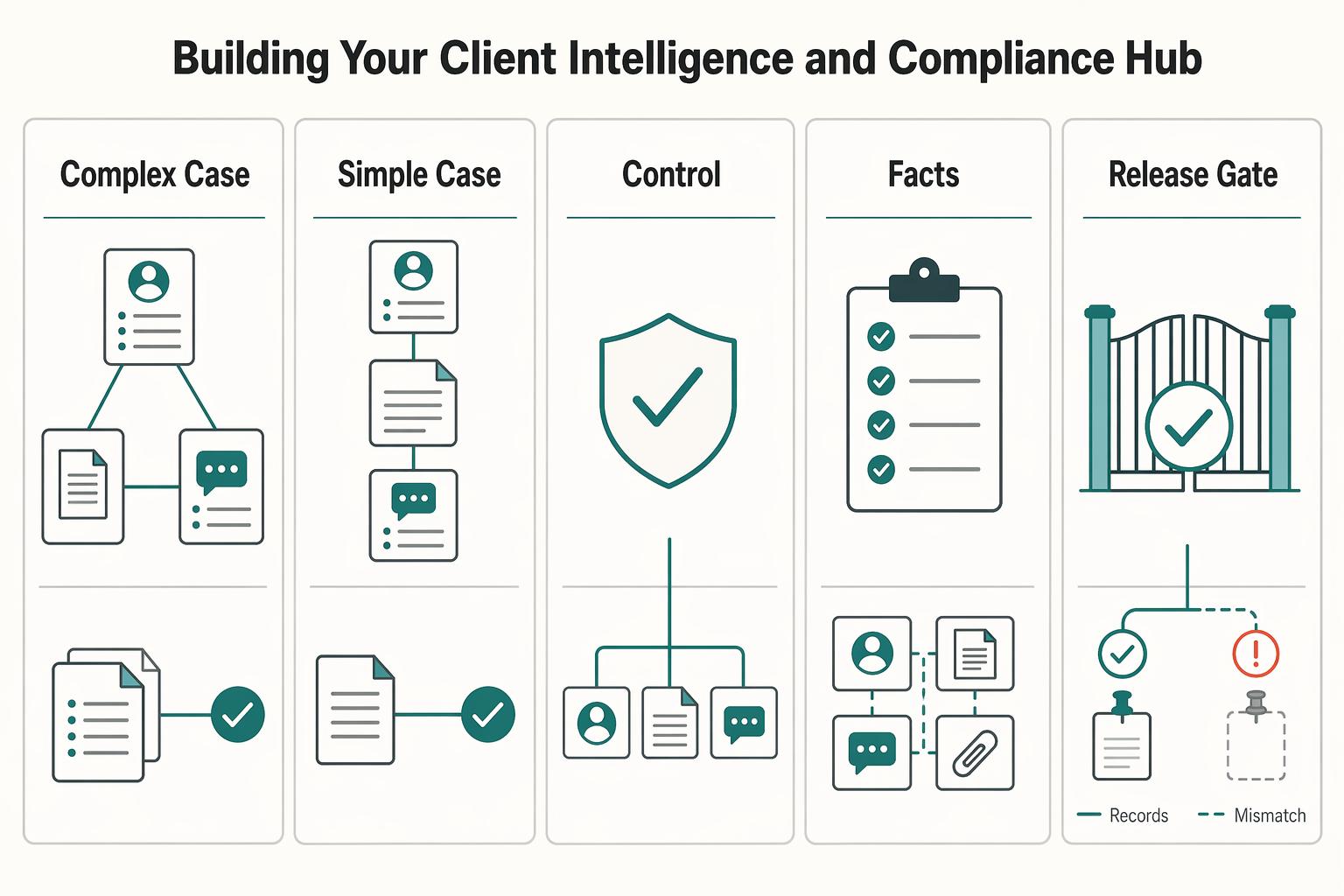
Component 1: Building Your Client Intelligence & Compliance Hub#
Build this hub first. It is your record of truth for client identity, agreements, and decisions. If a detail is not in this hub, treat it as unverified.
| Table | Focus | Key data |
|---|---|---|
| Clients | minimum-data standard | legal entity you invoice; billing and tax profile; authorized signer; current relationship status |
| Contracts | simple compliance workflow | contract type; current version; signature status; effective/renewal tracking; notice tracking; consistent file naming |
| Communications Log | dispute-control timeline | material decisions; scope changes; approvals; blockers; owner and next action |
Keep three linked tables: Clients, Contracts, and Communications Log.
In Clients, use a minimum-data standard instead of a catch-all list. Capture the legal entity you invoice, billing and tax profile, authorized signer, and current relationship status. If you work across jurisdictions, keep jurisdiction-specific fields unresolved until the applicable compliance requirements are verified from an approved internal policy or source record.
In Contracts, run a simple compliance workflow: contract type, current version, signature status, effective/renewal tracking, notice tracking, and consistent file naming. A practical convention is ClientName_ContractType_v3_YYYY-MM-DD.pdf. Keep only the active signed file marked as current. If legal specifics are required, leave the field unresolved until the current requirement is confirmed from an approved source record.
In Communications Log, record material decisions, scope changes, approvals, and blockers with owner and next action. This is your dispute-control timeline: a thread you can review when scope or invoicing questions come up.
| Checkpoint | No hub process | Hub process |
|---|---|---|
| Auditability | Facts are split across inboxes, calls, and files | Client, contract, and decision records are linked |
| Scope-control clarity | Changes are discussed but not anchored | Scope changes and approvals are logged and attributable |
| Invoicing readiness | Terms must be reconstructed before billing | Billing profile, active agreement, and approvals are visible |
Set this up first:
- create and link
Clients,Contracts, andCommunications Log - lock the minimum required fields in
Clients - require one active signed contract record for each live engagement
- log each material approval or scope change with owner and next action
For a step-by-step walkthrough, see Choosing Airtable Interfaces for Client Portals Without Access Risk.
Component 2: Engineering The Revenue Engine That Drives Profitability#
Use this component to answer two questions quickly: what cash is likely to arrive, and which services are worth more selling effort. Keep the flow as Opportunities -> Services -> Clients so every forecast is tied to real work and a real relationship.
In Opportunities, assign one owner to each live deal, even if that is you. That owner updates probability, close timing, and next step on a defined cadence so deals do not drift.
Forecasting views that support different decisions#
Use three views from the same Opportunities data. For the middle view, use your own internal Weighted Forecast convention, for example Potential Value * Probability, and treat it as a planning method, not a universal rule.
| View | What it includes | Best used for | Red flag |
|---|---|---|---|
| Potential total | Sum of all open Potential Value | Funnel sizing and target setting | Can look strong even if weak deals stay open too long |
| Weighted forecast | Open deals adjusted by your Probability field | Near-term cash planning and priority setting | Misleading if probability updates are stale |
| Closed-won actuals | Finalized revenue from won work only | Historical performance review | Inflated if duplicates or draft amounts are included |
Keep probability hygiene explicit:
- define who owns updates for each open opportunity
- define when probability must be reviewed, for example after a meaningful buyer interaction or stage review
- define what qualifies as a real stage change, and require a dated note that explains why
If your team has business-specific stage evidence rules, document them only after the criteria are verified from the CRM workflow or an approved source record.
Use Services to decide what to sell more of#
Opportunities tell you what may close; Services tell you what is worth scaling. Review won deals by service for three signals: service mix, a margin proxy, and sales velocity.
| Signal | Definition | How to review |
|---|---|---|
| Service mix | which services drive most won revenue | review won deals by service |
| Margin proxy | your internal profitability signal | compare sold amount versus delivery effort |
| Sales velocity | how quickly a service moves from active opportunity to closed-won | review won deals by service |
Keep these definitions explicit in your base before you act:
Service mix: which services drive most won revenueMargin proxy: your internal profitability signal (for example, sold amount versus delivery effort)Sales velocity: how quickly a service moves from active opportunity to closed-won
If margin or sales-velocity logic is still undefined, mark those fields as unresolved and verify the exact rules from internal finance policy or the approved CRM workflow before using them for decisions.
Close the loop in Clients with a CLV-style rollup, but only trust it when data quality is strict:
- include only finalized revenue records
- keep statuses unambiguous, for example
Open,Closed Won,Closed Lost,Duplicate/Merged - run duplicate-opportunity checks before reading trend lines
- verify the finance-approved revenue inclusion rule from internal finance policy before using CLV-style rollups
We covered this in detail in Using Airtable for Freelance Project Management That Stays Reliable.
Component 3: Running the Delivery System From One Project Record#
Your delivery system should start from one project record, not memory. Use [Projects] as the control point between what was sold, what was agreed, and what is being delivered so scope or timing issues surface early.
A practical setup is to link each project to Client, the source Opportunity, and the governing Contract. Treat each link as a control check:
Client: who needs updates, approvals, and decisionsOpportunity: what was originally sold and promisedContract: what is in scope when new requests appear
Build the project record like an execution brief#
Treat each project record as a living charter: purpose, goals, scope, stakeholders, and key details. Once approved, it becomes the base for the full project plan and helps prevent the common failure pattern of unclear goals or milestones.
| Field | What it tracks |
|---|---|
| Lifecycle Status | Onboarding, Active, Awaiting Feedback, Blocked, Complete |
| Milestone Dates | kickoff, review, approval, go-live, handoff |
| Decision Owner | who can approve changes or unblock work |
| Dependency Flag | waiting on assets, access, content, or client review |
| Risk / Escalation Notes | with a link to the latest client communication |
Keep these fields visible in your main grid so you can assess delivery health quickly:
Lifecycle Status(for example: Onboarding, Active, Awaiting Feedback, Blocked, Complete)Milestone Dates(kickoff, review, approval, go-live, handoff)Decision Owner(who can approve changes or unblock work)Dependency Flag(waiting on assets, access, content, or client review)Risk / Escalation Notes(with a link to the latest client communication)
If status or a milestone changes, log the reason in the record and link the dated note. Keep the current truth in Airtable so visibility stays shared as work evolves.
Match the view to the decision#
Use different views for different decisions instead of forcing one view to do everything.
| View | Best for | What to show | Red flag |
|---|---|---|---|
| Grid | Internal coordination and data hygiene | status, owner, dependencies, risk notes, linked contract | Too dense for stakeholder updates |
| Timeline/Gantt-style | Sequencing and handoffs | milestone dates, overlaps, blockers, handoff timing | Looks precise when dates are still guesses |
| Client-facing roadmap | External progress communication | major phases, approvals, next milestone, current status | Too much task-level detail creates confusion |
Turn onboarding into a repeatable handoff#
Set a clear trigger for onboarding, then run the same handoff every time. For example: when Project Status = Onboarding and the project has a linked client, contract, and decision owner, run your configured automation to create onboarding tasks, assign owners, and set due dates from kickoff.
Before work starts, confirm in the project record:
- signed contract is attached
- kickoff is scheduled
- required inputs are requested or received
If any checkpoint is missing, keep the project in onboarding and flag the dependency. That pause is usually cheaper than starting with unclear scope.
Minimum viable delivery system before moving to FAQs:
- one linked
[Projects]record per active engagement - approved charter details (or equivalent scope summary) in the record
- visible status, milestone, owner, dependency, and risk fields
- one internal planning view and one simplified client-facing roadmap
- onboarding automation with pre-start confirmation checkpoints
You might also find this useful: The Best CRM for Independent Consultants.
Conclusion: Stop Managing Your Business From Memory#
If you build Airtable around linked client records, a clear contract trail, pipeline visibility, and repeatable onboarding, you stop managing your business from memory. The practical shift is simple: you check one place before you act, and your decisions get better.
| Area | Reactive mode | Early mode |
|---|---|---|
| Client records | Details live across notes, inboxes, and old spreadsheets | Each client has one record with linked communications, opportunities, contracts, and projects |
| Contract trail | You hunt for the latest signed file when a question comes up | Signed contracts are centralized, so scope and terms are easier to verify before responding |
| Pipeline visibility | Revenue depends on gut feel and scattered follow-ups | You can use a Weighted Forecast based on Potential Value * Probability to see likely income more realistically |
| Onboarding consistency | New projects start differently each time, depending on memory | A standardized onboarding checklist automation gives each project the same starting steps |
| Delivery handoffs | Requests get passed around informally and context gets lost | Projects can stay linked to original client and deal context, so handoffs are less likely to lose context |
That creates resilience in a practical way. When you keep a single source of truth for client relationships, including signed contracts and key communications, you have something to check before a disagreement turns into a scramble. A good verification step is to spot-check a few active client records and confirm each one links to the current contract, latest important communication, and live project. If those links are missing, you are still exposed to the same old failure modes: missed renewals and untracked requests that become scope creep.
It also supports profitability because your pipeline is less of a guess. A weighted view of opportunities will not make revenue appear, but it does give you a more realistic view of likely income and earlier signal when the month looks thin. That is a better basis for deciding whether to pursue more work, push renewals, or protect delivery capacity.
Then there is professionalism. The win is not polish for its own sake. It is the habit of using the same onboarding trigger and linked client context every time. That way, client experience does not depend on what you happened to remember on a busy day.
Your next move is straightforward: review your linked hubs, fix one weak workflow that still depends on memory, and confirm who owns each key field and automation before you add anything new.
If you are still deciding whether Airtable is the right CRM for your consulting practice, compare it with other options in The Best CRMs for Freelancers to Manage Client Relationships. If Airtable is staying and your next bottleneck is follow-up rather than structure, read How to Write a Follow-Up Email That Closes the Deal. You do not need a perfect setup to get value here. You need a base that gives you clearer records, fewer blind spots, and better calls day to day.
Frequently Asked Questions
Is Airtable a true CRM for a solo consultant?
Yes, if you need linked records across contacts, opportunities, contracts, and projects instead of simple deal tracking. Airtable fits when you want one place for sales and delivery context and can shape the base around your actual client process. Pair it with specialized tools for outbound email, call reminders, or SMS, and plan a move to a dedicated CRM if permissions, reporting workarounds, and exception handling start taking more time than client management.
What are the limitations I should watch first?
Watch schema drift, inconsistent data entry, and weak interface permissions design first. Freeze core tables and field names, use linked records instead of free text for critical relationships, and standardize key status and owner fields. Test interface permissions with a non-admin account before sharing anything client facing, and verify current sync limits before designing around synced bases.
Airtable vs Salesforce for a solo consultant?
This article does not support a definitive Airtable versus Salesforce verdict. It shows Airtable as useful for small databases and notes that some CRM workflows rely on integrations for SMS, calls, and email. It also covers Airtable workflow mapping, linked records, sharing, interface permissions, possible sync friction, and the value of documenting field logic or bringing in an Airtable consultant before the base gets brittle.
Can Airtable automate my client workflow?
Yes, but keep the design simple and reviewable. Some workflows may rely on integrations rather than native Airtable actions, and client-facing steps should keep a human checkpoint. Where the build depends on quotas or plan features, mark that dependency as unresolved until the current limit is verified from Airtable plan documentation or another approved source.
Try a related tool
Researched and edited by the Gruv editorial team. Gruv builds cross-border billing, payouts, and finance-operations software for global businesses.
Sources
Includes 7 external sources outside the trusted-domain allowlist.
- egrove.olemiss.edu/cgi/viewcontent.cgitrusted
- air.tableforums.com/t/airtable-newbie-evaluating-airtable/1152external
- airtable.com/articles/best-project-management-toolsexternal
- airtable.com/pricingexternal
- clickworks.ie/business-glossaryexternal
- clutch.co/developers/airtableexternal
- community.airtable.com/development-apis-11/airtable-as-crm-5053external
- ecosystem.airtable.com/consultantsexternal
Educational content only. Not legal, tax, or financial advice.
Related Posts

Best CRM for Freelancers Who Need Reliable Client Follow-Up
If your client work is solid but your admin lives across email, notes, calendar alerts, and a spreadsheet, your CRM choice will succeed or fail on operations, not features. That is why so much advice on the **best crm for freelancers** misses the real issue. The main risk is not choosing a tool with too few buttons. It is choosing one that looks polished in a demo but still lets follow-ups slip when work gets busy.
How to Write a Follow-Up Email That Closes the Deal
**Run every freelance follow-up email like a mini sales process that turns uncertainty into one clear next step.** As the CEO of a business-of-one, your job is to turn messy inbox threads into clean decisions you can actually plan around.
How to Use Notion as a CRM
Use **notion as a crm** only if you want a setup you can keep current every week, not one that looks good right after setup but then drifts. The real value is not the template or the dashboard. It is whether your client records stay easy to scan, quick to update, and reliable enough to drive follow-ups without guesswork.