
Quick Answer
Start by using the pomodoro technique for freelancers as a daily routing rule: place each task in Product, Operations, or Growth, then run a single-task 25-minute sprint with a 5-minute break. After several cycles, take a longer break and reset. For client work, estimate in focus blocks instead of loose hours so scope changes are easier to explain. Keep a simple log of planned versus completed cycles to spot where interruptions or weak estimates are hurting your week.
How the Timer Loop Works and What Belongs in Each Mode#
If your day keeps getting split between client delivery and admin, you do not have a motivation problem. You have an attention-allocation problem. The point of the pomodoro technique for freelancers is not to become a timer purist. It is to stop letting every task compete for your next 25 minutes.
| Mode | What it covers |
|---|---|
| Product | Work that creates the client deliverable |
| Operations | Upkeep work that keeps recurring admin from leaking into everything else |
| Growth | Work that improves future pipeline, skills, or positioning |
In plain terms, one Pomodoro is 25 minutes of focused work, followed by a 5 minute break. After 3 to 4 cycles, take a longer 15 to 30 minute break. Before you start, do two quick checks. Estimate how many 25 minute cycles the task will need. Then remove obvious distractions before the timer starts, even if that only means putting your phone away and closing chat.
For a solo business owner, that loop matters because your work is mixed by default. Client delivery, admin, and future-building tasks can all feel urgent, so they blend into a reactive day. Sorting work into the three modes above gives each type a lane.
This method is less useful when your work depends on uncontrolled interaction with other people or constant movement. In those cases, use it for the parts you can control. With that limit in mind, the real question is not whether the timer works. It is what kind of work belongs in each mode.
For a step-by-step walkthrough, see A Guide to the '80/20 Rule' (Pareto Principle) for Your Freelance Business.
Mode 1: The "Product" Pomodoro - Defending Your Billable Deep Work#
Protect Product first, because it is your billable output and the work most affected by switching cost, attention residue, and weak time boundaries.
Before each block, tag the task as Product and filter your list to Product-only items. If admin tasks, inbox items, or other client requests stay visible, the timer is measuring distraction instead of protecting focus.
Pick the right block#
Choose the block size by task setup cost, cognitive load, and interruption risk.
| Block | When to use | Pattern | Example tasks |
|---|---|---|---|
| Short | The task is clear and interruption risk is high | One 25-minute interval | Defined revision pass; known bug fix; targeted research pull |
| Medium | Getting into the work is the hard part | Two connected 25-minute intervals with a 5-minute break between them | Drafting; design exploration; analysis |
| Long | Re-entry is expensive | Three to four consecutive 25-minute cycles with 5-minute breaks, then a 15 to 30-minute break after the fourth cycle | Complex reports; technical problem-solving; model building |
Use a short block when the task is clear and interruption risk is high: a defined revision pass, a known bug fix, or a targeted research pull.
Use a medium block when getting into the work is the hard part. Two connected 25-minute intervals on one task, with the standard 5-minute break between them, work well for drafting, design exploration, and analysis.
Use a long block when re-entry is expensive. Reserve three to four consecutive 25-minute cycles on one deliverable, keep 5-minute breaks, then take a 15 to 30-minute break after the fourth cycle. This is useful for dense tasks like complex reports, technical problem-solving, or model building.
If pings and messages keep breaking Product time, treat that as a container problem, not a stamina problem. Without a clear timebox, work expands and attention drifts.
Protect re-entry on breaks#
Breaks should protect your restart, not scatter your attention.
Use a continue-context break when the task is complex and re-entry is costly.
- Stand up or get water.
- Leave a one-line next-step note.
- Quickly review the outline, mockup, or work-in-progress you just touched.
- Sketch one thought on paper.
Use a break-context pause when quality is dropping and you need a reset.
- Walk or stretch.
- Look away from the screen.
- Breathe.
- Get a snack.
Avoid email, chat, client portals, or social feeds during short breaks. That new input can pull your attention away from the task you are about to resume.
Batch client work and scope decisions#
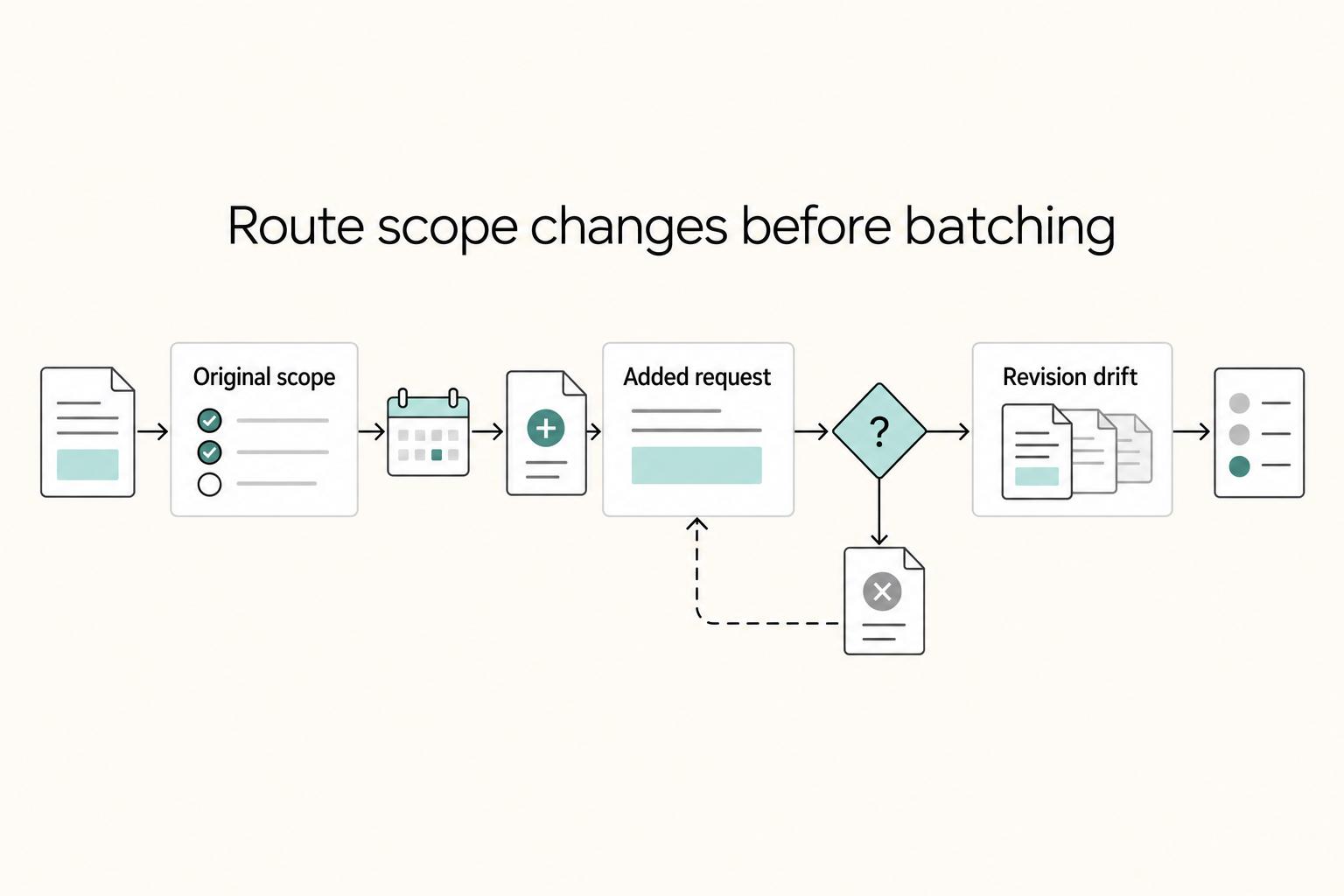
In multi-client weeks, route Product work by client and mental mode, not only urgency. Keep each deep-work block single-client, run a separate async triage window for messages later, and send overflow either to the next Product block or to a scope conversation.
Task switching can reportedly consume up to 40% of productive time in some settings, so reducing switches is a practical protection for billable work.
For scope changes, focus-block estimates can be easier to manage than loose hour language because they match how you do the work.
| Situation | Hour-based estimate | Focus-block estimate | Reusable client line |
|---|---|---|---|
| Original scope | "About 6 hours" | "Planned as 12 focus blocks" | "The current scope is budgeted for the focus-block count in the approved scope." |
| Added request | "It should not take too long" | Additional block count from your project records | "Happy to include that. The additional block count needs project-record verification before we adjust budget or timeline." |
| Revision drift | "We are spending more time than expected" | Completed and planned block counts from your project records | "We are now beyond the original block estimate. Let's decide what to keep, move, or re-scope." |
Block estimates will not make every project perfectly predictable. They do give you a clearer way to plan, track, and explain where the work is going. If you want a related read, see A Guide to 'Deep Work' for Freelancers.
Mode 2: The "Operations" Pomodoro - Taming Your Business's "Admin Tax"#
Use your Operations Pomodoro as a recurring control loop: batch admin so it does not spill back into billable focus. This is your scheduled block to handle the business tasks that keep work moving, records current, and systems usable.
| Bucket | Example tasks |
|---|---|
| Cash flow | Invoice follow-up; expense logging; payment checks |
| Contracts | Proposal terms; signature follow-ups; renewal reviews |
| Tax and compliance | Filing prep; record checks; items that need rule verification |
| Platform maintenance | Profile updates; portfolio fixes; booking links; software housekeeping |
Do not treat Operations as a catch-all. Before each session, sort tasks into four buckets so decisions are faster:
- Cash flow: invoice follow-up, expense logging, payment checks
- Contracts: proposal terms, signature follow-ups, renewal reviews
- Tax and compliance: filing prep, record checks, items that need rule verification
- Platform maintenance: profile updates, portfolio fixes, booking links, software housekeeping
Run a pre-flight before the timer starts#
A good Operations block is set up before the timer starts. Run this sequence every time:
- Capture: pull every admin item from email flags, notes, client portals, payment tools, and loose reminders.
- Prioritize: rank by risk first, then due date. Put payment blockers, signed-agreement items, and verification-required tasks at the top.
- Rewrite: convert each item into a clear done-state action.
Use done-state wording like:
- "Reconcile Q1 expense folder and mark missing receipts."
- "Replace outdated services page link and test contact form."
Ambiguous admin expands. Clear admin closes. Leave visible checkpoints so the next step is obvious at a glance.
| Handling style | Focus quality pattern | Error-risk pattern | Follow-through pattern |
|---|---|---|---|
| Reactive admin | Deep work gets interrupted by incoming reminders | More room for misses from partial context | Easy tasks get done; messy tasks drift |
| Batched Operations block | Admin stays contained outside Product blocks | Fewer context jumps while reviewing related items together | Finite list and clear end state improve completion |
| No defined Operations habit | Product and Growth both get interrupted | Verification-dependent items are easiest to miss | Work tends to pile up into catch-up bursts |
Use a good-enough standard#
Operations work does not need perfection; it needs a clear, checkable finish line. For most items, "good enough" means sent, filed, logged, updated, or queued for review, with a verification gate when needed, such as "Confirm account number," "Attach final receipt," or "Verify the current threshold from source records before use."
The usual failure mode is irregular cadence, not effort. Keep this loop steady, and your Product blocks stay cleaner while Growth time is easier to protect during the week. For more on focus protection during work blocks, see The Best Apps for Blocking Distracting Websites.
Mode 3: The "Growth" Pomodoro - Investing in Your Future#
Growth Pomodoros are where you work on your business, not just in it. Keep this mode separate from Product and Operations so future-facing work does not get pushed aside when delivery gets busy.
Use a flexible cadence you can sustain#
Do not force a rigid weekly quota. Use a simple loop instead: pick one growth priority in weekly planning, protect growth blocks when capacity allows, and run a short review at week's end to decide what to continue, pause, or change.
Start with a 25-minute block. Before the timer starts, choose one task, open only the materials you need, and remove unrelated tabs or messages. If you stack multiple blocks, keep a five-minute break between blocks and a 30-minute break after four Pomodoros.
Treat preparation as part of the work. "Improve visibility" is too vague; "draft one outreach message for a defined client segment" is concrete and finishable in a block.
Build a small growth portfolio#
Use four practical growth pillars so your effort stays balanced: capability building, demand generation, pipeline development, and offer design. The goal is not to do all four every week; it is to make each block produce a visible output.
| Growth goal | Best task format | Expected business effect | Evidence to track |
|---|---|---|---|
| Capability building | One 25-minute learning block tied to one applied output | Intended to improve delivery or pricing decisions | Lesson/note completed, one asset updated, one applied next step logged |
| Demand generation | Batched visibility task in one block | Intended to increase discoverability and clarity of your work | Draft published or queued, page/profile updated, outreach/referral ask sent |
| Pipeline development | Batched prospecting or follow-up block | Intended to create or advance active conversations | Prospect list updated, messages sent, replies logged, next follow-up date set |
| Offer design | One focused block for thinking plus drafting | Intended to make services easier to explain and buy | Offer draft updated, scope/pricing assumptions noted, objections captured, current threshold confirmed from source records where needed |
Keep a visible Pomodoro tracking chart and mark each finished interval. Next to each mark, log the exact output and where it lives so progress stays tied to assets, not just effort.
Use one block for strategic thinking#
Reserve some growth blocks for decisions, not execution. Run a short process: choose one decision, write your assumptions in plain language, draft one next action to test them, and park follow-ups for the next growth block.
Use this guardrail to protect delivery commitments: if a client deliverable is unclear, at risk, or waiting on your review, handle that first and limit Growth to planning or review. Any hard rule for when Growth can run should be verified from your source records before use. Related: The Best Personal Productivity Systems for Freelancers (GTD).
Conclusion: Decide What Gets Protected, Then Run It for a Week#
What matters now is ownership. If you use the method well, you are not just setting timers. You are deciding what gets protected in your business, and in what order.
Treat your work in three modes if that framing helps. Product blocks give client delivery a clean, uninterrupted lane. Operations blocks make room for invoices, follow-ups, file cleanup, and the admin that keeps work moving. Growth blocks reserve time for outreach, learning, and planning before those needs turn urgent. None of that happens by accident if you wait for a free hour to appear.
The useful next step is simple and concrete. Before the day starts:
- Write a short checklist.
- Assign each task to Product, Operations, or Growth.
- Estimate how many 25 minute cycles each task needs.
- Remove obvious distractions before each block.
- Run the 25/5 cycle and keep the task single-purpose.
- Track completed pomodoros so you can see where your time actually went.
That tracking step is the one many people skip, and it is often where the method becomes practical. If you thought a task needed one cycle and it took three, that is planning data for the next week. If you keep breaking a block to answer messages, the issue is not the timer. It is interruption control. If your day is full of constant movement or uncontrolled interactions, do not force this onto every hour. Use it where focused work is actually possible.
The payoff is not hype. For many people, it is a clearer view of capacity and a steadier rhythm for deep-focus work, but it will not fit every role or every day. Run it for a week, review what held and what broke, then adjust the next week's blocks accordingly.
If you want a deeper dive, read How to Manage Your Time Effectively as a Freelancer. Want to talk it through? Talk to Gruv.
Frequently Asked Questions
How should you use this for deep work?
If distraction is the real problem, start smaller, not longer. Use one focus block for one clearly named task, set a timer for 25 minutes, take the 5 minute break, and repeat. If 25 minutes is still too long for your current constraints, shorten it to 20 minutes, but keep the mono-tasking rule. A practical checkpoint is prep: open the exact file, note the next action, and remove chat and email before you start. A common failure mode is breaking the block with “quick checks,” which defeats the point even if the timer is still running.
Does it work for admin?
It can help, especially when admin keeps leaking into billable time. Batch similar admin tasks into one block, such as invoices only, expense review only, or contract follow-ups only, instead of mixing five small chores. You may get more from the block if you collect the needed documents first. A common trap is polishing low-value details because the timer makes the task feel urgent.
How do you handle multiple clients?
Keep each focus block to one task and one timer, even when you are juggling clients. If you switch clients mid-block, concentration usually drops and the finish point gets less clear. A practical rule to try: if a client message arrives during another client’s block, capture it and answer in the next communication window unless it is truly urgent. For more on that juggling act, see How to Manage Multiple Freelance Projects Without Losing Your Mind.
What kind of timer or tracker should you choose?
Start with the lightest tool you will actually use. A basic phone timer can be enough, and a dedicated app is optional. | Option | Tracking depth | Integrations | Reporting clarity | Friction | |---|---|---|---|---| | Phone timer | Minimal | None | Minimal | Very low | | Dedicated timer app | May include session history | Varies | Varies | Low | | Tracker linked to tasks or projects | May provide deeper logs by client or task | Varies | Varies | Medium |
Can this help with scope creep?
It can help as an internal capacity check, not as proof by itself. If a request adds work, pause, compare it against the original brief, and reply with a written change in deliverable, timeline, and budget. If impact is still unclear, say you need to verify before committing. Keep the evidence pack simple: original scope, current task list, and the new request in writing. The failure mode is saying yes on a call before you have checked what the added work displaces.
Try a related tool
Researched and edited by the Gruv editorial team. Gruv builds cross-border billing, payouts, and finance-operations software for global businesses.
Sources
Includes 7 external sources outside the trusted-domain allowlist.
- pmc.ncbi.nlm.nih.gov/articles/PMC6908507trusted
- chriswinfield.com/40-pomodoro-workweekexternal
- creators.spotify.com/pod/profile/the-programming-podcast/episodes...external
- dontpanicmgmt.com/pomodoro-technique-productivityexternal
- dthompsondev.com/podcastexternal
- engineeringmanagementinstitute.org/podcastexternal
- hubstaff.com/blog/productivity-techniquesexternal
- instagram.com/p/DVJI07hCWrRexternal
Educational content only. Not legal, tax, or financial advice.
Related Posts
How to Manage Your Time Effectively as a Freelancer
Most freelancers struggle not because they work too few hours, but because they misallocate the hours they have—treating time as an infinite resource rather than a finite business asset with a real cost per unit. The solution is a three-layer operating system: a Time Budget Framework that commits hours to four categories before any client work is booked, a Weekly Operating Template that assigns those categories to specific calendar windows, and a monthly Admin Audit Checklist that reconciles invoicing, bookkeeping, and compliance records. Multi-client orchestration requires a WIP limit, dedicated client windows, and a capacity decision rule run before accepting new engagements. Together, these systems replace reactive decision-making with a repeatable structure that keeps delivery quality consistent, records audit-ready, and the freelance practice operationally durable.

How to Manage Multiple Freelance Projects Without Losing Your Mind
If this feels hard, the issue is often not your craft. It is a lack of operating control: too many open commitments, a calendar filled with delivery blocks, an inbox setting priorities, and tasks that feel urgent because no clear next action exists.

The Best Productivity Systems for Freelancers: GTD, PARA, and Second Brain
**Treat productivity as a system you can run under load, not a vibe you summon on demand.** Client work is messy by default: requests scattered across Gmail and Slack, scope shifting midstream, and the annoying truth that "done" does not always mean "paid."