
Quick Answer
A digital shoebox scramble is the last-minute rush to rebuild scattered financial records when a tax preparer, lender, or tax authority needs clear numbers and supporting documents. It slows tax prep, makes proof-of-income requests harder, and can leave you reconstructing history for an audit. The fix is to build one record vault first, then add automation and regular monitoring.
The 'Digital Shoebox' Scramble: How It Erodes Profit and Peace of Mind#
If your financial records are split across email, cloud folders, payment apps, downloads, and bank portals, the scramble may already be starting. The digital shoebox scramble is not a formal tax term. It is what happens when fragmented records collide with a real deadline.
| Situation | Trigger | What is needed | Constraint or note |
|---|---|---|---|
| Tax prep | Your preparer asks for annual income, expenses, and support | Totals and documentation | The burden of proof is on you |
| Proof of income | A lender asks you to verify finances | Documents showing income source and down payment funds | More documents may be requested after the first submission |
| Audit or examination | An IRS records request | Documents supporting reported income, credits, or deductions | The request should not require creating new records |
The problem is not that you use a spreadsheet or more than one tool. The IRS allows any recordkeeping system that clearly shows income and expenses. The real question is whether you can produce clear numbers and matching support quickly and consistently. In practice, three common stress tests expose the gap:
Tax prep: Your preparer asks for annual income, expenses, and support. You need both totals and documentation because the burden of proof is on you. When records are scattered, the link between return figures and source documents can break.
Proof of income: A lender asks you to verify finances. Lenders generally must verify income source and down payment funds, and they may request more documents after the first submission. If you own 25% or more of a business, Fannie Mae treats you as self-employed. Lenders generally look for a two-year earnings history, with possible exceptions. If your files are scattered, proving that continuity gets harder.
Audit or examination: An IRS records request arrives. You must produce documents supporting reported income, credits, or deductions, and the request should not require creating new records. With scattered files, you can end up reconstructing history instead of presenting it.
| Area | Scramble mode | System mode |
|---|---|---|
| Operational drag | You search across tools to answer routine requests, and tax prep becomes document recovery. | Records already show income and expenses clearly, so prep is review, not reconstruction. |
| Compliance exposure | You cannot quickly tie reported items to source documents. Foreign-account tracking can also be missed when aggregate value crosses the filing threshold during the year. | Statements, receipts, and filed forms are stored together, so you can review thresholds and filing triggers from a complete record set. |
| Decision fatigue | Every filing, application, or estimate feels uncertain because you are relying on memory. | You can verify what exists, see what is missing, and act from evidence. |
Retention pressure makes this practical, not theoretical. IRS guidance is often 3 years, and can be 6 years when unreported income is more than 25% of gross income shown on the return.
Quick self-check: if a preparer, lender, or tax authority asked today, could you produce recent income records, supporting expenses, account statements, and signed agreements without rebuilding the story from scratch? If not, Step 1 is next: build the vault first. Related: Hiring Your First Subcontractor: Legal and Financial Steps.
Step 1: Ditch the Spreadsheet, Build a Vault#
Use your spreadsheet as a summary, not as your only record. If you need records other people can trust under pressure, you need traceability. Each number should map back to a supporting file without a search marathon.
Your vault is that system of record: one place where receipts and related support documents live together. The goal is not a perfect tool. It is a consistent setup you will actually follow, so tax filing, audit prep, and day-to-day decisions rest on evidence instead of memory.
What belongs in the vault#
Start with a practical checklist based on the documents you reach for most often:
| Document type | Examples or detail |
|---|---|
| Receipts | Digital copies when possible |
| Transaction support | Invoices, bills, and proof of purchase |
| Proof-of-payment records | Card confirmations, remittance emails, and statement lines matched to invoices |
| Tax-filing support documents | Documents you need to retrieve quickly |
| Return and warranty support documents | Documents tied to purchases |
Spreadsheet workflow vs vault workflow#
The difference is not cosmetic. It is whether your summary and your proof stay connected when someone asks questions.
| Task | Spreadsheet workflow | Vault workflow |
|---|---|---|
| Monthly tracking | Totals are updated, but support can stay scattered | Summary and support stay connected in one place |
| Document traceability | Amount is visible, source file may be hard to retrieve quickly | Amount points to the supporting document |
| Filing or audit readiness | You assemble documents at deadline | Documents are already assembled and retrievable |
| Higher receipt volume | Manual entry and email forwarding get brittle | After more than a handful of receipts, scanning apps usually pull ahead |
Use the 3C method#
A simple operating rule can work better than a clever folder tree you abandon after two weeks.
Consolidate (owner: one person). If you are solo, that owner is you. Pull records out of email, cloud folders, payment apps, downloads, and bank portals into the vault.
Categorize (owner: same person, one rule set). Use a simple, consistent pattern that mirrors how you answer real questions, so retrieval is predictable.
Control (cadence: at capture + regular check). File documents when they arrive, then run a short intake sweep for stragglers in email, downloads, and payment apps. This helps keep the scramble from rebuilding itself.
Once this vault is stable, you can automate with more confidence in Step 2. You might also find this useful: What is a 'Digital Shoebox' and How to Organize It for Tax Time.
Step 2: Escape the 'Admin Tax' with Automation#
Automate recurring admin only after your vault is stable. Otherwise, you just make disorder move faster. The benefit is simple: your weekly work shifts from retyping to reviewing.
Start with the three highest-frequency triggers that usually create the most avoidable admin:
- Expense capture. Trigger: a receipt is uploaded or emailed after purchase. Tools like QuickBooks can ingest the file, extract details, and create a transaction for review. Your job is verification, and you keep the source receipt with the record for tax support.
- Invoicing. Trigger: a signed engagement, milestone, or recurring cycle (
weekly,monthly, orannually). The system should generate from saved client and service data, then block sending if required fields are missing. - Payment reminders. Trigger: an invoice reaches due or overdue status. Xero can send automatic reminders, and Stripe can email customers when a one-off invoice remains unpaid.
| Task | Manual workflow | Automated workflow | Verification checkpoint |
|---|---|---|---|
| Receipt capture | You enter vendor/date/amount manually | Data lands in a review queue after upload or email | Confirm extracted fields match receipt and payment record |
| Invoicing | You copy and edit an old invoice | Draft is generated from saved billing data | Confirm tax treatment note, client fields, and sequential numbering as required |
| Reminders | You follow up from memory | Due or overdue emails send by rule | Confirm contact email exists and invoice status is eligible for reminders |
For cross-border invoicing, field completeness is the real control. EU VAT rules generally require invoices for most B2B supplies. Required particulars can include both parties' names and addresses, the customer VAT ID, and reverse-charge wording where applicable (Article 226). HMRC guidance for full VAT invoices also includes a unique sequential number. This is not legal advice. As an operating rule, if your workflow cannot enforce required fields and tax notes, treat it as draft-only, not autopilot.
Use a simple adoption loop:
- Pick recurring tasks first.
- Define each trigger and automation rule.
- Set exception handling (for example, split receipts, disputed invoices, missing VAT IDs).
- Run a monthly check on sample receipts, one recurring invoice, and one overdue reminder, and confirm supporting files are still in your vault.
Automation can reduce manual handling, but it does not replace evidence. Keep the receipts, invoices, and payment records that support your income and deductions, especially if you ever need to answer a tax notice or examination. We covered this in detail in The Best Digital Journaling Apps for Freelancers.
Step 3: From Reactive Records to Proactive Risk Mitigation#
Once records are flowing reliably, your vault should stop being passive storage. The real upgrade is using it as an early-warning tool, so you can catch filing risk, sourcing issues, and cash pressure while there is still time to act.
When invoices, bank activity, travel logs, and tax records are connected, they stop being dead files and start answering practical questions early.
Monitor cash flow, residency, and reporting scope#
Keep this simple and focused. Three monitoring lanes usually do the job:
| Monitoring lane | What to track | What it helps catch |
|---|---|---|
| Cash-flow signals | Invoices sent versus payments received, client concentration, and whether tax cash stays separate from operating cash | Cash pressure |
| Residency and sourcing | Days and work location if California is relevant | Sourcing issues |
| Reporting-scope monitoring | Which rule may apply, which data feeds it, and when you will review it before deadlines | Filing risk |
Turn records into defensible evidence#
Monitoring only works if each alert is backed by documents. For California sourcing, keep calendar entries, travel confirmations, engagement letters, invoices, and a log of where work was performed. If your workday ratio changes, you should be able to explain it with records.
For foreign account reporting, keep statements, account-opening records, and documents showing ownership or signature authority. FinCEN's notice language is scoped to certain U.S. individuals with signature authority but no financial interest in one or more foreign financial accounts. So signature authority belongs in your monitoring lane until you confirm its effect on your filing position.
FBAR monitoring without guesswork#
FBAR means Report of Foreign Bank and Financial Accounts. The practical process is straightforward: maintain a complete account inventory, review it on a schedule, and confirm which accounts and roles are in scope for your filing position. Do not treat accounts in isolation. Review all verified relevant accounts together, including ownership and signature-authority cases.
A common failure is misreading the deadline. FinCEN issued Notice FIN-2024-NTC7 on November 20, 2024, extending the due date to April 15, 2027 for certain individuals in the signature-authority notice context for the 2025 calendar year. For other individuals with an FBAR obligation, the due date remains April 15, 2026. If you treat the extension as universal, you can miss your actual deadline.
Another failure mode is assuming submitted equals complete. In BSA E-Filing, missing required FBAR XML elements can cause rejection, so your checkpoint is acceptance, not just preparation.
| Account owner | Institution | Account type | Currency | Monitoring status |
|---|---|---|---|---|
| [Your legal name] | [Institution name] | Personal checking | [USD/EUR/etc.] | Included in scope |
| [Your business entity] | [Institution name] | Business operating | [USD/EUR/etc.] | Included in scope |
| Entity where you hold signature authority | [Institution name] | Operating or treasury | [Currency] | [Signature-authority scope verified] |
| [Joint owner names] | [Institution name] | Savings or brokerage | [Currency] | [Ownership documents verified] |
Set an early-warning policy tied to applicable deadlines and scope checks: define your review cadence, define who confirms scope, and define what happens when the monitor flags risk. Then work through the edge cases: joint accounts, mixed-residency years, and signature authority without ownership.
If you want a deeper dive, read GDPR for Freelancers: A Step-by-Step Compliance Checklist for EU Clients.
Use a single weekly check-in to keep travel days current and reduce last-minute residency surprises: Track your days in one place.
Centralize, automate, and integrate your records#
If your records are still split across a spreadsheet, email, apps, and a basic QuickBooks setup, treat that as a system risk, not just a small-organization issue. DIY bookkeeping can work in early stages, but this is often the point where it starts shifting from a workable habit to a business liability.
You should also assume the cost is bigger than the subscription price alone. A $50 per month tool can still look cheaper than outside help. But the hidden cost of "free" bookkeeping is your time, late-night stress, and uncertainty about whether your numbers are accurate enough to act on.
Centralization#
Centralization comes first because everything else depends on it. Set one record home and make it your default for bookkeeping records and supporting documents. This can reduce the friction of searching across tools and make one decision easier: whether a number is ready to use.
Use one weekly test: can you trace a transaction or reporting position back to support without checking multiple places? If not, you may already be outgrowing your current setup.
Automation#
Automation helps once the records have a reliable home. Use it to reduce repetitive admin, then review exceptions on purpose instead of reconstructing everything later.
Your guardrail is simple: an imported entry without clear support is still unresolved. Automation can reduce workload, but it does not replace evidence.
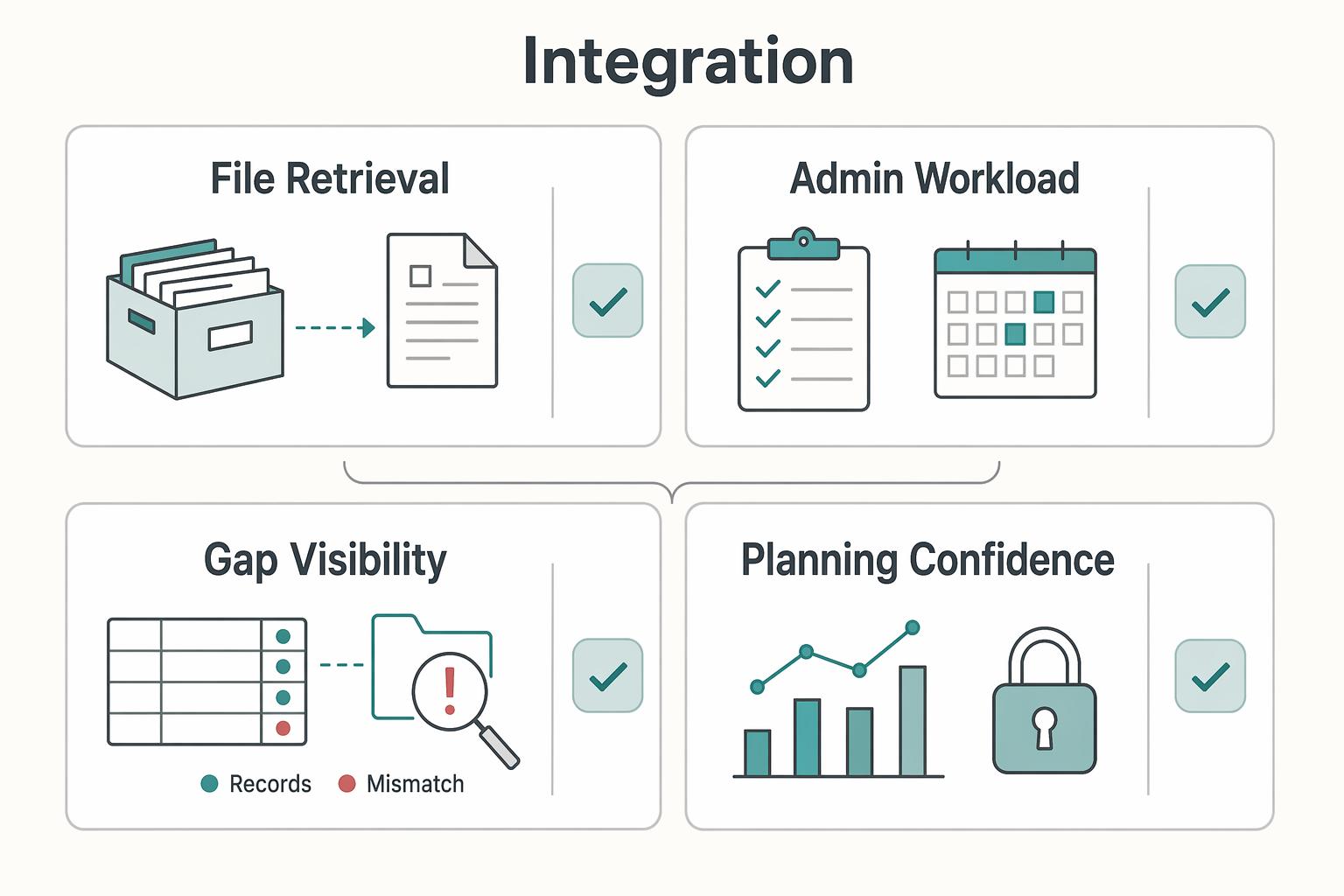
Integration#
Integration helps turn organization into control. Link your books, record home, and review routine so you can spot issues before deadlines. Used consistently, this can make gaps easier to see and planning decisions easier to review when you need to adjust spending, close record gaps, or get advice early.
| Area | Reactive | System-based |
|---|---|---|
| File retrieval | Search across tools | Pull from one record home |
| Admin workload | Rebuild history near deadlines | Capture and review as work happens |
| Gap visibility | Discover gaps late | Review gaps during the month |
| Planning confidence | Decide with uncertain numbers | Decide from reviewed records |
Use this weekly transition checklist:
- Centralize: route new records into one place as they are created.
- Automate: run capture and reminder workflows, then clear exceptions.
- Integrate: do a short weekly review so open issues are handled before deadlines.
For a step-by-step walkthrough, see How to Create a System for Naming and Organizing Your Digital Files. Before your next filing cycle, choose one practical upgrade and implement it this week from the Gruv tools library.
Frequently Asked Questions
What is a digital shoebox scramble?
A digital shoebox scramble is the last-minute rush to pull scattered records into one coherent story when a deadline is close. You end up searching email, bank downloads, apps, folders, and side notes instead of pulling from one reliable record home. That reconstruction burns time and raises error risk.
How should you organize your documents for cross-border taxes and compliance?
Use one secure record home and organize around proof, not by app. Keep revenue records, bank and fintech statements, travel records and calendar history, expense receipts and vendor bills, foreign tax receipts, signed contracts, and tax status forms when applicable. The test is simple: you should be able to find each document quickly and use it to support your position.
What is the most reliable way to track days for residency or travel rules?
The most reliable method is the one you can maintain consistently and verify against your records. A spreadsheet can work but has more manual-entry risk unless controls are strict, while a dedicated tracker can reduce manual-entry risk and often includes built-in history. If FEIE or Schengen exposure is relevant, your log should be checkable against source records and current-rule tools before filing decisions.
How do you avoid FBAR mistakes without overcomplicating it?
Use one operating rule: monitor, verify, document. Keep a complete foreign-account inventory, review accounts as one combined picture, confirm whether each account is in scope because of financial interest or signature authority, and compare that result to the applicable filing trigger. Keep the statements and account records that support every include or exclude decision.
What should you know about FEIE before relying on it?
Treat FEIE as a position you verify, not an assumption. You claim it on Form 2555, and the applicable amount can change by tax year, so confirm the current year amount and your eligibility before planning around it. Keep day-count support, income records, and location evidence to show how you reached your filing position.
What are the biggest compliance risks for an independent professional working across borders?
The biggest risks are weak evidence, day-count drift, and payer-form mix-ups. Weak evidence means you cannot substantiate reported positions, day-count drift means you rely on memory instead of maintained logs, and payer-form mix-ups mean using W-9 or W-8BEN incorrectly for the situation. The practical fix is to centralize records, review them on a cadence, and keep each filing decision traceable to documents you already hold.
Try a related tool
Researched and edited by the Gruv editorial team. Gruv builds cross-border billing, payouts, and finance-operations software for global businesses.
Sources
- bsaefiling.fincen.gov/docs/XMLUserGuide_FinCENFBAR.pdftrusted
- consumerfinance.gov/owning-a-home/close/submit-documents-and-ans...trusted
- fincen.gov/system/files/2025-12/FBAR-FBAR-Filing-Requir...trusted
- fincen.gov/report-foreign-bank-and-financial-accountstrusted
- ftb.ca.gov/file/personal/residency-status/part-year-and...trusted
- irs.gov/taxtopics/tc305trusted
- irs.gov/individuals/international-taxpayers/figuring...trusted
- pmc.ncbi.nlm.nih.gov/articles/PMC4587627trusted
Educational content only. Not legal, tax, or financial advice.
Related Posts

GDPR Compliance Checklist for Freelancers Working With EU Clients
Start by separating the decisions you are actually making. For a workable **GDPR setup**, run three distinct tracks and record each one in writing before the first invoice goes out: VAT treatment, GDPR scope and role, and daily privacy operations.

Hiring a Subcontractor for the First Time Without Costly Surprises
**Start with a risk-control sequence, not an ad hoc handoff.** As the Contractor, your goal is simple: deliver cleanly, control scope, and release payment only when the work and file are complete.
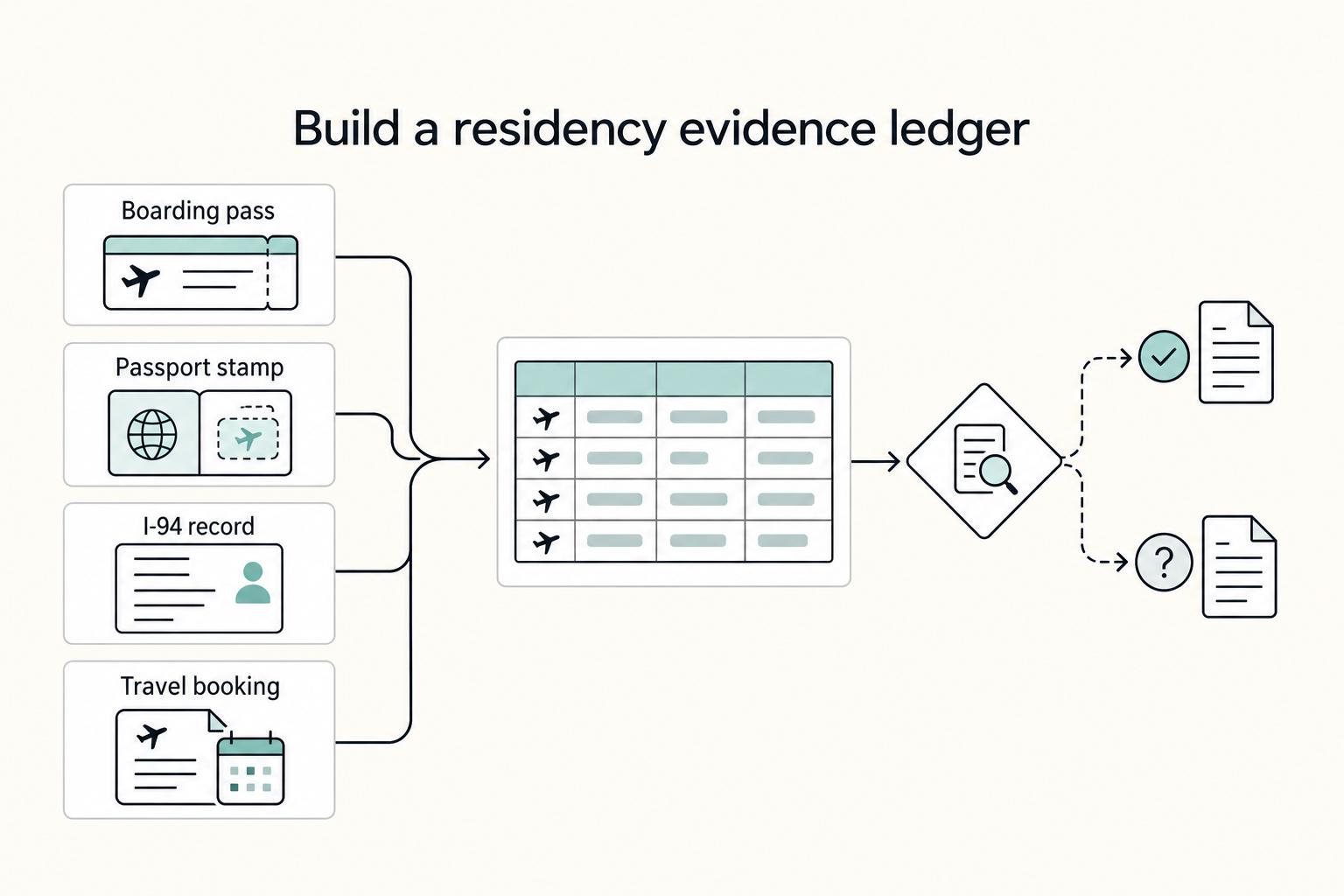
How to Organize a Digital Shoebox for Tax Time
The goal is simple: one Master Timeline you can trust at a glance. Keep one row per trip, and link each row to proof you can actually retrieve. For each trip, log departure and return dates, jurisdiction or locality, where you were at day-end or midnight when that matters, the trip purpose, and links to the source files. If you cannot answer "Where were you on this date?" quickly from one place, the system is not ready.