
Quick Answer
Choose a provider from the best vpns for families only after confirming router compatibility, then run it as a household system with a travel fallback and audit-based vendor checks. This gives you default coverage for shared devices at home, reduces missed app activations on public Wi-Fi, and keeps provider trust decisions tied to evidence rather than marketing claims.
Treat Family Network Security as an Operating Decision#
Your family's digital habits are part of your business risk whether you treat them that way or not. If your work laptop, a partner's phone, and your kids' devices all touch the same home or travel network, choosing from the best vpns for families is an operating decision, not a gadget purchase.
| Focus | Grounded detail | Article direction |
|---|---|---|
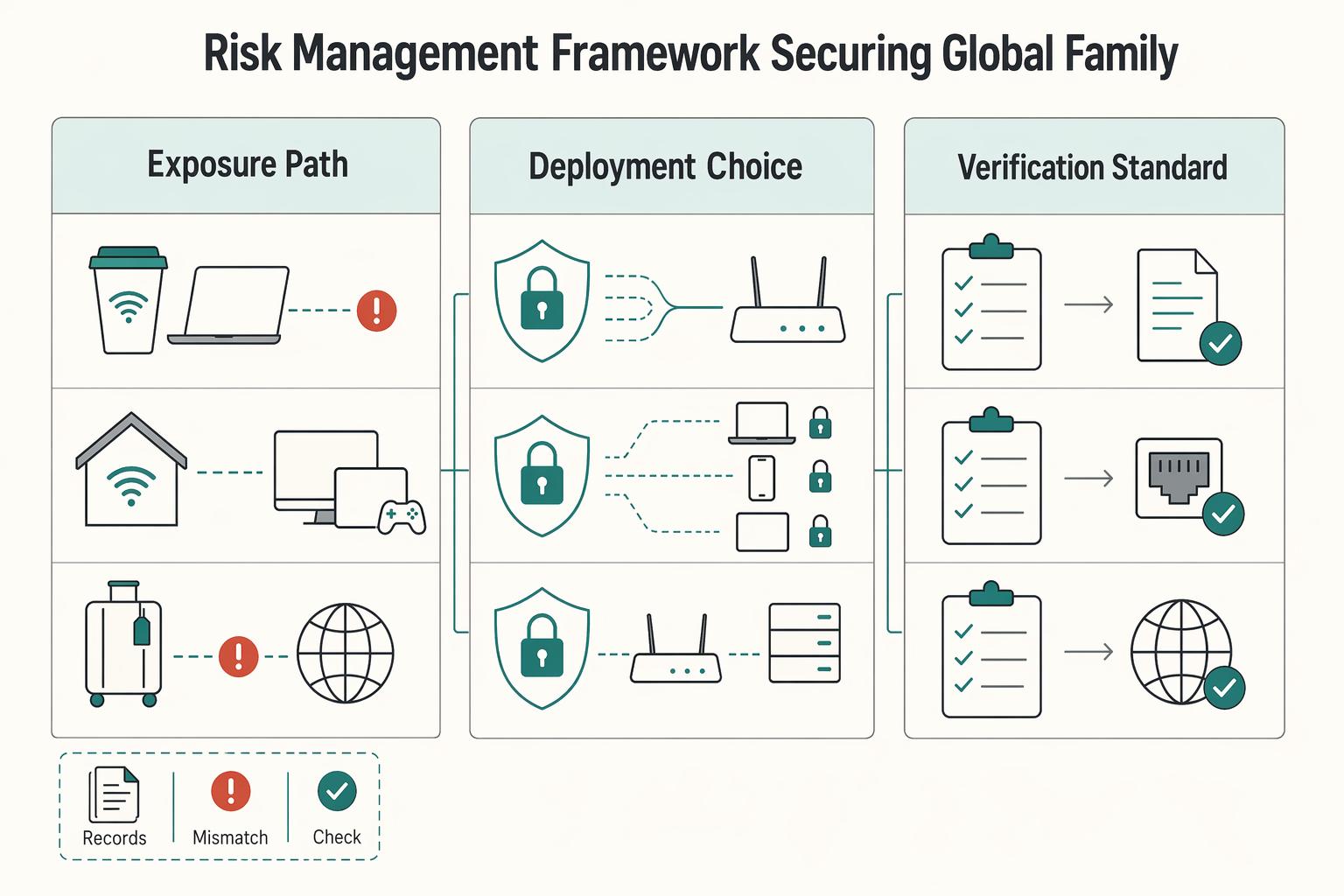
| Exposure path | Shared Wi-Fi, household devices, and public network carryover can bring exposure back into the same environment where you handle client files and logins | A VPN can reduce exposure on public networks and limit what your ISP can see about browsing activity |
| Deployment choice | App-only protection can fail when one person forgets to turn it on | Router-level coverage is often the stronger starting point because it can protect devices without relying on a manual toggle |
| Verification standard | Check for third-party no-logs audits and teach simple checks such as https:// and .gov or .mil for federal services | Use proof points instead of provider slogans |
- Exposure path
Shared Wi-Fi, household devices, and public network carryover are practical ways household activity can bleed into work risk. A family member might use coffee shop Wi-Fi in the morning, reconnect at home later, and bring that exposure path back into the same environment where you handle client files and logins. A VPN helps because it can reduce exposure on public networks and limit what your ISP can see about browsing activity.
- Deployment choice
App-only protection sounds fine until one person forgets to turn it on. That failure mode matters because one missed connection can expose traffic you assumed was protected. Router-level coverage is often the stronger starting point, where supported, because it can protect devices on your home and travel networks without relying on a manual toggle. Layer 1 will help you decide where protection should live and which devices you want covered by default.
- Verification standard
Provider marketing is noisy, so use proof points instead of slogans. A real checkpoint is looking for third-party no-logs audits. Another is teaching your household simple verification habits, such as checking for https:// and, for federal services, confirming .gov or .mil before sharing sensitive data. Later sections will help you separate network-level threat blocking from content controls, and sort providers that earn trust from those that mostly market it.
This guide helps you do three things:
- choose a provider based on evidence, not "fastest" claims
- choose a setup approach for home, travel, and multiple devices
- choose a light governance routine so protection stays on after day one
Layer 1: The Foundation - Fortifying Your Digital Perimeter#
Your default should be router-level VPN coverage because it protects your network at the boundary instead of relying on each person to remember an app. That baseline can cover the devices already in your household risk surface, including laptops, phones, smart TVs, and other Wi-Fi-connected devices.
App-only use is still useful, but it has a built-in failure mode: one missed activation can leave traffic exposed. Router-level coverage is more reliable for family operations because protection starts where traffic enters and leaves your network.
Treat that perimeter as something you maintain, not a one-time setup. Perimeter tools, including VPN and firewall technologies, have seen serious vulnerabilities across major vendors. A January 3, 2025 Security Boulevard report described a perimeter flaw that could allow unauthenticated code execution with root privileges on a firewall and referenced more than 156,000 potentially affected internet-connected devices in one incident. Use router coverage as your baseline, and verify providers with evidence such as a third-party no-logs audit.
Pick the route that fits your operating reality#
| Route | Router compatibility checkpoint | Setup complexity | Control level | Maintenance burden | Best-fit household profile |
|---|---|---|---|---|---|
| Managed router app route | Your exact router model is documented by the provider or router vendor | Lower | Moderate | Lower | You want family-wide coverage with less day-to-day handling |
| Manual firmware route | Your exact router model, current firmware, and provider config docs are confirmed before changes | Higher | Higher | Higher | You want more tuning control and can handle setup/recovery work |
| App-only fallback | No supported router path yet, or you need temporary coverage while validating hardware | Repeated per device | High per device, low perimeter consistency | Ongoing user-dependent upkeep | You need immediate protection, but not a long-term family baseline |
Use this decision rule: if your main risk is inconsistent behavior across people and devices, start with the managed route. Choose manual firmware only when you want deeper control and are prepared to verify compatibility before you make router changes.
If ExpressVPN, NordVPN, or Surfshark is on your shortlist, check your exact hardware path first, then confirm independent no-logs audit evidence before you treat the service as household infrastructure.
Travel router: pre-trip execution checklist#
| Checkpoint | What to do | Grounded note |
|---|---|---|
| Credentials | Test router admin access and VPN sign-in before departure | Do this while you still have stable home internet |
| Fallback connection | Keep one backup path ready | Example: direct device connection or hotspot if the travel setup fails |
| Onboarding sequence | Connect the travel router upstream first, test one device, then move the rest of the family | Move the rest only after traffic works as expected |
- Confirm credentials before departure: test router admin access and VPN sign-in while you still have stable home internet.
- Keep a fallback connection ready: maintain one backup path, for example a direct device connection or hotspot, in case the travel setup fails.
- Onboard in sequence: connect the travel router upstream first, test one device, then move the rest of the family only after traffic works as expected.
Related: The Best VPNs for Digital Nomads.
Layer 2: The Shield - Proactive Threat & Content Management#
After your perimeter is in place, treat this layer as active defense with two separate controls: threat blocking and content filtering. Threat blocking helps reduce exposure to malicious sites, trackers, and risky downloads. Content filtering helps reduce category-based exposure and household distractions. Keep them separate so you can protect business continuity without over-filtering every device.
If your family network also supports client work, this split is practical. Threat blocking is your default safety control. Content filtering is a policy control you apply more selectively by device and use case.
Keep the two jobs separate#
When comparing family VPNs, do not treat every "security" label as the same thing. A VPN can improve privacy and still create operational friction if filtering controls are hard to tune or easy to bypass.
Use a default-on, exception-based policy:
- Keep threat blocking on as your baseline.
- Add content filtering where it reduces real household risk.
- Handle breakage with narrow exceptions, not by turning everything off.
| Protection type | Where filtering runs (verify in docs) | Customization controls to look for | Likely trade-off |
|---|---|---|---|
| Threat blocking | Device app or provider-managed layer | Clear on/off, allowlist, per-device checks | Can break some logins, downloads, or script-heavy pages |
| DNS/content filtering | DNS layer or provider-side filtering | Category controls, allowlist, profile-level settings | Can overblock school, streaming, or portal traffic |
| Network-wide baseline | Router or network edge | Shared exception list, repeatable rollout method | Broad coverage, less precision for one-off device needs |
Trust testing more than feature pages#
Use rankings as inputs, not verdicts. Comparitech's February 11, 2026 recommendations required reliable unblocking and a full money-back guarantee, and the site says it regularly tests the top 70 VPNs against major streaming services. That is useful because household breakage usually appears first in critical, high-use apps and sites.
| Source or input | Grounded detail | Article takeaway |
|---|---|---|
| Comparitech | February 11, 2026 recommendations required reliable unblocking and a full money-back guarantee; the site says it regularly tests the top 70 VPNs against major streaming services | Use rankings as inputs, not verdicts |
| Security.org | Tested privacy/security, speed, and free trial/version limitations across its evaluation process | Be cautious with free plans or limited trials |
| Wizcase | Discloses affiliate commissions and common ownership considerations | Treat recommendation content with judgment |
| Academic analysis | Reported bias and weak alignment with user preferences across 376 blogs and six recommendation sites | Treat recommendation content with judgment |
Run your own validation during the refund window. A 30-day money-back guarantee is long enough to test your real device mix and routine. Be cautious with free plans or limited trials; Security.org explicitly tested privacy/security, speed, and free trial/version limitations across its evaluation process.
Treat recommendation content with judgment. Wizcase discloses affiliate commissions and common ownership considerations, and academic analysis of 376 blogs across six recommendation sites reported bias and weak alignment with user preferences.
Turn it on, test it, then document exceptions#
- Enable baseline protections first: threat blocking on, then only the content filters you plan to keep.
- Test household-critical services: banking, client tools, school portals, streaming apps, and daily-use devices.
- Tune narrowly: allowlist the specific site or split-tunnel the specific app instead of disabling the whole layer.
- Document each exception: device, app/site, reason, and date, so you can reapply settings consistently.
Keep the default on. Most failures happen when one broken site leads to a full shutdown of protections, and then nobody restores the setup across devices. We covered this in detail in The Best Health Insurance for Digital Nomad Families.
Layer 3: Verify Trust Controls, Legal Exposure, and Stability#
At this stage, your main job is vendor due diligence: verify trust controls, screen legal exposure, and confirm the service is stable enough for daily family and work use.
Treat the no-logs claim as a compliance check, not a slogan. For each provider, confirm four items: audit recency, audit scope, who ran the audit, and whether results are publicly accessible. If any item is unclear, treat that as unverified.
Use jurisdiction as a risk screen, not a shortcut. A practical baseline is to give closer review to providers headquartered outside the Five Eyes intelligence alliances, then validate the current legal context before you make a final decision. This matters more when your household network touches client data or frequent cross-border travel.
| Decision area | What to verify | Why it matters | Household/work fit |
|---|---|---|---|
| Audit posture | Third-party no-logs audit, recency, scope, auditor identity, public access to findings | Shows whether privacy claims are independently checked | Stronger fit when you need defensible vendor review |
| Jurisdiction posture | Headquarters location, including Five Eyes screening | Helps you assess legal-exposure risk | Higher priority for sensitive client communication and travel-heavy routines |
| Advanced controls | Whether split tunneling and port forwarding are available | Can solve specific routing needs, but adds setup risk | Best when one setup must serve mixed family and work traffic |
| Operational fit | Your own notes on stability, latency, and app reliability | Weak reliability can negate strong feature claims | Critical in shared homes where breakage leads to controls being disabled |
Only keep advanced controls you can justify. Split tunneling can help when some traffic should bypass the tunnel while other traffic stays protected. Port forwarding can support specialized remote-access setups, but it increases exposure if you enable it without a clear use case.
Finally, test real behavior, not feature pages. One documented review used an 11-point testing plan and still reported unstable download speeds, dropped connections, high latency, and UI dead ends; it also noted that results are a snapshot in time. Use that as your standard: verify trust controls first, then run your own device-level checks before committing. For a step-by-step walkthrough, see The Best Cities for Digital Nomads with Families.
Run the Setup as Three Layers: Home, Travel, and Provider#
Run this as a 3-layer system: secure the home network first, keep a travel fallback ready, and treat provider choice as a governance decision. That keeps protection consistent without turning you into full-time family IT support.
Start with a router-level VPN at home so devices on your Wi-Fi are covered by default, including easy-to-miss devices like smart TVs and gaming consoles. Keep per-device apps, or a prepared travel router setup, for time away from home because app-only protection can fail when someone forgets to turn it on.
Then pressure-test the provider itself: verify independent no-logs audit evidence, confirm headquarters jurisdiction, including whether it is outside Five Eyes, and make sure integrated threat protection is enabled to block malware, trackers, and phishing at the network layer.
| Layer | Your objective | Feature to verify | Practical outcome for family safety and work continuity |
|---|---|---|---|
| Foundation | Default protection at home | Router-level VPN support for your setup | Fewer unprotected household devices and less manual overhead |
| Travel | Maintain coverage outside home | Working per-device apps or a tested travel setup | More consistent protection when using unfamiliar networks |
| Governance | Reduce provider trust risk | Third-party no-logs audit, headquarters jurisdiction, integrated threat protection | Clearer due diligence and a stronger privacy/security baseline |
Use a light operating rhythm you can actually maintain. Weekly, confirm your home connection is still routing through the VPN and note any service that fails because of location handling. Monthly, re-check provider audit transparency, confirm threat-protection settings are still on, and retest your travel setup before you need it.
Implementation checklist
- Verify router compatibility before purchase or renewal.
- Enable integrated threat protection.
- Test your travel setup at home once.
- Record one fallback step for sites that reject VPN traffic.
- Pair this setup with a password manager so VPN coverage is only one layer of your security stack.
Next tool in the stack: The Best Password Managers for Freelancers and Teams. You might also use The Best Password Managers for Families. If you need coverage confirmation for your specific country or program, Talk to Gruv.
Frequently Asked Questions
What is the most secure setup for a family that travels frequently?
If you travel often, a lower-friction option can be a router-based VPN setup that you configure before you leave, then connect family devices to on the road. That can reduce public Wi-Fi exposure because a VPN encrypts information from your device, and people monitoring the public network should not be able to see what you’re browsing. Choose this when you want one shared setup. Choose per-device apps when each person travels separately or uses mobile data more than shared Wi-Fi. Action step: before the trip, verify your provider’s current router support and test every device on that network once at home.
How does a family VPN protect my professional work data?
A VPN helps by adding encryption and routing traffic through a different server, often in another country, and some employers require VPN use for remote work. At home, that protection boundary is mostly about traffic leaving the device or router, not about making every device in the house "safe," so you still need normal device updates and account security. One practical failure mode is confusion: a child may think the VPN makes everything harmless, even though Internet Matters warns children can still face viruses and online harm if they do not understand how VPNs work. Action step: keep the VPN on, then pair it with basic household rules and strong account security for work accounts.
Is it better to have more simultaneous connections or router support?
Router support is usually the stronger choice when you want broad home coverage with less hands-on work, because some providers offer a dedicated router app that can cover household devices under 1 connection. More simultaneous connections matter when your devices are mostly off the home network or you cannot use a router setup. One reviewed family-focused ranking cites up to 14 devices on a single plan, which can be enough for many households. The tradeoff is compatibility: router support only helps if it works with your current router model or firmware, and that detail needs current verification. Action step: count how many devices need protection away from home, then verify router compatibility before you compare plans.
How do I manage this without becoming the family’s full-time IT support?
You keep it manageable by pushing protection to the network where you can, then only using per-device apps for edge cases like travel, work-only laptops, or phones on public Wi-Fi. A low-maintenance habit is to leave the home setup alone unless something breaks, because providers may randomize server choice and you usually do not need to chase a specific server every session. One red flag to watch is location confusion: a website may see you as connecting from another country, which can sometimes affect logins or local services. Action step: write down one default home setup, one travel setup, and one fallback step for any site that behaves oddly.
Try a related tool
Researched and edited by the Gruv editorial team. Gruv builds cross-border billing, payouts, and finance-operations software for global businesses.
Sources
Includes 7 external sources outside the trusted-domain allowlist.
- ftc.gov/news-events/events/2000/12/mobile-wireless-w...trusted
- arxiv.org/html/2403.01648v1external
- engadget.com/cybersecurity/vpn/private-internet-access-vp...external
- gruv.ai/blog/the-best-vpns-for-familiesexternal
- internetmatters.org/resources/managing-vpns-a-guide-for-parents-...external
- safetydetectives.com/blog/best-vpns-for-familiesexternal
- security.org/vpn/best/windows/freeexternal
- securityboulevard.com/2025/01/if-you-are-reachable-you-are-breacha...external
Educational content only. Not legal, tax, or financial advice.
Related Posts

Value-Based Pricing for Freelancers Under Real Payment Risk
Value-based pricing works when you and the client can name the business result before kickoff and agree on how progress will be judged. If that link is weak, use a tighter model first. This is not about defending one pricing philosophy over another. It is about avoiding surprises by keeping pricing, scope, delivery, and payment aligned from day one.

The Best Password Managers for Freelancers and Teams
A client asks for an urgent file, you open their portal, and the login fails. Ten minutes later your invoicing app wants a reset too. That is why your password setup is a business risk, not just a nuisance. Weak credential habits can turn one mistake into wider account access problems, then into delivery delays and cleanup work.
The Best VPNs for Digital Nomads
Treat this as a pre-trip decision, not a travel convenience. Pick one setup you trust, configure it before departure, and run the same short checklist whenever you change locations. A VPN creates an encrypted tunnel, which matters when sensitive account activity happens on shared networks.