
Quick Answer
The best virtual phone number for freelancers is the one you can keep separate from your personal line, document clearly, and port when your business changes. Use three filters: professionalism, security, and scalability. Before buying, test business hours, voicemail, texting workflow, exports, and porting steps, because long-term client communication matters more than the lowest monthly price.
Your Phone Number is a Strategic Asset. It's Time You Treated It That Way.#
To choose the best virtual phone number for freelancers, start with one filter: pick a line you can separate, document, and port when your business changes. Price matters, but a cheap number gets expensive fast if it blurs personal boundaries, creates texting issues, or locks you in.
Use three filters: professionalism, security, and scalability.
1 Professionalism#
Professionalism is less about sounding corporate and more about keeping client communication predictable. You want a business line with business-hours behavior, clear voicemail, and consistent replies, not a setup shaped by your personal phone habits. For a freelancer, that usually means a client can call or text one number and get the same pattern every time, even when you are away from your desk or using your personal phone for unrelated conversations.
That's why plan details matter more than marketing language. Before you move a client-facing number, test the actual workflow you will live with: call the line during business hours, call it after hours, leave yourself a voicemail, send a text from another number, and check where each item lands. If texts end up mixed into your personal messages, or your voicemail greeting does not clearly identify your business, the setup is already creating friction.
| Setup | Privacy separation | Client-facing signal | Portability checkpoint | International coverage | Workflow fit |
|---|---|---|---|---|---|
| Personal cell | Can be weak; personal and client traffic may mix. | Direct, but personal. | Carrier process; confirm terms with your carrier. | Carrier dependent. | Can be weak for shared history or handoffs. |
| Google Voice business | Better; one number across devices with call forwarding. | Simple business presence for solo use. | Verify plan/account type. Personal Google Voice mobile port-in is $20; do not assume the same rule for Workspace-managed numbers. | One plan variant is shown as available in 14 countries; verify your country/use case. | Strong if you already use Google Workspace. Starter lists at $10 USD per user/month. |
| Grasshopper | Strong; business calls, texts, and voicemail run on your existing device while personal traffic stays separate. | Dedicated business number options (local, toll-free, vanity). | Ask for exact port-in/port-out steps before buying. | Verify directly with provider. | Strong if you want a second line on the phone you already use. |
| Quo (formerly OpenPhone) | Strong; app-based business line with business hours and auto-replies. | Consistent client communication workflows. | Porting is documented. Quo says most transfers complete in 3-10 business days, and its Google Voice transfer guide says that flow typically takes 1-2 weeks. | Country dependent; some countries are two-way, others are send-only. | Strong when you need unified history, exports, or shared-number workflows. |
Before you sign up, check the plan you will actually buy: business hours, voicemail setup, auto-replies, and personal/business separation.
A common mistake is buying for "I just need a number" instead of "I need a number clients can keep using long term." If you ever need someone else to cover messages, return missed calls, or review a client thread before a deadline, a number that felt "good enough" as a solo tool can suddenly feel improvised.
2 Security#
The right security question is not "Which provider sounds most secure?" It is "Which setup reduces operational risk and gives me a usable record if something goes wrong?" A separate business line on your existing phone helps, but it does not remove all device risk.
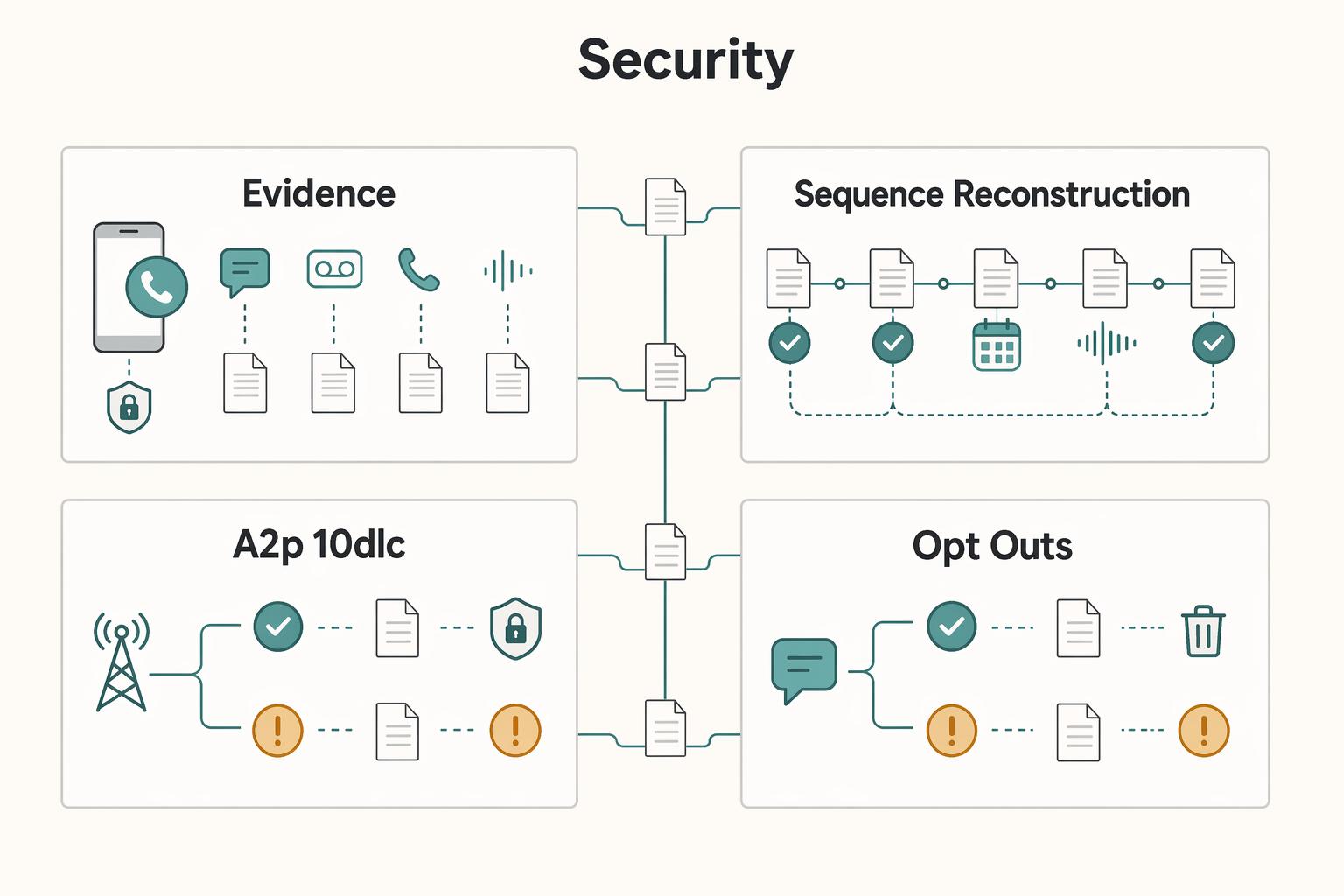
| Checkpoint | Detail | Note |
|---|---|---|
| Usable record | Quo centralizes calls, texts, voicemails, and recordings, and supports CSV export for contacts, call logs, and message history. | Gives you a usable timeline when instructions are disputed. |
| Sequence reconstruction | Pull the thread, the call entry, and the voicemail in one place. | Helps with missed approvals, conflicting instructions, unclear timing, and handoffs between you and a contractor or assistant. |
| A2P 10DLC | If you send business texts to US recipients through an application using a US 10-digit long code, A2P 10DLC registration is required before sending. | Verify the registration flow before you rely on texting. |
| Opt-outs | FCC guidance says callers and texters must honor opt-out requests promptly. | Revocation-related rules set for April 11, 2025, and one delayed requirement set for April 11, 2026. |
Start with recordkeeping. Quo centralizes calls, texts, voicemails, and recordings, and supports CSV export for contacts, call logs, and message history. That gives you a usable timeline if instructions are later disputed. Treat logs as helpful evidence, not automatic legal proof.
In practice, you want to be able to reconstruct a sequence without guessing. If a client says they approved a change by text, or says they called before a deadline, you need a system that lets you pull the thread, the call entry, and the voicemail in one place. Even if you never expect a serious dispute, clean records help with ordinary business problems too: missed approvals, conflicting instructions, unclear timing, and handoffs between you and a contractor or assistant.
Texting compliance also deserves a direct check. If you send business texts to US recipients through an application using a US 10-digit long code, A2P 10DLC registration is required before sending. Also confirm how opt-outs are handled: FCC guidance says callers and texters must honor opt-out requests promptly, with revocation-related rules set for April 11, 2025 and one delayed requirement set for April 11, 2026.
The common failure mode is treating SMS as informal when it is part of business operations. Before you rely on texting, verify the registration flow, decide who will watch for opt-out requests, and make sure your message history is exportable if you ever need to review what was sent and when.
3 Scalability#
Portability is the real test of whether a number will still work for you later. If you add support, expand into new markets, or switch providers, your number should move with you without drama. FCC rules for interconnected VoIP require porting without unreasonable delay or procedures that effectively block porting, and FCC guidance reiterates that expectation.
Ask two direct questions before you commit: "How do I port in?" and "How do I port out?" If the answers are vague, treat that as a risk. You are not looking for a sales promise. You are looking for a clear sequence you can follow later, with the exact conditions that control whether the number can move.
Check ownership and collaboration features early as well. Google Voice says business numbers stay with the business when employees leave. Quo supports shared numbers so multiple teammates can call and text from one number. Even if you are solo now, that matters once you start delegating. A number tied too tightly to one person's personal setup can become a problem the moment someone else needs access to call history, text threads, or voicemail.
This is also where workflow fit becomes more than convenience. If you expect to stay solo and simply need cleaner separation, a second business line on your existing device can be enough. If you expect shared coverage, handoffs, or a client service layer later, prioritize a setup that keeps one visible history instead of scattering it across one person's phone habits.
Once those three filters are clear, the decision gets much simpler.
4 Your selection checklist#
Use this before checkout:
| Checkpoint | What to confirm |
|---|---|
| Number type | Confirm your number type: local, toll-free, or vanity. |
| Porting steps | Get the exact port-in and port-out process in writing. |
| Plan workflow | Verify business hours, voicemail, and auto-replies on your specific plan. |
| Exports | Confirm you can export call logs and message history. |
| US texting | If you text US recipients from an app, confirm A2P 10DLC registration flow and opt-out handling. |
| International messaging | If you serve multiple countries, verify country-level messaging behavior instead of assuming full two-way SMS everywhere. |
Then run a short verification pass before you publicize the number. Place a test call, send a test text, check voicemail delivery, and confirm that after-hours behavior matches what you intend clients to experience. If possible, do this before moving your main client-facing number, because a five-minute trial can catch problems that are tedious to unwind later.
Pick the provider whose line you can separate, audit, and move. That usually beats choosing on monthly price alone.
If you want a deeper dive, read Value-Based Pricing: A Freelancer's Guide.
Once you finish your phone-system checklist, tighten the rest of your client ops with practical templates and calculators in the Gruv tools library.
Conclusion: Your Phone Number is an Investment, Not an Expense#
Treat this as an operations decision, not a shopping decision. You are choosing how clients reach you, how cleanly you can manage communication, and how easily you can switch providers later with less risk of losing continuity.
- Choose for real workflow fit. A cheaper plan becomes costly if it slows responses, limits routing, or weakens your communication record. If you are comparing Google Voice, evaluate free personal use separately from paid Workspace Voice tiers: Starter is $10 USD per user / month, and higher tiers add controls like multi-level automated attendants and ring groups. Check how the number behaves in your actual routine, not just in the product description.
- Verify portability up front. Porting is what protects your client-facing number when you move providers. FCC language supports keeping your number in the same geographic area, but the "1 business day" timing applies to simple requests, and SMS may take up to 48 hours to stabilize after transfer. Confirm both port-in and port-out before you commit, and keep that confirmation where you can find it later.
- Check privacy controls, not slogans. Confirm who controls the account, and whether you can access, update, delete, or export personal data. Google Voice states data is encrypted in transit and at rest; concrete controls like that matter more than generic "secure" claims. You want to know what you can review, what you can save, and what you can take with you if you leave.
- Confirm international and emergency behavior by plan. Coverage is tier-specific, so do not assume every plan includes the same locations or calling footprint. Google's managed offering lists local-number support in 14 countries/regions (and expanding), while personal Google Voice guidance says it can only be used in the US; some virtual providers also state 911 is not available. Check the exact plan and target market, not a general feature page.
Before you commit, verify this checklist:
- Dedicated business number, not your personal line
- Port-in and port-out rules confirmed in writing
- Privacy terms plus access/delete/export options saved
- International coverage and number type verified for your market
- Trial calls, voicemail, texts, and routing tested from another number
Shortlist your options, score each provider against this list, and move forward only after every verification item is confirmed. A number you can separate, document, and move will usually serve you longer than one that only looks cheaper at checkout.
Related: How to Create a Business Email Address for Your Freelance Business.
If you want your communication setup and cross-border payment flow to run with cleaner controls, review Gruv for freelancers.
Frequently Asked Questions
Is Google Voice professional enough for a consultant?
Yes, it can be professional enough, especially early on, but it is different from a paid business VoIP setup. Verify the account type, the port-out process, and who controls the number. Choose it only if the workflow still feels professional when you miss a call, switch devices, or need someone else to review the thread.
What is the most secure virtual phone number for freelancers?
The most secure option is the provider whose privacy terms, account controls, and message-history access you can clearly verify. Check the privacy notice, data-preference controls, and who can access records before you activate the line. Review and save the provider's privacy and account-control terms so you can confirm settings without confusion.
Can I get a virtual phone number for a different city or country?
Usually yes, because local-presence flexibility is a main reason to use a virtual number. Availability and messaging behavior vary by provider and location, so do not assume a number guarantees full calling and SMS everywhere. Before checkout, confirm the target location, number type, and exact calling and texting behavior.
How do I separate business and personal calls on one phone?
Use a dedicated business line app instead of sharing your personal number. Then test call routing, voicemail destination, text threading, and whether client traffic stays inside one app. A second number only helps if it creates a reliable second workflow for clients.
Does a virtual number protect your privacy?
It can, because it keeps your personal number out of client-facing materials and conversations. Privacy still depends on provider terms, account controls, and who can access your history. Verify those controls and the number type you want clients to see before you rely on it.
Try a related tool
Researched and edited by the Gruv editorial team. Gruv builds cross-border billing, payouts, and finance-operations software for global businesses.
Sources
Includes 1 external source outside the trusted-domain allowlist.
- cms.gov/priorities/innovation/files/access-rfa.pdftrusted
- consumercomplaints.fcc.gov/hc/en-ustrusted
- docs.fcc.gov/public/attachments/DA-24-1068A1.txttrusted
- docs.fcc.gov/public/attachments/DA-25-312A1.txttrusted
- ecfr.gov/current/title-47/chapter-I/subchapter-B/part...trusted
- my.chatham.edu/documents/getfile.cfmtrusted
- www2.census.gov/library/working-papers/2026/adrm/cbsm/rsm202...trusted
- crazyegg.com/blog/best-virtual-phone-number-companiesexternal
Educational content only. Not legal, tax, or financial advice.
Related Posts

Value-Based Pricing for Freelancers Under Real Payment Risk
Value-based pricing works when you and the client can name the business result before kickoff and agree on how progress will be judged. If that link is weak, use a tighter model first. This is not about defending one pricing philosophy over another. It is about avoiding surprises by keeping pricing, scope, delivery, and payment aligned from day one.

How to Create a Business Email Address for Your Freelance Business
A business email is not a logo choice. It is the identity layer most clients, vendors, and software tools treat as the real you.

Build a Freelancer Payment Portfolio That Protects Cashflow
A strong showcase portfolio can win work, but it serves a different purpose than your payment process. Common portfolio formats include PDF samples and public profiles on platforms like LinkedIn or Behance. Those assets build trust and show fit.