
Quick Answer
Choose best virtual data room software by matching your primary need first, then validating execution in a real room. For most independent professionals, a VDR becomes the right move when sensitive documents are shared with multiple external reviewers and you need staged access plus usable activity records. Build your shortlist by testing permission behavior, audit-log exports, and support quality under realistic conditions, not just feature lists.
What is a Virtual Data Room (and Why Isn't It Just a Secure Folder)?#
A virtual data room is a controlled workspace for sensitive deal documents, not just a nicer shared folder. A generic cloud drive is built for convenient collaboration. A VDR is built for higher-stakes moments, where speed and security both matter and you need tighter control plus clearer visibility into document activity.
That distinction matters in practice. With a normal folder, you can usually share or unshare. With a deal room, you should be able to set link-level access controls, apply viewer permissions, revoke access, and review tracking data. If you are evaluating the best virtual data room software, test these three checks first:
| Capability | Generic cloud folder | Secure sharing layer | VDR |
|---|---|---|---|
| Permission granularity | Basic folder or link access | Link-level access control and viewer permissions | More advanced permission controls; verify exact granularity |
| Post-download control | Usually limited | Revocation may exist, but verify scope | Verify what control remains once files are downloaded |
| Audit-log exportability | Limited activity history | Tracking is available; export options vary | Deeper tracking is common, but export format must be checked |
| Q&A or deal support | Not purpose-built | Light sharing experience | Designed for diligence-heavy document exchange |
| Buyer-side signal | "Here's a folder" | More polished sharing page | Purpose-built room for sensitive review |
- Control checks: confirm link-level access control, viewer permissions, and revocation behavior.
- Monitoring checks: verify what analytics or tracking you actually get.
- Evidence checks: confirm what activity history can be reviewed or exported before you depend on it for internal records.
Once you see that capability gap clearly, the rest of the decision gets easier. The next sections show how to use it for risk control, client trust, and a more repeatable process.
Framework Part 1: How to Use a VDR as Your Asset Protection Shield#
If you are using a VDR for asset protection, set your controls in sequence before you share anything sensitive. Start with four controls: dynamic watermarking, phased permissions, audit logging, and remote revoke. If these are missing, inconsistent, or paywalled instead of available by default, treat that as a vendor warning.
| Control | Use it for | Verify |
|---|---|---|
| Dynamic watermarking | Pre-contract files such as proposals, pricing logic, sample deliverables, and diligence documents | How the mark appears in allowed viewing modes; which fields the vendor actually stamps |
| Phased permissions | Access by phase, role, and document need | Whether permissions work by user, group, and document; test view only with a dummy user |
| Audit trail | Invitations, acceptance, permission changes, views, downloads, uploads, deletions, and Q&A activity where supported | Export format and completeness; export at milestones such as first share, each diligence round, and close/handoff |
| Remote revoke and wipe | A backstop when access changes or a deal stalls | Behavior across expected viewers and devices; limits for offline copies and screenshot risk |
- Dynamic watermarking
Use dynamic watermarking on pre-contract files where uncontrolled sharing would create risk. That usually includes proposals, pricing logic, sample deliverables, and diligence documents.
Keep the setup repeatable: enable watermarking before inviting external users, then test with a dummy account. Verify how the mark appears in the viewing modes you allow, on-screen first, then print/download if enabled. Marker fields vary by vendor, so confirm what your platform actually stamps instead of assuming specific fields are always present.
Use watermarking for traceability, not as a guarantee of prevention.
- Phased permissions
Build access by phase, role, and document need, not by folder convenience. Limit access to the smallest review group that can move the work forward, and define room purpose plus document set before assigning permissions.
| Phase | Who gets access | Default controls | Escalate only when |
|---|---|---|---|
| Pitch | One sponsor contact or a very small review group | View only, print off, download off, watermark on | They request deeper review and you can map that request to specific documents |
| Diligence | Named reviewers by function | Folder-level access, download only for approved files, watermark on | The deal is active and the file is required to answer a real diligence question |
| Delivery | Core client team plus stakeholders tied to final outputs | Broader access to final materials, editing only where required | You are in execution and access matches current responsibilities |
Some providers advertise 5 or 8 access-control levels. What matters more is whether you can set permissions by user, group, and document without workarounds. Test "view only" with a dummy user before uploading live files.
- Audit trail
Treat the audit trail as your defensibility workflow, not just an activity feed. Track key events such as invitations, acceptance, permission changes, document views, downloads, uploads, deletions, and Q&A activity where supported.
Export logs at milestones, not only after a dispute starts. A practical rhythm is after first share, after each diligence round, and at close/handoff. Store exports outside the room in a structured folder, for example [Client]/[Matter]/Evidence/[YYYY-MM-DD], with permission-setting screenshots, user-list captures, and related transmittal notes. Build a simple dispute packet with logs, the permissions matrix used at that stage, and the document set shared. Confirm export format and completeness in your VDR before you rely on it.
- Remote revoke and wipe
Use remote revoke/wipe, or similar DRM-style controls, as a backstop when access changes or a deal stalls. This control is strongest when files stay in supported viewers under provider control.
Keep expectations realistic: remote revoke may not cover every offline copy, and it does not eliminate screenshot risk. Compatibility can also vary by viewer, browser, and device policy. Test revoke behavior on the device mix you actually expect, then pair it with watermarking, tight permissions, and expiration settings when available.
Before sharing high-value files, confirm this minimum checklist:
- Watermarking is on for pre-contract sensitive files, and the visible marker behavior is tested.
- Role-based permissions are set by phase, and a dummy-user check is complete.
- Audit logging is enabled, and an external evidence folder is ready for exports and screenshots.
- Remote revoke is tested on at least one real viewer/device path.
- You have completed vendor security due diligence: complaints, breach history, related legal procedures, and whether core controls are included by default.
Framework Part 2: How to Use a VDR to Manage Client Perception#
If you want clients to trust your process, make the room feel prepared from the first click, keep one clear document authority, and keep Q&A traceable in one place. A well-prepared room signals discipline. A rushed one signals risk.
| Buyer-facing trust signal | Weak setup | Strong setup |
|---|---|---|
| Invitation flow | Generic link with little context | Named invite with project context, access scope, and clear next steps |
| Branded workspace | Generic provider interface only | Branded client portal or clearly named project room |
| Access friction | Confusing login, wrong folders visible, placeholders | Clean entry path, role-based access, only relevant folders visible |
| Document clarity | Near-duplicate files and unclear status | One current document path, clear file ownership, consistent approval-state labels |
| Communication traceability | Questions split across inboxes and chat | Centralized Q&A workflow with recorded responses and follow-up trail |
- Make the first click feel prepared
Run a repeatable onboarding sequence for each new client: send a named invite, set the room name to match the engagement, apply role-based access for the current phase, and add a short welcome note that tells them where to start and where to ask questions. Adjust permissions by phase instead of leaving access static.
Test the flow before sharing it. Accept the invite with a non-admin account, confirm the landing view is clear, and remove empty folders, stale drafts, or blocked files. If the room looks incomplete or disorganized, confidence drops, questions multiply, and momentum slows.
- Give every file one home and one owner
Use your VDR as the single source of truth, not a duplicate file store. Assign one owner to each client-facing file, define where the authoritative version lives, and apply approval-state labels consistently so clients can tell what is in progress, what is ready for review, and what is final.
Consistency here is operational, not cosmetic. Organizational gaps can slow 25-30% of venture deals due to legal and compliance hurdles, and the same pattern shows up in client work as delays and rework. If a client can still ask, "Which version should I use?", your document authority is not clear enough.
- Treat Q&A as a credibility system
Keep questions and answers in one centralized workflow instead of splitting them across email and chat. Assign a response owner for each question, log decisions when answers change scope or direction, and define an escalation path for issues tied to pricing, legal terms, or delivery commitments.
This shows reliability without overpromising. It also preserves traceability, since document views, downloads, and interactions may be recorded in the room.
Use this client perception checklist before each major review:
- The invitation explains the room's purpose and the first action to take
- The workspace name, folders, and branding match the project
- Each client-facing file has one clear current version and one owner
- Questions are handled in one place, with visible ownership and escalation where needed
Framework Part 3: How to Use a VDR to Optimize Your Process#
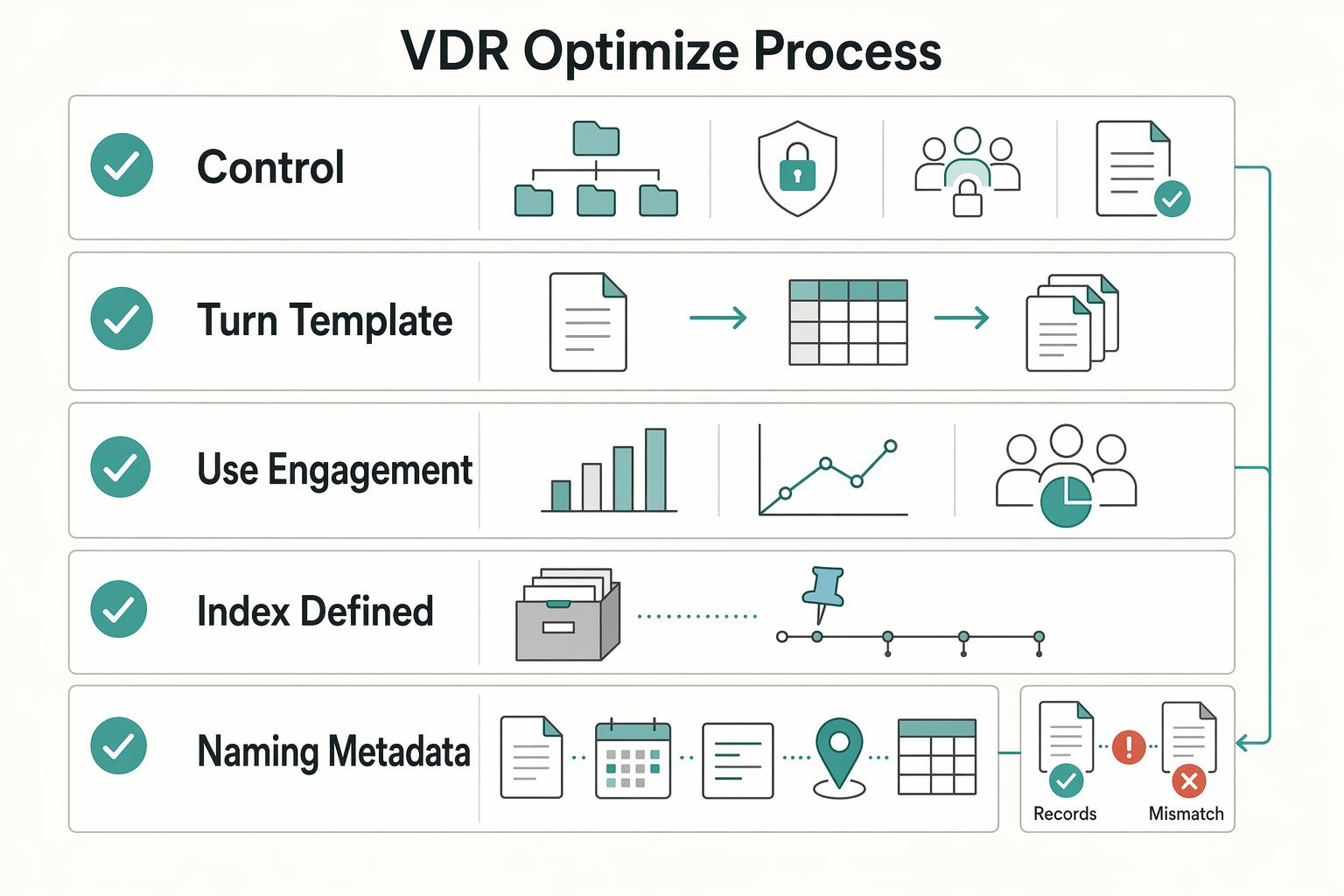
To optimize your process, treat your VDR as a system, not a file dump: standardize setup, control handoffs, and use analytics for next steps only.
| Area | Use it for | Guardrail |
|---|---|---|
| AI for sorting | Classification, routing, and duplicate detection | Keep taxonomy, naming rules, and permissions manual; do not let automation make final access or placement decisions without human review |
| Repeatable structure | Core folder architecture, owner by stage, handoff rules, and archive standards | Nothing moves to client review until naming, approval state, and permissions are verified |
| Engagement analytics | Operational signals for next steps | Limit visibility by role, set privacy expectations, and interpret activity cautiously; no setup is automatically compliant by default |
- Use AI to accelerate sorting, not to define control
Keep control decisions manual: your taxonomy, naming rules, and permissions. Set your data room index before upload, and keep index metadata consistent across file names, dates, descriptions, and locations so authorized reviewers can find what they need quickly with less oversight risk.
Then use automation where it helps: classification, routing, and duplicate detection. Do not let automation make final access or placement decisions without human review. Before launch, test as a non-admin user to confirm visibility, version accuracy, and routing.
- Turn your template into a repeatable operating framework
Use one repeatable structure each time: core folder architecture, owner by stage, handoff rules, and archive standards. A practical stage flow is setup, active working files, client review, final approved files, then archive.
Keep ownership clear with one accountable owner per stage. Use one handoff rule: nothing moves to client review until naming, approval state, and permissions are verified. Use one archive rule: at close, freeze finals, remove stale drafts from client view, and preserve the index and audit trail. This reduces avoidable churn, including the common document-finding failures that drive repeated questions.
- Use engagement analytics to pick actions, not infer intent
Treat engagement data as operational signals, not mind-reading. Limit analytics visibility by role, set privacy expectations in your engagement materials, and interpret activity cautiously. With evolving GDPR, CCPA, and HIPAA pressure, process discipline matters; a VDR can support a structured 6-step compliance workflow, but no setup is automatically compliant by default.
| Engagement signal | What to do next |
|---|---|
| Invite accepted, no document activity | Re-send the start note and verify access path |
| Repeated views on one file or folder | Send a focused follow-up on that topic |
| Activity across legal, pricing, and final files | Prepare one consolidated response and tighten version control |
| Download spike after a quiet period | Hold broad follow-up; stay ready with clarifications |
Before your next workspace launch, confirm:
- Index is defined before uploads
- Naming and metadata are consistent
- Each stage has one owner and one handoff checkpoint
- Archive standards hide stale drafts and preserve final records
- Analytics access is role-based, privacy-aligned, and interpreted conservatively
Choose your VDR by objective before you compare vendors#
Choose your VDR by objective first: asset protection, client perception, or process coordination. For most solo operators, that keeps the decision practical and prevents overbuying.
Pick your lane before you start trials#
Use this pre-check before you compare vendors:
- Required controls: Confirm which controls you actually need in daily work: permissions, DRM, dynamic watermarks, redaction, SSO, and IP/domain restrictions.
- Team and access model: Map exactly who needs access (client, bidders, counsel, advisors) and where visibility must differ.
- Document volume and review pattern: Test with a real folder index, one restricted folder, one redacted file, and multiple user roles.
- Procurement constraints: Confirm trial path and buying path early (self-serve, sales-led, or formal security review), and verify current plan limits directly.
If document flow breaks, trust drops and decisions slow down. So include setup effort and ongoing admin load in the decision, not just feature depth.
| Vendor | Best fit | Security controls | Permissions depth | Auditability | Branding / client UX | Workflow tools | Pricing clarity | Setup effort |
|---|---|---|---|---|---|---|---|---|
| iDeals | Asset protection and controlled disclosure | DRM, dynamic watermarks, SSO, IP/domain restrictions | 8 levels of access permissions | Strong control posture; verify log/export views in trial | Verify in demo | Verify against your Q&A/reporting needs | Free fully functional trial noted in the Dec 24, 2025 guide; package pricing should be confirmed directly | Medium |
| Intralinks VDRPro | Process-heavy reviews with active coordination | AI-driven redaction | Verify exact granularity in demo | Live reporting highlighted | Verify in demo | Structured Q&A workflows, built-in video conferencing | No free trial noted in the same guide | Higher |
| Firmex | Straightforward diligence workflows | Permissions and redaction | Solid for standard diligence; verify edge cases | Detailed audit logs | Verify in demo | Q&A included | Trial access by request noted in the same guide | Lower |
Best-fit and poor-fit notes#
Use this as a quick filter before you start demos:
| Vendor | Best fit | Poor fit |
|---|---|---|
| iDeals | Need tighter disclosure control across external stakeholders | Want a lightweight portal with minimal access-rule tuning |
| Intralinks VDRPro | Main pain is managing questions, updates, and cross-party review flow | Need a fast self-serve evaluation path |
| Firmex | Want a conventional diligence room with clear audit visibility and less operational complexity | Need a deeper control stack or heavier built-in workflow tooling |
Choose-now checklist#
- If your first concern is disclosure risk, start with iDeals.
- If your first concern is review coordination, start with Intralinks VDRPro.
- If your first concern is simplicity with diligence-ready controls, start with Firmex.
- Before committing, run one live test room and confirm permissions behavior, redaction flow, and audit-log output with your real workflow.
You may also see Datasite, Ansarada, SecureDocs, and DocSend in market roundups. Treat them as candidates to test with the same room setup and control checks before purchase.
Related: The Best Tools for Managing a Company's Legal Documents.
Decide on a VDR by risk, client confidence, and delivery consistency#
Treat this as an operating-system decision, not a storage decision. If sensitive files affect risk, client confidence, or delivery consistency, you need tighter control, clearer evidence, and a cleaner review experience.
- Control and evidence
Start with who can do what, then make sure you can verify what happened. Use granular permissions, and rely on activity logs that show who viewed, printed, or downloaded files and when. If control becomes minimal after a link is shared, that is your cue to upgrade your process.
- Trust signals
Your client experience is part of your risk posture. A structured, branded room helps you present information clearly, stage access intentionally, and reduce loose attachments that create confusion. In practice, trust comes from clean execution, not extra features.
- Reusable operating process
Build once, reuse often. A standard room structure, permissions pattern, and review habit gives you repeatable delivery instead of rebuilding each engagement from scratch. The common miss is setting up a room, then running it like a basic shared drive.
| Pillar | If you do this next |
|---|---|
| Control and evidence | Build one permissions template for teaser, core, and restricted files. |
| Trust signals | Run one external reviewer test to confirm the room flow is clear end to end. |
| Reusable operating process | Create one onboarding room template and review audit activity on a fixed cadence during active diligence. |
Use a VDR when you need staged access, stronger oversight, or disclosure evidence across external parties. Use standard secure sharing for routine, lower-sensitivity exchange. Treat the escalation criteria or room-level-control threshold as pending until your team verifies it against current deal, security, legal, source, or policy records before use.
Frequently Asked Questions
What is the difference between a VDR and Dropbox for Business?
A VDR is built for tighter permission control, disclosure proof, and a structured review process. Everyday cloud-sharing tools can work well for internal collaboration, but they start to break down when sensitive documents go to external parties and you need controlled access plus an audit trail. A practical trigger is when more than one external party needs access. Before you buy, test one restricted folder and confirm the activity history is clear enough for your review process.
How much should a data room cost for a single project?
Do not buy on headline price alone. Many providers customize pricing by transaction, so a low starting number tells you very little unless you also verify storage limits, user limits, overage risk, and whether support is DIY or managed service. Your checklist should include the pricing model, what triggers extra charges, the level of setup help, and whether “24/7” support is really available when you need it. If you need a market range, verify current vendor quotes first.
Do you need a VDR for fundraising as a solo founder?
Maybe not at the teaser stage, but it becomes much more useful once you move into real diligence and start sharing sensitive financials, contracts, or IP-related material. The key decision rule is staged access. If you want teaser first and full details later, a room with granular access controls is easier to manage than loose file links. It also helps you present a cleaner document index when investors are judging how organized you are.
What security features matter most?
Start with granular permissions and audit logging, because those control exposure first and give you a usable record second. After that, look for dynamic watermarking, encryption such as 128-bit or 256-bit SSL for communication, and any compliance certifications you need to verify directly. This order matters because permissions reduce accidental overexposure first, while logs help you reconstruct what happened later. Also ask where the data is hosted, where the data centers are located, and whether one admin can actually use the permissions model without daily friction.
Can you use a VDR for client onboarding?
Yes, if onboarding includes confidential files, approvals, or several outside reviewers. A room works well when you want one controlled place for contracts, briefs, and uploads instead of scattered email attachments. Keep it proportionate: if onboarding is just a proposal, a signed contract, and a few shared files, a simpler tool may be enough. If you want a cleaner setup, use a document index and permissioned folders from day one, or see How to Create a 'Data Room' for a Due Diligence Process.
Try a related tool
Researched and edited by the Gruv editorial team. Gruv builds cross-border billing, payouts, and finance-operations software for global businesses.
Sources
Includes 4 external sources outside the trusted-domain allowlist.
- csrc.nist.gov/files/pubs/sp/800/53/r5/ipd/docs/sp800-53r5-...trusted
- dspace.mit.edu/bitstream/handle/1721.1/153030/lowery-jplowe...trusted
- pmc.ncbi.nlm.nih.gov/articles/PMC10695846trusted
- profiles.stanford.edu/russ-altmantrusted
- btlj.org/data/articles2015/vol29/29_2/29-berkeley-tec...external
- data-rooms.org/blog/virtual-data-room-indexexternal
- dataroom-providers.org/blog/how-secure-are-virtual-data-roomsexternal
- dataroom-providers.org/faqexternal
Educational content only. Not legal, tax, or financial advice.
Related Posts

Value-Based Pricing for Freelancers Under Real Payment Risk
Value-based pricing works when you and the client can name the business result before kickoff and agree on how progress will be judged. If that link is weak, use a tighter model first. This is not about defending one pricing philosophy over another. It is about avoiding surprises by keeping pricing, scope, delivery, and payment aligned from day one.
The Best Tools for Managing a Company's Legal Documents
If your contracts, SOWs, and IP files are spread across different tools, you are exposed when a dispute or audit turns into a request for proof. The real risk is not clutter. It is whether your records can stand up as evidence.
How to Create a Due Diligence Data Room That Holds Up Under Review
Before you build a due diligence data room, decide what success looks like. The goal is not to assemble a giant archive. It is to create a review-ready room that lets another party verify facts quickly, with less back-and-forth and a clear record of what was shared and reviewed.