
Quick Answer
The best YouTube keyword research tools for client-focused channels are the ones that improve topic decisions, not just traffic estimates. Start with a macro SEO tool to map buyer problems and commercial intent, use YouTube autocomplete as a clue, then validate topics with TubeBuddy or vidIQ. After publishing, confirm real search terms in YouTube Analytics and build the next cluster from what actually brings qualified viewers.
Stage 1: The Market Intelligence Phase - Find Your Strategic "Blue Ocean"#
Before you touch video ideas, get clear on the business you want YouTube to support. The best YouTube keyword research tools are useful only after you know your client-facing niche, your core services, and the search intent tied to each service.
| Research input | Primary role | Article note |
|---|---|---|
| Ahrefs Lite | Map the broader search conversation before relying on a YouTube-only tool | Cited at $129/month |
| Keywordtool.io Pro Plus | Use a narrower option to help validate later | Cited at $25/month |
| YouTube suggestions | Mine autocomplete for pillar topics | Treat as demand clues, not a strategy by itself |
- Name your niche, then map each service to one intent theme.
Start with your offer, not with keywords. Write down your niche in client language, list your core services, and assign each service 1 primary search-intent theme such as comparison, problem solving, or implementation. The point is focus. If one service attracts buyers who want to compare options, do not blur it with a tutorial-first content angle.
This step keeps you from publishing broad advice that earns views but not leads. A simple check is whether a future client could see the topic and immediately understand what you help with. If that answer is fuzzy, your niche statement or service list is still too generic.
- Use a macro SEO tool first, then filter with commercial intent.
Start with Ahrefs or Semrush to map the broader search conversation before you rely on a YouTube-only tool. You are looking for pillar topics, long-tail variations, and modifiers that signal evaluation or buying intent. Your goal is qualified leads, not raw traffic. If the cost of a broad platform is a blocker, Ahrefs Lite is cited at $129/month, while a narrower option like Keywordtool.io Pro Plus is cited at $25/month. The difference is scope. Cheaper tools can help you validate later, but they do not replace macro market mapping.
Autocomplete mining helps here too. Pull YouTube suggestions for your pillar topics, but treat them as demand clues, not a strategy by themselves.
| Modifier type | Examples | What it signals | Best use case for your business | Use / Avoid |
|---|---|---|---|---|
| Problem or solution | integration, tutorial, for consultants, case study | The searcher has a defined problem and wants help applying a solution | Service businesses that sell implementation, advisory, or done-with-you work | Use when you solve a clear pain point. Avoid if your video stays too general to prove expertise. |
| Comparison | vs, alternative, comparison, review | The searcher is weighing options before a decision | Agencies, consultants, and specialists who help buyers choose or migrate | Use when you can explain tradeoffs credibly. Avoid if you cannot show real distinctions. |
| Purchase-focused | pricing, best, affordable, top 10 | The searcher is narrowing choices and thinking about cost or shortlist fit | Businesses selling productized services or decision support content | Use when you can discuss fit and limits honestly. Avoid clicky roundup content with no buyer value. |
- Find the gap competitors leave open, then turn it into a calendar.
Start with coverage gaps. Look for useful subtopics competitors barely cover, then treat potential missed angles as hypotheses until you validate them.
Keep a small evidence pack for each shortlisted topic: the search term, competitor URLs, the missed angle, and your planned video intent. Then turn the strongest topics into pillar clusters, assign one clear search intent per video, and flag where you need current tool or workflow details after verification.
That last step matters because keyword research does not end when the calendar is full. After publishing, check Traffic Source: YouTube Search in YouTube Analytics and feed the validated terms back into the next cluster. Without that feedback loop, even strong content can fade.
If you want a deeper dive, read Value-Based Pricing: A Freelancer's Guide.
Stage 2: The Content Targeting Phase - Pinpoint Your Ideal Client#
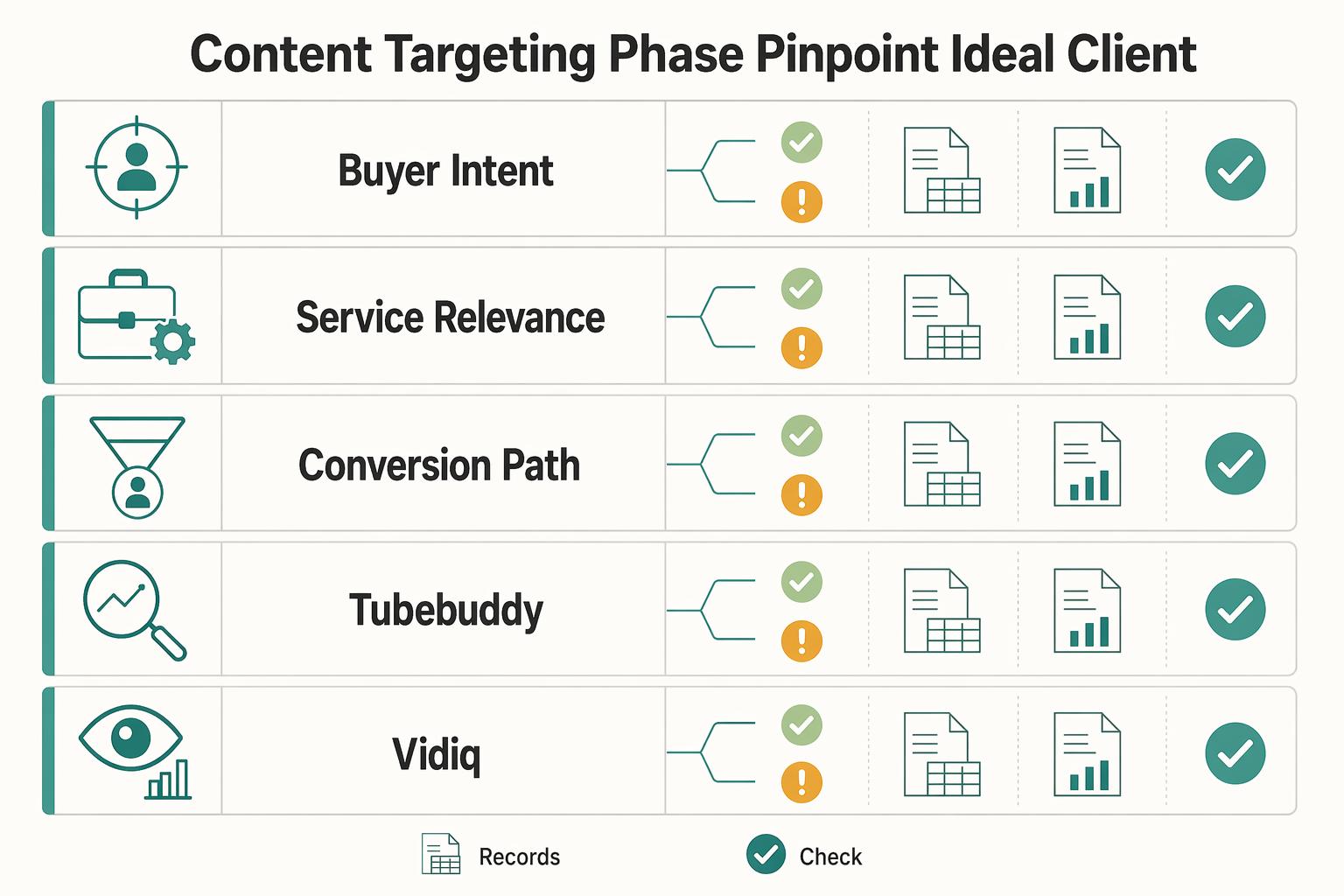
Once you have a shortlist from Stage 1, do not record until each topic passes a stricter approval check. Your target is not the biggest keyword. It is the query most likely to bring the right buyer to the next step in your business.
| Check | What to confirm | If weak |
|---|---|---|
| Buyer intent | The query is clearly comparison, problem-solving, or implementation intent, with modifiers like "vs" or "case study" where relevant | Do not approve the topic yet |
| Service relevance | It maps to a real offer, not just a broad topic you know | Do not approve the topic yet |
| Conversion path | If someone watches, the next step is obvious, for example a call, audit request, or relevant resource | Do not approve the topic yet |
- Approve only topics with a credible conversion path.
Validate each candidate in a YouTube-focused tool before you script. Approve only when you can confirm active search demand, manageable competition, and clear fit with what you actually sell.
Use this qualification filter before you approve:
- Buyer intent: Is the query clearly comparison, problem-solving, or implementation intent, with modifiers like "vs" or "case study" where relevant?
- Service relevance: Does it map to a real offer, not just a broad topic you know?
- Conversion path: If someone watches, is the next step obvious, for example a call, audit request, or relevant resource?
If one answer is weak, do not approve the topic yet. Trend-chasing is the common failure mode; demand alignment is the point.
- Build long-tail targets from client outcome to context.
Before recording, build each target in this order: service outcome + audience qualifier + problem context + format cue. This keeps you focused on high-intent searches instead of broad traffic.
Use it as a repeatable pattern, not a one-off brainstorm:
- Start with the outcome your service delivers.
- Add who it is for.
- Add the specific problem context.
- Add a format cue, for example comparison, checklist, or case study style.
If the phrase still sounds too broad, add one qualifier. If it becomes so narrow that it is unlikely to be searched, remove one layer and recheck.
- Choose tools by decision quality, not feature marketing.
At this stage, TubeBuddy and vidIQ serve the same core job: validate before production. Neither is universally "best." Pick the one that helps you make consistent approval decisions with less guesswork.
| Option | Primary use case | Where it helps most | Where it can mislead | Best fit by workflow style |
|---|---|---|---|---|
| TubeBuddy | Pre-recording keyword validation (confirm current metrics and plan-specific views in your account). | Fast go/no-go checks before scripting. | If you approve topics on tool output alone without buyer-intent and service-fit checks. | You want one consistent checkpoint before production. |
| vidIQ | Pre-recording keyword validation (confirm current metrics and plan-specific views in your account). | Comparing multiple candidates before committing production time. | If trend signals override strategy or conversion-path logic. | You compare options side by side and optimize by repeatable criteria. |
| Traffic Source: YouTube Search | Post-publish verification of the exact terms that brought viewers. | Turning validated search terms into your next topic set. | If you treat search terms alone as proof of buyer intent. | You refine strategy using published performance evidence. |
If you are deciding between TubeBuddy and vidIQ, run the same small query set through both and keep the one you interpret more consistently.
- Package the promise before you press record.
Do this alignment check before recording, not after editing:
- Title uses the approved query naturally and states a specific promise.
- Thumbnail angle matches that same promise.
- First lines of the description restate the problem and expected outcome.
- Confirm the current title length limit from YouTube's official guidelines.
- Confirm the current description length limit from YouTube's official guidelines.
- CTA matches the conversion path from your approval note.
If the query is comparison-focused, your packaging should not read like a beginner tutorial. If the query is implementation-focused, avoid a vague brand-first opening. For a deeper packaging pass, pair this with How to optimize your 'YouTube Videos' for search.
For a step-by-step walkthrough, see The best 'Lighting' for a YouTube studio.
Stage 3: The Performance & Optimization Phase - Measure What Truly Matters#
After you publish, judge performance by decision quality, not raw views: did the video attract the right searches, hold attention where it mattered, and surface useful next steps for your business?
| Pattern | What it can mean | Next action |
|---|---|---|
| Early drop-off | The opening does not match the title promise fast enough | Tighten the opening so it matches the title promise faster |
| Mid-video dips | Tangents, long examples, or weak structure are losing attention | Cut tangents, shorten examples, or restructure the section |
| Completion behavior | Viewers either got the answer early or the ending drifted into a generic wrap-up | Decide whether early exit is acceptable or the ending needs rewrite |
- Run YouTube Search as an action loop, not a trophy metric.
In your verified analytics views, review the search terms currently bringing viewers in, label each term by intent quality, and decide whether it matches the service outcome you sell. Then feed only validated terms back into your next topic shortlist.
If an unplanned query keeps appearing and fits your offer, promote it into the next script cycle. If it brings broad, low-fit traffic, do not prioritize it just because views are higher. Native analytics are strong for your own channel signals, but they do not show competitor gaps or wider market whitespace.
- Use retention patterns as diagnostics, not as a fixed score target.
Skip universal retention myths and inspect where behavior changes in the video. Check early drop-off, mid-video dips, and completion behavior, then map each pattern to a fix.
- Early drop-off: tighten the opening so it matches the title promise faster.
- Mid-video dips: cut tangents, shorten examples, or restructure the section.
- Completion behavior: decide whether viewers got the answer early, which can be acceptable, or whether the ending drifted into a generic wrap-up and needs rewrite.
- Current retention benchmark pending analytics/source verification.
When the same dip pattern repeats across videos, treat that segment type as a script-level issue and fix it in the next draft template.
- Triage comments by intent instead of counting totals.
Use three buckets: general praise, implementation question, and purchase-intent signal. This keeps follow-up practical without overclaiming outcomes.
General praise confirms tone and clarity. Implementation questions usually reveal your next tutorial, comparison, or walkthrough topic. Purchase-intent signals such as fit, scope, use-case, or help-beyond-video questions should get the fastest response, and you should log them as commercial-relevance signals, not guaranteed conversions.
- Keep a compact optimization cadence for every publish cycle.
Use this checklist so insights become actions, not forgotten notes.
- After publish: review search terms, retention pattern, and comment mix in your current verified analytics views.
- Adjust on existing videos: if discovered terms differ from your target, update on-page keyword placement in this order of impact: title, early description, then tags.
- Carry into the next script: save validated long-tail terms, repeated implementation questions, and recurring dip-causing segment types.
- Repeat consistently: a 15-minute pre-video review compounds over time, especially when upload competition is high.
High production quality alone does not guarantee discoverability. The reliable loop is simple: verify what search brought viewers in, inspect where attention broke, and use that evidence to choose what you publish next.
You might also find this useful: The Best Keyword Research Tools for SEO Freelancers.
Conclusion: Your YouTube Channel Is a Business Asset, Not a Hobby#
If you want more reliable results, stop asking which tool looks smartest and ask whether your process keeps improving topic choice. Keyword tools help only when they support a repeatable sequence: research the market, target the right search intent, then review what actually brought viewers and intent signals.
- Start with market problems
Begin with a broad SEO platform, not just YouTube autocomplete. Your job in Stage 1 is to map the business problems people already search for on Google, then narrow toward video topics that match your services. The red flag is simple: if a topic sounds interesting but does not connect to a real client problem, you are at risk of publishing content no high-value buyer is looking for.
- Target buyer-shaped searches
In Stage 2, turn those problems into long-tail phrases with commercial intent modifiers such as "vs," "case study," or other decision-stage wording. Then validate them in YouTube and your preferred YouTube-focused tool. The checkpoint is not just a tool score. You still need to inspect the search page and ask whether your video could reasonably compete and whether the query fits the client you want.
- Review post-publish search signals
In Stage 3, check Traffic Source: YouTube Search data, audience retention, and comments that show buying intent. Treat those as your core operating signals over time. If search terms and comments point to a different angle than you expected, update the next queue instead of hopping to another tool.
- Run the loop on purpose
Use this checklist: run the three-stage process, capture learnings after each video, update your next topic queue, and repeat on a schedule you can keep.
Related: How to Create a YouTube Channel to Showcase Your Freelance Skills.
Frequently Asked Questions
Are paid YouTube keyword tools worth it for a solo business?
They can be worth it when they save time or help you choose topics more consistently. Judge them by time saved, fit with how you already plan videos, and whether the topics chosen through that tool produce better audience response. Upgrade when research overhead slows you down or the cost of choosing the wrong topic outweighs the subscription cost.
TubeBuddy vs. vidIQ: which should you choose for a business channel?
Choose neither by default. Test the same small query set in both and keep the one that gets you from idea to publish decision faster and maps more cleanly to your services. Still inspect the actual search results manually, because a strong tool score can hide a results page dominated by channels with over 500,000 subscribers.
How do you find low-competition, high-value keywords?
Start with a phrase built around a real service problem, not a broad topic. Add service intent, an audience qualifier, and a pain-point modifier such as "vs," "fix," "tutorial," or "case study." Then check YouTube autocomplete for interest and use a YouTube keyword tool for harder prioritization.
What is the best YouTube keyword tool for B2B lead generation?
Usually, it is a sequence rather than one tool. Start with the business problems your buyers care about, validate the wording inside YouTube, and use third-party data when you need help choosing between similar topics. The goal is to choose topics that are both relevant and realistically rankable, not just topics that can get more views.
Can you just use free tools like YouTube’s search bar?
Yes, and you should start there. The YouTube search bar is fast and autocomplete reflects what users have already searched, but it offers limited idea depth and no keyword metrics. Use it for quick checks, then move to deeper research once free signals are no longer enough.
Try a related tool
Researched and edited by the Gruv editorial team. Gruv builds cross-border billing, payouts, and finance-operations software for global businesses.
Sources
Includes 7 external sources outside the trusted-domain allowlist.
- pmc.ncbi.nlm.nih.gov/articles/PMC7825186trusted
- dgtlmart.com/seo-with-ai-blue-ocean-seoexternal
- expertseo.co.nz/youtube-seoexternal
- gist.github.com/StevenACoffman/e4447f0220360e16a0fd3b8ffc1c046dexternal
- gruv.ai/blog/the-best-tools-for-youtube-keyword-rese...external
- keywordly.ai/blog/youtube-keyword-researchexternal
- keywordly.ai/blog/free-youtube-keyword-research-toolexternal
- keywordtooldominator.com/youtube-keyword-toolexternal
Educational content only. Not legal, tax, or financial advice.
Related Posts

Value-Based Pricing for Freelancers Under Real Payment Risk
Value-based pricing works when you and the client can name the business result before kickoff and agree on how progress will be judged. If that link is weak, use a tighter model first. This is not about defending one pricing philosophy over another. It is about avoiding surprises by keeping pricing, scope, delivery, and payment aligned from day one.
How to Create a YouTube Channel to Showcase Your Freelance Skills
Treat this like a business decision, not a creator identity project. Your goal is to publish videos that attract qualified inquiries instead of random attention.
How to Optimize YouTube Videos for Search as a Business Owner
--- **To optimize YouTube videos for search, decide what buyer question the video answers before you record. Then package and manage it like a business asset.** That is where many experienced professionals get stuck. They see the upside, but most advice pushes them toward trend chasing, vanity metrics, and shallow formats that do not fit a serious business.