
Quick Answer
Choose the option that passes your three-stage audit in your own setup: entry, facilitation, and handoff control. For most consultant-led sessions, the best virtual whiteboarding tools are the ones that let guests join with minimal friction, let you run the room with clear controls, and let you lock access after delivery. Use Miro, FigJam, or Mural only after you verify their behavior from both host and participant views.
Your Authority is on the Line#
If your client struggles to join the board, if the session stalls while you explain basic controls, or if nobody knows who owns the final output, they will not experience that as a software issue. They will experience it as your judgment call. Choosing among the best virtual whiteboarding tools is less about feature bragging rights and more about avoiding visible mistakes you could have screened out before the client ever saw the board.
That matters even more if you run a business of one. You do not have a delivery team to absorb a messy workshop or clean up a weak handoff. A board that supports fast, easy visual collaboration can help you look prepared. A poor fit can create friction, burn billable time, and make repeat work harder to win. Here is the audit used below:
- Onboarding audit
Start with join friction. Test the client path yourself with an external email account and a clean browser. Can a guest or invited participant open the board, understand the interface, and contribute without a rescue call? If a tool feels more like a generic drawing app than a proper online whiteboard, treat that as an early red flag.
- In-session execution audit
Real-time collaboration has to hold up when multiple people are working on the same board at once. Check for 4 basics that directly affect facilitation: sticky notes, annotations, live cursors, and video chat. If those cues are clumsy, you will spend the session managing the tool instead of guiding the decision.
- Post-session control audit
Your job is not done when the call ends. Verify how the board is saved, shared, and preserved so you do not lose a strong brainstorming session to bad handoff habits or unclear ownership. Security measures, shared-file handling, and output control belong in the evaluation from the start, not as an afterthought.
This is a comparison-led review built around checklists, not a generic roundup. You need a tool you can trust before, during, and after the client sees it.
You might also find this useful: The Best Tools for Creative Collaboration with Remote Teams.
Stage 1: The Frictionless Onboarding Audit - Will Your Client Be Impressed or Annoyed?#
Treat this as a risk check, not a feature debate: if the join experience is rough, stop and use another tool. Your client's impression starts when they open your invite, and onboarding friction can shift the session from problem-solving to tool troubleshooting.
Run this 4-question audit before every workshop using the exact link you plan to send.
Run the 4-question checklist#
| Check | How to test | Verify |
|---|---|---|
| Single-click join | Open the shared link in a clean browser and follow the guest path | one link, direct access, no detour |
| First-time guest contribution | Enter as a new participant and try one simple action | core actions are obvious on first use |
| Arrival experience | Set the opening view before guests join | first screen is intentional and session-ready |
| Device access | Test the same invite link in a different browser profile or device type | predictable entry in at least one alternate environment |
- Can my client join from a single click?
Open the shared link in a clean browser and follow the guest path. If entry requires account creation, login navigation, or software download before the board opens, you have avoidable friction. What to verify: one link, direct access, no detour.
- Can a first-time guest contribute without help?
Enter as a new participant and try one simple action, for example adding a sticky note or annotation. If basic actions are hard to find, onboarding risk is high even if the tool is powerful. What to verify: core actions are obvious on first use.
- Can I stage the arrival experience before guests join?
Set the opening view so people immediately understand where they are, why they are there, and what to do first. If guests land in a confusing prep area, you lose momentum early. What to verify: first screen is intentional and session-ready.
- Will access hold on the devices clients actually use?
Test the same invite link beyond your normal setup, for example in a different browser profile or device type. Access issues usually appear in the client environment, not yours. What to verify: predictable entry in at least one alternate environment.
Onboarding comparison table (verify live before use)#
| Tool | Guest join path | Sign-in friction | Link controls | Access constraints |
|---|---|---|---|---|
| Miro | Test whether a guest lands on the board directly from the share link | Check for any account, name, or app prompts before board entry | Check what access changes you can apply after sharing | Test in a clean browser and one alternate device |
| Mural | Test whether the link lands on the board or on an intermediate step | Check whether external guests hit any login or registration step | Check how tightly you can control link-based access | Test outside your primary admin or browser setup |
| FigJam | Test whether a guest can enter from a single-click invite path | Check whether first-time prompts interrupt entry | Check whether permissions can be tightened after invite distribution | Test on a non-desktop or alternate browser setup |
Failure signals: switch to your backup workflow#
- Guests cannot reach the board without registering first.
- You must explain basic controls before anyone can contribute.
- The opening screen looks unprepared or unclear.
- You only tested while logged in as yourself.
If Stage 1 is smooth, you protect credibility and keep attention on the work. For a step-by-step walkthrough, see The best tools for visual collaboration with remote teams.
Stage 2: The Execution & Professionalism Audit - Does This Tool Make You Look World-Class?#
A smooth join is only the first gate. In-session execution passes when you can run the workshop flow, keep attention, and hand off outputs without stopping to manage the tool.
| Area | What to check | Examples |
|---|---|---|
| Strategy-template depth | Can you start from a usable structure for the session type you sell, or do you have to rebuild the board before you begin? | usable structure for the session type you sell |
| Facilitation command features | Can you reliably run timers, voting, and summon from the participant view so you can bring the room back when attention drifts? | timers, voting, and summon |
| Presentation handoff quality | Can you produce a clean, shareable output from the board without rebuilding the work elsewhere? | diagram/export quality |
| Customization + workflow fit | Can you present in your visual style and move outcomes into tools your clients already use? | Jira, Confluence, Teams, Slack, Google Workspace, Zoom |
Run this as a pre-session dry run with your real agenda and two views, host + participant. Mark each area pass or fail:
- Strategy-template depth: Can you start from a usable structure for the session type you sell, or do you have to rebuild the board before you begin?
- Facilitation command features: Can you reliably run timers, voting, and summon from the participant view so you can bring the room back when attention drifts?
- Presentation handoff quality: Can you produce a clean, shareable output from the board, including diagram/export quality, without rebuilding the work elsewhere?
- Customization + workflow fit: Can you present in your visual style and move outcomes into tools your clients already use, for example Jira, Confluence, Teams, Slack, Google Workspace, Zoom?
| Tool | Strategy-template depth | Facilitation command features | Presentation handoff quality | Customization flexibility |
|---|---|---|---|---|
| Miro | Note the template depth you confirmed in your dry run | Note the facilitation controls you confirmed in your dry run | Note the output quality you confirmed in your dry run | Note the customization you confirmed in your dry run |
| Mural | Note the template depth you confirmed in your dry run | Note the facilitation controls you confirmed in your dry run | Note the output quality you confirmed in your dry run | Note the customization you confirmed in your dry run |
| FigJam | Note the template depth you confirmed in your dry run | Note the facilitation controls you confirmed in your dry run | Note the output quality you confirmed in your dry run | Note the customization you confirmed in your dry run |
Prevent in-session failures#
Before each client session, verify this from the same setup you will use live:
- Set the exact starting frame and make the first action obvious.
- Test timer, voting, and summon from participant view.
- Check real-time collaboration behavior: cursor presence, visible latency, and conflict handling during simultaneous edits.
- Export one sample deliverable so you know what the client will actually receive.
- If you need post-workshop handoff, confirm the integration path or define a manual next step.
Use one final fit check: some boards are stronger for structured workshops, while others are better for fast ideation. If your work is mostly solo notes or occasional simple diagrams, a full whiteboard can add process you do not need. Related: The Best Tools for Creating Professional Presentations.
Stage 3: The Secure Offboarding & IP Control Audit - How Do You Protect Your Work?#
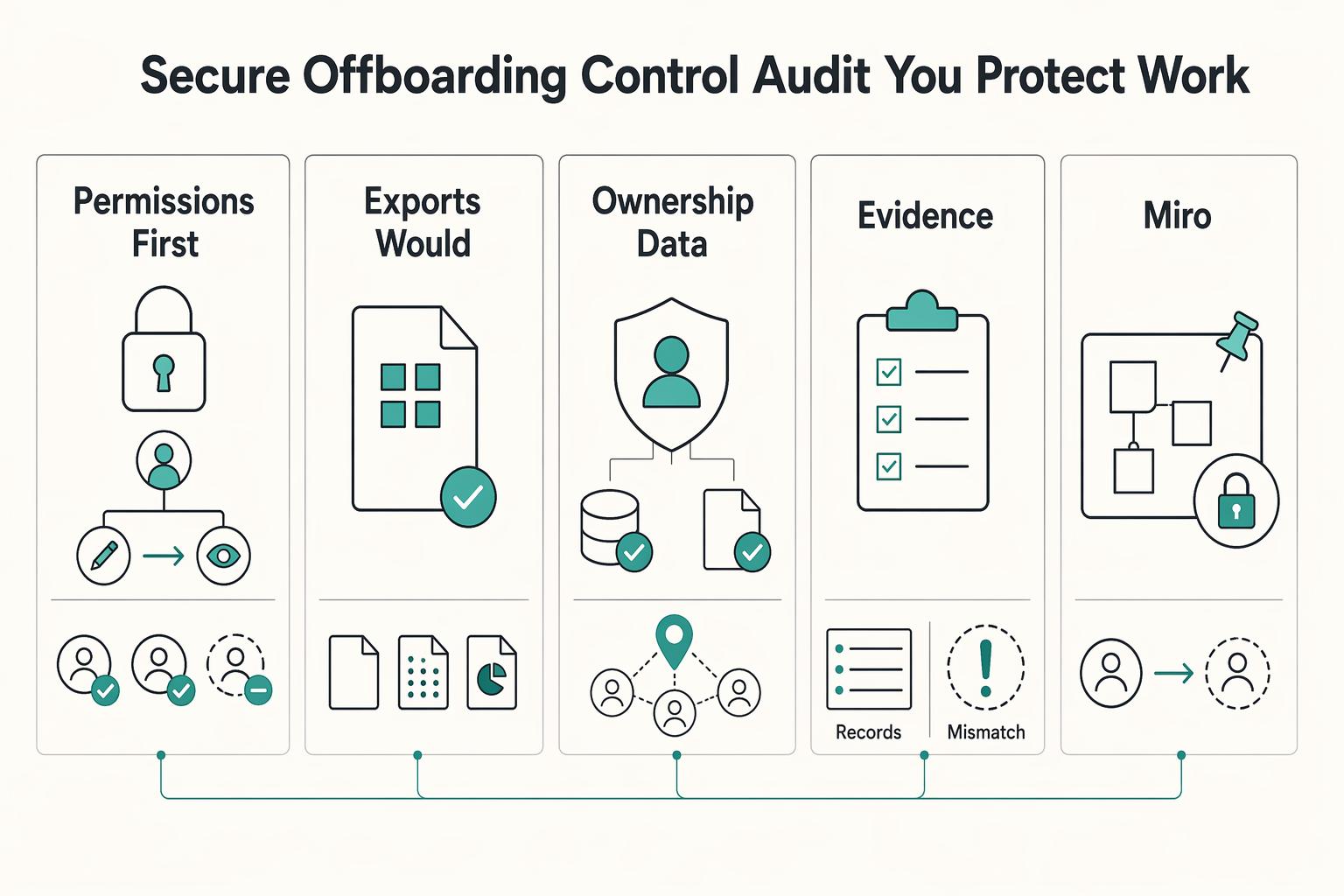
Your post-workshop standard is simple: lock editing, produce a defensible handoff file, confirm ownership/data-use terms, and verify you can recover prior states if something changes later.
| Control | Action | Confirm |
|---|---|---|
| Permissions first | Change participants from editor to viewer, or remove access if the engagement is complete | verify from a participant or guest view |
| Exports you would actually send | Generate the final deliverable before you close the project, then open it outside the platform | readability, structure, and whether the file works for email, storage, or reporting |
| Ownership and data-use terms | Check the current policy language before using the board for sensitive material | what the terms say about ownership, data use, and what happens at engagement close |
| Version history and audit evidence | Verify you can review prior states, identify changes, and restore a previous version | logs, reports, or session recording are supporting artifacts |
- Permissions first
Change participants from editor to viewer, or remove access if the engagement is complete, then verify from a participant or guest view. Immediate downgrade or revocation is your fastest control after the session. If role control is unclear, treat that as a signoff risk.
- Exports you would actually send
Generate the final deliverable before you close the project, then open it outside the platform. Confirm readability, structure, and whether the file works for email, storage, or reporting. Do not assume transfer or download is frictionless until you test it.
- Ownership and data-use terms
Check the current policy language before using the board for sensitive material. Confirm what the terms say about ownership, data use, and what happens at engagement close. If terms are unclear, use the board as a working surface and make your exported file the practical record.
- Version history and audit evidence
Verify you can review prior states, identify changes, and restore a previous version. If logs, reports, or session recording are available, treat them as supporting artifacts. Use them to strengthen your handoff record, not to replace direct checks in your actual board setup.
Use this handoff workflow every time: lock board, generate final deliverable, confirm access state, archive. Keep a small evidence pack: exported file, final sharing-settings screenshot, and a dated note on which policy page you checked.
| Tool | Access downgrade/revocation | Export quality/format flexibility | Ownership/data-use clarity | Restore/audit-trail reliability |
|---|---|---|---|---|
| Miro | Note the access control detail you verified | Note the export detail you verified | Note the policy detail you verified | Note the history detail you verified |
| Mural | Note the access control detail you verified | Note the export detail you verified | Note the policy detail you verified | Note the history detail you verified |
| FigJam | Note the access control detail you verified | Note the export detail you verified | Note the policy detail you verified | Note the history detail you verified |
For a related workflow lens, see The Best Tools for Business Process Mapping. If you want a next step for implementation, Browse Gruv tools.
The Gruv Verdict: Your Strategic Recommendation#
Choose based on operational risk, not brand familiarity. The right tool is the one that consistently passes all three stages in your real client setup: single-click onboarding, controlled execution, and secure offboarding.
- Start with onboarding and eliminate friction early
If participants cannot join from one link without account creation or software installs, remove that option early. Run a live-entry test in a clean browser with a non-admin account before you standardize. Decision checkpoint: can clients get in quickly with minimal friction?
- Use execution controls to separate viable options
After entry is clean, compare how reliably you can run the room. Prioritize facilitation controls that keep attention on the work, such as timers, voting, and summon. Decision checkpoint: does the tool support smooth facilitation instead of tool wrangling that wastes time and frustrates clients?
- Use offboarding controls for the final decision
For client work, especially where IP matters, confirm you can revoke editor access immediately after the session and produce a usable final export. If you cannot, treat the board as a working space, not the final record. Decision checkpoint: can you close access and hand off a defensible artifact right after signoff?
Use this as a re-verification table before you commit:
| Option | Where it is strongest (verify in your workspace) | Operational risk to test | Best engagement fit (after verification) |
|---|---|---|---|
| Miro | Summarize what passed in your onboarding, execution, and offboarding checks | Guest access behavior, facilitation control reliability, post-session permission changes | Add fit based on your client profile and control requirements |
| FigJam | Summarize what passed in your onboarding, execution, and offboarding checks | Guest access behavior, facilitation control reliability, post-session permission changes | Add fit based on your client profile and control requirements |
| Mural | Summarize what passed in your onboarding, execution, and offboarding checks | Guest access behavior, facilitation control reliability, post-session permission changes | Add fit based on your client profile and control requirements |
| Network option | Summarize what passed in your onboarding, execution, and offboarding checks | Convenience masking weak handoff, access, or control behavior | Add fit based on your client profile and control requirements |
Apply this quick selection framework now:
- Primary use case: one-off workshop, recurring facilitation, or internal collaboration.
- Client constraints: single-click access with minimal friction.
- Control requirements: facilitation controls during the session, immediate editor-access revocation after, and a usable archived export.
If two tools feel similar, choose the one that lowers operational risk across all three stages. For adjacent pricing strategy decisions, read Value-Based Pricing: A Freelancer's Guide.
Conclusion: Choose the Tool That Reduces Risk Across the Full Engagement#
Make the final choice like an owner, not a software shopper. For a business of one, your whiteboard is part of your business infrastructure. It affects client trust, delivery consistency, and how well you protect the work once the session ends.
The useful shift is simple: stop asking which tool has the longest feature list and start asking which one reduces risk across the full engagement. If a board adds friction, the session can turn into tool troubleshooting instead of problem-solving, which costs time and can chip away at confidence.
| Shopper question | Owner question tied to the audit |
|---|---|
| Which tool has more templates? | Which tool gets clients in with a single click and no signup or download? |
| Which one feels more powerful? | Which one gives you facilitator controls like timers, voting, or summon so you can keep the room moving? |
| Which one is cheapest? | Which one lets you revoke editor access immediately after the workshop? |
| Which app fits my preferences? | Which app fits the client relationship, the session format, and your IP stewardship needs? |
That is the real test. You are not buying novelty. You are choosing a repeatable operating method for live workshops and post-session handoff.
Before you commit, do one short decision check, then stick to the result:
- Client fit: open the guest link in a clean browser and confirm entry really is single-click.
- Facilitator control: run a short dry run and verify the exact controls you will use live.
- Governance: confirm who can view, comment, or edit after delivery, then test from a non-admin account.
- Context fit: pick the tool that best matches your specific client and workshop needs, not a one-size-fits-all winner.
If one tool wins those four checks in your setup, you likely have your answer. This pairs well with our guide on The best tools for creating 'Flowcharts' and 'Diagrams'. Want a second opinion on your setup? Talk to Gruv.
Frequently Asked Questions
Which tool feels most professional for client workshops?
For client-facing work, the most professional option is usually the one that best fits your use case and governance needs. A practical workflow is to use a decision-tree style tool finder first, then confirm fit in comparison tables, including board access and permission levels. If two tools look close, test the join and sharing experience in your own setup before deciding.
How should you choose between Miro, FigJam, and Mural?
Choose by workshop type and stakeholder context, not by brand. As a starting point, Zapier’s 2025 roundup maps Miro to turning ideas into tasks, Mural to big remote team meetings, and FigJam to collaborating on designs. Then validate your shortlist against your own requirements, especially board access and permission levels.
Is Zoom Whiteboard good enough for paid client work?
It can be good enough when the session is mainly live sketching and annotation inside a Zoom call, because keeping the whiteboard in the meeting can reduce context switching. If you also need broader free-form workspace outside the meeting, compare it against dedicated options built for that style of collaboration.
What is the safest way to share a board with a client?
Use a simple before, during, and after checklist focused on access control. At each stage, confirm board access and permission levels, and make sure the final shared state matches what the client should keep.
What if your business already runs inside ClickUp or another network?
Then integrations may matter more in your selection process, but they should not be the only factor. Run the same decision flow and comparison checks for any option, including board access and permission levels, before you standardize.
How much should pricing influence your decision?
Pricing matters, but evaluate it alongside fit for your workflow, including integrations, security measures, and access control needs. The lowest visible price is not always the best operational fit.
Try a related tool
Researched and edited by the Gruv editorial team. Gruv builds cross-border billing, payouts, and finance-operations software for global businesses.
Sources
Includes 7 external sources outside the trusted-domain allowlist.
- unimelb.edu.au/tli/learning-design-and-assessment/preparing...trusted
- edutopia.org/article/quick-ways-integrate-tech-classroomexternal
- gruv.ai/blog/the-best-tools-for-virtual-whiteboardin...external
- inairspace.com/blogs/learn-with-inair/most-powerful-ai-tool...external
- jabra.com/discover/hybrid-meeting-solutions/best-onlin...external
- nulab.com/learn/collaboration/online-whiteboard-toolexternal
- thedigitalprojectmanager.com/tools/visual-collaboration-toolsexternal
- zapier.com/blog/best-online-whiteboardexternal
Educational content only. Not legal, tax, or financial advice.
Related Posts

Value-Based Pricing for Freelancers Under Real Payment Risk
Value-based pricing works when you and the client can name the business result before kickoff and agree on how progress will be judged. If that link is weak, use a tighter model first. This is not about defending one pricing philosophy over another. It is about avoiding surprises by keeping pricing, scope, delivery, and payment aligned from day one.
The Best Tools for Creating Professional Presentations
Use a 2025-2026 validation sweep each quarter: confirm one monthly software baseline ($15/month), one collaboration baseline ($30/month), and one premium workflow baseline ($60/month) before changing client-facing tool commitments.
The Best Tools for Creative Collaboration with Remote Teams
As the CEO of your business-of-one, you're not here for vibes; you're here for a repeatable system you can run.